warning light LINCOLN CONTINENTAL 2019 Repair Manual
[x] Cancel search | Manufacturer: LINCOLN, Model Year: 2019, Model line: CONTINENTAL, Model: LINCOLN CONTINENTAL 2019Pages: 627, PDF Size: 6.39 MB
Page 363 of 627
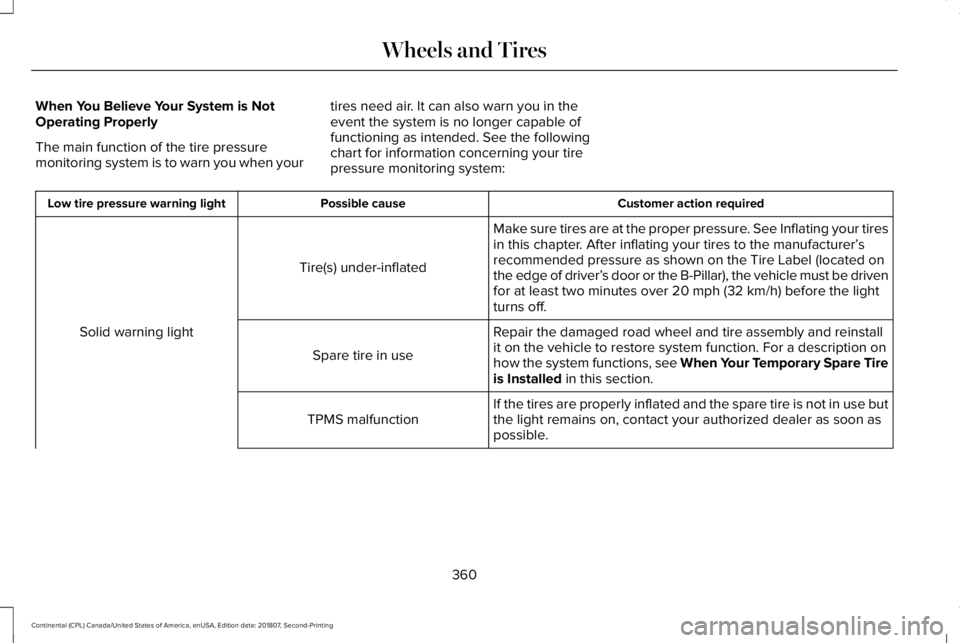
When You Believe Your System is Not
Operating Properly
The main function of the tire pressure
monitoring system is to warn you when your
tires need air. It can also warn you in the
event the system is no longer capable of
functioning as intended. See the following
chart for information concerning your tire
pressure monitoring system: Customer action required
Possible cause
Low tire pressure warning light
Make sure tires are at the proper pressure. See Inflating your tires
in this chapter. After inflating your tires to the manufacturer’s
recommended pressure as shown on the Tire Label (located on
the edge of driver’ s door or the B-Pillar), the vehicle must be driven
for at least two minutes over 20 mph (32 km/h) before the light
turns off.
Tire(s) under-inflated
Solid warning light Repair the damaged road wheel and tire assembly and reinstall
it on the vehicle to restore system function. For a description on
how the system functions, see When Your Temporary Spare Tire
is Installed
in this section.
Spare tire in use
If the tires are properly inflated and the spare tire is not in use but
the light remains on, contact your authorized dealer as soon as
possible.
TPMS malfunction
360
Continental (CPL) Canada/United States of America, enUSA, Edition date: 201807, Second-Printing Wheels and Tires
Page 364 of 627
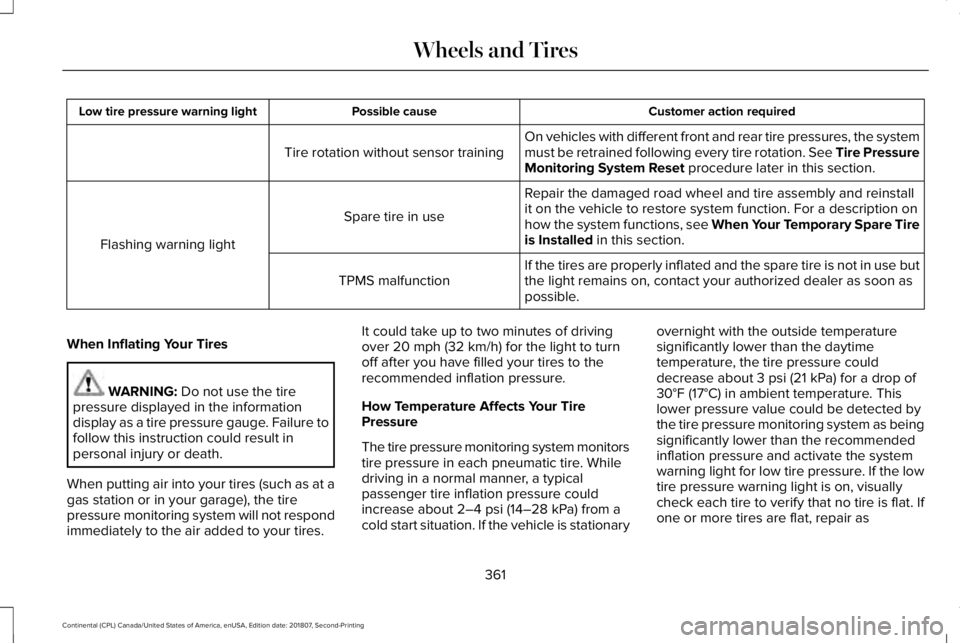
Customer action required
Possible cause
Low tire pressure warning light
On vehicles with different front and rear tire pressures, the system
must be retrained following every tire rotation. See Tire Pressure
Monitoring System Reset procedure later in this section.
Tire rotation without sensor training
Repair the damaged road wheel and tire assembly and reinstall
it on the vehicle to restore system function. For a description on
how the system functions, see When Your Temporary Spare Tire
is Installed
in this section.
Spare tire in use
Flashing warning light If the tires are properly inflated and the spare tire is not in use but
the light remains on, contact your authorized dealer as soon as
possible.
TPMS malfunction
When Inflating Your Tires WARNING:
Do not use the tire
pressure displayed in the information
display as a tire pressure gauge. Failure to
follow this instruction could result in
personal injury or death.
When putting air into your tires (such as at a
gas station or in your garage), the tire
pressure monitoring system will not respond
immediately to the air added to your tires. It could take up to two minutes of driving
over
20 mph (32 km/h) for the light to turn
off after you have filled your tires to the
recommended inflation pressure.
How Temperature Affects Your Tire
Pressure
The tire pressure monitoring system monitors
tire pressure in each pneumatic tire. While
driving in a normal manner, a typical
passenger tire inflation pressure could
increase about
2–4 psi (14–28 kPa) from a
cold start situation. If the vehicle is stationary overnight with the outside temperature
significantly lower than the daytime
temperature, the tire pressure could
decrease about
3 psi (21 kPa) for a drop of
30°F (17°C) in ambient temperature. This
lower pressure value could be detected by
the tire pressure monitoring system as being
significantly lower than the recommended
inflation pressure and activate the system
warning light for low tire pressure. If the low
tire pressure warning light is on, visually
check each tire to verify that no tire is flat. If
one or more tires are flat, repair as
361
Continental (CPL) Canada/United States of America, enUSA, Edition date: 201807, Second-Printing Wheels and Tires
Page 365 of 627
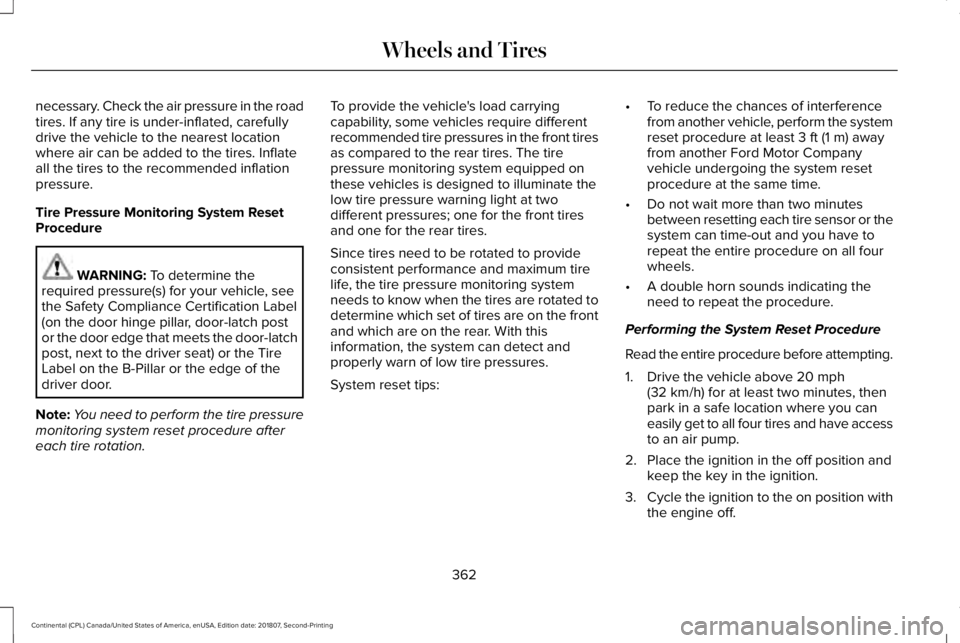
necessary. Check the air pressure in the road
tires. If any tire is under-inflated, carefully
drive the vehicle to the nearest location
where air can be added to the tires. Inflate
all the tires to the recommended inflation
pressure.
Tire Pressure Monitoring System Reset
Procedure
WARNING: To determine the
required pressure(s) for your vehicle, see
the Safety Compliance Certification Label
(on the door hinge pillar, door-latch post
or the door edge that meets the door-latch
post, next to the driver seat) or the Tire
Label on the B-Pillar or the edge of the
driver door.
Note: You need to perform the tire pressure
monitoring system reset procedure after
each tire rotation. To provide the vehicle's load carrying
capability, some vehicles require different
recommended tire pressures in the front tires
as compared to the rear tires. The tire
pressure monitoring system equipped on
these vehicles is designed to illuminate the
low tire pressure warning light at two
different pressures; one for the front tires
and one for the rear tires.
Since tires need to be rotated to provide
consistent performance and maximum tire
life, the tire pressure monitoring system
needs to know when the tires are rotated to
determine which set of tires are on the front
and which are on the rear. With this
information, the system can detect and
properly warn of low tire pressures.
System reset tips:
•
To reduce the chances of interference
from another vehicle, perform the system
reset procedure at least
3 ft (1 m) away
from another Ford Motor Company
vehicle undergoing the system reset
procedure at the same time.
• Do not wait more than two minutes
between resetting each tire sensor or the
system can time-out and you have to
repeat the entire procedure on all four
wheels.
• A double horn sounds indicating the
need to repeat the procedure.
Performing the System Reset Procedure
Read the entire procedure before attempting.
1. Drive the vehicle above
20 mph
(32 km/h) for at least two minutes, then
park in a safe location where you can
easily get to all four tires and have access
to an air pump.
2. Place the ignition in the off position and keep the key in the ignition.
3. Cycle the ignition to the on position with
the engine off.
362
Continental (CPL) Canada/United States of America, enUSA, Edition date: 201807, Second-Printing Wheels and Tires
Page 367 of 627
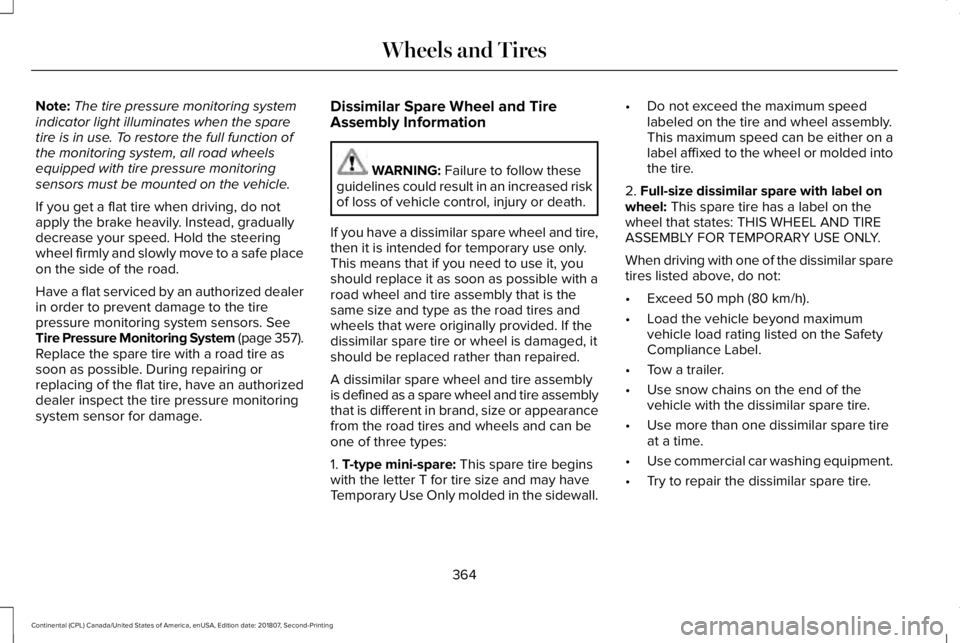
Note:
The tire pressure monitoring system
indicator light illuminates when the spare
tire is in use. To restore the full function of
the monitoring system, all road wheels
equipped with tire pressure monitoring
sensors must be mounted on the vehicle.
If you get a flat tire when driving, do not
apply the brake heavily. Instead, gradually
decrease your speed. Hold the steering
wheel firmly and slowly move to a safe place
on the side of the road.
Have a flat serviced by an authorized dealer
in order to prevent damage to the tire
pressure monitoring system sensors. See
Tire Pressure Monitoring System (page 357).
Replace the spare tire with a road tire as
soon as possible. During repairing or
replacing of the flat tire, have an authorized
dealer inspect the tire pressure monitoring
system sensor for damage. Dissimilar Spare Wheel and Tire
Assembly Information WARNING:
Failure to follow these
guidelines could result in an increased risk
of loss of vehicle control, injury or death.
If you have a dissimilar spare wheel and tire,
then it is intended for temporary use only.
This means that if you need to use it, you
should replace it as soon as possible with a
road wheel and tire assembly that is the
same size and type as the road tires and
wheels that were originally provided. If the
dissimilar spare tire or wheel is damaged, it
should be replaced rather than repaired.
A dissimilar spare wheel and tire assembly
is defined as a spare wheel and tire assembly
that is different in brand, size or appearance
from the road tires and wheels and can be
one of three types:
1.
T-type mini-spare: This spare tire begins
with the letter T for tire size and may have
Temporary Use Only molded in the sidewall. •
Do not exceed the maximum speed
labeled on the tire and wheel assembly.
This maximum speed can be either on a
label affixed to the wheel or molded into
the tire.
2.
Full-size dissimilar spare with label on
wheel: This spare tire has a label on the
wheel that states: THIS WHEEL AND TIRE
ASSEMBLY FOR TEMPORARY USE ONLY.
When driving with one of the dissimilar spare
tires listed above, do not:
• Exceed
50 mph (80 km/h).
• Load the vehicle beyond maximum
vehicle load rating listed on the Safety
Compliance Label.
• Tow a trailer.
• Use snow chains on the end of the
vehicle with the dissimilar spare tire.
• Use more than one dissimilar spare tire
at a time.
• Use commercial car washing equipment.
• Try to repair the dissimilar spare tire.
364
Continental (CPL) Canada/United States of America, enUSA, Edition date: 201807, Second-Printing Wheels and Tires
Page 614 of 627
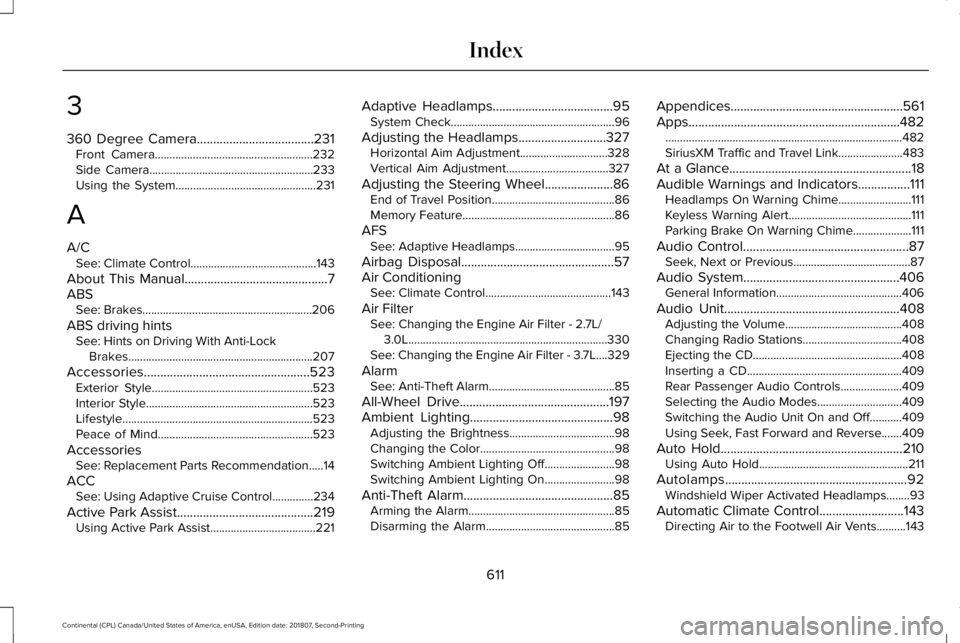
3
360 Degree Camera....................................231
Front Camera......................................................232
Side Camera........................................................233
Using the System................................................231
A
A/C See: Climate Control...........................................143
About This Manual............................................7
ABS See: Brakes..........................................................206
ABS driving hints See: Hints on Driving With Anti-Lock
Brakes...............................................................207
Accessories...................................................523 Exterior Style.......................................................523
Interior Style.........................................................523
Lifestyle.................................................................523
Peace of Mind.....................................................523
Accessories See: Replacement Parts Recommendation.....14
ACC See: Using Adaptive Cruise Control..............
234
Active Park Assist..........................................219 Using Active Park Assist....................................221 Adaptive Headlamps
.....................................95
System Check........................................................96
Adjusting the Headlamps...........................327 Horizontal Aim Adjustment..............................328
Vertical Aim Adjustment...................................327
Adjusting the Steering Wheel.....................86 End of Travel Position..........................................86
Memory Feature....................................................86
AFS See: Adaptive Headlamps..................................95
Airbag Disposal...............................................57
Air Conditioning See: Climate Control...........................................143
Air Filter See: Changing the Engine Air Filter - 2.7L/
3.0L....................................................................330
See: Changing the Engine Air Filter - 3.7L....329
Alarm See: Anti-Theft Alarm...........................................85
All-Wheel Drive
..............................................197
Ambient Lighting............................................98
Adjusting the Brightness....................................98
Changing the Color..............................................
98
Switching Ambient Lighting Off........................98
Switching Ambient Lighting On
........................98
Anti-Theft Alarm..............................................
85
Arming the Alarm..................................................85
Disarming the Alarm............................................85 Appendices.....................................................561
Apps.................................................................482
........................................................................\
.........482
SiriusXM Traffic and Travel Link......................483
At a Glance
........................................................18
Audible Warnings and Indicators................111 Headlamps On Warning Chime.........................111
Keyless Warning Alert..........................................111
Parking Brake On Warning Chime....................111
Audio Control
...................................................87
Seek, Next or Previous........................................87
Audio System................................................406 General Information...........................................406
Audio Unit
......................................................408
Adjusting the Volume........................................408
Changing Radio S
tations..................................408
Ejecting the CD...................................................
408
Inserting a CD.....................................................409
Rear Passenger Audio Controls.....................409
Selecting the Audio Modes.............................
409
Switching the Audio Unit On and Off...........409
Using Seek, Fast Forward and Reverse.......409
Auto Hold........................................................210 Using Auto Hold...................................................211
Autolamps........................................................92 Windshield Wiper Activated Headlamps........93
Automatic Climate Control..........................143 Directing Air to the Footwell Air Vents..........143
611
Continental (CPL) Canada/United States of America, enUSA, Edition date: 201807, Second-Printing Index
Page 623 of 627

Running Out of Fuel.....................................182
Adding Fuel From a Portable Fuel
Container..........................................................182
Filling a Portable Fuel Container.....................182
S
Safety Canopy™
...............................................55
Safety Precautions........................................180
Satellite Radio................................................413
Satellite Radio Electronic Serial Number
(ESN)...................................................................414
Satellite Radio Reception Factors...................413
SiriusXM Satellite Radio Service.....................414
Troubleshooting...................................................415
Scheduled Maintenance Record
..............540
Scheduled Maintenance............................528
Seatbelt Extension.........................................46
Seatbelt Height Adjustment.........................42
Seatbelt Reminder..........................................43 Belt-Minder™...........................................................43
Seatbelts
...........................................................37
Principle of Operation..........................................37
Seatbelt Warning Lamp and Indicator Chime..............................................................42
Conditions of operation......................................43
Seats.................................................................150
Security..............................................................83 Settings...........................................................485
911 Assist...............................................................493
Ambient Lighting................................................502
Bluetooth..............................................................488
Clock......................................................................487
Display..................................................................504
General.................................................................499
Media Player........................................................486
Mobile Apps.........................................................498
Navigation............................................................495
Phone....................................................................488
Radio......................................................................494
SiriusXM................................................................495
Sound....................................................................485
Valet Mode...........................................................505
Vehicle..................................................................502
Voice Control.......................................................504
Wi-Fi & Hotspot..................................................500
Side Airbags.....................................................53
Side Sensing System...................................218 Obstacle Distance Indicator.............................218
Sitting in the Correct Position....................150
Snow Chains See: Using Snow Chains..................................356
Soft Closing Door
............................................79
Spare Wheel See: Changing a Road Wheel.........................363 Special Notices
................................................15
New Vehicle Limited Warranty...........................15
On Board Diagnostics Data Link
Connector...........................................................15
Special Instructions...............................................15
Special Operating Conditions Scheduled Maintenance...............................................537
Exceptions............................................................539
Speed Control See: Cruise Control............................................234
Stability Control
.............................................213
Principle of Operation........................................213
Starting a Gasoline Engine
.........................176
Automatic Engine Shutdown............................177
Failure to Start......................................................176
Guarding Against Exhaust Fumes...................178
Important Ventilating Information....................178
Starting Y
our Vehicle..........................................176
Stopping the Engine When Your Vehicle is Moving...............................................................178
Stopping the Engine When Your Vehicle is Stationary..........................................................177
Starting and Stopping the Engine.............175 General Information............................................175
Steering..........................................................256 Adaptive Steering...............................................257
Electric Power Steering....................................256
Steering Wheel................................................86
620
Continental (CPL) Canada/United States of America, enUSA, Edition date: 201807, Second-Printing Index
Page 625 of 627

Changing the Set Speed..................................237
Detection Issues.................................................238
Following a Vehicle............................................235
Following a Vehicle to a Complete
Stop...................................................................236
Hilly Condition Usage.......................................238
Overriding the Set Speed................................237
Park Brake Application.....................................238
Resuming the Set Speed..................................237
Setting the Adaptive Cruise Speed...............235
Setting the Adaptive Cruise Speed When Your Vehicle is Stationary......................................235
Setting the Gap Distance.................................236
Switching Adaptive Cruise Control Off.........238
Switching Adaptive Cruise Control On.........235
Switching to Normal Cruise Control..............242
System Not Available........................................239
Using All-Wheel Drive..................................197 Driving In Special Conditions With All-Wheel
Drive (AWD)......................................................199
Operating AWD Vehicles With Spare or Mismatched Tires...........................................199
Using MyKey With Remote Start Systems...........................................................61
Using Snow Chains......................................356
Using Stability Control.................................214
Using Summer Tires....................................356 Using Traction Control
.................................212
Switching the System Off..................................212
System Indicator Lights and Messages.........212
Using a Switch.....................................................212
Using the Information Display Controls........212
Using Voice R
ecognition............................435
Audio Voice Commands...................................437
Climate Voice Commands................................438
Mobile App Voice Commands
........................443
Navigation Voice Commands...........................441
Phone Voice Commands..................................439
SiriusXM Traffic and Travel Link Voice Commands.......................................................444
Voice Settings Commands...............................444
Utilizing the Mediation/Arbitration Program (Canada Only).............................................286
V
Vehicle Care..................................................332 General Information
...........................................332
Vehicle Certification Label.........................380
Vehicle Identification Number..................380
Vehicle Identification...................................405
Vehicle Storage............................................340 Battery....................................................................341
Body.......................................................................340
Brakes.....................................................................341 Cooling system....................................................341
Engine...................................................................340
Fuel system..........................................................340
General.................................................................340
Miscellaneous
.......................................................341
Removing Vehicle From Storage
.....................341
Tires........................................................................\
341
Ventilation See: Climate Control...........................................143
VIN See: Vehicle Identification Number...............380
Voice Control
...................................................87
W
Warning Lamps and Indicators
..................107
Adaptive Cruise Control....................................107
Adaptive Steering...............................................108
Anti-Lock Braking System.................................108
Autohold Active...................................................108
Autohold Unavailable.........................................108
Automatic Headlamp High Beam...................108
Battery....................................................................
108
Blind Spot Monitor..............................................108
Brake System Warning Lamp...........................109
Cruise Control......................................................109
Direction Indicator..............................................109
Door Ajar...............................................................109
622
Continental (CPL) Canada/United States of America, enUSA, Edition date: 201807, Second-Printing Index
Page 626 of 627

Electric Park Brake..............................................109
Engine Coolant Temperature...........................109
Engine Oil...............................................................110
Fasten Seatbelt.....................................................110
Front Airbag...........................................................110
High Beam.............................................................110
Hood Ajar...............................................................110
Low Beam Warning Lamp..................................110
Low Fuel Level......................................................110
Low Tire Pressure Warning...............................110
Low Washer Fluid.................................................110
Parking Lamps.......................................................110
Powertrain Fault....................................................110
Service Engine Soon............................................111
Stability Control......................................................111
Stability Control Off...............................................111
Trunk Ajar................................................................111
Washer Fluid Check.....................................324
Washers See: Cleaning the Exterior...............................333
Waxing.............................................................334
Welcome Lighting...........................................96
Wheel Nuts See: Changing a Road Wheel.........................363
Wheels and Tires..........................................342 General Information...........................................342
Technical Specifications.....................................371
Windows and Mirrors.....................................99 Windshield Washers
......................................90
Front Camera Washer.........................................90
Wiper Blades See: Checking the Wiper Blades...................326
Wipers and Washers......................................89
623
Continental (CPL) Canada/United States of America, enUSA, Edition date: 201807, Second-Printing Index