warning LINCOLN CONTINENTAL 2020 Owners Manual
[x] Cancel search | Manufacturer: LINCOLN, Model Year: 2020, Model line: CONTINENTAL, Model: LINCOLN CONTINENTAL 2020Pages: 609, PDF Size: 6.24 MB
Page 394 of 609
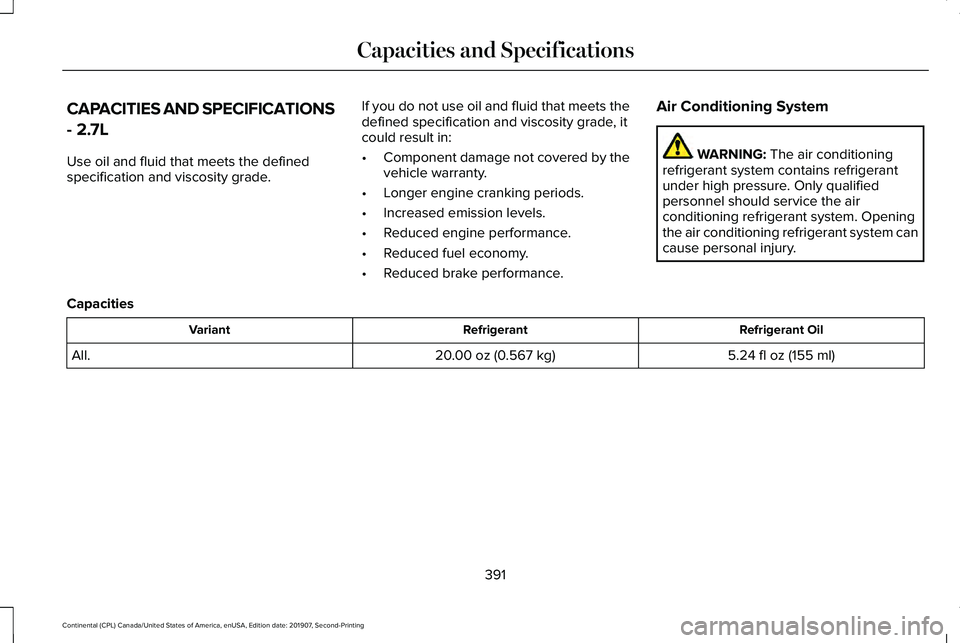
CAPACITIES AND SPECIFICATIONS
- 2.7L
Use oil and fluid that meets the defined
specification and viscosity grade.
If you do not use oil and fluid that meets the
defined specification and viscosity grade, it
could result in:
•
Component damage not covered by the
vehicle warranty.
• Longer engine cranking periods.
• Increased emission levels.
• Reduced engine performance.
• Reduced fuel economy.
• Reduced brake performance. Air Conditioning System WARNING: The air conditioning
refrigerant system contains refrigerant
under high pressure. Only qualified
personnel should service the air
conditioning refrigerant system. Opening
the air conditioning refrigerant system can
cause personal injury.
Capacities Refrigerant Oil
Refrigerant
Variant
5.24 fl oz (155 ml)
20.00 oz (0.567 kg)
All.
391
Continental (CPL) Canada/United States of America, enUSA, Edition date: 201907, Second-Printing Capacities and Specifications
Page 405 of 609
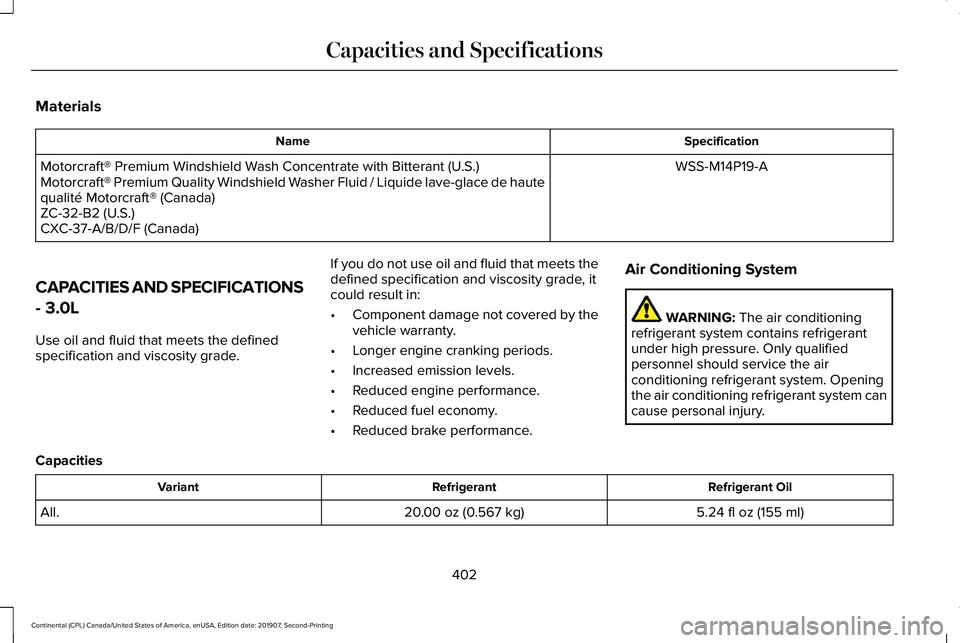
Materials
Specification
Name
WSS-M14P19-A
Motorcraft® Premium Windshield Wash Concentrate with Bitterant (U.S.)
Motorcraft® Premium Quality Windshield Washer Fluid / Liquide lave-glace de haute
qualité Motorcraft® (Canada)
ZC-32-B2 (U.S.)
CXC-37-A/B/D/F (Canada)
CAPACITIES AND SPECIFICATIONS
- 3.0L
Use oil and fluid that meets the defined
specification and viscosity grade. If you do not use oil and fluid that meets the
defined specification and viscosity grade, it
could result in:
•
Component damage not covered by the
vehicle warranty.
• Longer engine cranking periods.
• Increased emission levels.
• Reduced engine performance.
• Reduced fuel economy.
• Reduced brake performance. Air Conditioning System WARNING: The air conditioning
refrigerant system contains refrigerant
under high pressure. Only qualified
personnel should service the air
conditioning refrigerant system. Opening
the air conditioning refrigerant system can
cause personal injury.
Capacities Refrigerant Oil
Refrigerant
Variant
5.24 fl oz (155 ml)
20.00 oz (0.567 kg)
All.
402
Continental (CPL) Canada/United States of America, enUSA, Edition date: 201907, Second-Printing Capacities and Specifications
Page 416 of 609
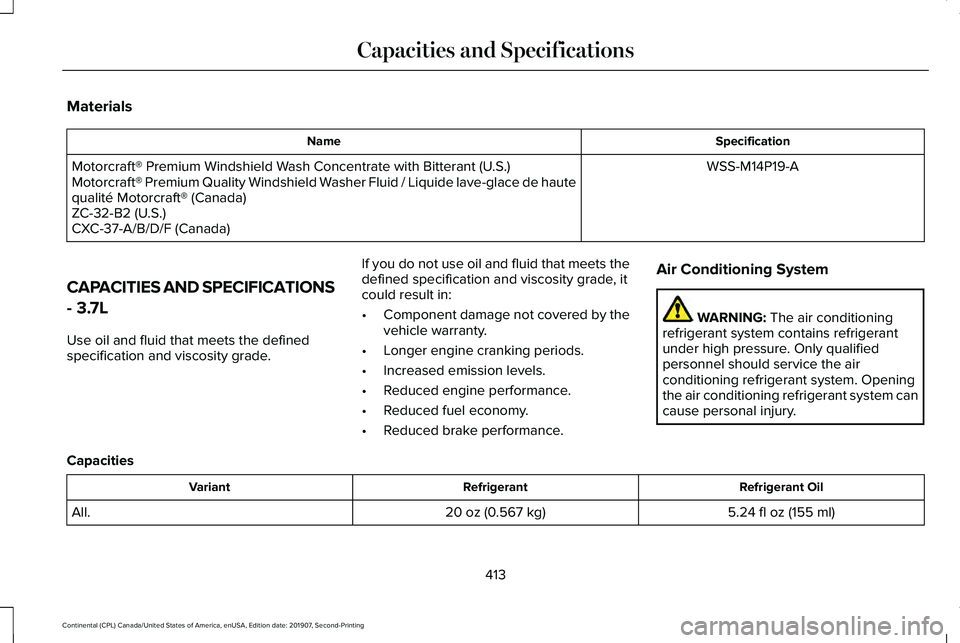
Materials
Specification
Name
WSS-M14P19-A
Motorcraft® Premium Windshield Wash Concentrate with Bitterant (U.S.)
Motorcraft® Premium Quality Windshield Washer Fluid / Liquide lave-glace de haute
qualité Motorcraft® (Canada)
ZC-32-B2 (U.S.)
CXC-37-A/B/D/F (Canada)
CAPACITIES AND SPECIFICATIONS
- 3.7L
Use oil and fluid that meets the defined
specification and viscosity grade. If you do not use oil and fluid that meets the
defined specification and viscosity grade, it
could result in:
•
Component damage not covered by the
vehicle warranty.
• Longer engine cranking periods.
• Increased emission levels.
• Reduced engine performance.
• Reduced fuel economy.
• Reduced brake performance. Air Conditioning System WARNING: The air conditioning
refrigerant system contains refrigerant
under high pressure. Only qualified
personnel should service the air
conditioning refrigerant system. Opening
the air conditioning refrigerant system can
cause personal injury.
Capacities Refrigerant Oil
Refrigerant
Variant
5.24 fl oz (155 ml)
20 oz (0.567 kg)
All.
413
Continental (CPL) Canada/United States of America, enUSA, Edition date: 201907, Second-Printing Capacities and Specifications
Page 437 of 609
GENERAL INFORMATION
WARNING: Driving while distracted
can result in loss of vehicle control, crash
and injury. We strongly recommend that
you use extreme caution when using any
device that may take your focus off the road. Your primary responsibility is the safe
operation of your vehicle. We recommend
against the use of any hand-held device
while driving and encourage the use of
voice-operated systems when possible.
Make sure you are aware of all applicable
local laws that may affect the use of
electronic devices while driving.
Radio Frequencies and Reception
Factors
Note:
Listening to loud audio for long
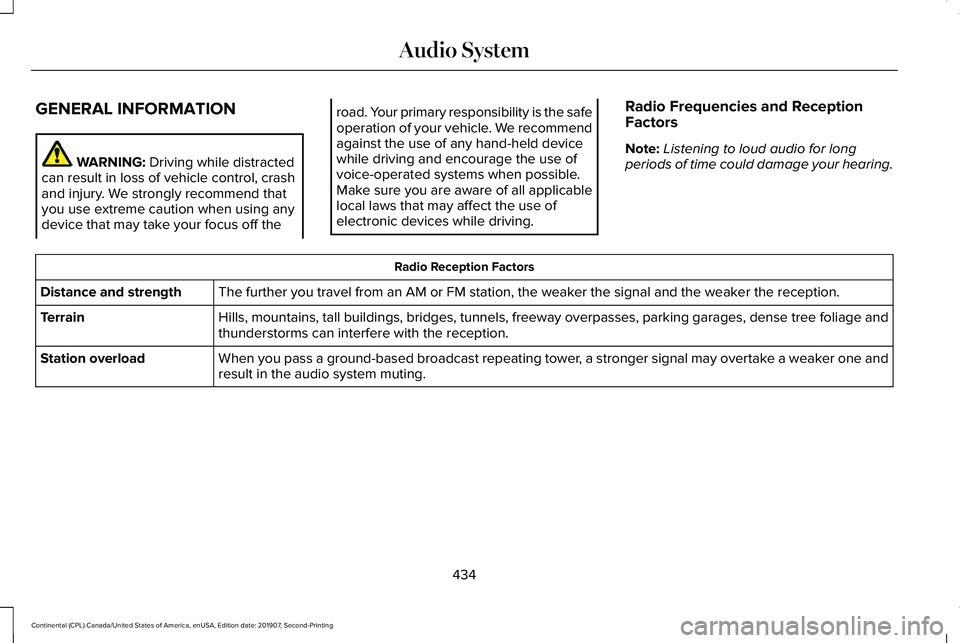
periods of time could damage your hearing. Radio Reception Factors
The further you travel from an AM or FM station, the weaker the signal and the weaker the reception.
Distance and strength
Hills, mountains, tall buildings, bridges, tunnels, freeway overpasses, \
parking garages, dense tree foliage and
thunderstorms can interfere with the reception.
Terrain
When you pass a ground-based broadcast repeating tower, a stronger signal may overtake a weaker one and
result in the audio system muting.
Station overload
434
Continental (CPL) Canada/United States of America, enUSA, Edition date: 201907, Second-Printing Audio System
Page 438 of 609
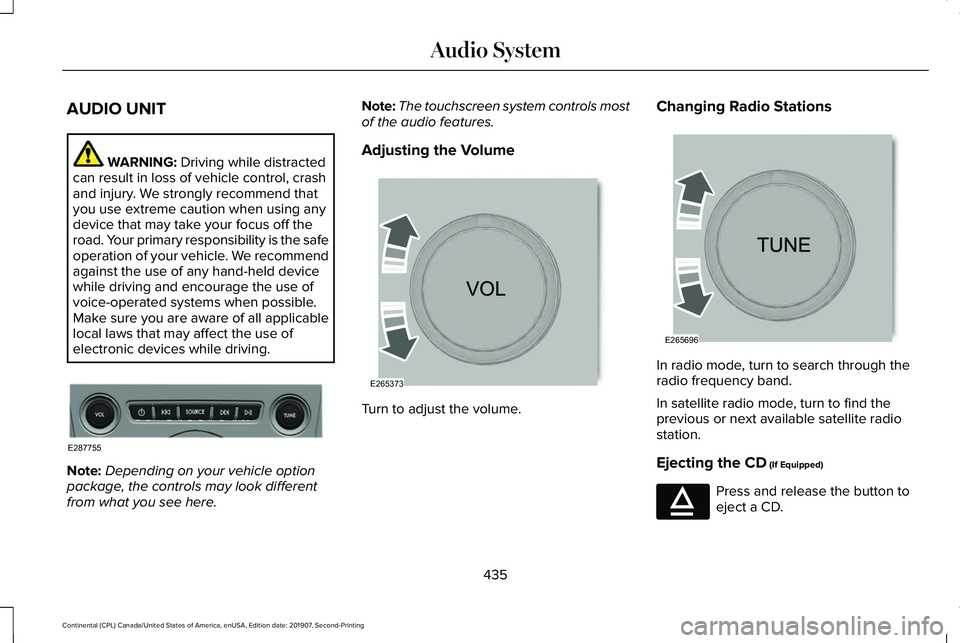
AUDIO UNIT
WARNING: Driving while distracted
can result in loss of vehicle control, crash
and injury. We strongly recommend that
you use extreme caution when using any
device that may take your focus off the
road. Your primary responsibility is the safe
operation of your vehicle. We recommend
against the use of any hand-held device
while driving and encourage the use of
voice-operated systems when possible.
Make sure you are aware of all applicable
local laws that may affect the use of
electronic devices while driving. Note:
Depending on your vehicle option
package, the controls may look different
from what you see here. Note:
The touchscreen system controls most
of the audio features.
Adjusting the Volume Turn to adjust the volume.Changing Radio Stations
In radio mode, turn to search through the
radio frequency band.
In satellite radio mode, turn to find the
previous or next available satellite radio
station.
Ejecting the CD
(If Equipped)
Press and release the button to
eject a CD.
435
Continental (CPL) Canada/United States of America, enUSA, Edition date: 201907, Second-Printing Audio SystemE287755 E265373 E265696 E265032
Page 446 of 609
Action
Condition
Message
Use the channel guide to turn off the Lock or
Skip function on that station.
All the channels in the selected category are
either skipped or locked.
None found
Check Channel Guide
No action required.
SiriusXM has updated the channels available
for your vehicle.
Subscription Updated
USB PORT WARNING: Driving while distracted
can result in loss of vehicle control, crash
and injury. We strongly recommend that
you use extreme caution when using any
device that may take your focus off the
road. Your primary responsibility is the safe
operation of your vehicle. We recommend
against the use of any hand-held device
while driving and encourage the use of
voice-operated systems when possible.
Make sure you are aware of all applicable
local laws that may affect the use of
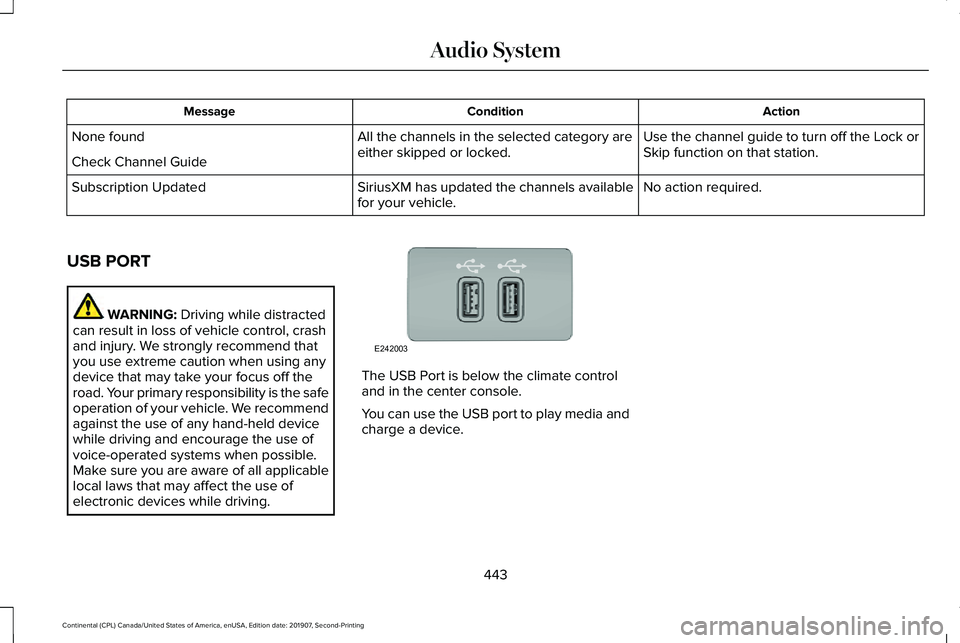
electronic devices while driving. The USB Port is below the climate control
and in the center console.
You can use the USB port to play media and
charge a device.
443
Continental (CPL) Canada/United States of America, enUSA, Edition date: 201907, Second-Printing Audio SystemE242003
Page 447 of 609

GENERAL INFORMATION
WARNING: Driving while distracted
can result in loss of vehicle control, crash
and injury. We strongly recommend that
you use extreme caution when using any
device that may take your focus off the
road. Your primary responsibility is the safe
operation of your vehicle. We recommend
against the use of any hand-held device
while driving and encourage the use of
voice-operated systems when possible.
Make sure you are aware of all applicable
local laws that may affect the use of
electronic devices while driving.
About SYNC
The system allows you to interact with the
entertainment, information and
communication systems on your vehicle
using voice commands and a touchscreen.
The system provides easy interaction with
audio, phone, navigation, mobile apps and
settings. Note:
You can switch the system on and use
it for up to an hour without switching the
ignition on.
Note: You can use the system after you
switch the ignition off for up to 10 minutes or
until you open a door.
Note: For your safety, some features are
speed-dependent. Their use is limited to
when your vehicle speed is less than 3 mph
(5 km/h)
. Using the Touchscreen Status bar.
A
Home screen.
B
Clock.
See Settings (page 486).
C
Outside air temperature.
D
Feature bar.
E
444
Continental (CPL) Canada/United States of America, enUSA, Edition date: 201907, Second-Printing SYNC™ 3E293823
Page 476 of 609
Switching the Ventilated Seats On and
Off
Touch the button to cycle through
the various ventilated seat settings.
Accessing Rear Climate Controls Touch the button to access
additional controls for the rear
climate system.
Rear Climate Control Lock Indicator Touch the button.
When on, you can only operate the
rear passenger settings through
the front controls.
Switching Rear Auto Mode On and Off Touch the button to switch on rear
automatic operation, then set the
temperature. Switching the Rear Climate Controlled
Seats On and Off Touch the button to cycle through
the various climate controlled seat
settings.
Switching the Rear Heated Seats On
and Off Touch the button to cycle through
the various heat settings.
Switching the Rear Ventilated Seats
On and Off Touch the button to cycle through
the various ventilated seat settings.PHONE WARNING: Driving while distracted
can result in loss of vehicle control, crash
and injury. We strongly recommend that
you use extreme caution when using any
device that may take your focus off the
road. Your primary responsibility is the safe
operation of your vehicle. We recommend
against the use of any hand-held device
while driving and encourage the use of
voice-operated systems when possible.
Make sure you are aware of all applicable
local laws that may affect the use of
electronic devices while driving.
Check the compatibility of your device on
the regional website.
Pairing Your Cell Phone for the First
Time
Go to the settings menu on your cell phone
and switch Bluetooth on. Select the phone option on the
feature bar.
473
Continental (CPL) Canada/United States of America, enUSA, Edition date: 201907, Second-Printing SYNC™ 3E268558 E270447 E265289 E265282 E268558
Page 487 of 609
5. Select the app that you want to use on
the touchscreen.
Note: Connect your device to a USB port if
you want to use a navigation app. When
using a navigation app, keep your device
unlocked and the app open.
Using Apps on an Android Device Select the apps option on the
feature bar.
1. If your device is connected via USB, switch Android Auto off. See Phone
(page 473).
2. Pair your device. See Phone (page 473).
3. Start the apps on your device that you want to use through SYNC.
Note: If you close the apps on your device,
you will not be able to use them through the
system.
4. Select
Find Mobile Apps.
Note: The system searches and connects to
compatible apps that are running on your
device. 5. Select the app that you want to use on
the touchscreen.
Note: Mobile Apps on your device use the
USB port to establish a connection with
SYNC. Some devices may lose the ability to
play music over USB when Mobile Apps are
enabled.
Using Mobile Navigation on an Android
Device
1. Connect your device to a USB port.
2. Switch Android Auto off.
See Phone
(page 473).
3. Switch on
Enable Mobile Apps via USB
in the Mobile Apps Settings tile.
4. Select the apps option on the feature bar.
5. Select the navigation app that you want to use on the touchscreen.
Note: When using a navigation app, keep
your device unlocked and the app open. SiriusXM Traffic and Travel Link
(If
Equipped) WARNING:
Driving while distracted
can result in loss of vehicle control, crash
and injury. We strongly recommend that
you use extreme caution when using any
device that may take your focus off the
road. Your primary responsibility is the safe
operation of your vehicle. We recommend
against the use of any hand-held device
while driving and encourage the use of
voice-operated systems when possible.
Make sure you are aware of all applicable
local laws that may affect the use of
electronic devices while driving.
Note: SiriusXM Traffic and Travel Link may
not be available in all markets.
Note: In order to use SiriusXM Traffic and
Travel Link, your vehicle must have
navigation.
Note: A paid subscription is required to
access and use these features. Go to
www.siriusxm.com/travellink for more
information.
484
Continental (CPL) Canada/United States of America, enUSA, Edition date: 201907, Second-Printing SYNC™ 3
Page 516 of 609
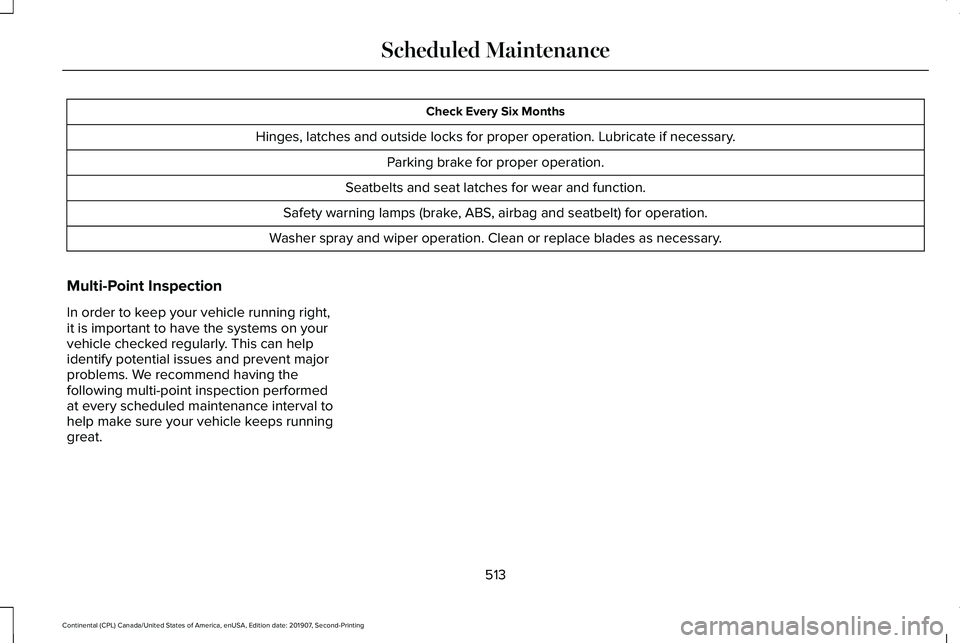
Check Every Six Months
Hinges, latches and outside locks for proper operation. Lubricate if necessary. Parking brake for proper operation.
Seatbelts and seat latches for wear and function.
Safety warning lamps (brake, ABS, airbag and seatbelt) for operation.
Washer spray and wiper operation. Clean or replace blades as necessary.
Multi-Point Inspection
In order to keep your vehicle running right,
it is important to have the systems on your
vehicle checked regularly. This can help
identify potential issues and prevent major
problems. We recommend having the
following multi-point inspection performed
at every scheduled maintenance interval to
help make sure your vehicle keeps running
great.
513
Continental (CPL) Canada/United States of America, enUSA, Edition date: 201907, Second-Printing Scheduled Maintenance