remote start LINCOLN CONTINENTAL 2020 Owner's Manual
[x] Cancel search | Manufacturer: LINCOLN, Model Year: 2020, Model line: CONTINENTAL, Model: LINCOLN CONTINENTAL 2020Pages: 609, PDF Size: 6.24 MB
Page 431 of 609
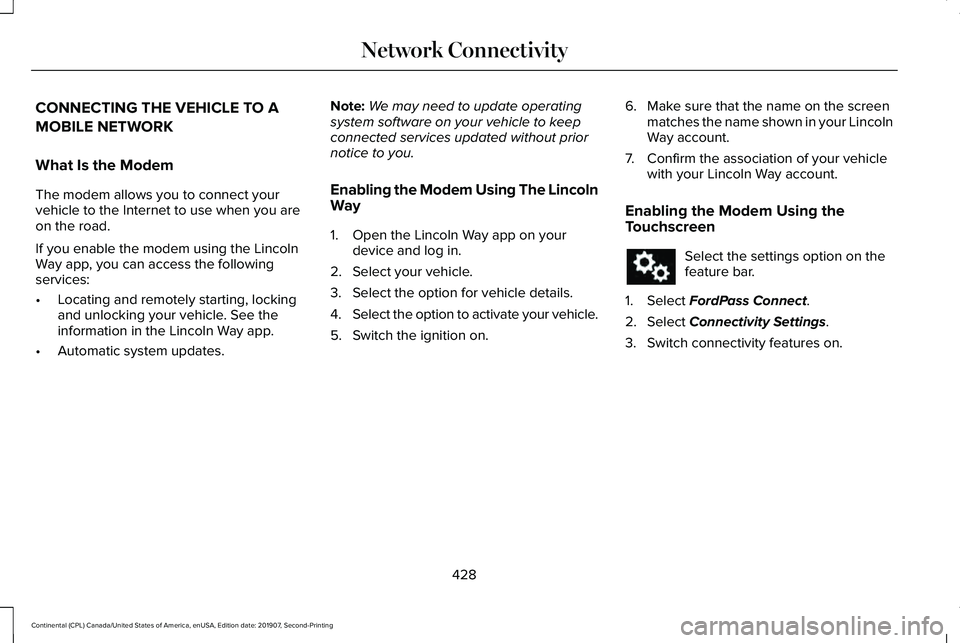
CONNECTING THE VEHICLE TO A
MOBILE NETWORK
What Is the Modem
The modem allows you to connect your
vehicle to the Internet to use when you are
on the road.
If you enable the modem using the Lincoln
Way app, you can access the following
services:
•
Locating and remotely starting, locking
and unlocking your vehicle. See the
information in the Lincoln Way app.
• Automatic system updates. Note:
We may need to update operating
system software on your vehicle to keep
connected services updated without prior
notice to you.
Enabling the Modem Using The Lincoln
Way
1. Open the Lincoln Way app on your device and log in.
2. Select your vehicle.
3. Select the option for vehicle details.
4. Select the option to activate your vehicle.
5. Switch the ignition on. 6. Make sure that the name on the screen
matches the name shown in your Lincoln
Way account.
7. Confirm the association of your vehicle with your Lincoln Way account.
Enabling the Modem Using the
Touchscreen Select the settings option on the
feature bar.
1. Select FordPass Connect.
2. Select
Connectivity Settings.
3. Switch connectivity features on.
428
Continental (CPL) Canada/United States of America, enUSA, Edition date: 201907, Second-Printing Network Connectivity
Page 506 of 609
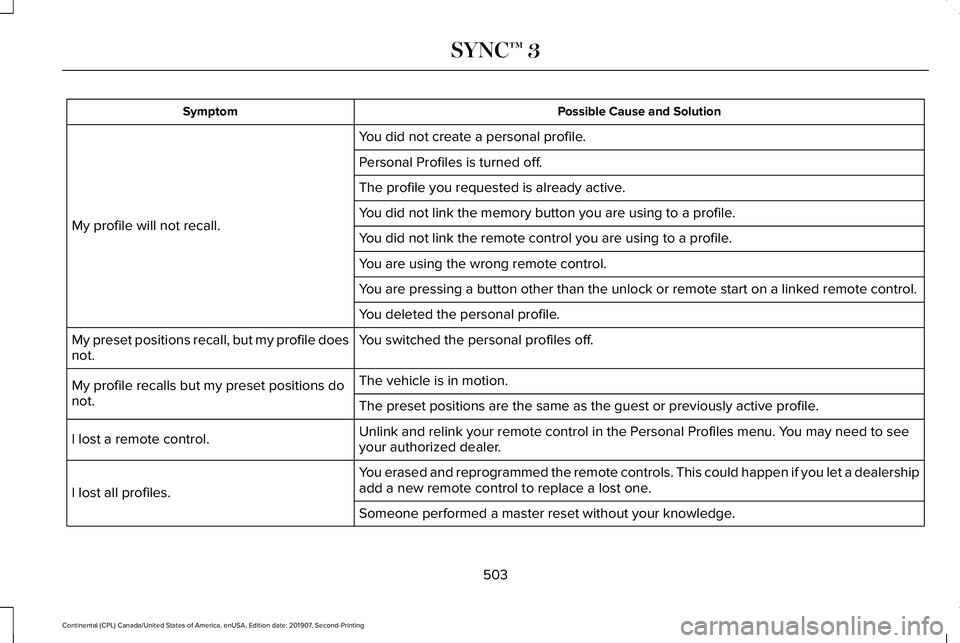
Possible Cause and Solution
Symptom
You did not create a personal profile.
My profile will not recall. Personal Profiles is turned off.
The profile you requested is already active.
You did not link the memory button you are using to a profile.
You did not link the remote control you are using to a profile.
You are using the wrong remote control.
You are pressing a button other than the unlock or remote start on a link\
ed remote control.
You deleted the personal profile.
You switched the personal profiles off.
My preset positions recall, but my profile does
not.
The vehicle is in motion.
My profile recalls but my preset positions do
not. The preset positions are the same as the guest or previously active prof\
ile.
Unlink and relink your remote control in the Personal Profiles menu. You may need to see
your authorized dealer.
I lost a remote control.
You erased and reprogrammed the remote controls. This could happen if you\
let a dealership
add a new remote control to replace a lost one.
I lost all profiles.
Someone performed a master reset without your knowledge.
503
Continental (CPL) Canada/United States of America, enUSA, Edition date: 201907, Second-Printing SYNC™ 3
Page 603 of 609
Hill Start Assist.....................................................133
Keys and Intelligent Access..............................133
Lane Keeping System........................................135
Maintenance.........................................................135
MyKey.....................................................................137
Park Aid..................................................................138
Park Brake.............................................................138
Power Steering....................................................139
Pre-Collision Assist.............................................140
Remote Start.........................................................140
Seats.......................................................................140
Stability Control.....................................................141
Starting System ....................................................141
Tire Pressure Monitoring System....................142
Transmission.........................................................142
Installing Child Restraints.............................23 Inflatable Seatbelts...............................................27
Standard Seatbelts...............................................24
Using Lap and Shoulder Belts...........................23
Using Lower Anchors and Tethers for
CHildren (LATCH).............................................29
Using Tether Straps...............................................31
Installing the Vehicle Identification Card...............................................................427
Instrument Cluster...........................................111
Instrument Lighting Dimmer........................99
Instrument Panel..............................................19 Interior Lamps.................................................101
Front Interior Lamp..............................................101
Interior Lamp Function.......................................102
Rear Interior Lamps............................................102
Switching All of the Interior Lamps Off..........102
Switching All of the Interior Lamps On...........101
Switching the Individual Map Lamps On and
Off.......................................................................102
Interior Luggage Compartment Release...........................................................85
Interior Mirror
.................................................108
Auto-Dimming Mirror..........................................108
Introduction
.........................................................7
J
Jump Starting the Vehicle..........................286 Connecting the Jumper Cables......................287
Jump Starting......................................................288
Preparing Your Vehicle.....................................286
Removing the Jumper Cables........................288
K
Keyless Entry
....................................................83
SECURICODE™ Keyless Entry Keypad.............83
Keyless Starting
.............................................180
Ignition Modes.....................................................180 Keys and Remote Controls............................61
L
Lane Keeping System..................................251
Switching the System On and Off..................252
Lighting Control
...............................................97
Flashing the Headlamp High Beam.................98
Headlamp High Beam.........................................98
Lighting..............................................................97 General Information.............................................97
Lincoln Automotive Financial Services......14
Lincoln Protect..............................................507 Lincoln Protect (CANADA ONLY)...................508
Lincoln Protect Extended Service Plans (U.S.
Only)..................................................................507
Load Carrying.................................................271
Load Limit
........................................................271
Special Loading Instructions for Owners of
Pick-up Trucks and Utility-type
Vehicles............................................................275
Vehicle Loading - with and without a Trailer..................................................................271
Locking and Unlocking..................................72 Activating Intelligent Access..............................
72
Autolock...................................................................77
Battery Saver..........................................................78
Door Lock Indicator..............................................72
600
Continental (CPL) Canada/United States of America, enUSA, Edition date: 201907, Second-Printing Index
Page 605 of 609
PATS
See: Passive Anti-Theft System.........................87
Perchlorate........................................................14
Personal Safety System ™
..............................48
How Does the Personal Safety System
Work?...................................................................48
Phone...............................................................473 Android Auto.......................................................475
Apple CarPlay......................................................475
Pairing Your Cell Phone for the First
Time...................................................................473
Text Messaging...................................................474
Using Your Cell Phone.......................................474
Post-Crash Alert System............................289
Power Decklid
..................................................79
Hands-Free Feature.............................................82
Obstacle Detection..............................................82
Opening and Closing the Power Decklid.......80
Power Door Locks See: Locking and Unlocking..............................
72
Power Seats
....................................................159
24-Way Seat Controls.........................................161
30-Way Seat Controls........................................159
Adjusting the Multi-Contour Front Seats With
Active Motion ..................................................163
Adjusting the Power Lumbar............................163
Adjusting the Power Seats...............................160
Power Steering Fluid Check......................334 Power Windows
.............................................105
Accessory Delay..................................................106
Bounce-Back........................................................105
One-Touch Down................................................105
One-Touch Up......................................................105
Window Lock........................................................106
Pre-Collision Assist
......................................265
Using the Pre-Collision Assist System..........266
Protecting the Environment
..........................18
Puncture See: Changing a Road Wheel.........................372
R
Rear Parking Aid............................................221 Object Distance Indicator................................223
Rear Passenger Climate Controls..............151 Directing Air to the Rear Console Air
Vents...................................................................151
Directing Air to the Rear Footwell Air Vents..................................................................152
Rear Climate Control Lock Indicator..............152
Setting the Rear Blower Motor Speed...........152
Setting the Rear Temperature..........................
152
Switching Rear Auto Mode On........................152
Switching the Rear Climate Control On and Off.......................................................................153 Switching the Rear Heated Seats On and
Off.......................................................................153
Switching the Rear Ventilated Seats On and Off.......................................................................153
Rear Seat Armrest.........................................178
Rear Seats
.......................................................167
Adjusting the Rear Seats...................................167
Rear View Camera.......................................235 Using the Rear View Camera System...........236
Rear View Camera See: Rear View Camera....................................235
Recommended Towing Weights
...............277
Refueling.........................................................189
Refueling System Overview.............................189
Refueling System Warning.................................191
Refueling Your Vehicle.......................................190
Remote Control
................................................61
Car Finder...............................................................64
Intelligent Access Key..........................................61
Remote Start..........................................................64
Replacing the Battery..........................................
63
Sounding the Panic Alarm..................................64
Remote Start
...................................................154
Automatic Settings..............................................154
Heated and Cooled Features..........................154
Last Settings.........................................................154
Repairing Minor Paint Damage.................348
602
Continental (CPL) Canada/United States of America, enUSA, Edition date: 201907, Second-Printing Index
Page 608 of 609
Transporting the Vehicle............................289
Type Approvals.............................................578
China.....................................................................590
Radio Frequency Certification for Keys and
Remote Controls.............................................591
Radio Frequency Certifications for Blind Spot Information System.......................................588
Radio Frequency Certifications for Body Control Module..............................................590
Radio Frequency Certifications for Cruise Control Module..............................................590
Radio Frequency Certifications for Mid Range Radar.................................................................582
Radio Frequency Certifications for Passive Anti-Theft System..........................................583
Radio Frequency Certifications for Radio Transceiver Module.......................................
586
Radio Frequency Certifications for SYNC 3........................................................................\
.590
Radio Frequency Certifications for Tire Pressure Monitoring Sensor(s)...................578
Radio Frequency Certifications for Wireless Charging..........................................................589
Radio Frequency Statement for Audio Unit.....................................................................591 U
Under Hood Overview - 2.7L/3.0L...........320
Under Hood Overview - 3.7L.....................322
Universal Garage Door Opener.................172
HomeLink Wireless Control System...............
172
USB Port
.........................................................443
Using Adaptive Cruise Control..................241 Automatic Cancellation.....................................244
Blocked Sensor...................................................247
Canceling the Set Speed.................................244
Changing the Set Speed..................................244
Detection Issues.................................................245
Following a Vehicle............................................242
Following a Vehicle to a Complete
Stop...................................................................243
Hilly Condition Usage.......................................245
Overriding the Set Speed................................244
Park Brake Application.....................................245
Resuming the Set Speed..................................244
Setting the Adaptive Cruise Speed...............242
Setting the Adaptive Cruise Speed When Your Vehicle is Stationary......................................242
Setting the Gap Distance.................................243
Switching Adaptive Cruise Control Off.........245
Switching Adaptive Cruise Control On.........242
Switching to Normal Cruise Control..............249
System Not Available........................................246 Using All-Wheel Drive
.................................203
Driving In Special Conditions With All-Wheel
Drive (AWD).....................................................205
Operating AWD Vehicles With Spare or Mismatched Tires..........................................205
Using MyKey With Remote Start Systems..........................................................70
Using Snow Chains
......................................366
Using Stability Control................................220
Using Summer Tires....................................366
Using Traction Control
.................................218
Switching the System Off..................................218
System Indicator Lights and Messages.........218
Using a Switch.....................................................218
Using the Information Display Controls........218
Using Voice Recognition............................446 Apps.......................................................................455
Automatic Blower Motor Speed
Reduction.........................................................457
Climate..................................................................450
Entertainment......................................................448
General..................................................................447
Navigation............................................................453
Phone.....................................................................451
SiriusXM Traffic and Travel Link.....................456
Voice Settings.....................................................456
Utilizing the Mediation/Arbitration Program (Canada Only)
.............................................294
605
Continental (CPL) Canada/United States of America, enUSA, Edition date: 201907, Second-Printing Index