climate settings LINCOLN CORSAIR 2020 User Guide
[x] Cancel search | Manufacturer: LINCOLN, Model Year: 2020, Model line: CORSAIR, Model: LINCOLN CORSAIR 2020Pages: 591, PDF Size: 6 MB
Page 434 of 591

Status Bar
Cell phone microphone muted.
Audio system muted.
Software update installed.
Wi-Fi connected.
Cell phone roaming.
Text message received.
Automatic crash notification system
off.
Cell phone network signal
strength.
Vehicle data sharing active. Vehicle location sharing active.
Vehicle data and location sharing
active.
Feature Bar Select to use the radio, a USB, a
media player or a Bluetooth
device. See Entertainment (page
444). Select to adjust climate settings
See
Climate (page 456).
Select to make calls and access
the phonebook on your cell phone.
See
Phone (page 459).
Select to use the navigation
system. See Navigation (page 461).
Select to search for and use
compatible apps on your iOS or
Android device.
See Apps (page
475). Select to adjust system settings.
See
Settings (page 478).
Cleaning the Touchscreen
See
Cleaning the Interior (page 350).
Updating the System
Updating the System Using a USB Drive
Downloading an Update
1. Go to the SYNC update page on the regional website.
2. Download the update.
Note: The website notifies you if an update
is available.
3. Insert a USB drive into your computer.
Note: The USB drive needs to be empty and
meet the minimum requirements detailed on
the website.
4. Follow the instructions provided to download the update to the USB drive.
431
Corsair (CTF) Canada/United States of America, enUSA, Edition date: 201906, Second-Printing SYNC™ 3 E100027 E283811 E280315
Page 459 of 591
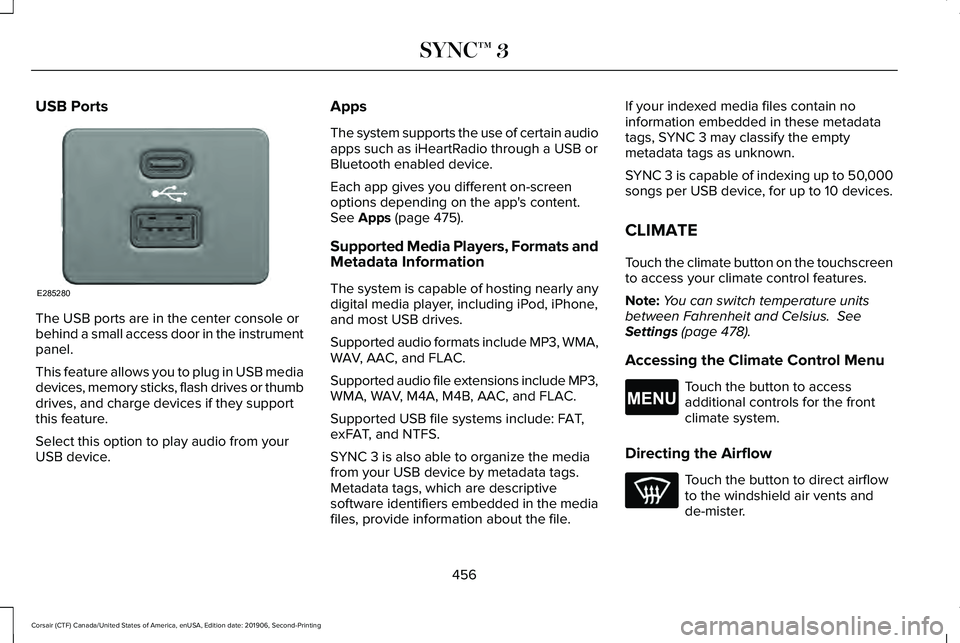
USB Ports
The USB ports are in the center console or
behind a small access door in the instrument
panel.
This feature allows you to plug in USB media
devices, memory sticks, flash drives or thumb
drives, and charge devices if they support
this feature.
Select this option to play audio from your
USB device. Apps
The system supports the use of certain audio
apps such as iHeartRadio through a USB or
Bluetooth enabled device.
Each app gives you different on-screen
options depending on the app's content.
See Apps (page 475).
Supported Media Players, Formats and
Metadata Information
The system is capable of hosting nearly any
digital media player, including iPod, iPhone,
and most USB drives.
Supported audio formats include MP3, WMA,
WAV, AAC, and FLAC.
Supported audio file extensions include MP3,
WMA, WAV, M4A, M4B, AAC, and FLAC.
Supported USB file systems include: FAT,
exFAT, and NTFS.
SYNC 3 is also able to organize the media
from your USB device by metadata tags.
Metadata tags, which are descriptive
software identifiers embedded in the media
files, provide information about the file. If your indexed media files contain no
information embedded in these metadata
tags, SYNC 3 may classify the empty
metadata tags as unknown.
SYNC 3 is capable of indexing up to 50,000
songs per USB device, for up to 10 devices.
CLIMATE
Touch the climate button on the touchscreen
to access your climate control features.
Note:
You can switch temperature units
between Fahrenheit and Celsius.
See
Settings (page 478).
Accessing the Climate Control Menu Touch the button to access
additional controls for the front
climate system.
Directing the Airflow Touch the button to direct airflow
to the windshield air vents and
de-mister.
456
Corsair (CTF) Canada/United States of America, enUSA, Edition date: 201906, Second-Printing SYNC™ 3E285280 E265038
Page 460 of 591
Touch the button to direct airflow
to the instrument panel air vents.
Touch the button to direct airflow
to the footwell air vents.
You can direct air through any combination
of these air vents.
Setting the Blower Motor Speed Touch up or down to increase or
decrease the volume of air that
circulates in your vehicle.
Setting the Temperature
Touch up or down on the left-hand
temperature control to set the left-hand
temperature.
Note: This control also adjusts the right-hand
side temperature when you switch off dual
zone mode.
Touch up or down on the right-hand
temperature control to set the right-hand
temperature. Switching Auto Mode On and Off Touch the button to switch on
automatic operation, then set the
temperature.
The system adjusts the blower motor speed,
air distribution, air conditioning operation,
and outside or recirculated air to reach and
maintain the temperature you have set.
Switching the Air Conditioning On and
Off A pop-up appears on the screen
to display the air conditioning
options.
MAX A/C: Touch the button to activate and
maximize cooling. The driver and passenger
temperatures are set to LO, recirculated air
flows through the instrument panel vents, air
conditioning automatically turns on and the
fan automatically adjusts to the highest
speed.
A/C: Touch to switch the air conditioning on
or off. Use A/C with recirculated air to
improve cooling performance and efficiency. Note:
In certain conditions, such as
maximum defrost, the air conditioning
compressor may continue to operate even
though you switch off the air conditioning.
Switching the Climate Control On and
Off Touch the button.
Switching the Climate Controlled Seats
On and Off Touch the button to cycle through
the various climate controlled seat
settings.
Switching Dual Zone Mode On and Off Touch the button to switch on
temperature control for the
right-hand side of the vehicle.
457
Corsair (CTF) Canada/United States of America, enUSA, Edition date: 201906, Second-Printing SYNC™ 3 E265282 E265280
Page 462 of 591
Switching the Ventilated Seats On and
Off
Touch the button to cycle through
the various ventilated seat settings.
Accessing Rear Climate Controls Touch the button to access
additional controls for the rear
climate system.
Rear Climate Control Lock Indicator Touch the button.
When on, you can only operate the
rear passenger settings through
the front controls.
Switching Rear Auto Mode On and Off Touch the button to switch on rear
automatic operation, then set the
temperature. Switching the Rear Climate Controlled
Seats On and Off Touch the button to cycle through
the various climate controlled seat
settings.
Switching the Rear Heated Seats On
and Off Touch the button to cycle through
the various heat settings.
Switching the Rear Ventilated Seats
On and Off Touch the button to cycle through
the various ventilated seat settings.PHONE WARNING: Driving while distracted
can result in loss of vehicle control, crash
and injury. We strongly recommend that
you use extreme caution when using any
device that may take your focus off the
road. Your primary responsibility is the safe
operation of your vehicle. We recommend
against the use of any hand-held device
while driving and encourage the use of
voice-operated systems when possible.
Make sure you are aware of all applicable
local laws that may affect the use of
electronic devices while driving.
Check the compatibility of your device on
the regional website.
Pairing Your Cell Phone for the First
Time
Go to the settings menu on your cell phone
and switch Bluetooth on. Select the phone option on the
feature bar.
459
Corsair (CTF) Canada/United States of America, enUSA, Edition date: 201906, Second-Printing SYNC™ 3E268558 E270447 E265289 E265282 E268558
Page 577 of 591
Air Filter
See: Changing the Engine Air Filter..............332
Alarm See: Anti-Theft Alarm...........................................88
All-Wheel Drive.............................................209
Ambient Lighting...........................................104 Adjusting the Brightness...................................105
Changing the Color............................................105
Switching Ambient Lighting Off.......................
105
Switching Ambient Lighting On.......................105
Anti-Theft Alarm
..............................................88
Arming the Alarm..................................................88
Disarming the Alarm............................................88
Appendices
....................................................535
Apps.................................................................475 SiriusXM Traffic and Travel Link......................
477
Using Apps on an Android Device................476
Using Apps on an iOS Device.........................
476
Using Mobile Navigation on an Android Device...............................................................476
At a Glance........................................................21
Audible Warnings and Indicators..............122 Headlamps On Warning Chime
.......................122
Keyless Warning Alert........................................122
Parking Brake On Warning Chime..................122
Audio Control..................................................92 You can operate the following functions with
the control:.........................................................92 Audio System
................................................420
General Information...........................................420
Audio Unit.......................................................421 Adjusting the Volume.........................................421
Changing Radio Stations...................................421
Selecting the Audio Modes..............................
421
Switching the Audio Unit On and Off............422
Switching the Display On and Off..................422
Using Seek, Fast Forward and Reverse.......
422
Auto Hold
........................................................218
Auto Hold Indicator.............................................219
Switching Auto Hold On and Off.....................218
Using Auto Hold..................................................218
Autolamps
........................................................99
Windshield Wiper Activated Headlamps........99
Automatic Climate Control
.........................152
Accessing the Air Distribution Controls........152
Accessing the Climate Control Menu............
152
Setting the Blower Motor Speed....................152
Setting the Temperature...................................152
Switching Auto Mode On and Off...................152
Switching Maximum Air Conditioning On and Off.......................................................................153
Switching Maximum Defrost On and Off.......154
Switching Recirculated Air On and Off..........154
Switching the Air Conditioning On and Off.......................................................................153 Switching the Climate Control On and
Off.......................................................................153
Automatic High Beam Control...................106
Automatic High Beam Control Indicators......................................................107
Automatic Transmission.............................203 Automatic Transmission Adaptive
Learning...........................................................208
If Your Vehicle Gets Stuck in Mud or Snow.................................................................208
Manual Park Release.........................................206
SelectShift™ Automatic Transmission............205
Understanding the Shift Positions of your Automatic Transmission...............................203
Automatic Transmission Fluid Check............................................................338
Auto-Start-Stop..............................................189 Disabling Auto-Start-Stop.................................190
Enabling Auto-Start-Stop...................................189
Autowipers.......................................................96 Autowipers Settings.............................................96
Low Temperature Wipe Inhibit..........................96
Auxiliary Power Points
..................................178
110 Volt AC Power Point.....................................178
12 Volt DC Power Point......................................178
USB Port and Power Point Locations.............178
AWD See: All-Wheel Drive.........................................209
574
Corsair (CTF) Canada/United States of America, enUSA, Edition date: 201906, Second-Printing Index
Page 581 of 591
Electric Parking Brake..................................215
Applying the Electric Parking Brake...............215
Automatically Releasing the Electric Parking
Brake..................................................................216
Manually Releasing the Electric Parking Brake..................................................................216
Releasing the Electric Parking Brake if the Vehicle Battery is Running Out of
Charge...............................................................217
Electric Vehicle Information.......................469
Charge Preferences...........................................473
Charge Settings..................................................470
Charge Time Settings........................................474
Departure Time Settings..................................475
Engine On Due To..............................................469
Power Flow..........................................................469
Vehicle Operational States..............................469
Electromagnetic Compatibility
..................535
Emergency Call Limitations.........................60
Emergency Call Requirements
...................59
Emission Law..................................................199
Noise Emissions Warranty, Prohibited
Tampering Acts and Maintenance............
200
Tampering With a Noise Control System
...............................................................199
End User License Agreement
...................540
VEHICLE SOFTWARE END USER LICENSE
AGREEMENT (EULA) ....................................540 Engine Block Heater
.....................................187
Using the Engine Block Heater.......................188
Engine Coolant Check................................333 Adding Coolant...................................................334
Coolant Change..................................................336
Engine Coolant Temperature
Management...................................................337
Fail-Safe Cooling................................................336
Recycled Coolant...............................................335
Severe Climates..................................................336
Engine Emission Control.............................199
Engine Immobilizer See: Passive Anti-Theft System
.........................87
Engine Oil Check
..........................................330
Adding Engine Oil...............................................331
Engine Oil Dipstick
.......................................330
Engine Specifications - 2.0L......................385
Drivebelt Routing................................................386
Engine Specifications - 2.3L
......................386
Drivebelt Routing................................................387
Entertainment................................................444 AM/FM Radio.......................................................445
Apps.......................................................................456
Bluetooth Stereo or USB..................................454
CD (If equipped)..................................................453
HD Radio ™ Information (If Available)..............449
SiriusXM® Satellite Radio (If Activated).........
445
Sources.................................................................444 Supported Media Players, Formats and
Metadata Information...................................456
USB Ports.............................................................456
Environment.....................................................20
EPB See: Electric Parking Brake..............................215
Essential Towing Checks
............................291
Before Towing a Trailer.....................................292
Hitches...................................................................291
Launching or Retrieving a Boat or Personal
Watercraft (PWC)............................................292
Safety Chains.......................................................291
Trailer Brakes.......................................................291
Trailer Lamps.......................................................292
When Towing a Trailer......................................292
Event Data Recording See: Data Recording.............................................12
Export Unique Options
...................................19
Exterior Mirrors...............................................110
Auto-Dimming Feature.........................................111
Auto-Folding Mirrors...........................................110
Blind Spot Monitor................................................111
Fold-Away Exterior Mirrors................................110
Heated Exterior Mirrors.......................................111
Lincoln Welcome Mat...........................................111
Memory Mirrors......................................................111
Power Exterior Mirrors........................................110
Signal Indicator Mirrors........................................111
578
Corsair (CTF) Canada/United States of America, enUSA, Edition date: 201906, Second-Printing Index
Page 583 of 591
Head Restraints.............................................159
Folding the Rear Seat Outermost Head
Restraint............................................................160
Installing the Head Restraint.............................161
Lowering the Head Restraint...........................160
Raising the Head Restraint...............................
160
Removing the Head Restraint..........................160
Tilting the Front Seat Head Restraint............160
Head Up Display...........................................148 Configuring The Head Up Display..................148
Head Up Display Overview..............................149
Maintaining Your Head Up Display..................151
Heated Exterior Mirrors...............................155
Heated Rear Window
...................................155
Heated Seats..................................................170
Front Seats............................................................170
Rear Seats..............................................................171
Heated Steering Wheel.................................94
Heated Windshield
.......................................155
Windshield Wiper De-Icer.................................155
Heating See: Climate Control..........................................152
Hill Start Assist...............................................217 Switching the System On and Off...................218
Using Hill Start Assist.........................................218 Hints on Controlling the Interior
Climate..........................................................154
Defogging the Side Windows in Cold Weather.............................................................155
General Hints........................................................154
Quickly Cooling the Interior.............................155
Quickly Heating the Interior.............................155
Recommended Settings for Cooling..............
155
Recommended Settings for Heating..............155
Hints on Driving With Anti-Lock Brakes...........................................................215
Hood Lock See: Opening and Closing the Hood............327
Horn
....................................................................94
How Does Adaptive Cruise Control With Stop and Go Work
.....................................245
I
In California (U.S. Only)...............................306
Information Display Control
.........................94
Information Displays.....................................123
General Information............................................123
Information Messages.................................128 Active Park............................................................128
Adaptive Cruise Control....................................129
Adaptive Headlamps..........................................129
AdvanceTrac ™ and Traction Control................
130Alarm......................................................................130
Automatic Engine Shutdown.............................
131
AWD........................................................................\
.131
Battery and Charging System..........................132
Blind Spot Information and Cross Traffic Alert System...............................................................133
Doors and Locks..................................................134
Driver Alert............................................................135
Fuel........................................................................\
.135
Hill Start Assist.....................................................136
Keys and Intelligent Access..............................136
Lane Keeping System.........................................137
Maintenance.........................................................138
MyKey.....................................................................139
Park Aid..................................................................140
Park Brake..............................................................141
Power Steering....................................................142
Pre-Collision Assist.............................................143
Remote Start.........................................................143
Seats.......................................................................143
Starting System ...................................................144
Stop Safely Now..................................................144
Tire Pressure Monitoring System....................145
Trailer......................................................................145
Transmission.........................................................146
Installing Child Restraints.............................26 Child Restraints.....................................................26
Using Lap and Shoulder Belts...........................26
580
Corsair (CTF) Canada/United States of America, enUSA, Edition date: 201906, Second-Printing Index
Page 589 of 591
T
Technical Specifications
See: Capacities and Specifications...............385
The Better Business Bureau (BBB) Auto Line Program (U.S. Only)..........................307
Tire Care
.........................................................357
Glossary of Tire Terminology..........................358
Information About Uniform Tire Quality Grading.............................................................357
Information Contained on the Tire Sidewall............................................................359
Temperature A B C............................................358
Traction AA A B C...............................................357
Treadwear.............................................................357
Tire Pressure Monitoring System..............371 Changing Tires With a Tire Pressure
Monitoring System.........................................373
Understanding Your Tire Pressure Monitoring System .............................................................373
Tires See: Wheels and Tires......................................355
Towing a Trailer
.............................................288
Load Placement..................................................288
Towing the Vehicle on Four Wheels
.......293
Emergency Towing............................................293
Recreational Towing..........................................293
Towing.............................................................288 Traction Control
............................................224
Principle of Operation.......................................224
Trailer Sway Control....................................289
Transmission Code Designation
...............391
Transmission..................................................203
Transporting the Vehicle............................303
U
Under Hood Overview................................329
Unique Driving Characteristics..................189
Universal Garage Door Opener.................174 HomeLink Wireless Control System...............174
USB Port
.........................................................428
Locating the USB Ports.....................................429
Using All-Wheel Drive
.................................209
Driving in Special Conditions With All-Wheel
Drive..................................................................209
Using MyKey With Remote Start Systems...........................................................73
Using Snow Chains
......................................370
Using Stability Control................................226
Using the Backup Starting Passcode........68
Using the Valet Mode....................................67
Using Traction Control................................224 Switching the System Off.................................224
System Indicator Lights and Messages........
224
Using a Switch....................................................224 Using the Information Display Controls.......224
Using Voice Recognition............................432 Apps........................................................................\
441
Automatic Blower Motor Speed
Reduction.........................................................443
Climate..................................................................436
Entertainment
......................................................434
General..................................................................433
Navigation............................................................439
Phone.....................................................................437
SiriusXM Traffic and Travel Link......................
442
Voice Settings.....................................................442
Utilizing the Mediation/Arbitration Program (Canada Only)
.............................................308
V
Vehicle Care
..................................................346
General Information...........................................346
Vehicle Certification Label
.........................390
Vehicle Identification Number..................390
Vehicle Storage............................................352
Body.......................................................................353
Brakes...................................................................354
Cooling system...................................................353
Disconnecting Your 12 Volt Battery...............353
Engine...................................................................353
Fuel system..........................................................353
586
Corsair (CTF) Canada/United States of America, enUSA, Edition date: 201906, Second-Printing Index