engine LINCOLN CORSAIR 2020 User Guide
[x] Cancel search | Manufacturer: LINCOLN, Model Year: 2020, Model line: CORSAIR, Model: LINCOLN CORSAIR 2020Pages: 591, PDF Size: 6 MB
Page 71 of 591
USING THE BACKUP STARTING
PASSCODE
If you are unable to start your vehicle with
phone as a key, follow the steps below:
1. Press the brake pedal and the ignition
button. If the system does not detect a
valid phone as a key, a message appears
and the system prompts you for your
backup starting passcode.
Note: Make sure you have phone as a key
active on at least one phone to use the
previously created backup starting code.
Note: If the backup starting passcode screen
does not appear, it is necessary to press the
ignition button again.
2. Use the touchscreen to enter your backup starting passcode.
3. After entering your backup starting passcode, you must press Enter within
30 seconds.
4. Once the system validates the backup starting passcode, a message alerts you
to start your vehicle. 5. Press the brake pedal and the ignition
button within 20 seconds to start the
engine.
6. If your vehicle does not start, repeat steps 1-5.
PHONE AS A KEY –
TROUBLESHOOTING
Phone as a Key – Frequently Asked
Questions
How can I tell if my vehicle has phone as a
key? Once you pair your phone with your
vehicle, the touchscreen display menu
identifies the phone as a key option if it
is available. See Programming Your
Phone (page 67). Why do I get a No Key Detected message
in the instrument cluster display when I am
using phone as a key and my phone is in
the car?
Your phone ’s Bluetooth connection has
been disrupted or is not connected. Try
to reconnect via Bluetooth using the
Lincoln Way app, verify your phone as
a key is still active, enabled and has not
been revoked.
What do I do if my phone is lost, damaged,
or the battery has depleted? Use the backup starting passcode that
you created to protect you in the event
that your phone is lost, damaged, or the
battery has depleted.
See Using the
Backup Starting Passcode (page 68).
How many phones can I use for phone as
a key? You can program and activate up to four
phones with phone as a key to your
vehicle.
68
Corsair (CTF) Canada/United States of America, enUSA, Edition date: 201906, Second-Printing Phone as a Key
Page 74 of 591
Note:
Not every feature applies to every
vehicle in every market. When they are
available for your vehicle, then they appear
in your information display, providing choices
to switch them on or off, or to select a more
specific setting.
• Various vehicle speed limits so the
MyKey driver cannot exceed certain
speeds. The information display shows
warnings followed by an audible tone
when the MyKey driver reaches the set
speed. You cannot override the set
speed by fully depressing the accelerator
pedal. WARNING: Do not set MyKey
maximum speed limit to a limit that will
prevent the driver from maintaining a safe
speed considering posted speed limits and
prevailing road conditions. The driver is
always responsible to drive in accordance
with local laws and prevailing conditions.
Failure to do so could result in accident or
injury. •
Various vehicle speed reminders so
MyKey drivers know when their vehicle
speed approaches the limits. Warnings
appear in your information display and a
tone sounds when the MyKey drivers
exceed the set vehicle speed.
• The audio system's maximum volume
limits to 45% so MyKey drivers can
concentrate on the road. A message
appears in the information display when
MyKey drivers attempt to exceed the
limited volume. MyKey also disables the
automatic volume control.
Note: If your
vehicle includes an AM/FM radio or a
very basic audio system, then the radio
may not limit.
• Always on setting. This setting forces
certain features to remain on and active
for MyKey drivers. For example, E911 or
emergency assistance and the do not
disturb features stay on even if a MyKey
driver uses the feature's control to switch
it off. When selected, you will not be able
to turn off Advance Trac or traction
control (if your vehicle has this feature). CREATING A MYKEY
Use the touchscreen to create a MyKey:
1. Insert the key you want to program into
the ignition. If your vehicle has a
push-button start, place the remote
control into the backup slot. See Starting
a Gasoline Engine
(page 184).
2. Switch the ignition on.
3. Access the main menu in the touchscreen and then scroll through the
menus to change the settings of your
MyKey. From the MyKey menu select the
option Create MyKey.
See Settings
(page 478).
4. When prompted, hold the OK button until
you see a message informing you to label
this key as a MyKey. The programmed
restrictions apply when you key off, open
and close the driver door and restart your
vehicle with the programmed key or
remote control.
You have successfully created a MyKey.
Make sure you label it so you can distinguish
it from the admin keys.
71
Corsair (CTF) Canada/United States of America, enUSA, Edition date: 201906, Second-Printing MyKey™
Page 76 of 591
Number of MyKeys
Indicates the number of MyKeys you have
programmed to your vehicle. Use this feature
to detect how many MyKeys you have for
your vehicle and determine when you have
deleted all MyKeys.
Number of Admin Keys
Indicates how many admin keys you have
programmed to your vehicle. Use this feature
to determine how many admin keys you have
for your vehicle, and detect if an additional
MyKey has been programmed.
USING MYKEY WITH REMOTE
START SYSTEMS
MyKey is not compatible with non
Lincoln-approved, aftermarket remote start
systems. If you choose to install a remote
start system, see an authorized dealer for a
Lincoln-approved remote start system.
MYKEY – TROUBLESHOOTING Potential causes
Condition
· The key or transmitter used to start the vehicle does not have admin
privileges.
I cannot create a MyKey.
· Vehicles with keyless start: Make sure you place the transmitter into
the backup slot. See Starting a Gasoline Engine (page 184).
· The key or transmitter used to start the vehicle is the only admin key.
There always has to be at least one admin key.
· SecuriLock passive anti-theft system is disabled or in unlimited mode.
· The key or transmitter used to start the vehicle does not have admin
privileges.
I cannot program the configurable settings.
73
Corsair (CTF) Canada/United States of America, enUSA, Edition date: 201906, Second-Printing MyKey™
Page 77 of 591
Potential causes
Condition
· There are no MyKeys programmed to the vehicle. See Creating a
MyKey (page 71).
· The key or transmitter used to start the vehicle does not have admin
privileges.
I cannot clear the MyKeys.
· No MyKeys are created.
See Creating a MyKey (page 71).
· Purchase a new key or transmitter from your authorized dealer.
I lost the only admin key.
· Program a spare key or transmitter. You may need to see your
authorized dealer.
See Starting a Gasoline Engine (page 184).
I lost a key.
· The MyKey user is not using the MyKey.
MyKey distances do not accumulate.
· An admin key holder cleared the MyKeys and created new MyKeys.
· The key system has been reset.
74
Corsair (CTF) Canada/United States of America, enUSA, Edition date: 201906, Second-Printing MyKey™
Page 90 of 591
PASSIVE ANTI-THEFT SYSTEM
Note:
The system is not compatible with
non-Lincoln aftermarket remote start
systems. Use of these systems may result in
engine starting problems and a loss of
security protection.
Note: Metallic objects, electronic devices or
a second coded key on the same key chain
may result in vehicle starting problems,
especially if they are too close to the key
when starting your vehicle. Prevent these
objects from touching the coded key when
starting your vehicle. Switch the ignition off,
move all objects on the key chain away from
the coded key and restart your vehicle if a
problem occurs
Note: Do not leave a duplicate coded key
in your vehicle. Always take your keys and
lock all doors when leaving your vehicle. SecuriLock®
The system helps prevent the engine from
starting unless you use a coded key
programmed to your vehicle. Using the
wrong key may prevent your vehicle from
starting. A message may appear in the
information display.
If you are unable to start your vehicle with a
coded key, it is not operating correctly. A
message may appear in the information
display.
Automatic Arming
The system arms when you switch the
ignition off.
Automatic Disarming
The system disarms when you switch the
ignition on with a coded key.
Replacement Keys
Note:
Your vehicle comes with two keys. The intelligent access key functions as a
programmed key that operates the driver
door lock and turns on the intelligent access
with push button start system, as well as a
remote control.
If your programmed transmitters are lost or
stolen and you do not have an extra coded
key, you will need to have your vehicle
towed to an authorized dealer to program
new coded keys.
Store a spare intelligent access key away
from your vehicle in a safe place. You can
purchase replacement keys or remote
controls from an authorized dealer.
Programming a Spare Key
Note:
You can program a maximum of four
keys to your vehicle.
You must have two previously programmed
intelligent access keys inside your vehicle
and the new unprogrammed intelligent
access keys readily accessible. Contact an
authorized dealer to have the spare key
programmed if two previously programmed
keys are not available.
87
Corsair (CTF) Canada/United States of America, enUSA, Edition date: 201906, Second-Printing Security
Page 97 of 591
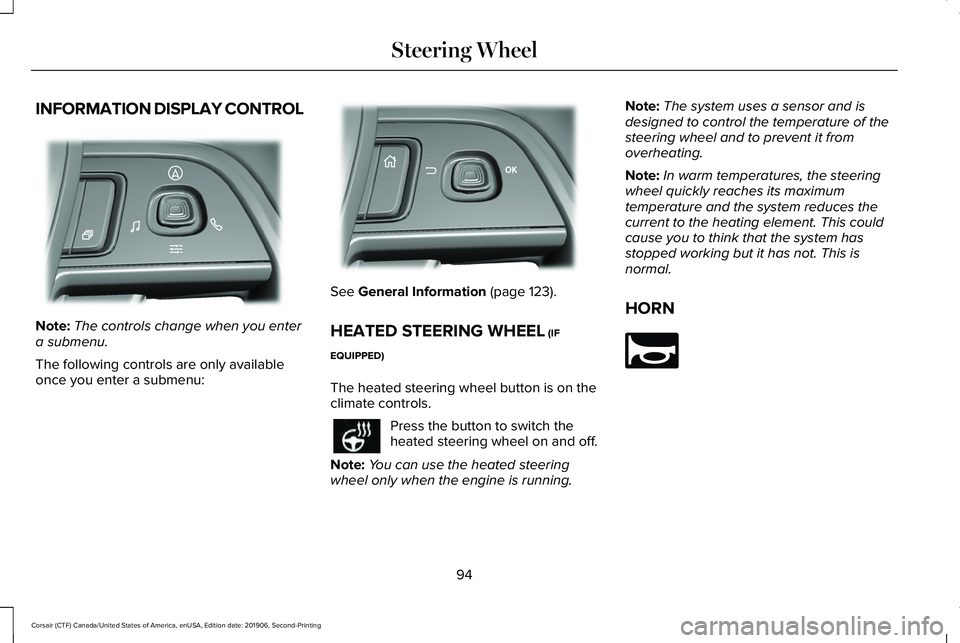
INFORMATION DISPLAY CONTROL
Note:
The controls change when you enter
a submenu.
The following controls are only available
once you enter a submenu: See General Information (page 123).
HEATED STEERING WHEEL
(IF
EQUIPPED)
The heated steering wheel button is on the
climate controls. Press the button to switch the
heated steering wheel on and off.
Note: You can use the heated steering
wheel only when the engine is running. Note:
The system uses a sensor and is
designed to control the temperature of the
steering wheel and to prevent it from
overheating.
Note: In warm temperatures, the steering
wheel quickly reaches its maximum
temperature and the system reduces the
current to the heating element. This could
cause you to think that the system has
stopped working but it has not. This is
normal.
HORN 94
Corsair (CTF) Canada/United States of America, enUSA, Edition date: 201906, Second-Printing Steering WheelE281220 E299701 E270945
Page 111 of 591
POWER WINDOWS
WARNING: Do not leave children
unattended in your vehicle and do not let
them play with the power windows. Failure
to follow this instruction could result in
personal injury. WARNING:
When closing the power
windows, verify they are free of obstruction
and make sure that children and pets are
not in the proximity of the window
openings. Press the control to open the
window. Lift the control to close
the window.
To reduce wind noise or pulsing noise when
just one window is open, slightly open the
opposite window.
One-Touch Down
Press the switch fully and release it. Press
again or lift it to stop the window. One-Touch Up
Lift the switch fully and release it. Press or
lift it again to stop the window.
Resetting One-Touch Up
Start the engine.
1.
Lift and hold the window switch until you
fully close the door window. Continue to
hold the switch for a few seconds after
you close the window.
2. Release the window switch.
3. Press and hold the window switch until you fully open the door window.
4. Release the window switch.
5. Lift and hold the window switch until you
fully close the window.
6. Test for correct window operation by carrying out the one-touch down and
one-touch up features. Rear Window Lock Press the control to lock or unlock
the rear window controls. It
illuminates when you lock the rear
window controls.
Bounce-Back
(If Equipped)
The window stops and reverses if it detects
an obstruction.
Overriding the Bounce-Back Feature WARNING:
If you override
bounce-back, the window does not reverse
if it detects an obstacle. Take care when
closing the windows to avoid personal
injury or damage to your vehicle.
Pull up the window switch and hold within a
few seconds of the window reaching the
bounce-back position. The window travels
up with no bounce-back protection. The
window stops if you release the switch
before the window fully closes.
108
Corsair (CTF) Canada/United States of America, enUSA, Edition date: 201906, Second-Printing Windows and Mirrors
Page 113 of 591
EXTERIOR MIRRORS
Power Exterior Mirrors
WARNING: Do not adjust the mirrors
when your vehicle is moving. This could
result in the loss of control of your vehicle,
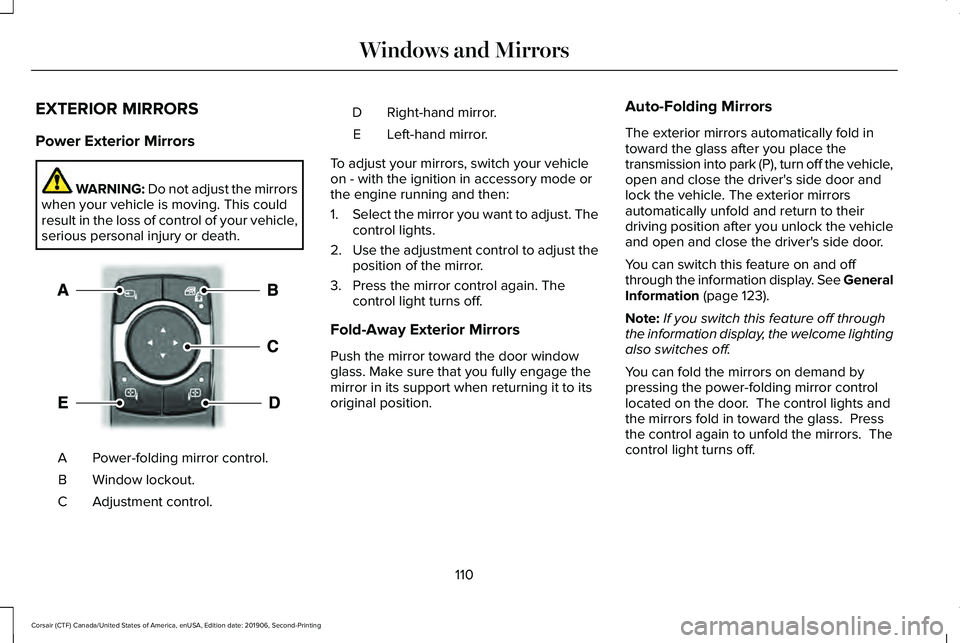
serious personal injury or death. Power-folding mirror control.
A
Window lockout.
B
Adjustment control.
C Right-hand mirror.
D
Left-hand mirror.
E
To adjust your mirrors, switch your vehicle
on - with the ignition in accessory mode or
the engine running and then:
1. Select the mirror you want to adjust. The
control lights.
2. Use the adjustment control to adjust the
position of the mirror.
3. Press the mirror control again. The control light turns off.
Fold-Away Exterior Mirrors
Push the mirror toward the door window
glass. Make sure that you fully engage the
mirror in its support when returning it to its
original position. Auto-Folding Mirrors
The exterior mirrors automatically fold in
toward the glass after you place the
transmission into park (P), turn off the vehicle,
open and close the driver's side door and
lock the vehicle. The exterior mirrors
automatically unfold and return to their
driving position after you unlock the vehicle
and open and close the driver's side door.
You can switch this feature on and off
through the information display. See General
Information (page 123).
Note: If you switch this feature off through
the information display, the welcome lighting
also switches off.
You can fold the mirrors on demand by
pressing the power-folding mirror control
located on the door. The control lights and
the mirrors fold in toward the glass. Press
the control again to unfold the mirrors. The
control light turns off.
110
Corsair (CTF) Canada/United States of America, enUSA, Edition date: 201906, Second-Printing Windows and MirrorsE295322
Page 118 of 591
Information display.
E
Engine coolant temperature gauge.
F
Information Bar
Displays information related to the
navigation, outside air temperature,
odometer and distance to empty.
Distance to Empty - Indicates the
approximate distance your vehicle can travel
on the fuel remaining in the tank. Changes
in driving pattern can cause the value to not
only decrease but also increase or stay
constant for periods of time.
Information Display
Information that appears depends on your
vehicle settings. See General Information
(page 123). Engine Coolant Temperature Gauge
Shows the temperature of the engine
coolant. At normal operating temperature,
the needle remains in the center section. If
the needle enters the red section, the engine
is overheating. Stop the engine, switch the
ignition off and determine the cause once
the engine has cooled down.
Note:
Do not restart the engine until the
cause of the overheating has been resolved. WARNING:
Do not remove the
coolant reservoir cap when the engine is
on or the cooling system is hot. Wait 10
minutes for the cooling system to cool
down. Cover the coolant reservoir cap with
a thick cloth to prevent the possibility of
scalding and slowly remove the cap.
Failure to follow this instruction could result
in personal injury. Fuel Gauge
The fuel gauge indicates about how much
fuel is in the fuel tank.
The arrow adjacent to the fuel pump symbol
indicates on which side of your vehicle the
fuel filler door is located.
Note:
The fuel gauge may vary slightly when
your vehicle is moving or on a slope.
Low Fuel Reminder
A low fuel level reminder displays and
sounds when the distance to empty reaches
75 mi (120 km) to empty for MyKey, and at
50 mi (80 km), 25 mi (40 km), 10 mi (20 km)
and 0 mi (0 km) for all vehicle keys.
Note: The low fuel reminder can appear at
different fuel gauge positions depending on
fuel economy conditions. This variation is
normal.
115
Corsair (CTF) Canada/United States of America, enUSA, Edition date: 201906, Second-Printing Instrument Cluster
Page 120 of 591
Status Bar.
A
Speedometer.
B
Right Information Group.
C
Distance to empty.
D
Fuel gauge.
E
Engine coolant temperature gauge.
F
Left Information Group.
G
Status Bar
Displays information related to the current
audio source, compass direction and outside
air temperature.
Left and Right Information Group
Information that appears depends on current
gauge view and on-demand settings. See
General Information (page 123).
Fuel Gauge
The fuel gauge indicates about how much
fuel is in the fuel tank. The arrow adjacent to the fuel pump symbol
indicates on which side of your vehicle the
fuel filler door is located.
Note:
The fuel gauge may vary slightly when
your vehicle is moving or on a slope.
Distance to Empty
Indicates the approximate distance your
vehicle can travel on the fuel remaining in
the tank. Changes in driving pattern can
cause the value to not only decrease but also
increase or stay constant for periods of time Low Fuel Reminder
A low fuel level reminder displays and
sounds when the distance to empty reaches
75 mi (120 km)
to empty for MyKey, and at
50 mi (80 km), 25 mi (40 km), 10 mi (20 km)
and 0 mi (0 km) for all vehicle keys.
Note: The low fuel reminder can appear at
different fuel gauge positions depending on
fuel economy conditions. This variation is
normal.
117
Corsair (CTF) Canada/United States of America, enUSA, Edition date: 201906, Second-Printing Instrument Cluster