lock LINCOLN CORSAIR 2020 Repair Manual
[x] Cancel search | Manufacturer: LINCOLN, Model Year: 2020, Model line: CORSAIR, Model: LINCOLN CORSAIR 2020Pages: 591, PDF Size: 6 MB
Page 206 of 591
AUTOMATIC TRANSMISSION
WARNING: Always fully apply the
parking brake and make sure you shift into
park (P). Failure to follow this instruction
could result in personal injury or death. WARNING:
When your vehicle is
stationary, keep the brake pedal fully
pressed when shifting gears. Failure to
follow this instruction could result in
personal injury, death or property damage.
Note: You may not be able to shift out of
park (P) unless the intelligent access key is
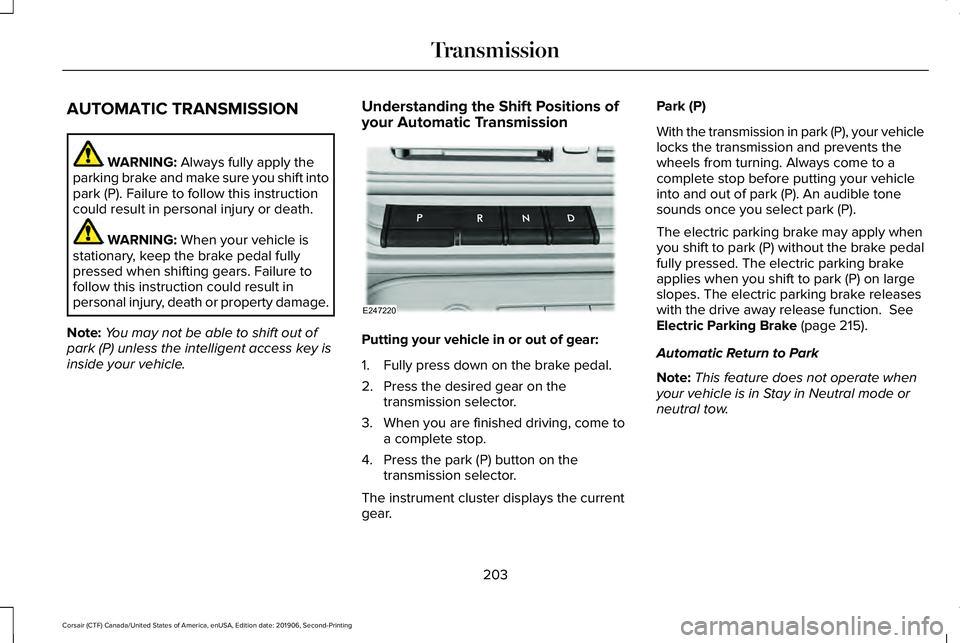
inside your vehicle. Understanding the Shift Positions of
your Automatic Transmission Putting your vehicle in or out of gear:
1. Fully press down on the brake pedal.
2. Press the desired gear on the
transmission selector.
3. When you are finished driving, come to a complete stop.
4. Press the park (P) button on the transmission selector.
The instrument cluster displays the current
gear. Park (P)
With the transmission in park (P), your vehicle
locks the transmission and prevents the
wheels from turning. Always come to a
complete stop before putting your vehicle
into and out of park (P). An audible tone
sounds once you select park (P).
The electric parking brake may apply when
you shift to park (P) without the brake pedal
fully pressed. The electric parking brake
applies when you shift to park (P) on large
slopes. The electric parking brake releases
with the drive away release function.
See
Electric Parking Brake (page 215).
Automatic Return to Park
Note: This feature does not operate when
your vehicle is in Stay in Neutral mode or
neutral tow.
203
Corsair (CTF) Canada/United States of America, enUSA, Edition date: 201906, Second-Printing TransmissionE247220
Page 207 of 591
Your vehicle has a feature that automatically
shifts your vehicle into park (P) when any of
the following conditions occur:
•
You turn the vehicle off.
• You open the driver door with your
seatbelt unlatched with the vehicle
stopped.
• You unlatch your seatbelt when the driver
door is open with the vehicle stopped.
If you turn your vehicle off when moving,
your vehicle first shifts into neutral (N) until
it stops and then shift into park (P)
automatically.
Note: If you have waited an extended period
of time, 2-15 minutes before starting your
vehicle, unlatching your seatbelt can cause
this feature to activate, even with the driver
door closed.
Note: This feature may not work properly if
the door ajar switch is malfunctioning. If your
door ajar indicator does not illuminate when
you open the driver door, or the indicator
illuminates with the driver door closed, see
your authorized dealer. Reverse (R)
With the selector in reverse (R), your vehicle
moves backward. Always come to a
complete stop before shifting into and out
of reverse (R).
Neutral (N)
WARNING: In neutral (N) your vehicle
has the ability to roll freely. If you intend to
leave your vehicle, make sure you apply
the parking brake.
In neutral (N), power is not transmitted to the
driven wheels but the transmission is not
locked. You can start the engine with the
transmission in this position. Stay in Neutral Mode
Note:
Stay in neutral mode is a temporary
vehicle state with the ignition off. Once in
this mode, sufficient battery voltage must be
maintained or your vehicle returns to park.
Extended usage of Stay in Neutral mode
may result in a battery voltage reduction to
a level where the vehicle may no longer
start. Do not tow your vehicle in this mode.
Note: When entering an automatic car wash,
always shift in neutral (N). If you are exiting
the vehicle by the car wash, Stay in Neutral
Mode is available. Failure to do this could
result in vehicle damage not covered by
warranty.
Stay in Neutral mode allows your vehicle to
stay in neutral when you exit your vehicle.
Your vehicle must be stationary to enter this
mode.
To enter Stay in Neutral mode:
• Press the neutral (N) button on the
transmission selector.
• Press the neutral (N) button again to
enter Stay in Neutral mode.
204
Corsair (CTF) Canada/United States of America, enUSA, Edition date: 201906, Second-Printing Transmission
Page 210 of 591
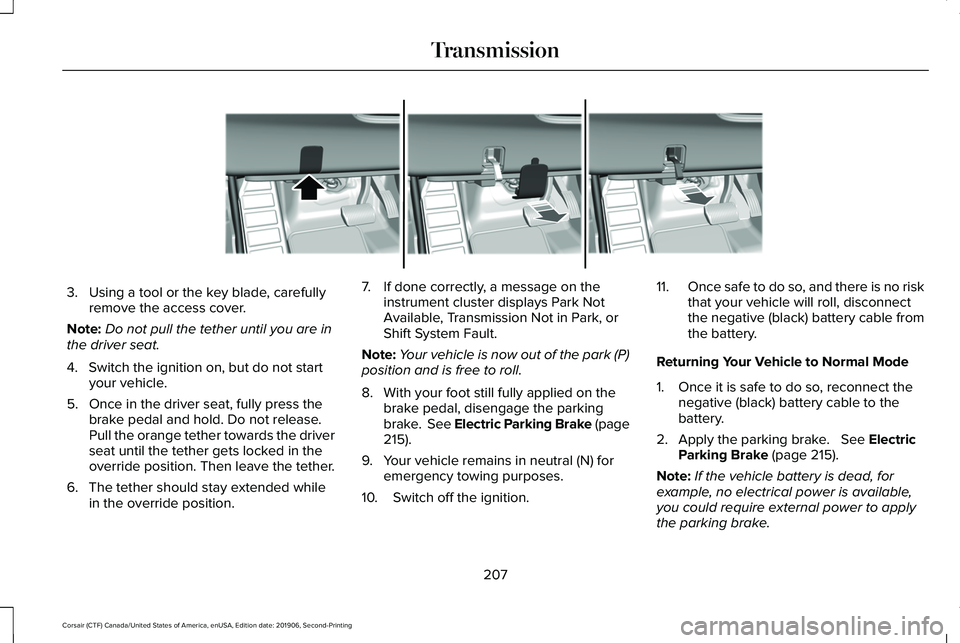
3. Using a tool or the key blade, carefully
remove the access cover.
Note: Do not pull the tether until you are in
the driver seat.
4. Switch the ignition on, but do not start your vehicle.
5. Once in the driver seat, fully press the brake pedal and hold. Do not release.
Pull the orange tether towards the driver
seat until the tether gets locked in the
override position. Then leave the tether.
6. The tether should stay extended while in the override position. 7. If done correctly, a message on the
instrument cluster displays Park Not
Available, Transmission Not in Park, or
Shift System Fault.
Note: Your vehicle is now out of the park (P)
position and is free to roll.
8. With your foot still fully applied on the brake pedal, disengage the parking
brake. See Electric Parking Brake (page
215).
9. Your vehicle remains in neutral (N) for emergency towing purposes.
10. Switch off the ignition. 11.
Once safe to do so, and there is no risk
that your vehicle will roll, disconnect
the negative (black) battery cable from
the battery.
Returning Your Vehicle to Normal Mode
1. Once it is safe to do so, reconnect the negative (black) battery cable to the
battery.
2. Apply the parking brake. See Electric
Parking Brake (page 215).
Note: If the vehicle battery is dead, for
example, no electrical power is available,
you could require external power to apply
the parking brake.
207
Corsair (CTF) Canada/United States of America, enUSA, Edition date: 201906, Second-Printing TransmissionE307867
Page 215 of 591
Start climbing a steep slope or hill in a low
gear rather than downshifting to a low gear
from a high gear after you have started your
climb. This reduces strain on the engine and
the possibility of stalling.
If your vehicle stalls, do not try to turn
around. Turning could cause the vehicle to
roll over. Instead, reverse back to a safe
location.
Apply just enough power to the wheels to
climb the hill. Too much power will cause the
tires to slip, spin or lose traction, and you
could lose control of your vehicle. To avoid brake overheating, come down a
hill in the same gear you used to go up the
hill. Do not come down in neutral. Move the
transmission selector lever to a lower gear.
When descending a steep hill, avoid sudden
hard braking to keep the front wheels rolling
and to maintain your vehicle's steering.
Your vehicle has anti-lock brakes. Apply the
brakes steadily. Do not pump the brake
pedal.
Driving on Snow and Ice
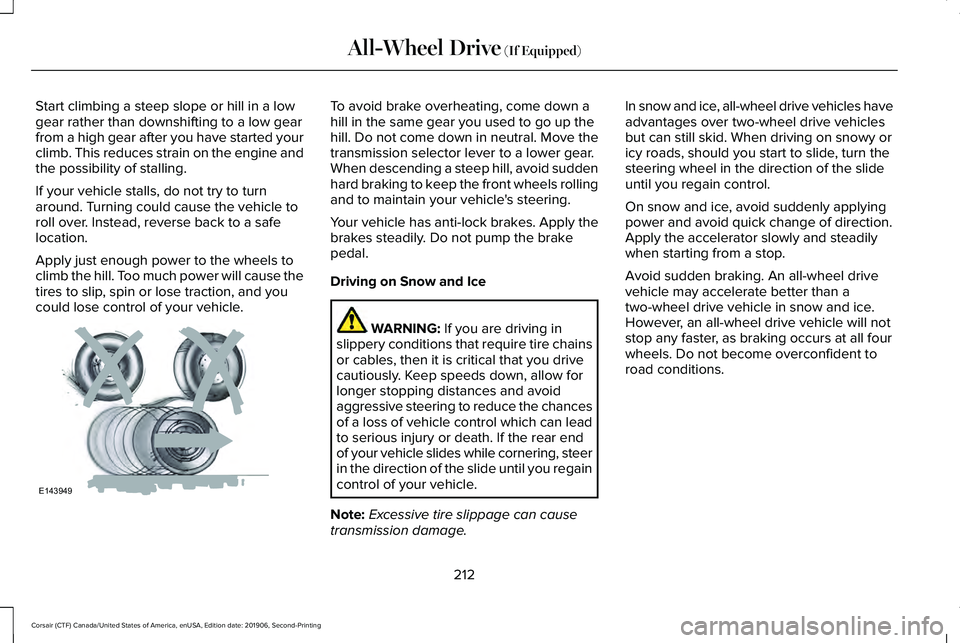
WARNING: If you are driving in
slippery conditions that require tire chains
or cables, then it is critical that you drive
cautiously. Keep speeds down, allow for
longer stopping distances and avoid
aggressive steering to reduce the chances
of a loss of vehicle control which can lead
to serious injury or death. If the rear end
of your vehicle slides while cornering, steer
in the direction of the slide until you regain
control of your vehicle.
Note: Excessive tire slippage can cause
transmission damage. In snow and ice, all-wheel drive vehicles have
advantages over two-wheel drive vehicles
but can still skid. When driving on snowy or
icy roads, should you start to slide, turn the
steering wheel in the direction of the slide
until you regain control.
On snow and ice, avoid suddenly applying
power and avoid quick change of direction.
Apply the accelerator slowly and steadily
when starting from a stop.
Avoid sudden braking. An all-wheel drive
vehicle may accelerate better than a
two-wheel drive vehicle in snow and ice.
However, an all-wheel drive vehicle will not
stop any faster, as braking occurs at all four
wheels. Do not become overconfident to
road conditions.
212
Corsair (CTF) Canada/United States of America, enUSA, Edition date: 201906, Second-Printing All-Wheel Drive
(If Equipped)E143949
Page 216 of 591
Make sure that you allow sufficient distance
between your vehicle and other vehicles for
stopping. On ice and snow, you should drive
more slowly than usual, and consider using
one of the lower gears. In emergency
stopping situations, steadily apply the brake.
Your vehicle has a four wheel anti-lock brake
system, do not pump the brake pedal. See
Hints on Driving With Anti-Lock Brakes
(page
215).
If Your Vehicle Gets Stuck In Mud or Snow
If your vehicle becomes stuck in mud or
snow, shift between forward and reverse
gears, and, in a steady pattern, stop between
shifts. Press lightly on the accelerator with
each shift. Rocking your vehicle this way may
dislodge your vehicle.
Note: Do not rock your vehicle if the engine
is not at normal operating temperature,
damage to the transmission may occur.
Note: Do not rock your vehicle for more than
a minute, damage to the transmission and
tires may occur or the engine may overheat. Maintenance and Modifications
The suspension and steering systems on
your vehicle provides predictable
performance whether your vehicle is loaded
or empty. For this reason, we recommend
that you do not make modifications to your
vehicle (lift kits or stabilizer bars) or use
replacement parts not equivalent to the
original factory equipment.
We recommend that you use caution when
your vehicle has either a high load or device
(ladder or luggage racks). Modifications to
your vehicle that raise the center of gravity
may cause your vehicle to tip if you should
lose vehicle control.
Failure to maintain your vehicle correctly may
void the warranty, increase your repair cost,
reduce vehicle performance and operational
capabilities, and adversely affect you and
your passenger's safety. We recommend that
you frequently inspect your vehicle's chassis
components if your vehicle is subject to
off-road use.
213
Corsair (CTF) Canada/United States of America, enUSA, Edition date: 201906, Second-Printing All-Wheel Drive
(If Equipped)
Page 217 of 591
GENERAL INFORMATION
Note:
Occasional brake noise is normal. If
a metal-to-metal, continuous grinding or
continuous squeal sound is present, the
brake linings may be worn-out and an
authorized dealer should check them. If the
vehicle has continuous vibration or shudder
in the steering wheel while braking, an
authorized dealer should check your vehicle.
Note: Brake dust may accumulate on the
wheels, even under normal driving
conditions. Some dust is inevitable as the
brakes wear and does not contribute to
brake noise. Wet brakes result in reduced
braking efficiency. Gently press the brake
pedal a few times when driving from a car
wash or standing water to dry the brakes.
See Cleaning the Wheels (page 352). Brake Over Accelerator
In the event the accelerator pedal becomes
stuck or entrapped, apply steady and firm
pressure to the brake pedal to slow the
vehicle and reduce engine power. If you
experience this condition, apply the brakes
and bring your vehicle to a safe stop. Switch
the engine off, move the transmission to park
(P) and apply the parking brake. Inspect the
accelerator pedal and the area around it for
any items or debris that may be obstructing
its movement. If none are found and the
condition persists, have your vehicle towed
to the nearest authorized dealer.
Emergency Brake Assist
Emergency brake assist detects when you
brake heavily by measuring the rate at which
you press the brake pedal. It provides
maximum braking efficiency as long as you
press the pedal. Emergency brake assist
can reduce stopping distances in critical
situations. Anti-lock Brake System
This system helps you maintain steering
control during emergency stops by keeping
the brakes from locking. This lamp momentarily illuminates
when you switch the ignition on.
If the light does not illuminate
during start up, remains on or flashes, the
anti-lock braking system may be disabled.
Have the system checked by an authorized
dealer. If the anti-lock brake system is
disabled, normal braking is still effective.
See
Warning Lamps and Indicators (page
118).
Note: Indicators vary depending on region. This lamp also illuminates
momentarily when you switch the
ignition on to confirm the lamp is
functional. If it does not illuminate
when you switch the ignition on,
or begins to flash at any time, have
the system checked by an authorized dealer.
If the brake warning lamp illuminates with
the parking brake released, have the system
checked immediately.
214
Corsair (CTF) Canada/United States of America, enUSA, Edition date: 201906, Second-Printing Brakes E270480
Page 218 of 591
HINTS ON DRIVING WITH ANTI-
LOCK BRAKES
The anti-lock braking system does not
eliminate the risks when:
•
You drive too closely to the vehicle in
front of you.
• Your vehicle is hydroplaning.
• You take corners too fast.
• The road surface is poor.
Note: If the system activates, the brake
pedal may pulse and may travel further.
Maintain pressure on the brake pedal. You
may also hear a noise from the system. This
is normal. ELECTRIC PARKING BRAKE WARNING: If the brake system
warning light remains illuminated or flashes
for more than four seconds after you have
released the parking brake, there could be
a problem with your braking system. Have
your vehicle checked as soon as possible. WARNING:
Always fully apply the
parking brake and make sure you shift into
park (P). Failure to follow this instruction
could result in personal injury or death. WARNING:
With the exception of
emergency conditions (for example, the
brake pedal is broken or is blocked), do
not apply the electric parking brake while
the vehicle is moving. On bends, or poor
road surfaces or weather conditions,
emergency braking can cause the vehicle
to skid out of control or off the road. WARNING:
If you drive extended
distances with the parking brake applied,
you could cause damage to the brake
system. WARNING:
The electric parking
brake does not operate if the vehicle
battery is running out of charge.
Note: The electric parking brake makes
noises during operation. This is normal.
Your vehicle has an electric parking brake.
You operate it with a switch instead of a
lever. The switch is on the center console or
to the left-hand side of the steering wheel,
on the lower part of the instrument panel.
Applying the Electric Parking Brake Pull the switch upward.
The red warning lamp flashes
during operation and illuminates
when the parking brake is applied.
215
Corsair (CTF) Canada/United States of America, enUSA, Edition date: 201906, Second-Printing BrakesE267156 E270480
Page 224 of 591
Note:
Certain add-on devices around the
bumper or fascia may create false alerts. For
example, large trailer hitches, bike or
surfboard racks, license plate brackets,
bumper covers or any other device that may
block the normal detection zone of the
system. Remove the add-on device to
prevent false alerts.
Note: The system does not react to small or
moving objects, particularly those close to
the ground.
Note: The system does not operate during
hard acceleration or steering.
The system only applies the brakes for a
short period of time when an event occurs.
The driver should take action as soon as they
notice the brakes automatically apply in
order to remain in control of the vehicle.
Note: If your vehicle sustains damage to the
bumper or fascia leaving it misaligned or
bent, the sensing zone may be altered
causing inaccurate measurement of
obstacles or false alerts. Note:
Vehicle loading and suspension
changes can impact the angle of the sensors
and may change the normal detection zone
of the system resulting in inaccurate
measurement of obstacles or false alerts.
Note: When you connect a trailer, the system
may detect the trailer and provide an alert
or the system automatically turns off. If the
system does not automatically turn off,
switch the system off manually after you
connect the trailer.
Note: You may experience reduced system
performance on road surfaces that limit
deceleration. For example, roads with ice,
loose gravel, mud or sand.
SWITCHING REVERSE BRAKING
ASSIST ON AND OFF
You can switch the system on or off through
the touchscreen. See Settings (page 478). Note:
The system is unavailable when rear
parking aid or cross traffic alert is off.
OVERRIDING REVERSE BRAKING
ASSIST
There could be instances when unexpected
or unwanted braking occurs. Firmly pressing
the accelerator pedal or switching the feature
off, overrides the system.
REVERSE BRAKING ASSIST
INDICATORS
If the system determines that a collision with
an obstacle may occur, full braking may
automatically apply. Bring your vehicle to a
stop a safe distance away from the obstacle. A message and warning indicator
appear when the system
automatically applies the brakes.
221
Corsair (CTF) Canada/United States of America, enUSA, Edition date: 201906, Second-Printing Reverse Braking Assist
(If Equipped)E293490
Page 226 of 591
Reverse Braking Assist – Frequently
Asked Questions
Note:
If the frequently asked questions and
answers that are shown in the following
chart do not assist you in returning the
system to available, contact an authorized
dealer to have the system checked for
proper operation.
Why is the system off ?
Make sure you switch the system on.
See Switching Reverse Braking Assist
On and Off (page 221).
Why is the system unavailable? Make sure that the liftgate and all doors
are closed.
Why is the system unavailable? Make sure the cross traffic alert system
is on. See Cross Traffic Alert (page 268).
Why is the system unavailable? Make sure the rear parking aid system
is on.
See Parking Aids (page 227). Why is the system unavailable?
Make sure traction control is on.
See
Using Traction Control (page 224).
Why is the system unavailable? The vehicle has sustained a rear end
impact. Contact an authorized dealer to
have the sensors checked for proper
coverage and operation.
Why is the system unavailable? An ABS, traction control or stability
control event may have occurred. The
system resumes operation when the
event is complete.
Why is the system unavailable? Make sure the rear view camera and
360 degree camera are not dirty or
obstructed. If it dirty, clean the camera.
See
Parking Aids (page 227). See
Parking Aids (page 227). If the message
still appears after cleaning the camera,
wait a short time and the message
should clear. If the message does not
clear, contact an authorized dealer. Why is the system unavailable?
Make sure the sensors are not blocked
or faulted. See Cross Traffic Alert (page
268). See Rear Parking Aid (page 227).
Why is the system unavailable? You recently had your vehicle serviced,
or the battery disconnected. Drive your
vehicle a short distance to resume
system operation.
Why does the system turn off when I
connect a trailer? The system does not function when you
connect a trailer. Operation resumes
when you disconnect the trailer.
223
Corsair (CTF) Canada/United States of America, enUSA, Edition date: 201906, Second-Printing Reverse Braking Assist
(If Equipped)
Page 230 of 591
PRINCIPLE OF OPERATION
WARNING: To help avoid personal
injury, always use caution when in reverse
(R) and when using the sensing system. WARNING:
The system may not
detect objects with surfaces that absorb
reflection. Always drive with due care and
attention. Failure to take care may result
in a crash. WARNING:
Traffic control systems,
inclement weather, air brakes, external
motors and fans may affect the correct
operation of the sensing system.This may
cause reduced performance or false alerts. WARNING:
The system may not
detect small or moving objects, particularly
those close to the ground.
Note: If your vehicle has MyKey™, the sensing
system cannot be switched off when a
MyKey™ is present.
See Principle of
Operation (page 70). Note:
Keep the sensors on the bumper or
fascia free from snow, ice and large
accumulations of dirt. If the sensors are
covered, the system’ s accuracy can be
affected. Do not clean the sensors with sharp
objects.
Note: If your vehicle sustains damage to the
bumper or fascia, leaving it misaligned or
bent, the sensing zone may be altered
causing inaccurate measurement of
obstacles or false alerts.
Note: Certain add-on devices installed
around the bumper or fascia may create
false alerts. For example, large trailer
hitches, bike or surfboard racks, license plate
brackets, bumper covers or any other device
that may block the normal detection zone
of the system. Remove the add-on device to
prevent false alerts.
Note: When you connect a trailer to your
vehicle, the rear parking aid may detect the
trailer and therefore provide an alert. Disable
the rear parking aid when you connect a
trailer to prevent the alert. The sensing system warns the driver of
obstacles within a certain range of your
vehicle. The system turns on automatically
whenever you switch the ignition on.
You can switch the system off through the
touchscreen or from the pop-up message
that appears once you shift the transmission
into reverse (R). See Settings (page 478). If
your vehicle has a parking aid button, you
can switch the system off by pressing the
button.
If a fault is present in the system, a warning
message appears in the information display.
See
Information Messages (page 128).
REAR PARKING AID WARNING:
The system may not
detect objects with surfaces that absorb
reflection. Always drive with due care and
attention. Failure to take care may result
in a crash.
227
Corsair (CTF) Canada/United States of America, enUSA, Edition date: 201906, Second-Printing Parking Aids