ECO mode LINCOLN CORSAIR 2020 Owners Manual
[x] Cancel search | Manufacturer: LINCOLN, Model Year: 2020, Model line: CORSAIR, Model: LINCOLN CORSAIR 2020Pages: 591, PDF Size: 6 MB
Page 4 of 591
Introduction
About This Manual
...........................................9
Symbols Glossary ............................................
9
Data Recording ...............................................
12
Perchlorate .......................................................
16
Lincoln Automotive Financial Services ........................................................................\
..
16
Replacement Parts Recommendation ........................................................................\
..
17
Special Notices ................................................
17
Mobile Communications Equipment .........
18
Export Unique Options ..................................
19
Environment
Protecting the Environment ........................
20
At a Glance
Instrument Panel .............................................
21
Child Safety
General Information ......................................
24
Installing Child Restraints ............................
26
Booster Seats .................................................
32Child Restraint Positioning
..........................
35
Child Safety Locks .........................................
37
Seatbelts
Principle of Operation ..................................
39
Fastening the Seatbelts ...............................
40
Seatbelt Height Adjustment ........................
43
Seatbelt Warning Lamp and Indicator Chime ...........................................................
43
Seatbelt Reminder .........................................
44
Child Restraint and Seatbelt Maintenance ........................................................................\
.
46
Seatbelt Extensions ......................................
46
Personal Safety System ™
Personal Safety System ™.............................
48
Supplementary Restraints System
Principle of Operation ..................................
49
Driver and Passenger Airbags ...................
50
Front Passenger Sensing System .............
52
Side Airbags ....................................................
54Driver and Passenger Knee Airbags
........
55
Safety Canopy™ ..............................................
56
Crash Sensors and Airbag Indicator .........
57
Airbag Disposal ..............................................
58
911 Assist
What Is 911 Assist ...........................................
59
Emergency Call Requirements ..................
59
Emergency Call Limitations ........................
60
Keys and Remote Controls
General Information on Radio Frequencies ........................................................................\
..
61
Remote Control ...............................................
61
Replacing a Lost Key or Remote Control ........................................................................\
66
Phone as a Key
What Is Phone As a Key ...............................
67
Phone as a Key Limitations .........................
67
Programming Your Phone ..........................
67
Using the Valet Mode ...................................
67
Using the Backup Starting Passcode .......
68
1
Corsair (CTF) Canada/United States of America, enUSA, Edition date: 201906, Second-Printing Table of Contents
Page 8 of 591
Adaptive Cruise Control Limitations -
Vehicles With: Adaptive Cruise Control
With Lane Centering ..............................247
Adaptive Cruise Control Limitations - Vehicles With: Adaptive Cruise Control
With Stop and Go ....................................
247
Switching Adaptive Cruise Control On and Off ...............................................................
249
Setting the Adaptive Cruise Control Speed ......................................................................
250
Setting the Adaptive Cruise Control Gap .......................................................................
251
Canceling the Set Speed ..........................
252
Resuming the Set Speed ..........................
252
Overriding the Set Speed .........................
252
Adaptive Cruise Control Indicators - Vehicles With: Adaptive Cruise Control
With Lane Centering ..............................
252
Adaptive Cruise Control Indicators - Vehicles With: Adaptive Cruise Control
With Stop and Go ....................................
253
Adaptive Cruise Control Indicators - Vehicles With: Intelligent Adaptive
Cruise Control ..........................................
253
Switching From Adaptive Cruise Control to Cruise Control .....................................
253Switching Lane Centering On and Off
......................................................................
254
Switching Intelligent Mode On and Off ......................................................................
255
Adjusting the Set Speed Tolerance .......
255
Adaptive Cruise Control – Troubleshooting ......................................................................
256
Driving Aids
Driver Alert ....................................................
259
Lane Keeping System ................................
260
Blind Spot Information System ................
266
Cross Traffic Alert ........................................
268
Steering ..........................................................
273
Pre-Collision Assist .....................................
273
Drive Mode Control
What Is Drive Mode Control .....................
279
Selecting a Drive Mode .............................
279
Drive Modes .................................................
279
Load Carrying
Rear Under Floor Storage ..........................
281
Luggage Covers ...........................................
281Roof Racks and Load Carriers
..................
281
Load Limit ......................................................
283
Towing
Towing a Trailer ...........................................
288
Trailer Sway Control ...................................
289
Recommended Towing Weights .............
289
Essential Towing Checks ...........................
291
Towing the Vehicle on Four Wheels ......
293
Driving Hints
Economical Driving .....................................
295
Breaking-In ...................................................
295
Driving Through Water ..............................
295
Floor Mats .....................................................
296
Roadside Emergencies
Roadside Assistance ..................................
298
Hazard Flashers ..........................................
299
Fuel Shutoff ..................................................
299
Jump Starting the Vehicle ........................
300
Post-Crash Alert System ...........................
303
Transporting the Vehicle ...........................
303
5
Corsair (CTF) Canada/United States of America, enUSA, Edition date: 201906, Second-Printing Table of Contents
Page 12 of 591
ABOUT THIS MANUAL
Thank you for choosing Lincoln. We
recommend that you take some time to get
to know your vehicle by reading this manual.
The more that you know about it, the greater
the safety and pleasure you will get from
driving it.
WARNING: Driving while distracted
can result in loss of vehicle control, crash
and injury. We strongly recommend that
you use extreme caution when using any
device that may take your focus off the
road. Your primary responsibility is the safe
operation of your vehicle. We recommend
against the use of any hand-held device
while driving and encourage the use of
voice-operated systems when possible.
Make sure you are aware of all applicable
local laws that may affect the use of
electronic devices while driving. Note:
This manual describes product
features and options available throughout
the range of available models, sometimes
even before they are generally available. It
may describe options not fitted to the vehicle
you have purchased.
Note: Some of the illustrations in this manual
may show features as used in different
models, so may appear different to you on
your vehicle.
Note: Always use and operate your vehicle
in line with all applicable laws and
regulations.
Note: Pass on this manual when selling your
vehicle. It is an integral part of your vehicle.
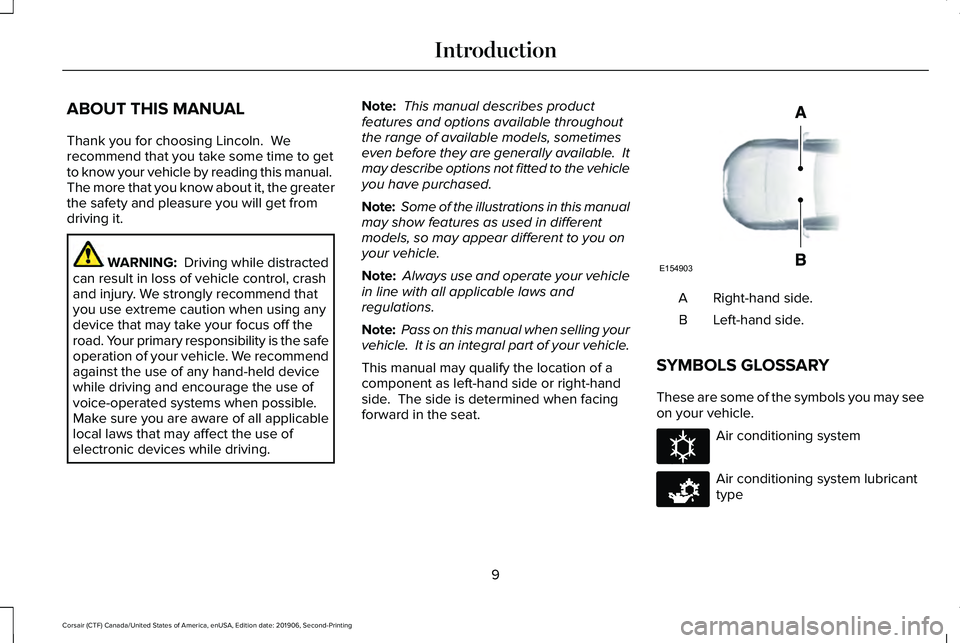
This manual may qualify the location of a
component as left-hand side or right-hand
side. The side is determined when facing
forward in the seat. Right-hand side.
A
Left-hand side.
B
SYMBOLS GLOSSARY
These are some of the symbols you may see
on your vehicle. Air conditioning system
Air conditioning system lubricant
type
9
Corsair (CTF) Canada/United States of America, enUSA, Edition date: 201906, Second-Printing IntroductionE154903 E162384 E231157
Page 18 of 591
Vehicles With a Modem (If Equipped)
The modem has a SIM. The
modem was enabled when your
vehicle was built and periodically
sends messages to stay connected to the
cell phone network, receive automatic
software updates and send vehicle-related
information to us, for example, diagnostic
information. These messages could include
information that identifies your vehicle, the
SIM and the electronic serial number of the
modem. Cell phone network service
providers could have access to additional
information, for example, cell phone network
tower identification. For additional
information about our privacy policy, visit
www .ConnectedLincoln. com or refer to your
local Lincoln website.
Note: The modem continues to send this
information unless you disable the modem
or stop the modem from sharing vehicle data
by changing the modem settings.
See
Network Connectivity (page 414). . Note:
The service can be unavailable or
interrupted for a number of reasons, for
example, environmental or topographical
conditions and data plan coverage.
Note: To find out if your vehicle has a
modem, visit
www .ConnectedLincoln. com .
Vehicles With SYNC
Mobile Device Data
If you connect a mobile device to your
vehicle, you can display data from your
device on the touchscreen for example,
music and album art. You can share your
vehicle data with mobile apps on your device
through the system.
See Apps (page 475).
The mobile apps function operates by your
connected device sending data to us in the
United States. The data is encrypted and
includes the vehicle identification number of
your vehicle, the SYNC module serial
number, odometer, enabled apps, usage
statistics and debugging information. We retain it only as long as necessary to provide
the service, to troubleshoot, for continuous
improvement and to offer you products and
services that may be of interest to you
according to your preferences and where
allowed by law.
If you connect a cell phone to the system,
the system creates a profile that links to that
cell phone. The cell phone profile enables
more mobile features and efficient operation.
The profile contains, for example, data from
your phonebook, read and unread text
messages and call history, including history
of calls when your cell phone was not
connected to the system.
If you connect a media device, the system
creates and retains a media device index of
supported media content. The system also
records a short diagnostic log of
approximately 10 minutes of all recent system
activity.
15
Corsair (CTF) Canada/United States of America, enUSA, Edition date: 201906, Second-Printing Introduction
Page 30 of 591
WARNING: Depending on where you
secure a child restraint, and depending on
the child restraint design, you may block
access to certain seatbelt buckle
assemblies and LATCH lower anchors,
rendering those features potentially
unusable. To avoid risk of injury, make sure
occupants only use seating positions
where they are able to be properly
restrained.
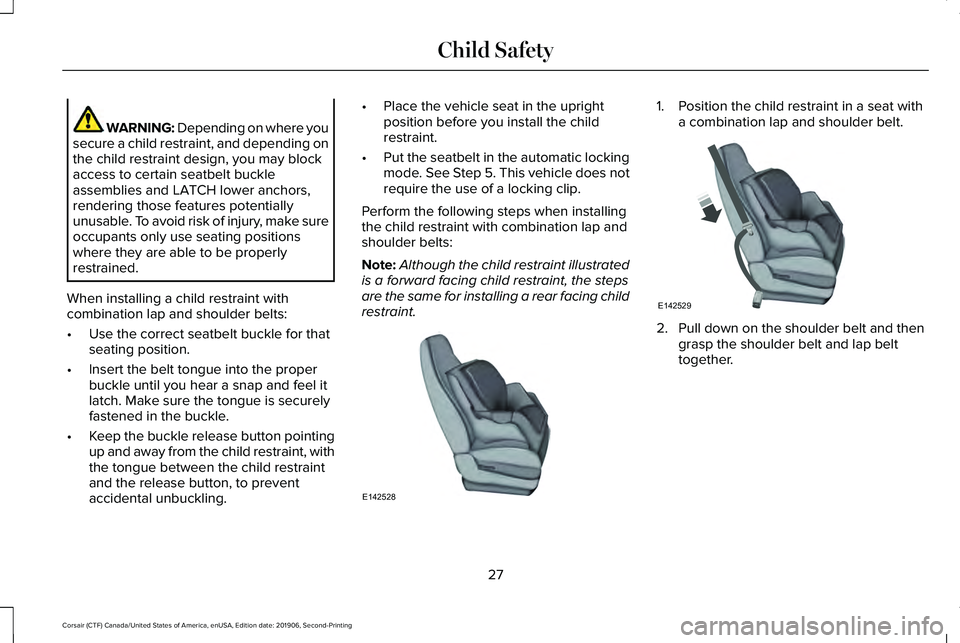
When installing a child restraint with
combination lap and shoulder belts:
• Use the correct seatbelt buckle for that
seating position.
• Insert the belt tongue into the proper
buckle until you hear a snap and feel it
latch. Make sure the tongue is securely
fastened in the buckle.
• Keep the buckle release button pointing
up and away from the child restraint, with
the tongue between the child restraint
and the release button, to prevent
accidental unbuckling. •
Place the vehicle seat in the upright
position before you install the child
restraint.
• Put the seatbelt in the automatic locking
mode. See Step 5. This vehicle does not
require the use of a locking clip.
Perform the following steps when installing
the child restraint with combination lap and
shoulder belts:
Note: Although the child restraint illustrated
is a forward facing child restraint, the steps
are the same for installing a rear facing child
restraint. 1. Position the child restraint in a seat with
a combination lap and shoulder belt. 2.
Pull down on the shoulder belt and then
grasp the shoulder belt and lap belt
together.
27
Corsair (CTF) Canada/United States of America, enUSA, Edition date: 201906, Second-Printing Child SafetyE142528 E142529
Page 31 of 591
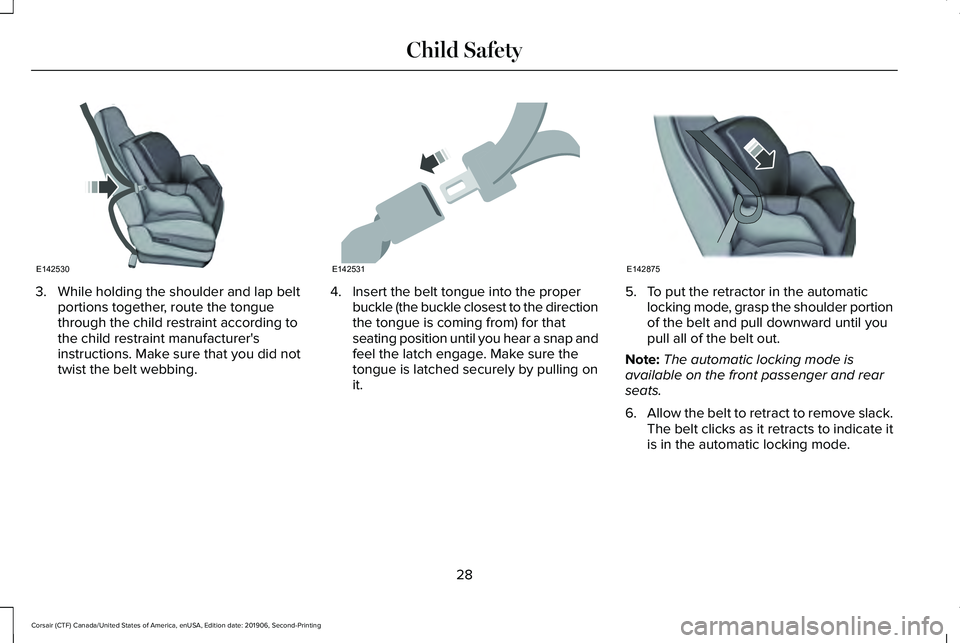
3. While holding the shoulder and lap belt
portions together, route the tongue
through the child restraint according to
the child restraint manufacturer's
instructions. Make sure that you did not
twist the belt webbing. 4. Insert the belt tongue into the proper
buckle (the buckle closest to the direction
the tongue is coming from) for that
seating position until you hear a snap and
feel the latch engage. Make sure the
tongue is latched securely by pulling on
it. 5. To put the retractor in the automatic
locking mode, grasp the shoulder portion
of the belt and pull downward until you
pull all of the belt out.
Note: The automatic locking mode is
available on the front passenger and rear
seats.
6. Allow the belt to retract to remove slack.
The belt clicks as it retracts to indicate it
is in the automatic locking mode.
28
Corsair (CTF) Canada/United States of America, enUSA, Edition date: 201906, Second-Printing Child SafetyE142530 E142531 E142875
Page 32 of 591
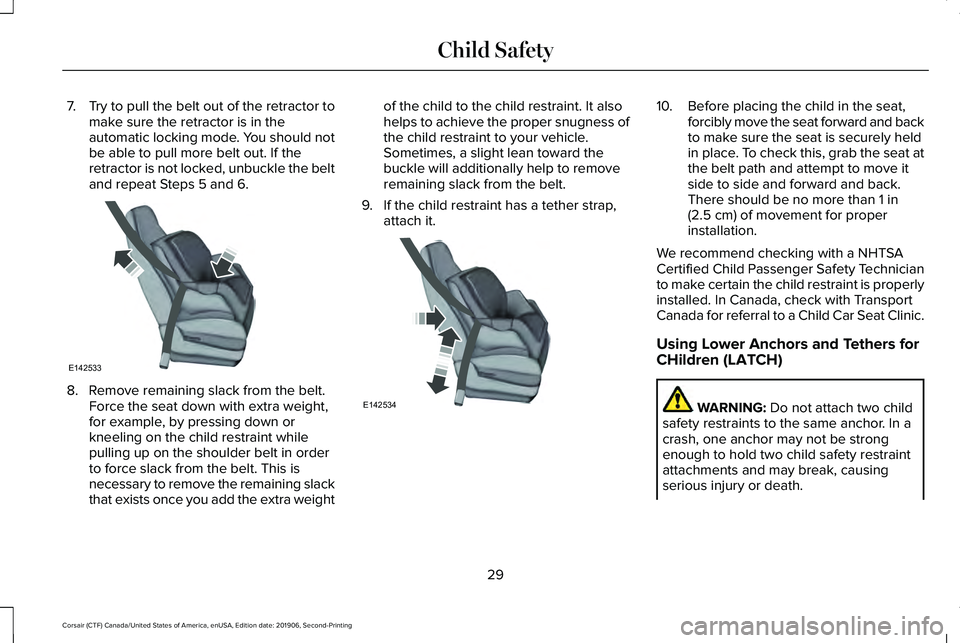
7.
Try to pull the belt out of the retractor to
make sure the retractor is in the
automatic locking mode. You should not
be able to pull more belt out. If the
retractor is not locked, unbuckle the belt
and repeat Steps 5 and 6. 8. Remove remaining slack from the belt.
Force the seat down with extra weight,
for example, by pressing down or
kneeling on the child restraint while
pulling up on the shoulder belt in order
to force slack from the belt. This is
necessary to remove the remaining slack
that exists once you add the extra weight of the child to the child restraint. It also
helps to achieve the proper snugness of
the child restraint to your vehicle.
Sometimes, a slight lean toward the
buckle will additionally help to remove
remaining slack from the belt.
9. If the child restraint has a tether strap, attach it. 10. Before placing the child in the seat,
forcibly move the seat forward and back
to make sure the seat is securely held
in place. To check this, grab the seat at
the belt path and attempt to move it
side to side and forward and back.
There should be no more than 1 in
(2.5 cm) of movement for proper
installation.
We recommend checking with a NHTSA
Certified Child Passenger Safety Technician
to make certain the child restraint is properly
installed. In Canada, check with Transport
Canada for referral to a Child Car Seat Clinic.
Using Lower Anchors and Tethers for
CHildren (LATCH) WARNING:
Do not attach two child
safety restraints to the same anchor. In a
crash, one anchor may not be strong
enough to hold two child safety restraint
attachments and may break, causing
serious injury or death.
29
Corsair (CTF) Canada/United States of America, enUSA, Edition date: 201906, Second-Printing Child SafetyE142533 E142534
Page 42 of 591
PRINCIPLE OF OPERATION
WARNING: Always drive and ride
with your seatback upright and the lap belt
snug and low across the hips. WARNING:
Children must always be
properly restrained. WARNING: Do not allow a passenger
to hold a child on their lap when your
vehicle is moving. Failure to follow this
instruction could result in personal injury
or death in the event of a sudden stop or
crash. WARNING:
All occupants of your
vehicle, including the driver, should always
properly wear their seatbelts, even when
an airbag supplemental restraint system is
provided. Failure to properly wear your
seatbelt could seriously increase the risk
of injury or death. WARNING: It is extremely dangerous
to ride in a cargo area, inside or outside of
a vehicle. In a crash, people riding in these
areas are more likely to be seriously
injured or killed. Do not allow people to
ride in any area of your vehicle that is not
equipped with seats and seatbelts. Make
sure everyone in your vehicle is in a seat
and properly using a seatbelt. Failure to
follow this warning could result in serious
personal injury or death. WARNING:
In a rollover crash, an
unbelted person is significantly more likely
to die than a person wearing a seatbelt. WARNING:
Each seating position in
your vehicle has a specific seatbelt
assembly made up of one buckle and one
tongue designed to be used as a pair. Use
the shoulder belt on the outside shoulder
only. Never wear the shoulder belt under
the arm. Never use a single seatbelt for
more than one person. WARNING:
Even with advanced
restraints systems, properly restrain
children 12 and under in a rear seating
position. Failure to follow this could
seriously increase the risk of injury or
death. WARNING:
Seatbelts and seats may
be hot in a vehicle that is in the sunshine.
The hot seatbelts or seats may burn a small
child. Check seat covers and buckles
before you place a child anywhere near
them.
All seating positions in your vehicle have lap
and shoulder seatbelts. All occupants of the
vehicle should always properly wear their
seatbelts, even when an airbag supplemental
restraint system is provided.
The seatbelt system consists of:
• Lap and shoulder seatbelts.
• Shoulder seatbelt with automatic locking
mode, (except driver seatbelt).
• Height adjuster at the front outermost
seating positions.
39
Corsair (CTF) Canada/United States of America, enUSA, Edition date: 201906, Second-Printing Seatbelts
Page 44 of 591
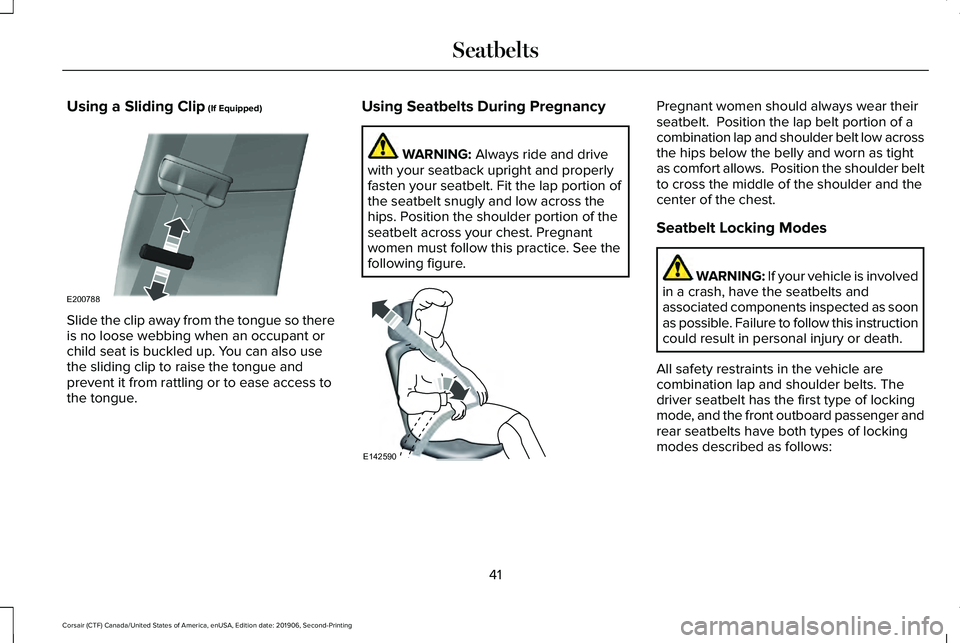
Using a Sliding Clip (If Equipped)
Slide the clip away from the tongue so there
is no loose webbing when an occupant or
child seat is buckled up. You can also use
the sliding clip to raise the tongue and
prevent it from rattling or to ease access to
the tongue. Using Seatbelts During Pregnancy WARNING:
Always ride and drive
with your seatback upright and properly
fasten your seatbelt. Fit the lap portion of
the seatbelt snugly and low across the
hips. Position the shoulder portion of the
seatbelt across your chest. Pregnant
women must follow this practice. See the
following figure. Pregnant women should always wear their
seatbelt. Position the lap belt portion of a
combination lap and shoulder belt low across
the hips below the belly and worn as tight
as comfort allows. Position the shoulder belt
to cross the middle of the shoulder and the
center of the chest.
Seatbelt Locking Modes
WARNING: If your vehicle is involved
in a crash, have the seatbelts and
associated components inspected as soon
as possible. Failure to follow this instruction
could result in personal injury or death.
All safety restraints in the vehicle are
combination lap and shoulder belts. The
driver seatbelt has the first type of locking
mode, and the front outboard passenger and
rear seatbelts have both types of locking
modes described as follows:
41
Corsair (CTF) Canada/United States of America, enUSA, Edition date: 201906, Second-Printing SeatbeltsE200788 E142590
Page 45 of 591
Vehicle Sensitive Mode
This is the normal retractor mode, which
allows free shoulder belt length adjustment
to your movements and locking in response
to vehicle movement. For example, if the
driver brakes suddenly or turns a corner
sharply, or the vehicle receives an impact of
about 5 mph (8 km/h) or more, the
combination seatbelts lock to help reduce
forward movement of the driver and
passengers.
In addition, the retractor is designed to lock
if you pull the webbing out too quickly. If the
seatbelt retractor locks, slowly lower the
height adjuster to allow the seatbelt to
retract. If the retractor does not unlock, pull
the seatbelt out slowly then feed a small
length of webbing back toward the stowed
position. For rear seatbelts, recline the rear
seat backrest or push the seat backrest
cushion away from the seatbelt. Feed a small
length of webbing back toward the stowed
position. Automatic Locking Mode
In this mode, the shoulder belt automatically
pre-locks. The belt still retracts to remove
any slack in the shoulder belt. The automatic
locking mode is not available on the driver
seatbelt.
When to Use the Automatic Locking Mode
Use this mode any time a child safety seat,
except a booster, is installed in passenger
front or rear seating positions. Properly
restrain children 12 years old and under in a
rear seating position whenever possible.
See
Child Safety (page 24).
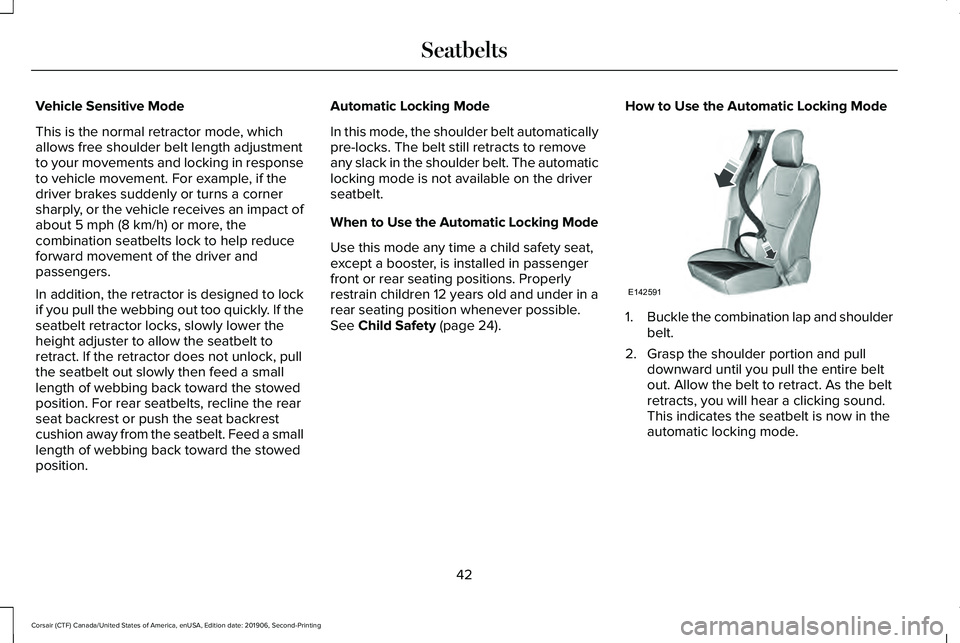
How to Use the Automatic Locking Mode 1.
Buckle the combination lap and shoulder
belt.
2. Grasp the shoulder portion and pull downward until you pull the entire belt
out. Allow the belt to retract. As the belt
retracts, you will hear a clicking sound.
This indicates the seatbelt is now in the
automatic locking mode.
42
Corsair (CTF) Canada/United States of America, enUSA, Edition date: 201906, Second-Printing SeatbeltsE142591