change wheel LINCOLN CORSAIR 2020 Owners Manual
[x] Cancel search | Manufacturer: LINCOLN, Model Year: 2020, Model line: CORSAIR, Model: LINCOLN CORSAIR 2020Pages: 591, PDF Size: 6 MB
Page 9 of 591
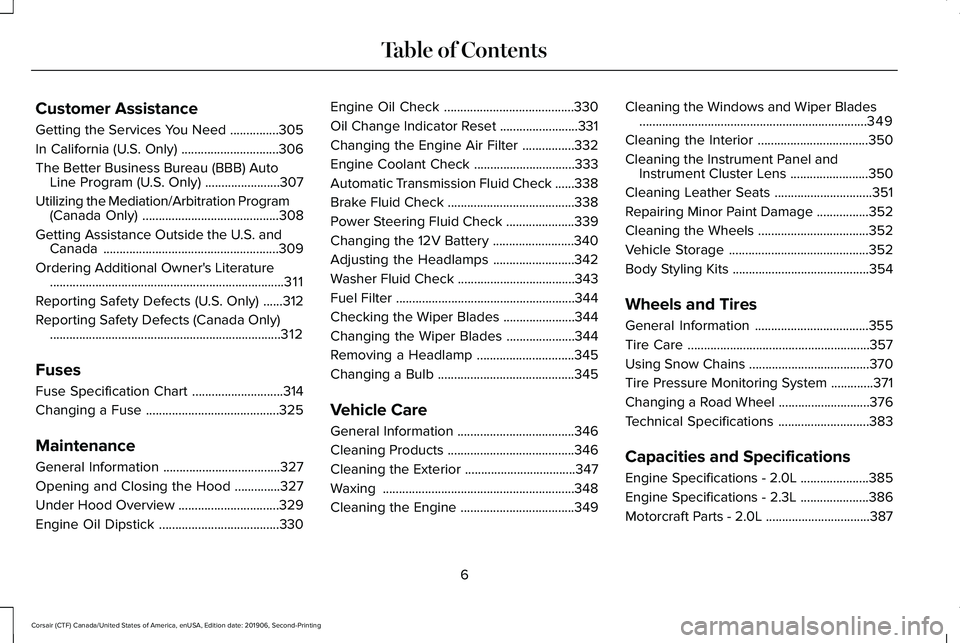
Customer Assistance
Getting the Services You Need
...............305
In California (U.S. Only) ..............................
306
The Better Business Bureau (BBB) Auto Line Program (U.S. Only) .......................
307
Utilizing the Mediation/Arbitration Program (Canada Only) ..........................................
308
Getting Assistance Outside the U.S. and Canada ......................................................
309
Ordering Additional Owner's Literature ........................................................................\
311
Reporting Safety Defects (U.S. Only) ......
312
Reporting Safety Defects (Canada Only) .......................................................................
312
Fuses
Fuse Specification Chart ............................
314
Changing a Fuse .........................................
325
Maintenance
General Information ....................................
327
Opening and Closing the Hood ..............
327
Under Hood Overview ...............................
329
Engine Oil Dipstick .....................................
330Engine Oil Check
........................................
330
Oil Change Indicator Reset ........................
331
Changing the Engine Air Filter ................
332
Engine Coolant Check ...............................
333
Automatic Transmission Fluid Check ......
338
Brake Fluid Check .......................................
338
Power Steering Fluid Check .....................
339
Changing the 12V Battery .........................
340
Adjusting the Headlamps .........................
342
Washer Fluid Check ....................................
343
Fuel Filter .......................................................
344
Checking the Wiper Blades ......................
344
Changing the Wiper Blades .....................
344
Removing a Headlamp ..............................
345
Changing a Bulb ..........................................
345
Vehicle Care
General Information ....................................
346
Cleaning Products .......................................
346
Cleaning the Exterior ..................................
347
Waxing ...........................................................
348
Cleaning the Engine ...................................
349Cleaning the Windows and Wiper Blades
......................................................................
349
Cleaning the Interior ..................................
350
Cleaning the Instrument Panel and Instrument Cluster Lens ........................
350
Cleaning Leather Seats ..............................
351
Repairing Minor Paint Damage ................
352
Cleaning the Wheels ..................................
352
Vehicle Storage ...........................................
352
Body Styling Kits ..........................................
354
Wheels and Tires
General Information ...................................
355
Tire Care ........................................................
357
Using Snow Chains .....................................
370
Tire Pressure Monitoring System .............
371
Changing a Road Wheel ............................
376
Technical Specifications ............................
383
Capacities and Specifications
Engine Specifications - 2.0L .....................
385
Engine Specifications - 2.3L .....................
386
Motorcraft Parts - 2.0L ................................
387
6
Corsair (CTF) Canada/United States of America, enUSA, Edition date: 201906, Second-Printing Table of Contents
Page 15 of 591
Windshield wash and wipe
DATA RECORDING WARNING: Do not connect wireless
plug-in devices to the data link connector.
Unauthorized third parties could gain
access to vehicle data and impair the
performance of safety related systems.
Only allow repair facilities that follow our
service and repair instructions to connect
their equipment to the data link connector.
We respect your privacy and are committed
to protecting it. The information contained
in this publication was correct at the time of
going to print but as technology rapidly
changes, we recommend that you visit the
regional Lincoln website for the latest
information. Your vehicle has electronic control units that
have data recording functionality and the
ability to permanently or temporarily store
data. This data could include information on
the condition and status of your vehicle,
vehicle maintenance requirements, events
and malfunctions. The types of data that can
be recorded are described in this section.
Some of the data recorded is stored in event
logs or error logs.
Note:
Error logs are reset following a service
or repair.
Note: We may provide information in
response to requests from law enforcement,
other government authorities and third
parties acting with lawful authority or through
a legal process. Such information could be
used by them in legal proceedings.
Data recorded includes, for example:
• Operating states of system components,
for example, fuel level, tire pressure and
battery charge level.
• Vehicle and component status, for
example, wheel speed, deceleration,
lateral acceleration and seatbelt status. •
Events or errors in essential systems, for
example, headlamps and brakes.
• System responses to driving situations,
for example, airbag deployment and
stability control.
• Environmental conditions, for example,
temperature.
Some of this data, when used in combination
with other information, for example, an
accident report, damage to a vehicle or
eyewitness statements, could be associated
with a specific person.
Service Data
Service data recorders in your vehicle are
capable of collecting and storing diagnostic
information about your vehicle. This
potentially includes information about the
performance or status of various systems
and modules in the vehicle, such as engine,
throttle, steering or brake systems. In order
to properly diagnose and service your
vehicle, Lincoln Motor Company (Lincoln of
Canada in Canada), and service and repair
facilities may access or share among them
vehicle diagnostic information received
12
Corsair (CTF) Canada/United States of America, enUSA, Edition date: 201906, Second-Printing Introduction
Page 95 of 591
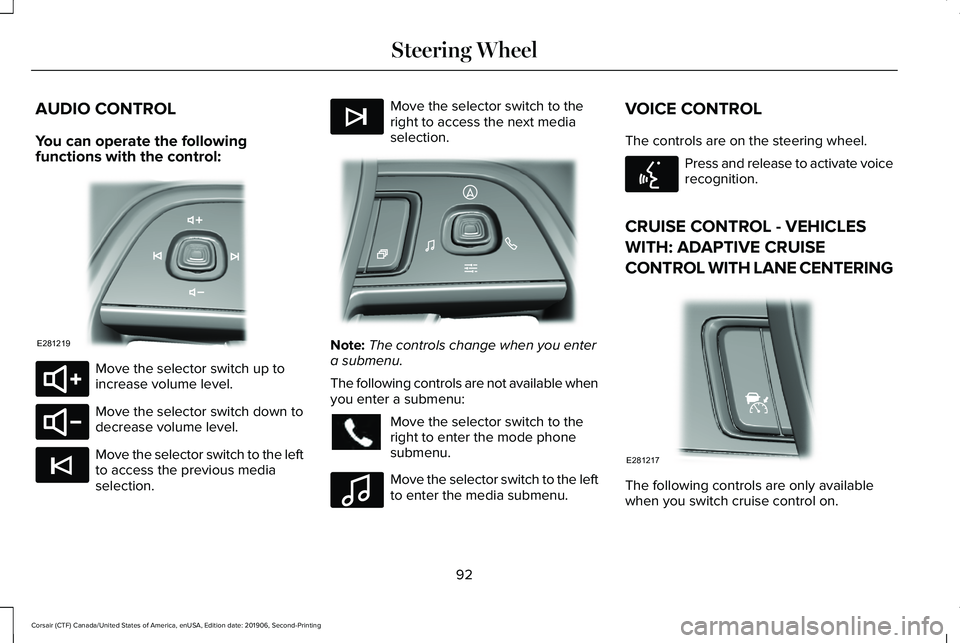
AUDIO CONTROL
You can operate the following
functions with the control:
Move the selector switch up to
increase volume level.
Move the selector switch down to
decrease volume level.
Move the selector switch to the left
to access the previous media
selection. Move the selector switch to the
right to access the next media
selection.
Note:
The controls change when you enter
a submenu.
The following controls are not available when
you enter a submenu: Move the selector switch to the
right to enter the mode phone
submenu.
Move the selector switch to the left
to enter the media submenu.VOICE CONTROL
The controls are on the steering wheel. Press and release to activate voice
recognition.
CRUISE CONTROL - VEHICLES
WITH: ADAPTIVE CRUISE
CONTROL WITH LANE CENTERING The following controls are only available
when you switch cruise control on.
92
Corsair (CTF) Canada/United States of America, enUSA, Edition date: 201906, Second-Printing Steering WheelE281219 E280803 E280802 E265045 E265044 E281220 E100027 E142599 E281217
Page 97 of 591
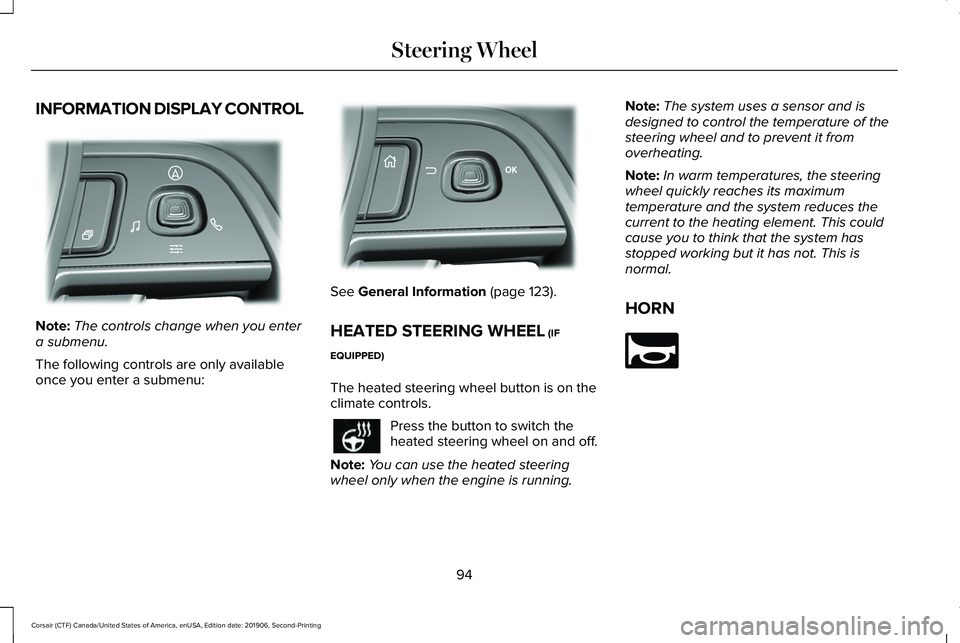
INFORMATION DISPLAY CONTROL
Note:
The controls change when you enter
a submenu.
The following controls are only available
once you enter a submenu: See General Information (page 123).
HEATED STEERING WHEEL
(IF
EQUIPPED)
The heated steering wheel button is on the
climate controls. Press the button to switch the
heated steering wheel on and off.
Note: You can use the heated steering
wheel only when the engine is running. Note:
The system uses a sensor and is
designed to control the temperature of the
steering wheel and to prevent it from
overheating.
Note: In warm temperatures, the steering
wheel quickly reaches its maximum
temperature and the system reduces the
current to the heating element. This could
cause you to think that the system has
stopped working but it has not. This is
normal.
HORN 94
Corsair (CTF) Canada/United States of America, enUSA, Edition date: 201906, Second-Printing Steering WheelE281220 E299701 E270945
Page 126 of 591
GENERAL INFORMATION
WARNING: Driving while distracted
can result in loss of vehicle control, crash
and injury. We strongly recommend that
you use extreme caution when using any
device that may take your focus off the
road. Your primary responsibility is the safe
operation of your vehicle. We recommend
against the use of any hand-held device
while driving and encourage the use of
voice-operated systems when possible.
Make sure you are aware of all applicable
local laws that may affect the use of
electronic devices while driving.
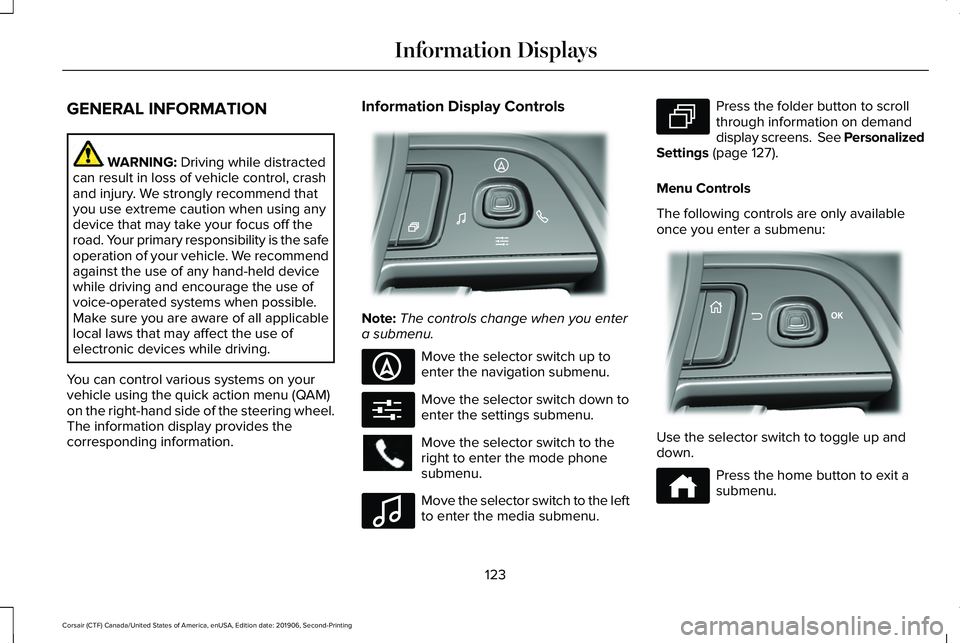
You can control various systems on your
vehicle using the quick action menu (QAM)
on the right-hand side of the steering wheel.
The information display provides the
corresponding information. Information Display Controls
Note:
The controls change when you enter
a submenu. Move the selector switch up to
enter the navigation submenu.
Move the selector switch down to
enter the settings submenu.
Move the selector switch to the
right to enter the mode phone
submenu.
Move the selector switch to the left
to enter the media submenu. Press the folder button to scroll
through information on demand
display screens. See Personalized
Settings (page 127).
Menu Controls
The following controls are only available
once you enter a submenu: Use the selector switch to toggle up and
down.
Press the home button to exit a
submenu.
123
Corsair (CTF) Canada/United States of America, enUSA, Edition date: 201906, Second-Printing Information DisplaysE281220 E281481 E280315 E100027 E281483 E299701 E272621
Page 140 of 591
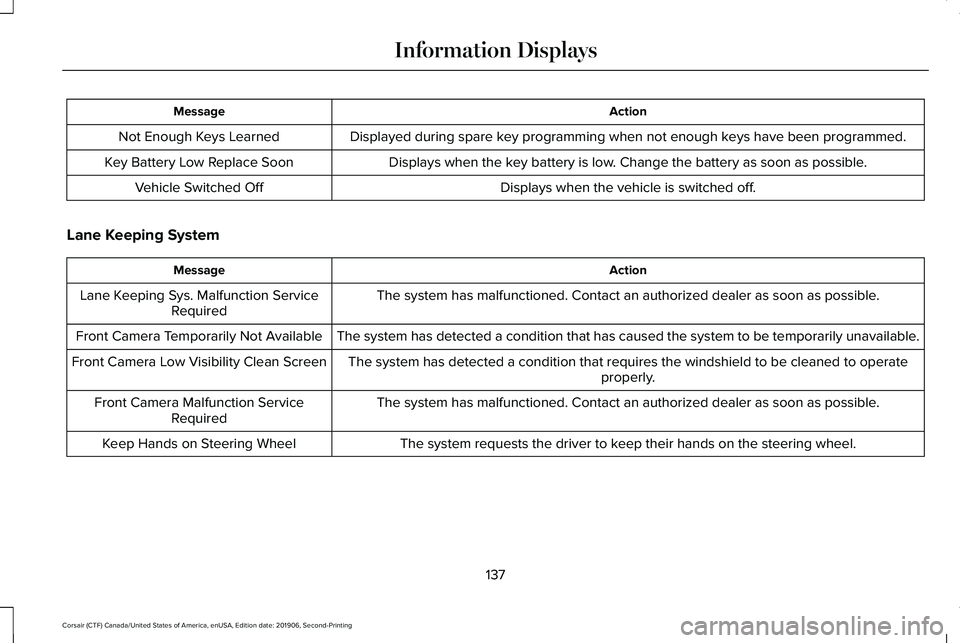
Action
Message
Displayed during spare key programming when not enough keys have been programmed.
Not Enough Keys Learned
Displays when the key battery is low. Change the battery as soon as possible.
Key Battery Low Replace Soon
Displays when the vehicle is switched off.
Vehicle Switched Off
Lane Keeping System Action
Message
The system has malfunctioned. Contact an authorized dealer as soon as po\
ssible.
Lane Keeping Sys. Malfunction Service
Required
The system has detected a condition that has caused the system to be tem\
porarily unavailable.
Front Camera Temporarily Not Available
The system has detected a condition that requires the windshield to be c\
leaned to operateproperly.
Front Camera Low Visibility Clean Screen
The system has malfunctioned. Contact an authorized dealer as soon as po\
ssible.
Front Camera Malfunction Service
Required
The system requests the driver to keep their hands on the steering wheel.
Keep Hands on Steering Wheel
137
Corsair (CTF) Canada/United States of America, enUSA, Edition date: 201906, Second-Printing Information Displays
Page 159 of 591
Note:
Do not remove ice from the mirrors
with a scraper or adjust the mirror glass
when it is frozen in place.
Note: Do not clean the mirror housing or
glass with harsh abrasives, fuel or other
petroleum-based cleaning products. The
vehicle warranty may not cover damage
caused to the mirror housing or glass.
CABIN AIR FILTER
The cabin air filter is under the instrument
panel in the passenger footwell area or
under the center console on the passenger
side.
The system filters airborne particles such as
dust, spores and pollen in the air supplied to
and recirculated in the interior of your
vehicle.
Make sure you have a cabin air filter installed
at all times. Running the system without a
filter in place could degrade or damage the
system. Your vehicle cabin air filter gives you and
your passengers the following benefits:
•
It improves your driving comfort by
reducing particle concentration.
• It improves the interior compartment
cleanliness.
• It protects the climate control
components from particle deposits.
Change the air filter element at the proper
intervals. See Scheduled Maintenance
(page 502).
For additional cabin air filter information, or
to replace the filter, see an authorized dealer.
REMOTE START
(IF EQUIPPED)
The system adjusts the interior temperature
depending on your chosen settings during
remote start.
You cannot adjust the climate control setting
during remote start operation. When you
switch the ignition on, the climate control
system returns to the previous settings. You
can now make adjustments. Some features may remain on if they turn on
during remote start:
•
Driver heated seat.
• Driver ventilated seat.
• Heated steering wheel.
• Heated mirrors.
• Heated rear window.
• Windshield wiper de-icer.
Note: If the passenger heated or ventilated
seats are on when you switch the vehicle
off, they default to the driver setting when
you switch the vehicle on.
You can adjust the default remote start
settings using the information display
controls. See Information Displays (page
123).
Automatic Settings
In hot weather, the system sets to
72°F
(22°C). The ventilated seats set to high (if
available, and if you select AUTO in the
information display).
156
Corsair (CTF) Canada/United States of America, enUSA, Edition date: 201906, Second-Printing Climate Control
Page 208 of 591
A message appears in your information
display screen when your vehicle has
entered Stay in Neutral mode.
To exit Stay in Neutral mode, apply the brake
and select a different gear.
Drive (D)
Drive (D) is the normal driving position for
the best fuel economy. The overdrive
function allows automatic upshifts and
downshifts through gears one through ten.
SelectShift™ Automatic Transmission
Your vehicle is equipped with a SelectShift
Automatic transmission. The SelectShift
Automatic transmission gives you the ability
to change gears up or down, without a
clutch, as desired.
In order to prevent the engine from running
at too low of an RPM, which may cause it to
stall, SelectShift still automatically makes
some downshifts if it has determined that
you have not downshifted in time. Although
SelectShift makes some downshifts for you,
it still allows you to downshift at any time as
long as the SelectShift determines that
damage to the engine does not occur from
over-revving.
Note:
Engine damage may occur if you
maintain excessive engine revving without
shifting.
SelectShift does not automatically upshift,
even if the engine is approaching the RPM
limit. It must be shifted manually by pressing
the (+) paddle.
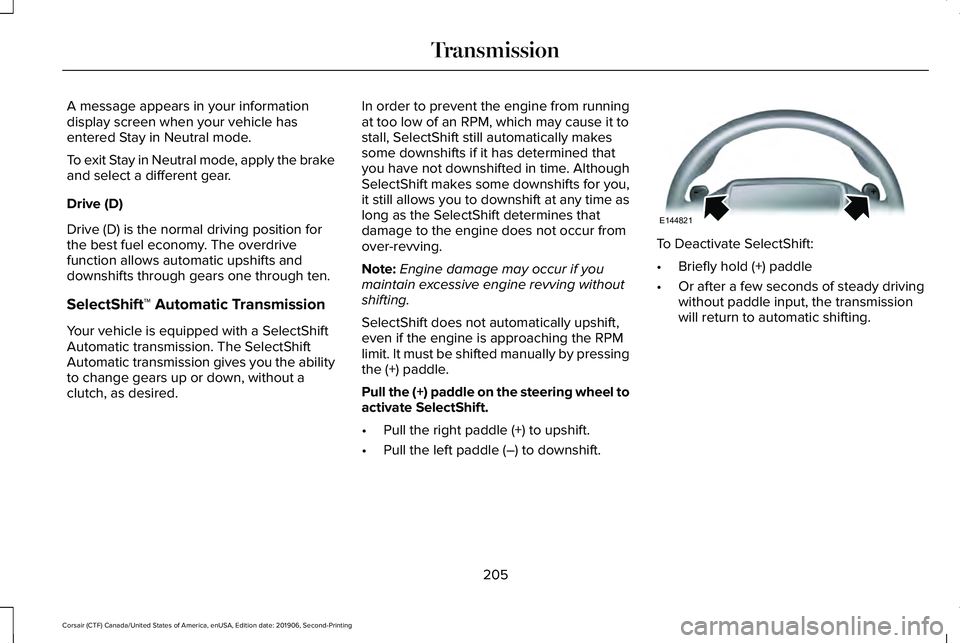
Pull the (+) paddle on the steering wheel to
activate SelectShift.
• Pull the right paddle (+) to upshift.
• Pull the left paddle (–) to downshift. To Deactivate SelectShift:
•
Briefly hold (+) paddle
• Or after a few seconds of steady driving
without paddle input, the transmission
will return to automatic shifting.
205
Corsair (CTF) Canada/United States of America, enUSA, Edition date: 201906, Second-Printing TransmissionE144821
Page 213 of 591
When driving at slow speeds off road under
high load conditions, use a low gear when
possible. Low gear operation will maximize
the engine and transmission cooling
capability.
Under severe operating conditions, the air
conditioning may cycle on and off to prevent
the engine from overheating.
Basic Operating Principles
•
Drive slower in strong crosswinds that
can affect the normal steering
characteristics of your vehicle.
• When driving your vehicle on surfaces
made slippery by loose sand, water,
gravel, snow or ice, proceed with care.
If Your Vehicle leaves the Road
If your vehicle leaves the road, reduce your
vehicle speed and avoid severe braking.
Once you have reduced your vehicle speed,
ease your vehicle back onto the road. Do
not turn the steering wheel sharply while
returning your vehicle to the road. It may be safer to stay on the shoulder of the
road and slow down gradually before
returning to the road. You may lose control
if you do not slow down or if you turn the
steering wheel too sharply or abruptly.
It may be less risky to strike small objects,
such as freeway reflectors, with minor
damage to your vehicle rather than attempt
an abrupt dangerous direction change.
Remember, your primary concern should be
your safety and the safety of others.
Emergency Maneuvers
If you must make a sudden emergency
direction change, avoid over-driving your
vehicle. Turn the steering wheel only as
rapidly and as far as you need to avoid the
emergency. Apply smooth pressure to the
accelerator pedal or brake pedal as needed.
Avoid abrupt steering, acceleration and
braking changes. Abrupt changes could
increase the risk of vehicle roll over, loss of
vehicle control and personal injury. Use all
available road surfaces to bring your vehicle
under control.In the event of an emergency stop, avoid
skidding and do not attempt any sharp
steering wheel movements.
Your vehicle responds differently to steering,
accelerating and braking on different road
surfaces when changing from one type of
surface to another.
Sand
When driving over sand, avoid driving at
excessive speeds. This will cause your
vehicle momentum to work against you. Your
vehicle could become stuck and that may
require assistance from another vehicle.
Remember, if you proceed with caution you
may be able to back out the way you came.
Do not drive in deep sand for an extended
period. This will cause the all-wheel drive
system to overheat. You will see a warning
message in the information display. See
Information Messages (page 128).
210
Corsair (CTF) Canada/United States of America, enUSA, Edition date: 201906, Second-Printing All-Wheel Drive
(If Equipped)
Page 214 of 591
To resume operation, switch the ignition off
and allow the system to cool down for a
minimum of 15 minutes. After the system has
cooled down, you will see a brief message
display in the information display. See
Information Messages (page 128).
When driving at slow speeds in deep sand
under high outside temperatures, use a low
gear when possible. Low gear operation will
maximize the engine and transmission
cooling capability.
Tips when driving over sand:
• Keep all four wheels on the most solid
area of the trail.
• Shift to a lower gear.
• Apply the accelerator slowly.
• Drive steadily through the terrain.
• Avoid excessive wheel spin.
• Avoid reducing the tire pressures. Mud and Water
Mud
Avoid sudden changes in vehicle speed or
direction when you are driving in mud. Even
all-wheel drive vehicles can lose traction in
mud. If your vehicle does slide, steer in the
direction of the slide until you regain control
of your vehicle.
After driving through mud, clean off excess
mud stuck to rotating driveshafts and tires.
Excess mud stuck on tires and rotating
driveshafts can cause an imbalance that
could damage drive components.
Water
Drive slowly through high water. Traction or
brake capability may be limited.
When driving through water, determine the
depth and avoid water higher than the
bottom of the wheel rims. If the ignition
system gets wet, your vehicle may stall. Once through water, always try the brakes.
Wet brakes will not stop your vehicle as
quickly as dry brakes. Apply light pressure
to the brake pedal while slowly moving the
vehicle to dry the brakes.
Note:
Driving through deep water may
damage the transmission. If the front or rear
axle is submerged in water, have the power
transfer unit (PTU) or rear axle serviced by
an authorized dealer.
Driving on Hilly or Sloping Terrain
Although natural obstacles may make it
necessary to travel diagonally up or down a
hill or steep incline, always try to drive
straight up or straight down the sloping
terrain.
Note: To maintain traction and avoid
possibly rolling your vehicle, avoid turning
on steep slopes or hills. When you drive on
a hill, determine beforehand the route you
will use. Do not drive over a hill without first
seeing what is on the other side. Do not drive
in reverse over a hill without the aid of an
observer.
211
Corsair (CTF) Canada/United States of America, enUSA, Edition date: 201906, Second-Printing All-Wheel Drive
(If Equipped)