low beam LINCOLN CORSAIR 2020 Owners Manual
[x] Cancel search | Manufacturer: LINCOLN, Model Year: 2020, Model line: CORSAIR, Model: LINCOLN CORSAIR 2020Pages: 591, PDF Size: 6 MB
Page 102 of 591
Push the lever away from you to
switch the high beam on.
Push the lever forward again or pull the lever
toward you to switch the high beams off.
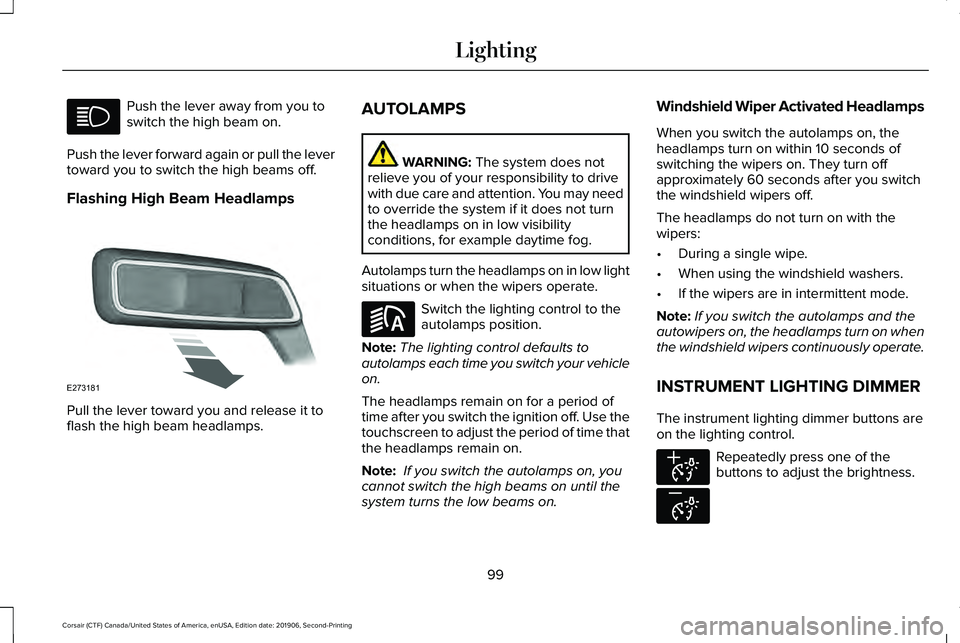
Flashing High Beam Headlamps Pull the lever toward you and release it to
flash the high beam headlamps. AUTOLAMPS WARNING: The system does not
relieve you of your responsibility to drive
with due care and attention. You may need
to override the system if it does not turn
the headlamps on in low visibility
conditions, for example daytime fog.
Autolamps turn the headlamps on in low light
situations or when the wipers operate. Switch the lighting control to the
autolamps position.
Note: The lighting control defaults to
autolamps each time you switch your vehicle
on.
The headlamps remain on for a period of
time after you switch the ignition off. Use the
touchscreen to adjust the period of time that
the headlamps remain on.
Note: If you switch the autolamps on, you
cannot switch the high beams on until the
system turns the low beams on. Windshield Wiper Activated Headlamps
When you switch the autolamps on, the
headlamps turn on within 10 seconds of
switching the wipers on. They turn off
approximately 60 seconds after you switch
the windshield wipers off.
The headlamps do not turn on with the
wipers:
•
During a single wipe.
• When using the windshield washers.
• If the wipers are in intermittent mode.
Note: If you switch the autolamps and the
autowipers on, the headlamps turn on when
the windshield wipers continuously operate.
INSTRUMENT LIGHTING DIMMER
The instrument lighting dimmer buttons are
on the lighting control. Repeatedly press one of the
buttons to adjust the brightness.
99
Corsair (CTF) Canada/United States of America, enUSA, Edition date: 201906, Second-Printing Lighting E273181 E281240 E291299 E296433
Page 104 of 591
You can switch the front fog lamps on if any
of the following occur:
•
You set the lighting control to the parking
lamps position.
• You set the lighting control to the
headlamps position.
• You set the lighting control to the
autolamps position and the headlamps
are on.
The front fog lamp button is on the lighting
control. Press the button to switch the front
fog lamps on or off.
Note: The brightness of the daytime running
lamps may decrease when the front fog
lamps are switched on.
Front Fog Lamp Indicator It illuminates when you switch the
front fog lamps on. ADAPTIVE HEADLAMPS (IF EQUIPPED)
About Adaptive Headlamps
The headlamps are designed to adapt when
you are steering around a curve, or if the
camera detects lane markings indicating a
curve or traffic signs indicating an
intersection.
The system is designed to operate if all of
the following occur:
• You switch the system on through your
vehicle settings.
• You set the lighting control to the
autolamps position.
• The ambient light level is low enough that
high beams are required.
101
Corsair (CTF) Canada/United States of America, enUSA, Edition date: 201906, Second-Printing Lighting
Page 109 of 591
WHAT IS AUTOMATIC HIGH BEAM
CONTROL
The system turns on high beams if it is dark
enough and no other traffic is present. If it
detects an approaching vehicle
’s headlamps
or tail lamps, or street lighting ahead, the
system turns the high beams off. Low beams
remain on.
A camera sensor, centrally mounted behind
the windshield of your vehicle, continuously
monitors conditions to turn the high beams
on and off.
SWITCHING AUTOMATIC HIGH
BEAM CONTROL ON AND OFF WARNING: Do not use the system in
poor visibility, for example fog, heavy rain,
spray or snow.
1. Press
Settings on the touchscreen.
2. Press
Vehicle.
3. Press
Lighting. Activating the Automatic High Beam
Control Switch the lighting control to the
autolamps position.
See
Autolamps (page 99).
Note: The lighting control defaults to
autolamps each time you switch your vehicle
on.
When active, the high beams turn on if:
• The ambient light level is low enough.
• There is no traffic in front of your vehicle.
• The vehicle speed is greater than
approximately
32 mph (51 km/h).
When active, the high beams turn off if:
• The ambient light level is high enough
that high beams are not required.
• The system detects an approaching
vehicle's headlamps or tail lamps.
• The system detects severe rain, snow or
fog.
• The camera is blocked.
• The vehicle speed falls below
approximately
27 mph (44 km/h). Note:
The deactivation speed is lower on
curves.
Note: High beam reactivation may be
delayed in certain curvy road situations.
Note: The system may not operate properly
if the sensor is blocked. Keep the windshield
free from obstruction or damage.
Note: The system may not operate properly
in cold or inclement conditions. You can
switch on the high beams by overriding the
system.
Note: If the system detects a blockage, for
example bird droppings, bug splatter, snow
or ice, the system goes into low beam mode
until you clear the blockage. A message may
appear in the information display if the
camera is blocked.
Note: Using much larger tires or equipping
vehicle accessories such as snowplows can
modify your vehicle's ride height and
degrade automatic high beam control
performance.
106
Corsair (CTF) Canada/United States of America, enUSA, Edition date: 201906, Second-Printing Automatic High Beam Control
(If Equipped)E281240
Page 110 of 591
AUTOMATIC HIGH BEAM
CONTROL INDICATORS
The indicator illuminates to confirm
when the system is ready to assist.
OVERRIDING AUTOMATIC HIGH
BEAM CONTROL WARNING: The system does not
relieve you of your responsibility to drive
with due care and attention. You may need
to override the system if it does not turn
the high beams on or off. WARNING:
You may need to
override the system when approaching
other road users. WARNING:
You may need to
override the system during inclement
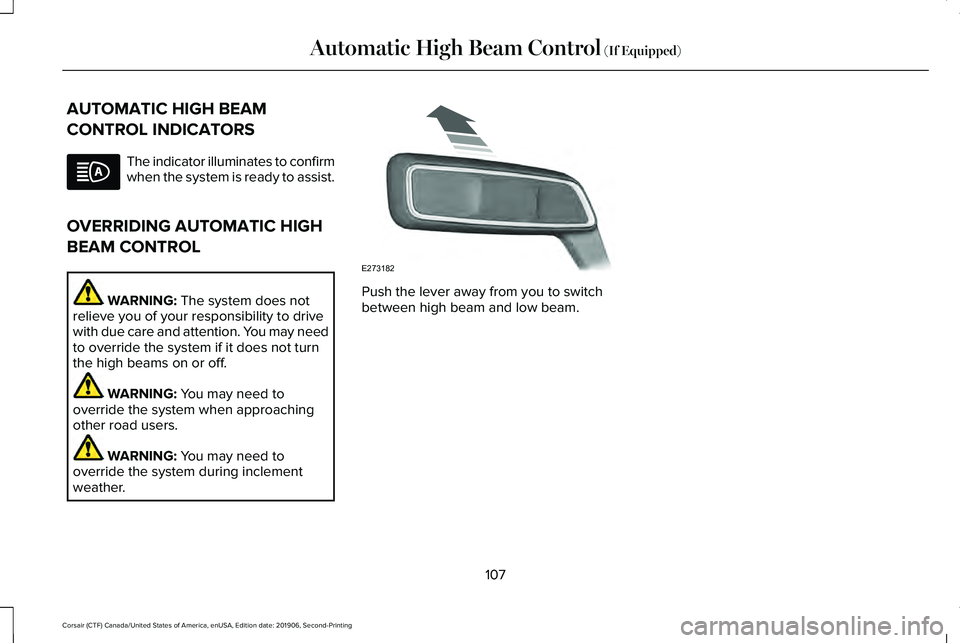
weather. Push the lever away from you to switch
between high beam and low beam.
107
Corsair (CTF) Canada/United States of America, enUSA, Edition date: 201906, Second-Printing Automatic High Beam Control
(If Equipped) E273182
Page 121 of 591
Engine Coolant Temperature Gauge
WARNING: Do not remove the
coolant reservoir cap when the engine is
on or the cooling system is hot. Wait 10
minutes for the cooling system to cool
down. Cover the coolant reservoir cap with
a thick cloth to prevent the possibility of
scalding and slowly remove the cap.
Failure to follow this instruction could result
in personal injury.
Indicates engine coolant temperature. At
normal operating temperature, the level
indicator will be in the normal range. If the
engine coolant temperature exceeds the
normal range, stop your vehicle as soon as
safely possible, switch off the engine and let
the engine cool. WARNING LAMPS AND
INDICATORS
The following warning lamps and indicators
alert you to a vehicle condition that may
become serious. Some lamps illuminate
when you start your vehicle to make sure
they work. If any lamps remain on after
starting your vehicle, refer to the respective
system warning lamp for further information.
Note:
Some warning indicators appear in
the information display and function the
same as a warning lamp, but do not display
when you start your vehicle.
Adaptive Cruise Control
(If Equipped) The speed control system indicator
light changes color to indicate
what mode the system is in.
See
Adaptive Cruise Control Indicators (page
253).
On (white light): Illuminates when you switch
on the adaptive cruise control system. Turns
off when the speed control system is turned
off. Engaged (green light): Illuminates when you
engage the adaptive cruise control system.
Turns off when you disengage the speed
control system.
Anti-Lock Braking System
If it illuminates when you are
driving, this indicates a system
error. You continue to have the
normal braking (without ABS) unless the
brake system warning lamp also illuminates.
Have the system checked by an authorized
dealer.
Automatic High Beam Control (If Equipped) Illuminates when this feature is on.
See
Automatic High Beam
Control Indicators (page 107).
Auto Hold Active Illuminates when the system holds
your vehicle stationary.
118
Corsair (CTF) Canada/United States of America, enUSA, Edition date: 201906, Second-Printing Instrument ClusterE144524 E197933
Page 124 of 591
Lamps On
Illuminates when you switch the
low beam headlamps or the
parking lamps on.
Liftgate Ajar Illuminates when the liftgate is not
completely closed.
Low Beam Warning Illuminates when the low beam
headlamp bulb is not functioning
properly.
Low Fuel Level Illuminates when the fuel level is
low or the fuel tank is nearly
empty. Refuel as soon as possible. Low Tire Pressure Warning Illuminates when your tire pressure
is low. If the lamp remains on with
the engine running or when
driving, check your tire pressure as soon as
possible.
It also illuminates momentarily when you
switch the ignition on to confirm the lamp is
functional. If it does not illuminate when you
switch the ignition on, or begins to flash at
any time, have the system checked by an
authorized dealer.
Low Washer Fluid Illuminates when the windshield
washer fluid is low.
Powertrain Fault Illuminates when the system
detects a powertrain or a
4WD/AWD fault. Contact an
authorized dealer as soon as possible. Rear Fog Lamps Indicator (If Equipped) Illuminates when you switch the
rear fog lamps on.
Service Engine Soon It illuminates when you switch the
ignition on prior to engine start to
check the bulb and to indicate
whether your vehicle is ready for Inspection
and Maintenance (I/M) testing.
Normally, it illuminates until the engine is
cranked and automatically turns off if no
system errors are present. However, if after
15 seconds it flashes eight times, this
indicates that your vehicle is not ready for
Inspection and Maintenance (I/M) testing.
See
Catalytic Converter (page 200).
If it illuminates when the engine is running
this indicates a system error. The On Board
Diagnostics system has detected an error in
the vehicle emission control system.
121
Corsair (CTF) Canada/United States of America, enUSA, Edition date: 201906, Second-Printing Instrument Cluster E162453 E181350 E132353 E67040
Page 346 of 591
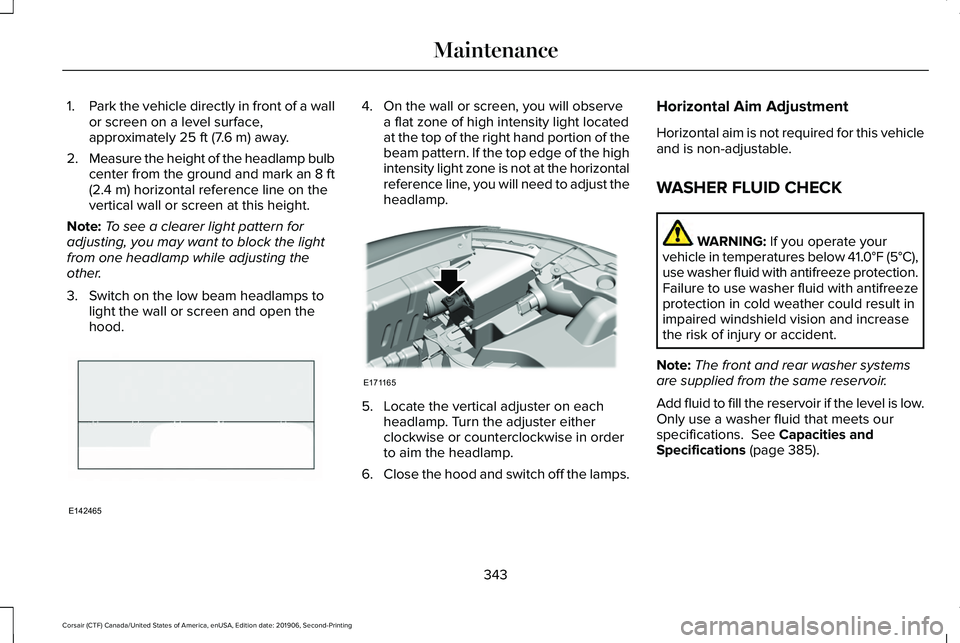
1.
Park the vehicle directly in front of a wall
or screen on a level surface,
approximately 25 ft (7.6 m) away.
2. Measure the height of the headlamp bulb
center from the ground and mark an 8 ft
(2.4 m)
horizontal reference line on the
vertical wall or screen at this height.
Note: To see a clearer light pattern for
adjusting, you may want to block the light
from one headlamp while adjusting the
other.
3. Switch on the low beam headlamps to light the wall or screen and open the
hood. 4. On the wall or screen, you will observe
a flat zone of high intensity light located
at the top of the right hand portion of the
beam pattern. If the top edge of the high
intensity light zone is not at the horizontal
reference line, you will need to adjust the
headlamp. 5. Locate the vertical adjuster on each
headlamp. Turn the adjuster either
clockwise or counterclockwise in order
to aim the headlamp.
6. Close the hood and switch off the lamps. Horizontal Aim Adjustment
Horizontal aim is not required for this vehicle
and is non-adjustable.
WASHER FLUID CHECK
WARNING:
If you operate your
vehicle in temperatures below 41.0°F (5°C),
use washer fluid with antifreeze protection.
Failure to use washer fluid with antifreeze
protection in cold weather could result in
impaired windshield vision and increase
the risk of injury or accident.
Note: The front and rear washer systems
are supplied from the same reservoir.
Add fluid to fill the reservoir if the level is low.
Only use a washer fluid that meets our
specifications.
See Capacities and
Specifications (page 385).
343
Corsair (CTF) Canada/United States of America, enUSA, Edition date: 201906, Second-Printing MaintenanceE142465 E171165
Page 415 of 591
BULB SPECIFICATION CHART
The chart that follows specifies the
replacement bulbs. Use headlamp bulbs
marked with an authorized D.O.T.
(Department of Transportation) for North
America to affirm lamp performance, light
brightness and pattern and safe visibility. The
correct bulbs do not damage the lamp
assembly or void the lamp assembly warranty
and provide quality bulb burn time. Trade number
Function
LED.
Headlamp low and high beam. 1
LED.
Sidemarker - front. 1
LED.
Park lamp - front. 1
LED.
Turn lamp - front. 1
LED.
Signal indicator mirror lamp. 1
LED.
Welcome light. 1
LED.
Approach lamp. 1
LED.
Tail and brake lamp. 1
LED.
Turn lamp - rear. 1
412
Corsair (CTF) Canada/United States of America, enUSA, Edition date: 201906, Second-Printing Capacities and Specifications
Page 577 of 591
Air Filter
See: Changing the Engine Air Filter..............332
Alarm See: Anti-Theft Alarm...........................................88
All-Wheel Drive.............................................209
Ambient Lighting...........................................104 Adjusting the Brightness...................................105
Changing the Color............................................105
Switching Ambient Lighting Off.......................
105
Switching Ambient Lighting On.......................105
Anti-Theft Alarm
..............................................88
Arming the Alarm..................................................88
Disarming the Alarm............................................88
Appendices
....................................................535
Apps.................................................................475 SiriusXM Traffic and Travel Link......................
477
Using Apps on an Android Device................476
Using Apps on an iOS Device.........................
476
Using Mobile Navigation on an Android Device...............................................................476
At a Glance........................................................21
Audible Warnings and Indicators..............122 Headlamps On Warning Chime
.......................122
Keyless Warning Alert........................................122
Parking Brake On Warning Chime..................122
Audio Control..................................................92 You can operate the following functions with
the control:.........................................................92 Audio System
................................................420
General Information...........................................420
Audio Unit.......................................................421 Adjusting the Volume.........................................421
Changing Radio Stations...................................421
Selecting the Audio Modes..............................
421
Switching the Audio Unit On and Off............422
Switching the Display On and Off..................422
Using Seek, Fast Forward and Reverse.......
422
Auto Hold
........................................................218
Auto Hold Indicator.............................................219
Switching Auto Hold On and Off.....................218
Using Auto Hold..................................................218
Autolamps
........................................................99
Windshield Wiper Activated Headlamps........99
Automatic Climate Control
.........................152
Accessing the Air Distribution Controls........152
Accessing the Climate Control Menu............
152
Setting the Blower Motor Speed....................152
Setting the Temperature...................................152
Switching Auto Mode On and Off...................152
Switching Maximum Air Conditioning On and Off.......................................................................153
Switching Maximum Defrost On and Off.......154
Switching Recirculated Air On and Off..........154
Switching the Air Conditioning On and Off.......................................................................153 Switching the Climate Control On and
Off.......................................................................153
Automatic High Beam Control...................106
Automatic High Beam Control Indicators......................................................107
Automatic Transmission.............................203 Automatic Transmission Adaptive
Learning...........................................................208
If Your Vehicle Gets Stuck in Mud or Snow.................................................................208
Manual Park Release.........................................206
SelectShift™ Automatic Transmission............205
Understanding the Shift Positions of your Automatic Transmission...............................203
Automatic Transmission Fluid Check............................................................338
Auto-Start-Stop..............................................189 Disabling Auto-Start-Stop.................................190
Enabling Auto-Start-Stop...................................189
Autowipers.......................................................96 Autowipers Settings.............................................96
Low Temperature Wipe Inhibit..........................96
Auxiliary Power Points
..................................178
110 Volt AC Power Point.....................................178
12 Volt DC Power Point......................................178
USB Port and Power Point Locations.............178
AWD See: All-Wheel Drive.........................................209
574
Corsair (CTF) Canada/United States of America, enUSA, Edition date: 201906, Second-Printing Index
Page 584 of 591
Using Lower Anchors and Tethers for
CHildren (LATCH).............................................29
Using Tether Straps...............................................31
Instrument Cluster..........................................114
Instrument Lighting Dimmer........................99
Instrument Panel..............................................21
Interior Lamps................................................104 Front Interior Lamp.............................................104
Rear Interior Lamps.............................................104
Interior Mirror
....................................................111
Auto-Dimming Mirror...........................................112
Introduction.........................................................9
J
Jump Starting the Vehicle..........................300 Connecting the Jumper Cables .....................301
Preparing Your Vehicle......................................301
Removing the Jumper Cables........................302
Starting the Engine............................................302
K
Keyless Entry
....................................................79
SECURICODE™ KEYLESS ENTRY
KEYPAD...............................................................79
Keyless Starting
.............................................183
Ignition Modes.....................................................183 Keys and Remote Controls............................61
L
Lane Keeping System.................................260
Switching the System On and Off...................261
Liftgate...............................................................82
Lighting Control
..............................................98
Flashing High Beam Headlamps......................99
Lighting Control Selections................................98
Switching High Beam Headlamps On and
Off........................................................................\
.98
Lighting..............................................................98 General Information.............................................98
Lincoln Automotive Financial Services......16
Lincoln Protect
..............................................499
Lincoln Protect (CANADA ONLY)...................500
Lincoln Protect Extended Service Plans (U.S.
Only)..................................................................499
Load Carriers See: Roof Racks and Load Carriers................281
Load Carrying
.................................................281
Load Limit.......................................................283
Special Loading Instructions for Owners of
Pick-up Trucks and Utility-type
Vehicles............................................................287
Vehicle Loading - with and without a Trailer................................................................283 Locking and Unlocking..................................75
Activating Intelligent Access..............................
76
Autolock..................................................................78
Autounlock..............................................................78
Battery Saver..........................................................79
Illuminated Entry....................................................78
Illuminated Exit.......................................................78
Mechanical Key.....................................................76
Opening a Rear Door from Inside.....................76
Power Door Locks................................................75
Remote Control.....................................................75
Smart Unlocks........................................................77
Welcome Lighting.................................................79
Luggage Covers............................................281
Lug Nuts See: Changing a Road Wheel.........................376
M
Maintenance..................................................327 General Information...........................................327
Memory Function
..........................................165
Easy Entry and Exit Feature..............................166
Linking a PreSet Position to Your Remote
Control ..............................................................166
Personal Profiles..................................................166
Saving a PreSet Position...................................
165
581
Corsair (CTF) Canada/United States of America, enUSA, Edition date: 201906, Second-Printing Index