seat adjustment LINCOLN CORSAIR 2020 Owners Manual
[x] Cancel search | Manufacturer: LINCOLN, Model Year: 2020, Model line: CORSAIR, Model: LINCOLN CORSAIR 2020Pages: 591, PDF Size: 6 MB
Page 4 of 591
Introduction
About This Manual
...........................................9
Symbols Glossary ............................................
9
Data Recording ...............................................
12
Perchlorate .......................................................
16
Lincoln Automotive Financial Services ........................................................................\
..
16
Replacement Parts Recommendation ........................................................................\
..
17
Special Notices ................................................
17
Mobile Communications Equipment .........
18
Export Unique Options ..................................
19
Environment
Protecting the Environment ........................
20
At a Glance
Instrument Panel .............................................
21
Child Safety
General Information ......................................
24
Installing Child Restraints ............................
26
Booster Seats .................................................
32Child Restraint Positioning
..........................
35
Child Safety Locks .........................................
37
Seatbelts
Principle of Operation ..................................
39
Fastening the Seatbelts ...............................
40
Seatbelt Height Adjustment ........................
43
Seatbelt Warning Lamp and Indicator Chime ...........................................................
43
Seatbelt Reminder .........................................
44
Child Restraint and Seatbelt Maintenance ........................................................................\
.
46
Seatbelt Extensions ......................................
46
Personal Safety System ™
Personal Safety System ™.............................
48
Supplementary Restraints System
Principle of Operation ..................................
49
Driver and Passenger Airbags ...................
50
Front Passenger Sensing System .............
52
Side Airbags ....................................................
54Driver and Passenger Knee Airbags
........
55
Safety Canopy™ ..............................................
56
Crash Sensors and Airbag Indicator .........
57
Airbag Disposal ..............................................
58
911 Assist
What Is 911 Assist ...........................................
59
Emergency Call Requirements ..................
59
Emergency Call Limitations ........................
60
Keys and Remote Controls
General Information on Radio Frequencies ........................................................................\
..
61
Remote Control ...............................................
61
Replacing a Lost Key or Remote Control ........................................................................\
66
Phone as a Key
What Is Phone As a Key ...............................
67
Phone as a Key Limitations .........................
67
Programming Your Phone ..........................
67
Using the Valet Mode ...................................
67
Using the Backup Starting Passcode .......
68
1
Corsair (CTF) Canada/United States of America, enUSA, Edition date: 201906, Second-Printing Table of Contents
Page 45 of 591
Vehicle Sensitive Mode
This is the normal retractor mode, which
allows free shoulder belt length adjustment
to your movements and locking in response
to vehicle movement. For example, if the
driver brakes suddenly or turns a corner
sharply, or the vehicle receives an impact of
about 5 mph (8 km/h) or more, the
combination seatbelts lock to help reduce
forward movement of the driver and
passengers.
In addition, the retractor is designed to lock
if you pull the webbing out too quickly. If the
seatbelt retractor locks, slowly lower the
height adjuster to allow the seatbelt to
retract. If the retractor does not unlock, pull
the seatbelt out slowly then feed a small
length of webbing back toward the stowed
position. For rear seatbelts, recline the rear
seat backrest or push the seat backrest
cushion away from the seatbelt. Feed a small
length of webbing back toward the stowed
position. Automatic Locking Mode
In this mode, the shoulder belt automatically
pre-locks. The belt still retracts to remove
any slack in the shoulder belt. The automatic
locking mode is not available on the driver
seatbelt.
When to Use the Automatic Locking Mode
Use this mode any time a child safety seat,
except a booster, is installed in passenger
front or rear seating positions. Properly
restrain children 12 years old and under in a
rear seating position whenever possible.
See
Child Safety (page 24).
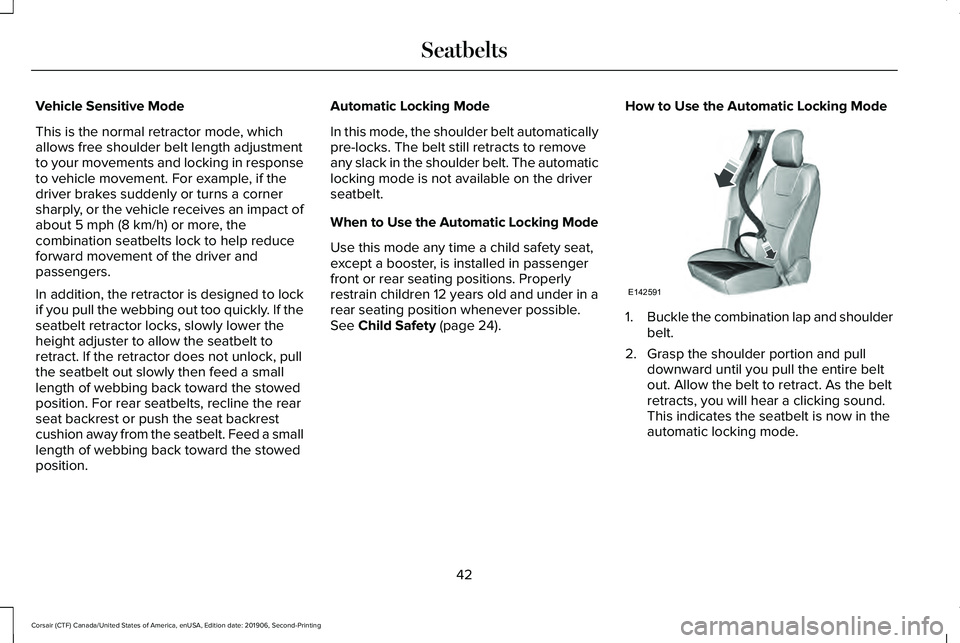
How to Use the Automatic Locking Mode 1.
Buckle the combination lap and shoulder
belt.
2. Grasp the shoulder portion and pull downward until you pull the entire belt
out. Allow the belt to retract. As the belt
retracts, you will hear a clicking sound.
This indicates the seatbelt is now in the
automatic locking mode.
42
Corsair (CTF) Canada/United States of America, enUSA, Edition date: 201906, Second-Printing SeatbeltsE142591
Page 46 of 591
How to Disengage the Automatic Locking
Mode
Unbuckle the combination lap and shoulder
belt and allow it to retract completely to
disengage the automatic locking mode and
turn on the vehicle sensitive (emergency)
locking mode.
How to Extract Seatbelts in the Rear
Outermost Positions
Seatbelts in the rear outermost positions can
lock if you firmly return the seat backrest to
its upright position. You can unlock the
seatbelts using the following procedures.
For vehicles where the rear seats recline:
1. Recline the seat to its full rear recline
position.
2. The seatbelt should then unlock.
3. Return the seat backrest to your desired
upright position.
For vehicles with rear seats that do not
recline or are locked with the seat in its full
rear recline position: 1.
Grasp the seatbelt webbing at the top of
the seat backrest.
2. Pull the seatbelt webbing forward, firmly.
3. After pulling the seatbelt forward, allow the seatbelt to feed back into the seatbelt
retractor as much as possible. If
necessary, press the seat backrest down
to allow the seatbelt webbing to retract
further.
4. The seatbelt should then unlock.
5. If the seatbelt does not unlock, repeat steps 1-3.
SEATBELT HEIGHT ADJUSTMENT WARNING: Position the seatbelt
height adjuster so that the belt rests across
the middle of your shoulder. Failure to
adjust the seatbelt properly could reduce
the effectiveness of the seatbelt and
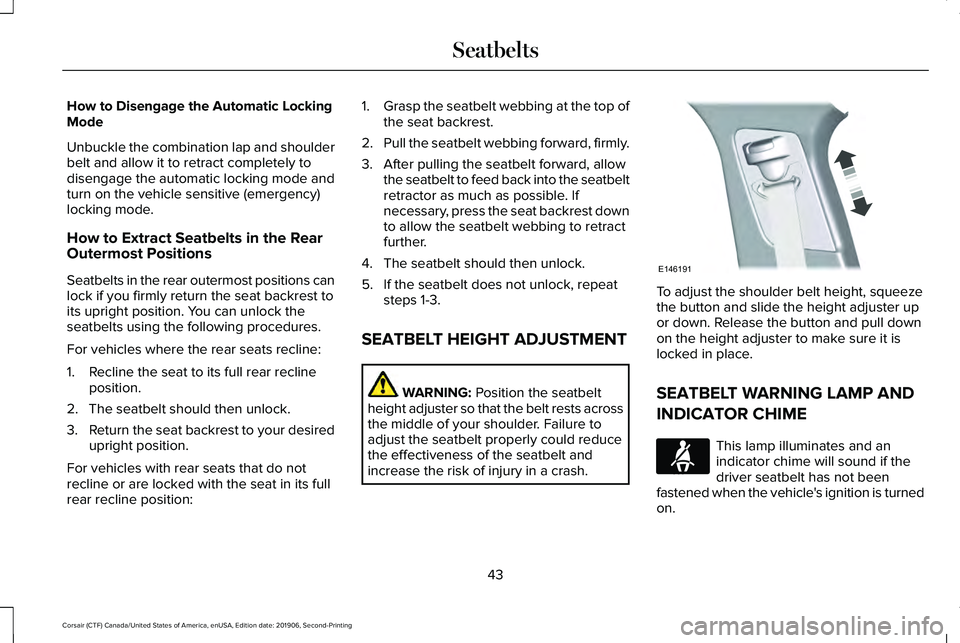
increase the risk of injury in a crash. To adjust the shoulder belt height, squeeze
the button and slide the height adjuster up
or down. Release the button and pull down
on the height adjuster to make sure it is
locked in place.
SEATBELT WARNING LAMP AND
INDICATOR CHIME
This lamp illuminates and an
indicator chime will sound if the
driver seatbelt has not been
fastened when the vehicle's ignition is turned
on.
43
Corsair (CTF) Canada/United States of America, enUSA, Edition date: 201906, Second-Printing SeatbeltsE146191 E71880
Page 54 of 591
The driver and passenger front airbag system
consists of:
•
Driver and passenger airbag modules.
• Front passenger sensing system. · Crash sensors and monitoring
system with readiness indicator.
See Crash Sensors and Airbag
Indicator (page 57).
Proper Driver and Front Passenger
Seating Adjustment WARNING:
National Highway Traffic
Safety Administration (NHTSA)
recommends a minimum distance of at
least
10 in (25 cm) between an occupant's
chest and the driver airbag module.
To properly position yourself away from the
airbag:
• Move your seat to the rear as far as you
can while still reaching the pedals
comfortably.
• Recline the seat slightly (one or two
degrees) from the upright position. After all occupants have adjusted their seats
and put on seatbelts, it is very important that
they continue to sit properly. A properly
seated occupant sits upright, leaning against
the seatback, and centered on the seat
cushion, with their feet comfortably extended
on the floor. Sitting improperly can increase
the chance of injury in a crash event. For
example, if an occupant slouches, lies down,
turns sideways, sits forward, leans forward
or sideways, or puts one or both feet up, the
chance of injury during a crash is greatly
increased.
Children and Airbags
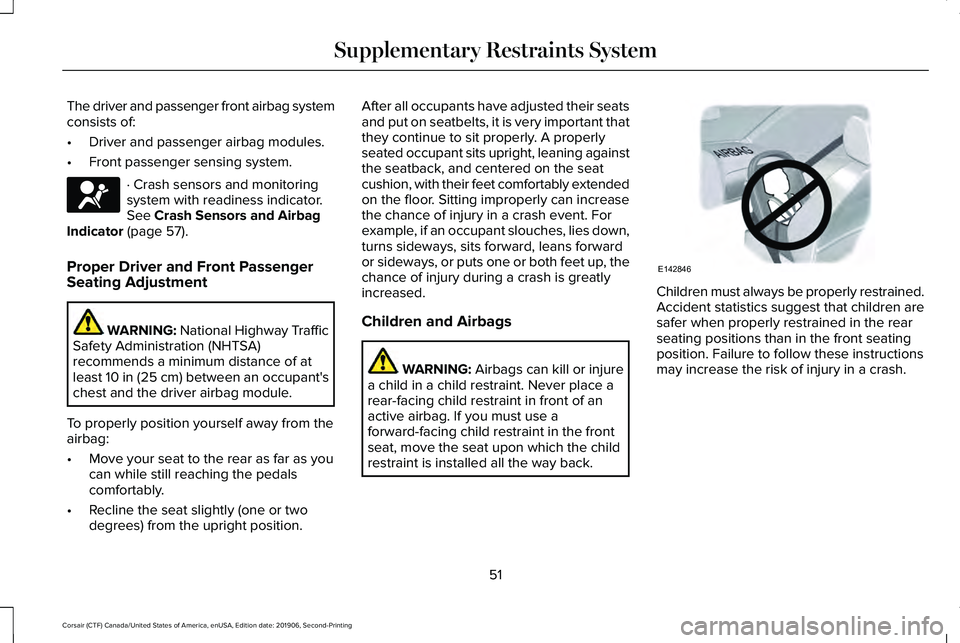
WARNING: Airbags can kill or injure
a child in a child restraint. Never place a
rear-facing child restraint in front of an
active airbag. If you must use a
forward-facing child restraint in the front
seat, move the seat upon which the child
restraint is installed all the way back. Children must always be properly restrained.
Accident statistics suggest that children are
safer when properly restrained in the rear
seating positions than in the front seating
position. Failure to follow these instructions
may increase the risk of injury in a crash.
51
Corsair (CTF) Canada/United States of America, enUSA, Edition date: 201906, Second-Printing Supplementary Restraints SystemE67017 E142846
Page 159 of 591
Note:
Do not remove ice from the mirrors
with a scraper or adjust the mirror glass
when it is frozen in place.
Note: Do not clean the mirror housing or
glass with harsh abrasives, fuel or other
petroleum-based cleaning products. The
vehicle warranty may not cover damage
caused to the mirror housing or glass.
CABIN AIR FILTER
The cabin air filter is under the instrument
panel in the passenger footwell area or
under the center console on the passenger
side.
The system filters airborne particles such as
dust, spores and pollen in the air supplied to
and recirculated in the interior of your
vehicle.
Make sure you have a cabin air filter installed
at all times. Running the system without a
filter in place could degrade or damage the
system. Your vehicle cabin air filter gives you and
your passengers the following benefits:
•
It improves your driving comfort by
reducing particle concentration.
• It improves the interior compartment
cleanliness.
• It protects the climate control
components from particle deposits.
Change the air filter element at the proper
intervals. See Scheduled Maintenance
(page 502).
For additional cabin air filter information, or
to replace the filter, see an authorized dealer.
REMOTE START
(IF EQUIPPED)
The system adjusts the interior temperature
depending on your chosen settings during
remote start.
You cannot adjust the climate control setting
during remote start operation. When you
switch the ignition on, the climate control
system returns to the previous settings. You
can now make adjustments. Some features may remain on if they turn on
during remote start:
•
Driver heated seat.
• Driver ventilated seat.
• Heated steering wheel.
• Heated mirrors.
• Heated rear window.
• Windshield wiper de-icer.
Note: If the passenger heated or ventilated
seats are on when you switch the vehicle
off, they default to the driver setting when
you switch the vehicle on.
You can adjust the default remote start
settings using the information display
controls. See Information Displays (page
123).
Automatic Settings
In hot weather, the system sets to
72°F
(22°C). The ventilated seats set to high (if
available, and if you select AUTO in the
information display).
156
Corsair (CTF) Canada/United States of America, enUSA, Edition date: 201906, Second-Printing Climate Control
Page 166 of 591
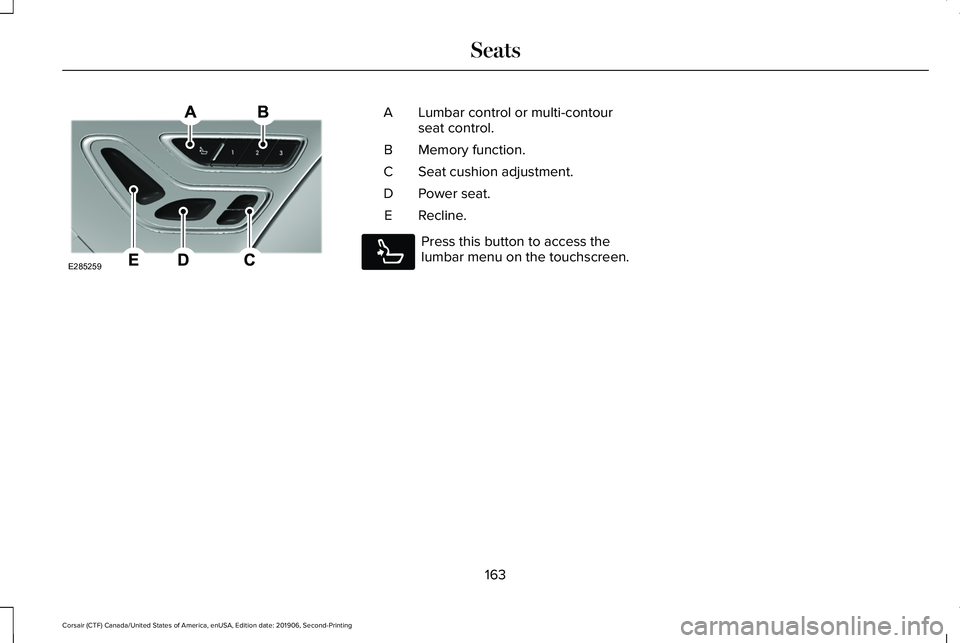
Lumbar control or multi-contour
seat control.
A
Memory function.
B
Seat cushion adjustment.
C
Power seat.
D
Recline.
E Press this button to access the
lumbar menu on the touchscreen.
163
Corsair (CTF) Canada/United States of America, enUSA, Edition date: 201906, Second-Printing SeatsE285259
A E285278
Page 169 of 591
Recalling a PreSet Position
Press and release the preset button
associated with your preferred driving
position. The memory features move to the
position stored for that preset.
Note:
You can only recall a preset memory
position when the ignition is off, or when the
transmission is in park (P) or neutral (N) and
the ignition is on.
Note: Press any seat or mirror adjustment
switch, or any memory button during a
memory recall, to cancel the operation.
You can also recall a preset memory position
by:
• Pressing the unlock button on your
remote control if you linked it to a preset
position.
• Unlocking the driver door if a linked
remote control is present.
Note: Using a linked remote control to recall
your memory position when the ignition is
off moves the seat and steering column to
the Easy Entry position. Linking a PreSet Position to Your
Remote Control
For information on linking a preset position
to your remote control, see the Personal
Profiles section.
Easy Entry and Exit Feature
If you enable the easy entry and exit feature,
it moves the driver seat position rearward up
to 2 in (5 cm) when you switch the ignition
off. The driver seat returns to the previous
position when you switch the ignition on.
You can enable or disable this feature
through the information display.
See
Information Displays (page 123). Personal Profiles
This feature allows you to create multiple
personal profiles enabling users to
personalize vehicle
’s settings. You can
create one profile for each preset memory
seat button along with a guest profile. You
can recall a profile using the touchscreen or
the preset button you selected when you
created your profile. You can also link a
remote control and a mobile device to your
profile, which are used to recall it.
Creating a Personal Profile
Use the touchscreen to create a personal
profile.
1. Switch the ignition on and leave the vehicle in park (P).
2. Select the Personal Profiles button under
Settings.
3. Follow the instructions on the display.
166
Corsair (CTF) Canada/United States of America, enUSA, Edition date: 201906, Second-Printing Seats
Page 172 of 591
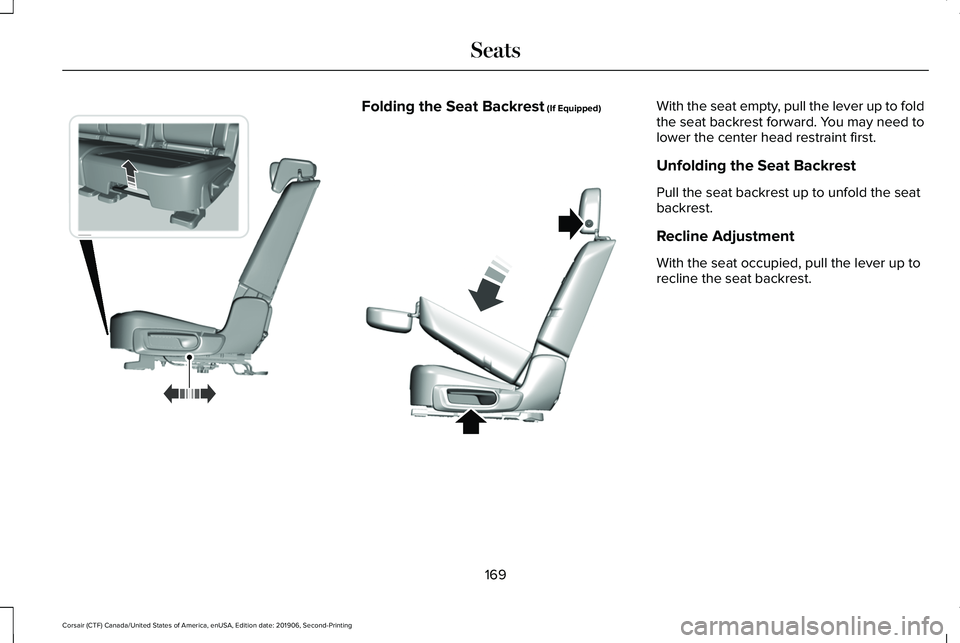
Folding the Seat Backrest (If Equipped) With the seat empty, pull the lever up to fold
the seat backrest forward. You may need to
lower the center head restraint first.
Unfolding the Seat Backrest
Pull the seat backrest up to unfold the seat
backrest.
Recline Adjustment
With the seat occupied, pull the lever up to
recline the seat backrest.
169
Corsair (CTF) Canada/United States of America, enUSA, Edition date: 201906, Second-Printing SeatsE298125 E307842
Page 580 of 591
Creating a MyKey.............................................71
Programming and Changing Configurable
Settings...............................................................72
Creating a Vehicle Wi-Fi Hotspot..............418 Connecting a Device to the Wi-Fi
Hotspot..............................................................418
Finding the Wi-Fi Hotspot Name and Password...........................................................418
Cross Traffic Alert.........................................268 Cross Traffic Alert Behavior When Trailer is
Attached............................................................271
Cross Traffic Alert Indicator.............................272
Cross Traffic Alert Information Messages.........................................................272
Cross Traffic Alert System Limitations............
271
Cross Traffic Alert System Sensors.................271
Switching the System On and Off...................271
Using Cross Traffic Alert...................................268
Cruise Control...............................................243
Cruise Control Indicators
...........................244
Cruise Control - Vehicles With: Adaptive Cruise Control With Lane Centering
.......92
Cruise Control - Vehicles With: Cruise Control............................................................93
Customer Assistance
..................................305 D
Data Recording
................................................12
Comfort, Convenience and Entertainment
Data.......................................................................14
Event Data...............................................................13
Service Data............................................................12
Services That Third Parties Provide..................14
Services That We Provide....................................14
Vehicles With a Modem.......................................15
Vehicles With an Emergency Call System.......16
Vehicles With SYNC..............................................15
Daytime Running Lamps - Vehicles With: Configurable Daytime Running
Lamps............................................................100
Daytime Running Lamps - Vehicles With: Daytime Running Lamps (DRL)...............100
Declaration of Conformity..........................570
Declaration of Conformity - Vehicles With: SYNC 3..........................................................571
Radio Frequency Statement.............................
571
Digital Radio..................................................422 HD Radio Reception and Station
Troubleshooting.............................................423
Direction Indicators
......................................103
Indicating a Lane Change.................................103
Doors and Locks.............................................75 Drive Mode Control
.....................................279
Drive Modes.........................................................279
Drive Modes..................................................279 Conserve..............................................................279
Deep Conditions.................................................279
Excite.....................................................................280
Normal..................................................................\
.280
Slippery.................................................................280
Driver Alert.....................................................259 Using Driver Alert...............................................260
Driver and Passenger Airbags
....................50
Children and Airbags............................................51
Proper Driver and Front Passenger Seating
Adjustment..........................................................51
Driver and Passenger Knee Airbags.........55
Driving Aids
...................................................259
Driving Hints..................................................295
Driving Through Water
...............................295
DRL See: Daytime Running Lamps - Vehicles With:
Configurable Daytime Running Lamps......100
See: Daytime Running Lamps - Vehicles With: Daytime Running Lamps (DRL)...................100
E
Economical Driving
......................................295
577
Corsair (CTF) Canada/United States of America, enUSA, Edition date: 201906, Second-Printing Index
Page 586 of 591
Obstacle Detection..............................................84
Opening and Closing the Liftgate....................82
Setting the Liftgate Open Height.....................84
Stopping the Liftgate Movement......................84
Switching the Power Liftgate On or Off..........85
Power Seats.....................................................161 10-Way Seat Controls..........................................161
24-Way Seat Controls........................................162
Adjusting the Multi-Contour Front Seats With
Active Motion ..................................................165
Power Steering Fluid Check......................339
Power Windows
.............................................108
Accessory Delay..................................................109
Bounce-Back........................................................108
One-Touch Down................................................108
One-Touch Up......................................................108
Rear Window Lock..............................................108
Pre-Collision Assist
......................................273
Adjusting the Pre-Collision Assist
Settings.............................................................276
Blocked Sensors.................................................277
Distance Indication and Alert..........................275
Evasive Steering Assist.....................................276
Using the Pre-Collision Assist System..........274
Programming Your Phone.............................67
Protecting the Environment.........................20
Puncture See: Changing a Road Wheel.........................376 R
Rear Parking Aid...........................................227
Object Distance Indicator................................
229
Rear Seats.......................................................168 Folding the Power Seat Backrest....................170
Folding the Seat Backrest.................................
169
Moving the Seats Backward and Forward.............................................................168
Recline Adjustment.............................................169
Unfolding the Seat Backrest............................169
Rear Under Floor Storage...........................281 Cargo Management System.............................281
Rear View Camera
.......................................237
Using the Rear View Camera System...........237
Rear View Camera See: Rear View Camera....................................
237
Rear Window Wiper and Washers..............97 Rear Window Washer...........................................97
Rear Window Wiper..............................................97
Recommended Towing Weights..............289
Refueling ..........................................................
194
Refueling System Overview.............................194
Refueling System Warning................................
196
Refueling Your Vehicle.......................................195
Remote Control
................................................61
Car Finder...............................................................64
Intelligent Access Key..........................................61 Remote Start..........................................................64
Replacing the Battery..........................................
62
Sounding the Panic Alarm..................................64
Remote Start
...................................................156
Automatic Settings..............................................156
Removing a Headlamp
...............................345
Repairing Minor Paint Damage.................352
Replacement Parts Recommendation
........17
Collision Repairs.....................................................17
Scheduled Maintenance and Mechanical
Repairs..................................................................17
Warranty on Replacement Parts.........................17
Replacing a Lost Key or Remote Control............................................................66
Reporting Safety Defects (Canada Only)...............................................................312
Reporting Safety Defects (U.S. Only)
.......312
Resuming the Set Speed............................244 Resuming the Set Speed from a Complete
Stop...................................................................252
Reverse Braking Assist Indicators............221
Reverse Braking Assist Precautions.......220
Reverse Braking Assist...............................220 Reverse Braking Assist –
Troubleshooting.............................................222
583
Corsair (CTF) Canada/United States of America, enUSA, Edition date: 201906, Second-Printing Index