remote control LINCOLN CORSAIR 2021 Owner's Manual
[x] Cancel search | Manufacturer: LINCOLN, Model Year: 2021, Model line: CORSAIR, Model: LINCOLN CORSAIR 2021Pages: 638, PDF Size: 5.7 MB
Page 93 of 638
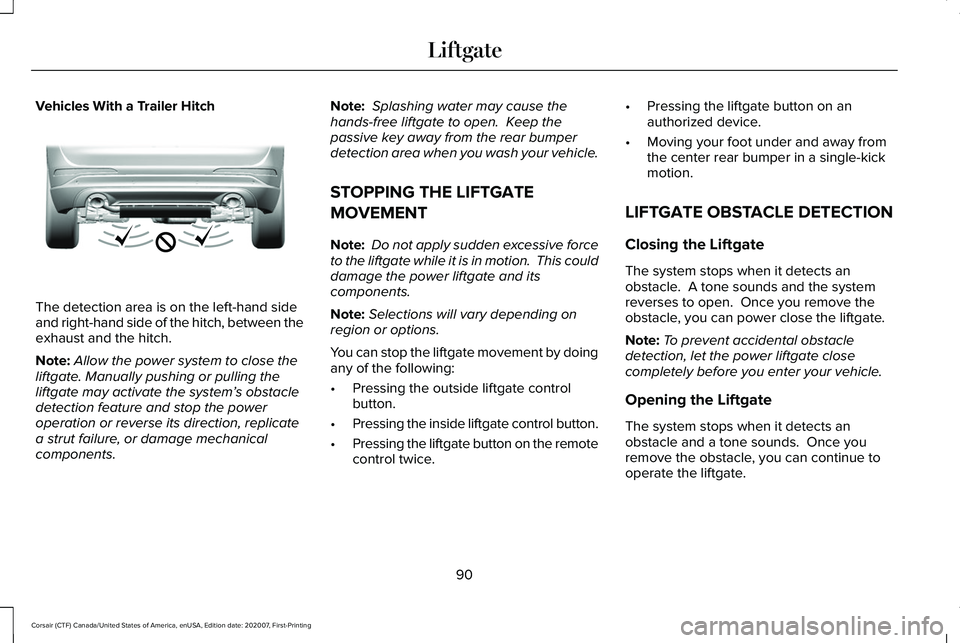
Vehicles With a Trailer Hitch
The detection area is on the left-hand side
and right-hand side of the hitch, between the
exhaust and the hitch.
Note:
Allow the power system to close the
liftgate. Manually pushing or pulling the
liftgate may activate the system’ s obstacle
detection feature and stop the power
operation or reverse its direction, replicate
a strut failure, or damage mechanical
components. Note:
Splashing water may cause the
hands-free liftgate to open. Keep the
passive key away from the rear bumper
detection area when you wash your vehicle.
STOPPING THE LIFTGATE
MOVEMENT
Note: Do not apply sudden excessive force
to the liftgate while it is in motion. This could
damage the power liftgate and its
components.
Note: Selections will vary depending on
region or options.
You can stop the liftgate movement by doing
any of the following:
• Pressing the outside liftgate control
button.
• Pressing the inside liftgate control button.
• Pressing the liftgate button on the remote
control twice. •
Pressing the liftgate button on an
authorized device.
• Moving your foot under and away from
the center rear bumper in a single-kick
motion.
LIFTGATE OBSTACLE DETECTION
Closing the Liftgate
The system stops when it detects an
obstacle. A tone sounds and the system
reverses to open. Once you remove the
obstacle, you can power close the liftgate.
Note: To prevent accidental obstacle
detection, let the power liftgate close
completely before you enter your vehicle.
Opening the Liftgate
The system stops when it detects an
obstacle and a tone sounds. Once you
remove the obstacle, you can continue to
operate the liftgate.
90
Corsair (CTF) Canada/United States of America, enUSA, Edition date: 202007, First-Printing LiftgateE310718
Page 96 of 638
PASSIVE ANTI-THEFT SYSTEM
What Is the Passive Anti-Theft System
The passive anti-theft system prevents
someone from starting the vehicle with an
incorrectly coded key.
Arming the Passive Anti-Theft System
The Passive Anti-Theft System arms
automatically after a short period of time
when you switch the ignition off.
Disarming the Passive Anti-Theft
System
The engine immobilizer disarms when you
switch the ignition on with a correctly coded
key.
Note:
You could have difficulty starting the
vehicle if you have metallic objects,
electronic devices or a second coded key
on the same key chain. ANTI-THEFT ALARM SYSTEM
What Is the Anti-Theft Alarm System
The Anti-Theft Alarm System warns you of
an unauthorized entry to your vehicle.
How Does the Anti-Theft Alarm System
Work
When armed, the anti-theft alarm is triggered
in any of the following ways:
•
If someone opens a door, the liftgate or
the hood without a correctly coded key
or remote control.
• If you turn the power on without a
correctly coded key.
• If the interior sensors detect movement
inside your vehicle.
• If the inclination sensors detect an
attempt to raise your vehicle.
• If someone disconnects the vehicle
battery or the battery backup alarm. If the anti-theft alarm is triggered, the alarm
horn sounds for 30 seconds and the
direction indicators flash for 5 minutes.
Any further attempts to carry out one of the
above sounds the alarm again.
What Is the Perimeter Alarm
The perimeter alarm is designed to detect
unauthorized access to your vehicle.
What Are the Interior Sensors
The interior sensors are designed to detect
any movement inside your vehicle.
The interior sensors are in the overhead
console.
Note:
Do not cover the interior sensors.
What Are the Inclination Sensors
The inclination sensor is designed to detect
an attempt to raise your vehicle, for example
to remove a wheel or to tow it away.
93
Corsair (CTF) Canada/United States of America, enUSA, Edition date: 202007, First-Printing Security
Page 97 of 638
What Is the Battery Backup Alarm
The battery backup alarm is an additional
alarm system that has its own battery and
horn. It is designed to detect if the vehicle
battery or the battery backup alarm is
disconnected.
Arming the Anti-Theft Alarm System
The alarm is ready to arm when there is not
a key in your vehicle.
Lock your vehicle with your remote control
to arm the alarm.
Disarming the Anti-Theft Alarm System
Disarm the alarm by performing any of the
following actions:
•
Unlock the doors or luggage
compartment with the remote control.
• Switch your vehicle on or start your
vehicle. ANTI-THEFT ALARM SYSTEM
SETTINGS
What are the Alarm Security Levels
You can select two levels of alarm security,
all sensors and perimeter sensing.
All Sensors
All sensors is the standard setting.
In all sensors, all equipped sensors are on
when you arm the alarm.
Note:
Do not arm the alarm with all sensors
if passengers, animals or other moving
objects are inside your vehicle.
Perimeter Sensing
In perimeter sensing, the interior sensors are
off when you arm the alarm.
All the other equipped sensors activate when
you arm the alarm in this mode. Setting the Alarm Security Level
1. Press Settings on the touchscreen.
2. Press
Vehicle Settings.
3. Press
Alarm System.
4. Press
Sensor Set.
5. Press a setting.
What Is Ask on Exit
You can choose which level of security you
require after you switch the ignition off.
Note: If you do not choose a setting, the
system defaults to all sensors.
Switching Ask on Exit On and Off
1. Press
Settings on the touchscreen.
2. Press
Vehicle Settings.
3. Press
Alarm System.
4. Switch
Ask on Exit on or off.
94
Corsair (CTF) Canada/United States of America, enUSA, Edition date: 202007, First-Printing Security
Page 99 of 638
Security – Frequently Asked Questions
What should I do if there is any potential
alarm problem with my vehicle?
Take all remote controls to an
authorized dealer if there is any
potential alarm problem with your
vehicle.
What should I do if the vehicle is unable to
start with a correctly coded key? Have your vehicle checked as soon as
possible.
96
Corsair (CTF) Canada/United States of America, enUSA, Edition date: 202007, First-Printing Security
Page 111 of 638
1.
Select Settings. See Settings (page 526).
2. Select
Vehicle.
3. Select
Lighting.
INTERIOR LAMPS
The lamps turn on under the following
conditions:
• You open any door.
• You press a button on the remote control.
• You press the all lamps on button on the
overhead console.
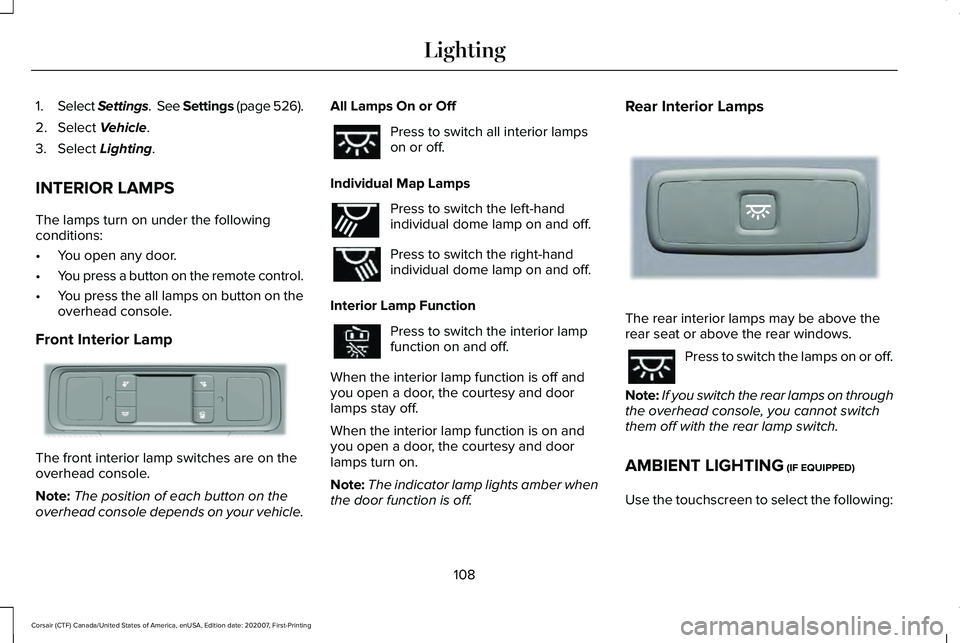
Front Interior Lamp The front interior lamp switches are on the
overhead console.
Note:
The position of each button on the
overhead console depends on your vehicle. All Lamps On or Off Press to switch all interior lamps
on or off.
Individual Map Lamps Press to switch the left-hand
individual dome lamp on and off.
Press to switch the right-hand
individual dome lamp on and off.
Interior Lamp Function Press to switch the interior lamp
function on and off.
When the interior lamp function is off and
you open a door, the courtesy and door
lamps stay off.
When the interior lamp function is on and
you open a door, the courtesy and door
lamps turn on.
Note: The indicator lamp lights amber when
the door function is off. Rear Interior Lamps
The rear interior lamps may be above the
rear seat or above the rear windows.
Press to switch the lamps on or off.
Note: If you switch the rear lamps on through
the overhead console, you cannot switch
them off with the rear lamp switch.
AMBIENT LIGHTING
(IF EQUIPPED)
Use the touchscreen to select the following:
108
Corsair (CTF) Canada/United States of America, enUSA, Edition date: 202007, First-Printing LightingE281230 E262193 E281231
Page 116 of 638
Accessory Delay
You can use the window controls for several
minutes after switching off the ignition or
until opening either front door.
GLOBAL OPENING AND CLOSING
You can use the remote control to operate
the windows with the ignition off.
Note:
You can switch this feature on and off
in the information display or contact an
authorized dealer. See General Information
(page 131).
Note: To operate this feature, make sure the
accessory delay is not switched on.
Opening the Windows
You can open the windows only for a short
time after you unlock your vehicle with the
remote control. After you unlock your vehicle,
press and hold the remote control unlock
button to open the windows. Release the
button once movement starts. Press the lock
or unlock button to stop movement. Closing the Windows WARNING:
When closing the
windows, you should verify they are free
of obstructions and make sure that children
and pets are not in the proximity of the
window openings.
To close the windows, press and hold the
remote control lock button. Release the
button once movement starts. Press the lock
or unlock button to stop movement.
EXTERIOR MIRRORS
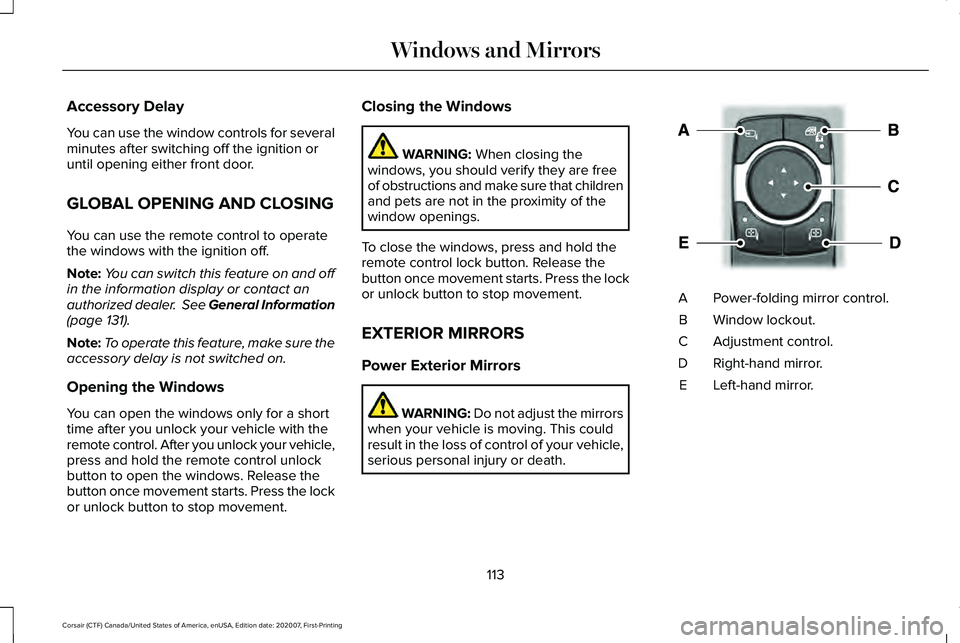
Power Exterior Mirrors WARNING: Do not adjust the mirrors
when your vehicle is moving. This could
result in the loss of control of your vehicle,
serious personal injury or death. Power-folding mirror control.
A
Window lockout.
B
Adjustment control.
C
Right-hand mirror.
D
Left-hand mirror.
E
113
Corsair (CTF) Canada/United States of America, enUSA, Edition date: 202007, First-Printing Windows and MirrorsE295322
Page 164 of 638
WHAT IS REMOTE START
The system allows you to remotely start your
vehicle and to adjust the interior temperature
according to the settings that you chose.
REMOTE START LIMITATIONS
Remote start does not work if:
•
The alarm horn is sounding.
• The hood is open.
• The transmission is not in park (P).
• Remote start is not enabled.
• The ignition is on.
Note: Do not use remote start if your fuel
level is low.
ENABLING REMOTE START
1. Press Settings on the touchscreen.
2. Press
Vehicle Settings.
3. Press
Remote Start Setup.
4. Switch
System on or off. Note:
To use remote start, make sure that
the modem is enabled.
See Network
Connectivity (page 462).
REMOTELY STARTING THE ENGINE WARNING:
To avoid exhaust fumes,
do not use remote start if your vehicle is
parked indoors or in areas that are not well
ventilated.
To start the engine, do the following: Press the button on the remote
control.
Within three seconds, press the
button on the remote control.
Within three seconds, press the
button again.
Note: You can also use the Lincoln Way App
to start the engine.
Note: The direction indicators flash twice.
Note: The parking lamps turn on when the
engine is running. Note:
The horn sounds if the system fails to
start.
Note: All other vehicle systems remain off
when you remotely started the engine.
Note: The vehicle remains secure when you
remotely start the engine. Make sure a valid
key is inside your vehicle to switch the
ignition on and drive your vehicle.
EXTENDING THE REMOTE START
DURATION
To extend the engine running duration
during remote start, do the following: Press the button on the remote
control.
Within three seconds, press the
button on the remote control.
Within three seconds, press the
button again.
Note: You can extend the engine running
duration to a maximum of 30 minutes.
161
Corsair (CTF) Canada/United States of America, enUSA, Edition date: 202007, First-Printing Remote StartE138623 E138625 E138623 E138625
Page 165 of 638
REMOTELY STOPPING THE
ENGINE
Press the button on the remote
control to stop the engine.
Note: You can also use the Lincoln Way App
to stop the engine.
REMOTE START REMOTE
CONTROL INDICATORS
Remote Control Feedback
An LED on the remote control provides status
feedback of remote start or stop commands. Status
LED
Remote startsuccessful.
Solid green.
Remote stopsuccessful.
Solid red.
Request failed or
status not received.
Blinking red.
Status incomplete.
Blinking green.
REMOTE START SETTINGS
Switching Climate Control Auto Mode
On and Off
1. Using the information display controls on
the steering wheel, select Settings.
2. Select
Vehicle.
3. Select
Remote Start.
4. Select
Climate Control.
5. Switch
Auto on and off. Note:
If you switch the auto mode on, the
system attempts to heat or cool the interior
to
72°F (22°C).
Note: When you switch the ignition on, the
climate control system returns to the last
used settings.
Note: The heated windshield, heated rear
window, heated mirrors, heated seats and
heated steering wheel could turn on in cold
weather.
Switching Climate Control Last
Settings On and Off
1. Using the information display controls on
the steering wheel, select
Settings.
2. Select
Vehicle.
3. Select
Remote Start.
4. Select
Climate Control.
5. Switch
Last settings on or off.
Note: If you switch the last settings on, the
system remembers the last used settings.
162
Corsair (CTF) Canada/United States of America, enUSA, Edition date: 202007, First-Printing Remote StartE138625
Page 166 of 638
Switching the Heated Seat Settings On
and Off
1.
Using the information display controls on
the steering wheel, select Settings.
2. Select
Vehicle.
3. Select
Remote Start.
4. Select
Front Seats.
5. Select
Auto or Off.
Note: If you switch the heated seat settings
on, the heated seats turn on during cold
weather.
Note: You cannot adjust the heated seat
settings when you have remotely started the
engine.
Switching the Heated Steering Wheel
Settings On and Off
1. Using the information display controls on
the steering wheel, select
Settings.
2. Select
Vehicle.
3. Select
Remote Start.
4. Select
Front Seats & Wheel. 5. Select
Auto or Off.
Note: If you switch the heated steering wheel
settings on, the heated steering wheel turns
on during cold weather.
Note: You cannot adjust the heated steering
wheel settings when you have remotely
started the engine.
Setting the Remote Start Duration
You can set a duration for the engine to run.
Note: Wait a few seconds before remotely
starting the engine after the engine stops
running.
1. Using the information display controls on
the steering wheel, select
Settings.
2. Select
Vehicle.
3. Select
Remote Start.
4. Select
Duration.
163
Corsair (CTF) Canada/United States of America, enUSA, Edition date: 202007, First-Printing Remote Start
Page 181 of 638
Recalling a PreSet Position
Press and release the preset button
associated with your preferred driving
position. The memory features move to the
position stored for that preset.
Note:
You can only recall a preset memory
position when the ignition is off, or when the
transmission is in park (P) or neutral (N) and
the ignition is on.
Note: Press any seat or mirror adjustment
switch, or any memory button during a
memory recall, to cancel the operation.
You can also recall a preset memory position
by:
• Pressing the unlock button on your
remote control if you linked it to a preset
position.
• Unlocking the driver door if a linked
remote control is present.
Note: Using a linked remote control to recall
your memory position when the ignition is
off moves the seat and steering column to
the Easy Entry position. Linking a PreSet Position to Your
Remote Control
For information on linking a preset position
to your remote control, see the Personal
Profiles section.
Easy Entry and Exit Feature
If you enable the easy entry and exit feature,
it moves the driver seat position rearward up
to 2 in (5 cm) when you switch the ignition
off. The driver seat returns to the previous
position when you switch the ignition on.
You can enable or disable this feature
through the information display.
See
Information Displays (page 131). Personal Profiles
This feature allows you to create multiple
personal profiles enabling users to
personalize vehicle
’s settings. You can
create one profile for each preset memory
seat button along with a guest profile. You
can recall a profile using the touchscreen or
the preset button you selected when you
created your profile. You can also link a
remote control and a mobile device to your
profile, which are used to recall it.
Creating a Personal Profile
Use the touchscreen to create a personal
profile.
1. Switch the ignition on and leave the vehicle in park (P).
2. Select the Personal Profiles button under
Settings.
3. Follow the instructions on the display.
178
Corsair (CTF) Canada/United States of America, enUSA, Edition date: 202007, First-Printing Seats