key LINCOLN CORSAIR 2021 Service Manual
[x] Cancel search | Manufacturer: LINCOLN, Model Year: 2021, Model line: CORSAIR, Model: LINCOLN CORSAIR 2021Pages: 638, PDF Size: 5.7 MB
Page 153 of 638
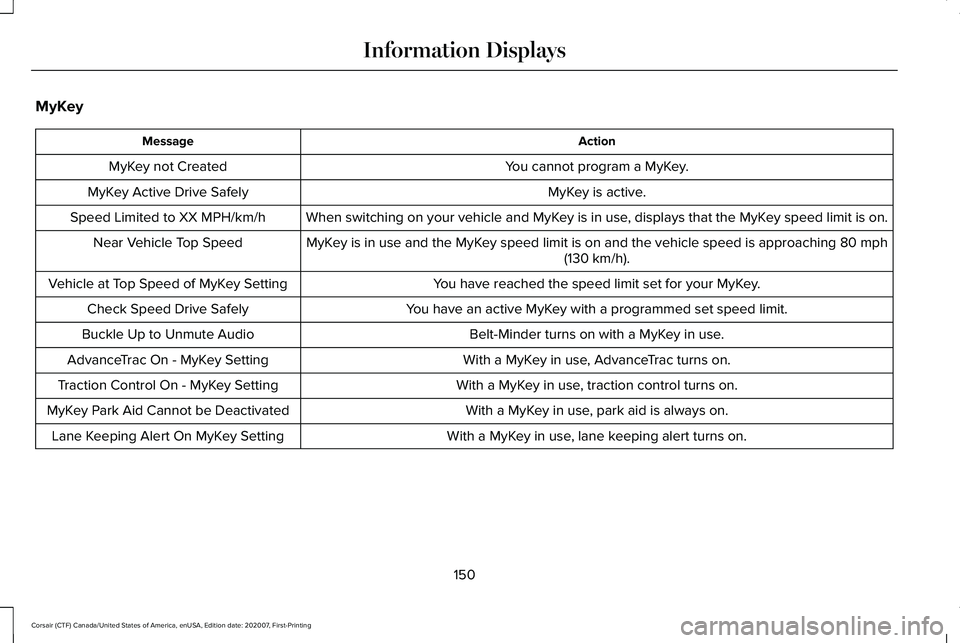
MyKey
Action
Message
You cannot program a MyKey.
MyKey not Created
MyKey is active.
MyKey Active Drive Safely
When switching on your vehicle and MyKey is in use, displays that the MyKey speed limit is on.
Speed Limited to XX MPH/km/h
MyKey is in use and the MyKey speed limit is on and the vehicle speed is approaching 80 mph
(130 km/h).
Near Vehicle Top Speed
You have reached the speed limit set for your MyKey.
Vehicle at Top Speed of MyKey Setting
You have an active MyKey with a programmed set speed limit.
Check Speed Drive Safely
Belt-Minder turns on with a MyKey in use.
Buckle Up to Unmute Audio
With a MyKey in use, AdvanceTrac turns on.
AdvanceTrac On - MyKey Setting
With a MyKey in use, traction control turns on.
Traction Control On - MyKey Setting
With a MyKey in use, park aid is always on.
MyKey Park Aid Cannot be Deactivated
With a MyKey in use, lane keeping alert turns on.
Lane Keeping Alert On MyKey Setting
150
Corsair (CTF) Canada/United States of America, enUSA, Edition date: 202007, First-Printing Information Displays
Page 164 of 638
WHAT IS REMOTE START
The system allows you to remotely start your
vehicle and to adjust the interior temperature
according to the settings that you chose.
REMOTE START LIMITATIONS
Remote start does not work if:
•
The alarm horn is sounding.
• The hood is open.
• The transmission is not in park (P).
• Remote start is not enabled.
• The ignition is on.
Note: Do not use remote start if your fuel
level is low.
ENABLING REMOTE START
1. Press Settings on the touchscreen.
2. Press
Vehicle Settings.
3. Press
Remote Start Setup.
4. Switch
System on or off. Note:
To use remote start, make sure that
the modem is enabled.
See Network
Connectivity (page 462).
REMOTELY STARTING THE ENGINE WARNING:
To avoid exhaust fumes,
do not use remote start if your vehicle is
parked indoors or in areas that are not well
ventilated.
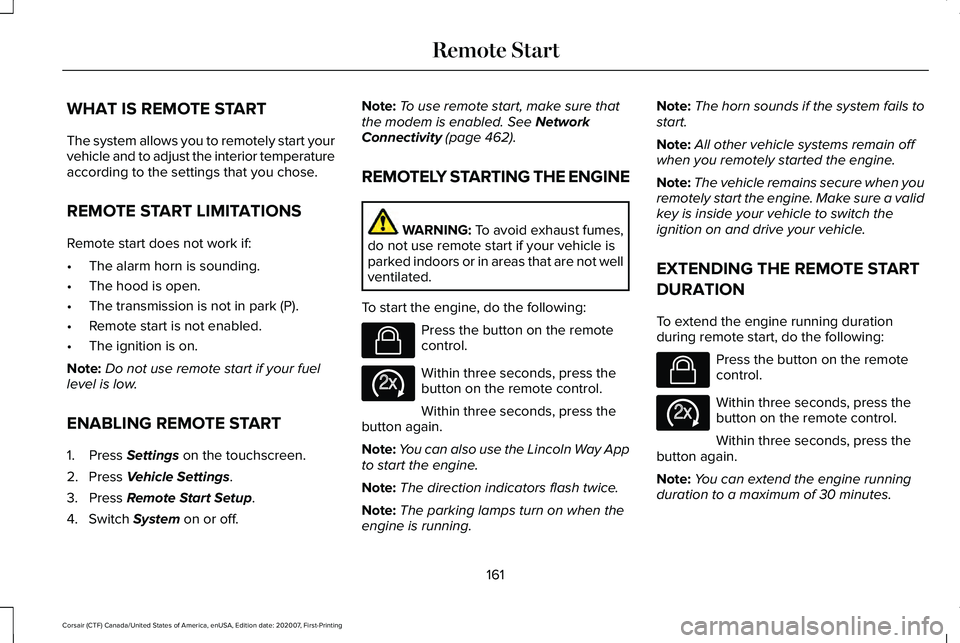
To start the engine, do the following: Press the button on the remote
control.
Within three seconds, press the
button on the remote control.
Within three seconds, press the
button again.
Note: You can also use the Lincoln Way App
to start the engine.
Note: The direction indicators flash twice.
Note: The parking lamps turn on when the
engine is running. Note:
The horn sounds if the system fails to
start.
Note: All other vehicle systems remain off
when you remotely started the engine.
Note: The vehicle remains secure when you
remotely start the engine. Make sure a valid
key is inside your vehicle to switch the
ignition on and drive your vehicle.
EXTENDING THE REMOTE START
DURATION
To extend the engine running duration
during remote start, do the following: Press the button on the remote
control.
Within three seconds, press the
button on the remote control.
Within three seconds, press the
button again.
Note: You can extend the engine running
duration to a maximum of 30 minutes.
161
Corsair (CTF) Canada/United States of America, enUSA, Edition date: 202007, First-Printing Remote StartE138623 E138625 E138623 E138625
Page 182 of 638
Linking a Personal Profile to Your Remote
Control or Mobile Device
You can save preset memory positions for
up to three remote controls by assigning a
remote control to a personal profile using
the touchscreen. You can assign three
additional remote controls set up as Phone
as a Key.
Use the touchscreen to link a remote control,
mobile device or both to a personal profile.
1. Switch the ignition on and leave the
vehicle in park (P).
2. Select the Personal Profiles button under
Settings.
3. Touch the arrow for the profile you wish to link to a remote control or mobile
device.
4. Select remote control, mobile device, or
both.
5. Follow the instructions on the display.
Note: To successfully link a mobile device,
the mobile device must be in your vehicle,
and must have previously been setup as a
remote control for your vehicle. Note:
If more than one linked remote control
is in range, the memory function moves to
the settings of the first key to initiate a
memory recall.
Note: The guest profile consists of existing
settings when there is no driver profile
created. After you create a driver profile, the
guest profile serves as an additional driver
profile.
Note: You cannot link a personalized name,
a memory seat button or a remote control
to a guest profile.
Personal Settings
Personal Profiles allow you to personalize
positional settings such as seats and mirrors,
as well as non-positional settings such as
radio, navigation, driver assist and system
settings. See SYNC™ 3 (page 478). You
cannot change the menu locations and
settings of those personalized features with
Personal Profiles.
Note: Non-positional settings save to the
active driver profile whenever you change
a setting. Note:
You can save positional settings if you
press and hold a memory seat button.
Recalling and Changing a Profile
You can recall a profile by:
• Using a remote control or mobile device
linked to a driver profile to access the
remote start feature, press an unlock
button or open the door with the exterior
door handle.
• Pressing a memory seat button linked to
a driver profile.
• Using the Personal Profiles menu on the
touchscreen.
Note: The recalled profile replaces the
previously active profile. If the active profile
is not your preferred profile, you can change
it using any of the three methods listed.
179
Corsair (CTF) Canada/United States of America, enUSA, Edition date: 202007, First-Printing Seats
Page 199 of 638
GENERAL INFORMATION
WARNING: Extended idling at high
engine speeds can produce very high
temperatures in the engine and exhaust
system, creating the risk of fire or other
damage. WARNING:
Do not park, idle or drive
your vehicle on dry grass or other dry
ground cover. The emission system heats
up the engine compartment and exhaust
system, creating the risk of fire. WARNING:
Do not start the engine
in a closed garage or in other enclosed
areas. Exhaust fumes can be toxic. Always
open the garage door before you start the
engine. WARNING: Exhaust leaks may result
in entry of harmful and potentially lethal
fumes into the passenger compartment. If
you smell exhaust fumes inside your
vehicle, have your vehicle inspected
immediately. Do not drive if you smell
exhaust fumes.
If you disconnect the battery, your vehicle
may exhibit some unusual driving
characteristics for approximately 5 mi (8 km)
after you reconnect it. This is because the
engine management system must realign
itself with the engine. You can disregard any
unusual driving characteristics during this
period.
The powertrain control system meets all
Canadian interference-causing equipment
standard requirements regulating the
impulse electrical field or radio noise.
When you start the engine, avoid pressing
the accelerator pedal before and during
operation. Only use the accelerator pedal
when you have difficulty starting the engine. KEYLESS STARTING
Note:
The keyless starting system may not
function if the key is close to metal objects
or electronic devices such as cellular
phones.
Note: A valid key must be located inside
your vehicle to switch the ignition on and
start the engine.
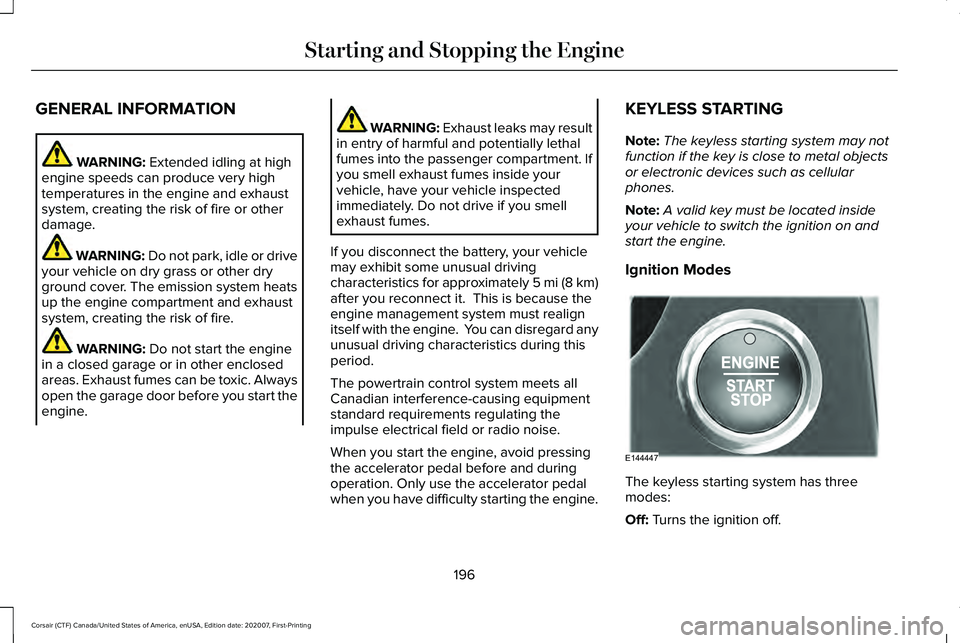
Ignition Modes The keyless starting system has three
modes:
Off:
Turns the ignition off.
196
Corsair (CTF) Canada/United States of America, enUSA, Edition date: 202007, First-Printing Starting and Stopping the EngineE144447
Page 200 of 638
•
Without applying the brake pedal, press
and release the button once when the
ignition is in the on mode, or when the
engine is running but the vehicle is not
moving.
On: All electrical circuits are operational and
the warning lamps and indicators illuminate.
• Without applying the brake pedal, press
and release the button once.
Note: You may have to press the push
button ignition switch twice to switch the
ignition on.
Start:
Starts the engine.
• Press the brake pedal, and then press
the button for any length of time. An
indicator light on the button illuminates
when then ignition is on and when the
engine starts. STARTING A GASOLINE ENGINE
When you start the engine, the idle speed
increases, this helps to warm up the engine.
If the engine idle speed does not slow down,
have your vehicle checked as soon as
possible.
Note:
If your vehicle has remote start, you
can start your vehicle with the remote, and
then drive away by pressing the brake pedal
and pushing a button on the transmission.
This allows you to drive away without
pressing the engine start button.
Before starting the engine, check the
following:
• Make sure all occupants have fastened
their seatbelts.
• Make sure the headlamps and electrical
accessories are off.
• Make sure the parking brake is on.
• Make sure the transmission is in park (P).
Note: Do not touch the accelerator pedal.
1. Fully press the brake pedal.
2. Press the push button ignition switch. The system does not function if:
•
The key frequencies are jammed.
• The key battery has no charge.
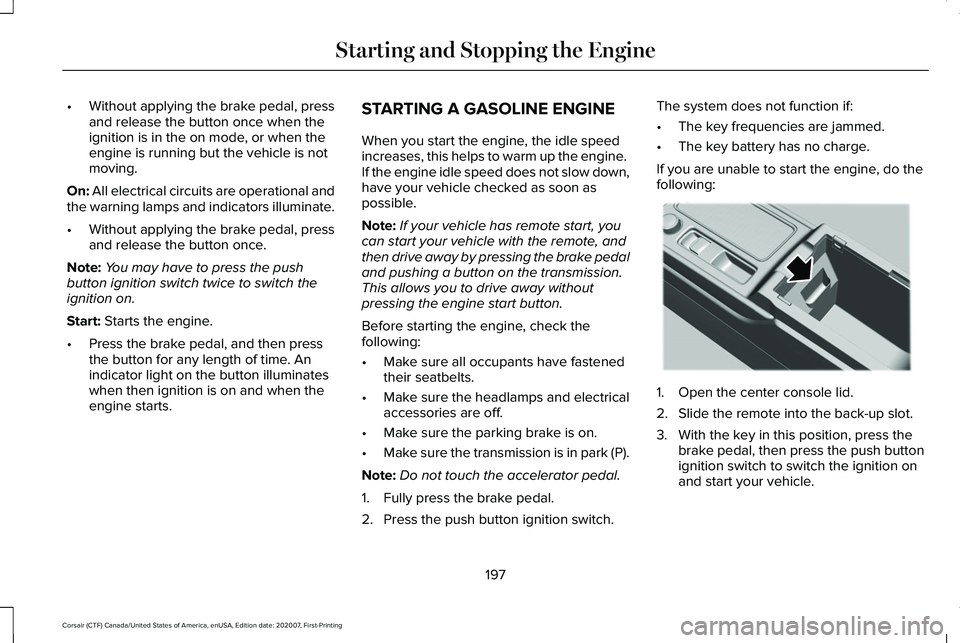
If you are unable to start the engine, do the
following: 1. Open the center console lid.
2. Slide the remote into the back-up slot.
3. With the key in this position, press the
brake pedal, then press the push button
ignition switch to switch the ignition on
and start your vehicle.
197
Corsair (CTF) Canada/United States of America, enUSA, Edition date: 202007, First-Printing Starting and Stopping the EngineE306288
Page 201 of 638
Fast Restart
The fast restart feature allows you to restart
the engine within 20 seconds of switching it
off, even if a valid key is not present.
Within 20 seconds of switching the engine
off, press the brake pedal and press the push
button ignition switch. After 20 seconds, you
can no longer restart the engine without the
key present inside your vehicle.
Once the engine starts, it remains running
until you press the push button ignition
switch, even if the system does not detect a
valid key. If you open and close a door while
the engine is running, the system searches
for a valid key. You cannot restart the engine
if the system does not detect a valid key
within 20 seconds.
Vehicles using Phone as a Key
Note:
Do not touch the accelerator pedal.
Note: You must have your Phone as a Key
in your vehicle to shift the transmission out
of park (P). 1. Fully depress the brake pedal.
2. Press the push button ignition switch.
The system does not function if:
•
The Bluetooth enabled phone
frequencies are jammed.
• The Phone as a Key battery is low or fully
discharged. See Phone as a Key (page
68).
Automatic Engine Shutdown
If your vehicle has a keyless ignition, it has
a feature that shuts down the engine if it has
been idling for an extended period. The
ignition also turns off in order to save battery
power. Before the engine shuts down, a
message appears in the information display
showing a timer counting down from 30
seconds. If you do not intervene within 30
seconds, the engine shuts down. Another
message appears in the information display
to inform you that the engine has shut down
in order to save fuel. Start your vehicle as
you normally do. Automatic Engine Shutdown Override
Note:
You cannot permanently switch off
the automatic engine shutdown feature.
When you switch it off temporarily, it turns
on at the next ignition cycle.
You can stop the engine shutdown, or reset
the timer, at any point before the 30-second
countdown has expired by doing any of the
following:
• You can reset the timer by interacting
with your vehicle, such as pressing the
brake pedal or accelerator pedal.
• You can temporarily switch off the
shutdown feature any time the ignition is
on, for the current ignition cycle only. Use
the information display to do so.
See
Information Displays (page 131).
• During the countdown before engine
shutdown, a message appears prompting
you to press OK or RESET, depending on
your type of information display, to
temporarily switch the feature off.
198
Corsair (CTF) Canada/United States of America, enUSA, Edition date: 202007, First-Printing Starting and Stopping the Engine
Page 202 of 638
Stopping the Engine When Your
Vehicle is Stationary
1. Put the transmission in park (P).
2. Press the push button ignition switch
once.
3. Apply the parking brake.
Note: This switches off the ignition, all
electrical circuits, warning lamps and
indicators.
Note: If the engine is idling for 30 minutes,
the ignition and engine shut down.
Vehicles using Phone as a Key
1. Shift into park (P).
2. Press the push button ignition switch.
3. Apply the parking brake.
Note: The ignition, all electrical circuits and
all warning lamps and indicators turn off.
Note: If the engine is idling for 30 minutes,
the ignition and engine shut down. Stopping the Engine When Your
Vehicle is Moving WARNING: Switching off the engine
when your vehicle is still moving results in
a significant decrease in braking
assistance. Higher effort is required to
apply the brakes and to stop your vehicle.
A significant decrease in steering
assistance could also occur. The steering
does not lock, but higher effort could be
required to steer your vehicle. When you
switch the ignition off, some electrical
circuits, for example airbags, also turn off.
If you unintentionally switch the ignition
off, shift into neutral (N) and restart the
engine.
1. Put the transmission into neutral (N) and
use the brakes to bring your vehicle to a
safe stop.
2. When your vehicle has stopped, shift into
park (P).
3. Press and hold the push button ignition switch for one second, or press it three
times within two seconds. 4. Apply the parking brake.
Vehicles using Phone as a Key
1.
Put the transmission into neutral (N) and
use the brakes to bring your vehicle to a
safe stop.
2. When your vehicle has stopped, shift into
park (P).
3. Press and hold the push button ignition switch, or press it three times within two
seconds.
4. Apply the parking brake.
Guarding Against Exhaust Fumes WARNING: Exhaust leaks may result
in entry of harmful and potentially lethal
fumes into the passenger compartment. If
you smell exhaust fumes inside your
vehicle, have your vehicle inspected
immediately. Do not drive if you smell
exhaust fumes.
199
Corsair (CTF) Canada/United States of America, enUSA, Edition date: 202007, First-Printing Starting and Stopping the Engine
Page 203 of 638
Important Ventilating Information
If you stop your vehicle and the leave the
engine idling for long periods, we
recommend that you do one of the following:
•
Open the windows at least 1 in (2.5 cm).
• Set your climate control to outside air.
STARTING A HYBRID ELECTRIC
VEHICLE SYSTEM
When the engine starts for the first time on
your drive, the idle speed increases, this
helps to warm up the engine. If the engine
idle speed does not slow down, have your
vehicle checked as soon as possible.
Before starting your vehicle, check the
following:
• Make sure all occupants fasten their
seatbelt.
• Make sure the headlamps and electrical
accessories are off.
• Make sure the parking brake is on.
• Make sure the transmission is in park (P). Note:
Do not touch the accelerator pedal.
1. Fully press the brake pedal.
2. Press the push button ignition switch.
Note: The green ready indicator illuminates
letting you know that your vehicle is ready
for driving. Since your vehicle is equipped
with a silent key start, the engine may not
start when your vehicle starts.
The system does not function if:
• The key frequencies are jammed.
• The key battery has no charge.
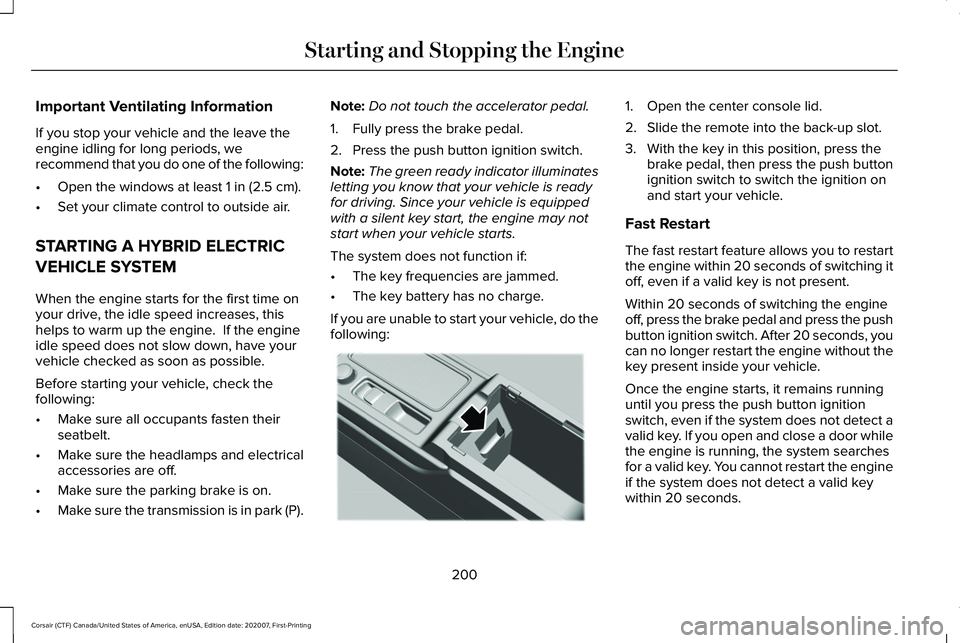
If you are unable to start your vehicle, do the
following: 1. Open the center console lid.
2. Slide the remote into the back-up slot.
3. With the key in this position, press the
brake pedal, then press the push button
ignition switch to switch the ignition on
and start your vehicle.
Fast Restart
The fast restart feature allows you to restart
the engine within 20 seconds of switching it
off, even if a valid key is not present.
Within 20 seconds of switching the engine
off, press the brake pedal and press the push
button ignition switch. After 20 seconds, you
can no longer restart the engine without the
key present inside your vehicle.
Once the engine starts, it remains running
until you press the push button ignition
switch, even if the system does not detect a
valid key. If you open and close a door while
the engine is running, the system searches
for a valid key. You cannot restart the engine
if the system does not detect a valid key
within 20 seconds.
200
Corsair (CTF) Canada/United States of America, enUSA, Edition date: 202007, First-Printing Starting and Stopping the EngineE306288
Page 204 of 638
Vehicles using Phone as a Key
Note:
Do not touch the accelerator pedal.
Note: You must have your Phone as a Key
in your vehicle in order to shift the
transmission out of park (P).
1. Fully depress the brake pedal.
2. Press the push button ignition switch.
The system does not function if:
• The Bluetooth enabled phone
frequencies are jammed.
• The Phone as a Key battery is low or fully
discharged. See Phone as a Key (page
68).
Automatic Shutdown
This feature shuts down your vehicle if it has
been idling for an extended period. The
ignition also turns off in order to save battery
power. Before your vehicle shuts down, a
message appears in the information display
showing a timer counting down from 30 seconds. If you do not intervene within 30
seconds, your vehicle shuts down. Another
message appears in the information display
to inform you that your vehicle has shut down
in order to save fuel. Start your vehicle as
you normally do.
Automatic Shutdown Override
Note:
You cannot permanently switch off
the automatic engine shutdown feature.
When you switch it off temporarily, it turns
on at the next ignition cycle.
You can stop the shutdown, or reset the
timer, at any point before the 30-second
countdown has expired by doing any of the
following: •
Interacting with your vehicle, for example
pressing the brake or accelerator pedal.
• You can temporarily switch off the
shutdown feature any time the ignition is
on (for the current ignition cycle only).
Use the information display to do so. See
Information Displays
(page 131).
• During the countdown before shutdown,
you are prompted to press OK or RESET
(depending on your type of information
display) to temporarily switch the feature
off (for the current ignition cycle only).
Switching Off Your Vehicle When It Is
Stationary
1. Shift into park (P).
2. Press the push button ignition switch.
3. Apply the parking brake.
Note: This switches off the ignition, all
electrical circuits, warning lamps and
indicators.
Note: If the engine is idling for 30 minutes,
the ignition and engine shut down.
201
Corsair (CTF) Canada/United States of America, enUSA, Edition date: 202007, First-Printing Starting and Stopping the Engine
Page 205 of 638
Vehicles using Phone as a Key
1. Shift into park (P).
2. Press the push button ignition switch.
3. Apply the parking brake.
Note:
This switches off the ignition, all
electrical circuits, warning lamps and
indicators.
Note: If the engine is idling for 30 minutes,
the ignition and engine shut down.
Switching Off Your Vehicle When It Is
Moving WARNING: Switching off the engine
when your vehicle is still moving results in
a significant decrease in braking
assistance. Higher effort is required to
apply the brakes and to stop your vehicle.
A significant decrease in steering
assistance could also occur. The steering
does not lock, but higher effort could be required to steer your vehicle. When you
switch the ignition off, some electrical
circuits, for example airbags, also turn off.
If you unintentionally switch the ignition
off, shift into neutral (N) and restart the
engine.
1. Shift into neutral (N) and use the brakes to bring your vehicle to a safe stop.
2. When your vehicle has stopped, shift into
park (P).
3. Press and hold the push button ignition switch until the engine stops, or press it
three times within two seconds.
4. Apply the parking brake.
Vehicles using Phone as a Key
1. Shift into neutral (N) and use the brakes to bring your vehicle to a safe stop.
2. When your vehicle has stopped, shift into
park (P).
3. Press and hold the push button ignition switch, or press it three times within two
seconds.
4. Apply the parking brake. Guarding Against Exhaust Fumes WARNING: Exhaust leaks may result
in entry of harmful and potentially lethal
fumes into the passenger compartment. If
you smell exhaust fumes inside your
vehicle, have your vehicle inspected
immediately. Do not drive if you smell
exhaust fumes.
Important Ventilating Information
If you stop your vehicle and then leave the
engine idling for long periods of time, we
recommend that you do one of the following:
• Open the windows at least 1 in (3 cm).
• Set your climate control to outside air.
ENGINE BLOCK HEATER
(IF EQUIPPED) WARNING:
Failure to follow engine
block heater instructions could result in
property damage or serious personal
injury.
202
Corsair (CTF) Canada/United States of America, enUSA, Edition date: 202007, First-Printing Starting and Stopping the Engine