cooling LINCOLN CORSAIR 2021 Owners Manual
[x] Cancel search | Manufacturer: LINCOLN, Model Year: 2021, Model line: CORSAIR, Model: LINCOLN CORSAIR 2021Pages: 638, PDF Size: 5.7 MB
Page 124 of 638
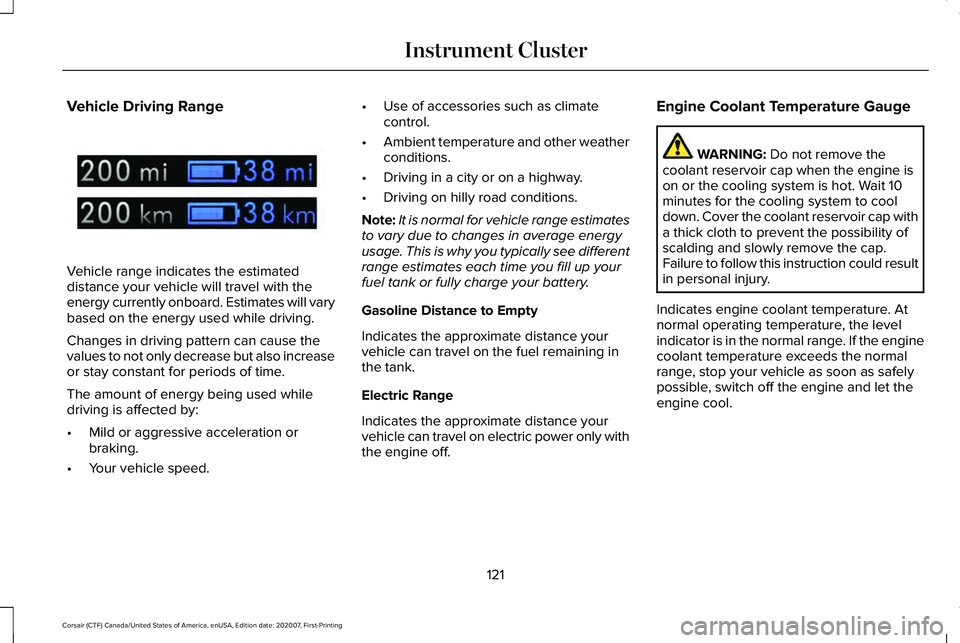
Vehicle Driving Range
Vehicle range indicates the estimated
distance your vehicle will travel with the
energy currently onboard. Estimates will vary
based on the energy used while driving.
Changes in driving pattern can cause the
values to not only decrease but also increase
or stay constant for periods of time.
The amount of energy being used while
driving is affected by:
•
Mild or aggressive acceleration or
braking.
• Your vehicle speed. •
Use of accessories such as climate
control.
• Ambient temperature and other weather
conditions.
• Driving in a city or on a highway.
• Driving on hilly road conditions.
Note: It is normal for vehicle range estimates
to vary due to changes in average energy
usage. This is why you typically see different
range estimates each time you fill up your
fuel tank or fully charge your battery.
Gasoline Distance to Empty
Indicates the approximate distance your
vehicle can travel on the fuel remaining in
the tank.
Electric Range
Indicates the approximate distance your
vehicle can travel on electric power only with
the engine off. Engine Coolant Temperature Gauge WARNING: Do not remove the
coolant reservoir cap when the engine is
on or the cooling system is hot. Wait 10
minutes for the cooling system to cool
down. Cover the coolant reservoir cap with
a thick cloth to prevent the possibility of
scalding and slowly remove the cap.
Failure to follow this instruction could result
in personal injury.
Indicates engine coolant temperature. At
normal operating temperature, the level
indicator is in the normal range. If the engine
coolant temperature exceeds the normal
range, stop your vehicle as soon as safely
possible, switch off the engine and let the
engine cool.
121
Corsair (CTF) Canada/United States of America, enUSA, Edition date: 202007, First-Printing Instrument ClusterE320830
Page 126 of 638
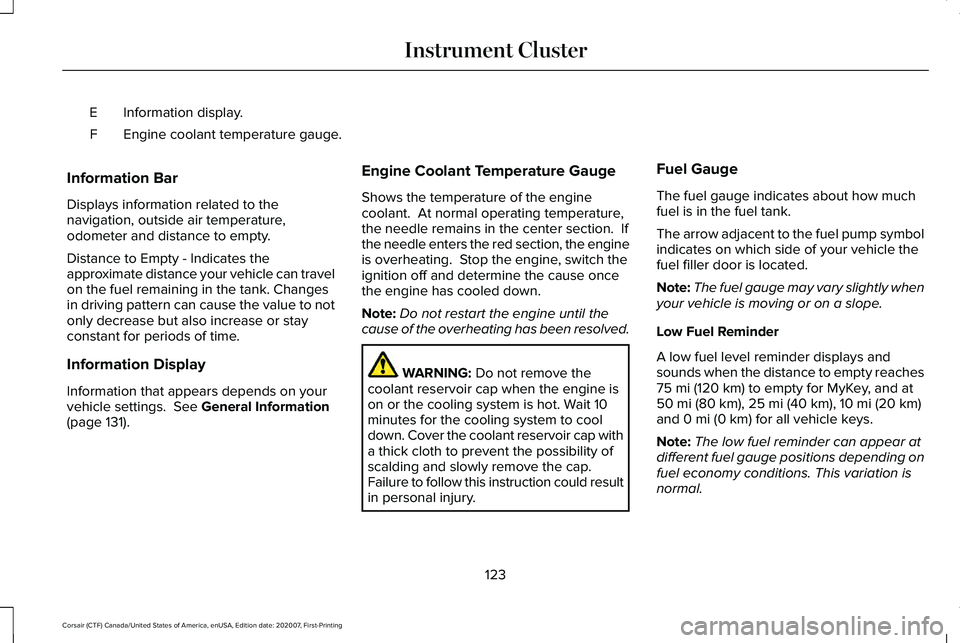
Information display.
E
Engine coolant temperature gauge.
F
Information Bar
Displays information related to the
navigation, outside air temperature,
odometer and distance to empty.
Distance to Empty - Indicates the
approximate distance your vehicle can travel
on the fuel remaining in the tank. Changes
in driving pattern can cause the value to not
only decrease but also increase or stay
constant for periods of time.
Information Display
Information that appears depends on your
vehicle settings. See General Information
(page 131). Engine Coolant Temperature Gauge
Shows the temperature of the engine
coolant. At normal operating temperature,
the needle remains in the center section. If
the needle enters the red section, the engine
is overheating. Stop the engine, switch the
ignition off and determine the cause once
the engine has cooled down.
Note:
Do not restart the engine until the
cause of the overheating has been resolved. WARNING:
Do not remove the
coolant reservoir cap when the engine is
on or the cooling system is hot. Wait 10
minutes for the cooling system to cool
down. Cover the coolant reservoir cap with
a thick cloth to prevent the possibility of
scalding and slowly remove the cap.
Failure to follow this instruction could result
in personal injury. Fuel Gauge
The fuel gauge indicates about how much
fuel is in the fuel tank.
The arrow adjacent to the fuel pump symbol
indicates on which side of your vehicle the
fuel filler door is located.
Note:
The fuel gauge may vary slightly when
your vehicle is moving or on a slope.
Low Fuel Reminder
A low fuel level reminder displays and
sounds when the distance to empty reaches
75 mi (120 km) to empty for MyKey, and at
50 mi (80 km), 25 mi (40 km), 10 mi (20 km)
and 0 mi (0 km) for all vehicle keys.
Note: The low fuel reminder can appear at
different fuel gauge positions depending on
fuel economy conditions. This variation is
normal.
123
Corsair (CTF) Canada/United States of America, enUSA, Edition date: 202007, First-Printing Instrument Cluster
Page 129 of 638
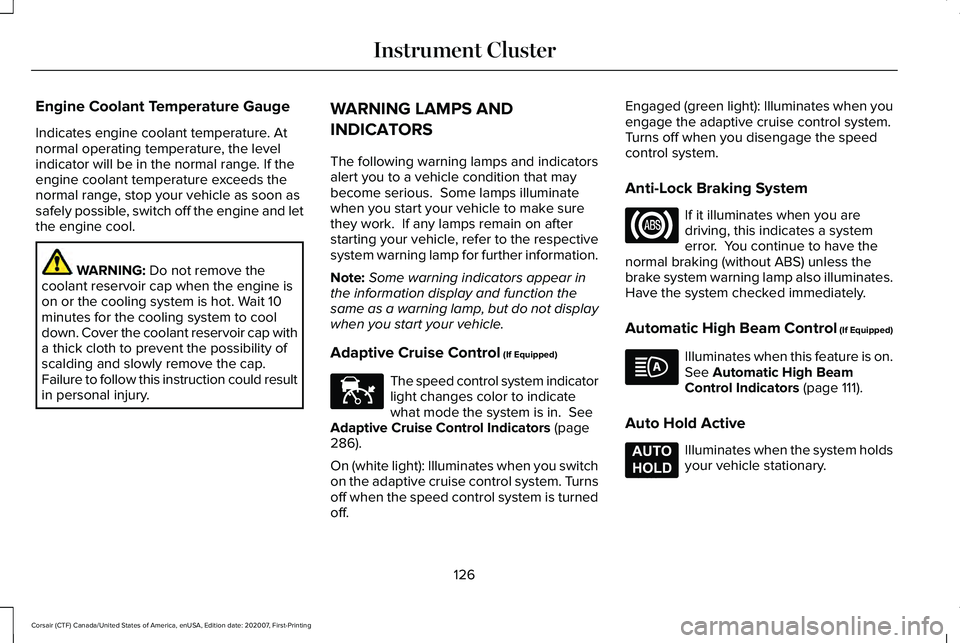
Engine Coolant Temperature Gauge
Indicates engine coolant temperature. At
normal operating temperature, the level
indicator will be in the normal range. If the
engine coolant temperature exceeds the
normal range, stop your vehicle as soon as
safely possible, switch off the engine and let
the engine cool.
WARNING: Do not remove the
coolant reservoir cap when the engine is
on or the cooling system is hot. Wait 10
minutes for the cooling system to cool
down. Cover the coolant reservoir cap with
a thick cloth to prevent the possibility of
scalding and slowly remove the cap.
Failure to follow this instruction could result
in personal injury. WARNING LAMPS AND
INDICATORS
The following warning lamps and indicators
alert you to a vehicle condition that may
become serious. Some lamps illuminate
when you start your vehicle to make sure
they work. If any lamps remain on after
starting your vehicle, refer to the respective
system warning lamp for further information.
Note:
Some warning indicators appear in
the information display and function the
same as a warning lamp, but do not display
when you start your vehicle.
Adaptive Cruise Control
(If Equipped) The speed control system indicator
light changes color to indicate
what mode the system is in.
See
Adaptive Cruise Control Indicators (page
286).
On (white light): Illuminates when you switch
on the adaptive cruise control system. Turns
off when the speed control system is turned
off. Engaged (green light): Illuminates when you
engage the adaptive cruise control system.
Turns off when you disengage the speed
control system.
Anti-Lock Braking System
If it illuminates when you are
driving, this indicates a system
error. You continue to have the
normal braking (without ABS) unless the
brake system warning lamp also illuminates.
Have the system checked immediately.
Automatic High Beam Control (If Equipped) Illuminates when this feature is on.
See
Automatic High Beam
Control Indicators (page 111).
Auto Hold Active Illuminates when the system holds
your vehicle stationary.
126
Corsair (CTF) Canada/United States of America, enUSA, Edition date: 202007, First-Printing Instrument ClusterE144524 E197933
Page 167 of 638
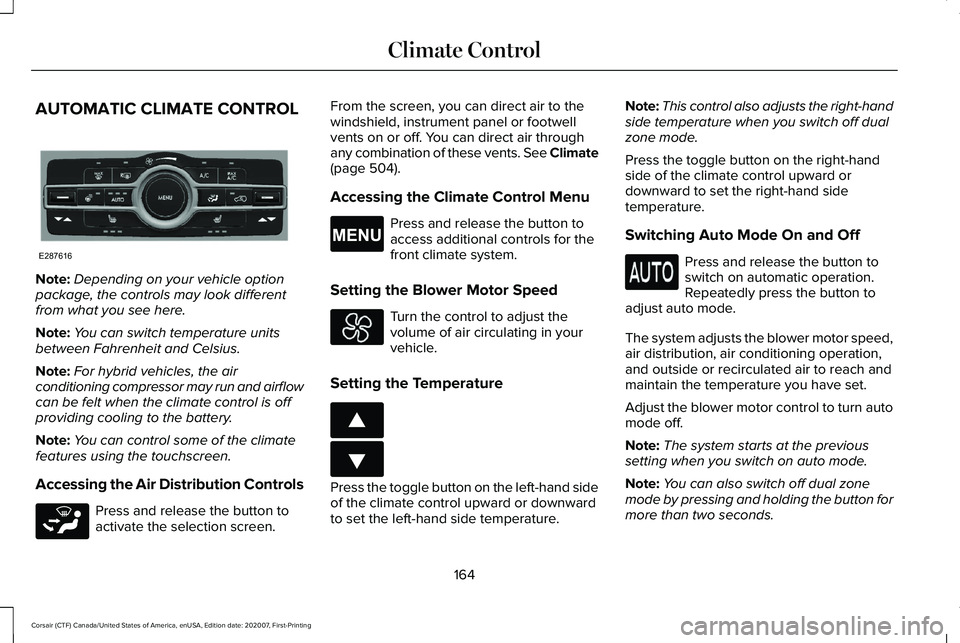
AUTOMATIC CLIMATE CONTROL
Note:
Depending on your vehicle option
package, the controls may look different
from what you see here.
Note: You can switch temperature units
between Fahrenheit and Celsius.
Note: For hybrid vehicles, the air
conditioning compressor may run and airflow
can be felt when the climate control is off
providing cooling to the battery.
Note: You can control some of the climate
features using the touchscreen.
Accessing the Air Distribution Controls Press and release the button to
activate the selection screen. From the screen, you can direct air to the
windshield, instrument panel or footwell
vents on or off. You can direct air through
any combination of these vents. See Climate
(page 504).
Accessing the Climate Control Menu Press and release the button to
access additional controls for the
front climate system.
Setting the Blower Motor Speed Turn the control to adjust the
volume of air circulating in your
vehicle.
Setting the Temperature Press the toggle button on the left-hand side
of the climate control upward or downward
to set the left-hand side temperature.Note:
This control also adjusts the right-hand
side temperature when you switch off dual
zone mode.
Press the toggle button on the right-hand
side of the climate control upward or
downward to set the right-hand side
temperature.
Switching Auto Mode On and Off Press and release the button to
switch on automatic operation.
Repeatedly press the button to
adjust auto mode.
The system adjusts the blower motor speed,
air distribution, air conditioning operation,
and outside or recirculated air to reach and
maintain the temperature you have set.
Adjust the blower motor control to turn auto
mode off.
Note: The system starts at the previous
setting when you switch on auto mode.
Note: You can also switch off dual zone
mode by pressing and holding the button for
more than two seconds.
164
Corsair (CTF) Canada/United States of America, enUSA, Edition date: 202007, First-Printing Climate ControlE287616 E265283 E265038 E266187 E266186
Page 168 of 638
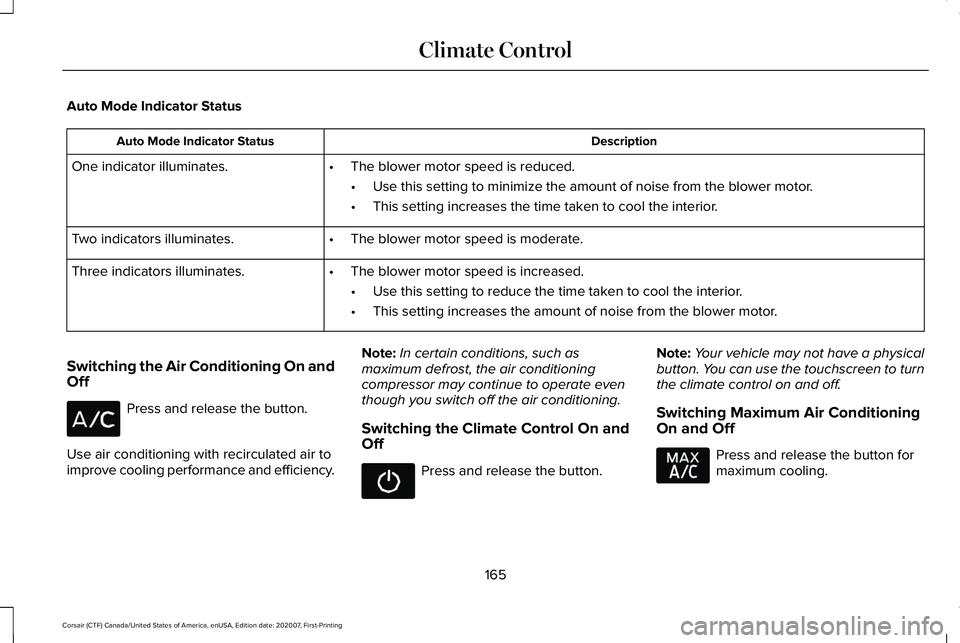
Auto Mode Indicator Status
Description
Auto Mode Indicator Status
One indicator illuminates. •The blower motor speed is reduced.
•Use this setting to minimize the amount of noise from the blower motor.
• This setting increases the time taken to cool the interior.
Two indicators illuminates. •The blower motor speed is moderate.
Three indicators illuminates. •The blower motor speed is increased.
•Use this setting to reduce the time taken to cool the interior.
• This setting increases the amount of noise from the blower motor.
Switching the Air Conditioning On and
Off Press and release the button.
Use air conditioning with recirculated air to
improve cooling performance and efficiency. Note:
In certain conditions, such as
maximum defrost, the air conditioning
compressor may continue to operate even
though you switch off the air conditioning.
Switching the Climate Control On and
Off Press and release the button.
Note:
Your vehicle may not have a physical
button. You can use the touchscreen to turn
the climate control on and off.
Switching Maximum Air Conditioning
On and Off Press and release the button for
maximum cooling.
165
Corsair (CTF) Canada/United States of America, enUSA, Edition date: 202007, First-Printing Climate Control
Page 169 of 638
The left-hand and right-hand settings set to
LO, recirculated air flows through the
instrument panel air vents, air conditioning
turns on and the blower motor adjusts to the
highest speed.
Switching Maximum Defrost On and
Off
Press and release the button for
maximum defrosting.
The left-hand and right-hand temperatures
are set to HI, air flows through the windshield
air vents, and the blower motor adjusts to
the highest speed.
You can also use this setting to defog and
clear the windshield of a thin covering of ice.
Note: To prevent window fogging, you
cannot select recirculated air when
maximum defrost is on.
Note: The heated rear window also turns on
when you select maximum defrost. Switching Recirculated Air On and Off Press and release the button to
switch between outside air and
recirculated air.
The air currently in the passenger
compartment recirculates. This may reduce
the time needed to cool the interior, when
used with air conditioning, and reduce
unwanted odors from entering your vehicle.
Note: Recirculated air may turn off, or
prevent you from switching on, in all air flow
modes except maximum air conditioning to
reduce the risk of fogging. Recirculation may
also turn on and off in various air distribution
control combinations during hot weather to
improve cooling efficiency.
HINTS ON CONTROLLING THE
INTERIOR CLIMATE
General Hints
Note: Prolonged use of recirculated air may
cause the windows to fog up. Note:
You may feel a small amount of air
from the footwell air vents regardless of the
air distribution setting.
Note: To reduce humidity build-up inside
your vehicle, do not drive with the system
switched off or with recirculated air always
switched on.
Note: Do not place objects under the front
seats as this may interfere with the airflow
to the rear seats.
Note: Remove any snow, ice or leaves from
the air intake area at the base of the
windshield.
Note: To improve the time to reach a
comfortable temperature in hot weather,
drive with the windows open until you feel
cold air through the air vents.
Automatic Climate Control
Note: Adjusting the settings when your
vehicle interior is extremely hot or cold is not
necessary. Automatic mode is best
recommended to maintain set temperature.
166
Corsair (CTF) Canada/United States of America, enUSA, Edition date: 202007, First-Printing Climate Control
Page 170 of 638
Note:
The system adjusts to heat or cool the
interior to the temperature you select as
quickly as possible.
Note: For the system to function efficiently,
the instrument panel and side air vents
should be fully open.
Note: If you select AUTO during cold outside
temperatures, the system directs air flow to
the windshield and side window air vents. In
addition, the blower motor may run at a
slower speed until the engine warms up.
Note: If you select
AUTO during hot
temperatures and the inside of the vehicle
is hot, the system uses recirculated air to
maximize interior cooling. Blower motor
speed may also reduce until the air cools.
Quickly Heating the Interior
1. Press and release
AUTO.
2. Adjust the temperature function to the setting you prefer.
Recommended Settings for Heating
1. Press and release
AUTO. 2. Adjust the temperature function to the
setting you prefer. Use
72°F (22°C) as a
starting point, then adjust the setting as
necessary.
Quickly Cooling the Interior
1. Press and release
MAX A/C.
Recommended Settings for Cooling
1. Press and release
AUTO.
2. Adjust the temperature function to the setting you prefer. Use
72°F (22°C) as a
starting point, then adjust the setting as
necessary.
Defogging the Side Windows in Cold
Weather
1. Press and release defrost or maximum defrost.
2. Adjust the temperature control to the setting you prefer. Use
72°F (22°C) as a
starting point, then adjust the setting as
necessary. HEATED WINDSHIELD
(IF EQUIPPED)
Windshield Wiper De-Icer When you switch the heated rear
window on, the windshield wiper
de-icer turns on.
HEATED REAR WINDOW Press the button to clear the rear
window of thin ice and fog. The
heated rear window turns off after
a short period of time.
Note: Do not use harsh chemicals, razor
blades or other sharp objects to clean or
remove decals from the inside of the heated
rear window. The vehicle warranty may not
cover damage to the heated rear window
grid lines.
167
Corsair (CTF) Canada/United States of America, enUSA, Edition date: 202007, First-Printing Climate ControlE184884 E184884
Page 228 of 638
GENERAL INFORMATION
WARNING: This battery pack should
only be serviced by an authorized electric
vehicle technician. Improper handling can
result in personal injury or death. WARNING: Apply the parking brake,
shift into park (P), switch the ignition off
and remove the key before you open the
hood or have any service or repair work
completed. If you do not switch the ignition
off, the engine could restart at any time.
Failure to follow this instruction could result
in personal injury or death. WARNING:
Do not touch the
electronic ignition system parts after you
have switched the ignition on or when the
engine is running. The system operates at
high voltage. Failure to adhere to this
warning could result in serious personal
injury or death. WARNING:
Keep your hands and
clothing clear of the engine cooling fan. Note:
The high-voltage battery does not
require regular service maintenance.
Your vehicle consists of various high-voltage
components and wiring. All of the
high-voltage power flows through specific
wiring assemblies labeled as such or covered
with a solid orange convolute, or orange
striped tape, or both. Do not come in contact
with these components.
The high-voltage battery pack contains a
lithium-ion battery. The pack is underneath
the vehicle. The high-voltage battery system
uses an advanced liquid heating and cooling
system to regulate the high-voltage battery
temperature and help maximize high-voltage
battery life.
CHARGING THE HIGH VOLTAGE
BATTERY
IMPORTANT SAFETY INSTRUCTIONS WARNING: In Canada, do not use
the 120 volt convenience cord in
commercial garages. WARNING:
This equipment has
arcing or sparking parts. Do not expose to
flammable vapors. Position this equipment
at least
18 in (450 mm) above the floor.
RISK OF FIRE or ELECTRIC SHOCK WARNING:
The AC wall plug must
fit firmly into the AC outlet. If the
connection feels loose, worn or the AC
outlet is damaged, please have a qualified
electrician replace the AC outlet. Using a
convenience cord with a worn outlet may
cause burns, property damage and
increase the risk of electric shock. WARNING:
Do not use the 120 V
convenience cord with an extension cord,
two-prong adapter, surge protector, timer
or other adapter.
225
Corsair (CTF) Canada/United States of America, enUSA, Edition date: 202007, First-Printing High Voltage Battery
(If Equipped)
Page 244 of 638
When driving at slow speeds off road under
high load conditions, use a low gear when
possible. Low gear operation will maximize
the engine and transmission cooling
capability.
Under severe operating conditions, the air
conditioning may cycle on and off to prevent
the engine from overheating.
Basic Operating Principles
•
Drive slower in strong crosswinds that
can affect the normal steering
characteristics of your vehicle.
• When driving your vehicle on surfaces
made slippery by loose sand, water,
gravel, snow or ice, proceed with care.
If Your Vehicle leaves the Road
If your vehicle leaves the road, reduce your
vehicle speed and avoid severe braking.
Once you have reduced your vehicle speed,
ease your vehicle back onto the road. Do
not turn the steering wheel sharply while
returning your vehicle to the road. It may be safer to stay on the shoulder of the
road and slow down gradually before
returning to the road. You may lose control
if you do not slow down or if you turn the
steering wheel too sharply or abruptly.
It may be less risky to strike small objects,
such as freeway reflectors, with minor
damage to your vehicle rather than attempt
an abrupt dangerous direction change.
Remember, your primary concern should be
your safety and the safety of others.
Emergency Maneuvers
If you must make a sudden emergency
direction change, avoid over-driving your
vehicle. Turn the steering wheel only as
rapidly and as far as you need to avoid the
emergency. Apply smooth pressure to the
accelerator pedal or brake pedal as needed.
Avoid abrupt steering, acceleration and
braking changes. Abrupt changes could
increase the risk of vehicle roll over, loss of
vehicle control and personal injury. Use all
available road surfaces to bring your vehicle
under control.In the event of an emergency stop, avoid
skidding and do not attempt any sharp
steering wheel movements.
Your vehicle responds differently to steering,
accelerating and braking on different road
surfaces when changing from one type of
surface to another.
Sand
When driving over sand, avoid driving at
excessive speeds. This will cause your
vehicle momentum to work against you. Your
vehicle could become stuck and that may
require assistance from another vehicle.
Remember, if you proceed with caution you
may be able to back out the way you came.
Do not drive in deep sand for an extended
period. This will cause the all-wheel drive
system to overheat. You will see a warning
message in the information display. See
Information Messages (page 137).
241
Corsair (CTF) Canada/United States of America, enUSA, Edition date: 202007, First-Printing All-Wheel Drive
(If Equipped)
Page 245 of 638
To resume operation, switch the ignition off
and allow the system to cool down for a
minimum of 15 minutes. After the system has
cooled down, you will see a brief message
display in the information display. See
Information Messages (page 137).
When driving at slow speeds in deep sand
under high outside temperatures, use a low
gear when possible. Low gear operation will
maximize the engine and transmission
cooling capability.
Tips when driving over sand:
• Keep all four wheels on the most solid
area of the trail.
• Shift to a lower gear.
• Apply the accelerator slowly.
• Drive steadily through the terrain.
• Avoid excessive wheel spin.
• Avoid reducing the tire pressures. Mud and Water
Mud
Avoid sudden changes in vehicle speed or
direction when you are driving in mud. Even
all-wheel drive vehicles can lose traction in
mud. If your vehicle does slide, steer in the
direction of the slide until you regain control
of your vehicle.
After driving through mud, clean off excess
mud stuck to rotating driveshafts and tires.
Excess mud stuck on tires and rotating
driveshafts can cause an imbalance that
could damage drive components.
Water
Drive slowly through high water. Traction or
brake capability may be limited.
When driving through water, determine the
depth and avoid water higher than the
bottom of the wheel rims. If the ignition
system gets wet, your vehicle may stall. Once through water, always try the brakes.
Wet brakes will not stop your vehicle as
quickly as dry brakes. Apply light pressure
to the brake pedal while slowly moving the
vehicle to dry the brakes.
Note:
Driving through deep water may
damage the transmission. If the front or rear
axle is submerged in water, have the power
transfer unit (PTU) or rear axle serviced by
an authorized dealer.
Driving on Hilly or Sloping Terrain
Although natural obstacles may make it
necessary to travel diagonally up or down a
hill or steep incline, always try to drive
straight up or straight down the sloping
terrain.
Note: To maintain traction and avoid
possibly rolling your vehicle, avoid turning
on steep slopes or hills. When you drive on
a hill, determine beforehand the route you
will use. Do not drive over a hill without first
seeing what is on the other side. Do not drive
in reverse over a hill without the aid of an
observer.
242
Corsair (CTF) Canada/United States of America, enUSA, Edition date: 202007, First-Printing All-Wheel Drive
(If Equipped)