warning LINCOLN CORSAIR 2022 Owners Manual
[x] Cancel search | Manufacturer: LINCOLN, Model Year: 2022, Model line: CORSAIR, Model: LINCOLN CORSAIR 2022Pages: 676, PDF Size: 7.67 MB
Page 238 of 676
GENERAL INFORMATION
WARNING: This battery pack should
only be serviced by an authorized electric
vehicle technician. Improper handling can
result in personal injury or death. WARNING: Apply the parking brake,
shift into park (P), switch the ignition off
and remove the key before you open the
hood or have any service or repair work
completed. If you do not switch the ignition
off, the engine could restart at any time.
Failure to follow this instruction could result
in personal injury or death. WARNING:
Do not touch the
electronic ignition system parts after you
have switched the ignition on or when the
engine is running. The system operates at
high voltage. Failure to adhere to this
warning could result in serious personal
injury or death. WARNING:
Keep your hands and
clothing clear of the engine cooling fan. Note:
The high-voltage battery does not
require regular service maintenance.
Your vehicle consists of various high-voltage
components and wiring. All of the
high-voltage power flows through specific
wiring assemblies labeled as such or covered
with a solid orange convolute, or orange
striped tape, or both. Do not come in contact
with these components.
The high-voltage battery pack contains a
lithium-ion battery. The pack is underneath
the vehicle. The high-voltage battery system
uses an advanced liquid heating and cooling
system to regulate the high-voltage battery
temperature and help maximize high-voltage
battery life.
CHARGING THE HIGH VOLTAGE
BATTERY
There are two different style chargers that
could be used for charging your vehicle.
Refer to the illustrations below to identify the
charger, and the instructions for use with the
specific type charger. Charging Solution One
IMPORTANT SAFETY INSTRUCTIONS WARNING:
Do not use the
dual-voltage charging cord in commercial
garages. WARNING:
This equipment has
arcing or sparking parts. Do not expose to
flammable vapors. Position this equipment
at least
18 in (450 mm) above the floor.
RISK OF FIRE or ELECTRIC SHOCK WARNING:
The AC wall plug must
fit firmly into the AC outlet. If the
connection feels loose, worn or the AC
outlet is damaged, please have a qualified
electrician replace the AC outlet. Using a
dual-voltage charging cord with a worn
outlet may cause burns, property damage
and increase the risk of electric shock or
fire.
235
2022 Corsair (CTF) Canada/United States of America, enUSA, Edition date: 202106, First-Printing High Voltage Battery
(If Equipped)
Page 239 of 676
WARNING: Do not use the
dual-voltage charging cord with an
extension cord, two-prong adapter, surge
protector, timer or other adapter. Failure
to follow this instruction could result in
electric shock or fire. WARNING:
Do not allow charging
equipment to be immersed in water or
liquids. Failure to follow this warning could
result in fire, electric shock, or serious
personal injury or death. WARNING:
Do not attempt to open
the charging equipment. Failure to follow
this instruction could result in personal
injury, fire, electric shock, death or property
damage. WARNING:
Do not use the charging
equipment if it is faulty or has been
damaged. Failure to follow this instruction
could result in personal injury, fire, electric
shock, death or property damage. WARNING:
You risk death, fire, or
serious injury to yourself and others if you
do not follow the instruction highlighted
by the warning symbol. WARNING:
Install charging
equipment in compliance with local
regulations. Failure to follow this warning
could result in fire, electric shock, serious
personal injury or death. WARNING:
Do not use an
ungrounded wall outlet. The wall outlet
must be in good condition and meet
up-to-date local codes. Have a qualified
electrician check the wall outlet, if you
suspect that it is not properly grounded.
Failure to follow this instruction could result
in electric shock, personal injury, or death. WARNING:
Do not modify the
dual-voltage charging cord plug. If the
dual-voltage charging cord plug does not
properly fit into the wall outlet, have a
qualified electrician install the correct wall
outlet. Failure to follow this instruction
could result in personal injury, fire, electric
shock, or death.
OPERATION INSTRUCTIONS
• Read all the instructions before using this
product.
• Supervise this device when in use around
children.
• Do not put fingers into the electric vehicle
connector.
• Do not use this product if the flexible
power cord or electric vehicle cable has
broken insulation, or any other signs of
damage.
• Do not use this product if the enclosure
or the electric vehicle connector is
broken, cracked, open, or shows any
other indication of damage.
236
2022 Corsair (CTF) Canada/United States of America, enUSA, Edition date: 202106, First-Printing High Voltage Battery
(If Equipped)
Page 245 of 676
4.
Press the center right edge of the charge
port door to close.
Note: Do not pull the wall plug from the wall
when your vehicle is charging. Doing so
could damage the outlet and the cord.
MOVING AND STORAGE
INSTRUCTIONS
Make sure that you completely wrap the
dual-voltage charging cord after charging.
When complete, replace the dual-voltage
charging cord in the luggage compartment.
Note: Do not hold the dual-voltage charging
cord by the flexible power cable.
Note: Store the dual-voltage charging cord
in a clean, dry place between the
temperature of -39.9–157.9°F (-40–70°C).
Charging Solution Two
There are two different style chargers that
could be used for charging your vehicle.
Refer to the illustration below to identify the
charger and the instructions for use with the
specific type charger. WARNING:
Do not allow charging
equipment to be immersed in water or
liquids. Failure to follow this warning could
result in fire, electric shock, or serious
personal injury or death. WARNING:
Do not attempt to open
the charging equipment. Failure to follow
this instruction could result in personal
injury, fire, electric shock, death or property
damage. WARNING:
Do not use the charging
equipment if it is faulty or has been
damaged. Failure to follow this instruction
could result in personal injury, fire, electric
shock, death or property damage. WARNING:
Install charging
equipment in compliance with local
regulations. Failure to follow this warning
could result in fire, electric shock, serious
personal injury or death. WARNING:
Do not use an
ungrounded wall outlet. The wall outlet
must be in good condition and meet
up-to-date local codes. Have a qualified
electrician check the wall outlet, if you
suspect that it is not properly grounded.
Failure to follow this instruction could result
in electric shock, personal injury, or death. WARNING:
It is recommended that
electrical outlets for use with your charging
equipment be installed by a licensed,
qualified electrician. Installations must
comply with the provisions of all local
codes. Failure to follow this warning could
result in personal injury or death. WARNING:
Do NOT DROP the
control box or coupler. WARNING:
Do NOT use if stored
outside temperature range specified. WARNING:
Do not attempt to repair
the charging equipment. Contact your local
dealer for assistance.
242
2022 Corsair (CTF) Canada/United States of America, enUSA, Edition date: 202106, First-Printing High Voltage Battery
(If Equipped)
Page 246 of 676
WARNING: Read all warnings on the
charging equipment before using for the
first time. WARNING:
Read all instructions in
this publication before using the charging
equipment. WARNING:
To reduce the risk of fire,
connect only to a circuit provided with 40
amps maximum branch circuit overcurrent
protection installed in accordance with
NEC and local electrical code. WARNING:
Do not use the charging
equipment with an extension cord, surge
protector, timer or other adapter. Failure
to follow this instruction could result in
electric shock or fire. WARNING:
The wall plug must fit
firmly into the outlet. If the connection feels
loose, worn or the outlet is damaged, have
a qualified electrician replace the outlet.
Using charging equipment with a worn
outlet may cause burns, property damage
and increase the risk of electric shock. WARNING:
Fully insert the plug into
the wall outlet. Failure to follow this
instruction could result in electric shock. WARNING:
Children should be
supervised when in the vicinity of the
charging equipment while plugged in. WARNING:
Do not put fingers into
the electric charge coupler. Failure to
follow this instruction could result in
electric shock. WARNING:
This equipment has
arcing or sparking parts. Do not expose to
flammable vapors. Position this equipment
at least
18 in (450 mm) above the floor. WARNING:
Do not connect or
disconnect any pluggable components of
the charging equipment when in use or
charging. Failure to follow this instruct can
cause damage to the charging equipment. WARNING:
Do not use the charging
equipment in temperatures outside of the
operation range of
-22°F (-30°C) to 122°F
(50°C). WARNING:
Store the charging
equipment in a clean dry place between
the temperatures of -22°F (-30°C) to 185°F
(85°C)
. WARNING:
Do not plug the charging
equipment into an electrical outlet that is
submerged in water or covered in snow. WARNING:
Do not use charging
equipment in severe rain, snow or
electrical storm.
243
2022 Corsair (CTF) Canada/United States of America, enUSA, Edition date: 202106, First-Printing High Voltage Battery
(If Equipped)
Page 247 of 676
WARNING: Do not allow charging
equipment to be immersed in water or
liquids. Failure to follow this warning could
result in fire, electric shock, or serious
personal injury or death. WARNING:
When using the charging
equipment avoid moisture, water, snow
and foreign objects at all times. WARNING:
Do not replace the plug
on the connector. There are critical safety
devices in the plug, and the charging
equipment will not operate, if the plug is
replaced. Failure to follow this instruction
could result in electric shock, personal
injury, death, or fire. WARNING:
Charging equipment
contains no user modifiable or repairable
parts. If the charging equipment plug does
not properly fit into the wall outlet, have a
qualified electrician install the correct wall
outlet. Failure to follow this instruction
could result in personal injury or death. WARNING:
High voltage is present
in your electric meter housing and power
distribution service panel. Contact with
high voltage can cause death or serious
personal injury. WARNING:
Visually inspect the
charging equipment before each use. Do
not use the charging equipment if it is
damaged. WARNING: Keep charging equipment
inside when not in use. Stow the control
box on the hanger or all the charging
equipment in the bag after use to prevent
damage to the charging equipment and
personal injury. WARNING:
Use the charger only to
supply power to electric vehicles equipped
with an SAE J1772 or IEC 62196-2
compliant vehicle receptacle. Your vehicle comes with a mobile charger
that has a low power connector to use with
a 120V plug NEMA 5-15 and a high power
connector to use with a 240V plug NEMA
14-50. Other connectors, such as NEMA
6-20, are available as service parts at
authorized dealers. Specification Value
Specification Type
SAE
Charger Model
120-240 VAC
Voltage
32 amps maxcontinuous
Maximum Current
60Hz
Frequency
< 2 Watts
Power draw when
idle
< 4 Watts
Power draw when
charging
Approximately
20 ft
(6.1 m)
Cable length
8.6 lb (3.9 kg)
Weight
244
2022 Corsair (CTF) Canada/United States of America, enUSA, Edition date: 202106, First-Printing High Voltage Battery
(If Equipped)
Page 259 of 676
AUTOMATIC TRANSMISSION -
EXCLUDING: PLUG-IN HYBRID
ELECTRIC VEHICLE (PHEV)
WARNING: Apply the parking brake,
shift into park (P), switch the ignition off
and remove the key before you leave your
vehicle. Failure to follow this instruction
could result in personal injury or death. WARNING: When your vehicle is
stationary, keep the brake pedal fully
pressed when shifting gears. Failure to
follow this instruction could result in
personal injury, death or property damage. WARNING:
Do not apply the brake
pedal and accelerator pedal
simultaneously. Applying both pedals
simultaneously for more than a few
seconds will limit engine performance,
which may result in difficulty maintaining
speed in traffic and could lead to serious
injury. Note:
You may not be able to shift out of
park (P) unless the intelligent access key is
inside your vehicle.
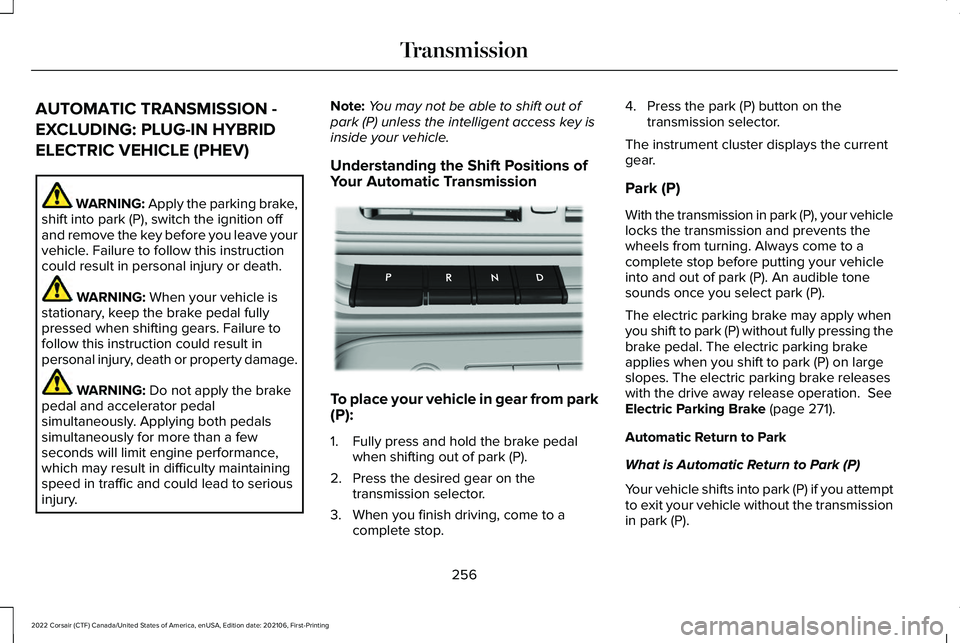
Understanding the Shift Positions of
Your Automatic Transmission To place your vehicle in gear from park
(P):
1. Fully press and hold the brake pedal
when shifting out of park (P).
2. Press the desired gear on the transmission selector.
3. When you finish driving, come to a complete stop. 4. Press the park (P) button on the
transmission selector.
The instrument cluster displays the current
gear.
Park (P)
With the transmission in park (P), your vehicle
locks the transmission and prevents the
wheels from turning. Always come to a
complete stop before putting your vehicle
into and out of park (P). An audible tone
sounds once you select park (P).
The electric parking brake may apply when
you shift to park (P) without fully pressing the
brake pedal. The electric parking brake
applies when you shift to park (P) on large
slopes. The electric parking brake releases
with the drive away release operation. See
Electric Parking Brake (page 271).
Automatic Return to Park
What is Automatic Return to Park (P)
Your vehicle shifts into park (P) if you attempt
to exit your vehicle without the transmission
in park (P).
256
2022 Corsair (CTF) Canada/United States of America, enUSA, Edition date: 202106, First-Printing TransmissionE247220
Page 260 of 676
How Does Automatic Return to Park (P)
Work
Your vehicle shifts into park (P) when your
vehicle is stationary and any of the following
occur:
•
You switch the vehicle off.
• You open the driver door with your
seatbelt unlatched.
• You unlatch the driver seatbelt when the
driver door is open.
Note: Do not use automatic return to park
(P) when your vehicle is moving, except in
an emergency.
Automatic Return to Park (P) Limitations
Automatic return to park (P) may not work if
the door ajar switch is malfunctioning.
See an authorized dealer if any of the
following occur: •
Door ajar indicator does not illuminate
with the driver door open.
• Door ajar indicator illuminates with the
driver door closed.
• Transmission not in park message
appears with the driver door closed, after
you shift out of park (P).
Reverse (R)
With the selector in reverse (R), your vehicle
moves backward. Always come to a
complete stop before shifting into and out
of reverse (R).
Neutral (N) WARNING: In neutral (N) your vehicle
is free to roll.
In neutral (N), power does not transmit to the
driven wheels, but the transmission does not
lock. You can start the engine with the
transmission in this position. Temporary Neutral Mode
What is Temporary Neutral Mode
This mode keeps your vehicle in neutral (N)
when you switch your vehicle off. Use this
mode at an automatic car wash if you exit
your vehicle, or switch your vehicle off.
Note:
Do not tow your vehicle in this mode.
Note: Automatic return to park (P) delays
when your vehicle is in this mode.
Temporary Neutral Mode Limitations
Your vehicle could shift to park (P) after 30
minutes, or when the vehicle battery charge
level is low. Prolonged use of this mode can
cause the vehicle battery to run out of
charge.
Do not tow your vehicle in this mode. Failure
to follow these instructions could result in
vehicle damage not covered by the vehicle
warranty.
Entering Temporary Neutral Mode
1. Power your vehicle on.
2. Bring your vehicle to a complete stop.
257
2022 Corsair (CTF) Canada/United States of America, enUSA, Edition date: 202106, First-Printing Transmission
Page 261 of 676
3. Press and hold the brake pedal.
4. Press the neutral (N) button.
Note:
A confirmation message appears
when your vehicle enters the mode.
5. Release the brake pedal.
Note: Your vehicle is free to roll.
6. Switch your vehicle off.
Note: Do not tow your vehicle in this mode.
Note: The neutral (N) indicator on the
transmission selector may flash in this mode.
Exiting Temporary Neutral Mode
1. Press the brake pedal.
2. Shift into park (P), or power your vehicle on and shift into drive (D), or reverse (R).
Drive (D)
Drive (D) is the normal driving position for
the best fuel economy. Transmission Not in Park (P) Audible
Warning
Sounds if you open the driver door before
shifting into park (P).
Park Selection Audible Warning
Sounds when you shift into park (P).
Manually Shifting Gears with Live in
Drive
Shifting Using Paddle Shifters
The instrument cluster displays the current
gear. The current gear flashes when your
vehicle cannot shift into the requested gear.
Your vehicle cannot shift if the requested
gear raises or lowers the engine speed
beyond the limit.
Your vehicle could shift when you fully press
the accelerator or brake pedal.
Note:
Prolonged driving with high engine
speed could cause vehicle damage not
covered by the vehicle warranty.
Note: Shifting into the requested gear could
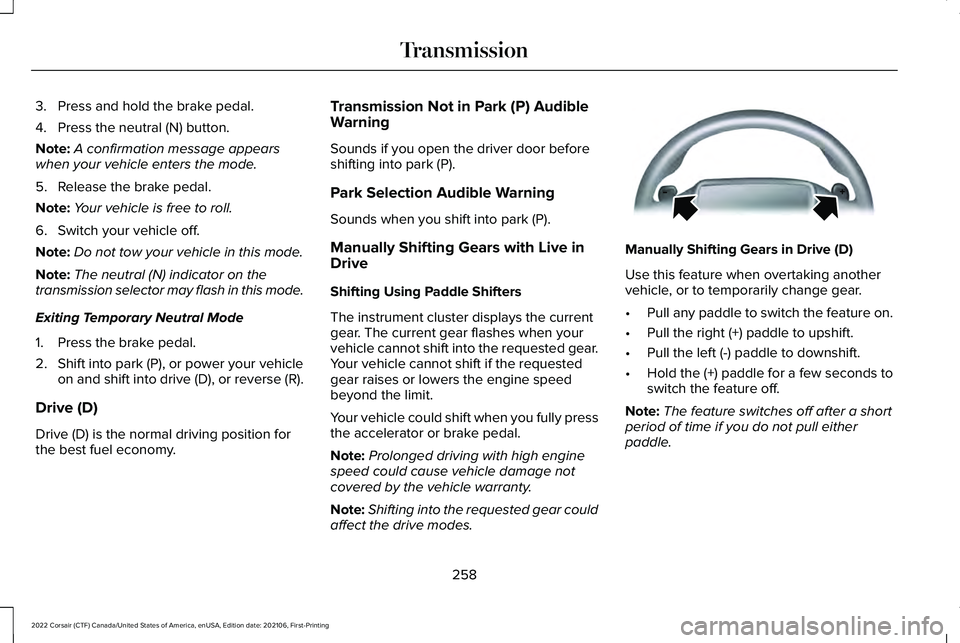
affect the drive modes. Manually Shifting Gears in Drive (D)
Use this feature when overtaking another
vehicle, or to temporarily change gear.
•
Pull any paddle to switch the feature on.
• Pull the right (+) paddle to upshift.
• Pull the left (-) paddle to downshift.
• Hold the (+) paddle for a few seconds to
switch the feature off.
Note: The feature switches off after a short
period of time if you do not pull either
paddle.
258
2022 Corsair (CTF) Canada/United States of America, enUSA, Edition date: 202106, First-Printing TransmissionE144821
Page 262 of 676
Manual Park Release
WARNING: When doing this
procedure, you need to take the
transmission out of park (P) which means
your vehicle can roll freely. To avoid
unwanted vehicle movement, always fully
apply the parking brake prior to doing this
procedure. Use wheel chocks if
appropriate. WARNING:
If the parking brake is
fully released, but the brake warning lamp
remains illuminated, the brakes may not
be working properly. Have your vehicle
checked as soon as possible. WARNING: Do not drive your vehicle
until you verify that the stoplamps are
working.
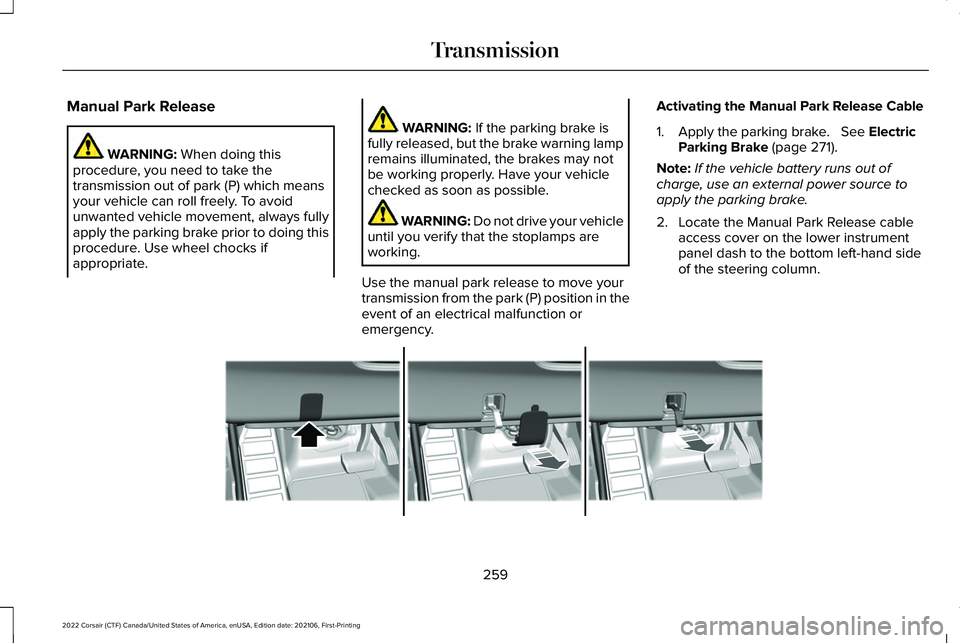
Use the manual park release to move your
transmission from the park (P) position in the
event of an electrical malfunction or
emergency. Activating the Manual Park Release Cable
1. Apply the parking brake. See Electric
Parking Brake (page 271).
Note: If the vehicle battery runs out of
charge, use an external power source to
apply the parking brake.
2. Locate the Manual Park Release cable access cover on the lower instrument
panel dash to the bottom left-hand side
of the steering column. 259
2022 Corsair (CTF) Canada/United States of America, enUSA, Edition date: 202106, First-Printing TransmissionE307867
Page 264 of 676
Automatic Transmission Adaptive
Learning
This feature may increase durability and
provide consistent shift feel over the life of
your vehicle. A new vehicle or transmission
may have firm shifts, soft shifts or both. This
is normal and does not affect the operation
or durability of the transmission. Over time,
the adaptive learning process fully updates
transmission operation.
If Your Vehicle Gets Stuck in Mud or
Snow
If your vehicle gets stuck in mud or snow,
you can rock it out by shifting between
forward and reverse gears, stopping
between shifts in a steady pattern. Press
lightly on the accelerator in each gear.
Note:
Do not rock your vehicle if the engine
is not at normal operating temperature or
damage to the transmission could occur.
Note: Do not rock your vehicle for more than
a minute or damage to the transmission and
tires could occur, or the engine may
overheat. Note:
If your vehicle has SelectShift™, you
can pull away in second (2) gear.
1. Shift into drive (D).
2. Pull the (+) paddle until 2 shows on the instrument cluster.
AUTOMATIC TRANSMISSION -
PLUG-IN HYBRID ELECTRIC
VEHICLE (PHEV) WARNING: Apply the parking brake,
shift into park (P), switch the ignition off
and remove the key before you leave your
vehicle. Failure to follow this instruction
could result in personal injury or death. WARNING: When your vehicle is
stationary, keep the brake pedal fully
pressed when shifting gears. Failure to
follow this instruction could result in
personal injury, death or property damage. WARNING:
Do not apply the brake
pedal and accelerator pedal
simultaneously. Applying both pedals
simultaneously for more than a few
seconds will limit engine performance,
which may result in difficulty maintaining
speed in traffic and could lead to serious
injury.
Note: You may not be able to shift out of
park (P) unless the intelligent access key is
inside your vehicle.
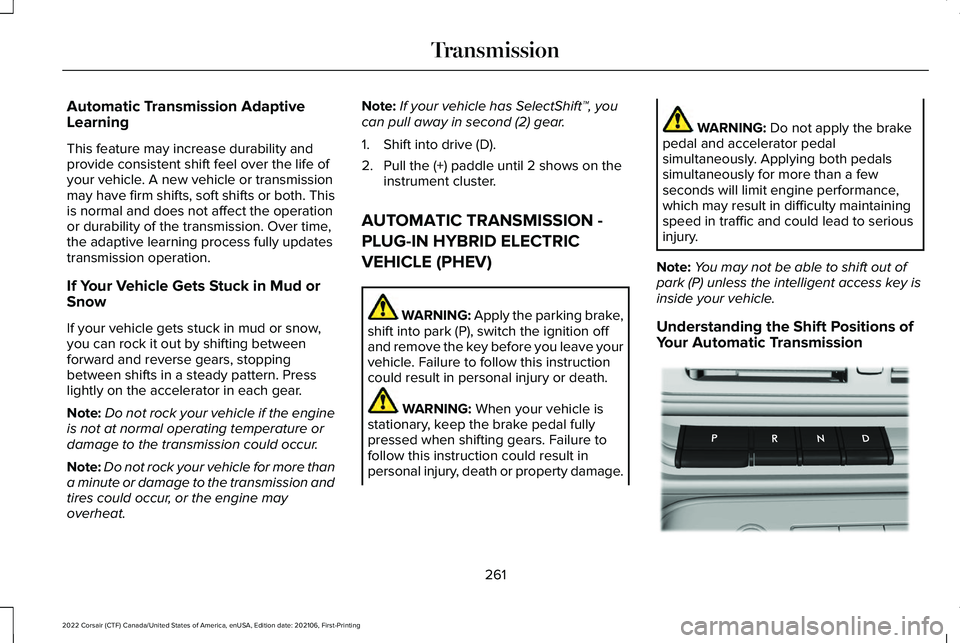
Understanding the Shift Positions of
Your Automatic Transmission 261
2022 Corsair (CTF) Canada/United States of America, enUSA, Edition date: 202106, First-Printing TransmissionE247220