display LINCOLN CORSAIR 2022 Owners Manual
[x] Cancel search | Manufacturer: LINCOLN, Model Year: 2022, Model line: CORSAIR, Model: LINCOLN CORSAIR 2022Pages: 676, PDF Size: 7.67 MB
Page 454 of 676
When Inflating Your Tires
WARNING: Do not use the tire
pressure displayed in the information
display as a tire pressure gauge.
Failure to follow this instruction could
result in personal injury or death.
When putting air into your tires (such as
at a gas station or in your garage), the
tire pressure monitoring system may not
respond immediately to the air added
to your tires.
It may take up to two minutes of driving
over
20 mph (32 km/h) for the light to
turn off after you have filled your tires to
the recommended inflation pressure. How Temperature Affects Your Tire
Pressure
The tire pressure monitoring system
monitors tire pressure in each pneumatic
tire. While driving in a normal manner, a
typical passenger tire inflation pressure
may increase about 2–4 psi (14–28 kPa)
from a cold start situation. If the vehicle
is stationary overnight with the outside
temperature significantly lower than the
daytime temperature, the tire pressure
may decrease about
3 psi (21 kPa) for a
drop of 30°F (17°C) in ambient
temperature. This lower pressure value
may be detected by the tire pressure
monitoring system as being significantly
lower than the recommended inflation
pressure and activate the system
warning light for low tire pressure. If the
low tire pressure warning light is on,
visually check each tire to verify that no
tire is flat. If one or more tires are flat, repair as necessary. Check the air
pressure in the road tires. If any tire is
under-inflated, carefully drive the vehicle
to the nearest location where air can be
added to the tires. Inflate all the tires to
the recommended inflation pressure.
CHANGING A ROAD WHEEL
(IF
EQUIPPED) WARNING:
The tire pressure
monitoring system is not a substitute for
manually checking tire pressures. You
should periodically check tire pressures
using a pressure gauge. Failure to correctly
maintain tire pressures could increase the
risk of tire failure, loss of control, vehicle
rollover and personal injury. WARNING:
If the tire pressure
monitor sensor becomes damaged it may
not function.
451
2022 Corsair (CTF) Canada/United States of America, enUSA, Edition date: 202106, First-Printing Wheels and Tires
Page 472 of 676

Motorcraft® Yellow Prediluted Antifreeze/Coolant / Antigel/liquide de refroidissement\
prédilué j")
Materials
Specification
Name
WSS-M97B57-A2
Motorcraft® Yellow Prediluted Antifreeze/Coolant(U.S.)
Motorcraft® Yellow Prediluted Antifreeze/Coolant / Antigel/liquide de refroidissement\
prédilué jaune Motorcraft®(Canada)
VC-13DL-G(U.S.)
CVC-13DL-G(Canada)
Engine Oil An oil that displays this symbol conforms to
current engine, emission system and fuel
economy performance standards of ILSAC.
We recommend Motorcraft® motor oil for
your vehicle. If Motorcraft® oil is not available,
use motor oils of the recommended viscosity
grade that display the API Certification Mark
for gasoline engines.
Do not use supplemental engine oil additives
because they are unnecessary and could
lead to engine damage not covered by your
vehicle warranty.
469
2022 Corsair (CTF) Canada/United States of America, enUSA, Edition date: 202106, First-Printing Capacities and SpecificationsE142732
Page 480 of 676

Motorcraft® Yellow Prediluted Antifreeze/Coolant / Antigel/liquide de refroidissement\
prédilué j")
Materials
Specification
Name
WSS-M97B57-A2
Motorcraft® Yellow Prediluted Antifreeze/Coolant(U.S.)
Motorcraft® Yellow Prediluted Antifreeze/Coolant / Antigel/liquide de refroidissement\
prédilué jaune Motorcraft®(Canada)
VC-13DL-G(U.S.)
CVC-13DL-G(Canada)
Engine Oil An oil that displays this symbol conforms to
current engine, emission system and fuel
economy performance standards of ILSAC.
We recommend Motorcraft® motor oil for
your vehicle. If Motorcraft® oil is not available,
use motor oils of the recommended viscosity
grade that display the API Certification Mark
for gasoline engines.
Do not use supplemental engine oil additives
because they are unnecessary and could
lead to engine damage not covered by your
vehicle warranty.
477
2022 Corsair (CTF) Canada/United States of America, enUSA, Edition date: 202106, First-Printing Capacities and SpecificationsE142732
Page 488 of 676

Motorcraft® Yellow Prediluted Antifreeze/Coolant / Antigel/liquide de refroidissement\
prédilué j")
Materials
Specification
Name
WSS-M97B57-A2
Motorcraft® Yellow Prediluted Antifreeze/Coolant(U.S.)
Motorcraft® Yellow Prediluted Antifreeze/Coolant / Antigel/liquide de refroidissement\
prédilué jaune Motorcraft®(Canada)
VC-13DL-G(U.S.)
CVC-13DL-G(Canada)
Engine Oil An oil that displays this symbol conforms to
current engine, emission system and fuel
economy performance standards of ILSAC.
We recommend Motorcraft® motor oil for
your vehicle. If Motorcraft® oil is not available,
use motor oils of the recommended viscosity
grade that display the API Certification Mark
for gasoline engines.
Do not use supplemental engine oil additives
because they are unnecessary and could
lead to engine damage not covered by your
vehicle warranty.
485
2022 Corsair (CTF) Canada/United States of America, enUSA, Edition date: 202106, First-Printing Capacities and SpecificationsE142732
Page 502 of 676
Switching the Audio Unit On and Off
Press and release the button.
Switching the Display On and Off (If
Equipped) Press and release the button.
Using Seek, Fast Forward and Reverse In radio mode, select a frequency band and
press and release either button. The system
stops at the first station it finds in that
direction.
In satellite radio mode, press and release to
select the next or previous satellite radio
station. If you select a specific category, such
as jazz, rock or news, press to find the next
or previous station in that category. DIGITAL RADIO
Note:
HD Radio broadcasts are not available
in all markets.
HD Radio technology is the digital evolution
of analog AM/FM radio. Your system has a
special receiver that allows it to receive
digital broadcasts, where available, in
addition to the analog broadcasts, it already
receives. Digital broadcasts provide a better
sound quality than analog broadcasts with
free, crystal-clear audio and no static or
distortion. For more information, and a guide
to available stations and programming,
please visit www.hdradio.com.
When HD Radio is on and you tune to a
station broadcasting HD Radio technology,
you may notice the HD Radio logo on your
screen. When this logo is available, you may
also see Title and Artist fields on-screen. The multicast indicator appears in FM mode,
only, if the current station is broadcasting
multiple digital broadcasts. The highlighted
numbers signify available digital channels
where new or different content is available.
HD1 signifies the main programming status
and is available in analog and digital
broadcasts. Other multicast stations, HD2
through HD7, are only available digitally.
When HD Radio broadcasts are active, you
can access the following functions:
•
Memory presets
allow you to save an
active channel as a memory preset.
Touch and hold a memory preset slot
until the sound returns. There is a brief
mute while the radio saves the station.
Sound returns when finished. When
switching to an HD2 or HD3 memory
preset, the sound mutes before the
digital audio plays, because the system
has to reacquire the digital signal.
Note: As with any saved radio station, you
cannot access the saved station if your
vehicle is outside the station’ s reception
area.
499
2022 Corsair (CTF) Canada/United States of America, enUSA, Edition date: 202106, First-Printing Audio System E272035
Page 505 of 676
HD Radio Technology manufactured under
license from iBiquity Digital Corporation and
foreign patents. HD Radio and the HD and
HD Radio logos are proprietary trademarks
of DTS. Ford and DTS are not responsible
for the content sent using HD Radio
technology. Content may be changed, added
or deleted at any time at the station owner's
discretion.
SATELLITE RADIO
SiriusXM® Satellite Radio broadcasts a
variety of music, news, sports, weather, traffic
and entertainment satellite radio channels.
For more information and a complete list of
SiriusXM satellite radio channels, visit
www.siriusxm.com in the United States,
www.siriusxm.ca in Canada, or call SiriusXM
at 1-888-539-7474.Note:
This receiver includes the eCos
real-time operating system. eCos is
published under the eCos License.
Satellite Radio Reception Factors Potential Satellite Radio Reception Issues
For optimal reception performance, keep the antenna clear of snow and ice build-up and keep luggage and
other material as far away from the antenna as possible.
Factory-installed and aftermarket vehicle structures including, but not limited to, roof racks and soft top roofs
in a partially open position could reduce reception performance.
Antenna obstructions
Hills, mountains, tall buildings, bridges, tunnels, freeway overpasses, \
parking garages, dense tree foliage and
thunderstorms can interfere with your reception.
Terrain
When you pass a ground-based broadcast-repeating tower, a stronger signal may overtake a weaker one and
the audio system could mute.
Station overload
Your display may show ACQUIRING . . . to indicate the interference and th\
e audio system could mute.
Satellite radio signal interfer-
ence
502
2022 Corsair (CTF) Canada/United States of America, enUSA, Edition date: 202106, First-Printing Audio System
Page 519 of 676
Navigation (If Equipped)
Setting a Destination Description
Voice Command
Enter a destination address. When prompted, provide the house number, the street
and city.
Find an Address
Search for a point of interest by name or by category.
Find a Place
Search for a nearby point of interest by category.1
Find the Next ___
Search for a point of interest category.1
Find a POI Category
Set your saved home address as your destination.
Drive Home
Set your saved place of work as your destination.
Drive to Work
Display and select from a list of previous destinations.
Show Previous Destinations
Display and select from a list of favorite destinations.
Show Favorites
1 Add a point of interest category or the name of a major brand or chain t\
o the command.
516
2022 Corsair (CTF) Canada/United States of America, enUSA, Edition date: 202106, First-Printing SYNC™ 3
Page 520 of 676
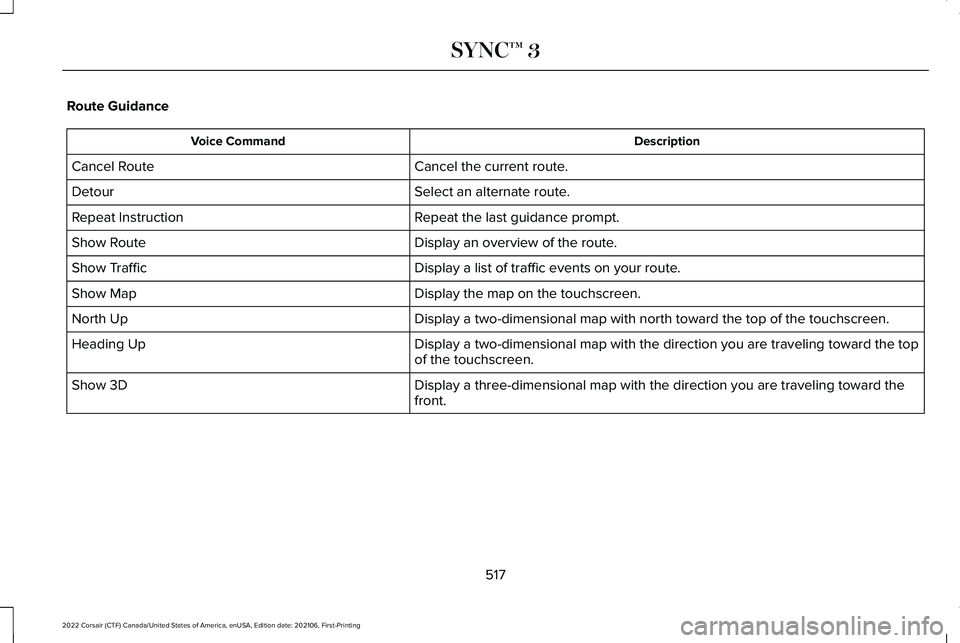
Route Guidance
Description
Voice Command
Cancel the current route.
Cancel Route
Select an alternate route.
Detour
Repeat the last guidance prompt.
Repeat Instruction
Display an overview of the route.
Show Route
Display a list of traffic events on your route.
Show Traffic
Display the map on the touchscreen.
Show Map
Display a two-dimensional map with north toward the top of the touchscre\
en.
North Up
Display a two-dimensional map with the direction you are traveling towar\
d the top
of the touchscreen.
Heading Up
Display a three-dimensional map with the direction you are traveling tow\
ard the
front.
Show 3D
517
2022 Corsair (CTF) Canada/United States of America, enUSA, Edition date: 202106, First-Printing SYNC™ 3
Page 522 of 676
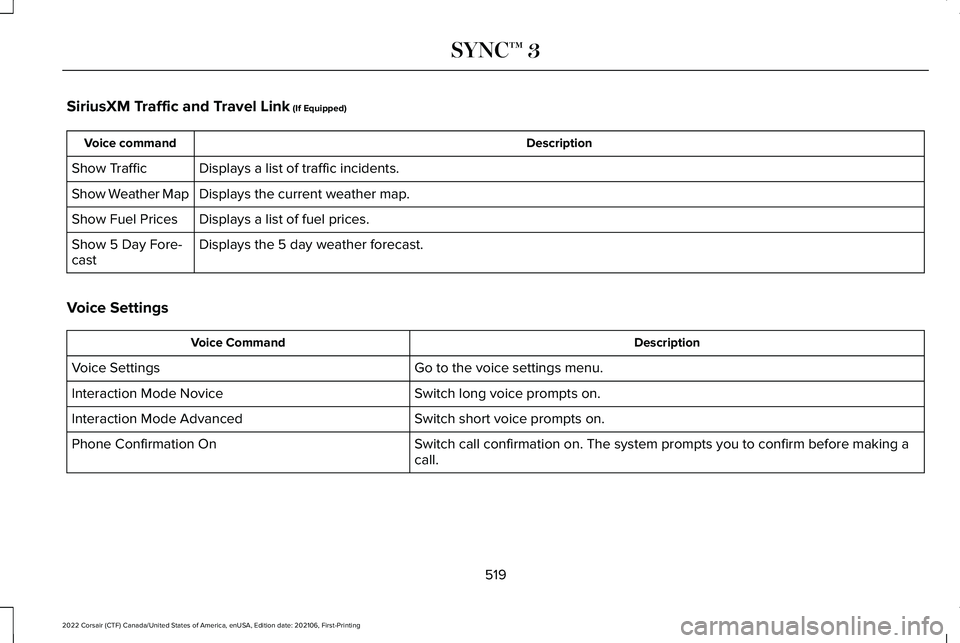
SiriusXM Traffic and Travel Link (If Equipped)
Description
Voice command
Displays a list of traffic incidents.
Show Traffic
Displays the current weather map.
Show Weather Map
Displays a list of fuel prices.
Show Fuel Prices
Displays the 5 day weather forecast.
Show 5 Day Fore-
cast
Voice Settings Description
Voice Command
Go to the voice settings menu.
Voice Settings
Switch long voice prompts on.
Interaction Mode Novice
Switch short voice prompts on.
Interaction Mode Advanced
Switch call confirmation on. The system prompts you to confirm before mak\
ing a
call.
Phone Confirmation On
519
2022 Corsair (CTF) Canada/United States of America, enUSA, Edition date: 202106, First-Printing SYNC™ 3
Page 523 of 676
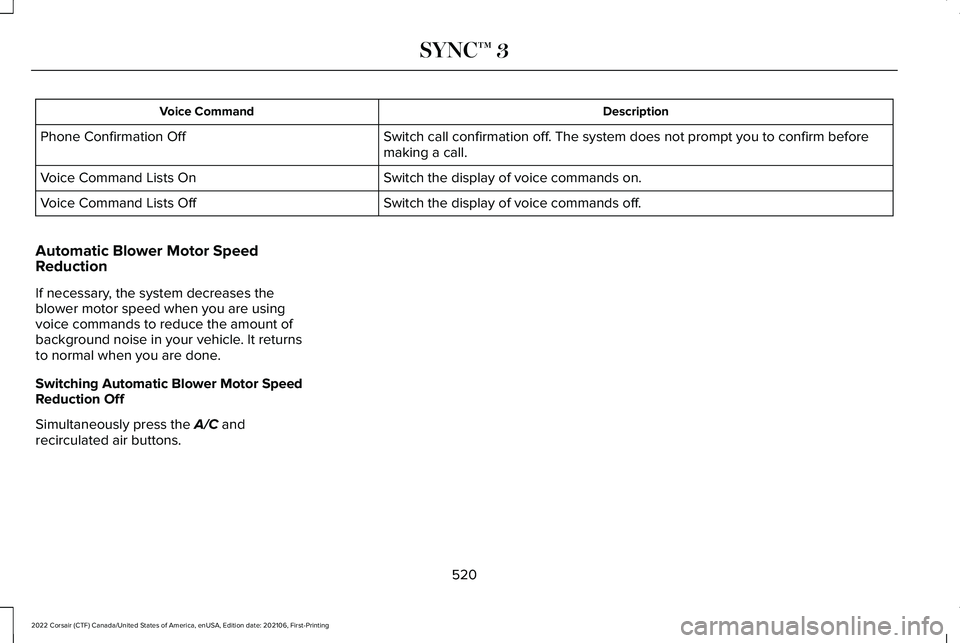
Description
Voice Command
Switch call confirmation off. The system does not prompt you to confirm before
making a call.
Phone Confirmation Off
Switch the display of voice commands on.
Voice Command Lists On
Switch the display of voice commands off.
Voice Command Lists Off
Automatic Blower Motor Speed
Reduction
If necessary, the system decreases the
blower motor speed when you are using
voice commands to reduce the amount of
background noise in your vehicle. It returns
to normal when you are done.
Switching Automatic Blower Motor Speed
Reduction Off
Simultaneously press the A/C and
recirculated air buttons.
520
2022 Corsair (CTF) Canada/United States of America, enUSA, Edition date: 202106, First-Printing SYNC™ 3