alarm LINCOLN CORSAIR 2022 User Guide
[x] Cancel search | Manufacturer: LINCOLN, Model Year: 2022, Model line: CORSAIR, Model: LINCOLN CORSAIR 2022Pages: 676, PDF Size: 7.67 MB
Page 148 of 676

Alarm
Details
Message
Alarm triggered due to unauthorized entry. See What Is the Anti-Theft Alarm System (page 96).
Vehicle Alarm To Stop Alarm, Start Vehicle.
Automatic Engine Shutdown Details
Message
The engine is getting ready to shut off.
Vehicle Shuts Off In {seconds:#0} Seconds
The engine has shut off to help increase fuel economy.
Vehicle Shut Off to Save Energy
The engine is getting ready to shut off. You can press OK on the left-hand steering wheelbutton to override the shut down.
Vehicle Shuts Off in {seconds:#0} Seconds
Press Ok to Override
145
2022 Corsair (CTF) Canada/United States of America, enUSA, Edition date: 202106, First-Printing Information Displays
Page 169 of 676
WHAT IS REMOTE START
The system allows you to remotely start your
vehicle and therefore to heat or cool the
interior to a predetermined temperature.
REMOTE START LIMITATIONS
Remote start does not work if:
•
The alarm horn is sounding.
• The hood is open.
• The transmission is not in park (P).
• Remote start is not enabled.
• The ignition is on.
Note: Do not use remote start if your fuel
level is low.
ENABLING REMOTE START
1. Press Settings on the touchscreen.
2. Press
Vehicle Settings.
3. Press
Remote Start Setup.
4. Switch
System on or off. Note:
To use remote start, make sure that
the modem is enabled.
See Enabling and
Disabling the Modem (page 491).
REMOTELY STARTING THE ENGINE WARNING:
Do not start the engine
in a closed garage or in other enclosed
areas. Exhaust fumes are toxic. Always
open the garage door before you start the
engine. Failure to follow this instruction
could result in personal injury or death.
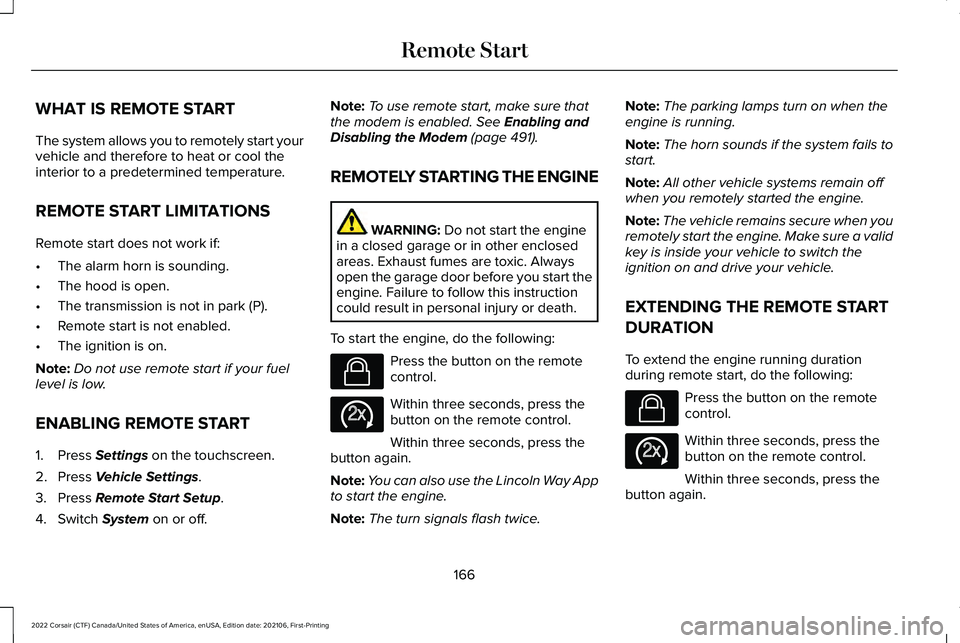
To start the engine, do the following: Press the button on the remote
control.
Within three seconds, press the
button on the remote control.
Within three seconds, press the
button again.
Note: You can also use the Lincoln Way App
to start the engine.
Note: The turn signals flash twice. Note:
The parking lamps turn on when the
engine is running.
Note: The horn sounds if the system fails to
start.
Note: All other vehicle systems remain off
when you remotely started the engine.
Note: The vehicle remains secure when you
remotely start the engine. Make sure a valid
key is inside your vehicle to switch the
ignition on and drive your vehicle.
EXTENDING THE REMOTE START
DURATION
To extend the engine running duration
during remote start, do the following: Press the button on the remote
control.
Within three seconds, press the
button on the remote control.
Within three seconds, press the
button again.
166
2022 Corsair (CTF) Canada/United States of America, enUSA, Edition date: 202106, First-Printing Remote StartE138623 E138625 E138623 E138625
Page 308 of 676
Hilly Condition Usage
You should select a lower gear when the
system is active in situations such as
prolonged downhill driving on steep grades,
for example in mountainous areas. The
system needs additional engine braking in
these situations to reduce the load on the
vehicle
’s regular brake system to prevent it
from overheating.
Note: An audible alarm sounds and the
system shuts down if it applies brakes for an
extended period of time. This allows the
brakes to cool. The system functions
normally again after the brakes cool.
ADAPTIVE CRUISE CONTROL
LIMITATIONS - VEHICLES WITH:
ADAPTIVE CRUISE CONTROL
WITH LANE CENTERING
Adaptive cruise control limitations apply to
lane centering unless stated otherwise or
contradicted by a lane centering limitation.
See Adaptive Cruise Control Limitations
(page 305). The system may not correctly operate in any
of the following conditions:
•
The lane is too narrow or wide.
• The system does not detect at least one
lane marking or when lanes merge or
split.
• Limited steering torque input is applied.
• Areas under construction or new
infrastructure.
• When modifications to the steering
system have been made.
• When using a spare tire.
Note: The driving assistance torque is limited
and may not be sufficient for all driving
situations such as driving through tight
curves or driving through curves at high
speeds.
Note: In exceptional conditions, the system
may deviate from the center line. ADAPTIVE CRUISE CONTROL
LIMITATIONS - VEHICLES WITH:
ADAPTIVE CRUISE CONTROL
WITH STOP AND GO
Sensor Limitations WARNING:
On rare occasions,
detection issues can occur due to the road
infrastructures, for example bridges,
tunnels and safety barriers. In these cases,
the system may brake late or
unexpectedly. At all times, you are
responsible for controlling your vehicle,
supervising the system and intervening, if
required. WARNING:
If the system
malfunctions, have your vehicle checked
as soon as possible. WARNING: Large contrasts in outside
lighting can limit sensor performance.
305
2022 Corsair (CTF) Canada/United States of America, enUSA, Edition date: 202106, First-Printing Adaptive Cruise Control
(If Equipped)
Page 559 of 676

Driver Assist (If Equipped)
Select this tile to adjust Driver Assist features
like Parking Aids, Lane Keeping system,
Pedestrian Detection, and Auto-Start-Stop.
Vehicle
Select this tile to adjust vehicle settings like
windows, alarm, lighting, backup starting
passcode, and MyKey settings.
Lincoln Way
Select this tile to adjust the Lincoln Way
settings.
General
Select this tile to adjust settings like
language, measurement units, or to reset the
system.
911 Assist
(If Equipped)
Select this tile to switch 911 Assist on and off. Automatic Updates
Select this tile to adjust automatic update
settings.
Mobile Apps
Select this tile to adjust permissions, enable,
disable, and update mobile apps.
Display
Select this tile to adjust display settings like
brightness and auto dim.
Charge Settings
(If Equipped)
Select this tile to adjust the electric vehicle
charge setting.
Voice Control
Select this tile to adjust voice control settings
like command confirmations and displayed
lists. Navigation
(If Equipped)
Select this tile to adjust navigation settings
like map preferences and route guidance.
Seats
(If Equipped)
Select this tile to adjust the lumbar function
and massage function of your multi contour
seats.
Message Center
(If Equipped)
Select this tile to view vehicle messages.
Personal Profiles
(If Equipped)
Select this tile to adjust recalled memory
features when using personal profiles.
Valet Mode
(If Equipped)
Select this tile to enable and disable valet
mode.
Ambient Lighting
(If Equipped)
Select this tile to change the color or
intensity of the interior lighting.
556
2022 Corsair (CTF) Canada/United States of America, enUSA, Edition date: 202106, First-Printing SYNC™ 3
Page 577 of 676
For a complete listing of the accessories that
are available for your vehicle, please contact
your authorized dealer or visit the online
store website:
Web Address (United States)
https://accessories.lincoln.com/ Web Address (Canada)
www.lincolncanada.com
We will repair or replace any properly
authorized dealer-installed Lincoln Original
Accessory found to be defective in
factory-supplied materials or workmanship
during the warranty period, as well as any
component damaged by the defective
accessories.
We will warrant your Lincoln Original
Accessory through the warranty that provides
the greatest benefit:
• 24 months, unlimited mileage.
• The remainder of your new vehicle
limited warranty. Lincoln Licensed Accessories
The accessory manufacturer designs,
develops and therefore warrants Lincoln
Licensed Accessories, and does not design
or test these accessories to Lincoln
engineering requirements. Contact an
authorized Lincoln dealer for the accessory
manufacturer's limited warranty details and
request a copy of the Lincoln Licensed
Accessories product limited warranty from
the accessory manufacturer. See your
warranty guide for more information.
For maximum vehicle performance, keep the
following information in mind when adding
accessories or equipment to your vehicle:
•
When adding accessories, equipment,
passengers and luggage to your vehicle,
do not exceed the total weight capacity
of the vehicle or of the front or rear axle
(GVWR or GAWR as indicated on the
Safety Compliance Certification label).
Ask an authorized dealer for specific
weight information.
• The Federal Communications
Commission (FCC) and Canadian Radio
Telecommunications Commission (CRTC)
regulate the use of mobile
communications systems that have radio
transmitters, for example two-way radios,
telephones and theft alarms. Any such
equipment installed in your vehicle
should comply with Federal
Communications Commission (FCC) and
Canadian Radio Telecommunications
Commission (CRTC) regulations and
should only be installed by an authorized
dealer.
574
2022 Corsair (CTF) Canada/United States of America, enUSA, Edition date: 202106, First-Printing Accessories
Page 667 of 676
AFS
See: Adaptive Headlamps................................108
Airbag Disposal................................................61
Air Conditioning See: Climate Control..........................................169
Air Filter See: Changing the Engine Air Filter - 2.0L/
2.3L....................................................................397
See: Changing the Engine Air Filter - 2.5L, Plug-In Hybrid Electric Vehicle (PHEV)......399
All-Wheel Drive.............................................265
Ambient Lighting
.............................................111
Anti-Theft Alarm System...............................96 Arming the Anti-Theft Alarm System...............97
Disarming the Anti-Theft Alarm System..........97
How Does the Anti-Theft Alarm System
Work.....................................................................96
What Are the Inclination Sensors.....................97
What Are the Interior Sensors...........................96
What Is the Anti-Theft Alarm System...............96
What Is the Battery Backup Alarm....................97
What Is the Perimeter Alarm..............................96
Anti-Theft Alarm System Settings...............97 Setting the Alarm Security Level.......................
97
Switching Ask on Exit On and Off....................98
What are the Alarm Security Levels.................97
What Is Ask on Exit...............................................97
Appendices...................................................626 Apps................................................................552
At a Glance.......................................................24
Audible Warnings and Indicators
..............135
Audio System................................................497
General Information...........................................497
Audio Unit
......................................................498
Auto Hold.......................................................274
Autolamps.......................................................106
Automatic Climate Control.........................169
Automatic High Beam Control....................113
Automatic High Beam Control Indicators.......................................................114
Automatic Transmission - Excluding: Plug-In Hybrid Electric Vehicle
(PHEV)
..........................................................256
Automatic Transmission Fluid Check...........................................................404
Automatic Transmission - Plug-In Hybrid Electric Vehicle (PHEV)
.............................261
Auto-Start-Stop...............................................211
Autowipers......................................................103
Auxiliary Power Points.................................198
AWD See: All-Wheel Drive..........................................265 B
Battery
See: Changing the 12V Battery......................406
Blind Spot Information System.................324
BLIS See: Blind Spot Information System..............324
Body Styling Kits............................................421
Bonnet Lock See: Opening and Closing the Hood.............391
Booster Seats
..................................................35
Brake Fluid Check.......................................405
Brakes.............................................................270 General Information...........................................270
Breaking-In.....................................................359
Bulb Specification Chart.............................489
C
Canceling the Set Speed
...........................302
Capacities and Specifications - 2.0L.......467
Capacities and Specifications - 2.3L.......475
Capacities and Specifications - 2.5L, Plug-In Hybrid Electric Vehicle
(PHEV)...........................................................483
Capacities and Specifications....................461
Car Wash See: Cleaning the Exterior................................414
664
2022 Corsair (CTF) Canada/United States of America, enUSA, Edition date: 202106, First-Printing Index
Page 674 of 676
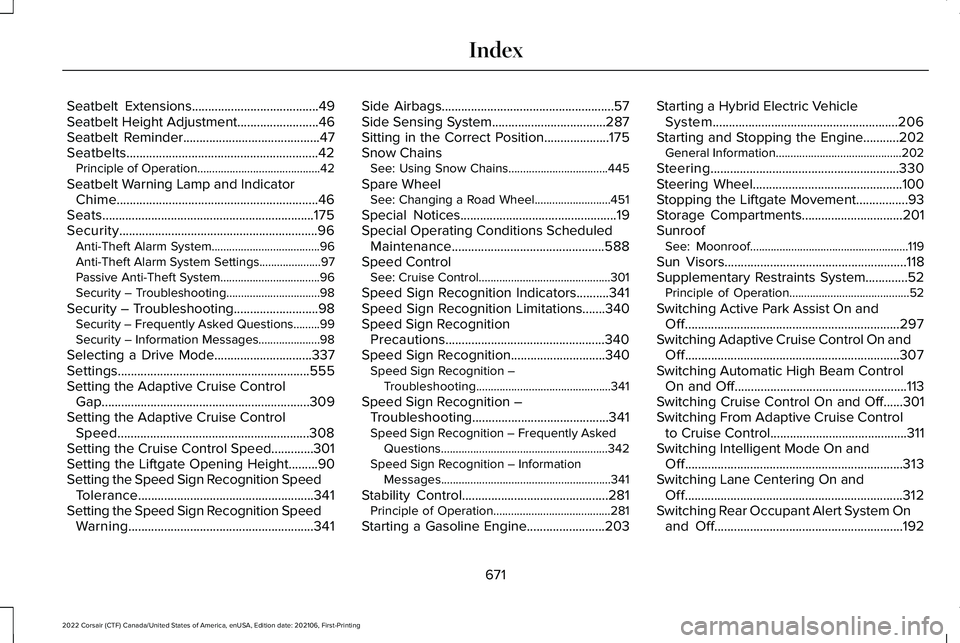
Seatbelt Extensions.......................................49
Seatbelt Height Adjustment.........................46
Seatbelt Reminder..........................................47
Seatbelts...........................................................42 Principle of Operation..........................................42
Seatbelt Warning Lamp and Indicator Chime..............................................................46
Seats.................................................................175
Security.............................................................96 Anti-Theft Alarm System.....................................96
Anti-Theft Alarm System Settings.....................
97
Passive Anti-Theft System..................................96
Security – Troubleshooting................................98
Security – Troubleshooting..........................98 Security – Frequently Asked Questions.........99
Security – Information Messages.....................
98
Selecting a Drive Mode..............................337
Settings...........................................................555
Setting the Adaptive Cruise Control Gap................................................................309
Setting the Adaptive Cruise Control Speed...........................................................308
Setting the Cruise Control Speed.............301
Setting the Liftgate Opening Height.........90
Setting the Speed Sign Recognition Speed Tolerance......................................................341
Setting the Speed Sign Recognition Speed Warning.........................................................341 Side Airbags
.....................................................57
Side Sensing System...................................287
Sitting in the Correct Position....................175
Snow Chains See: Using Snow Chains..................................445
Spare Wheel See: Changing a Road Wheel..........................451
Special Notices
................................................19
Special Operating Conditions Scheduled Maintenance
...............................................588
Speed Control See: Cruise Control.............................................301
Speed Sign Recognition Indicators..........341
Speed Sign Recognition Limitations.......340
Speed Sign Recognition Precautions.................................................340
Speed Sign Recognition.............................340 Speed Sign Recognition –
Troubleshooting..............................................341
Speed Sign Recognition – Troubleshooting..........................................341
Speed Sign Recognition – Frequently Asked Questions.........................................................342
Speed Sign Recognition – Information Messages..........................................................341
Stability Control
.............................................281
Principle of Operation........................................281
Starting a Gasoline Engine
........................203 Starting a Hybrid Electric Vehicle
System.........................................................206
Starting and Stopping the Engine...........202 General Information...........................................202
Steering..........................................................330
Steering Wheel
..............................................100
Stopping the Liftgate Movement................93
Storage Compartments
...............................201
Sunroof See: Moonroof......................................................119
Sun Visors........................................................118
Supplementary Restraints System.............52 Principle of Operation.........................................52
Switching Active Park Assist On and Off..................................................................297
Switching Adaptive Cruise Control On and Off..................................................................307
Switching Automatic High Beam Control On and Off.....................................................113
Switching Cruise Control On and Off......301
Switching From Adaptive Cruise Control to Cruise Control..........................................311
Switching Intelligent Mode On and Off...................................................................313
Switching Lane Centering On and Off...................................................................312
Switching Rear Occupant Alert System On and Off..........................................................192
671
2022 Corsair (CTF) Canada/United States of America, enUSA, Edition date: 202106, First-Printing Index