light LINCOLN CORSAIR 2022 Owner's Guide
[x] Cancel search | Manufacturer: LINCOLN, Model Year: 2022, Model line: CORSAIR, Model: LINCOLN CORSAIR 2022Pages: 676, PDF Size: 7.67 MB
Page 128 of 676

Vehicle driving range.
D
Fuel and battery gauges.
E
Engine coolant temperature gauge.
F
Power gauge.
G
Status Bar
Displays information related to the current
audio source, compass direction and outside
air temperature.
Left and Right Information Group
Information that appears depends on current
gauge view and personalized settings. See
General Information (page 136).
Fuel Gauge
The fuel gauge indicates about how much
fuel is in the fuel tank.
The arrow adjacent to the fuel pump symbol
indicates on which side of your vehicle the
fuel filler door is located.
Note: The fuel gauge may vary slightly when
your vehicle is moving or on a slope. Low Fuel Reminder
A low fuel level reminder displays and
sounds when the distance to empty reaches
75 mi (120 km)
to empty for MyKey, and at
50 mi (80 km), 25 mi (40 km), 10 mi (20 km)
and 0 mi (0 km) for all vehicle keys.
Note: The low fuel reminder can appear at
different fuel gauge positions depending on
fuel economy conditions. This variation is
normal. High Voltage Battery Gauge
The high voltage battery gauge displays the
total amount of charge associated with your
available electric only driving range. A full fill
represents the total amount of energy you
can get from an external charge, plugging
your vehicle in. When the fill reaches empty,
the powertrain system switches to hybrid
operation.
See Plug-In Hybrid Vehicle
Operation (page 215).
125
2022 Corsair (CTF) Canada/United States of America, enUSA, Edition date: 202106, First-Printing Instrument Cluster
Page 131 of 676
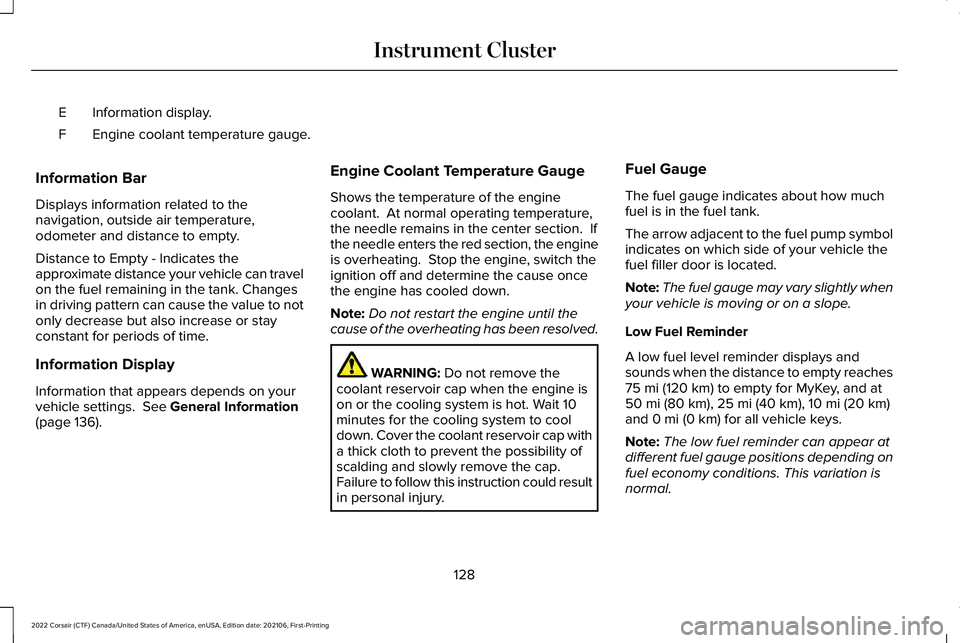
Information display.
E
Engine coolant temperature gauge.
F
Information Bar
Displays information related to the
navigation, outside air temperature,
odometer and distance to empty.
Distance to Empty - Indicates the
approximate distance your vehicle can travel
on the fuel remaining in the tank. Changes
in driving pattern can cause the value to not
only decrease but also increase or stay
constant for periods of time.
Information Display
Information that appears depends on your
vehicle settings. See General Information
(page 136). Engine Coolant Temperature Gauge
Shows the temperature of the engine
coolant. At normal operating temperature,
the needle remains in the center section. If
the needle enters the red section, the engine
is overheating. Stop the engine, switch the
ignition off and determine the cause once
the engine has cooled down.
Note:
Do not restart the engine until the
cause of the overheating has been resolved. WARNING:
Do not remove the
coolant reservoir cap when the engine is
on or the cooling system is hot. Wait 10
minutes for the cooling system to cool
down. Cover the coolant reservoir cap with
a thick cloth to prevent the possibility of
scalding and slowly remove the cap.
Failure to follow this instruction could result
in personal injury. Fuel Gauge
The fuel gauge indicates about how much
fuel is in the fuel tank.
The arrow adjacent to the fuel pump symbol
indicates on which side of your vehicle the
fuel filler door is located.
Note:
The fuel gauge may vary slightly when
your vehicle is moving or on a slope.
Low Fuel Reminder
A low fuel level reminder displays and
sounds when the distance to empty reaches
75 mi (120 km) to empty for MyKey, and at
50 mi (80 km), 25 mi (40 km), 10 mi (20 km)
and 0 mi (0 km) for all vehicle keys.
Note: The low fuel reminder can appear at
different fuel gauge positions depending on
fuel economy conditions. This variation is
normal.
128
2022 Corsair (CTF) Canada/United States of America, enUSA, Edition date: 202106, First-Printing Instrument Cluster
Page 133 of 676

Status bar.
A
Speedometer.
B
Right information group.
C
Vehicle driving range.
D
Fuel gauge.
E
Engine coolant temperature gauge.
F
Left information group.
G
Status Bar
Displays information related to the current
audio source, compass direction and outside
air temperature.
Left and Right Information Group
Information that appears depends on current
gauge view and personalized settings. See
General Information (page 136).
Fuel Gauge
The fuel gauge indicates about how much
fuel is in the fuel tank. The arrow adjacent to the fuel pump symbol
indicates on which side of your vehicle the
fuel filler door is located.
Note:
The fuel gauge may vary slightly when
your vehicle is moving or on a slope.
Distance to Empty
Indicates the approximate distance your
vehicle can travel on the fuel remaining in
the tank. Changes in driving pattern can
cause the value to not only decrease but also
increase or stay constant for periods of time Low Fuel Reminder
A low fuel level reminder displays and
sounds when the distance to empty reaches
75 mi (120 km)
to empty for MyKey, and at
50 mi (80 km), 25 mi (40 km), 10 mi (20 km)
and 0 mi (0 km) for all vehicle keys.
Note: The low fuel reminder can appear at
different fuel gauge positions depending on
fuel economy conditions. This variation is
normal.
130
2022 Corsair (CTF) Canada/United States of America, enUSA, Edition date: 202106, First-Printing Instrument Cluster
Page 134 of 676

Engine Coolant Temperature Gauge
Indicates engine coolant temperature. At
normal operating temperature, the level
indicator will be in the normal range. If the
engine coolant temperature exceeds the
normal range, stop your vehicle as soon as
safely possible, switch off the engine and let
the engine cool.
WARNING: Do not remove the
coolant reservoir cap when the engine is
on or the cooling system is hot. Wait 10
minutes for the cooling system to cool
down. Cover the coolant reservoir cap with
a thick cloth to prevent the possibility of
scalding and slowly remove the cap.
Failure to follow this instruction could result
in personal injury. WARNING LAMPS AND
INDICATORS
The following warning lamps and indicators
alert you to a vehicle condition that may
become serious. Some lamps illuminate
when you start your vehicle to make sure
they work. If any lamps remain on after
starting your vehicle, refer to the respective
system warning lamp for further information.
Note:
Some warning indicators appear in
the information display and function the
same as a warning lamp, but do not display
when you start your vehicle.
Adaptive Cruise Control
(If Equipped) The speed control system indicator
light changes color to indicate
what mode the system is in.
See
Adaptive Cruise Control Indicators (page
311).
On (white light): Illuminates when you switch
on the adaptive cruise control system. Turns
off when the speed control system is turned
off. Engaged (green light): Illuminates when you
engage the adaptive cruise control system.
Turns off when you disengage the speed
control system.
Anti-Lock Brake System
If it illuminates when you are
driving, this indicates a system
error. You continue to have the
normal braking (without ABS) unless the
brake system warning lamp also illuminates.
Have the system checked immediately.
Automatic High Beam Control (If Equipped) Illuminates when this feature is on.
See
Automatic High Beam
Control Indicators (page 114).
Auto Hold Active Illuminates when the system holds
your vehicle stationary.
131
2022 Corsair (CTF) Canada/United States of America, enUSA, Edition date: 202106, First-Printing Instrument ClusterE144524 E197933
Page 140 of 676

Move the selector switch to the left
to exit a submenu.
Move the selector switch to the
right to choose and confirm
settings or messages.
Menu This icon shows the features on or
off status. A check in the box
indicates the feature is on, and
unchecked indicates the feature is off. Note:
Some menu items are regional specific
or optional and may appear slightly different
or not at all.
Settings Settings
See Personalized Settings (page 140).
Information Screens
Display Setup
Speedometer km/h
Speedometer MPH
Show Tach in Normal
Show Power Gauge in Normal 1
Driving History 1
Eco Coach Enter the submenu and select your setting
Border Crossing
Brake Coach Displays your oil life status
Oil Life
137
2022 Corsair (CTF) Canada/United States of America, enUSA, Edition date: 202106, First-Printing Information DisplaysE281480 E265041 E204495
Page 143 of 676

PERSONALIZED SETTINGS
Information On Demand
Note:
On Demand information appears on the right-hand side of the instrument c\
luster in single gauge view and in the center of the instrument
cluster in dual gauge view when you switch on certain drive modes.
Note: Pure EV information is only available when you switch on the Pure EV dri\
ve mode.
Note: Some menu items are regional specific or optional and may appear slightl\
y different or not at all. Information Screens
Calm ScreenPURE EV Trip 1
Trip 2
This Trip
Fuel Economy
Auto StartStop Seatbelts
Tire Pressure
Power Distribution
140
2022 Corsair (CTF) Canada/United States of America, enUSA, Edition date: 202106, First-Printing Information Displays
Page 144 of 676

Information Screens
Trailer Light Check Off Road
ECO Behaviors EV Coach
Electric Efficiency
Trip 1 and 2
Provides trip timer, trip average fuel
economy, total trip distance traveled, and
distance traveled on electric power only with
the engine off.
Press and hold the folder button to reset. This Trip
Provides trip timer, trip average fuel
economy, total trip distance traveled, and
distance traveled on electric power only with
the engine off. If the gasoline engine has not
turned on during the trip then trip average
fuel economy is not shown. This trip
automatically resets each time you start your
vehicle.
Fuel Economy
An instant fuel economy gauge is provided
along with average fuel economy. Average
fuel economy is continuously averaged since
the last reset.Both electric only and hybrid operation are
included in the calculation. More electric only
driving will result in greater average fuel
economy.
While viewing this screen you can reset your
average fuel economy by pressing and
holding the folder button.
When the gasoline engine is off the instant
fuel economy gauge is replaced with an
electric driving message.
EV Coach
EV coach can help you to get the most out
of your vehicle's electric driving and
regenerative braking capabilities.
141
2022 Corsair (CTF) Canada/United States of America, enUSA, Edition date: 202106, First-Printing Information Displays
Page 154 of 676

Driver Alert
Details
Message
Stop and rest as soon as it is safe to do so.
Driver Alert Warning Rest Now
Take a rest soon.
Driver Alert Warning Rest Suggested
Fuel Details
Message
An early reminder of a low fuel condition.
Fuel Level Low
The fuel fill inlet valve may not be properly closed.
Check Fuel Fill Inlet
Wait for up to 15 seconds while the fuel system depressurizes.
Fuel Door Opening
The fuel system has finished depressurizing.
Fuel Door Open
A reminder to close the fuel door. Failure to follow this instruction can cause the check engine light to illuminate.
Close Fuel Door to Avoid ""Check Engine""
Light
There is an error in attempting to refill your vehicle. See Refueling (page 222).
Refuel Error See Manual
151
2022 Corsair (CTF) Canada/United States of America, enUSA, Edition date: 202106, First-Printing Information Displays
Page 166 of 676
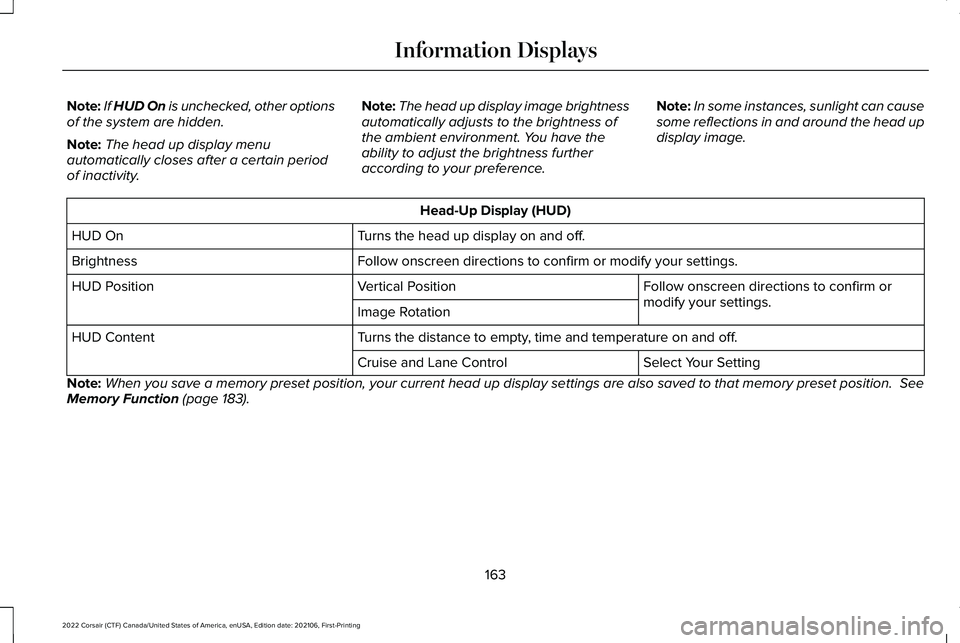
Note:
If HUD On is unchecked, other options
of the system are hidden.
Note: The head up display menu
automatically closes after a certain period
of inactivity. Note:
The head up display image brightness
automatically adjusts to the brightness of
the ambient environment. You have the
ability to adjust the brightness further
according to your preference. Note:
In some instances, sunlight can cause
some reflections in and around the head up
display image. Head-Up Display (HUD)
Turns the head up display on and off.
HUD On
Follow onscreen directions to confirm or modify your settings.
Brightness
Follow onscreen directions to confirm or
modify your settings.
Vertical Position
HUD Position
Image Rotation
Turns the distance to empty, time and temperature on and off.
HUD Content
Select Your Setting
Cruise and Lane Control
Note: When you save a memory preset position, your current head up display set\
tings are also saved to that memory preset position. See
Memory Function (page 183).
163
2022 Corsair (CTF) Canada/United States of America, enUSA, Edition date: 202106, First-Printing Information Displays
Page 168 of 676
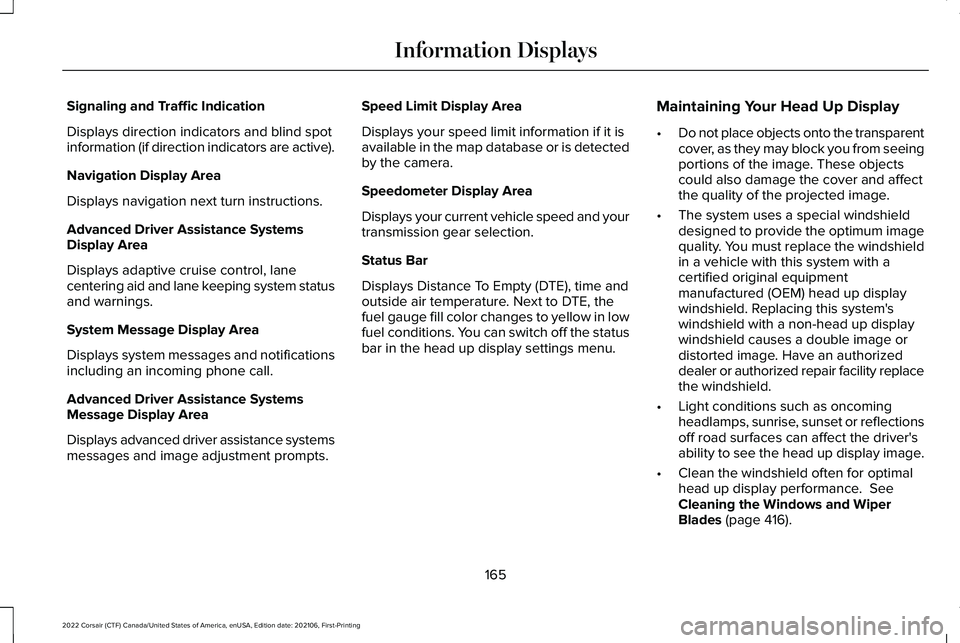
Signaling and Traffic Indication
Displays direction indicators and blind spot
information (if direction indicators are active).
Navigation Display Area
Displays navigation next turn instructions.
Advanced Driver Assistance Systems
Display Area
Displays adaptive cruise control, lane
centering aid and lane keeping system status
and warnings.
System Message Display Area
Displays system messages and notifications
including an incoming phone call.
Advanced Driver Assistance Systems
Message Display Area
Displays advanced driver assistance systems
messages and image adjustment prompts.
Speed Limit Display Area
Displays your speed limit information if it is
available in the map database or is detected
by the camera.
Speedometer Display Area
Displays your current vehicle speed and your
transmission gear selection.
Status Bar
Displays Distance To Empty (DTE), time and
outside air temperature. Next to DTE, the
fuel gauge fill color changes to yellow in low
fuel conditions. You can switch off the status
bar in the head up display settings menu.
Maintaining Your Head Up Display
•
Do not place objects onto the transparent
cover, as they may block you from seeing
portions of the image. These objects
could also damage the cover and affect
the quality of the projected image.
• The system uses a special windshield
designed to provide the optimum image
quality. You must replace the windshield
in a vehicle with this system with a
certified original equipment
manufactured (OEM) head up display
windshield. Replacing this system's
windshield with a non-head up display
windshield causes a double image or
distorted image. Have an authorized
dealer or authorized repair facility replace
the windshield.
• Light conditions such as oncoming
headlamps, sunrise, sunset or reflections
off road surfaces can affect the driver's
ability to see the head up display image.
• Clean the windshield often for optimal
head up display performance. See
Cleaning the Windows and Wiper
Blades
(page 416).
165
2022 Corsair (CTF) Canada/United States of America, enUSA, Edition date: 202106, First-Printing Information Displays