display LINCOLN CORSAIR 2022 Repair Manual
[x] Cancel search | Manufacturer: LINCOLN, Model Year: 2022, Model line: CORSAIR, Model: LINCOLN CORSAIR 2022Pages: 676, PDF Size: 7.67 MB
Page 187 of 676
Recalling a Preset Position
Press and release the preset button
associated with your preferred driving
position. The memory features move to the
position stored for that preset.
Note:
You can only recall a preset memory
position when the ignition is off, or when the
transmission is in park (P) or neutral (N) and
the ignition is on.
Note: Press any seat or mirror adjustment
switch, or any memory button during a
memory recall, to cancel the operation.
You can also recall a preset memory position
by:
• Pressing the unlock button on your
remote control if you linked it to a preset
position.
• Unlocking the driver door if a linked
remote control is present.
Note: Using a linked remote control to recall
your memory position when the ignition is
off moves the seat and steering column to
the Easy Entry position. Linking a Preset Position to Your
Remote Control
For information on linking a preset position
to your remote control, see the Personal
Profiles section.
Easy Entry and Exit Feature
If you enable the easy entry and exit feature,
it moves the driver seat position rearward up
to 2 in (5 cm) when you switch the ignition
off. The driver seat returns to the previous
position when you switch the ignition on.
You can enable or disable this feature
through the information display.
See
Information Displays (page 136). Personal Profiles
This feature allows you to create multiple
personal profiles enabling users to
personalize vehicle
’s settings. You can
create one profile for each preset memory
seat button along with a guest profile. You
can recall a profile using the touchscreen or
the preset button you selected when you
created your profile. You can also link a
remote control and a mobile device to your
profile, which are used to recall it.
Creating a Personal Profile
Use the touchscreen to create a personal
profile.
1. Switch the ignition on and leave the vehicle in park (P).
2. Select the Personal Profiles button under
Settings.
3. Follow the instructions on the display.
184
2022 Corsair (CTF) Canada/United States of America, enUSA, Edition date: 202106, First-Printing Seats
Page 188 of 676
Linking a Personal Profile to Your Remote
Control or Mobile Device
You can save preset memory positions for
up to three remote controls by assigning a
remote control to a personal profile using
the touchscreen. You can assign three
additional remote controls set up as Phone
as a Key.
Use the touchscreen to link a remote control,
mobile device or both to a personal profile.
1. Switch the ignition on and leave the
vehicle in park (P).
2. Select the Personal Profiles button under
Settings.
3. Touch the arrow for the profile you wish to link to a remote control or mobile
device.
4. Select remote control, mobile device, or
both.
5. Follow the instructions on the display.
Note: To successfully link a mobile device,
the mobile device must be in your vehicle,
and must have previously been setup as a
remote control for your vehicle. Note:
If more than one linked remote control
is in range, the memory function moves to
the settings of the first key to initiate a
memory recall.
Note: The guest profile consists of existing
settings when there is no driver profile
created. After you create a driver profile, the
guest profile serves as an additional driver
profile.
Note: You cannot link a personalized name,
a memory seat button or a remote control
to a guest profile.
Personal Settings
Personal Profiles allow you to personalize
positional settings such as seats and mirrors,
as well as non-positional settings such as
radio, navigation, driver assist and system
settings. See SYNC™ 3 (page 507). You
cannot change the menu locations and
settings of those personalized features with
Personal Profiles.
Note: Non-positional settings save to the
active driver profile whenever you change
a setting. Note:
You can save positional settings if you
press and hold a memory seat button.
Recalling and Changing a Profile
You can recall a profile by:
• Using a remote control or mobile device
linked to a driver profile to access the
remote start feature, press an unlock
button or open the door with the exterior
door handle.
• Pressing a memory seat button linked to
a driver profile.
• Using the Personal Profiles menu on the
touchscreen.
Note: The recalled profile replaces the
previously active profile. If the active profile
is not your preferred profile, you can change
it using any of the three methods listed.
185
2022 Corsair (CTF) Canada/United States of America, enUSA, Edition date: 202106, First-Printing Seats
Page 194 of 676
WHAT IS THE REAR OCCUPANT
ALERT SYSTEM
The rear occupant alert system monitors
vehicle conditions and notifies you to check
for rear seat occupants when you switch the
ignition off.
HOW DOES THE REAR OCCUPANT
ALERT SYSTEM WORK
The system monitors when rear doors have
been opened and closed to indicate the
potential presence of an occupant in the rear
seat.
A message displays in the information and
entertainment display screen and an audible
warning sounds when you switch the ignition
off after any of the following conditions have
been met:
•
A rear door is opened or closed while
the ignition is on.
• You switch the ignition on within 15
minutes of a rear door opening and
closing.
• You switch the ignition on within 15
minutes of the alert having displayed or
sounded.
REAR OCCUPANT ALERT SYSTEM
PRECAUTIONS WARNING: On hot days, the
temperature inside the vehicle can rise
very quickly. Exposure of people or animals
to these high temperatures for even a short
time can cause death or serious heat
related injuries, including brain damage.
Small children are particularly at risk. WARNING:
Do not leave children or
pets unattended in your vehicle. Failure to
follow this instruction could result in
personal injury or death.
REAR OCCUPANT ALERT SYSTEM
LIMITATIONS
The system does not detect the presence of
objects or passengers in the rear seat. It
monitors when rear doors are opened and
closed.
Note: It is possible to receive an alert when
there is no rear seat occupant, but alert
conditions are met.
Note: It is possible to receive no alert when
there is an occupant in the rear seat, if alert
conditions are not met. For example, if a rear
seat occupant does not enter the vehicle
through a rear door.
Note: The audible warning does not sound
when the front door is opened before you
switch the ignition off.
191
2022 Corsair (CTF) Canada/United States of America, enUSA, Edition date: 202106, First-Printing Rear Occupant Alert System
(If Equipped)
Page 195 of 676
SWITCHING REAR OCCUPANT
ALERT SYSTEM ON AND OFF
1. Press Settings on the touchscreen.
2. Press
Vehicle.
3. Switch
Rear Occupant Alert on or off.
Note: The default setting is on.
Note: Performing a master reset causes the
system to switch on again.
Semiannual Reminder
(If Equipped)
When you switch the system off, a message
appears every six months as a reminder that
the system is off. You can switch the system
back on or leave it off. REAR OCCUPANT ALERT SYSTEM
INDICATORS
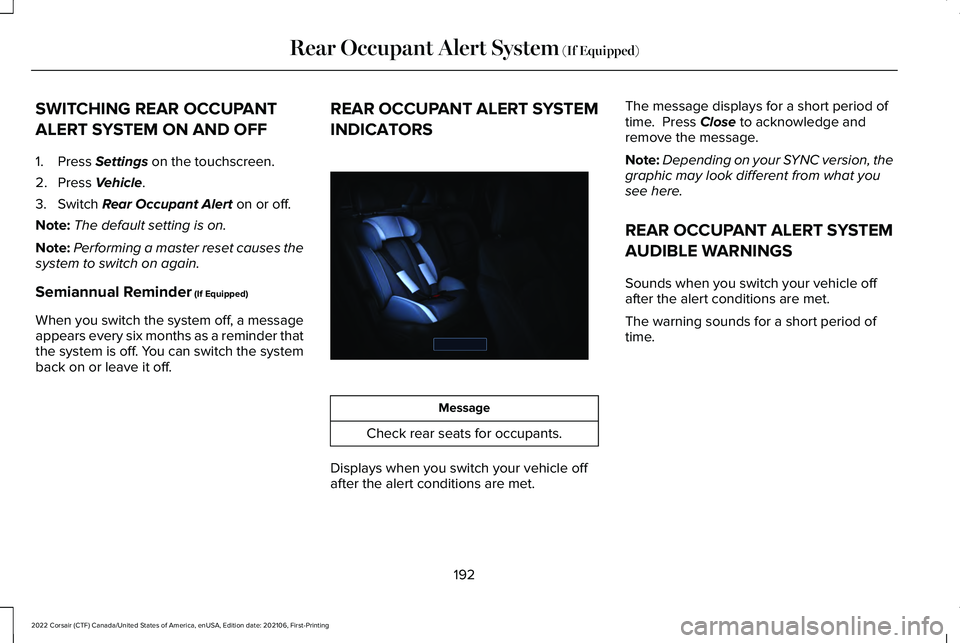
Message
Check rear seats for occupants.
Displays when you switch your vehicle off
after the alert conditions are met. The message displays for a short period of
time. Press
Close to acknowledge and
remove the message.
Note: Depending on your SYNC version, the
graphic may look different from what you
see here.
REAR OCCUPANT ALERT SYSTEM
AUDIBLE WARNINGS
Sounds when you switch your vehicle off
after the alert conditions are met.
The warning sounds for a short period of
time.
192
2022 Corsair (CTF) Canada/United States of America, enUSA, Edition date: 202106, First-Printing Rear Occupant Alert System
(If Equipped)E350472
Page 202 of 676
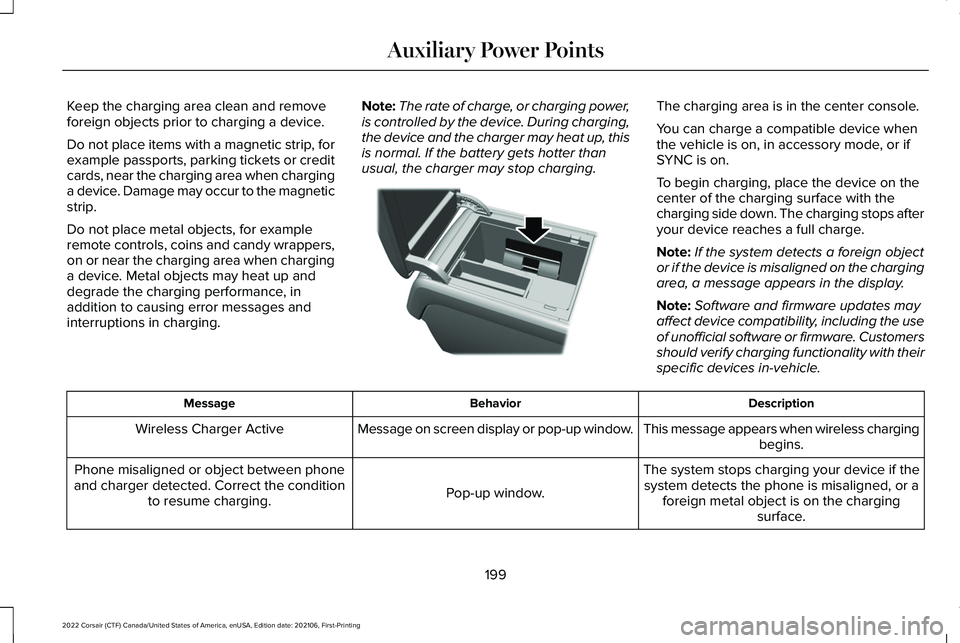
Keep the charging area clean and remove
foreign objects prior to charging a device.
Do not place items with a magnetic strip, for
example passports, parking tickets or credit
cards, near the charging area when charging
a device. Damage may occur to the magnetic
strip.
Do not place metal objects, for example
remote controls, coins and candy wrappers,
on or near the charging area when charging
a device. Metal objects may heat up and
degrade the charging performance, in
addition to causing error messages and
interruptions in charging.
Note:
The rate of charge, or charging power,
is controlled by the device. During charging,
the device and the charger may heat up, this
is normal. If the battery gets hotter than
usual, the charger may stop charging. The charging area is in the center console.
You can charge a compatible device when
the vehicle is on, in accessory mode, or if
SYNC is on.
To begin charging, place the device on the
center of the charging surface with the
charging side down. The charging stops after
your device reaches a full charge.
Note:
If the system detects a foreign object
or if the device is misaligned on the charging
area, a message appears in the display.
Note: Software and firmware updates may
affect device compatibility, including the use
of unofficial software or firmware. Customers
should verify charging functionality with their
specific devices in-vehicle. Description
Behavior
Message
This message appears when wireless chargingbegins.
Message on screen display or pop-up window.
Wireless Charger Active
The system stops charging your device if thesystem detects the phone is misaligned, or a foreign metal object is on the charging surface.
Pop-up window.
Phone misaligned or object between phone
and charger detected. Correct the condition to resume charging.
199
2022 Corsair (CTF) Canada/United States of America, enUSA, Edition date: 202106, First-Printing Auxiliary Power PointsE317944
Page 207 of 676
Fast Restart
The fast restart feature allows you to restart
the engine within 20 seconds of switching it
off, even if a valid key is not present.
When you switch it off temporarily, it turns
on at the next ignition cycle. After 20
seconds, you can no longer restart the
engine without the key present inside your
vehicle.
Once the engine starts, it remains running
until you press the push button ignition
switch, even if the system does not detect a
valid key. If you open and close a door while
the engine is running, the system searches
for a valid key. You cannot restart the engine
if the system does not detect a valid key
within 20 seconds.
Vehicles using Phone as a Key
Note:
Do not touch the accelerator pedal.
Note: You must have your Phone as a Key
in your vehicle to shift the transmission out
of park (P). 1. Fully depress the brake pedal.
2. Press the push button ignition switch.
The system does not function if:
•
The Bluetooth® enabled phone
frequencies are jammed.
• The Phone as a Key battery is low or fully
discharged.
See Phone as a Key (page
69).
Automatic Engine Shutdown
If your vehicle has a keyless ignition, it has
a feature that shuts down the engine if it has
been idling for an extended period. The
ignition also turns off in order to save battery
power. Before the engine shuts down, a
message appears in the information display
showing a timer counting down from 30
seconds. If you do not intervene within 30
seconds, the engine shuts down. Another
message appears in the information display
to inform you that the engine has shut down
in order to save fuel. Start your vehicle as
you normally do. Automatic Engine Shutdown Override
Note:
You cannot permanently switch off the
automatic engine shutdown feature. When
you switch it off temporarily, it turns on at
the next ignition cycle.
You can stop the engine shutdown, or reset
the timer, at any point before the 30-second
countdown has expired by doing any of the
following:
• You can reset the timer by interacting
with your vehicle, such as pressing the
brake pedal or accelerator pedal.
• Use the vehicle settings on the
touchscreen to switch 30min max idle on
or off.
• During the countdown before engine
shutdown, a message appears prompting
you to press OK or RESET, depending on
your type of information display, to
temporarily switch the feature off.
Stopping the Engine When Your
Vehicle is Stationary
1. Put the transmission in park (P).
204
2022 Corsair (CTF) Canada/United States of America, enUSA, Edition date: 202106, First-Printing Starting and Stopping the Engine
Page 210 of 676
Vehicles using Phone as a Key
Note:
Do not touch the accelerator pedal.
Note: You must have your Phone as a Key
in your vehicle in order to shift the
transmission out of park (P).
1. Fully depress the brake pedal.
2. Press the push button ignition switch.
The system does not function if:
• The Bluetooth® enabled phone
frequencies are jammed.
• The Phone as a Key battery is low or fully
discharged. See Phone as a Key (page
69).
Automatic Shutdown
This feature shuts down your vehicle if it has
been idling for an extended period. The
ignition also turns off in order to save battery
power. Before your vehicle shuts down, a
message appears in the information display
showing a timer counting down from 30 seconds. If you do not intervene within 30
seconds, your vehicle shuts down. Another
message appears in the information display
to inform you that your vehicle has shut down
in order to save fuel. Start your vehicle as
you normally do.
Automatic Shutdown Override
Note:
You cannot permanently switch off
the automatic engine shutdown feature.
When you switch it off temporarily, it turns
on at the next ignition cycle.
You can stop the shutdown, or reset the
timer, at any point before the 30-second
countdown has expired by doing any of the
following: •
Interacting with your vehicle, for example
pressing the brake or accelerator pedal.
• You can temporarily switch off the
shutdown feature any time the ignition is
on (for the current ignition cycle only).
Use the information display to do so. See
Information Displays
(page 136).
• During the countdown before shutdown,
you are prompted to press OK or RESET
(depending on your type of information
display) to temporarily switch the feature
off (for the current ignition cycle only).
Switching Off Your Vehicle When It Is
Stationary
1. Shift into park (P).
2. Press the push button ignition switch.
3. Apply the parking brake.
Note: This switches off the ignition, all
electrical circuits, warning lamps and
indicators.
Note: If the engine is idling for 30 minutes,
the ignition and engine shut down.
207
2022 Corsair (CTF) Canada/United States of America, enUSA, Edition date: 202106, First-Printing Starting and Stopping the Engine
Page 214 of 676

AUTO-START-STOP (IF EQUIPPED)
WARNING:
Always fully apply the
parking brake and make sure you shift into
park (P). Failure to follow this instruction
could result in personal injury or death. WARNING: Apply the parking brake,
shift into park (P), switch the ignition off
and remove the key before you open the
hood or have any service or repair work
completed. If you do not switch the ignition
off, the engine could restart at any time.
Failure to follow this instruction could result
in personal injury or death. WARNING:
The system may require
the engine to automatically restart when
the auto-start-stop indicator illuminates
green or flashes amber. Failure to follow
this instruction could result in personal
injury. The system helps reduce fuel consumption
by automatically shutting off and restarting
the engine while your vehicle is stopped.
The engine will restart automatically when
you release the brake pedal. In some
situations, your vehicle may restart
automatically, for example:
•
To maintain interior comfort
• To recharge the battery
Note: Power assist steering is turned off
when the engine is off.
The Auto-Start-Stop system status is
available at a glance within the information
display.
See Information Displays (page
136).
Enabling Auto-Start-Stop
The system is automatically enabled every
time you start your vehicle if the following
conditions are met:
• The Auto-Start-Stop button is not pressed
(not illuminated).
• Your vehicle exceeds an initial speed of
3 mph (5 km/h) after the vehicle has been
initially started. •
Your vehicle is stopped.
• Your foot is on the brake pedal.
• The transmission is in drive (D).
• The driver's door is closed.
• There is adequate brake vacuum.
• The interior compartment has been
cooled or warmed to an acceptable level.
• The front windshield defroster is off.
• The steering wheel is not turned rapidly
or is not at a sharp angle.
• The vehicle is not on a steep road grade.
• The battery is within optimal operating
conditions (battery state of charge and
temperature in range).
• The engine coolant is at operating
temperature.
• The Vehicle is not at a high altitude.
• Ambient temperature is moderate. The green Auto-Start-Stop
indicator light on the instrument
cluster will illuminate to indicate
when the automatic engine stop occurs.
211
2022 Corsair (CTF) Canada/United States of America, enUSA, Edition date: 202106, First-Printing Unique Driving Characteristics
Page 218 of 676

PLUG-IN HYBRID VEHICLE
OPERATION - PLUG-IN HYBRID
ELECTRIC VEHICLE (PHEV)
Regularly plug in your vehicle to get optimal
electric-only range capability from the high
voltage battery. Charging your vehicle adds
electrical energy. This energy propels the
vehicle.
Estimated electric-only driving range shows
in blue next to the gasoline range on the
information display.
The system maximizes the use of
electric-only operation in normal drive mode.
System conditions could require the engine
to operate, however, the system uses the
available electric range whenever possible.
In Pure EV drive mode, your vehicle only
uses electric power unless you enable the
engine, or system conditions require the
engine to operate.
Preserve EV drive mode saves the electric
range for later use. If you select this mode
and the battery is at full or near full charge,
it uses some electric-only range to discharge
the battery. This allows the regenerative
braking system to fully operate. If the battery
charge is low when selecting Preserve EV
mode, the engine charges the high voltage
battery to a minimum level. This provides
additional electric driving range. When the
battery charges to this level, Preserve EV
saves the electric range for later use.
Other drive modes appropriately make use
of electric power to help deliver the selected
drive mode experience. It could use available
electric-only range, if needed. See What Is
Drive Mode Control (page 337). When the electric-only range reaches zero,
the powertrain system switches to hybrid
operation. This means the energy you gain
from plugging in and charging your vehicle
is now gone. Both the gasoline engine and
electric motor power your vehicle and
maximize fuel economy during hybrid
operation. Hybrid operation provides some
electric-only driving as the powertrain system
maintains the high voltage battery charge
level within functional limits.
Low Engine Use
The low engine use mode properly lubricates
the engine at sufficient temperature and
activates when you drive your vehicle with
limited engine operation. When in low engine
use mode, your vehicle runs the engine as
necessary. When low engine use mode
begins, a message appears in the information
display. If low engine use mode does not
complete before you switch your vehicle off,
it continues the next time you start your
vehicle and the message reappears.
See
Information Messages (page 142).
Pure EV mode is not available during low
engine use mode.
215
2022 Corsair (CTF) Canada/United States of America, enUSA, Edition date: 202106, First-Printing Unique Driving Characteristics
Page 227 of 676
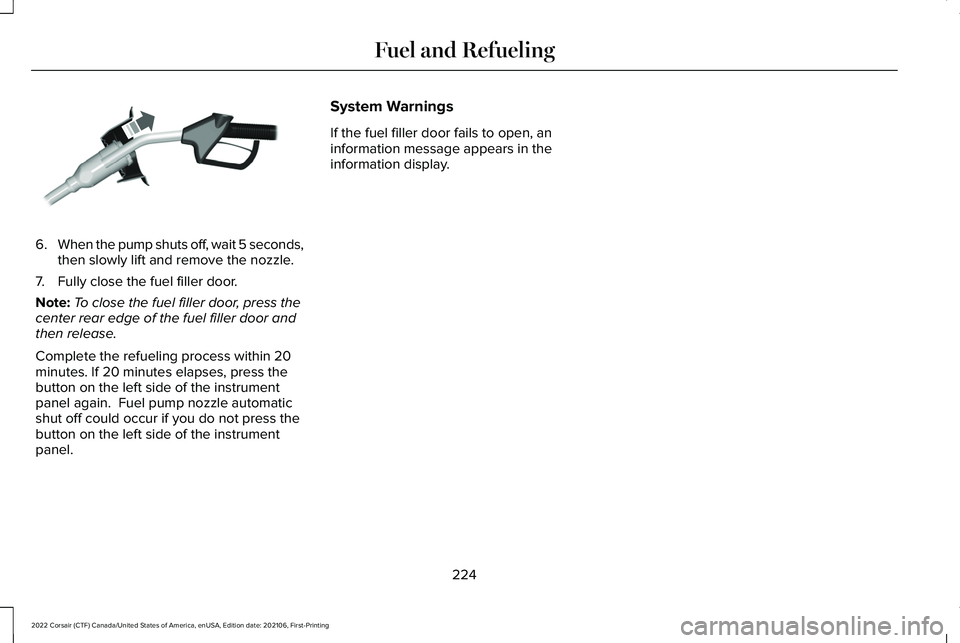
6.
When the pump shuts off, wait 5 seconds,
then slowly lift and remove the nozzle.
7. Fully close the fuel filler door.
Note: To close the fuel filler door, press the
center rear edge of the fuel filler door and
then release.
Complete the refueling process within 20
minutes. If 20 minutes elapses, press the
button on the left side of the instrument
panel again. Fuel pump nozzle automatic
shut off could occur if you do not press the
button on the left side of the instrument
panel. System Warnings
If the fuel filler door fails to open, an
information message appears in the
information display.
224
2022 Corsair (CTF) Canada/United States of America, enUSA, Edition date: 202106, First-Printing Fuel and RefuelingE119081