battery LINCOLN CORSAIR 2022 Manual PDF
[x] Cancel search | Manufacturer: LINCOLN, Model Year: 2022, Model line: CORSAIR, Model: LINCOLN CORSAIR 2022Pages: 676, PDF Size: 7.67 MB
Page 274 of 676
If the light does not momentarily
illuminate, continues to flash or
remains on when you switch the
ignition on, have the system
checked by an authorized dealer.
If the brake warning lamp
illuminates with the parking brake released,
have the system checked immediately.
HINTS ON DRIVING WITH ANTI-
LOCK BRAKES
The anti-lock brake system does not
eliminate the risks when:
• You drive too closely to the vehicle in
front of you.
• Your vehicle is hydroplaning.
• You take corners too fast.
• The road surface is poor.
Note: If the system activates, the brake
pedal could pulse and may travel further.
Maintain pressure on the brake pedal. You
may also hear a noise from the system. This
is normal. ELECTRIC PARKING BRAKE WARNING: Always fully apply the
parking brake and make sure you shift into
park (P). Failure to follow this instruction
could result in personal injury or death. WARNING:
If you drive extended
distances with the parking brake applied,
you could cause damage to the brake
system. WARNING:
The electric parking
brake does not operate if the vehicle
battery is running out of charge.
Note: The electric parking brake makes
noises during operation. This is normal.
Your vehicle has an electric parking brake.
You operate it with a switch instead of a
lever. The switch is on the center console or
to the left-hand side of the steering wheel,
on the lower part of the instrument panel. Applying the Electric Parking Brake Pull the switch upward.
The red warning lamp flashes
during operation and illuminates
when you apply the parking brake.
Note:
It remains illuminated for a short
period of time after you switch the ignition
off.
If it continues to flash or does not illuminate,
the system has malfunctioned. Have your
vehicle checked as soon as possible.
Note: You can apply the electric parking
brake when the ignition is off.
Note: The electric parking brake could
automatically apply when you shift into park
(P).
See Transmission (page 256).
271
2022 Corsair (CTF) Canada/United States of America, enUSA, Edition date: 202106, First-Printing BrakesE270480 E267156 E270480
Page 276 of 676
Releasing the Electric Parking Brake if
the Vehicle Battery is Running Out of
Charge
Note:
The electric parking brake does not
apply or release if the battery is low or has
no charge.
Connect a booster battery to the vehicle
battery to release the electric parking brake
if the vehicle battery is running out of charge.
See Jump Starting the Vehicle (page 364).
HILL START ASSIST
(IF EQUIPPED) WARNING:
The system does not
replace the parking brake. When you leave
your vehicle, always apply the parking
brake. WARNING: You must remain in your
vehicle when the system turns on. At all
times, you are responsible for controlling
your vehicle, supervising the system and
intervening, if required. Failure to take care
may result in the loss of control of your
vehicle, serious personal injury or death.
Note: If the engine is revved excessively, or
if a malfunction is detected, the system turns
off.
The system makes it easier to pull away
when your vehicle is on a slope without the
need to use the parking brake.
When the system is active, your vehicle will
remain stationary on the slope for two to
three seconds after you release the brake
pedal. This allows you time to move your
foot from the brake to the accelerator pedal.
The brakes release automatically when the
engine has sufficient torque to prevent your
vehicle from rolling down the grade. This is
an advantage when pulling away on a slope,
for example from a car park ramp, traffic
lights or when reversing uphill into a parking
space. The system will activate automatically on any
slope that will cause significant vehicle
rollback. For vehicles with a manual
transmission, you can switch this feature off
using the information display.
See
Information Displays (page 136). The system
will remain on or off depending on how it
was last set.
Note: There is no warning lamp to indicate
the system is either on or off.
Note: If your vehicle is equipped with Auto
Hold, Hill Start Assist is not available while
Auto Hold is active.
Using Hill Start Assist
1. Bring your vehicle to a complete standstill. Keep the brake pedal pressed
and select a forward gear, for example,
drive (D) or first (1) when facing uphill or
reverse (R) when facing downhill.
2. If the sensors detect that your vehicle is on a slope, the system will activate
automatically.
273
2022 Corsair (CTF) Canada/United States of America, enUSA, Edition date: 202106, First-Printing Brakes
Page 282 of 676
REVERSE BRAKING ASSIST –
FREQUENTLY ASKED QUESTIONS
Why is reverse braking assist unavailable?
•
Make sure the reverse braking assist is
on. See Switching Reverse Braking
Assist On and Off (page 277).
• Make sure that all doors and the liftgate
or tailgate are closed. Drive the vehicle
on a straight road for a short period. If
the message remains, contact an
authorized dealer.
• Make sure the cross traffic alert system
is on if equipped.
• Make sure the rear parking aid system is
on.
See Parking Aids (page 283).
• Make sure the traction control is on. See
Using Traction Control
(page 280).
Note: The traction control automatically turns
off if four-wheel drive low and certain drive
modes such as mud/ruts and snow/sand is
activated. •
The vehicle may have sustained a rear
end impact. Contact an authorized dealer
to have the sensors checked for proper
coverage and operation.
• An anti-lock brake, traction control or
stability control event may have occurred.
Reverse braking assist resumes
operation when the event is complete.
• Make sure the rear view camera and 360
degree camera are not dirty or
obstructed. If dirty, clean the camera. If
the message still appears after cleaning
the camera, wait a short time for the
message to clear. If the message does
not clear, contact an authorized dealer.
• Make sure the cross traffic alert and rear
parking aid sensors are not blocked or
faulty.
• You recently had your vehicle serviced,
or the battery disconnected. Drive your
vehicle a short distance to resume
system operation.
• Reverse braking assist does not function
when you connect a trailer. Operation
resumes when you disconnect the trailer. Note:
If the answers to why the system is
unavailable do not assist in returning reverse
braking assist to available, have the system
checked as soon as possible.
279
2022 Corsair (CTF) Canada/United States of America, enUSA, Edition date: 202106, First-Printing Reverse Braking Assist
(If Equipped)
Page 302 of 676
ACTIVE PARK ASSIST –
TROUBLESHOOTING
ACTIVE PARK ASSIST – INFORMATION
MESSAGES
Action
Message
The system requiresservice. Have your
vehicle checked as soon as possible.
Active Park Fault
ACTIVE PARK ASSIST – FREQUENTLY
ASKED QUESTIONS
Why does active park assist not operate
correctly? The system is unable to detect a vehicle,
curb or object to park next to or in
between. The system needs boundary
objects to operate correctly.
Why does active park assist not search for
a parking space? You have switched traction control off. Why does active park assist not search for
a parking space?
The transmission is in reverse (R). Your
vehicle must be moving forward to be
able to detect a parking space.
Why does active park assist not offer a
parking space? The sensors could be blocked. For
example, snow, ice or large
accumulations of dirt. Blocked sensors
can affect how the system functions.
Why does active park assist not offer a
parking space? The sensors in the front or rear bumper
could be damaged.
Why does active park assist not offer a
parking space? There is not enough room in the parking
space for your vehicle to safely park.
Why does active park assist not offer a
parking space? There is not enough space for the
parking maneuver on the opposite side
of the parking space. Why does active park assist not offer a
parking space?
The parking space is more than 5 ft
(1.5 m) or less than 2 ft (0.5 m) away from
your vehicle.
Why does active park assist not offer a
parking space? Your vehicle's speed is greater than
22 mph (35 km/h)
for parallel parking or
greater than 19 mph (30 km/h) for
perpendicular parking.
Why does active park assist not offer a
parking space? You recently disconnected or replaced
the battery. After you reconnect the
battery you must drive your vehicle on
a straight road for a short period of time.
Why does active park assist not correctly
position the vehicle into a parking space? An irregular curb along the parking
space prevents the system from
correctly aligning your vehicle.
299
2022 Corsair (CTF) Canada/United States of America, enUSA, Edition date: 202106, First-Printing Active Park Assist
(If Equipped)
Page 359 of 676
Recreational Towing - All-Wheel and
Four-Wheel Drive Vehicles (If Equipped)
You cannot recreational tow your vehicle
with all wheels on the ground because
vehicle or transmission damage could occur.
We recommend towing your vehicle with all
four wheels off the ground, such as when
using a car-hauling trailer. Otherwise, you
cannot recreational tow your vehicle. TOWING THE VEHICLE ON FOUR
WHEELS - PLUG-IN HYBRID
ELECTRIC VEHICLE (PHEV),
AUTOMATIC TRANSMISSION –
HF45
Emergency Towing
If your vehicle becomes inoperable without
access to wheel dollies or a vehicle transport
trailer, it can be flat-towed with all wheels on
the ground, regardless of the powertrain and
transmission configuration, under the
following conditions:
•
Your vehicle is facing forward for towing
in a forward direction.
• You switch
Neutral Tow on.
• You release the parking brake.
• You switch welcome lighting off.
See
Welcome Lighting (page 110).
• Maximum speed is
35 mph (55 km/h).
• Maximum distance is
50 mi (80 km). Switching
Neutral Tow On
1. Switch your vehicle on in accessory mode.
2. Press the menu button on the steering wheel to enter the instrument cluster
display main menu.
3. Select
Settings.
4. Select
Neutral Tow.
5. Follow the instructions on the information
display.
6. Fully press the brake pedal.
7. Shift into neutral (N).
8. Switch the ignition off.
Note: Failure to follow these instructions
could result in damage to the transmission.
Note: Switching neutral tow on requires
battery power.
Note: Put your climate control system in
recirculated air mode to prevent exhaust
fumes from entering your vehicle.
See
Climate Control (page 169).
356
2022 Corsair (CTF) Canada/United States of America, enUSA, Edition date: 202106, First-Printing Towing
Page 360 of 676
Switching Neutral Tow Off
1. Switch your vehicle on in accessory mode.
2. Fully press the brake pedal.
3. Shift into park (P).
Note: Switch welcome lighting on to
reactivate it.
See Welcome Lighting (page
110).
Recreational Towing
Follow these guidelines if you have a need
for recreational towing. An example of
recreational towing is towing your vehicle
behind a motorhome. These guidelines
ensure that you do not damage the
transmission.
If you have a front-wheel drive vehicle, you
can tow with the front wheels off the ground
by using a tow dolly. If you have an all-wheel
drive vehicle, you can tow with all four
wheels off the ground using a vehicle
transport trailer. If you are using a tow dolly
or a vehicle transport trailer, follow the
instruction specified by the equipment
provider. Note:
Put your climate control system in
recirculated air mode to prevent exhaust
fumes from entering your vehicle.
See
Climate Control (page 169).
You can tow your vehicle with all four wheels
on the ground under the following
conditions:
• Your vehicle is facing forward for towing
in a forward direction.
• You switch
Neutral Tow on.
• You release the parking brake.
• You switch welcome lighting off.
See
Welcome Lighting (page 110).
• You do not exceed
70 mph (113 km/h).
Switching
Neutral Tow On
1. Switch your vehicle on in accessory mode.
2. Press the menu button on the steering wheel to enter the information display
main menu.
3. Select
Settings.
4. Select
Neutral Tow. 5.
Follow the instructions on the information
display.
6. Fully press the brake pedal.
7. Shift into neutral (N).
8. Switch the ignition off.
Note: Failure to follow these instructions
could result in damage to the transmission.
Note: Switching on neutral tow mode
requires battery power.
Note: If the parking brake is applied, a
message appears in the instrument cluster
display.
Note: If your vehicle has an ignition key, you
cannot remove the key from the ignition
when the transmission is in neutral (N) and
your vehicle is off.
Note: Start the engine and allow it to run for
a few minutes at the beginning of each day,
and every six hours or fewer. With the engine
running and your foot on the brake, shift into
drive (D) and then into reverse (R) before
shifting back into neutral (N). Before
continuing to tow, re-enable neutral tow.
357
2022 Corsair (CTF) Canada/United States of America, enUSA, Edition date: 202106, First-Printing Towing
Page 365 of 676
ROADSIDE ASSISTANCE
Vehicles sold in the United States:
Getting Roadside Assistance
To fully assist you should you have a vehicle
concern, Lincoln offers a complimentary
roadside assistance program. This program
is separate from the New Vehicle Limited
Warranty.
The service is available:
•
Throughout the life of the vehicle for
original owners.
• For six years or 70,000 mi (110,000 km)
(whichever comes first) for subsequent
owners.
Roadside Assistance covers:
• A flat tire change with a good spare
(except vehicles supplied with a tire
inflation kit).
• Battery jump start.
• Lock-out assistance (key replacement
cost is the client's responsibility). •
Fuel delivery — independent service
contractors, if not prohibited by state,
local or municipal law shall deliver up to
2 gal (8 L)
of gasoline fuel to a disabled
vehicle. Roadside Assistance limits fuel
delivery service to two no-charge
occurrences within a 12-month period.
• Winch out — available within 100 ft (30 m)
of a paved or county maintained road,
no recoveries. •
Towing — independent service
contractors, if not prohibited by state,
local or municipal law shall tow Lincoln
eligible vehicles to the client's selling or
preferred dealer within 100 mi (160 km)
of the disablement location or to the
nearest Lincoln dealer. If a client requests
a tow to a selling or preferred dealer that
is more than
100 mi (160 km) from the
disablement location, the client is
responsible for any mileage costs in
excess of
100 mi (160 km).
• Roadside Assistance includes up to $200
for a towed trailer if the disabled eligible
vehicle requires service at the nearest
authorized dealer. If the towing vehicle
is operational but the trailer is not, then
the trailer does not qualify for any
roadside services.
Vehicles Sold in the United States:
Using Roadside Assistance
United States clients who require roadside
assistance, call 1-800-521-4140 or contact
Roadside Assistance using the Lincoln Way
mobile app.
362
2022 Corsair (CTF) Canada/United States of America, enUSA, Edition date: 202106, First-Printing Roadside Emergencies
Page 366 of 676
If you need to arrange roadside assistance
for yourself, Lincoln reimburses a reasonable
amount for towing to the nearest Lincoln
dealership within 100 mi (160 km). To obtain
reimbursement information, United States
clients, call 1-800-521-4140. Clients need to
submit their original receipts.
Vehicles Sold in Canada: Getting
Roadside Assistance
To fully assist you should you have a vehicle
concern, Lincoln offers a complimentary
roadside assistance program. This program
is eligible within Canada or the continental
United States.
The service is available 24 hours a day,
seven days a week.
This program is separate from the New
Vehicle Limited Warranty, beginning from
the original warranty start date and lasts the
life of the vehicle for the original owner.
Subsequent owners receive coverage that
is concurrent with the 6 years or
70,000 mi
(110,000 km) (whichever occurs first)
powertrain warranty coverage period. Note:
Canadian roadside coverage and
benefits may differ from the U.S. coverage.
For complete program coverage details,
review your warranty guide, contact your
dealer, call us in Canada at 1-800-387-9333,
or visit our website at
www.lincolncanada.com.
If you purchased your vehicle in Canada and
require roadside assistance, please call
1-800-387-9333 or contact Roadside
Assistance using the Lincoln Way mobile
app.
Note: For quick reference, complete the
roadside assistance identification card found
in the glove compartment of your vehicle
and place it in your wallet.
HAZARD FLASHERS
Note: The hazard flashers operate when the
ignition is in any position, or if the key is not
in the ignition. If used when the vehicle is not
running, the battery loses charge. As a result,
there may be insufficient power to restart
your vehicle. The flasher control is on the
instrument panel. Use your hazard
flashers when your vehicle is
creating a safety hazard for other motorists.
• Press the flasher control and all front and
rear direction indicators flash.
• Press the button again to switch them off.
FUEL SHUTOFF WARNING:
If your vehicle has been
involved in a crash, have the fuel system
checked. Failure to follow this instruction
could result in fire, personal injury or death.
Note: When you try to restart your vehicle
after a fuel shutoff, the vehicle makes sure
that various systems are safe to restart.
Once the vehicle determines the systems
are safe, then the vehicle allows you to
restart.
Note: In the event that your vehicle does not
restart after your third attempt, contact a
qualified technician.
363
2022 Corsair (CTF) Canada/United States of America, enUSA, Edition date: 202106, First-Printing Roadside Emergencies
Page 367 of 676
The fuel pump shutoff stops the flow of fuel
to the engine in the event of a moderate to
severe crash. Not every impact causes a
shutoff.
Should your vehicle shut off after a crash,
you may restart your vehicle.
If your vehicle has a key system:
1. Switch off the ignition.
2. Switch to start position.
3. Switch off the ignition.
4. Switch on the ignition to re-enable the
fuel pump.
5. If the vehicle does not start, repeat steps
1 through 4.
If your vehicle has a push button start
system:
1. Press START/STOP to switch off your
vehicle.
2. Press the brake pedal and
START/STOP
to switch on your vehicle.
3. Remove your foot from the brake pedal and press
START/STOP to switch off
your vehicle. 4. You can attempt to start the vehicle by
pressing the brake pedal and
START/STOP
, or press START/STOP
without pressing the brake pedal.
5. If the vehicle does not start, repeat steps
1 through 4.
JUMP STARTING THE VEHICLE WARNING:
Batteries normally
produce explosive gases which can cause
personal injury. Therefore, do not allow
flames, sparks or lighted substances to
come near the battery. When working near
the battery, always shield your face and
protect your eyes. Always provide correct
ventilation. WARNING:
Keep batteries out of
reach of children. Batteries contain sulfuric
acid. Avoid contact with skin, eyes or
clothing. Shield your eyes when working
near the battery to protect against possible
splashing of acid solution. In case of acid
contact with skin or eyes, flush immediately
with water for a minimum of 15 minutes and
get prompt medical attention. If acid is
swallowed, call a physician immediately. WARNING:
Use only adequately
sized cables with insulated clamps. WARNING: Make sure that the cables
are clear of any moving parts and fuel
delivery system parts.
Note: Do not attempt to push-start your
automatic transmission vehicle. Attempting
to push-start a vehicle with an automatic
transmission may cause transmission
damage.
Note: Do not disconnect the battery of the
disabled vehicle as this could damage the
vehicle electrical system.
364
2022 Corsair (CTF) Canada/United States of America, enUSA, Edition date: 202106, First-Printing Roadside Emergencies
Page 368 of 676
Preparing Your Vehicle
Note:
Use only a 12 volt supply to start your
vehicle.
Park the booster vehicle close to the hood
of the disabled vehicle, making sure the two
vehicles do not touch.
Connecting the Jumper Cables WARNING: Do not connect the
negative jumper cable to any other part of
your vehicle. Use the ground point.
Note: If you are using a jump pack or booster
box, follow that manufacturer's instructions.
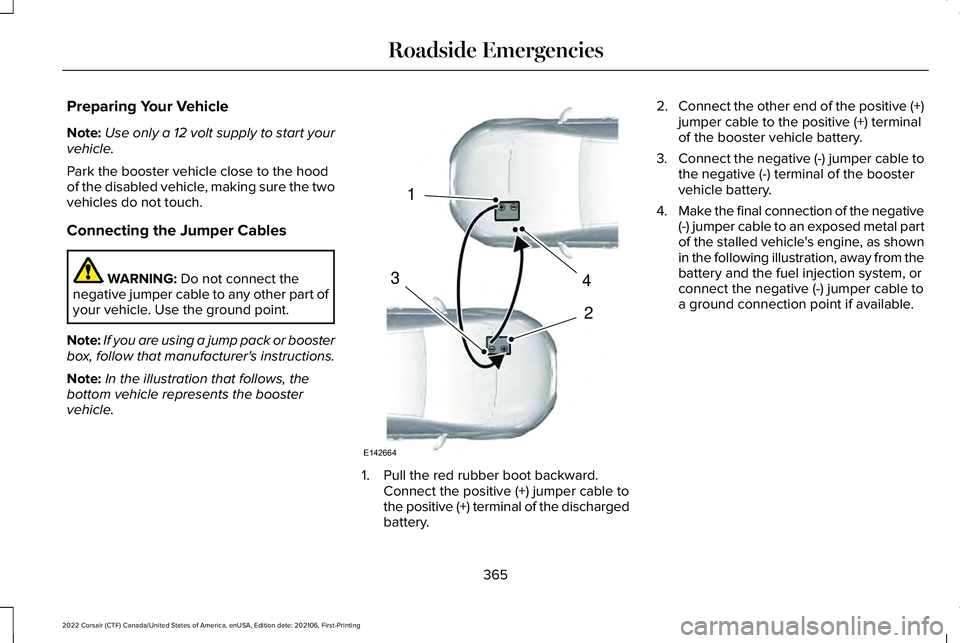
Note: In the illustration that follows, the
bottom vehicle represents the booster
vehicle. 1. Pull the red rubber boot backward.
Connect the positive (+) jumper cable to
the positive (+) terminal of the discharged
battery. 2.
Connect the other end of the positive (+)
jumper cable to the positive (+) terminal
of the booster vehicle battery.
3. Connect the negative (-) jumper cable to
the negative (-) terminal of the booster
vehicle battery.
4. Make the final connection of the negative
(-) jumper cable to an exposed metal part
of the stalled vehicle's engine, as shown
in the following illustration, away from the
battery and the fuel injection system, or
connect the negative (-) jumper cable to
a ground connection point if available.
365
2022 Corsair (CTF) Canada/United States of America, enUSA, Edition date: 202106, First-Printing Roadside Emergencies4
2
1
3
E142664