ad blue LINCOLN CORSAIR 2022 Owners Manual
[x] Cancel search | Manufacturer: LINCOLN, Model Year: 2022, Model line: CORSAIR, Model: LINCOLN CORSAIR 2022Pages: 676, PDF Size: 7.67 MB
Page 66 of 676
WHAT IS 911 ASSIST
911 Assist is a SYNC system feature that can
call for help if you are in an accident. If a
crash deploys an airbag, excluding knee
airbags and rear inflatable seatbelts [if
equipped], or activates the fuel pump
shut-off, your SYNC-equipped vehicle may
be able to contact emergency services by
dialing 911 through a paired and connected
Bluetooth enabled phone. You can learn
more about the 911 Assist feature, by visiting:
Website
www.owner.lincoln.com
www.syncmyride.ca
www.syncmaroute.ca
Not all crashes will deploy an airbag or
activate the fuel pump shut-off, the triggers
for 911 Assist. If a connected cell phone
sustains damage or loses its connection to
SYNC during a crash, SYNC will search for
and try to connect to a previously paired cell
phone. SYNC will then attempt to call the
emergency services. Before making the call:
•
SYNC provides a short window of time,
about 10 seconds, to cancel the call. If
you fail to cancel the call, SYNC attempts
to dial 911.
• SYNC says the following, or a similar
message: SYNC will attempt to call 911,
to cancel the call, press Cancel on your
screen or press and hold the phone
button on your steering wheel.
If you do not cancel the call, and SYNC
makes a successful call, a pre-recorded
message plays for the 911 operator, and then
the occupant(s) in your vehicle is able to talk
with the operator. Be prepared to
immediately provide your name, phone
number and location, because not all 911
systems are capable of receiving this
information electronically.
During an emergency call, the system
transmits vehicle data to the emergency
service. See Data Recording (page 14). EMERGENCY CALL
REQUIREMENTS WARNING: Do not wait for 911 Assist
to make an emergency call if you can do
it yourself. Dial emergency services
immediately to avoid delayed response
time which could increase the risk of
serious injury or death after a crash. If you
do not hear 911 Assist within five seconds
of the crash, the system or phone may be
damaged or non-functional. WARNING: Always place your phone
in a secure location in your vehicle so it
does not become a projectile or get
damaged in a crash. Failure to do so may
cause serious injury to someone or
damage the phone which could prevent
911 Assist from working properly. WARNING: Unless the 911 Assist
setting is set on before a crash, the system
will not dial for help which could delay
response time, potentially increasing the
risk of serious injury or death after a crash.
63
2022 Corsair (CTF) Canada/United States of America, enUSA, Edition date: 202106, First-Printing 911 Assist
Page 67 of 676
•
SYNC must be powered and working
properly at the time of the incident and
throughout feature activation and use.
• The 911 Assist feature must be set on
before the incident.
• You must pair and connect a Bluetooth®
enabled and compatible cell phone to
SYNC.
• A connected Bluetooth® enabled phone
must have the ability to make and
maintain an outgoing call at the time of
the incident.
• A connected Bluetooth® enabled phone
must have adequate network coverage,
battery power and signal strength.
• The vehicle must have battery power and
be located in the U.S., Canada or in a
territory in which 911 is the emergency
number.
Note: If any user sets 911 Assist to on or off,
that setting applies for all paired phones. If
911 Assist is switched off and the phone is
connected to SYNC, an icon displays on the
status bar. Note:
Every phone operates differently.
While SYNC 911 Assist works with most
cellular phones, some may have trouble
using this feature.
EMERGENCY CALL LIMITATIONS
The SYNC 911 Assist feature only operates
in the U.S., Canada or in a territory in which
911 is the emergency number.
• Your cellular phone or 911 Assist
hardware sustains damage in a crash.
• The vehicle's battery or the SYNC system
has no power.
• The phone(s) thrown from your vehicle
are the ones paired and connected to
the system.
64
2022 Corsair (CTF) Canada/United States of America, enUSA, Edition date: 202106, First-Printing 911 Assist
Page 72 of 676
WHAT IS PHONE AS A KEY
Phone as a Key allows you to use your phone
in place of a passive key.
You can use your phone for the following
functions:
•
Remote locking and unlocking.
• Passive entry and exit.
• Passive start and drive the vehicle.
• Remote start.
• Memory function recall.
PHONE AS A KEY LIMITATIONS
Limitations can vary based on the make and
model of your phone, phone location and
physical obstructions.
The following items could impact Phone as
a Key performance or prevent functionality
in some cases:
• The typical operating range for Phone as
a Key is 131 ft (40 m). •
Your
Bluetooth® connection is not
enabled, is disrupted, or out of range.
• Your Phone as a Key is not active or
enabled on at least one phone.
• Your vehicle battery has depleted.
• Your phone battery has depleted.
• Interference from other devices using
radio frequencies or physical
obstructions.
• Your phone is too close to metal objects
or other electronic devices.
Note: Do not leave a duplicate coded key
in the vehicle. Always take your keys and
phone and lock all doors when leaving the
vehicle.
PROGRAMMING YOUR PHONE
To program your smartphone as Phone as a
Key:
1. Visit your device's app store to download
the Lincoln Way app. 2.
Create or sign-in to the Lincoln Way app
and add the vehicle identification number
to your account.
3. Once you add the vehicle identification number, follow the prompts in the Lincoln
Way app to complete the Sync Connect
Authorization process.
4. After the vehicle authorizes, you can setup Phone as a Key following the
prompts in the Lincoln Way app.
5. After Phone as a Key is setup, you can setup the Backup Start Passcode by
following the prompts on your
touchscreen.
Note: Keep your new Backup Start Passcode
with you in case of an emergency.
Resetting Phone as a Key
If the Phone as a Key belongs to your
account, you can delete it from your phone.
If not, reset Phone as a Key using the
following steps:
1. Press
Settings on the touchscreen.
2. Press
General.
3. Press
Reset.
69
2022 Corsair (CTF) Canada/United States of America, enUSA, Edition date: 202106, First-Printing Phone as a Key
(If Equipped)
Page 74 of 676
5. Press the brake pedal and the ignition
button within 20 seconds to start the
vehicle.
6. If your vehicle does not start, repeat steps 1-5.
System Lockout
The system locks after five attempts of trying
to enter a Backup Start Passcode, resetting
a current passcode or entering an incorrect
Valet Mode passcode.
Note: The system remains locked for five
minutes. After five minutes the system allows
codes to be entered again. PHONE AS A KEY –
TROUBLESHOOTING
PHONE AS A KEY – FREQUENTLY
ASKED QUESTIONS
How can I tell if my vehicle has Phone as a
Key?
The touchscreen shows the Phone as a
Key reset option if your vehicle has
Phone as a Key. If you have registered
your vehicle through the Lincoln Way
app, a control button appears on the
home screen of the Lincoln Way app. What happens if I cannot unlock the vehicle
with Phone as a Key?
Attempt to move your phone closer to
the vehicle. Check that the Lincoln Way
app is still running and that the Phone
as a Key control screen shows
connected. If the phone is connected,
attempt to press the remote unlock
button in the Lincoln Way app. If the
phone is not connected or the remote
unlock button does not work in the
Lincoln Way app, attempt to force close
and restart the app.
Why do I get a No Key Detected message
in the instrument cluster display when I am
using Phone as a Key and my phone is in
the car? Your phone ’s Bluetooth connection has
been disrupted or is not connected. Try
reconnecting your phone's Bluetooth
connection. Move the phone closer to
the center of the vehicle near the cup
holder or center console. Verify your
Phone as a Key is still active, enabled
and has not been revoked.
71
2022 Corsair (CTF) Canada/United States of America, enUSA, Edition date: 202106, First-Printing Phone as a Key (If Equipped)
Page 75 of 676
What do I do if my phone is lost, damaged,
or the battery has depleted?
Use the Backup Start Passcode that you
created to protect you in the event that
you lose your phone, damage it, or the
battery depletes. See Using the
Backup Start Passcode (page 70).
How many phones can I use for Phone as
a Key? You can program and activate up to four
phones with Phone as a Key to your
vehicle.
How does a valet drive my car if I only use
my Phone as a Key? Have the valet use the temporary valet
passcode that you created when using
valet mode. See Using the Valet Mode
(page
70). I uninstalled my Lincoln Way app and
reinstalled it. Why am I not able to get a
new Phone as a Key?
Remove the Phone as a Key that was
previously associated with your phone
or reset Phone as a Key from your
vehicle, and then request a new Phone
as a Key.
See Programming Your
Phone (page 69).
Why can I not remotely start the vehicle
with my Phone as a Key? Using the Lincoln Way app, verify your
Phone as a Key setup is complete and
enabled via Bluetooth connection on at
least one phone. If Bluetooth has
connected but Phone as a Key setup is
not complete, complete the setup of
your Phone as a Key, as prompted from
the Lincoln Way app.
See Programming
Your Phone (page 69).
72
2022 Corsair (CTF) Canada/United States of America, enUSA, Edition date: 202106, First-Printing Phone as a Key
(If Equipped)
Page 145 of 676

When you are accelerating or maintaining
speed you will see a blue or white solid bar
indicating vehicle power. You may also see
a blue rectangular box which shows the
power level at which the engine will turn on.
•
When your power level is within the box
the color of the bar will be blue. This
means you are in electric operation and
the engine is off.
• When your power level is outside of the
box the color of the bar will be white. This
means you are in hybrid operation with
a combination of the electric motor and
the engine providing vehicle power.
When you are decelerating with either your
foot off the accelerator pedal or on the brake
pedal you will see a green or white solid bar
indicating the power being used to slow
down the vehicle. You may also see a green
rectangular box which shows the amount of
power that can be recaptured by the
regenerative braking system and returned
to the high voltage battery. •
When your power level is completely
within the box the color of the bar will be
all green. This means that the
regenerative braking system is being
used to efficiently slow the vehicle down
and return the maximum percentage of
energy to the high voltage battery.
• When your power level is outside of the
green box then the bar will be white. This
means that both the regenerative braking
system and conventional braking system
are being used.
Electric Efficiency
The screen shows your average driving
distance per kWh of electricity used on your
plug-in hybrid vehicle. The value is calculated
only when your available electric range is
being used and the gasoline engine is off.
Distance per full charge is also shown. This
is an estimate of the electric range you would
have if you plugged in and fully charged your
vehicle right now. The higher the electric
efficiency, the higher your distance per full
charge. Your electric efficiency is affected by your
driving style and route, climate control use,
outside temperature and other factors. Best
efficiency is achieved in mild ambient
temperatures with mild to moderate
acceleration and braking, moderate speeds
and low climate control usage.
INFORMATION MESSAGES
142
2022 Corsair (CTF) Canada/United States of America, enUSA, Edition date: 202106, First-Printing Information DisplaysE281220
Page 207 of 676
Fast Restart
The fast restart feature allows you to restart
the engine within 20 seconds of switching it
off, even if a valid key is not present.
When you switch it off temporarily, it turns
on at the next ignition cycle. After 20
seconds, you can no longer restart the
engine without the key present inside your
vehicle.
Once the engine starts, it remains running
until you press the push button ignition
switch, even if the system does not detect a
valid key. If you open and close a door while
the engine is running, the system searches
for a valid key. You cannot restart the engine
if the system does not detect a valid key
within 20 seconds.
Vehicles using Phone as a Key
Note:
Do not touch the accelerator pedal.
Note: You must have your Phone as a Key
in your vehicle to shift the transmission out
of park (P). 1. Fully depress the brake pedal.
2. Press the push button ignition switch.
The system does not function if:
•
The Bluetooth® enabled phone
frequencies are jammed.
• The Phone as a Key battery is low or fully
discharged.
See Phone as a Key (page
69).
Automatic Engine Shutdown
If your vehicle has a keyless ignition, it has
a feature that shuts down the engine if it has
been idling for an extended period. The
ignition also turns off in order to save battery
power. Before the engine shuts down, a
message appears in the information display
showing a timer counting down from 30
seconds. If you do not intervene within 30
seconds, the engine shuts down. Another
message appears in the information display
to inform you that the engine has shut down
in order to save fuel. Start your vehicle as
you normally do. Automatic Engine Shutdown Override
Note:
You cannot permanently switch off the
automatic engine shutdown feature. When
you switch it off temporarily, it turns on at
the next ignition cycle.
You can stop the engine shutdown, or reset
the timer, at any point before the 30-second
countdown has expired by doing any of the
following:
• You can reset the timer by interacting
with your vehicle, such as pressing the
brake pedal or accelerator pedal.
• Use the vehicle settings on the
touchscreen to switch 30min max idle on
or off.
• During the countdown before engine
shutdown, a message appears prompting
you to press OK or RESET, depending on
your type of information display, to
temporarily switch the feature off.
Stopping the Engine When Your
Vehicle is Stationary
1. Put the transmission in park (P).
204
2022 Corsair (CTF) Canada/United States of America, enUSA, Edition date: 202106, First-Printing Starting and Stopping the Engine
Page 210 of 676
Vehicles using Phone as a Key
Note:
Do not touch the accelerator pedal.
Note: You must have your Phone as a Key
in your vehicle in order to shift the
transmission out of park (P).
1. Fully depress the brake pedal.
2. Press the push button ignition switch.
The system does not function if:
• The Bluetooth® enabled phone
frequencies are jammed.
• The Phone as a Key battery is low or fully
discharged. See Phone as a Key (page
69).
Automatic Shutdown
This feature shuts down your vehicle if it has
been idling for an extended period. The
ignition also turns off in order to save battery
power. Before your vehicle shuts down, a
message appears in the information display
showing a timer counting down from 30 seconds. If you do not intervene within 30
seconds, your vehicle shuts down. Another
message appears in the information display
to inform you that your vehicle has shut down
in order to save fuel. Start your vehicle as
you normally do.
Automatic Shutdown Override
Note:
You cannot permanently switch off
the automatic engine shutdown feature.
When you switch it off temporarily, it turns
on at the next ignition cycle.
You can stop the shutdown, or reset the
timer, at any point before the 30-second
countdown has expired by doing any of the
following: •
Interacting with your vehicle, for example
pressing the brake or accelerator pedal.
• You can temporarily switch off the
shutdown feature any time the ignition is
on (for the current ignition cycle only).
Use the information display to do so. See
Information Displays
(page 136).
• During the countdown before shutdown,
you are prompted to press OK or RESET
(depending on your type of information
display) to temporarily switch the feature
off (for the current ignition cycle only).
Switching Off Your Vehicle When It Is
Stationary
1. Shift into park (P).
2. Press the push button ignition switch.
3. Apply the parking brake.
Note: This switches off the ignition, all
electrical circuits, warning lamps and
indicators.
Note: If the engine is idling for 30 minutes,
the ignition and engine shut down.
207
2022 Corsair (CTF) Canada/United States of America, enUSA, Edition date: 202106, First-Printing Starting and Stopping the Engine
Page 218 of 676

PLUG-IN HYBRID VEHICLE
OPERATION - PLUG-IN HYBRID
ELECTRIC VEHICLE (PHEV)
Regularly plug in your vehicle to get optimal
electric-only range capability from the high
voltage battery. Charging your vehicle adds
electrical energy. This energy propels the
vehicle.
Estimated electric-only driving range shows
in blue next to the gasoline range on the
information display.
The system maximizes the use of
electric-only operation in normal drive mode.
System conditions could require the engine
to operate, however, the system uses the
available electric range whenever possible.
In Pure EV drive mode, your vehicle only
uses electric power unless you enable the
engine, or system conditions require the
engine to operate.
Preserve EV drive mode saves the electric
range for later use. If you select this mode
and the battery is at full or near full charge,
it uses some electric-only range to discharge
the battery. This allows the regenerative
braking system to fully operate. If the battery
charge is low when selecting Preserve EV
mode, the engine charges the high voltage
battery to a minimum level. This provides
additional electric driving range. When the
battery charges to this level, Preserve EV
saves the electric range for later use.
Other drive modes appropriately make use
of electric power to help deliver the selected
drive mode experience. It could use available
electric-only range, if needed. See What Is
Drive Mode Control (page 337). When the electric-only range reaches zero,
the powertrain system switches to hybrid
operation. This means the energy you gain
from plugging in and charging your vehicle
is now gone. Both the gasoline engine and
electric motor power your vehicle and
maximize fuel economy during hybrid
operation. Hybrid operation provides some
electric-only driving as the powertrain system
maintains the high voltage battery charge
level within functional limits.
Low Engine Use
The low engine use mode properly lubricates
the engine at sufficient temperature and
activates when you drive your vehicle with
limited engine operation. When in low engine
use mode, your vehicle runs the engine as
necessary. When low engine use mode
begins, a message appears in the information
display. If low engine use mode does not
complete before you switch your vehicle off,
it continues the next time you start your
vehicle and the message reappears.
See
Information Messages (page 142).
Pure EV mode is not available during low
engine use mode.
215
2022 Corsair (CTF) Canada/United States of America, enUSA, Edition date: 202106, First-Printing Unique Driving Characteristics
Page 241 of 676
Note:
Make sure the electrical source meets
the requirements for the high-voltage
batteries to charge.
Make sure that the dual-voltage charging
cord is completely unwrapped before
charging. Always plug the cord into the AC
outlet before connecting the charged coupler
into the charge port on your vehicle.
Note: If the power indicator light is off after
plugging in the dual-voltage charging cord
and you cannot determine a charge status,
use a different outlet.
Note: Store the dual-voltage charging cord
in a clean dry place between the
temperature of -39.9–157.9°F (-40–70°C)
Note: For further information on the
dual-voltage charging cord, please refer to
the user manual provided with the
dual-voltage charging cord. Charge Port
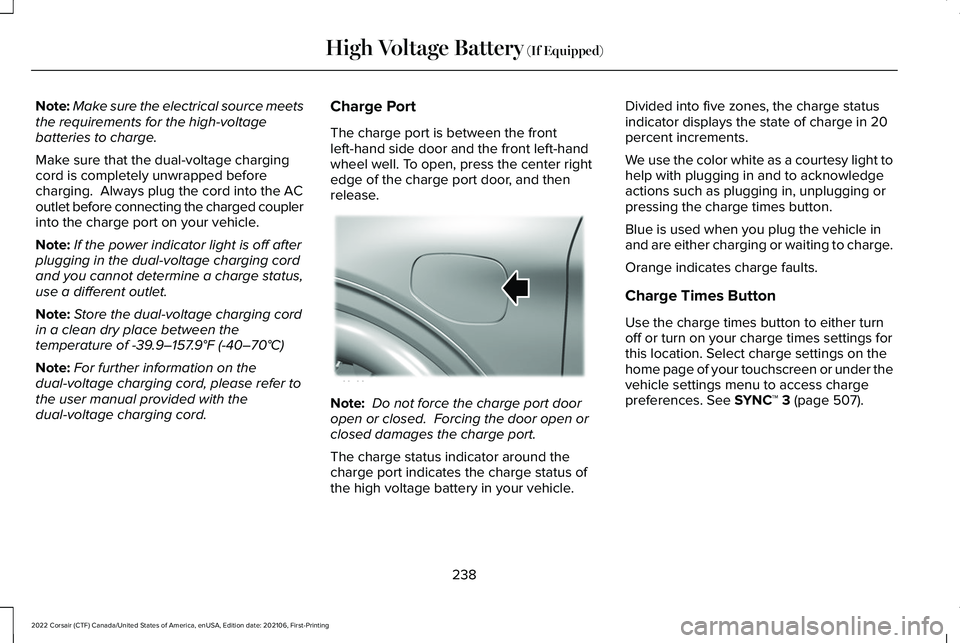
The charge port is between the front
left-hand side door and the front left-hand
wheel well. To open, press the center right
edge of the charge port door, and then
release.
Note:
Do not force the charge port door
open or closed. Forcing the door open or
closed damages the charge port.
The charge status indicator around the
charge port indicates the charge status of
the high voltage battery in your vehicle. Divided into five zones, the charge status
indicator displays the state of charge in 20
percent increments.
We use the color white as a courtesy light to
help with plugging in and to acknowledge
actions such as plugging in, unplugging or
pressing the charge times button.
Blue is used when you plug the vehicle in
and are either charging or waiting to charge.
Orange indicates charge faults.
Charge Times Button
Use the charge times button to either turn
off or turn on your charge times settings for
this location. Select charge settings on the
home page of your touchscreen or under the
vehicle settings menu to access charge
preferences.
See SYNC™ 3 (page 507).
238
2022 Corsair (CTF) Canada/United States of America, enUSA, Edition date: 202106, First-Printing High Voltage Battery
(If Equipped)E295258