page 521 LINCOLN CORSAIR 2022 Owners Manual
[x] Cancel search | Manufacturer: LINCOLN, Model Year: 2022, Model line: CORSAIR, Model: LINCOLN CORSAIR 2022Pages: 676, PDF Size: 7.67 MB
Page 142 of 676

Audio
Audio
Menu options covered in the SYNC chapter. See Entertainment (page 521).
Navigation
(If Equipped) Navigation
Menu options covered in the SYNC chapter.
See Navigation (page 538).
Hybrid Display Information
For plug-in hybrid vehicles it displays unique
hybrid vehicle information when you shut off
your vehicle or come to a stop.
Brake Coach
The brake coach appears after you bring
your vehicle to a stop. It coaches you to
brake in a manner that maximizes the
amount of energy returned through the
regenerative braking system. The percent displayed is an indication of the
regenerative braking efficiency with 100%
representing the maximum amount of energy
recovery. You can switch brake coach on or
off in the settings menu.
Trip Summary
Displays upon switching off your vehicle. The
values are cumulative since you last started
your vehicle.
The information shown is the same as the
This Trip
on demand screen. See
Personalized Settings (page 140).
Vehicle Charging Status
Displays when you switch off your vehicle
and when you switch it on when plugged in.
Charging status includes the charge start or
charge end time as appropriate. You can
modify your vehicles charge settings through
the touchscreen.
See SYNC™ 3 (page 507).
139
2022 Corsair (CTF) Canada/United States of America, enUSA, Edition date: 202106, First-Printing Information Displays
Page 511 of 676
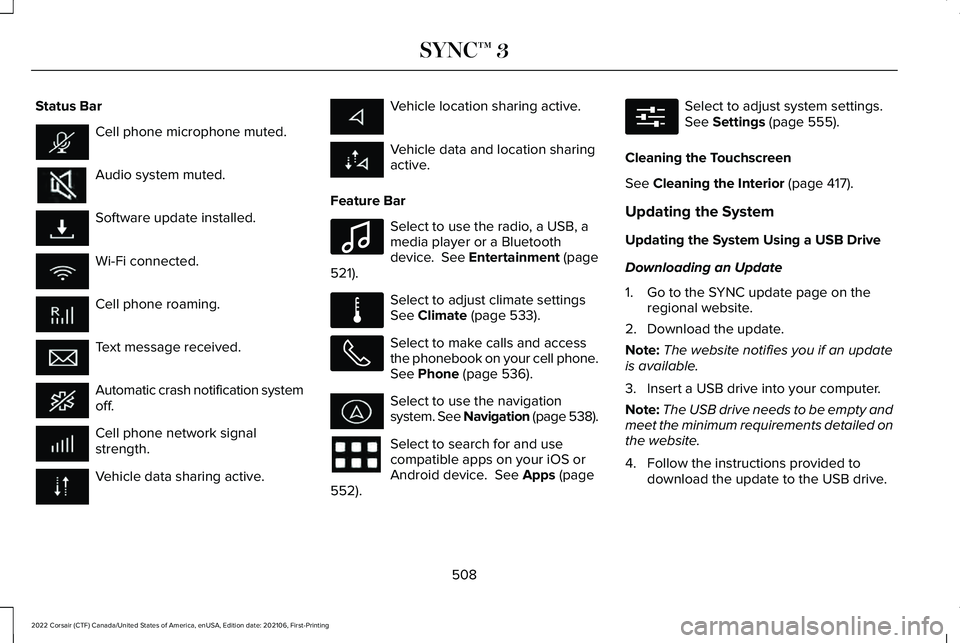
Status Bar
Cell phone microphone muted.
Audio system muted.
Software update installed.
Wi-Fi connected.
Cell phone roaming.
Text message received.
Automatic crash notification system
off.
Cell phone network signal
strength.
Vehicle data sharing active. Vehicle location sharing active.
Vehicle data and location sharing
active.
Feature Bar Select to use the radio, a USB, a
media player or a Bluetooth
device. See Entertainment (page
521). Select to adjust climate settings
See
Climate (page 533).
Select to make calls and access
the phonebook on your cell phone.
See
Phone (page 536).
Select to use the navigation
system. See Navigation (page
538).
Select to search for and use
compatible apps on your iOS or
Android device.
See Apps (page
552). Select to adjust system settings.
See
Settings (page 555).
Cleaning the Touchscreen
See
Cleaning the Interior (page 417).
Updating the System
Updating the System Using a USB Drive
Downloading an Update
1. Go to the SYNC update page on the regional website.
2. Download the update.
Note: The website notifies you if an update
is available.
3. Insert a USB drive into your computer.
Note: The USB drive needs to be empty and
meet the minimum requirements detailed on
the website.
4. Follow the instructions provided to download the update to the USB drive.
508
2022 Corsair (CTF) Canada/United States of America, enUSA, Edition date: 202106, First-Printing SYNC™ 3 E100027 E283811 E280315
Page 564 of 676

Possible Cause and Resolution
Symptom
I cannot stream audio from my Bluetooth®
device. –
Incompatible device.
•Check the compatibility of your device on our website.
– Device not connected.
•Pair your device.
See Phone (page 536).
– Media player not running.
•Start the media player on your device.
The system does not recognize the music on
my device. –
Missing or incorrect audio file metadata, for example artist, song title\
, album or genre.
•Repair the files on your device.
– Corrupt files.
•Repair the files on your device.
– Copyright-protected files.
•Use a device that contains files that are not copyright protected.
– Unsupported file format.
•Repair or convert the files to a supported format.
See Entertainment (page 521).
– Device indexing required.
•Re-index your device.
See Settings (page 555).
– Device lock screen enabled.
•Unlock your device before connecting it.
561
2022 Corsair (CTF) Canada/United States of America, enUSA, Edition date: 202106, First-Printing SYNC™ 3