wipers LINCOLN CORSAIR 2022 Owners Manual
[x] Cancel search | Manufacturer: LINCOLN, Model Year: 2022, Model line: CORSAIR, Model: LINCOLN CORSAIR 2022Pages: 676, PDF Size: 7.67 MB
Page 5 of 676
Programming Your Phone
...........................69
Using the Valet Mode ...................................
70
Using the Backup Start Passcode .............
70
Phone as a Key – Troubleshooting ............
71
MyKey™
What Is MyKey ................................................
73
MyKey Settings ...............................................
73
Creating a MyKey ...........................................
74
Programming a MyKey .................................
74
Clearing All MyKeys ......................................
74
Checking MyKey System Status ................
75
Using MyKey With Remote Start Systems ........................................................................\
.
75
MyKey – Troubleshooting ............................
75
Doors and Locks
Locking and Unlocking .................................
77
Keyless Entry
Keyless Entry Limitations .............................
82
Keyless Entry Settings ..................................
82
Using Keyless Entry ......................................
82Keyless Entry – Troubleshooting
...............
83
Keyless Entry Keypad
What Is the Keyless Entry Keypad .............
84
Keyless Entry Keypad Limitations ..............
84
Locating the Keyless Entry Keypad ..........
84
Keyless Entry Keypad Master Access Code ........................................................................\
.
84
Keyless Entry Keypad Personal Access Codes ...........................................................
85
Using the Keyless Entry Keypad ................
86
Keyless Entry Keypad – Troubleshooting ........................................................................\
.
87
Liftgate
Liftgate Precautions ......................................
88
Opening the Liftgate .....................................
88
Setting the Liftgate Opening Height ........
90
Closing the Liftgate ........................................
91
Stopping the Liftgate Movement ...............
93
Liftgate Obstacle Detection ........................
93
Liftgate – Troubleshooting ..........................
94Security
Passive Anti-Theft System
..........................
96
Anti-Theft Alarm System ..............................
96
Anti-Theft Alarm System Settings ..............
97
Security – Troubleshooting .........................
98
Steering Wheel
Adjusting the Steering Wheel - Vehicles With: Power Adjustable Steering Column
.......................................................................
100
Adjusting the Steering Wheel - Vehicles With: Manual Adjustable Steering
Column .......................................................
100
Resetting the Stopping Position - Vehicles With: Power Adjustable Steering Column
........................................................................\
101
Horn ..................................................................
101
Switching the Heated Steering Wheel On and Off .........................................................
101
Wipers and Washers
Windshield Wipers .......................................
102
Autowipers .....................................................
103
Windshield Washers ....................................
104
2
2022 Corsair (CTF) Canada/United States of America, enUSA, Edition date: 202106, First-Printing Table of Contents
Page 28 of 676
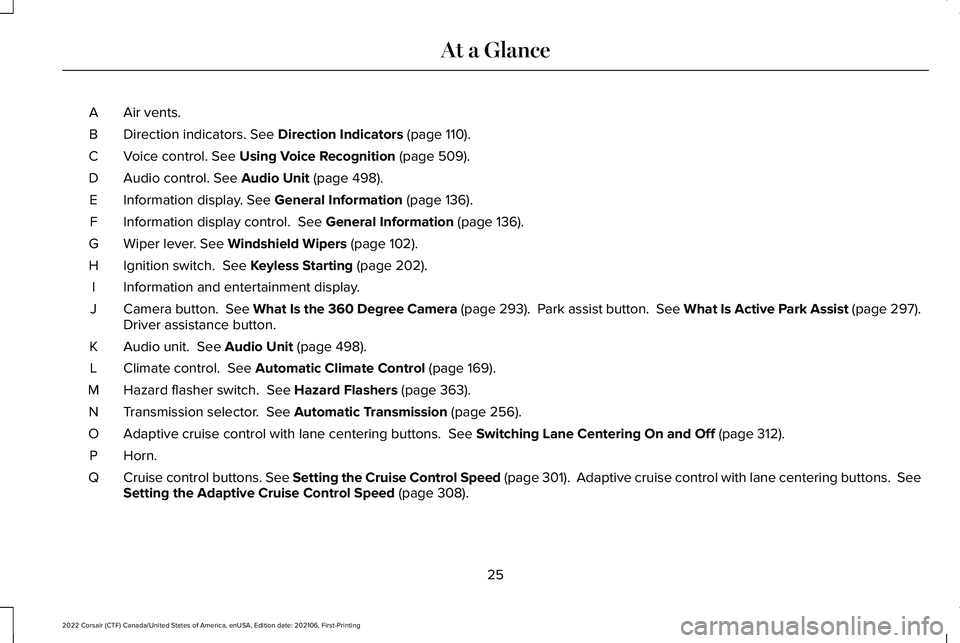
Air vents.
A
Direction indicators. See Direction Indicators (page 110).
B
Voice control.
See Using Voice Recognition (page 509).
C
Audio control.
See Audio Unit (page 498).
D
Information display.
See General Information (page 136).
E
Information display control.
See General Information (page 136).
F
Wiper lever.
See Windshield Wipers (page 102).
G
Ignition switch.
See Keyless Starting (page 202).
H
Information and entertainment display.
I
Camera button. See What Is the 360 Degree Camera (page 293). Park assist button. See What Is Active Park Assist (page 297).
Driver assistance button.
J
Audio unit.
See Audio Unit (page 498).
K
Climate control.
See Automatic Climate Control (page 169).
L
Hazard flasher switch.
See Hazard Flashers (page 363).
M
Transmission selector.
See Automatic Transmission (page 256).
N
Adaptive cruise control with lane centering buttons.
See Switching Lane Centering On and Off (page 312).
O
Horn.P
Cruise control buttons. See Setting the Cruise Control Speed (page 301). Adaptive cruise control with lane centering buttons. Se\
e
Setting the Adaptive Cruise Control Speed
(page 308).
Q
25
2022 Corsair (CTF) Canada/United States of America, enUSA, Edition date: 202106, First-Printing At a Glance
Page 105 of 676
WINDSHIELD WIPERS
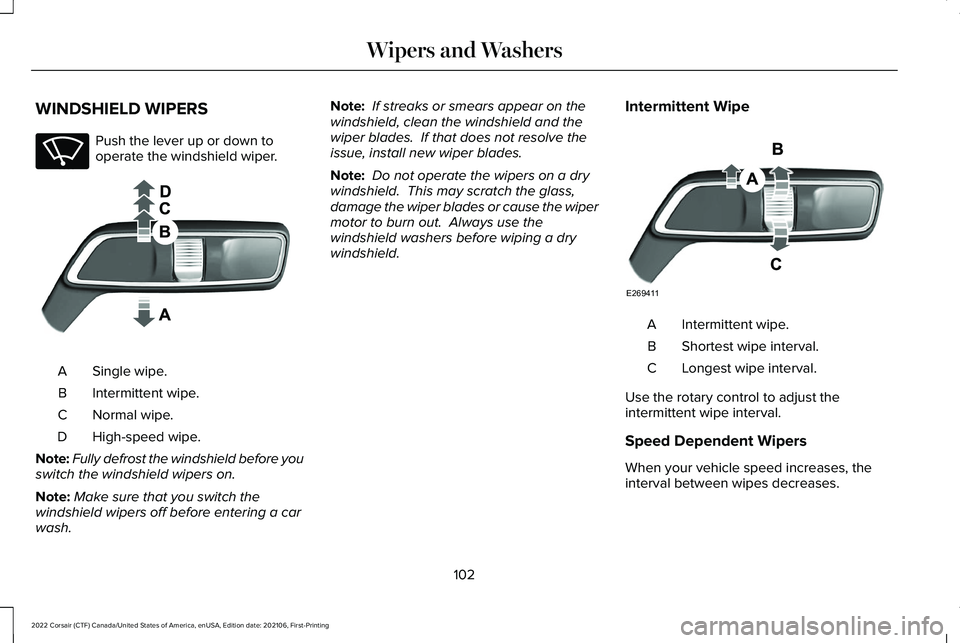
Push the lever up or down to
operate the windshield wiper.
Single wipe.
A
Intermittent wipe.
B
Normal wipe.
C
High-speed wipe.
D
Note: Fully defrost the windshield before you
switch the windshield wipers on.
Note: Make sure that you switch the
windshield wipers off before entering a car
wash. Note:
If streaks or smears appear on the
windshield, clean the windshield and the
wiper blades. If that does not resolve the
issue, install new wiper blades.
Note: Do not operate the wipers on a dry
windshield. This may scratch the glass,
damage the wiper blades or cause the wiper
motor to burn out. Always use the
windshield washers before wiping a dry
windshield. Intermittent Wipe Intermittent wipe.
A
Shortest wipe interval.
B
Longest wipe interval.
C
Use the rotary control to adjust the
intermittent wipe interval.
Speed Dependent Wipers
When your vehicle speed increases, the
interval between wipes decreases.
102
2022 Corsair (CTF) Canada/United States of America, enUSA, Edition date: 202106, First-Printing Wipers and WashersE270969 E269410 E269411
Page 106 of 676
AUTOWIPERS
Wet or winter driving conditions with ice,
snow or salty road mist can cause
inconsistent and unexpected wiping or
smearing.
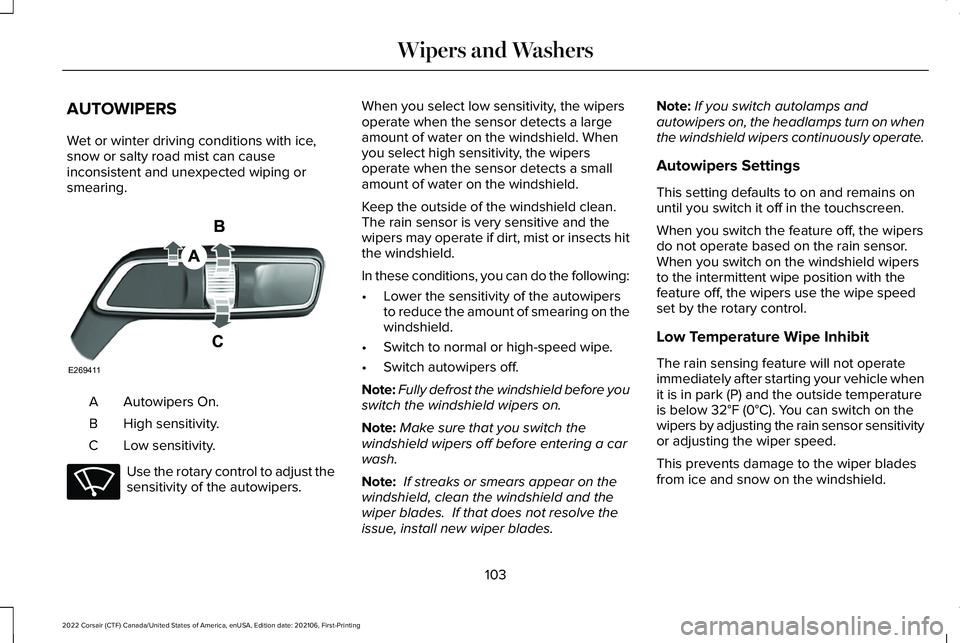
Autowipers On.
A
High sensitivity.
B
Low sensitivity.
C Use the rotary control to adjust the
sensitivity of the autowipers. When you select low sensitivity, the wipers
operate when the sensor detects a large
amount of water on the windshield. When
you select high sensitivity, the wipers
operate when the sensor detects a small
amount of water on the windshield.
Keep the outside of the windshield clean.
The rain sensor is very sensitive and the
wipers may operate if dirt, mist or insects hit
the windshield.
In these conditions, you can do the following:
•
Lower the sensitivity of the autowipers
to reduce the amount of smearing on the
windshield.
• Switch to normal or high-speed wipe.
• Switch autowipers off.
Note: Fully defrost the windshield before you
switch the windshield wipers on.
Note: Make sure that you switch the
windshield wipers off before entering a car
wash.
Note: If streaks or smears appear on the
windshield, clean the windshield and the
wiper blades. If that does not resolve the
issue, install new wiper blades. Note:
If you switch autolamps and
autowipers on, the headlamps turn on when
the windshield wipers continuously operate.
Autowipers Settings
This setting defaults to on and remains on
until you switch it off in the touchscreen.
When you switch the feature off, the wipers
do not operate based on the rain sensor.
When you switch on the windshield wipers
to the intermittent wipe position with the
feature off, the wipers use the wipe speed
set by the rotary control.
Low Temperature Wipe Inhibit
The rain sensing feature will not operate
immediately after starting your vehicle when
it is in park (P) and the outside temperature
is below 32°F (0°C). You can switch on the
wipers by adjusting the rain sensor sensitivity
or adjusting the wiper speed.
This prevents damage to the wiper blades
from ice and snow on the windshield.
103
2022 Corsair (CTF) Canada/United States of America, enUSA, Edition date: 202106, First-Printing Wipers and WashersE269411 E270969
Page 107 of 676
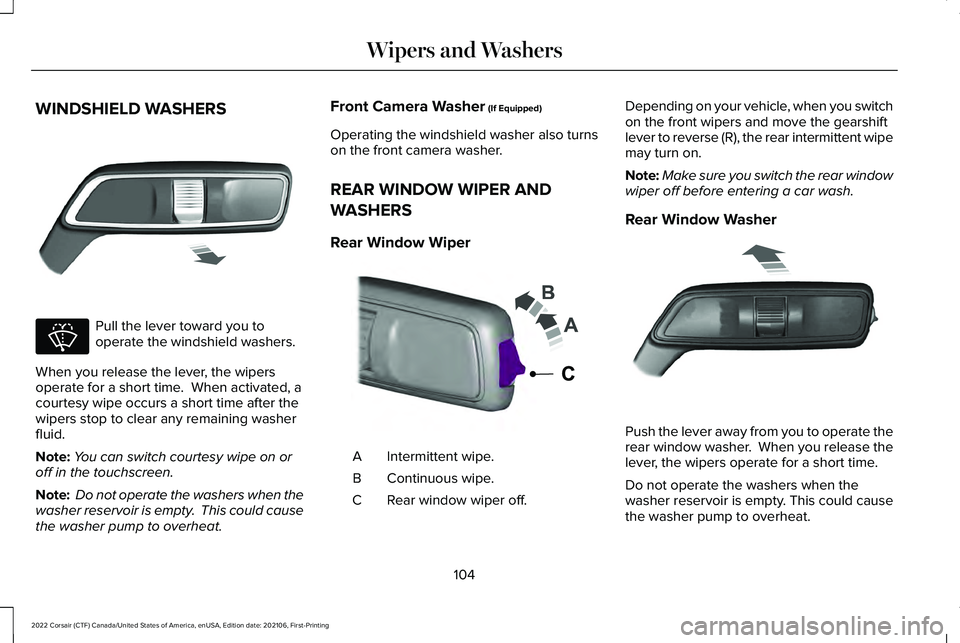
WINDSHIELD WASHERS
Pull the lever toward you to
operate the windshield washers.
When you release the lever, the wipers
operate for a short time. When activated, a
courtesy wipe occurs a short time after the
wipers stop to clear any remaining washer
fluid.
Note: You can switch courtesy wipe on or
off in the touchscreen.
Note: Do not operate the washers when the
washer reservoir is empty. This could cause
the washer pump to overheat. Front Camera Washer (If Equipped)
Operating the windshield washer also turns
on the front camera washer.
REAR WINDOW WIPER AND
WASHERS
Rear Window Wiper Intermittent wipe.
A
Continuous wipe.
B
Rear window wiper off.
C Depending on your vehicle, when you switch
on the front wipers and move the gearshift
lever to reverse (R), the rear intermittent wipe
may turn on.
Note:
Make sure you switch the rear window
wiper off before entering a car wash.
Rear Window Washer Push the lever away from you to operate the
rear window washer. When you release the
lever, the wipers operate for a short time.
Do not operate the washers when the
washer reservoir is empty. This could cause
the washer pump to overheat.
104
2022 Corsair (CTF) Canada/United States of America, enUSA, Edition date: 202106, First-Printing Wipers and WashersE269412 E270967 E242324 E269727
Page 109 of 676
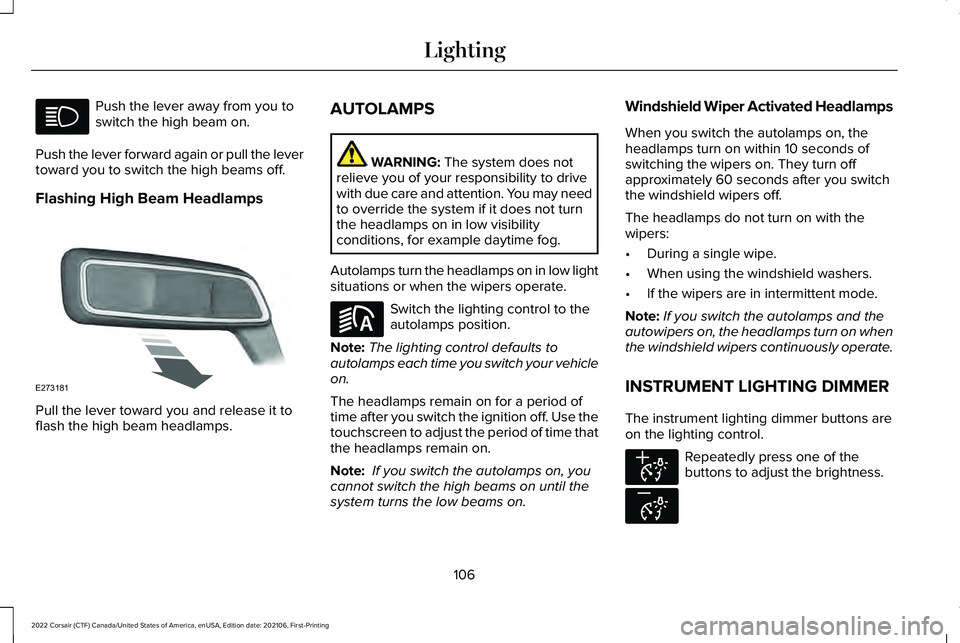
Push the lever away from you to
switch the high beam on.
Push the lever forward again or pull the lever
toward you to switch the high beams off.
Flashing High Beam Headlamps Pull the lever toward you and release it to
flash the high beam headlamps. AUTOLAMPS WARNING: The system does not
relieve you of your responsibility to drive
with due care and attention. You may need
to override the system if it does not turn
the headlamps on in low visibility
conditions, for example daytime fog.
Autolamps turn the headlamps on in low light
situations or when the wipers operate. Switch the lighting control to the
autolamps position.
Note: The lighting control defaults to
autolamps each time you switch your vehicle
on.
The headlamps remain on for a period of
time after you switch the ignition off. Use the
touchscreen to adjust the period of time that
the headlamps remain on.
Note: If you switch the autolamps on, you
cannot switch the high beams on until the
system turns the low beams on. Windshield Wiper Activated Headlamps
When you switch the autolamps on, the
headlamps turn on within 10 seconds of
switching the wipers on. They turn off
approximately 60 seconds after you switch
the windshield wipers off.
The headlamps do not turn on with the
wipers:
•
During a single wipe.
• When using the windshield washers.
• If the wipers are in intermittent mode.
Note: If you switch the autolamps and the
autowipers on, the headlamps turn on when
the windshield wipers continuously operate.
INSTRUMENT LIGHTING DIMMER
The instrument lighting dimmer buttons are
on the lighting control. Repeatedly press one of the
buttons to adjust the brightness.
106
2022 Corsair (CTF) Canada/United States of America, enUSA, Edition date: 202106, First-Printing Lighting E273181 E281240 E291299 E296433
Page 419 of 676
•
Do not allow wax to come in contact with
any non-body (low-gloss black) colored
trim. The wax will discolor or stain the
parts over time.
•Roof racks.
• Bumpers.
• Grained door handles.
• Side moldings.
• Mirror housings.
• Windshield cowl area.
• Do not apply wax to glass areas.
• After waxing, your car's paint should feel
smooth, and be free of streaks and
smudges.
CLEANING THE ENGINE
Engines are more efficient when they are
clean because grease and dirt buildup keep
the engine warmer than normal. When washing:
•
Take care when using a power washer
to clean the engine. The high-pressure
fluid could penetrate the sealed parts
and cause damage.
• Do not spray a hot engine with cold water
to avoid cracking the engine block or
other engine components.
• Spray Motorcraft Engine Shampoo and
Degreaser on all parts that require
cleaning and pressure rinse clean. In
Canada, use Motorcraft Engine Shampoo.
Note: If your vehicle has an engine cover
remove the cover before application of
Motorcraft Engine Shampoo and Degreaser.
Immediately rinse away any over spray.
• Never wash or rinse the engine while it
is hot or running; water in the running
engine may cause internal damage.
• Never wash or rinse any ignition coil,
spark plug wire or spark plug well, or the
area in and around these locations.
• Cover the battery, power distribution box,
and air filter assembly to prevent water
damage when cleaning the engine. CLEANING THE WINDOWS AND
WIPER BLADES
Car wash chemicals and environmental
fallout can result in windshield and wiper
blade contamination. Dirty windshield and
wipers will result in poor windshield wiper
operation. Keep the windshield and wiper
blades clean to maintain windshield wiper
performance.
To clean the windshield and wiper blades:
•
Clean the windshield with a non-abrasive
glass cleaner. When cleaning the interior
of the windshield, avoid getting any glass
cleaner on the instrument panel or door
panels. Wipe any glass cleaner off these
surfaces immediately.
• For windshields contaminated with tree
sap, chemicals, wax or bugs, clean the
entire windshield using steel wool (no
greater than 0000 grade) in a circular
motion and rinse with water.
• Clean the wiper blades with isopropyl
rubbing alcohol or windshield washer
concentrate.
416
2022 Corsair (CTF) Canada/United States of America, enUSA, Edition date: 202106, First-Printing Vehicle Care
Page 424 of 676
Plugging in Your HYBRID
We recommend the following options for
your plug-in vehicle (PHEV) :
•
Leave your vehicle plugged in. The 12
volt battery maintains power if left
plugged in. However, this periodically
uses electricity from the household
outlet.
• Connect a battery charger to your 12 volt
battery and leave it on a continuous, slow
charge.
• Disconnect the 12 volt battery. If your 12
volt battery is located in the luggage
compartment, do not fully shut the
luggage compartment after
disconnecting the 12 volt battery. Only
leave the luggage compartment open if
your vehicle is stored in a locked
location.
Brakes
• Make sure the brakes and parking brake
release fully. Tires
•
Maintain recommended air pressure.
Miscellaneous
• Make sure all linkages, cables, levers and
pins under your vehicle are covered with
grease to prevent rust.
• Move vehicles at least 25 ft (7.5 m) every
15 days to lubricate working parts and
prevent corrosion.
Removing Vehicle From Storage
When your vehicle is ready to come out of
storage, do the following:
• Wash your vehicle to remove any dirt or
grease film build-up on window surfaces.
• Check windshield wipers for any
deterioration.
• Check under the hood for any foreign
material that may have collected during
storage such as mice or squirrel nests.
• Check the exhaust for any foreign
material that may have collected during
storage. •
Check tire pressures and set tire inflation
per the Tire Label.
• Check brake pedal operation. Drive your
vehicle 15 ft (4.5 m) back and forth to
remove rust build-up.
• Check fluid levels (including coolant, oil
and gas) to make sure there are no leaks,
and fluids are at recommended levels.
• If you remove the battery, clean the
battery cable ends and check for
damage.
Contact an authorized dealer if you have any
concerns or issues.
BODY STYLING KITS
The distance between the underside of your
vehicle and the ground is less than that of
other models. Drive with extreme care to
avoid damage to your vehicle.
421
2022 Corsair (CTF) Canada/United States of America, enUSA, Edition date: 202106, First-Printing Vehicle Care
Page 667 of 676
AFS
See: Adaptive Headlamps................................108
Airbag Disposal................................................61
Air Conditioning See: Climate Control..........................................169
Air Filter See: Changing the Engine Air Filter - 2.0L/
2.3L....................................................................397
See: Changing the Engine Air Filter - 2.5L, Plug-In Hybrid Electric Vehicle (PHEV)......399
All-Wheel Drive.............................................265
Ambient Lighting
.............................................111
Anti-Theft Alarm System...............................96 Arming the Anti-Theft Alarm System...............97
Disarming the Anti-Theft Alarm System..........97
How Does the Anti-Theft Alarm System
Work.....................................................................96
What Are the Inclination Sensors.....................97
What Are the Interior Sensors...........................96
What Is the Anti-Theft Alarm System...............96
What Is the Battery Backup Alarm....................97
What Is the Perimeter Alarm..............................96
Anti-Theft Alarm System Settings...............97 Setting the Alarm Security Level.......................
97
Switching Ask on Exit On and Off....................98
What are the Alarm Security Levels.................97
What Is Ask on Exit...............................................97
Appendices...................................................626 Apps................................................................552
At a Glance.......................................................24
Audible Warnings and Indicators
..............135
Audio System................................................497
General Information...........................................497
Audio Unit
......................................................498
Auto Hold.......................................................274
Autolamps.......................................................106
Automatic Climate Control.........................169
Automatic High Beam Control....................113
Automatic High Beam Control Indicators.......................................................114
Automatic Transmission - Excluding: Plug-In Hybrid Electric Vehicle
(PHEV)
..........................................................256
Automatic Transmission Fluid Check...........................................................404
Automatic Transmission - Plug-In Hybrid Electric Vehicle (PHEV)
.............................261
Auto-Start-Stop...............................................211
Autowipers......................................................103
Auxiliary Power Points.................................198
AWD See: All-Wheel Drive..........................................265 B
Battery
See: Changing the 12V Battery......................406
Blind Spot Information System.................324
BLIS See: Blind Spot Information System..............324
Body Styling Kits............................................421
Bonnet Lock See: Opening and Closing the Hood.............391
Booster Seats
..................................................35
Brake Fluid Check.......................................405
Brakes.............................................................270 General Information...........................................270
Breaking-In.....................................................359
Bulb Specification Chart.............................489
C
Canceling the Set Speed
...........................302
Capacities and Specifications - 2.0L.......467
Capacities and Specifications - 2.3L.......475
Capacities and Specifications - 2.5L, Plug-In Hybrid Electric Vehicle
(PHEV)...........................................................483
Capacities and Specifications....................461
Car Wash See: Cleaning the Exterior................................414
664
2022 Corsair (CTF) Canada/United States of America, enUSA, Edition date: 202106, First-Printing Index
Page 675 of 676
Switching Reverse Braking Assist On and
Off..................................................................277
Switching the Heated Steering Wheel On and Off...........................................................101
Symbols Glossary.............................................11
SYNC™ 3..........................................................507
General Information...........................................507
SYNC™ 3 Troubleshooting
..........................557
T
Technical Specifications See: Capacities and Specifications................461
The Better Business Bureau (BBB) Auto Line Program (U.S. Only)...........................371
Tire Care..........................................................431
Tire Inflation When Punctured See: Tire Sealant and Inflator Kit....................424
Tire Pressure Monitoring System.............446
Tire Repair Kit See: Tire Sealant and Inflator Kit....................424
Tire Sealant and Inflator Kit.......................424
Tires See: Wheels and Tires......................................422
Towing a Trailer.............................................350
Towing the Vehicle on Four Wheels - Gasoline, 8-Speed Automatic
Transmission – 8F35/8F40
.....................355 Towing the Vehicle on Four Wheels -
Plug-In Hybrid Electric Vehicle (PHEV),
Automatic Transmission – HF45...........356
Towing.............................................................350
Traction Control............................................280 Principle of Operation.......................................
280
Trailer Sway Control.....................................351
Transmission ..................................................
256
Transporting the Vehicle.............................367
U
Under Hood Overview - 2.0L/2.3L..........393
Under Hood Overview - Plug-In Hybrid Electric Vehicle (PHEV)............................395
Unique Driving Characteristics
...................211
USB Port.........................................................505
Using All-Wheel Drive.................................265
Using Keyless Entry.......................................82
Using MyKey With Remote Start Systems..........................................................75
Using Snow Chains
......................................445
Using Stability Control................................282
Using the Backup Start Passcode..............70
Using the Keyless Entry Keypad.................86
Using the Valet Mode....................................70
Using Traction Control
................................280
Using Voice Recognition............................509 Utilizing the Mediation/Arbitration Program
(Canada Only)
.............................................372
V
Vehicle Care
...................................................413
General Information............................................413
Vehicle Identification Number
..................490
Locating the Vehicle Identification
Number............................................................490
Vehicle Identification Number Overview..........................................................490
Vehicle Identification...................................490 Vehicle Identification Number........................490
Vehicle Storage
.............................................419
Vehicle Wi-Fi Hotspot.................................495
Ventilated Seats............................................189
Ventilation See: Climate Control..........................................169
W
Warning Lamps and Indicators...................131
Washer Fluid Check.....................................410
Washers See: Cleaning the Exterior................................414
See: Wipers and Washers.................................102
Waxing..............................................................415
672
2022 Corsair (CTF) Canada/United States of America, enUSA, Edition date: 202106, First-Printing Index