battery LINCOLN CORSAIR 2023 User Guide
[x] Cancel search | Manufacturer: LINCOLN, Model Year: 2023, Model line: CORSAIR, Model: LINCOLN CORSAIR 2023Pages: 690, PDF Size: 15.04 MB
Page 84 of 690
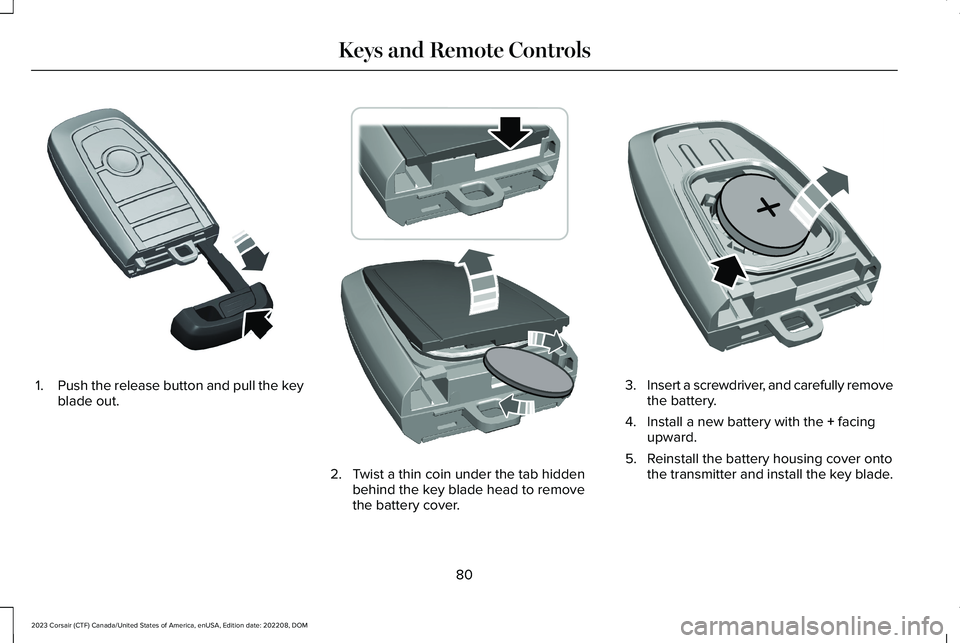
1.Push the release button and pull the keyblade out.
2.Twist a thin coin under the tab hiddenbehind the key blade head to removethe battery cover.
3.Insert a screwdriver, and carefully removethe battery.
4.Install a new battery with the + facingupward.
5.Reinstall the battery housing cover ontothe transmitter and install the key blade.
80
2023 Corsair (CTF) Canada/United States of America, enUSA, Edition date: 202208, DOMKeys and Remote ControlsE322866 E303824 E218402
Page 85 of 690
Dispose of old batteries in anenvironmentally friendly way. Seekadvice from your local authorityabout recycling old batteries.
Note:Do not wipe off any grease on thebattery terminals or on the back surface ofthe circuit board.
Note: Replacing the battery does not erasethe programmed key from your vehicle. Theremote control should operate normally.
REPLACING A LOST KEY OR
REMOTE CONTROL
You can purchase replacement keys orremote controls from an authorized dealer.Authorized dealers can program remotecontrols for your vehicle.
PROGRAMMING THE REMOTE
CONTROL
Note:You can program a maximum of fourremote controls to your vehicle.
Note:If your programmed remote controlsare lost or stolen and you do not have anextra coded remote, you need to have yourvehicle towed to an authorized dealer. Storean extra programmed remote away fromyour vehicle in a safe place to help preventany inconvenience. Contact an authorizeddealer to purchase additional spare orreplacement remotes.
You must have two previously programmedremote controls inside your vehicle and thenew unprogrammed remote controls readilyaccessible. Contact an authorized dealer tohave the spare remote control programmedif two previously programmed remotes arenot available. Make sure that your vehicleis off before beginning this procedure. Makesure that you close all the doors beforebeginning and that they remain closedthroughout the procedure. Perform all stepswithin 30 seconds of starting the sequence. Stop and wait for at least one minute beforestarting again if you perform any steps outof sequence.
Read and understand the entire procedurebefore you begin.
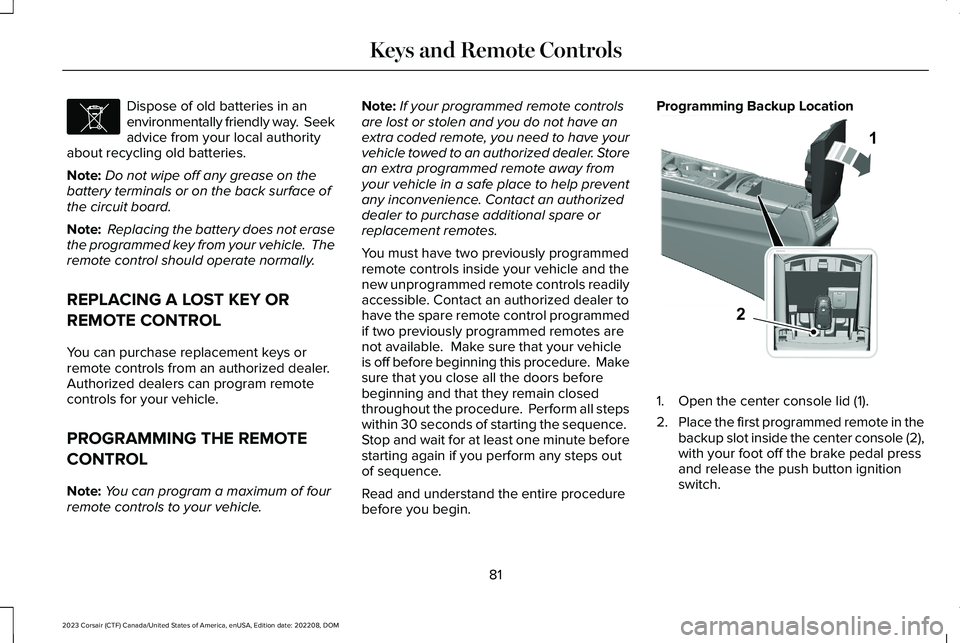
Programming Backup Location
1.Open the center console lid (1).
2.Place the first programmed remote in thebackup slot inside the center console (2),with your foot off the brake pedal pressand release the push button ignitionswitch.
81
2023 Corsair (CTF) Canada/United States of America, enUSA, Edition date: 202208, DOMKeys and Remote ControlsE107998 12E331284
Page 86 of 690
3.Wait a few seconds and then press andrelease the push button ignition switchagain.
4.Remove the remote control.
5.Within 10 seconds, place a secondprogrammed remote control in thebackup slot. Press and release the pushbutton ignition switch.
6.Wait a few seconds and then press andrelease the push button ignition switchagain. Keep the ignition on for a fewseconds, but no more than 10 seconds.
7.Remove the remote control.
8.Place the unprogrammed remote controlin the backup slot and press and releasethe push button ignition switch.
Programming is now complete. With yourfoot on the brake pedal press the pushbutton ignition switch to verify the remotecontrol functions operate and your vehiclestarts with the new remote control.
If programming was not successful, wait 10seconds and repeat Steps 1 through 7. If youare still unsuccessful, contact an authorizeddealer to program remote controls for yourvehicle.
KEYS AND REMOTE CONTROLS – TROUBLESHOOTING
KEYS AND REMOTE CONTROLS – INFORMATION MESSAGES
ActionMessage
Replace remote control battery.Key Battery Low Replace Soon
82
2023 Corsair (CTF) Canada/United States of America, enUSA, Edition date: 202208, DOMKeys and Remote Controls
Page 87 of 690
WHAT IS PHONE AS A KEY
Phone as a Key allows you to use your phonein place of a passive key.
You can use your phone for the followingfunctions:
•Remote locking and unlocking.
•Passive entry and exit.
•Passive start and drive the vehicle.
•Remote start.
•Memory function recall.
PHONE AS A KEY LIMITATIONS
Limitations can vary based on the make andmodel of your phone, phone location andphysical obstructions.
The following items could impact Phone asa Key performance or prevent functionalityin some cases:
•The typical operating range for Phone asa Key is 131 ft (40 m).
•Your Bluetooth® connection is notenabled, is disrupted, or out of range.
•Your Phone as a Key is not active orenabled on at least one phone.
•Your vehicle battery has depleted.
•Your phone battery has depleted.
•Interference from other devices usingradio frequencies or physicalobstructions.
•Your phone is too close to metal objectsor other electronic devices.
Note:Do not leave a duplicate coded keyin the vehicle. Always take your keys andphone and lock all doors when leaving thevehicle.
PROGRAMMING YOUR PHONE
To program your smartphone as phone as akey:
1.Visit your device's app store to downloadthe Lincoln Way app.
2.Create a new account or sign in to anexisting account on the Lincoln Way app.
3.Add the vehicle identification number toyour account and follow the prompts inthe Lincoln Way app to complete theSync Connect Authorization process.
4.After the authorization is complete, youcan set up phone as a key following theprompts in the Lincoln Way app.
5.After phone as a key is set up, you canset up the backup start passcode byfollowing the prompts on yourtouchscreen.
Note:Keep your new backup start passcodewith you in case of an emergency.
Resetting Phone as a Key
1.Press Settings on the touchscreen.
2.Press General.
3.Press Reset.
4.Press the app connect reset option.
5.Press Phone as a Key Reset.
6.Confirm you would like to continue witherasing all phone as a key, keys andbackup start passcodes.
7.Press Continue.
83
2023 Corsair (CTF) Canada/United States of America, enUSA, Edition date: 202208, DOMPhone as a Key (If Equipped)
Page 90 of 690
Why do I get a No Key Detectedmessage in the instrument clusterdisplay when I am using phone as akey and my phone is in the car?
•Your phone’s Bluetooth connection hasbeen disrupted or is not connected. Tryreconnecting your phone's Bluetoothconnection.
•Move the phone closer to the center ofthe vehicle near the cup holder or centerconsole.
•Verify your phone as a key is still active,enabled and has not been revoked.
What do I do if my phone is lost,damaged or the battery has depleted?
•Use the backup start passcode that youcreated. See Using the Backup StartPasscode (page 84).
How many phones can I use for phoneas a key?
•You can program and activate up to fourphones with phone as a key to yourvehicle.
How does a valet drive my car if I onlyuse my phone as a key?
•Have the valet use the temporary valetpasscode that you created. See Usingthe Valet Mode (page 84).
I uninstalled my Lincoln Way app andreinstalled it. Why am I not able to geta new phone as a key?
•Remove the phone as a key that waspreviously associated with your phone.
•Reset phone as a key from your vehicle,and then request a new phone as a key.See Programming Your Phone (page83).
Why can I not remotely start thevehicle with my phone as a key?
•Using the Lincoln Way app, verify yourphone as a key setup is complete andenabled via Bluetooth connection on atleast one phone. If Bluetooth hasconnected but phone as a key setup isnot complete, complete the setup of yourphone as a key as prompted from theLincoln Way app. See ProgrammingYour Phone (page 83).
PHONE AS A KEY VIDEOS
Lincoln Phone As A Key Video Link
Phone As A Key: Valet Mode Video Link
86
2023 Corsair (CTF) Canada/United States of America, enUSA, Edition date: 202208, DOMPhone as a Key (If Equipped)
Page 96 of 690
KEYLESS ENTRY LIMITATIONS
Make sure your remote control is within 3 ft(1 m) from the front door handles and thetailgate.
The system could not function if:
•The remote control remains stationaryfor about a minute.
•The vehicle battery has no charge.
•The remote control battery has nocharge.
•There is interference causing issues withthe remote control frequencies.
•The remote control is too close to metalobjects or electronic devices, for examplekeys or a cell phone.
KEYLESS ENTRY SETTINGS
Switching Keyless Entry On and Off
1.Switch the ignition on.
2.Press Settings on the touchscreen.
3.Press Vehicle Settings.
4.Press Locks.
Reprogramming the UnlockingFunction
You can enable two-stage unlocking functionallowing you to unlock only the driver doorwhen you touch the unlock sensor.
Press and hold both the lock and unlockbuttons on the remote control for fourseconds to disable or enable two-stageunlocking.
If you program the unlocking function so thatonly the driver door unlocks, you can unlockall of the other doors from inside your vehicleusing the power door lock control. You canunlock individual doors by pulling the interiordoor handles on those doors.
USING KEYLESS ENTRY
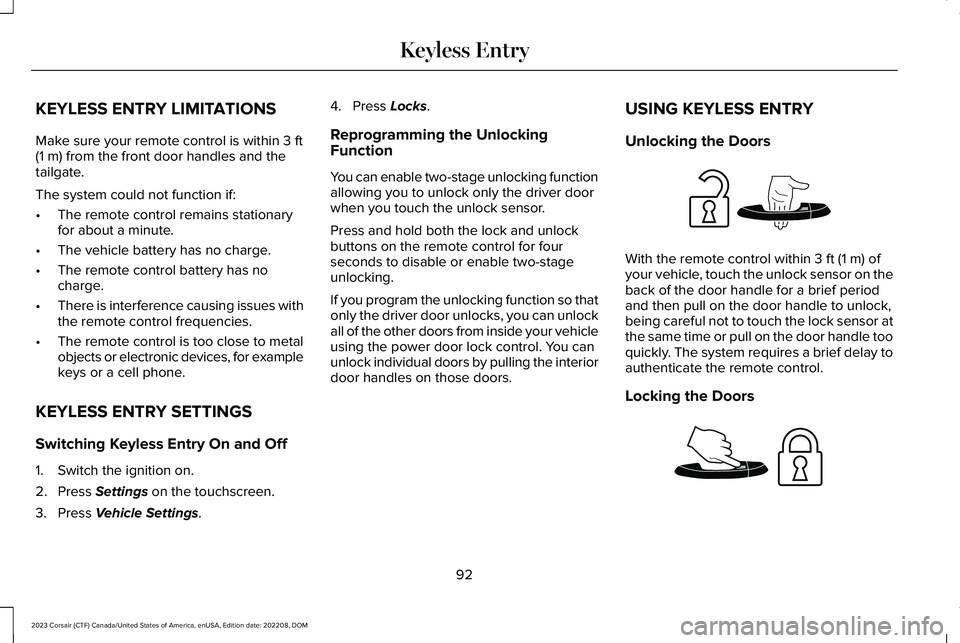
Unlocking the Doors
With the remote control within 3 ft (1 m) ofyour vehicle, touch the unlock sensor on theback of the door handle for a brief periodand then pull on the door handle to unlock,being careful not to touch the lock sensor atthe same time or pull on the door handle tooquickly. The system requires a brief delay toauthenticate the remote control.
Locking the Doors
92
2023 Corsair (CTF) Canada/United States of America, enUSA, Edition date: 202208, DOMKeyless EntryE248553 E248554
Page 98 of 690
WHAT IS THE KEYLESS ENTRY
KEYPAD
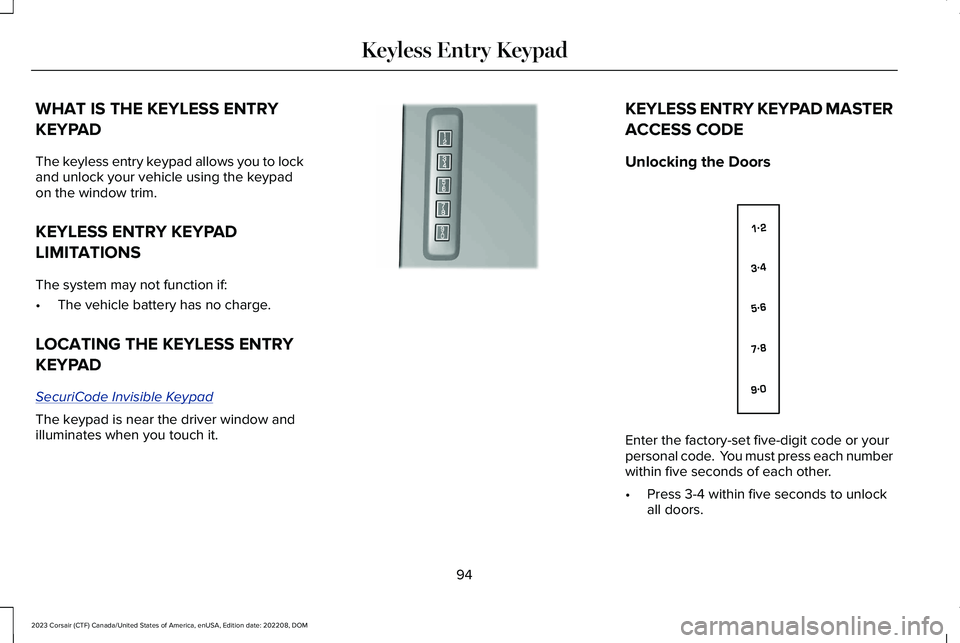
The keyless entry keypad allows you to lockand unlock your vehicle using the keypadon the window trim.
KEYLESS ENTRY KEYPAD
LIMITATIONS
The system may not function if:
•The vehicle battery has no charge.
LOCATING THE KEYLESS ENTRY
KEYPAD
SecuriCode Invisible Keypad
The keypad is near the driver window andilluminates when you touch it.
KEYLESS ENTRY KEYPAD MASTER
ACCESS CODE
Unlocking the Doors
Enter the factory-set five-digit code or yourpersonal code. You must press each numberwithin five seconds of each other.
•Press 3-4 within five seconds to unlockall doors.
94
2023 Corsair (CTF) Canada/United States of America, enUSA, Edition date: 202208, DOMKeyless Entry KeypadE190936 E138637
Page 106 of 690
Note:The system recalls the newprogrammed height until you reprogram it,even if you disconnect the battery.
CLOSING THE LIFTGATE
CLOSING THE LIFTGATE FROM INSIDEYOUR VEHICLE
WARNING: Make sure all personsare clear of the power liftgate area beforeusing the power liftgate control.
With the transmission in park (P),press the button on the instrumentpanel.
Note: Make sure that you close the liftgatebefore operating or moving your vehicle,especially in an enclosure, like a garage ora parking structure. This could damage theliftgate and its components.
Note: Make sure the area behind yourvehicle is free from obstruction and thatthere is enough room for you to operate theliftgate. Objects too close to your vehicle,for example a wall, garage door or anothervehicle may come into contact with themoving liftgate. This could damage theliftgate and its components.
Note:Make sure that you fully close theliftgate to prevent cargo from falling out.
CLOSING THE LIFTGATE FROMOUTSIDE YOUR VEHICLE
WARNING: Make sure all personsare clear of the power liftgate area beforeusing the power liftgate control.
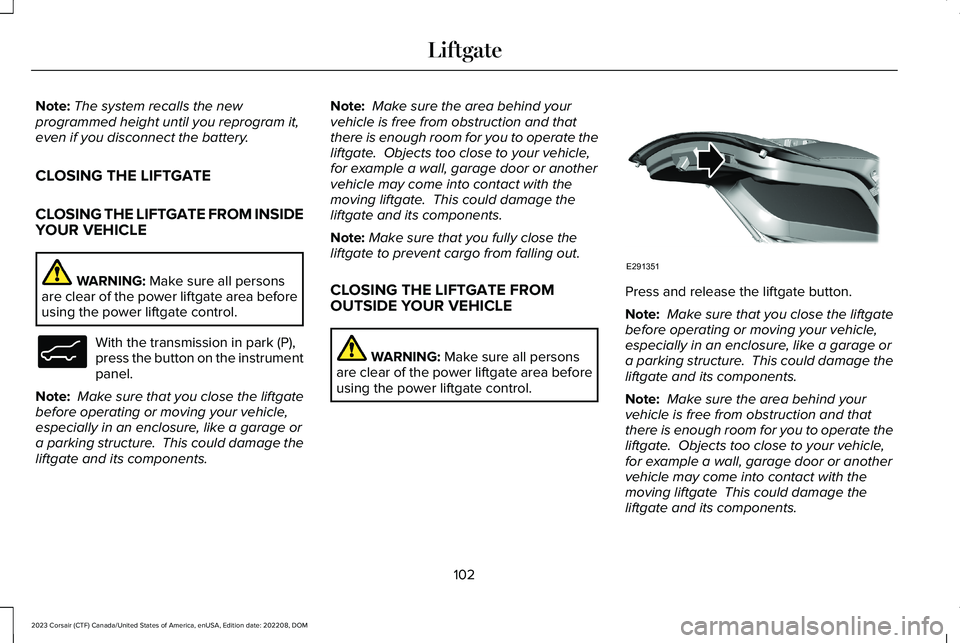
Press and release the liftgate button.
Note: Make sure that you close the liftgatebefore operating or moving your vehicle,especially in an enclosure, like a garage ora parking structure. This could damage theliftgate and its components.
Note: Make sure the area behind yourvehicle is free from obstruction and thatthere is enough room for you to operate theliftgate. Objects too close to your vehicle,for example a wall, garage door or anothervehicle may come into contact with themoving liftgate This could damage theliftgate and its components.
102
2023 Corsair (CTF) Canada/United States of America, enUSA, Edition date: 202208, DOMLiftgateE138633 E291351
Page 110 of 690
LIFTGATE – FREQUENTLY ASKEDQUESTIONS
Why won't my power liftgate function?
It can happen in freezing conditions orwhen parking on downhill slopes. Makesure the power liftgate is enabled. Makesure the transmission is in park (P),ensure nothing is obstructing the liftgatepath and there is not excessive weighton the liftgate. If there are continuedissues, the battery voltage may be lowor there may be other system issues.See an authorized dealer.
106
2023 Corsair (CTF) Canada/United States of America, enUSA, Edition date: 202208, DOMLiftgate
Page 111 of 690
PASSIVE ANTI-THEFT SYSTEM
WHAT IS THE PASSIVE ANTI-THEFTSYSTEM
The passive anti-theft system preventssomeone from starting the vehicle with anincorrectly coded key.
Note:Do not leave a duplicate coded keyin your vehicle. Always take the keys andlock all the doors when leaving your vehicle.
HOW DOES THE PASSIVE ANTI-THEFTSYSTEM WORK
The passive anti-theft system arms when youswitch the ignition off.
It disarms when the ignition is switched onwith a correctly coded key.
Note:The system is not compatible withnon-Ford aftermarket remote start systems.
Note:Do not leave a duplicate coded keyin your vehicle. Always take the keys andlock all doors when leaving your vehicle.
ARMING THE PASSIVE ANTI-THEFTSYSTEM
The passive anti-theft system arms yourvehicle after a short period of time when youswitch the power off.
DISARMING THE PASSIVE ANTI-THEFTSYSTEM
The passive anti-theft system disarms whenyou switch the power on with a correctlycoded key.
Note:You could have difficulty starting thevehicle if you have metallic objects,electronic devices or a second coded keyon the same key chain.
ANTI-THEFT ALARM SYSTEM
WHAT IS THE ANTI-THEFT ALARMSYSTEM
The anti-theft alarm system warns you of anunauthorized entry to your vehicle.
HOW DOES THE ANTI-THEFT ALARMSYSTEM WORK
When armed, the anti-theft alarm is triggeredin any of the following ways:
•If someone opens a door, the liftgate orthe hood without a correctly coded keyor remote control.
•If you turn the power on without acorrectly coded key.
•If the interior sensors detect movementinside your vehicle.
•If the inclination sensors detect anattempt to raise your vehicle.
•If someone disconnects the vehiclebattery or the battery backup alarm.
If the anti-theft alarm is triggered, the alarmhorn sounds for 30 seconds and thedirection indicators flash for 5 minutes.
Any further attempts to carry out one of theabove sounds the alarm again.
107
2023 Corsair (CTF) Canada/United States of America, enUSA, Edition date: 202208, DOMSecurity