warning light LINCOLN CORSAIR 2023 User Guide
[x] Cancel search | Manufacturer: LINCOLN, Model Year: 2023, Model line: CORSAIR, Model: LINCOLN CORSAIR 2023Pages: 690, PDF Size: 15.04 MB
Page 125 of 690
SWITCHING THE DAYTIME RUNNINGLAMPS ON AND OFF - VEHICLESWITH: DAYTIME RUNNING LAMPS(DRL)
WARNING: The daytime runninglamps system does not activate the rearlamps and may not provide adequatelighting during low visibility drivingconditions. Make sure you switch theheadlamps on, as appropriate, during alllow visibility conditions. Failure to do somay result in a crash.
Daytime running lamps are always on unlessyou switch on the headlamps or your vehicleis in park (P).
SWITCHING WELCOME LIGHTING ONAND OFF
Welcome lighting slowly turns on the exteriorlamps when you approach your vehicle withan authenticated device or unlock the doors.
1.Using the instrument cluster controls onthe steering wheel, select Settings.
2.Select Vehicle.
3.Select Lighting.
4.Switch Welcome Lighting on or off.
EXTERIOR LAMP INDICATORS
Turn Signal Lamp
It flashes when you switch the turnsignal lamps on.
Note:An increase in the rate of flashingwarns of a failed turn signal lamp.
EXTERIOR LAMPS ON AUDIBLEWARNING
Sounds when you open the driver door andthe exterior lamps are on.
AUTOMATIC HIGH BEAM CONTROL
HOW DOES AUTOMATIC HIGH BEAMCONTROL WORK
Automatic high beam control turns the highbeams on if it is dark enough and no othertraffic is present. If it detects an approachingvehicle’s headlamps or tail lamps, or streetlighting ahead, the system turns the highbeams off.
A camera sensor, centrally mounted behindthe windshield of your vehicle, continuouslymonitors conditions to turn the high beamson and off.
121
2023 Corsair (CTF) Canada/United States of America, enUSA, Edition date: 202208, DOMExterior LightingE67018
Page 126 of 690
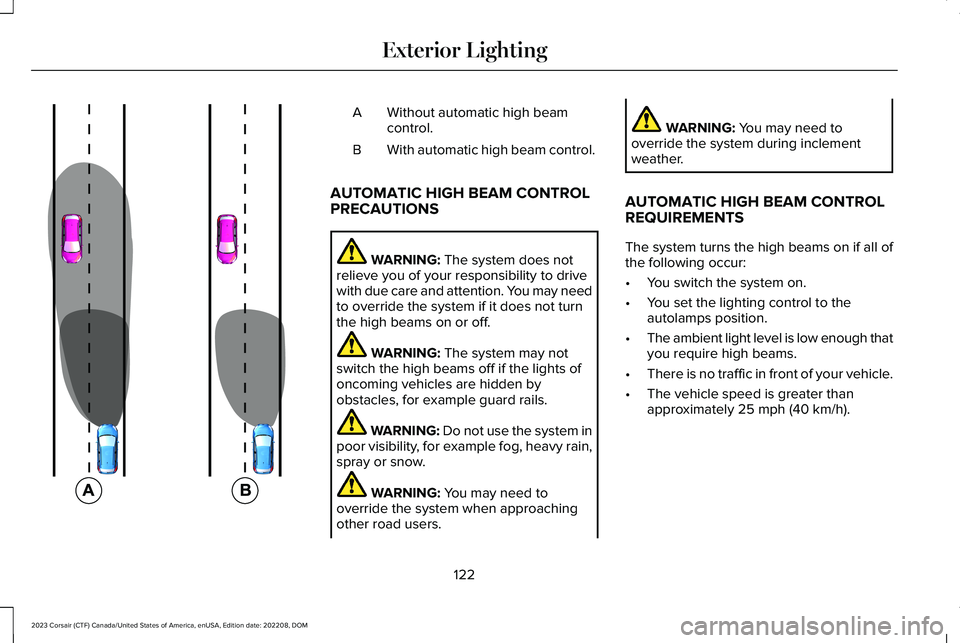
Without automatic high beamcontrol.A
With automatic high beam control.B
AUTOMATIC HIGH BEAM CONTROLPRECAUTIONS
WARNING: The system does notrelieve you of your responsibility to drivewith due care and attention. You may needto override the system if it does not turnthe high beams on or off.
WARNING: The system may notswitch the high beams off if the lights ofoncoming vehicles are hidden byobstacles, for example guard rails.
WARNING: Do not use the system inpoor visibility, for example fog, heavy rain,spray or snow.
WARNING: You may need tooverride the system when approachingother road users.
WARNING: You may need tooverride the system during inclementweather.
AUTOMATIC HIGH BEAM CONTROLREQUIREMENTS
The system turns the high beams on if all ofthe following occur:
•You switch the system on.
•You set the lighting control to theautolamps position.
•The ambient light level is low enough thatyou require high beams.
•There is no traffic in front of your vehicle.
•The vehicle speed is greater thanapproximately 25 mph (40 km/h).
122
2023 Corsair (CTF) Canada/United States of America, enUSA, Edition date: 202208, DOMExterior Lighting E327596
Page 129 of 690
ADAPTIVE FRONT LIGHTING
HOW DOES ADAPTIVE FRONTLIGHTING WORK
WARNING: Inspect and replace thewindshield wiper blades regularly to makesure the camera sensor has a clear view.The windshield wiper blades must be thecorrect length.
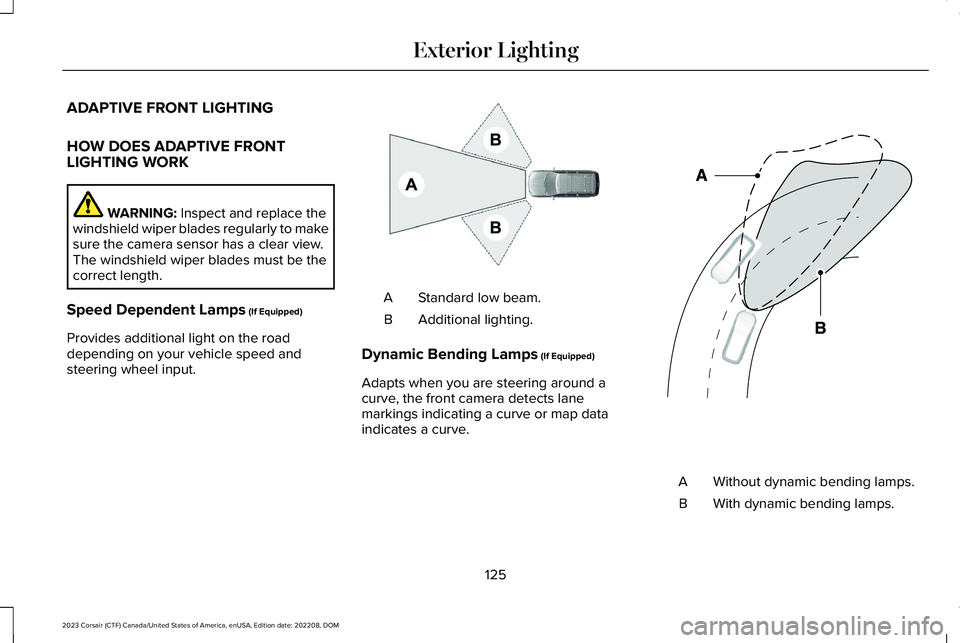
Speed Dependent Lamps (If Equipped)
Provides additional light on the roaddepending on your vehicle speed andsteering wheel input.
Standard low beam.A
Additional lighting.B
Dynamic Bending Lamps (If Equipped)
Adapts when you are steering around acurve, the front camera detects lanemarkings indicating a curve or map dataindicates a curve.
Without dynamic bending lamps.A
With dynamic bending lamps.B
125
2023 Corsair (CTF) Canada/United States of America, enUSA, Edition date: 202208, DOMExterior LightingE275680 E161714
Page 134 of 690
OPENING AND CLOSING THE
WINDOWS
WARNING: Do not leave childrenunattended in your vehicle and do not letthem play with the power windows. Failureto follow this instruction could result inpersonal injury.
WARNING: When closing the powerwindows, verify they are free of obstructionand make sure that children and pets arenot in the proximity of the windowopenings.
Press the window control switchto open the window. Lift thewindow control switch to close thewindow.
Note:The power windows operate with theignition on, and for several minutes after youswitch the ignition off or until you open afront door.
To reduce wind noise or pulsing noise whenone window is open, slightly open theopposite window.
One-Touch Open
Fully press the window control switch andrelease it. Press again or lift it to stop thewindow.
One-Touch Close
Fully lift the window control switch andrelease it. Press again or lift it to stop thewindow.
Resetting One-Touch Close
Carry out all steps within 30 seconds ofstarting the sequence.
1.Close the window.
2.Press and hold the window control switchuntil the window is fully open. Keep thewindow control switch pressed for a fewseconds.
3.Lift and hold the window control switchuntil the window is fully closed. Keep thewindow control switch held for a fewseconds.
4.Press and hold the window control switchuntil the window is fully open. Keep thewindow control switch pressed for a fewseconds.
5.Lift and hold the window control switchuntil the window is fully closed. Keep thewindow control switch held for a fewseconds.
Note:Repeat the procedure if the windowdoes not close when you use one-touch.
GLOBAL OPENING AND CLOSING
WHAT IS GLOBAL OPENING ANDCLOSING
You can use the remote control to open thewindows with the ignition off.
130
2023 Corsair (CTF) Canada/United States of America, enUSA, Edition date: 202208, DOMWindows
Page 137 of 690
INTERIOR MIRROR PRECAUTIONS
WARNING: Do not adjust the mirrorswhen your vehicle is moving. This couldresult in the loss of control of your vehicle,serious personal injury or death.
Note:Do not clean the mirror housing orglass with harsh abrasives, fuel or otherpetroleum-based cleaning products.
AUTO-DIMMING INTERIOR MIRROR
WHAT IS THE AUTO-DIMMINGINTERIOR MIRROR
The mirror dims to reduce the effect of brightlight from behind. It returns to normal whenthe bright light from behind is no longerpresent or if you shift into reverse (R).
AUTO-DIMMING INTERIOR MIRRORLIMITATIONS
Do not block the sensors on the front andback of the mirror.
Note:A rear center passenger or raised rearcenter head restraint could prevent light fromreaching the sensor.
133
2023 Corsair (CTF) Canada/United States of America, enUSA, Edition date: 202208, DOMInterior Mirror
Page 138 of 690
ADJUSTING THE EXTERIOR
MIRRORS
WARNING: Do not adjust the mirrorswhen your vehicle is moving. This couldresult in the loss of control of your vehicle,serious personal injury or death.
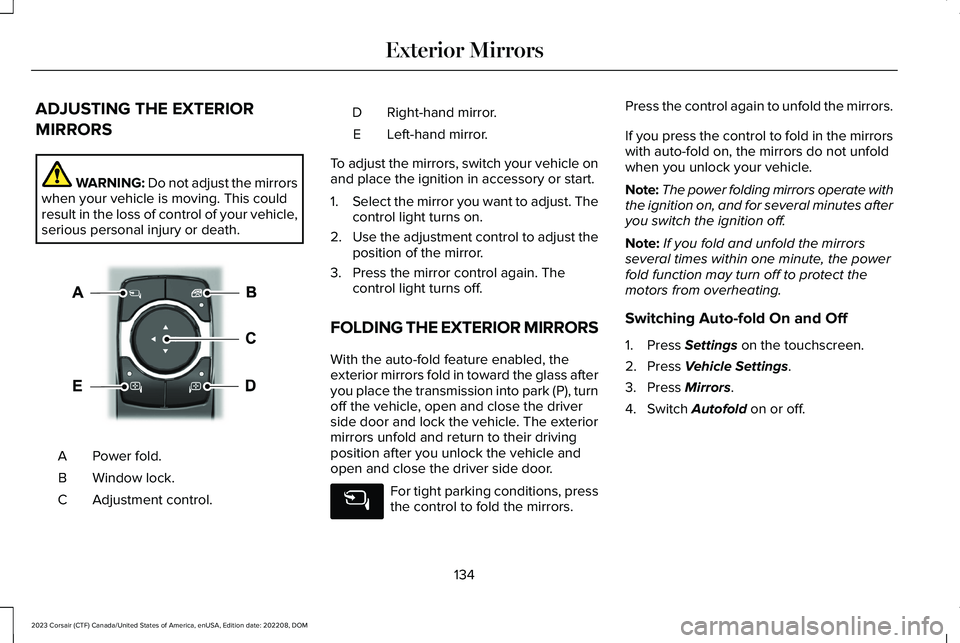
Power fold.A
Window lock.B
Adjustment control.C
Right-hand mirror.D
Left-hand mirror.E
To adjust the mirrors, switch your vehicle onand place the ignition in accessory or start.
1.Select the mirror you want to adjust. Thecontrol light turns on.
2.Use the adjustment control to adjust theposition of the mirror.
3.Press the mirror control again. Thecontrol light turns off.
FOLDING THE EXTERIOR MIRRORS
With the auto-fold feature enabled, theexterior mirrors fold in toward the glass afteryou place the transmission into park (P), turnoff the vehicle, open and close the driverside door and lock the vehicle. The exteriormirrors unfold and return to their drivingposition after you unlock the vehicle andopen and close the driver side door.
For tight parking conditions, pressthe control to fold the mirrors.
Press the control again to unfold the mirrors.
If you press the control to fold in the mirrorswith auto-fold on, the mirrors do not unfoldwhen you unlock your vehicle.
Note:The power folding mirrors operate withthe ignition on, and for several minutes afteryou switch the ignition off.
Note:If you fold and unfold the mirrorsseveral times within one minute, the powerfold function may turn off to protect themotors from overheating.
Switching Auto-fold On and Off
1.Press Settings on the touchscreen.
2.Press Vehicle Settings.
3.Press Mirrors.
4.Switch Autofold on or off.
134
2023 Corsair (CTF) Canada/United States of America, enUSA, Edition date: 202208, DOMExterior MirrorsE368669
Page 182 of 690
FRONT SEAT PRECAUTIONS
WARNING: Sitting improperly, out ofposition or with the seatback reclined toofar can take weight off the seat cushionand affect the decision of the passengersensing system, resulting in serious injuryor death in the event of a crash. Always situpright against your seat back, with yourfeet on the floor.
WARNING: Do not recline the seatbackrest too far as this can cause theoccupant to slide under the seatbelt,resulting in personal injury in the event ofa crash.
WARNING: Do not place objectshigher than the top of the seat backrest.Failure to follow this instruction could resultin personal injury or death in the event ofa sudden stop or crash.
WARNING: Do not adjust the driverseat or seat backrest when your vehicle ismoving. This may result in sudden seatmovement, causing the loss of control ofyour vehicle.
SITTING IN THE CORRECT
POSITION
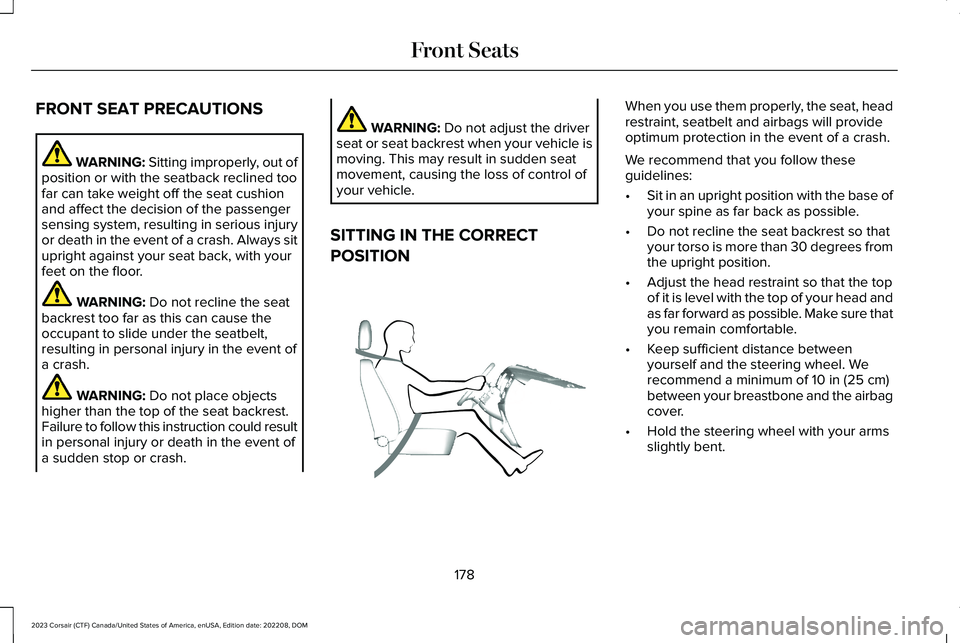
When you use them properly, the seat, headrestraint, seatbelt and airbags will provideoptimum protection in the event of a crash.
We recommend that you follow theseguidelines:
•Sit in an upright position with the base ofyour spine as far back as possible.
•Do not recline the seat backrest so thatyour torso is more than 30 degrees fromthe upright position.
•Adjust the head restraint so that the topof it is level with the top of your head andas far forward as possible. Make sure thatyou remain comfortable.
•Keep sufficient distance betweenyourself and the steering wheel. Werecommend a minimum of 10 in (25 cm)between your breastbone and the airbagcover.
•Hold the steering wheel with your armsslightly bent.
178
2023 Corsair (CTF) Canada/United States of America, enUSA, Edition date: 202208, DOMFront SeatsE68595
Page 183 of 690
•Bend your legs slightly so that you canpress the pedals fully.
•Position the shoulder strap of the seatbeltover the center of your shoulder andposition the lap strap tightly across yourhips.
Make sure that your driving position iscomfortable and that you can maintain fullcontrol of your vehicle.
POWER SEATS
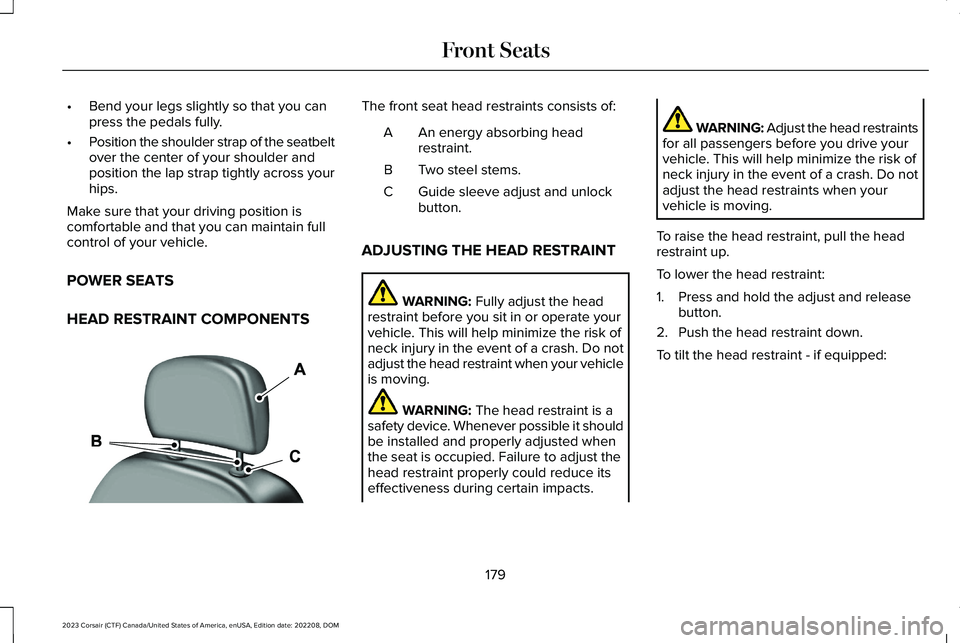
HEAD RESTRAINT COMPONENTS
The front seat head restraints consists of:
An energy absorbing headrestraint.A
Two steel stems.B
Guide sleeve adjust and unlockbutton.C
ADJUSTING THE HEAD RESTRAINT
WARNING: Fully adjust the headrestraint before you sit in or operate yourvehicle. This will help minimize the risk ofneck injury in the event of a crash. Do notadjust the head restraint when your vehicleis moving.
WARNING: The head restraint is asafety device. Whenever possible it shouldbe installed and properly adjusted whenthe seat is occupied. Failure to adjust thehead restraint properly could reduce itseffectiveness during certain impacts.
WARNING: Adjust the head restraintsfor all passengers before you drive yourvehicle. This will help minimize the risk ofneck injury in the event of a crash. Do notadjust the head restraints when yourvehicle is moving.
To raise the head restraint, pull the headrestraint up.
To lower the head restraint:
1.Press and hold the adjust and releasebutton.
2.Push the head restraint down.
To tilt the head restraint - if equipped:
179
2023 Corsair (CTF) Canada/United States of America, enUSA, Edition date: 202208, DOMFront SeatsE291139
Page 192 of 690
HEATED SEATS (IF EQUIPPED)
HEATED SEAT PRECAUTIONS
WARNING: Use caution when usingthe heated seat if you are unable to feelpain to your skin because of advancedage, chronic illness, diabetes, spinal cordinjury, medication, alcohol use, exhaustionor other physical conditions. The heatedseat could cause burns even at lowtemperatures, especially if used for longperiods of time. Failure to follow thisinstruction could result in personal injury.
WARNING: Do not poke sharpobjects into the seat cushion or seatbackrest. This could damage the heatedseat element and cause it to overheat.Failure to follow this instruction could resultin personal injury.
WARNING: Do not place anything onthe seat that blocks the heat, for examplea seat cover or a cushion. This could causethe seat to overheat. Failure to follow thisinstruction could result in personal injury.
Do not:
•Place heavy objects on the seat.
•Operate the heated seat if water or anyother liquid spills on the seat. Allow theseat to dry.
SWITCHING THE HEATED SEATS ONAND OFF
The vehicle must be running to use thisfeature.
The rear seat heat controls are on the rearof the center console.
Press the heated seat symbol to cyclethrough the various heat settings and off.More indicator lights indicate warmersettings.
The heated seats turn off when you switchoff the vehicle.
188
2023 Corsair (CTF) Canada/United States of America, enUSA, Edition date: 202208, DOMRear SeatsE146322
Page 198 of 690
GARAGE DOOR OPENER
INTRODUCTION
HomeLink Wireless Control System
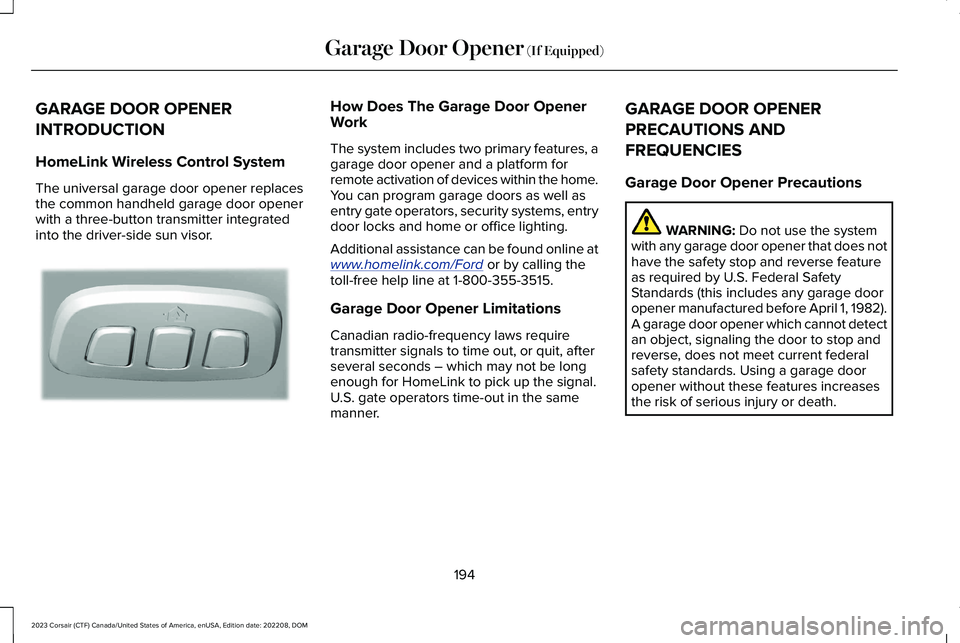
The universal garage door opener replacesthe common handheld garage door openerwith a three-button transmitter integratedinto the driver-side sun visor.
How Does The Garage Door OpenerWork
The system includes two primary features, agarage door opener and a platform forremote activation of devices within the home.You can program garage doors as well asentry gate operators, security systems, entrydoor locks and home or office lighting.
Additional assistance can be found online atwww.homelink.com/Ford or by calling thetoll-free help line at 1-800-355-3515.
Garage Door Opener Limitations
Canadian radio-frequency laws requiretransmitter signals to time out, or quit, afterseveral seconds – which may not be longenough for HomeLink to pick up the signal.U.S. gate operators time-out in the samemanner.
GARAGE DOOR OPENER
PRECAUTIONS AND
FREQUENCIES
Garage Door Opener Precautions
WARNING: Do not use the systemwith any garage door opener that does nothave the safety stop and reverse featureas required by U.S. Federal SafetyStandards (this includes any garage dooropener manufactured before April 1, 1982).A garage door opener which cannot detectan object, signaling the door to stop andreverse, does not meet current federalsafety standards. Using a garage dooropener without these features increasesthe risk of serious injury or death.
194
2023 Corsair (CTF) Canada/United States of America, enUSA, Edition date: 202208, DOMGarage Door Opener (If Equipped)E188211