ECO mode LINCOLN LS 2000 User Guide
[x] Cancel search | Manufacturer: LINCOLN, Model Year: 2000, Model line: LS, Model: LINCOLN LS 2000Pages: 272, PDF Size: 2.36 MB
Page 76 of 272
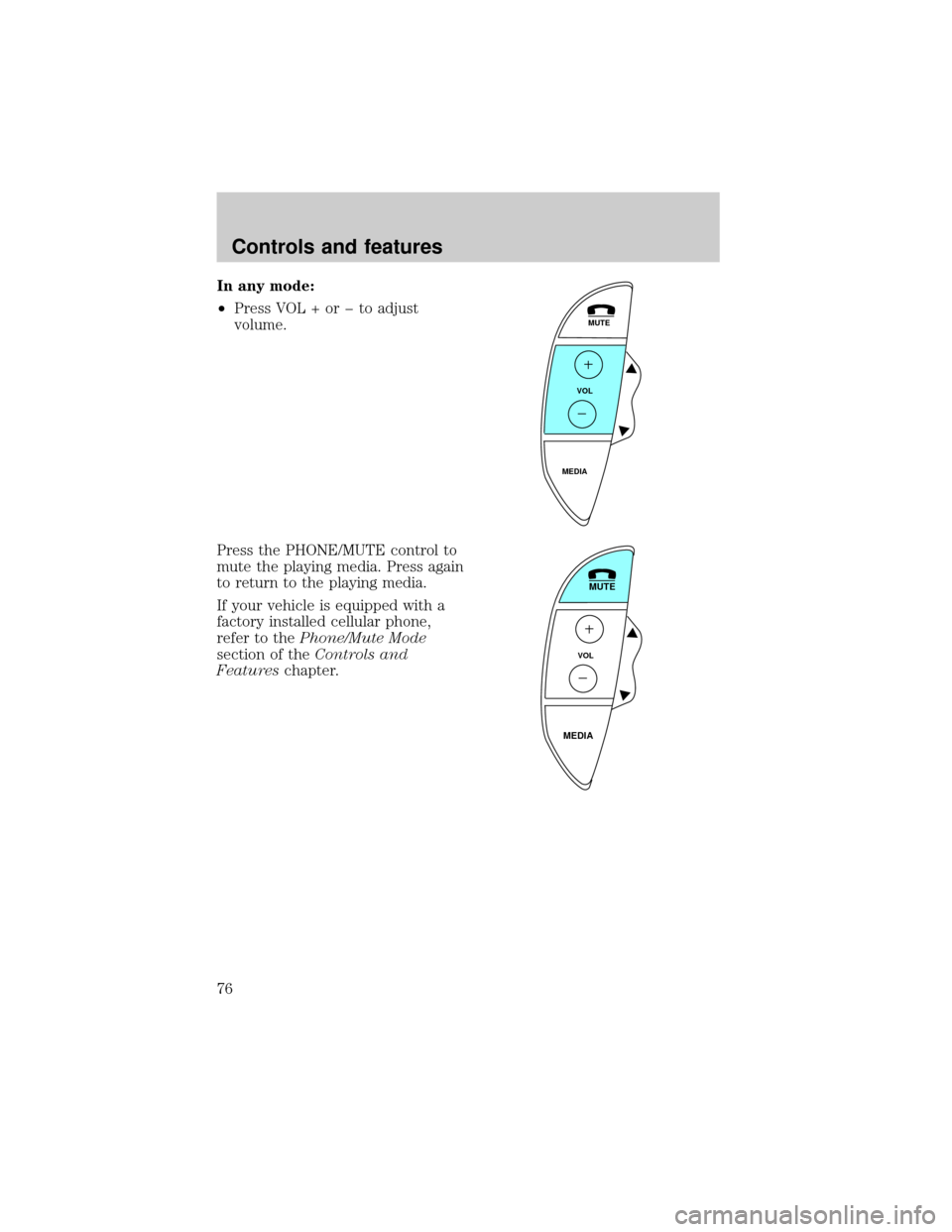
In any mode:
²Press VOL + or þ to adjust
volume.
Press the PHONE/MUTE control to
mute the playing media. Press again
to return to the playing media.
If your vehicle is equipped with a
factory installed cellular phone,
refer to thePhone/Mute Mode
section of theControls and
Featureschapter.
MUTE
VOL
MEDIA
MUTE
VOL
MEDIA
Controls and features
76
Page 95 of 272

²Positioning capability temporarily degraded after battery
reconnect
When your vehicle is started, the Lincoln RESCU GPS receiver begins
the process of determining vehicle location. The receiver will search the
sky and attempt to acquire signals from all visible satellites. A real-time
clock and an almanac containing detailed information about satellite
constellation are stored in the on-board computer's memory and are used
to expedite the search. If the vehicle's battery is disconnected, the clock
memory is erased and time and date are lost. Once the battery is
reconnected, it could take approximately 15 minutes to reacquire the
clock and for positioning capability to be restored. During this time, the
system will operate but the response center will not be able to identify
your location. In this situation, the operator will depend on you to
provide verbal information regarding vehicle location.
²
Inoperative if cellular signal marginal or unavailable
Since the Lincoln RESCU System utilizes the vehicle's cellular phone, it
can only be operated in geographical areas with cellular coverage.
Although approximately 90 percent of the U.S. population lives and
works in cellular coverage areas, there are various rural or mountainous
areas where coverage is marginal or does not exist. If an activation
occurs in this situation, the messages ªNO CELLULAR SIGNALº and
ªWAITING TO ACQUIREº will alternately be displayed on the message
center. If after several attempts cellular service can not be acquired, the
message ªUNABLE TO PLACE CALLº will be displayed, the assistance
request will be terminated and the phone will return to its normal
operating mode.
²
Inoperative if cellular system is busy
In a particular area, the local cellular system can only handle a limited
number of cellular calls at one time. Once volume has reached the
maximum limit, additional callers are denied access. If an activation
occurs in this situation, the messages ªCELLULAR SYSTEM BUSYº and
ªPLEASE WAITº will alternately be displayed on the message center. If
after several attempts a cellular channel cannot be acquired, the message
ªUNABLE TO PLACE CALLº will be displayed, the assistance request
will be terminated and the phone will return to its normal operating
mode.
Controls and features
95
Page 138 of 272
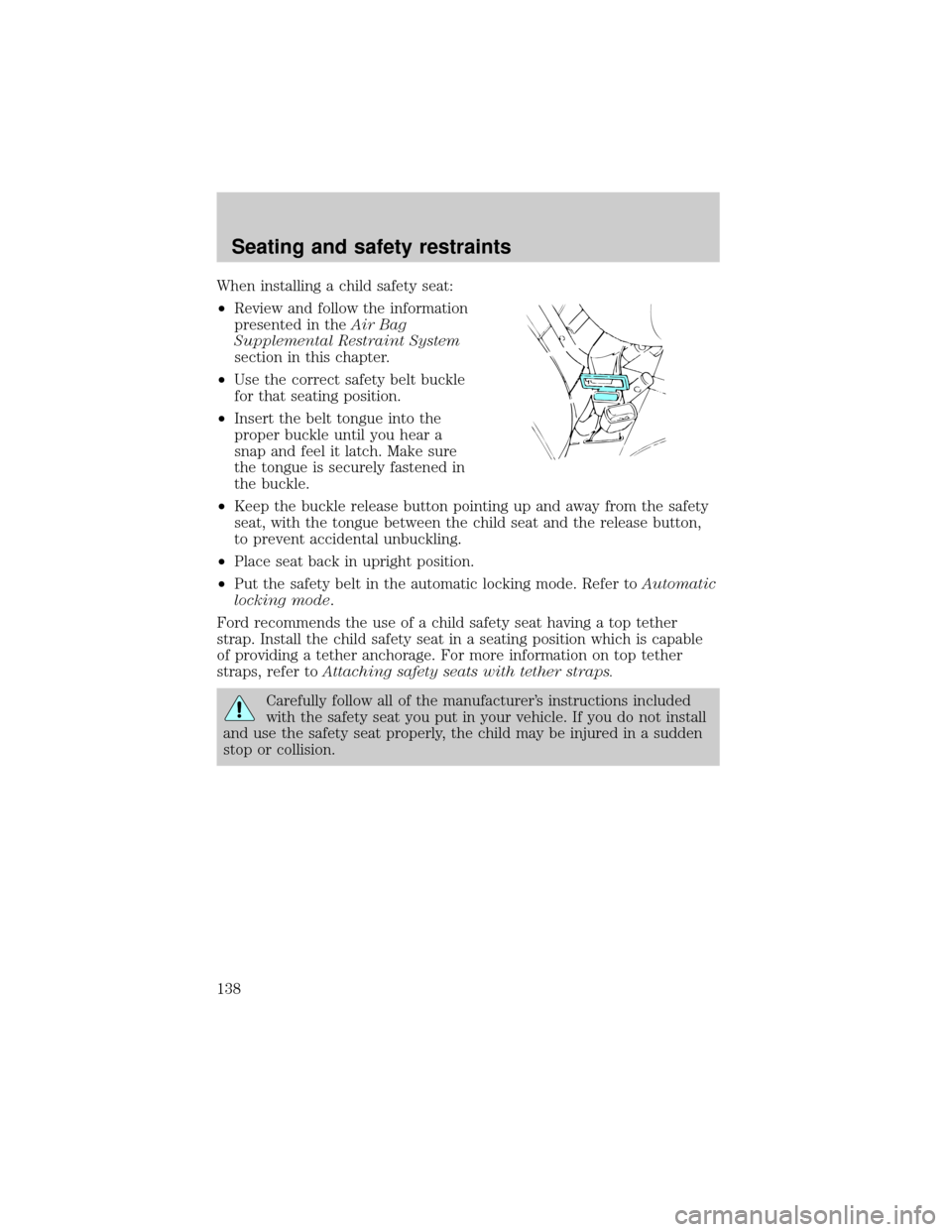
When installing a child safety seat:
²Review and follow the information
presented in theAir Bag
Supplemental Restraint System
section in this chapter.
²Use the correct safety belt buckle
for that seating position.
²Insert the belt tongue into the
proper buckle until you hear a
snap and feel it latch. Make sure
the tongue is securely fastened in
the buckle.
²Keep the buckle release button pointing up and away from the safety
seat, with the tongue between the child seat and the release button,
to prevent accidental unbuckling.
²Place seat back in upright position.
²Put the safety belt in the automatic locking mode. Refer toAutomatic
locking mode.
Ford recommends the use of a child safety seat having a top tether
strap. Install the child safety seat in a seating position which is capable
of providing a tether anchorage. For more information on top tether
straps, refer toAttaching safety seats with tether straps.
Carefully follow all of the manufacturer's instructions included
with the safety seat you put in your vehicle. If you do not install
and use the safety seat properly, the child may be injured in a sudden
stop or collision.
Seating and safety restraints
138
Page 160 of 272
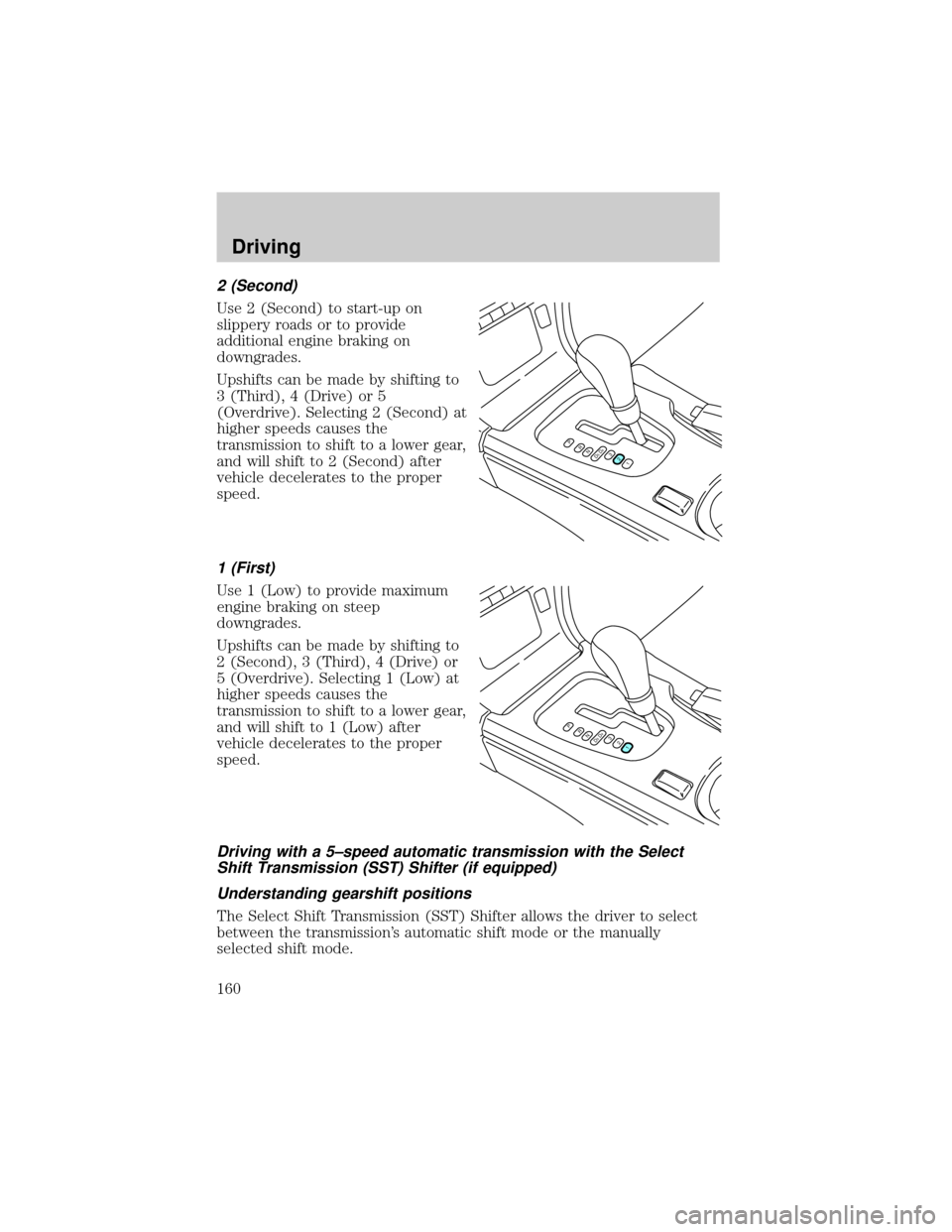
2 (Second)
Use 2 (Second) to start-up on
slippery roads or to provide
additional engine braking on
downgrades.
Upshifts can be made by shifting to
3 (Third), 4 (Drive) or 5
(Overdrive). Selecting 2 (Second) at
higher speeds causes the
transmission to shift to a lower gear,
and will shift to 2 (Second) after
vehicle decelerates to the proper
speed.
1 (First)
Use 1 (Low) to provide maximum
engine braking on steep
downgrades.
Upshifts can be made by shifting to
2 (Second), 3 (Third), 4 (Drive) or
5 (Overdrive). Selecting 1 (Low) at
higher speeds causes the
transmission to shift to a lower gear,
and will shift to 1 (Low) after
vehicle decelerates to the proper
speed.
Driving with a 5±speed automatic transmission with the Select
Shift Transmission (SST) Shifter (if equipped)
Understanding gearshift positions
The Select Shift Transmission (SST) Shifter allows the driver to select
between the transmission's automatic shift mode or the manually
selected shift mode.
PRND5D4321
PRND5D4321
Driving
160
Page 162 of 272
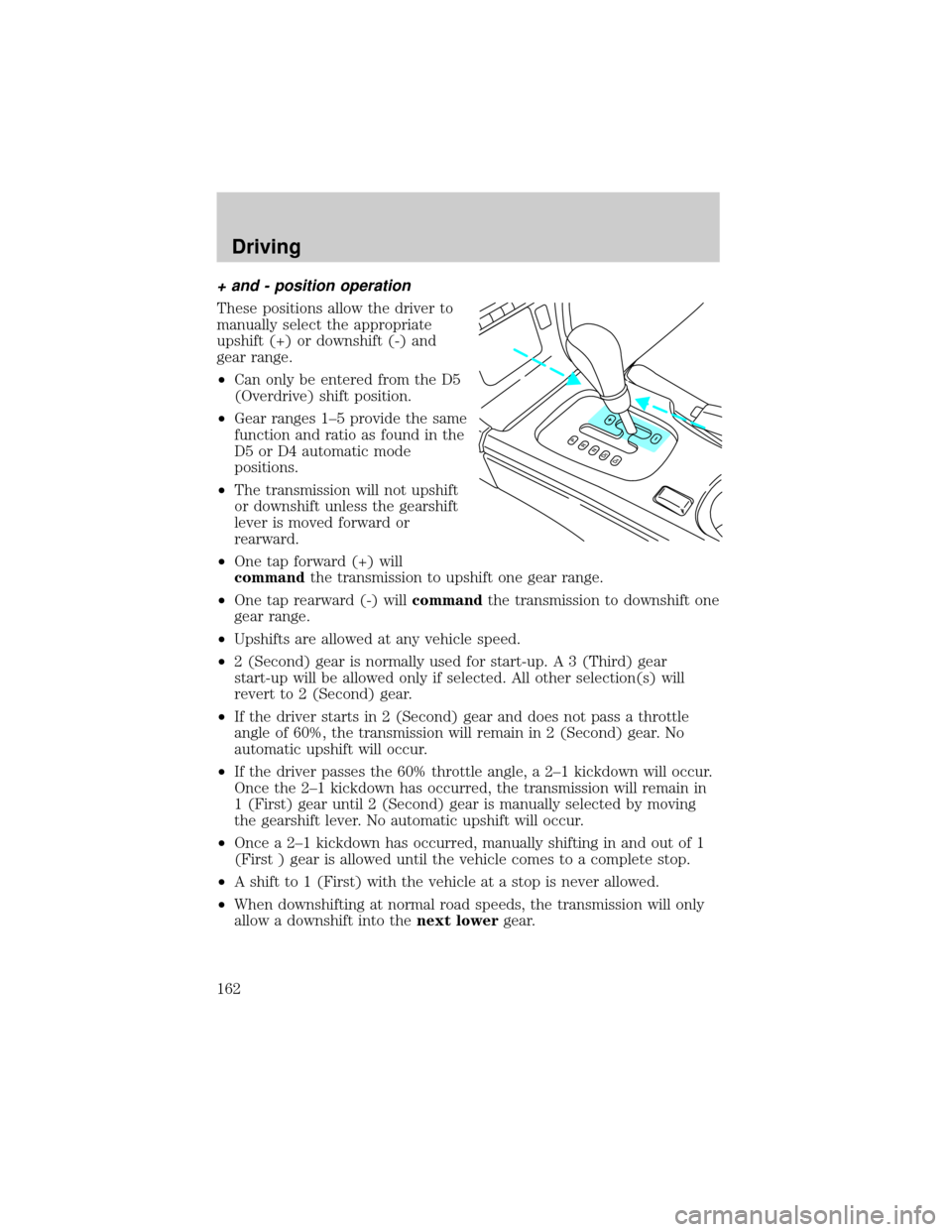
+ and - position operation
These positions allow the driver to
manually select the appropriate
upshift (+) or downshift (-) and
gear range.
²Can only be entered from the D5
(Overdrive) shift position.
²Gear ranges 1±5 provide the same
function and ratio as found in the
D5 or D4 automatic mode
positions.
²The transmission will not upshift
or downshift unless the gearshift
lever is moved forward or
rearward.
²One tap forward (+) will
commandthe transmission to upshift one gear range.
²One tap rearward (-) willcommandthe transmission to downshift one
gear range.
²Upshifts are allowed at any vehicle speed.
²2 (Second) gear is normally used for start-up. A 3 (Third) gear
start-up will be allowed only if selected. All other selection(s) will
revert to 2 (Second) gear.
²If the driver starts in 2 (Second) gear and does not pass a throttle
angle of 60%, the transmission will remain in 2 (Second) gear. No
automatic upshift will occur.
²If the driver passes the 60% throttle angle, a 2±1 kickdown will occur.
Once the 2±1 kickdown has occurred, the transmission will remain in
1 (First) gear until 2 (Second) gear is manually selected by moving
the gearshift lever. No automatic upshift will occur.
²Once a 2±1 kickdown has occurred, manually shifting in and out of 1
(First ) gear is allowed until the vehicle comes to a complete stop.
²A shift to 1 (First) with the vehicle at a stop is never allowed.
²When downshifting at normal road speeds, the transmission will only
allow a downshift into thenext lowergear.
Driving
162
Page 191 of 272
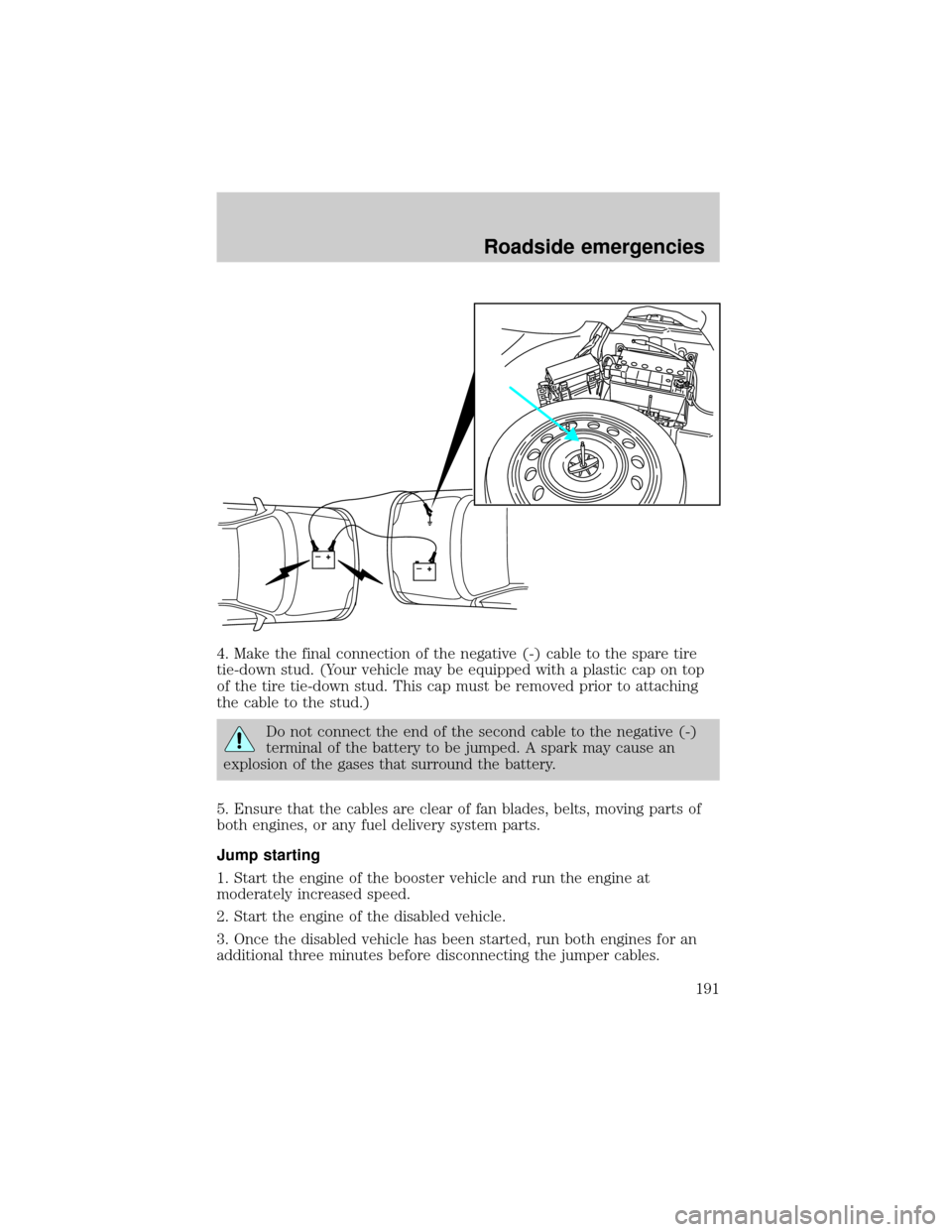
4. Make the final connection of the negative (-) cable to the spare tire
tie-down stud. (Your vehicle may be equipped with a plastic cap on top
of the tire tie-down stud. This cap must be removed prior to attaching
the cable to the stud.)
Do not connect the end of the second cable to the negative (-)
terminal of the battery to be jumped. A spark may cause an
explosion of the gases that surround the battery.
5. Ensure that the cables are clear of fan blades, belts, moving parts of
both engines, or any fuel delivery system parts.
Jump starting
1. Start the engine of the booster vehicle and run the engine at
moderately increased speed.
2. Start the engine of the disabled vehicle.
3. Once the disabled vehicle has been started, run both engines for an
additional three minutes before disconnecting the jumper cables.
+–+–
Roadside emergencies
191
Page 233 of 272

Calculating fuel economy
1. Fill the fuel tank completely and record the initial odometer reading
(in kilometers or miles).
2. Each time you fill the tank, record the amount of fuel added (in liters
or gallons).
3. After at least three to five tank fill-ups, fill the fuel tank and record
the current odometer reading.
4. Subtract your initial odometer reading from the current odometer
reading.
5. Follow one of the simple calculations in order to determine fuel
economy:
Multiply liters used by 100, then divide by total kilometers
traveled.
Divide total miles traveled by total gallons used.
Keep a record for at least one month and record the type of driving (city
or highway). This will provide an accurate estimate of the vehicle's fuel
economy under current driving conditions. Additionally, keeping records
during summer and winter will show how temperature impacts fuel
economy. In general, lower temperatures give lower fuel economy.
Driving style Ð good driving and fuel economy habits
Give consideration to the lists that follow and you may be able to change
a number of variables and improve your fuel economy.
Habits
²Smooth, moderate operation can yield up to 10% savings in fuel.
²Steady speeds without stopping will usually give the best fuel
economy.
²Idling for long periods of time (greater than one minute) may waste
fuel.
²Anticipate stopping; slowing down may eliminate the need to stop.
²Sudden or hard accelerations may reduce fuel economy.
²Slow down gradually.
²Driving at reasonable speeds (traveling at 88 km/h [55 mph] uses 15%
less fuel than traveling at 105 km/h [65 mph]).
²Revving the engine before turning it off may reduce fuel economy.
Maintenance and care
233
Page 258 of 272

is dependent upon the customer's possession of the vehicle.
Eligibility may differ according to state law. For example, see the unique
brochures for California, West Virginia, Georgia and Wisconsin
purchasers/lessees.
Board membership
The Board consists of:
²three consumer representatives
²a Ford or Lincoln Mercury dealership representative
Consumer candidates for Board membership are recruited and trained by
an independent consulting firm. The dealership Board member is chosen
from Ford and Lincoln Mercury dealership management, recognized for
their business leadership qualities.
What the Board needs
To have your case reviewed you must complete the application in the
DSB brochure and mail it to the address provided on the application
form. Some states will require you to use certified mail, with return
receipt requested.
Your application is reviewed and, if it is determined to be eligible, you
will receive an acknowledgment indicating:
²the file number assigned to your application
²the toll-free phone number of the DSB's independent administrator
Your dealership and a Ford Motor Company representative will then be
asked to submit statements.
To properly review your case, the Board needs the following information:
²legible copies of all documents and maintenance or repair orders
relevant to the case
²the year, make, model, and Vehicle Identification Number (VIN) listed
on your vehicle ownership license
²the date of repair(s) and mileage at the time of occurrence(s)
²the current mileage
²the name of the dealer(s) who sold or serviced the vehicle
²a brief description of your unresolved concern
Customer assistance
258
Page 262 of 272

Ford Multi-Purpose Cleaner*
Motorcraft Car Wash Concentrate
Motorcraft Carlite Glass Cleaner
Ford Spot and Stain Remover*
Ford Super Premium Tire and Trim Dressing
Ford Triple Clean
Ford Ultra-Clear Spray Glass Cleaner
* May be sold with the Motorcraft name
FORD ACCESSORIES FOR YOUR VEHICLE
A wide selection of Ford accessories are available for your vehicle
through your local authorized Lincoln Mercury dealer. These quality
accessories have been specifically engineered to fulfill your automotive
needs; they are custom designed to complement the style and
aerodynamic appearance of your vehicle. In addition, each accessory is
made from high quality materials and meets or exceeds Ford's rigid
engineering and safety specifications. Ford accessories are warranted for
up to 12 months or 20,000 km (12,000 miles) on all cars unless the
accessory is installed on a new vehicle, then the warranty becomes the
balance of the new vehicle's warranty or the accessories warranty,
whichever is greater. See your dealer for complete warranty information
and availability.
Not all accessories are available for all models.
Vehicle Security
Styled wheel protector locks
Vehicle security systems
Comfort and convenience
Cargo nets
Cargo organizers (trunk)
Cargo trays
Electrochromic compass inside mirror
Engine block heaters
Gear shift knob (woodgrain) Ð manual transmission
Customer assistance
262