radio LINCOLN LS 2002 Owner's Manual
[x] Cancel search | Manufacturer: LINCOLN, Model Year: 2002, Model line: LS, Model: LINCOLN LS 2002Pages: 288, PDF Size: 2.44 MB
Page 45 of 288
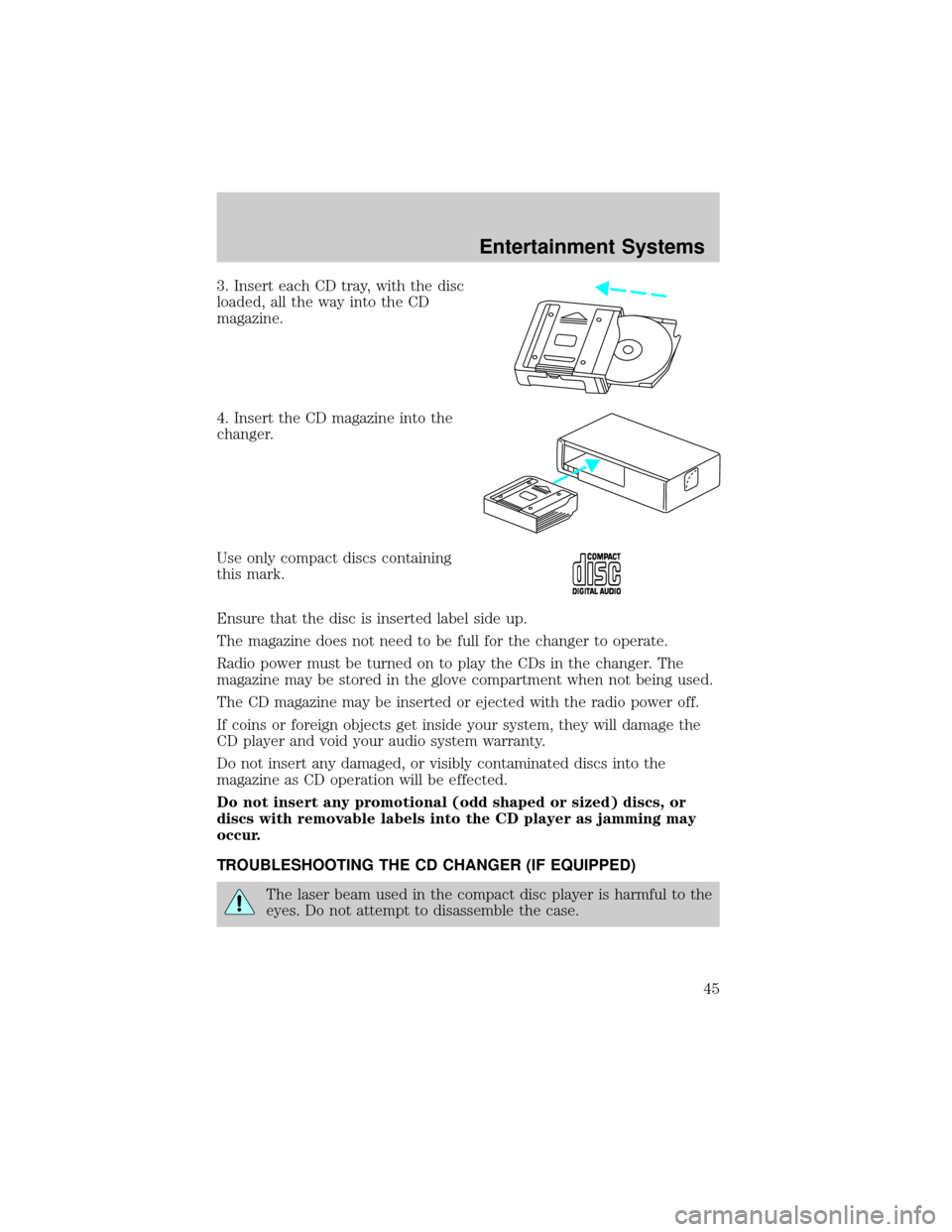
3. Insert each CD tray, with the disc
loaded, all the way into the CD
magazine.
4. Insert the CD magazine into the
changer.
Use only compact discs containing
this mark.
Ensure that the disc is inserted label side up.
The magazine does not need to be full for the changer to operate.
Radio power must be turned on to play the CDs in the changer. The
magazine may be stored in the glove compartment when not being used.
The CD magazine may be inserted or ejected with the radio power off.
If coins or foreign objects get inside your system, they will damage the
CD player and void your audio system warranty.
Do not insert any damaged, or visibly contaminated discs into the
magazine as CD operation will be effected.
Do not insert any promotional (odd shaped or sized) discs, or
discs with removable labels into the CD player as jamming may
occur.
TROUBLESHOOTING THE CD CHANGER (IF EQUIPPED)
The laser beam used in the compact disc player is harmful to the
eyes. Do not attempt to disassemble the case.
Entertainment Systems
45
Page 47 of 288

²Tighten very loose tapes by inserting a finger or pencil into the hole
and turning the hub.
²Remove loose labels before inserting tapes.
²Do not leave tapes in the cassette player for a long time when not
being played.
RADIO FREQUENCY INFORMATION
The Federal Communications Commission (FCC) and the Canadian Radio
and Telecommunications Commission(CRTC) establish the frequencies
AM and FM stations may use for their broadcasts. Allowable frequencies
are:
AM 530, 540±1600, 1610 kHz
FM 87.7, 87.9±107.7, 107.9 MHz
Not all frequencies are used in a given area.
RADIO RECEPTION FACTORS
Three factors can affect radio reception:
²Distance/strength.The further an FM signal travels, the weaker it is.
The listenable range of the average FM station is approximately 40 km
(24 miles). This range can be affected by ªsignal modulation.º Signal
modulation is a process radio stations use to increase their
strength/volume relative to other stations.
²Terrain.Hills, mountains and tall buildings between your vehicle's
antenna and the radio station signal can cause FM reception problems.
Static can be caused on AM stations by power lines, electric fences,
traffic lights and thunderstorms. Moving away from an interfering
structure (out of its ªshadowº) returns your reception to normal.
²Station overload.Weak signals are sometimes captured by stronger
signals when you pass a broadcast tower. A stronger signal may
temporarily overtake a weaker signal and play while the weak station
frequency is displayed.
The audio system automatically switches to single channel reception if it
will improve the reception of a station normally received in stereo.
AUDIO SYSTEM WARRANTIES AND SERVICE
Refer to theWarranty Guidefor audio system warranty information.
If service is necessary, see your dealer or a qualified technician.
Entertainment Systems
47
Page 56 of 288
With the ignition in RUN and the engine running, the feature will be
automatically enabled if the temperature is below 5ÉC (40ÉF). The
feature can be manually selected or deselected at any time. However, the
automatic feature will be enabled each time the engine is started.
In cold, dry conditions where wet snow or ice is not present it is
acceptable to manually deselect the operation of this feature.
The feature will run continuously unless a low battery condition is
detected, or unless the feature is manually deselected, and will only
activate when the vehicle engine is running (to prevent excessive drain
of the vehicle battery).
R(rear window defroster) Ð Refer toRear Window Defroster.
Displaying outside temperature
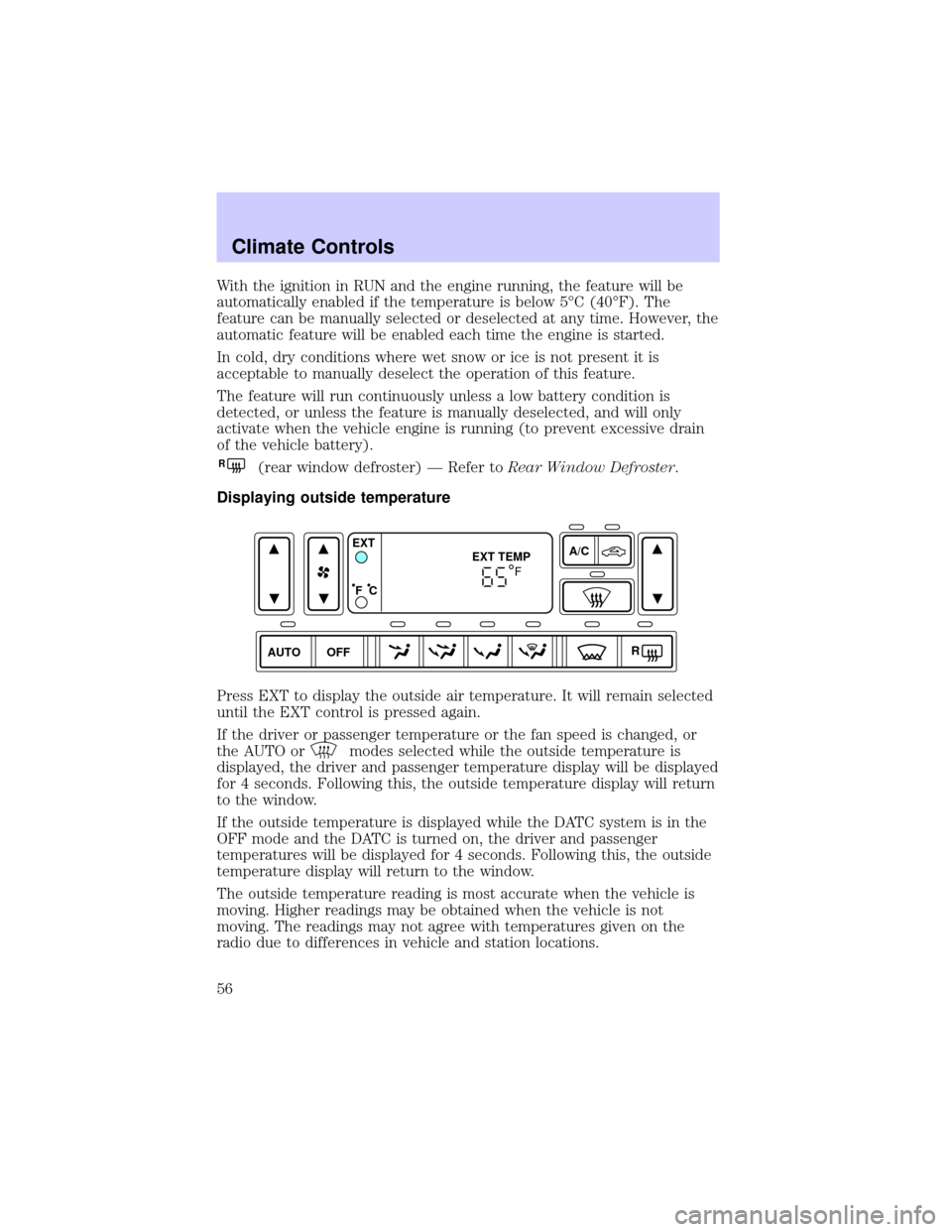
Press EXT to display the outside air temperature. It will remain selected
until the EXT control is pressed again.
If the driver or passenger temperature or the fan speed is changed, or
the AUTO or
modes selected while the outside temperature is
displayed, the driver and passenger temperature display will be displayed
for 4 seconds. Following this, the outside temperature display will return
to the window.
If the outside temperature is displayed while the DATC system is in the
OFF mode and the DATC is turned on, the driver and passenger
temperatures will be displayed for 4 seconds. Following this, the outside
temperature display will return to the window.
The outside temperature reading is most accurate when the vehicle is
moving. Higher readings may be obtained when the vehicle is not
moving. The readings may not agree with temperatures given on the
radio due to differences in vehicle and station locations.
AUTO OFFA/C
R EXT
EXT TEMP
F C
F
Climate Controls
56
Page 84 of 288
STEERING WHEEL CONTROLS
These controls allow you to operate some audio control features.
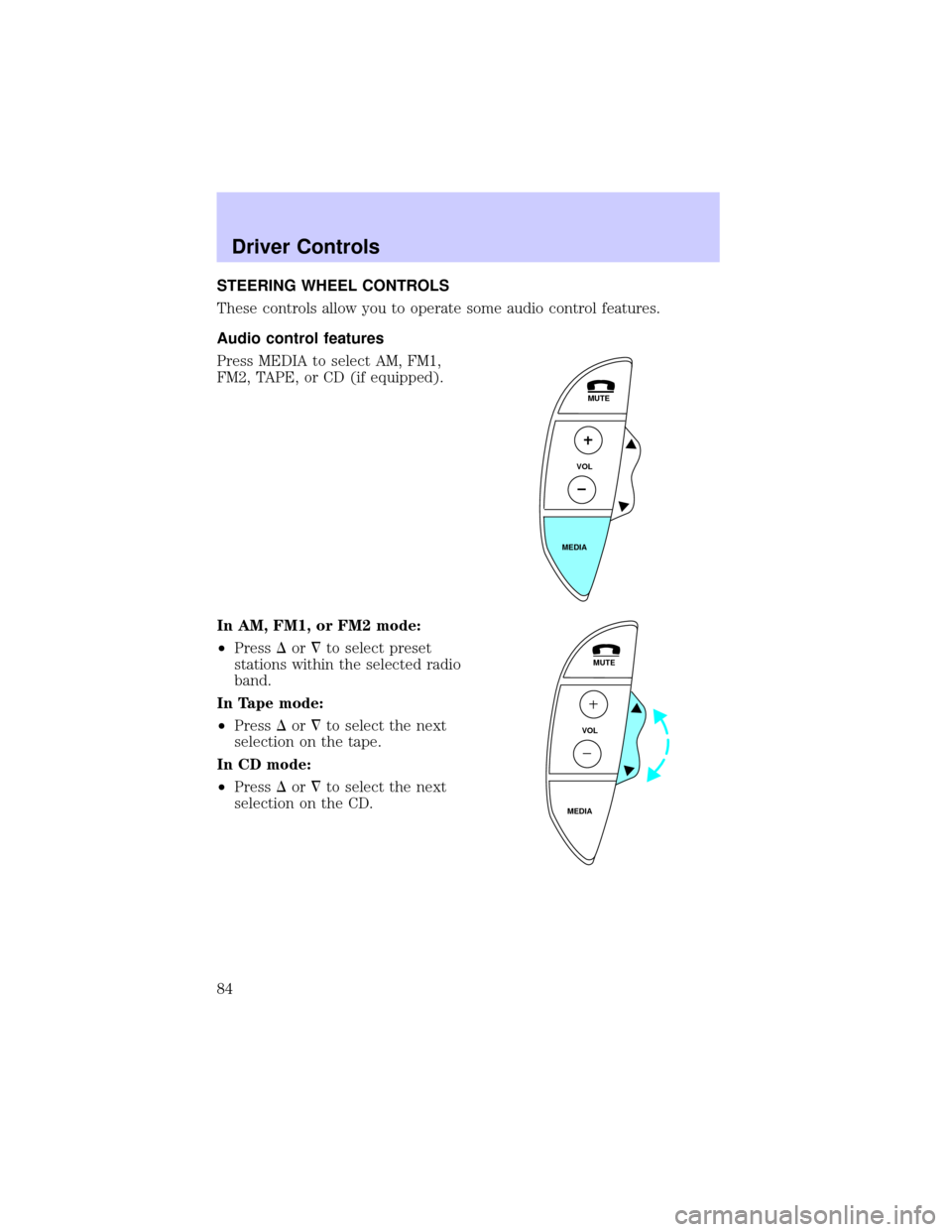
Audio control features
Press MEDIA to select AM, FM1,
FM2, TAPE, or CD (if equipped).
In AM, FM1, or FM2 mode:
²PressDor¹to select preset
stations within the selected radio
band.
In Tape mode:
²PressDor¹to select the next
selection on the tape.
In CD mode:
²PressDor¹to select the next
selection on the CD.
MUTE
VOL
MEDIA
MUTE
VOL
MEDIA
Driver Controls
84
Page 86 of 288
MOON ROOF (IF EQUIPPED)
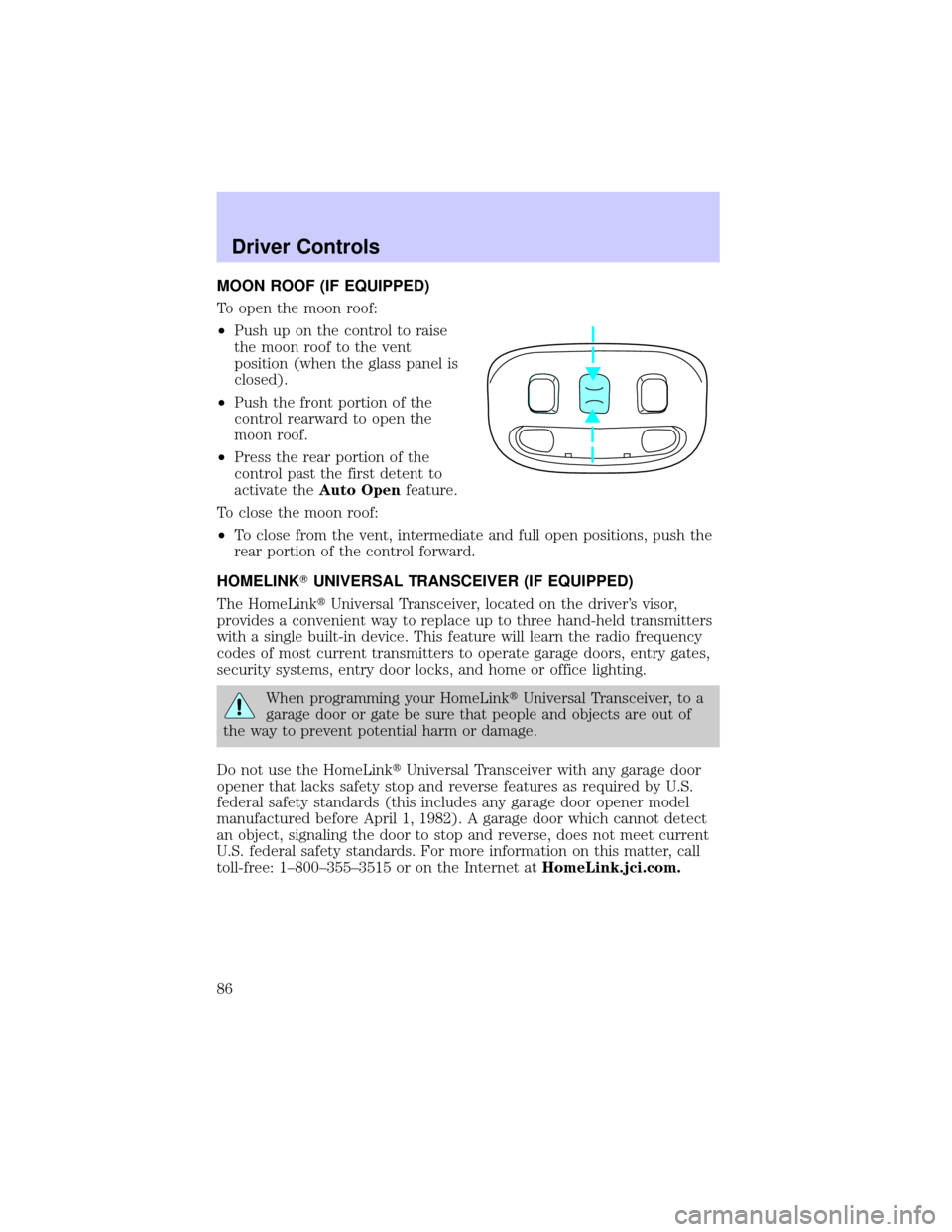
To open the moon roof:
²Push up on the control to raise
the moon roof to the vent
position (when the glass panel is
closed).
²Push the front portion of the
control rearward to open the
moon roof.
²Press the rear portion of the
control past the first detent to
activate theAuto Openfeature.
To close the moon roof:
²To close from the vent, intermediate and full open positions, push the
rear portion of the control forward.
HOMELINKTUNIVERSAL TRANSCEIVER (IF EQUIPPED)
The HomeLinktUniversal Transceiver, located on the driver's visor,
provides a convenient way to replace up to three hand-held transmitters
with a single built-in device. This feature will learn the radio frequency
codes of most current transmitters to operate garage doors, entry gates,
security systems, entry door locks, and home or office lighting.
When programming your HomeLinktUniversal Transceiver, to a
garage door or gate be sure that people and objects are out of
the way to prevent potential harm or damage.
Do not use the HomeLinktUniversal Transceiver with any garage door
opener that lacks safety stop and reverse features as required by U.S.
federal safety standards (this includes any garage door opener model
manufactured before April 1, 1982). A garage door which cannot detect
an object, signaling the door to stop and reverse, does not meet current
U.S. federal safety standards. For more information on this matter, call
toll-free: 1±800±355±3515 or on the Internet atHomeLink.jci.com.
Driver Controls
86
Page 94 of 288
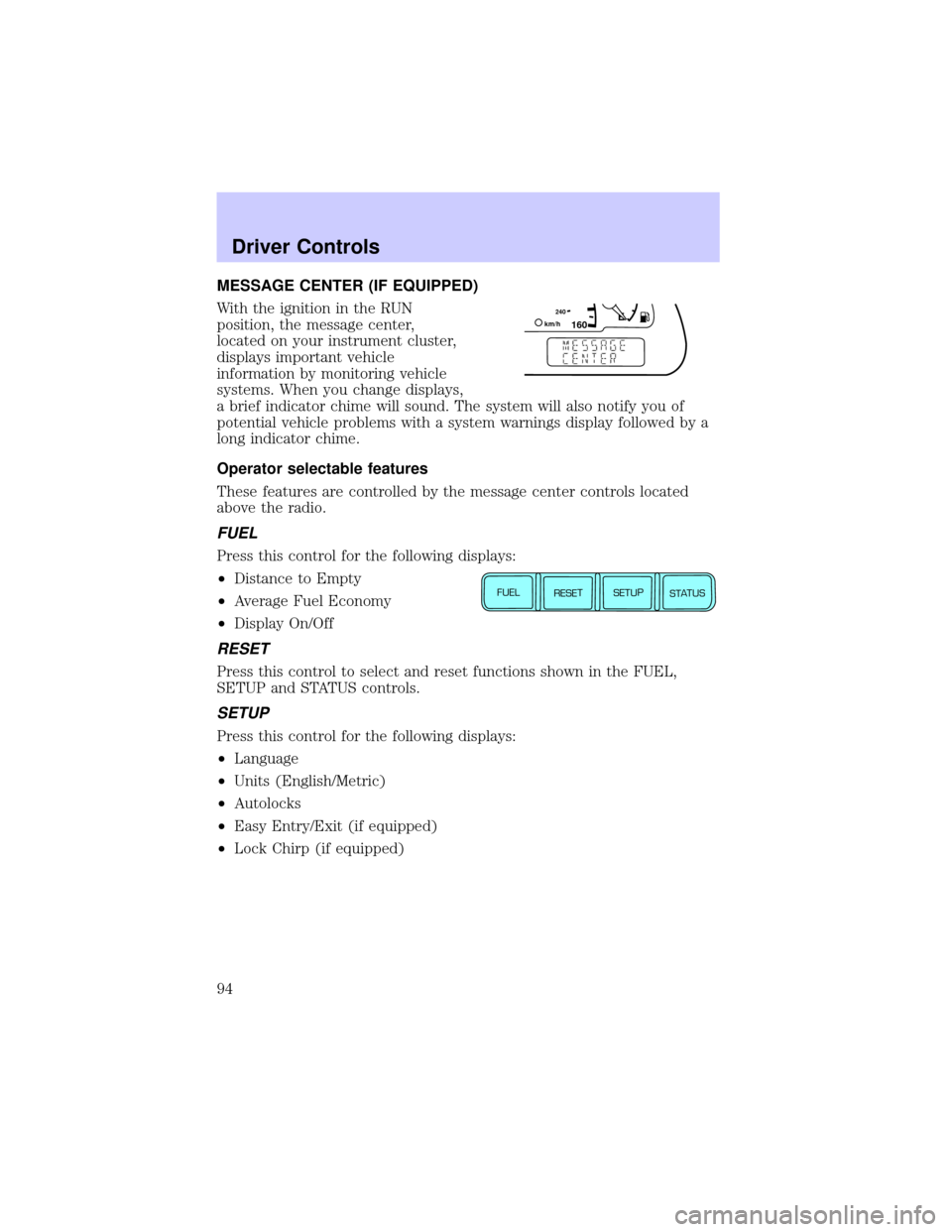
MESSAGE CENTER (IF EQUIPPED)
With the ignition in the RUN
position, the message center,
located on your instrument cluster,
displays important vehicle
information by monitoring vehicle
systems. When you change displays,
a brief indicator chime will sound. The system will also notify you of
potential vehicle problems with a system warnings display followed by a
long indicator chime.
Operator selectable features
These features are controlled by the message center controls located
above the radio.
FUEL
Press this control for the following displays:
²Distance to Empty
²Average Fuel Economy
²Display On/Off
RESET
Press this control to select and reset functions shown in the FUEL,
SETUP and STATUS controls.
SETUP
Press this control for the following displays:
²Language
²Units (English/Metric)
²Autolocks
²Easy Entry/Exit (if equipped)
²Lock Chirp (if equipped)
160240km/hE
FUEL
RESET
SETUP
STATUS
Driver Controls
94
Page 114 of 288
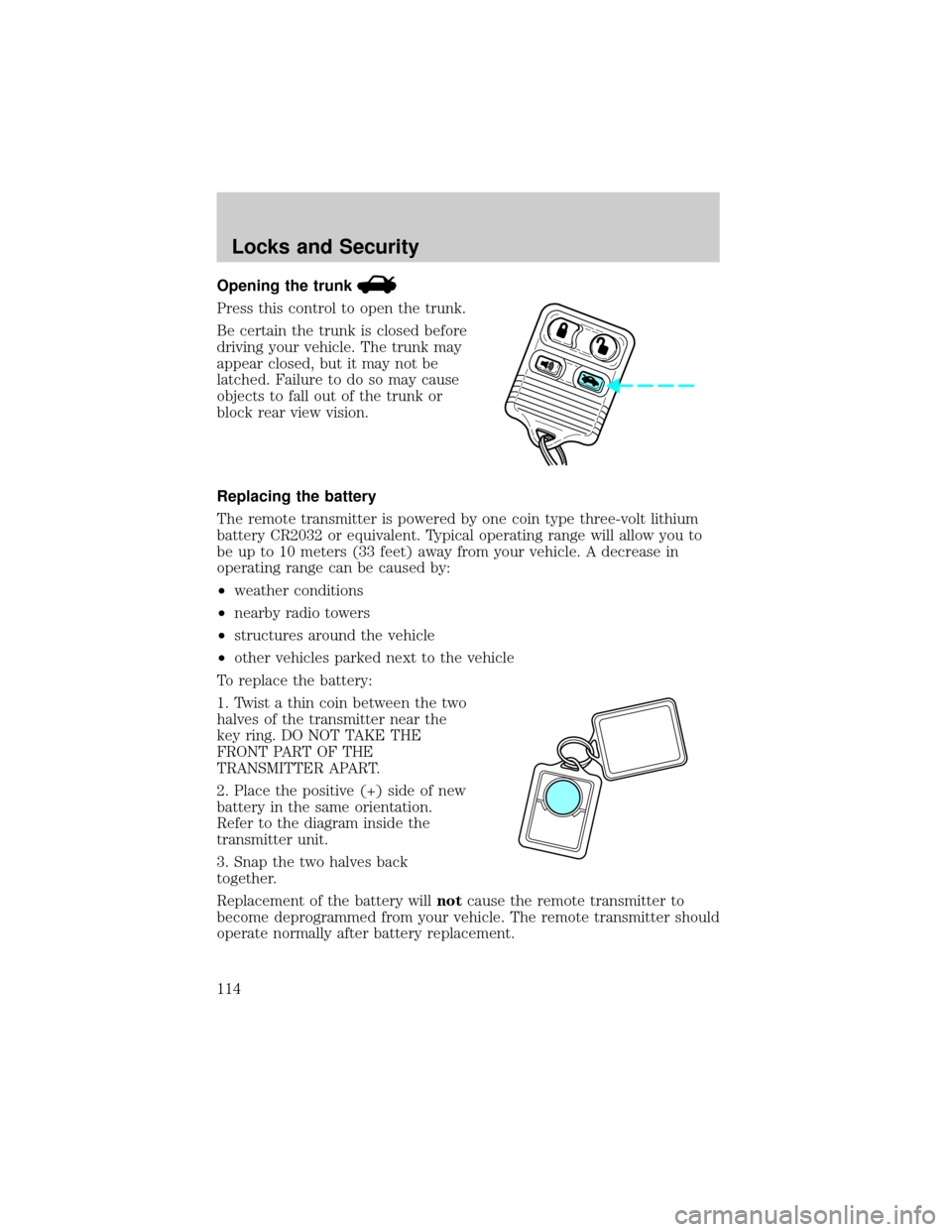
Opening the trunk
Press this control to open the trunk.
Be certain the trunk is closed before
driving your vehicle. The trunk may
appear closed, but it may not be
latched. Failure to do so may cause
objects to fall out of the trunk or
block rear view vision.
Replacing the battery
The remote transmitter is powered by one coin type three-volt lithium
battery CR2032 or equivalent. Typical operating range will allow you to
be up to 10 meters (33 feet) away from your vehicle. A decrease in
operating range can be caused by:
²weather conditions
²nearby radio towers
²structures around the vehicle
²other vehicles parked next to the vehicle
To replace the battery:
1. Twist a thin coin between the two
halves of the transmitter near the
key ring. DO NOT TAKE THE
FRONT PART OF THE
TRANSMITTER APART.
2. Place the positive (+) side of new
battery in the same orientation.
Refer to the diagram inside the
transmitter unit.
3. Snap the two halves back
together.
Replacement of the battery willnotcause the remote transmitter to
become deprogrammed from your vehicle. The remote transmitter should
operate normally after battery replacement.
Locks and Security
114
Page 156 of 288
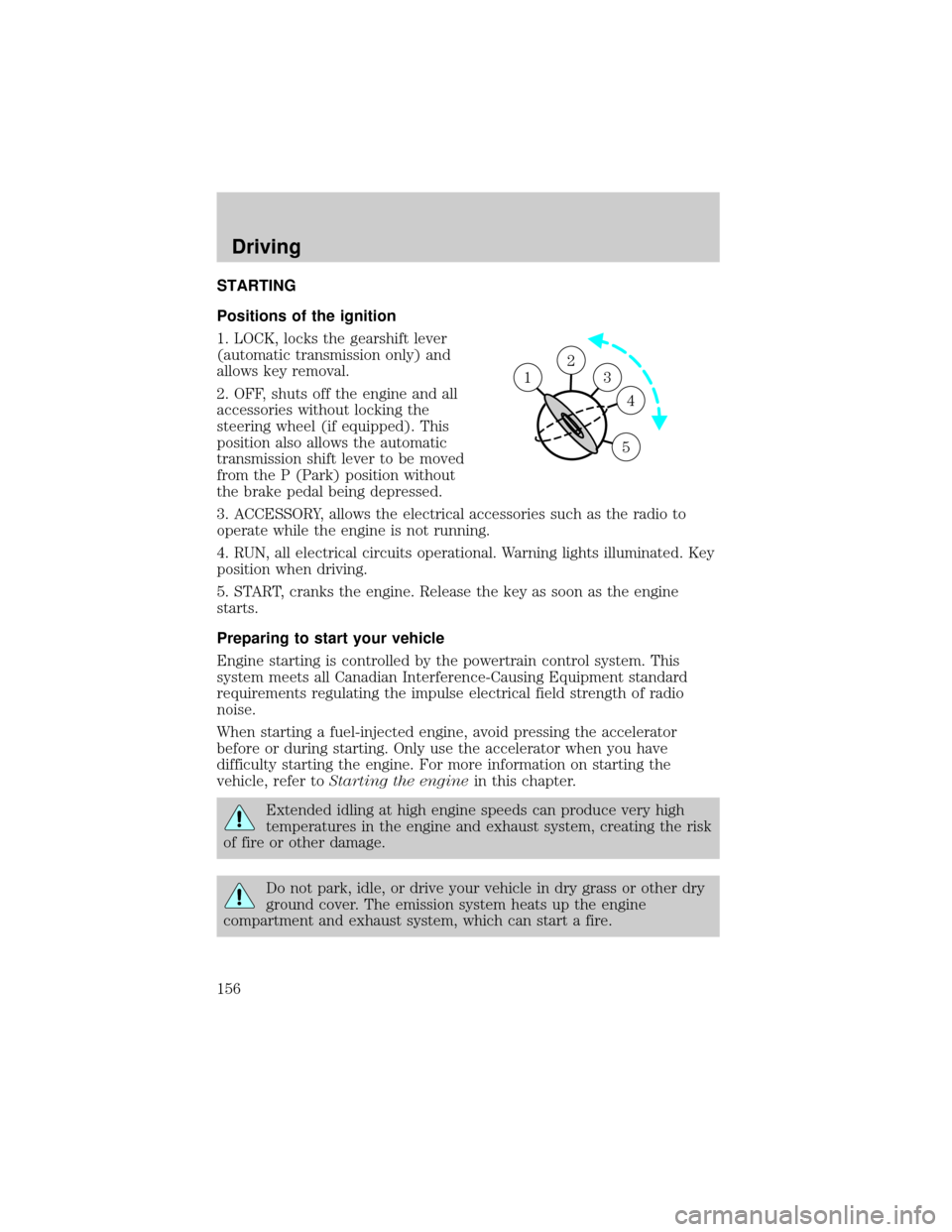
STARTING
Positions of the ignition
1. LOCK, locks the gearshift lever
(automatic transmission only) and
allows key removal.
2. OFF, shuts off the engine and all
accessories without locking the
steering wheel (if equipped). This
position also allows the automatic
transmission shift lever to be moved
from the P (Park) position without
the brake pedal being depressed.
3. ACCESSORY, allows the electrical accessories such as the radio to
operate while the engine is not running.
4. RUN, all electrical circuits operational. Warning lights illuminated. Key
position when driving.
5. START, cranks the engine. Release the key as soon as the engine
starts.
Preparing to start your vehicle
Engine starting is controlled by the powertrain control system. This
system meets all Canadian Interference-Causing Equipment standard
requirements regulating the impulse electrical field strength of radio
noise.
When starting a fuel-injected engine, avoid pressing the accelerator
before or during starting. Only use the accelerator when you have
difficulty starting the engine. For more information on starting the
vehicle, refer toStarting the enginein this chapter.
Extended idling at high engine speeds can produce very high
temperatures in the engine and exhaust system, creating the risk
of fire or other damage.
Do not park, idle, or drive your vehicle in dry grass or other dry
ground cover. The emission system heats up the engine
compartment and exhaust system, which can start a fire.
2
3
4
5
1
Driving
156
Page 191 of 288
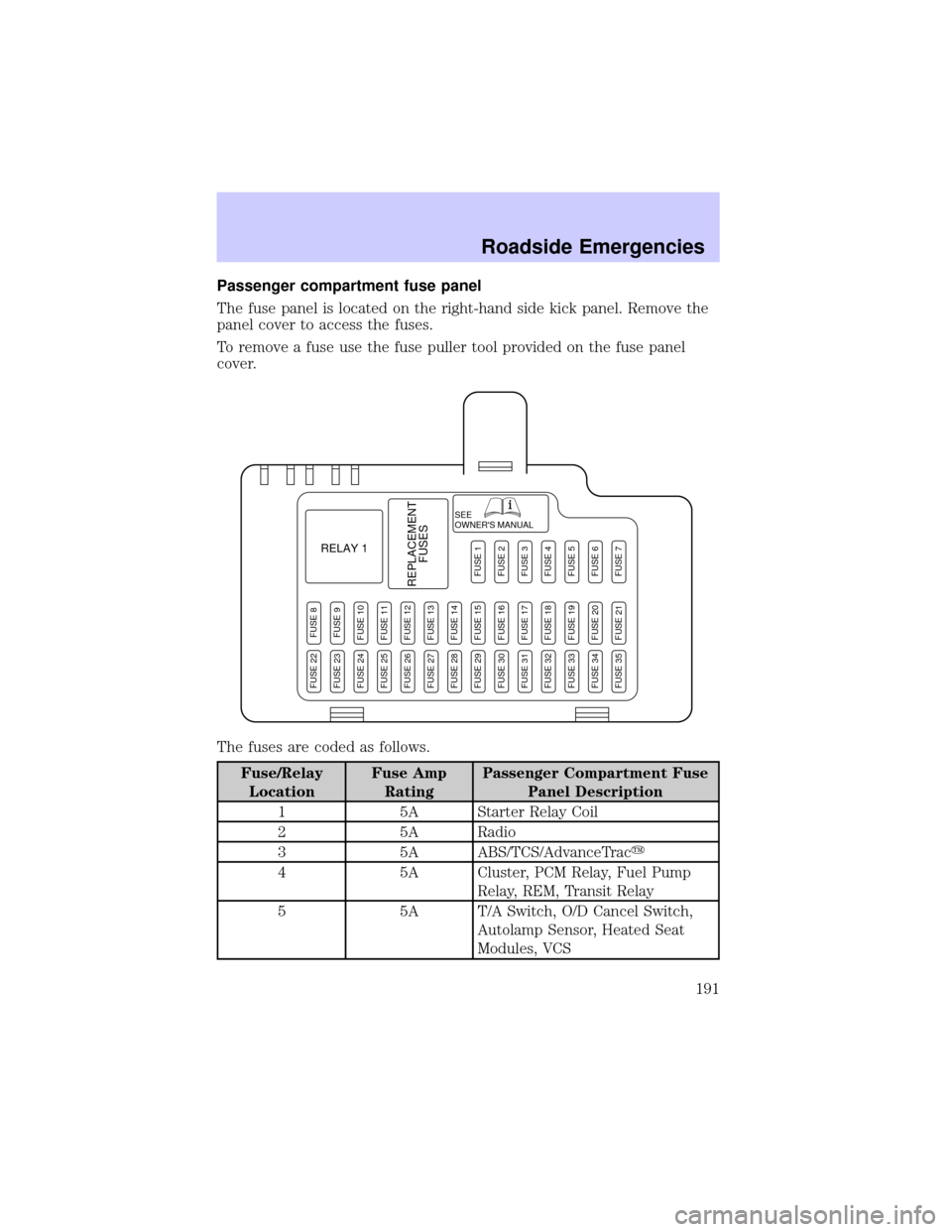
Passenger compartment fuse panel
The fuse panel is located on the right-hand side kick panel. Remove the
panel cover to access the fuses.
To remove a fuse use the fuse puller tool provided on the fuse panel
cover.
The fuses are coded as follows.
Fuse/Relay
LocationFuse Amp
RatingPassenger Compartment Fuse
Panel Description
1 5A Starter Relay Coil
2 5A Radio
3 5A ABS/TCS/AdvanceTracy
4 5A Cluster, PCM Relay, Fuel Pump
Relay, REM, Transit Relay
5 5A T/A Switch, O/D Cancel Switch,
Autolamp Sensor, Heated Seat
Modules, VCS
SEE
OWNER'S MANUAL
RELAY 1
REPLACEMENT
FUSES
FUSE 8FUSE 9FUSE 10FUSE 11FUSE 12FUSE 13FUSE 14FUSE 15FUSE 16FUSE 17FUSE 18FUSE 19FUSE 20FUSE 21
FUSE 1FUSE 2FUSE 3FUSE 4FUSE 5FUSE 6FUSE 7
FUSE 22FUSE 23FUSE 24FUSE 25FUSE 26FUSE 27FUSE 28FUSE 29FUSE 30FUSE 31FUSE 32FUSE 33FUSE 34FUSE 35
Roadside Emergencies
191
Page 192 of 288
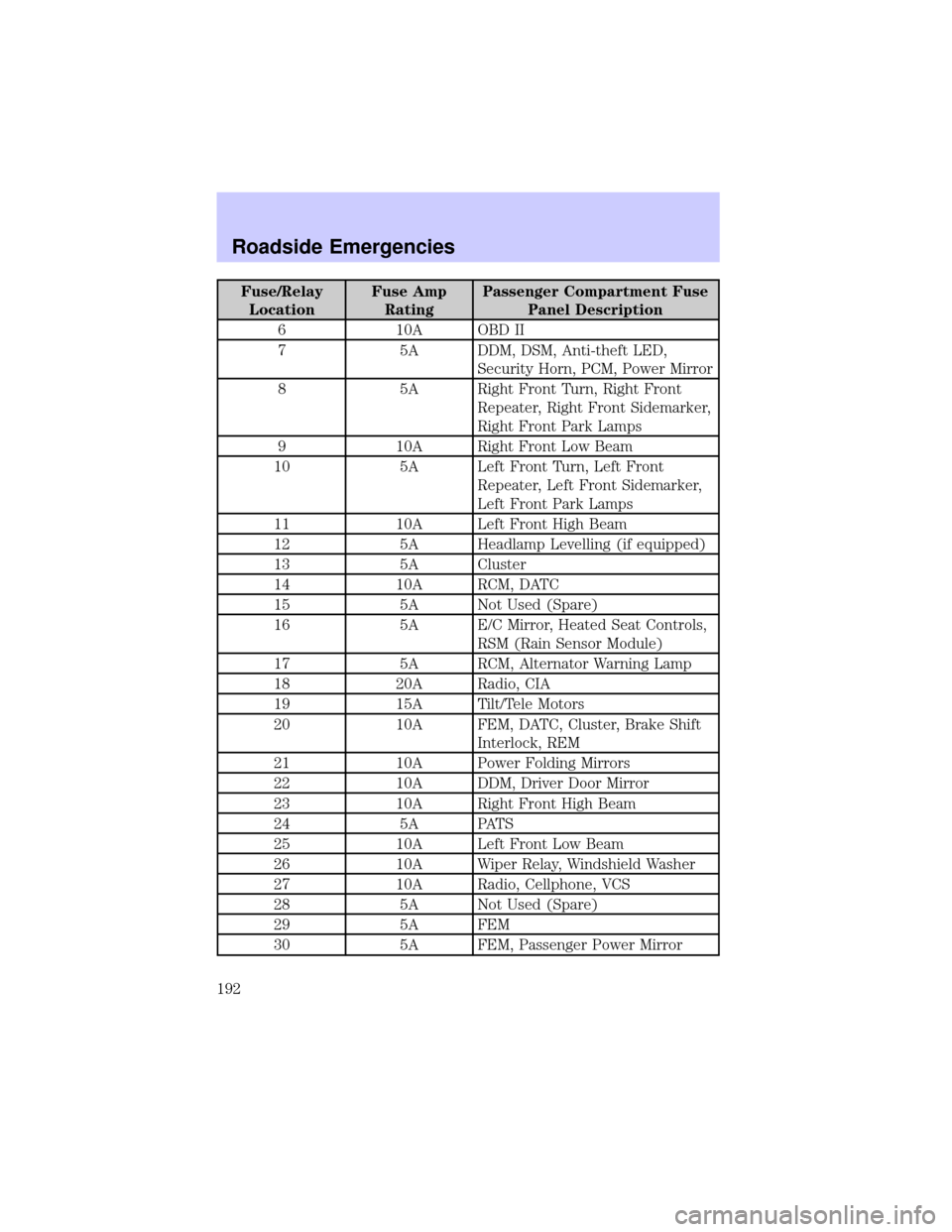
Fuse/Relay
LocationFuse Amp
RatingPassenger Compartment Fuse
Panel Description
6 10A OBD II
7 5A DDM, DSM, Anti-theft LED,
Security Horn, PCM, Power Mirror
8 5A Right Front Turn, Right Front
Repeater, Right Front Sidemarker,
Right Front Park Lamps
9 10A Right Front Low Beam
10 5A Left Front Turn, Left Front
Repeater, Left Front Sidemarker,
Left Front Park Lamps
11 10A Left Front High Beam
12 5A Headlamp Levelling (if equipped)
13 5A Cluster
14 10A RCM, DATC
15 5A Not Used (Spare)
16 5A E/C Mirror, Heated Seat Controls,
RSM (Rain Sensor Module)
17 5A RCM, Alternator Warning Lamp
18 20A Radio, CIA
19 15A Tilt/Tele Motors
20 10A FEM, DATC, Cluster, Brake Shift
Interlock, REM
21 10A Power Folding Mirrors
22 10A DDM, Driver Door Mirror
23 10A Right Front High Beam
24 5A PATS
25 10A Left Front Low Beam
26 10A Wiper Relay, Windshield Washer
27 10A Radio, Cellphone, VCS
28 5A Not Used (Spare)
29 5A FEM
30 5A FEM, Passenger Power Mirror
Roadside Emergencies
192