clock LINCOLN LS 2006 User Guide
[x] Cancel search | Manufacturer: LINCOLN, Model Year: 2006, Model line: LS, Model: LINCOLN LS 2006Pages: 320, PDF Size: 4.38 MB
Page 253 of 320
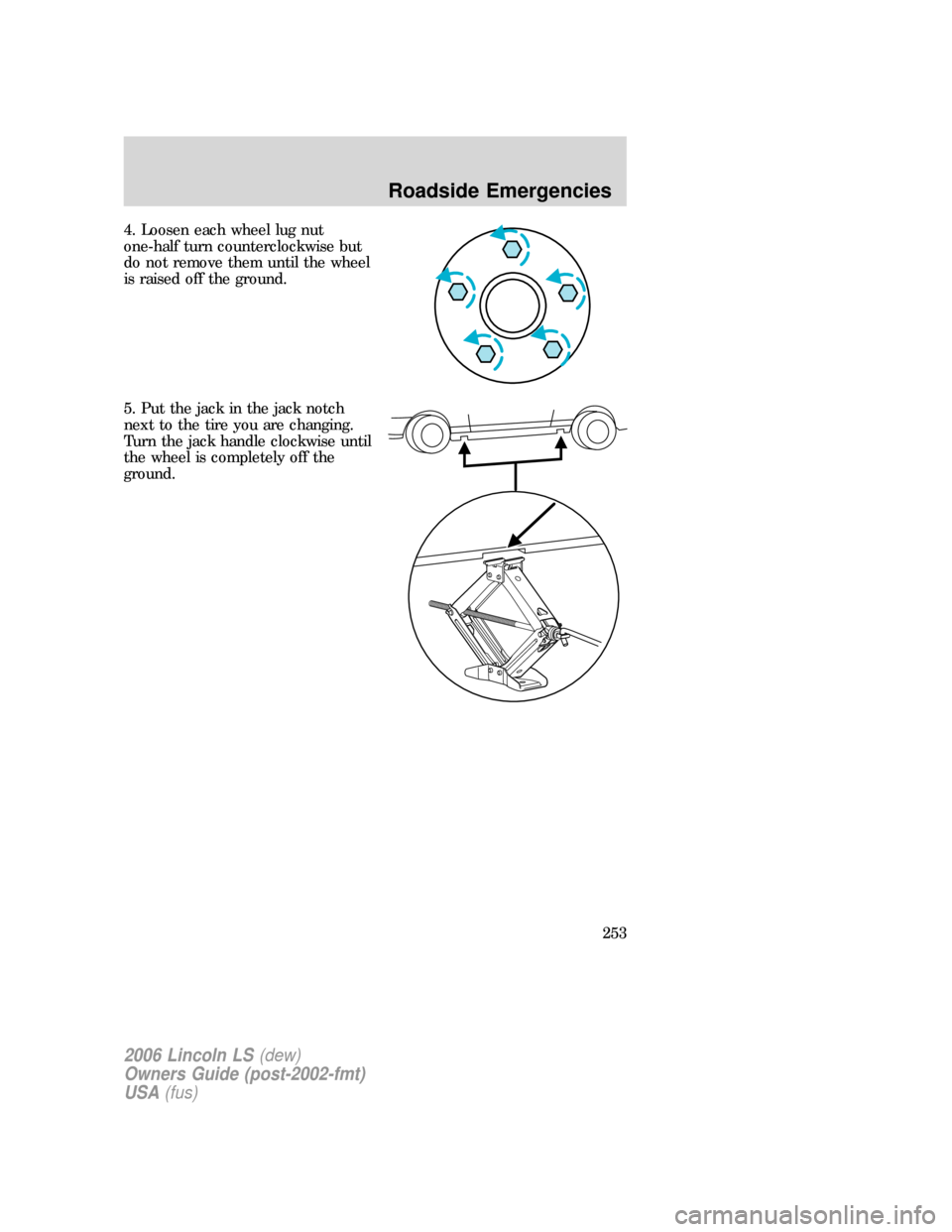
4. Loosen each wheel lug nut
one-half turn counterclockwise but
do not remove them until the wheel
is raised off the ground.
5. Put the jack in the jack notch
next to the tire you are changing.
Turn the jack handle clockwise until
the wheel is completely off the
ground.
2006 Lincoln LS(dew)
Owners Guide (post-2002-fmt)
USA(fus)
Roadside Emergencies
253
Page 254 of 320
Never use the rear differential
as a jacking point.
To lessen the risk of
personal injury, do not put
any part of your body under the
vehicle while changing a tire. Do
not start the engine when your
vehicle is on the jack. The jack is
only meant for changing the tire.
6. Remove the lug nuts with the lug wrench.
7. Replace the flat tire with the spare tire, making sure the valve stem is
facing outward. Reinstall lug nuts until the wheel is snug against the hub.
Do not fully tighten the lug nuts until the wheel has been lowered.
8. Lower the wheel by turning the jack handle counterclockwise.
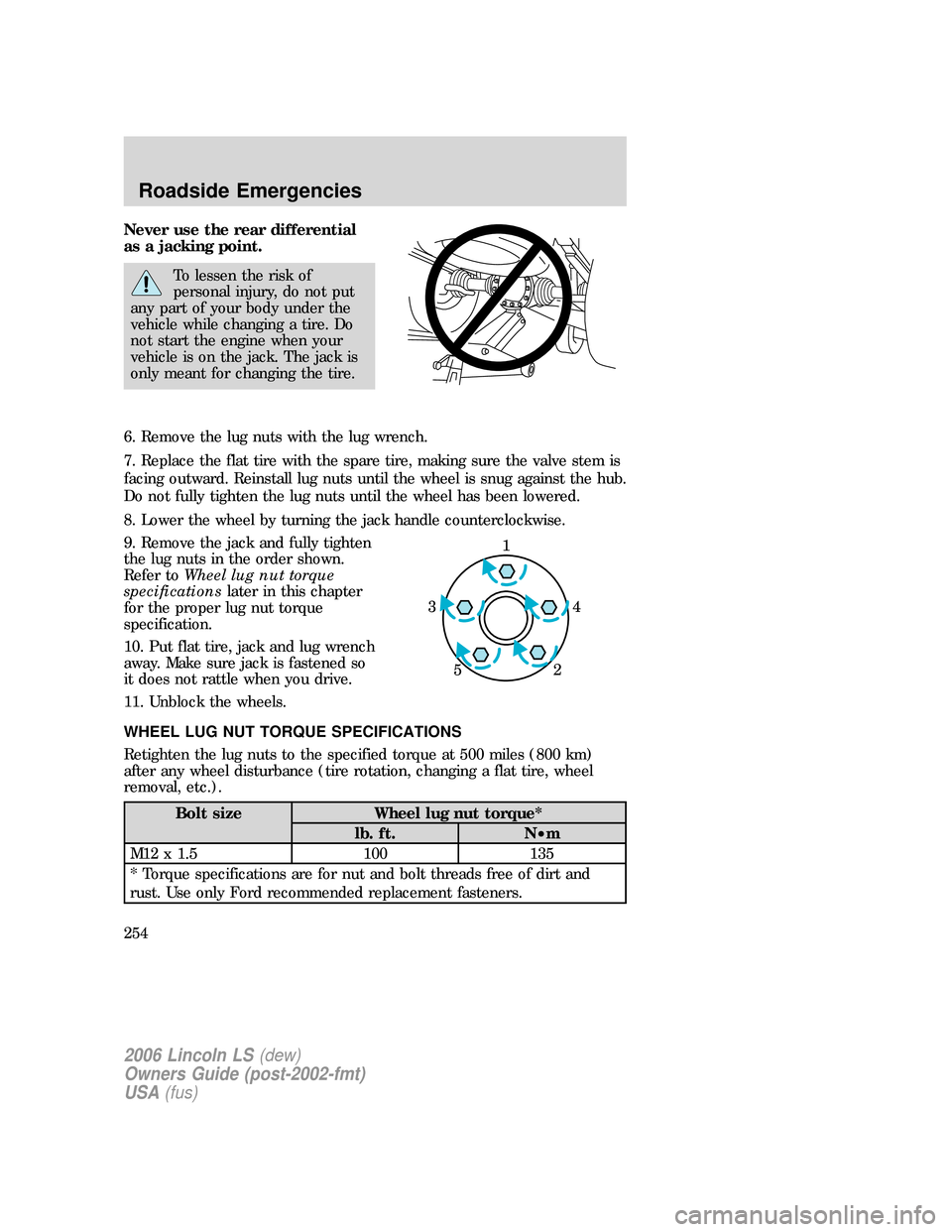
9. Remove the jack and fully tighten
the lug nuts in the order shown.
Refer toWheel lug nut torque
specificationslater in this chapter
for the proper lug nut torque
specification.
10. Put flat tire, jack and lug wrench
away. Make sure jack is fastened so
it does not rattle when you drive.
11. Unblock the wheels.
WHEEL LUG NUT TORQUE SPECIFICATIONS
Retighten the lug nuts to the specified torque at 500 miles (800 km)
after any wheel disturbance (tire rotation, changing a flat tire, wheel
removal, etc.).
Bolt size Wheel lug nut torque*
lb. ft. N•m
M12 x 1.5 100 135
* Torque specifications are for nut and bolt threads free of dirt and
rust. Use only Ford recommended replacement fasteners.
1
4 3
2 5
2006 Lincoln LS(dew)
Owners Guide (post-2002-fmt)
USA(fus)
Roadside Emergencies
254
Page 281 of 320
3. Recheck the engine oil level. Make sure the oil level is not above the
MAX mark on the engine oil level indicator (dipstick).
4. Install the indicator and ensure it is fully seated.
5. Fully install the engine oil filler cap by turning the filler cap clockwise
tightly until clicks are heard, or until it is snug.
To avoid possible oil loss, DO NOT operate the vehicle with the
engine oil level indicator and/or the engine oil filler cap removed.
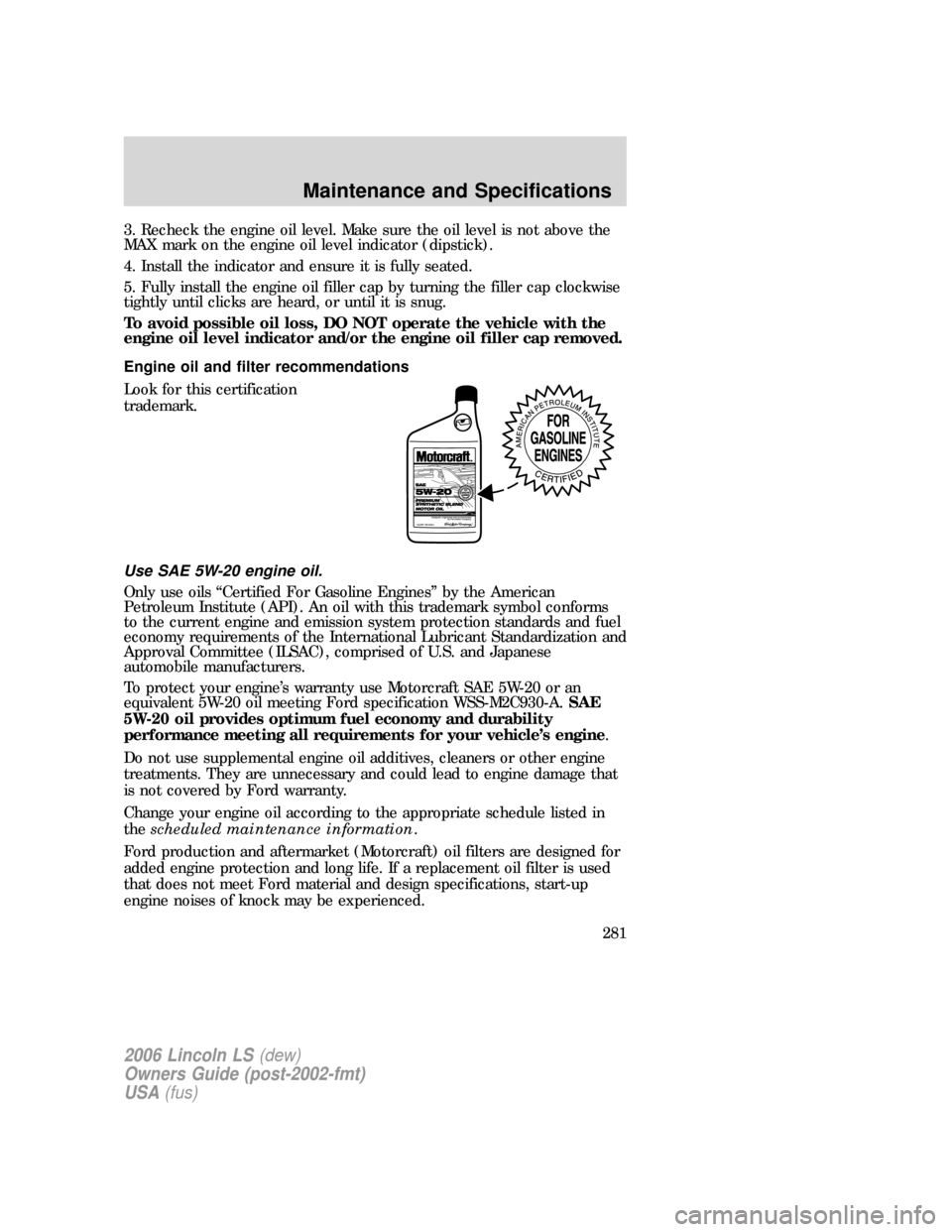
Engine oil and filter recommendations
Look for this certification
trademark.
Use SAE 5W-20 engine oil.
Only use oils “Certified For Gasoline Engines” by the American
Petroleum Institute (API). An oil with this trademark symbol conforms
to the current engine and emission system protection standards and fuel
economy requirements of the International Lubricant Standardization and
Approval Committee (ILSAC), comprised of U.S. and Japanese
automobile manufacturers.
To protect your engine’s warranty use Motorcraft SAE 5W-20 or an
equivalent 5W-20 oil meeting Ford specification WSS-M2C930-A.SAE
5W-20 oil provides optimum fuel economy and durability
performance meeting all requirements for your vehicle’s engine.
Do not use supplemental engine oil additives, cleaners or other engine
treatments. They are unnecessary and could lead to engine damage that
is not covered by Ford warranty.
Change your engine oil according to the appropriate schedule listed in
thescheduled maintenance information.
Ford production and aftermarket (Motorcraft) oil filters are designed for
added engine protection and long life. If a replacement oil filter is used
that does not meet Ford material and design specifications, start-up
engine noises of knock may be experienced.
2006 Lincoln LS(dew)
Owners Guide (post-2002-fmt)
USA(fus)
Maintenance and Specifications
281
Page 284 of 320
If the battery has been disconnected or a new battery has been installed,
the clock and the preset radio stations must be reset once the battery is
reconnected.
•Always dispose of automotive
batteries in a responsible manner.
Follow your local authorized
standards for disposal. Call your
local authorized recycling center
to find out more about recycling
automotive batteries.
ENGINE COOLANT
Checking engine coolant
The concentration and level of engine coolant should be checked at the
intervals listed inscheduled maintenance information.The coolant
concentration should be maintained at 50/50 coolant and distilled water,
which equates to a freeze point of -34°F (-36°C). Coolant concentration
testing is possible with a hydrometer or antifreeze tester (such as the
Rotunda Battery and Antifreeze Tester, 014–R1060). The level of coolant
should be maintained at the “FULL COLD” level or within the “COLD
FILL RANGE” in the coolant reservoir. If the level falls below, add
coolant per the instructions in theAdding engine coolantsection.
Your vehicle was factory-filled with a 50/50 engine coolant and water
concentration. If the concentration of coolant falls below 40% or above
60%, the engine parts could become damaged or not work properly.A
50–50 mixture of coolant and water provides the following:
•Freeze protection down to -34°F (-36°C).
•Boiling protection up to 265°F (129°C).
•Protection against rust and other forms of corrosion.
•Enables calibrated gauges to work properly.
L
E
A
D
RETURN
RECYCLE
2006 Lincoln LS(dew)
Owners Guide (post-2002-fmt)
USA(fus)
Maintenance and Specifications
284
Page 287 of 320

coolant degas system with a pressurized cap, or if it is necessary to
remove the coolant pressure relief cap on the radiator of a vehicle with
an overflow system, follow these steps to add engine coolant.
To reduce the risk of personal injury, make sure the engine is
cool before unscrewing the coolant pressure relief cap. The
cooling system is under pressure; steam and hot liquid can come out
forcefully when the cap is loosened slightly.
1. Before you begin, turn the engine off and let it cool.
2. When the engine is cool, wrap a thick cloth around the coolant
pressure relief cap on the coolant reservoir (a translucent plastic bottle).
Slowly turn cap counterclockwise (left) until pressure begins to release.
3. Step back while the pressure releases.
4. When you are sure that all the pressure has been released, use the
cloth to turn it counterclockwise and remove the cap.
5. Fill the coolant reservoir slowly with the proper coolant mixture (see
above), to within the “COLD FILL RANGE” or the “FULL COLD” level on
the reservoir. If you removed the radiator cap in an overflow system, fill
the radiator until the coolant is visible and radiator is almost full.
6. Replace the cap. Turn until tightly installed. (Cap must be tightly
installed to prevent coolant loss.)
After any coolant has been added, check the coolant concentration (refer
toChecking engine coolant). If the concentration is not 50/50
(protection to –34° F/–36° C), drain some coolant and adjust the
concentration. It may take several drains and additions to obtain a 50/50
coolant concentration.
Whenever coolant has been added, the coolant level in the coolant
reservoir should be checked the next few times you drive the vehicle. If
necessary, add enough 50/50 concentration of engine coolant and
distilled water to bring the liquid level to the proper level.
If you have to add more than 1.0 quart (1.0 liter) of engine coolant per
month, have your authorized dealer check the engine cooling system.
Your cooling system may have a leak. Operating an engine with a low
level of coolant can result in engine overheating and possible engine
damage.
Recycled engine coolant
Ford Motor Company does NOT recommend the use of recycled engine
coolant in vehicles originally equipped with Motorcraft Premium Gold
Engine Coolant since a Ford-approved recycling process is not yet
available.
2006 Lincoln LS(dew)
Owners Guide (post-2002-fmt)
USA(fus)
Maintenance and Specifications
287
Page 292 of 320
Refueling
Fuel vapor burns violently and a fuel fire can cause severe
injuries. To help avoid injuries to you and others:
•Read and follow all the instructions on the pump island;
•Turn off your engine when you are refueling;
•Do not smoke if you are near fuel or refueling your vehicle;
•Keep sparks, flames and smoking materials away from fuel;
•Stay outside your vehicle and do not leave the fuel pump unattended
when refueling your vehicle — this is against the law in some places;
•Keep children away from the fuel pump; never let children pump fuel
Use the following guidelines to avoid static build-up when filling an
ungrounded fuel container:
•Place approved fuel container on the ground.
•DO NOT fill a fuel container while it is in the vehicle (including the
cargo area).
•Keep the fuel pump nozzle in contact with the fuel container while
filling.
•DO NOT use a device that would hold the fuel pump handle in the fill
position.
Fuel Filler Cap
Your fuel tank filler cap has an indexed design with a 1/4 turn on/off
feature.
When fueling your vehicle:
1. Turn the engine off.
2. Carefully turn the filler cap counterclockwise 1/4 of a turn to unscrew
the cap.
3. Pull to remove the cap from the fuel filler pipe.
4. To install the cap, align the tabs on the cap with the notches on the
filler pipe.
5. Turn the filler cap clockwise until at least one click is heard.
If the “Check Fuel Cap” indicator comes on and stays on after you start
the engine, the fuel filler cap may not be properly installed. Turn off the
engine, remove the fuel filler cap, align the cap properly and reinstall it.
2006 Lincoln LS(dew)
Owners Guide (post-2002-fmt)
USA(fus)
Maintenance and Specifications
292
Page 315 of 320
waxing .....................................269
wheels ......................................270
wiper blades ............................271
Climate control (see Air
conditioning or Heating) ......88, 90
Clock adjust
6-CD in dash .............................18
AM/FM/Tape/CD .......................22
Compass, electronic ..................111
calibration ...............................112
set zone adjustment ...............112
Console ......................................106
overhead ..................................107
Controls
power seat ...............................156
steering column ......................117
Coolant
checking and adding ..............284
refill capacities ................288, 304
specifications ..................306–307
Cruise control
(see Speed control) ..................114
Customer Assistance ................237
Ford Extended Service
Plan ..........................................266
Getting assistance outside the
U.S. and Canada .....................267
Getting roadside assistance ...237
Getting the service you
need .........................................262
Ordering additional owner’s
literature .................................267
Utilizing the
Mediation/Arbitration
Program ...................................265
D
Daytime running lamps
(see Lamps) ................................97Defrost
rear window ..............................95
Dipstick
automatic transmission
fluid ..........................................301
engine oil .................................279
Doors
central unlocking ....................140
lubricant specifications ..........306
Driving under special
conditions ..................................234
through water .........................236
E
Emergencies, roadside
jump-starting ..........................255
Emergency Flashers .................239
Emission control system ..........297
Engine ................................307–308
cleaning ...................................270
coolant .....................................284
fail-safe cooling .......................289
idle speed control ...................282
lubrication
specifications ..................306–307
refill capacities ........................304
service points ..........................277
Engine block heater .................222
Engine oil ..................................279
checking and adding ..............279
dipstick ....................................279
filter, specifications ........281, 303
recommendations ...................281
refill capacities ........................304
specifications ..................306–307
Exhaust fumes ..........................221
F
Fail safe cooling ........................289
2006 Lincoln LS(dew)
Owners Guide (post-2002-fmt)
USA(fus)
Index
315
Page 318 of 320
fluid, checking and adding ....300
fluid, refill capacity ................304
fluid, specifications .........306–307
Power Windows .........................108
R
Radio ......................................16, 20
Rear Park Assist .......................234
Rear window defroster ...............95
Relays ........................................240
Remote entry system ...............144
opening the trunk ...................145
Roadside assistance ..................237
S
Safety Belt Maintenance ..........174
Safety belts (see Safety
restraints) ..........163, 165, 167–170
Safety defects, reporting ..........268
Safety
restraints ...........163, 165, 167–170
belt minder .............................171
extension assembly ................174
for adults .........................167–169
for children .....................185–186
safety belt maintenance .........174
warning light and chime ........170
Safety seats for children ..........190
Safety Compliance
Certification Label ....................309
Seat belts
(see Safety restraints) .............163
Seats ..........................................155
child safety seats ....................190
climate control ........................159
memory seat ...................148, 158Select Shift Transmission
(SST) shifter .............................232
Servicing your vehicle ..............275
Setting the clock
AM/FM/In-dash 6 CD ................18
AM/FM/Tape/CD .......................22
Spark plugs,
specifications .............303, 307–308
Specification chart,
lubricants ...........................306–307
Speed control ............................114
Starting your vehicle ........219–221
jump starting ..........................255
Steering
speed sensitive .......................228
Steering column lock ................105
Steering wheel
controls ....................................117
tilting .......................................104
T
Tilt steering wheel ....................104
Tires ...........................198–199, 249
alignment ................................205
care ..........................................202
changing ..........................249, 252
checking the pressure ............202
inspecting and inflating .........200
label .........................................211
replacing ..................................204
rotating ....................................205
safety practices .......................204
sidewall information ...............206
snow tires and chains ............212
spare tire .................................250
terminology .............................199
tire grades ...............................199
treadwear ........................198, 203
2006 Lincoln LS(dew)
Owners Guide (post-2002-fmt)
USA(fus)
Index
318