driver LINCOLN MARK LT 2007 Owners Manual
[x] Cancel search | Manufacturer: LINCOLN, Model Year: 2007, Model line: MARK LT, Model: LINCOLN MARK LT 2007Pages: 304, PDF Size: 2.88 MB
Page 1 of 304
Introduction 4
Instrument Cluster 12
Warning lights and chimes 12
Gauges 16
Entertainment Systems 19
How to get going 19
AM/FM stereo with in-dash six CD 23
Auxiliary input jack 30
Satellite radio information 34
Family entertainment system 37
Climate Controls 63
Automatic temperature control 63
Rear window defroster 66
Lights 67
Headlamps 67
Turn signal control 70
Bulb replacement 72
Driver Controls 77
Windshield wiper/washer control 77
Steering wheel adjustment 77
Power windows 83
Mirrors 85
Speed control 88
Message center 96
Tailgate 105
Locks and Security 108
Keys 108
Locks 108
Anti-theft system 119
Table of Contents
1
2007 Mark LT(mlt)
Owners Guide (post-2002-fmt)
USA(fus)
Page 8 of 304
Event Data Recording
Other modules in your vehicle — event data recorders — are capable of
collecting and storing data during a crash or near crash event. The
recorded information may assist in the investigation of such an event.
The modules may record information about both the vehicle and the
occupants, potentially including information such as:
•how various systems in your vehicle were operating;
•whether or not the driver and passenger seatbelts were buckled;
•how far (if at all) the driver was depressing the accelerator and/or the
brake pedal;
•how fast the vehicle was traveling; and
•where the driver was positioning the steering wheel.
To access this information, special equipment must be directly connected
to the recording modules. Ford Motor Company and Ford of Canada do
not access event data recorder information without obtaining consent,
unless pursuant to court order or where required by law enforcement,
other government authorities or other third parties acting with lawful
authority. Other parties may seek to access the information
independently of Ford Motor Company and Ford of Canada.
Notice to owners of pickup trucks and utility type vehicles
Utility vehicles have a significantly higher rollover rate than
other types of vehicles.
Before you drive your vehicle, please read thisOwner’s Guidecarefully.
Your vehicle is not a passenger car. As with other vehicles of this type,
failure to operate this vehicle correctly may result in loss of vehicle
control, vehicle rollover, personal injury or death.
2007 Mark LT(mlt)
Owners Guide (post-2002-fmt)
USA(fus)
Introduction
8
Page 9 of 304
Using your vehicle with a snowplow
Do not use this vehicle for snowplowing.
Your vehicle is not equipped with a snowplowing package.
Using your vehicle as an ambulance
Do not use this vehicle as an ambulance.
Your vehicle is not equipped with the Ford Ambulance Preparation
Package.
Cell phone use
The use of Mobile Communications Equipment has become increasingly
important in the conduct of business and personal affairs. However,
drivers must not compromise their own or others’ safety when using
such equipment. Mobile Communications can enhance personal safety
and security when appropriately used, particularly in emergency
situations. Safety must be paramount when using mobile communications
equipment to avoid negating these benefits.
Mobile Communication Equipment includes, but is not limited to cellular
phones, pagers, portable email devices, in-vehicle communications
systems, telematics devices and portable two-way radios.
Driving while distracted can result in loss of vehicle control,
accident and injury. Ford strongly recommends that drivers use
extreme caution when using any device that may take their focus off
the road. The drivers primary responsibility is the safe operation of
their vehicle. Only use cell phones and other devices not essential to
the driving task when it is safe to do so.
2007 Mark LT(mlt)
Owners Guide (post-2002-fmt)
USA(fus)
Introduction
9
Page 15 of 304
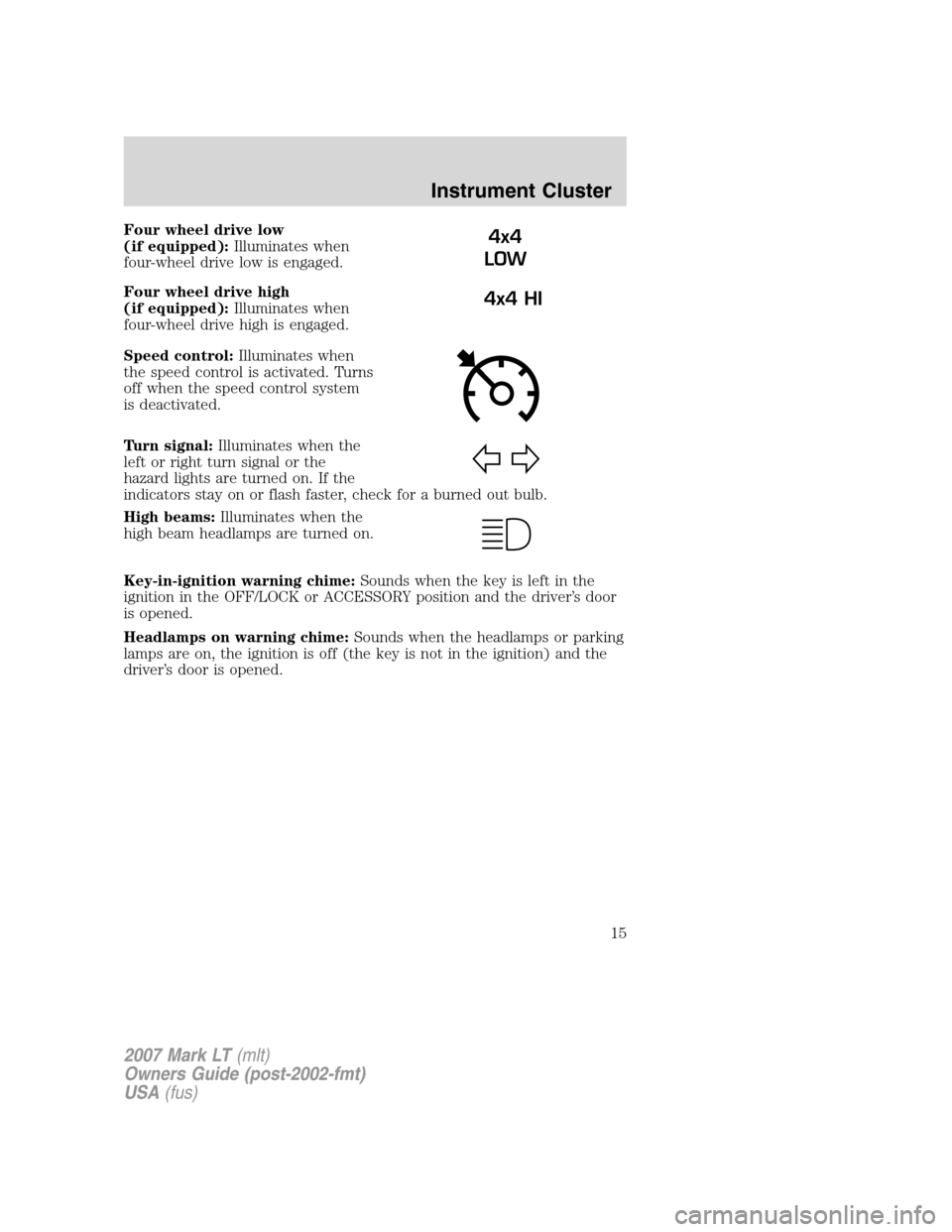
Four wheel drive low
(if equipped):Illuminates when
four-wheel drive low is engaged.
Four wheel drive high
(if equipped):Illuminates when
four-wheel drive high is engaged.
Speed control:Illuminates when
the speed control is activated. Turns
off when the speed control system
is deactivated.
Turn signal:Illuminates when the
left or right turn signal or the
hazard lights are turned on. If the
indicators stay on or flash faster, check for a burned out bulb.
High beams:Illuminates when the
high beam headlamps are turned on.
Key-in-ignition warning chime:Sounds when the key is left in the
ignition in the OFF/LOCK or ACCESSORY position and the driver’s door
is opened.
Headlamps on warning chime:Sounds when the headlamps or parking
lamps are on, the ignition is off (the key is not in the ignition) and the
driver’s door is opened.4x4
LOW
4x4 HI
2007 Mark LT(mlt)
Owners Guide (post-2002-fmt)
USA(fus)
Instrument Cluster
15
Page 17 of 304
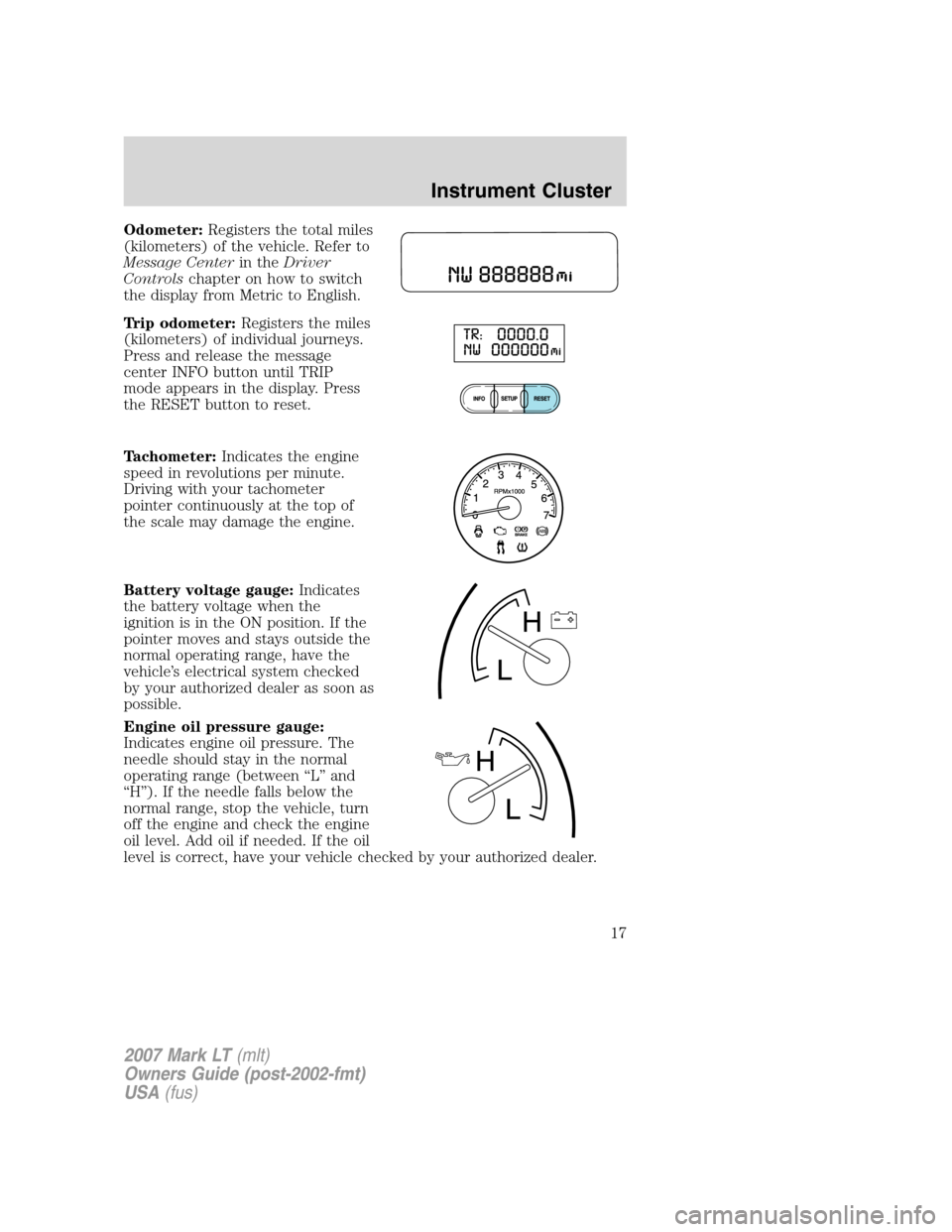
Odometer:Registers the total miles
(kilometers) of the vehicle. Refer to
Message Centerin theDriver
Controlschapter on how to switch
the display from Metric to English.
Trip odometer:Registers the miles
(kilometers) of individual journeys.
Press and release the message
center INFO button until TRIP
mode appears in the display. Press
the RESET button to reset.
Tachometer:Indicates the engine
speed in revolutions per minute.
Driving with your tachometer
pointer continuously at the top of
the scale may damage the engine.
Battery voltage gauge:Indicates
the battery voltage when the
ignition is in the ON position. If the
pointer moves and stays outside the
normal operating range, have the
vehicle’s electrical system checked
by your authorized dealer as soon as
possible.
Engine oil pressure gauge:
Indicates engine oil pressure. The
needle should stay in the normal
operating range (between “L” and
“H”). If the needle falls below the
normal range, stop the vehicle, turn
off the engine and check the engine
oil level. Add oil if needed. If the oil
level is correct, have your vehicle checked by your authorized dealer.
2007 Mark LT(mlt)
Owners Guide (post-2002-fmt)
USA(fus)
Instrument Cluster
17
Page 25 of 304
To view the station name or type:When the desired category appears
in the display, press TEXT/SCAN to toggle between displaying the station
type (COUNTRY, ROCK, etc.) or the station name (WYCD, WXYZ, etc.).
BASS:Press MENU to reach the bass setting. Use
//
SEEK, SEEKto adjust.
TREB (Treble):Press MENU to reach the treble setting.
Use
//SEEK, SEEKto adjust.
BAL (Balance):Press MENU to reach the balance setting.
Use
//SEEK, SEEKto adjust the audio between the left
(L) and right (R) speakers.
FADE:Press MENU to reach the fade setting. Use
//
SEEK, SEEKto adjust the audio between the back (B) and
front (F) speakers.
ALL SEATS (Occupancy mode):Press MENU repeatedly to access.
Press
//SEEKto optimize sound for ALL SEATS,
DRIVERS SEAT or REAR SEATS.
SPEEDVOL (Speed sensitive volume, if equipped):Press MENU to
reach the SPEEDVOL setting. Radio volume automatically gets louder
with increasing vehicle speed to compensate for road and wind noise.
Use
//SEEK, SEEKto adjust.
The default setting isoff;increasing your vehicle speed will not change
the volume level.
Adjust1–7:Increasing this setting from 1 (lowest setting) to 7 (highest
setting) allows the radio volume to automatically change slightly with
vehicle speed to compensate for road and wind noise.
Recommended level is1–3;SPEED OFF turns the feature off and level 7
is the maximum setting.
Track/Folder Mode:Available only on MP3 discs in CD mode. In Track
Mode, pressing
SEEK, SEEKwill scroll through all tracks on the
disc. In Folder mode, pressing
SEEK, SEEKwill scroll only
through tracks within the selected folder.
2007 Mark LT(mlt)
Owners Guide (post-2002-fmt)
USA(fus)
Entertainment Systems
25
Page 60 of 304
The front glass on the liquid crystal display (LCD) flip-down
screen may break when hit with a hard surface. If the glass
breaks, do not touch the liquid crystalline material. In case of contact
with skin, wash immediately with soap and water.
The driver should not attempt to operate any function of the
DVD system while the vehicle is in motion. Give full attention to
driving and to the road. Pull off the road in a safe place before
inserting or extracting DVDs from the system. A remote control is
included in the system to allow the rear seat occupants to operate the
FES functions without distracting the driver.
Do not expose the liquid crystal display (LCD) flip-down screen
to direct sunlight or intensive ultraviolet rays for extensive
periods of time. Ultraviolet rays deteriorate the liquid crystal.
Be sure to review User Manuals for video games and video game
equipment when used as auxiliary inputs for your Family Entertainment
System (FES).
Do not operate video games or video equipment if the power cords
and/or cables are broken, split or damaged. Carefully place cords and/or
cables where they will not be stepped on or interfere with the operation
of seats and/or compartments.
Disconnect video games and video equipment power cords and/or cables
when not in use.
Avoid touching auxiliary input jacks with your fingers. Do not blow on
them or allow them to get wet or dirty.
Do not clean any part of the DVD player with benzene, paint thinner or
any other solvent.
Federal Communication Commission (FCC) Compliance
Changes or modifications not approved by Ford Lincoln-Mercury could
void user’s authority to operate the equipment. This equipment has been
tested and found to comply with the limits for a Class B digital device,
pursuant to Part 15 of the FCC Rules. These limits are designed to
provide reasonable protection against harmful interference in a
residential installation. This equipment generates, uses and can radiate
radio frequency energy and, if not installed and used in accordance with
the instructions, may cause harmful interference and radio
communications.
2007 Mark LT(mlt)
Owners Guide (post-2002-fmt)
USA(fus)
Entertainment Systems
60
Page 63 of 304
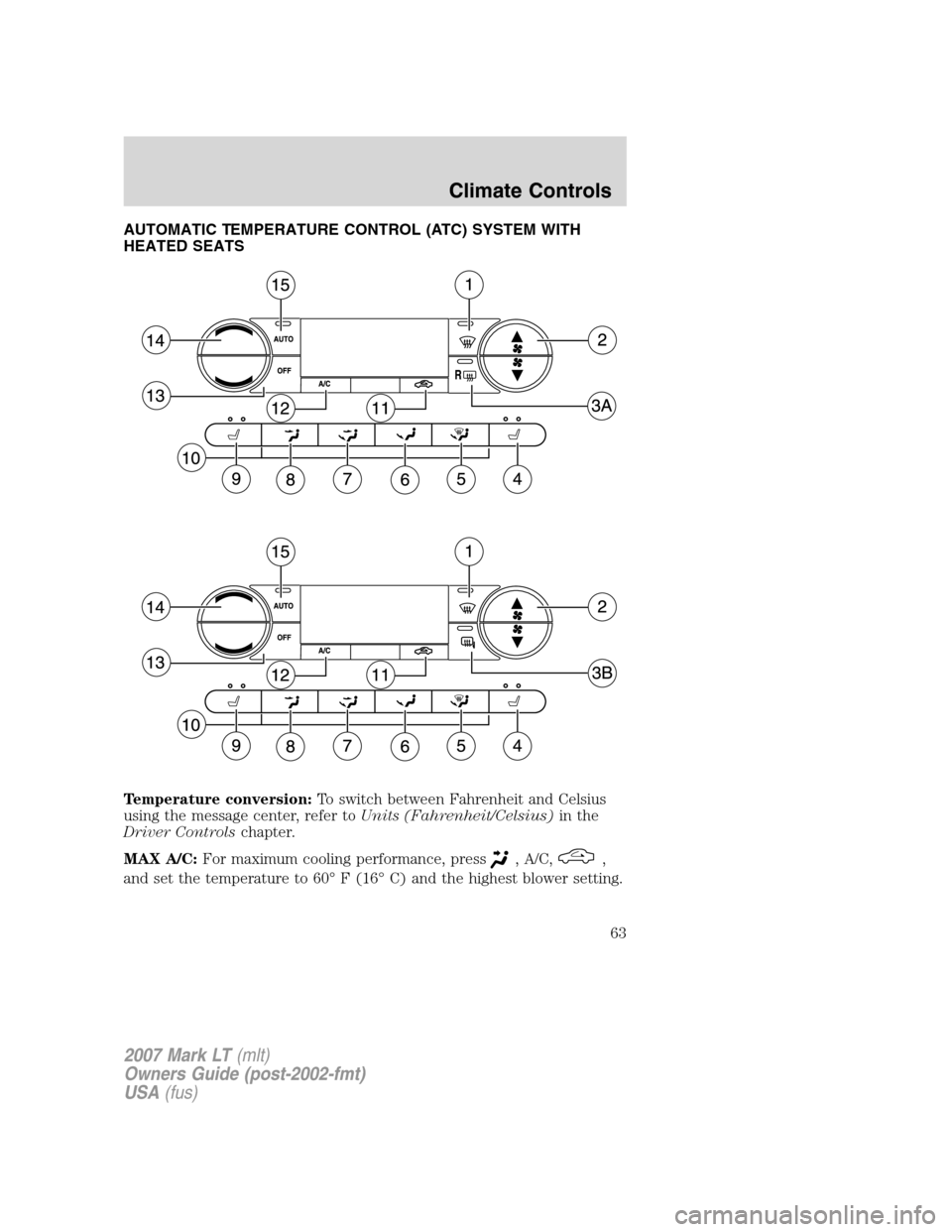
AUTOMATIC TEMPERATURE CONTROL (ATC) SYSTEM WITH
HEATED SEATS
Temperature conversion:To switch between Fahrenheit and Celsius
using the message center, refer toUnits (Fahrenheit/Celsius)in the
Driver Controlschapter.
MAX A/C:For maximum cooling performance, press
, A/C,,
and set the temperature to 60° F (16° C) and the highest blower setting.
2007 Mark LT(mlt)
Owners Guide (post-2002-fmt)
USA(fus)
Climate Controls
63
Page 64 of 304
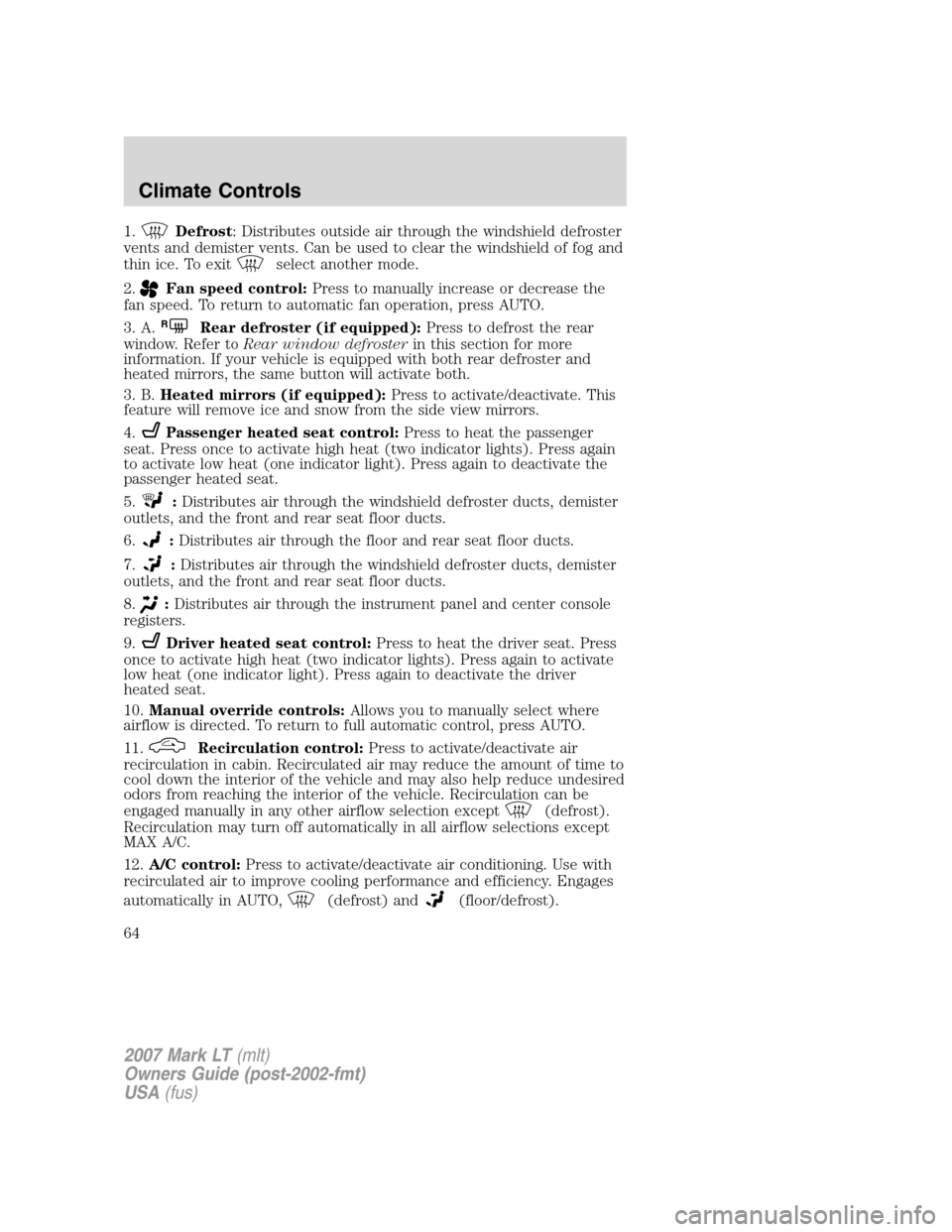
1.Defrost: Distributes outside air through the windshield defroster
vents and demister vents. Can be used to clear the windshield of fog and
thin ice. To exit
select another mode.
2.
Fan speed control:Press to manually increase or decrease the
fan speed. To return to automatic fan operation, press AUTO.
3. A.
RRear defroster (if equipped):Press to defrost the rear
window. Refer toRear window defrosterin this section for more
information. If your vehicle is equipped with both rear defroster and
heated mirrors, the same button will activate both.
3. B.Heated mirrors (if equipped):Press to activate/deactivate. This
feature will remove ice and snow from the side view mirrors.
4.
Passenger heated seat control:Press to heat the passenger
seat. Press once to activate high heat (two indicator lights). Press again
to activate low heat (one indicator light). Press again to deactivate the
passenger heated seat.
5.
:Distributes air through the windshield defroster ducts, demister
outlets, and the front and rear seat floor ducts.
6.
:Distributes air through the floor and rear seat floor ducts.
7.
:Distributes air through the windshield defroster ducts, demister
outlets, and the front and rear seat floor ducts.
8.
:Distributes air through the instrument panel and center console
registers.
9.
Driver heated seat control:Press to heat the driver seat. Press
once to activate high heat (two indicator lights). Press again to activate
low heat (one indicator light). Press again to deactivate the driver
heated seat.
10.Manual override controls:Allows you to manually select where
airflow is directed. To return to full automatic control, press AUTO.
11.
Recirculation control:Press to activate/deactivate air
recirculation in cabin. Recirculated air may reduce the amount of time to
cool down the interior of the vehicle and may also help reduce undesired
odors from reaching the interior of the vehicle. Recirculation can be
engaged manually in any other airflow selection except
(defrost).
Recirculation may turn off automatically in all airflow selections except
MAX A/C.
12.A/C control:Press to activate/deactivate air conditioning. Use with
recirculated air to improve cooling performance and efficiency. Engages
automatically in AUTO,
(defrost) and(floor/defrost).
2007 Mark LT(mlt)
Owners Guide (post-2002-fmt)
USA(fus)
Climate Controls
64
Page 67 of 304
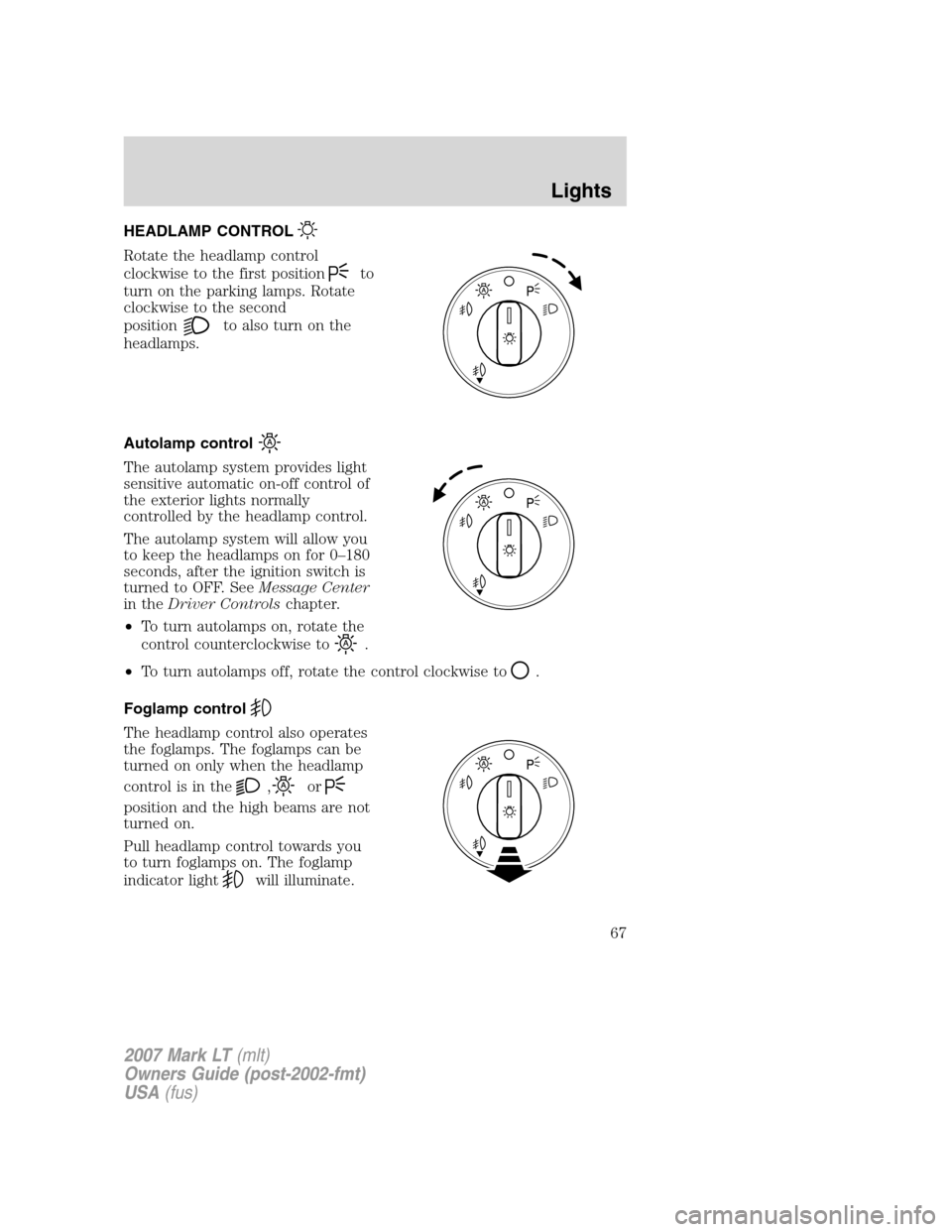
HEADLAMP CONTROL
Rotate the headlamp control
clockwise to the first position
to
turn on the parking lamps. Rotate
clockwise to the second
position
to also turn on the
headlamps.
Autolamp control
The autolamp system provides light
sensitive automatic on-off control of
the exterior lights normally
controlled by the headlamp control.
The autolamp system will allow you
to keep the headlamps on for 0–180
seconds, after the ignition switch is
turned to OFF. SeeMessage Center
in theDriver Controlschapter.
•To turn autolamps on, rotate the
control counterclockwise to
.
•To turn autolamps off, rotate the control clockwise to
.
Foglamp control
The headlamp control also operates
the foglamps. The foglamps can be
turned on only when the headlamp
control is in the
,or
position and the high beams are not
turned on.
Pull headlamp control towards you
to turn foglamps on. The foglamp
indicator light
will illuminate.
2007 Mark LT(mlt)
Owners Guide (post-2002-fmt)
USA(fus)
Lights
67