ignition LINCOLN MARK LT 2008 User Guide
[x] Cancel search | Manufacturer: LINCOLN, Model Year: 2008, Model line: MARK LT, Model: LINCOLN MARK LT 2008Pages: 328, PDF Size: 3.17 MB
Page 40 of 328
Press the power button to turn the
system off. The indicator light will
turn off indicating the system is off.
Note:The audio from the DVD system will play over all vehicle speakers
and can be adjusted by the radio volume control.
To play a CD in the DVD system:
The DVD system can play audio CDs, CD-R and CD-R/W, CD-ROM and
video CDs. To ensure proper disc operation, check the disc for finger
prints and scratches. Clean the disc with a soft cloth, wiping from the
center to the edge.
1. Ensure that the vehicle ignition is in the RUN or ACCESSORY
position.
2. Insert a CD into the system,
label-side up to turn on the DVD
system. It will load and
automatically begin to play. If there
is already a CD in the system, press
PLAY on the DVD player.
3. The disc will begin to play and
the ’CD Audio Disc’ screen will
display. From this screen, you can
also select from COMPRESSION,
SHUFFLE and SCAN features.
To play an MP3 disc in the DVD system:
1. Ensure that the vehicle ignition is in the RUN or ACCESSORY
position.
2. Insert an MP3 disc into the
system, label-side up to turn on the
DVD system. It will load and
automatically begin to play. If there
is already a disc in the system, press
PLAY on the DVD player.
2008 Mark LT(mlt)
Owners Guide (post-2002-fmt)
USA(fus)
Entertainment Systems
40
Page 41 of 328
3. The disc will begin to play and
the ’MP3 Audio Disc’ screen will
display and allow you to access the
COMPRESSION, SHUFFLE, SCAN
and FOLDER MODE features.
To play an auxiliary source through the DVD system
The DVD system can be used to connect and play auxiliary electronic
devices such as game systems, personal camcorders, video cassette
recorders, etc.
1. Ensure that the vehicle ignition is in the RUN or ACCESSORY
position.
2. Press the power button to turn
the DVD system on. The indicator
light next to the power button will
illuminate.
3. Connect an auxiliary audio/video
source by connecting RCA cords
(not included) to the RCA jacks on
the left hand side of the system.
•Yellow (1) — video input
•White (2) — left channel audio
input
•Red (3) — right channel audio
input
4. Press MEDIA on the DVD system to change the media source to AUX.
5. Press VIDEO on the DVD system to change the video source to
DVD-AUX. If your source is properly plugged in, it will appear on the
LCD (Liquid Crystal Display) screen. If your auxiliary source does not
have a video signal, or if the DVD system does not detect a video signal
from the auxiliary source, the screen will remain black. If the video
source is set to DVD-AUX, the display will automatically turn on if a
video signal is detected.
2008 Mark LT(mlt)
Owners Guide (post-2002-fmt)
USA(fus)
Entertainment Systems
41
Page 57 of 328
Once you have made your selection,
press ENTER to confirm. The
system default is English.
Subtitles
Select SUBTITLES to turn the
subtitle option on or off. The system
default is OFF.
Once you have made your selection,
press ENTER to confirm. This is
disc dependent.
Audio CDs
To play audio CDs on your DVD system:
1. Ensure that the vehicle ignition is in the RUN or ACCESSORY
position.
2. Ensure that the DVD system is ON.
3. Insert an audio CD into the DVD system, label side up.
2008 Mark LT(mlt)
Owners Guide (post-2002-fmt)
USA(fus)
Entertainment Systems
57
Page 58 of 328
4. The track and elapsed time will
appear in the status bar. Use the
DVD cursor controls on the bezel to
highlight which track you would like
to play. You can also use the cursor
controls to highlight
COMPRESSION, SHUFFLE or
SCAN. Once you have highlighted
the desired track or function, press ENTER on the DVD bezel to confirm
your selection.
COMP (Compression):Compression brings soft and loud CD passages
together for a more consistent listening level when in CD mode. Press to
turn the feature on/off.
SHUFFLE:Press to hear all tracks on the current CD in random order.
Press again to stop.
SCAN:Press for a brief sampling of all tracks on the current CD. Press
again to stop.
Playing MP3 discs
To play an MP3 disc on your DVD system:
1. Ensure that the vehicle ignition is in the RUN or ACCESSORY
position.
2. Ensure that the DVD system is on.
3. Insert the MP3 disc into the DVD system, label side up.
4. The folder, track and elapsed
time will appear in the status bar.
The screen will list the Artist, Title,
Album and File Name.
COMP (Compression):
Compression brings soft and loud
CD/MP3 passages together for a
more consistent listening level when
in CD mode. Press to turn the feature on/off.
SHUFFLE:Press to hear all tracks on the current MP3 folder in random
order. Press again to stop.
SCAN:Press for a brief sampling of all tracks on the current MP3 folder.
Press again to stop.
FOLDER LIST:Press access folder mode and to go to the previous/next
folder in the MP3 disc.
2008 Mark LT(mlt)
Owners Guide (post-2002-fmt)
USA(fus)
Entertainment Systems
58
Page 60 of 328
•Do not disassemble the player. The laser used in disc playback is
extremely harmful to the eyes.
The FES DVD system is designed to play commercially pressed 12
cm (4.75 in) audio compact discs and digital versatile discs (DVD)
only. Due to technical incompatibility, certain recordable and
re-recordable compact discs may not function correctly when
used in Ford CD and DVD players. Irregular shaped CDs or DVDs,
CDs or DVDs with a scratch protection film attached, and CDs
with homemade paper (adhesive) labels should not be inserted
into the FES DVD system. The label may peel and cause the CD
or DVD to become jammed. It is recommended that homemade
CDs or DVDs be identified with permanent felt tip marker rather
than adhesive labels. Ball point pens may damage CDs or DVDs.
Please contact your authorized dealer for further information.
Playing a DVD
1. Ensure that the vehicle ignition is in the RUN or ACCESSORY
position.
2. Ensure that the navigation system is on.
3. Insert a DVD label-side up into the system.
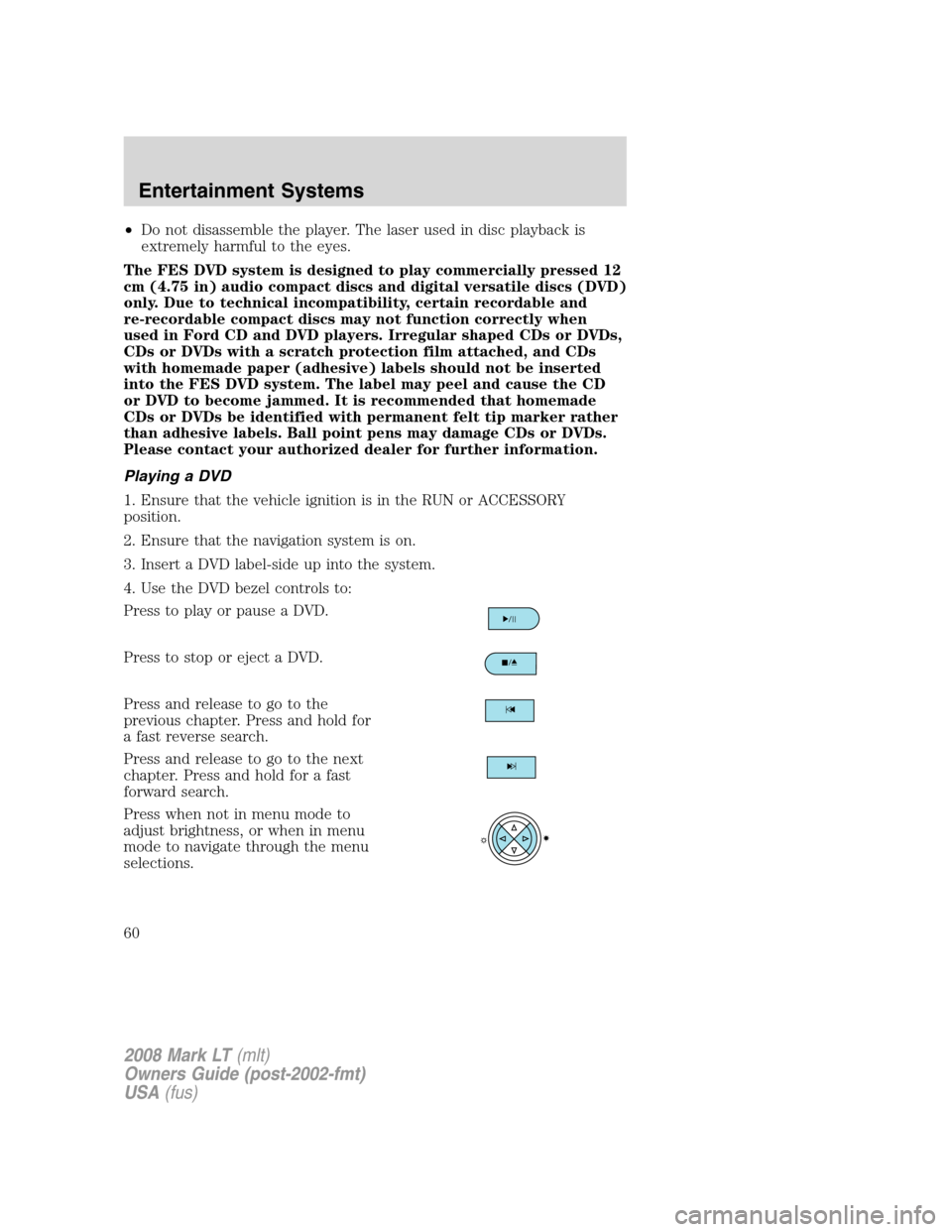
4. Use the DVD bezel controls to:
Press to play or pause a DVD.
Press to stop or eject a DVD.
Press and release to go to the
previous chapter. Press and hold for
a fast reverse search.
Press and release to go to the next
chapter. Press and hold for a fast
forward search.
Press when not in menu mode to
adjust brightness, or when in menu
mode to navigate through the menu
selections.
2008 Mark LT(mlt)
Owners Guide (post-2002-fmt)
USA(fus)
Entertainment Systems
60
Page 63 of 328
•: Press to play a DVD or to pause the DVD.
When the radio displays “DVD MENU”, press PLAY on the radio
(memory preset #6), to play the disc.
Parental control for the DVD system
Your Family Entertainment System (FES) allows you to have control
over the rear seat controls in a few different ways. The DVD system is
automatically activated when the vehicle ignition is ON, which allows the
rear seat passengers to use the DVD system.
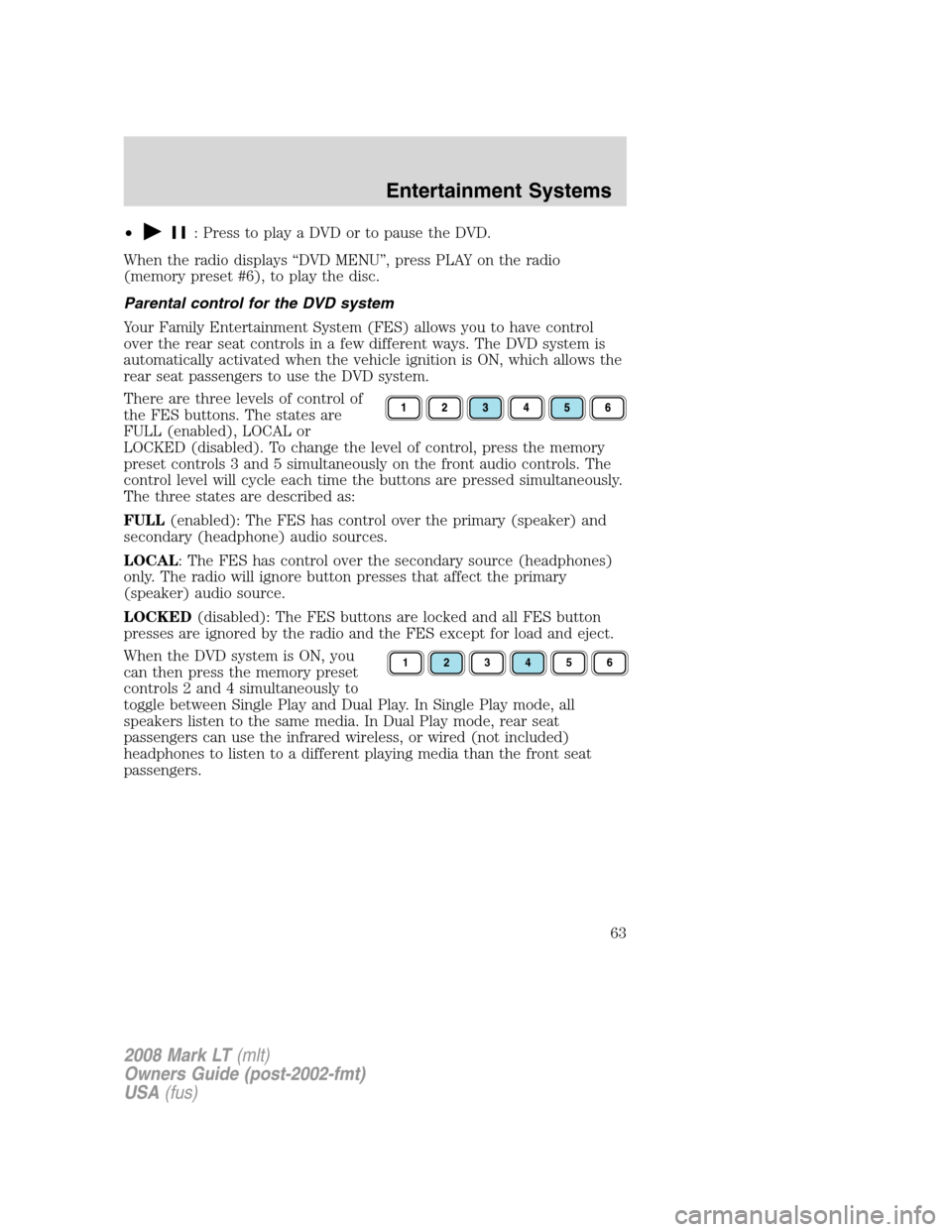
There are three levels of control of
the FES buttons. The states are
FULL (enabled), LOCAL or
LOCKED (disabled). To change the level of control, press the memory
preset controls 3 and 5 simultaneously on the front audio controls. The
control level will cycle each time the buttons are pressed simultaneously.
The three states are described as:
FULL(enabled): The FES has control over the primary (speaker) and
secondary (headphone) audio sources.
LOCAL: The FES has control over the secondary source (headphones)
only. The radio will ignore button presses that affect the primary
(speaker) audio source.
LOCKED(disabled): The FES buttons are locked and all FES button
presses are ignored by the radio and the FES except for load and eject.
When the DVD system is ON, you
can then press the memory preset
controls 2 and 4 simultaneously to
toggle between Single Play and Dual Play. In Single Play mode, all
speakers listen to the same media. In Dual Play mode, rear seat
passengers can use the infrared wireless, or wired (not included)
headphones to listen to a different playing media than the front seat
passengers.
123456
2008 Mark LT(mlt)
Owners Guide (post-2002-fmt)
USA(fus)
Entertainment Systems
63
Page 71 of 328
REAR WINDOW DEFROSTER (IF EQUIPPED)R
The rear defroster control is located on the climate control panel and
works to defrost your rear windshield from fog and thin ice. If equipped,
it also operates the heated mirror to remove snow and thin ice from the
side mirrors.
Ensure that the ignition is in the ON position. Press to turn the defroster
on/off. The indicator light will illuminate when activated.
Do not use razor blades or other sharp objects to clean the inside
of the rear window or to remove decals from the inside of the
rear window. This may cause damage to the heated grid lines and
will not be covered by your warranty.
2008 Mark LT(mlt)
Owners Guide (post-2002-fmt)
USA(fus)
Climate Controls
71
Page 72 of 328
HEADLAMP CONTROL
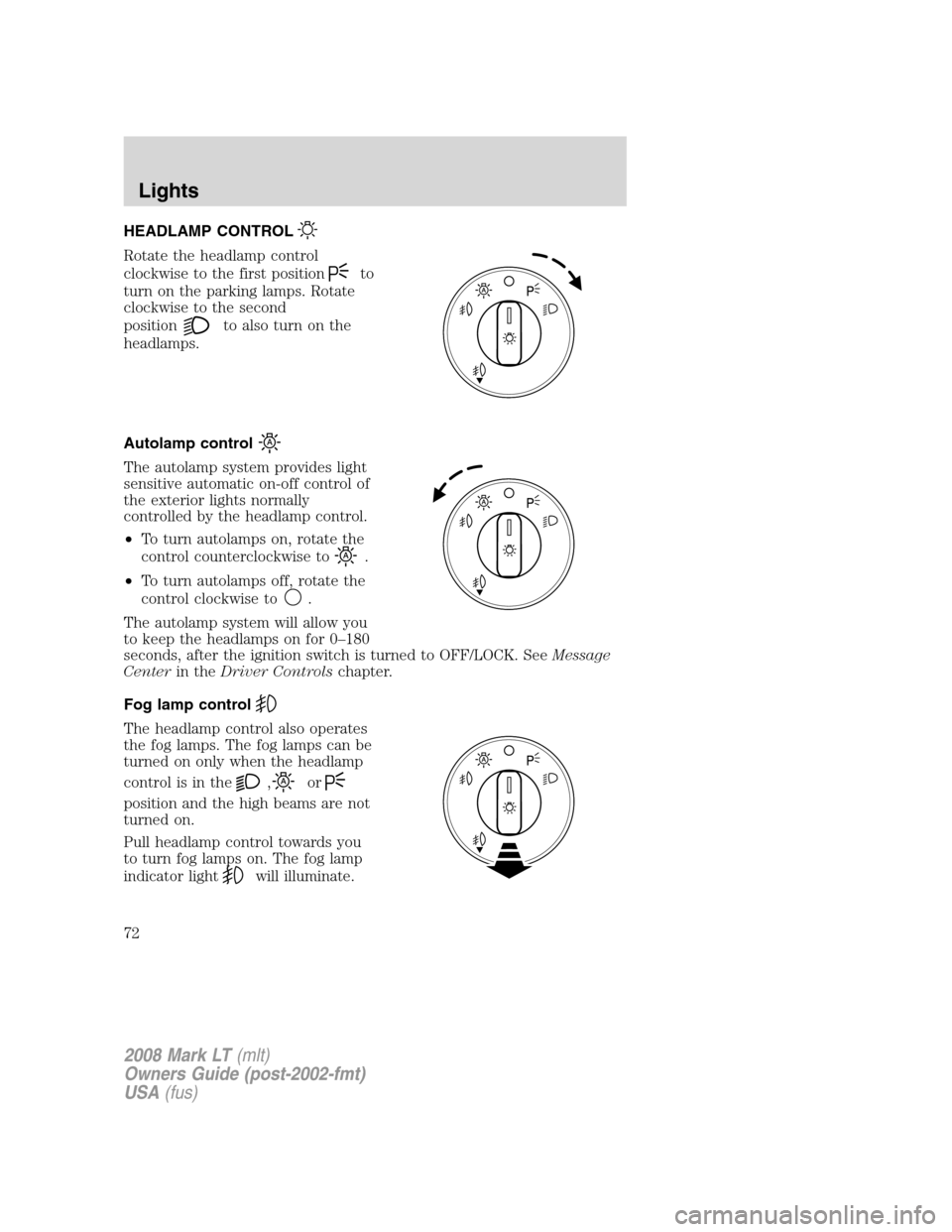
Rotate the headlamp control
clockwise to the first position
to
turn on the parking lamps. Rotate
clockwise to the second
position
to also turn on the
headlamps.
Autolamp control
The autolamp system provides light
sensitive automatic on-off control of
the exterior lights normally
controlled by the headlamp control.
•To turn autolamps on, rotate the
control counterclockwise to
.
•To turn autolamps off, rotate the
control clockwise to
.
The autolamp system will allow you
to keep the headlamps on for 0–180
seconds, after the ignition switch is turned to OFF/LOCK. SeeMessage
Centerin theDriver Controlschapter.
Fog lamp control
The headlamp control also operates
the fog lamps. The fog lamps can be
turned on only when the headlamp
control is in the
,or
position and the high beams are not
turned on.
Pull headlamp control towards you
to turn fog lamps on. The fog lamp
indicator light
will illuminate.
2008 Mark LT(mlt)
Owners Guide (post-2002-fmt)
USA(fus)
Lights
72
Page 73 of 328
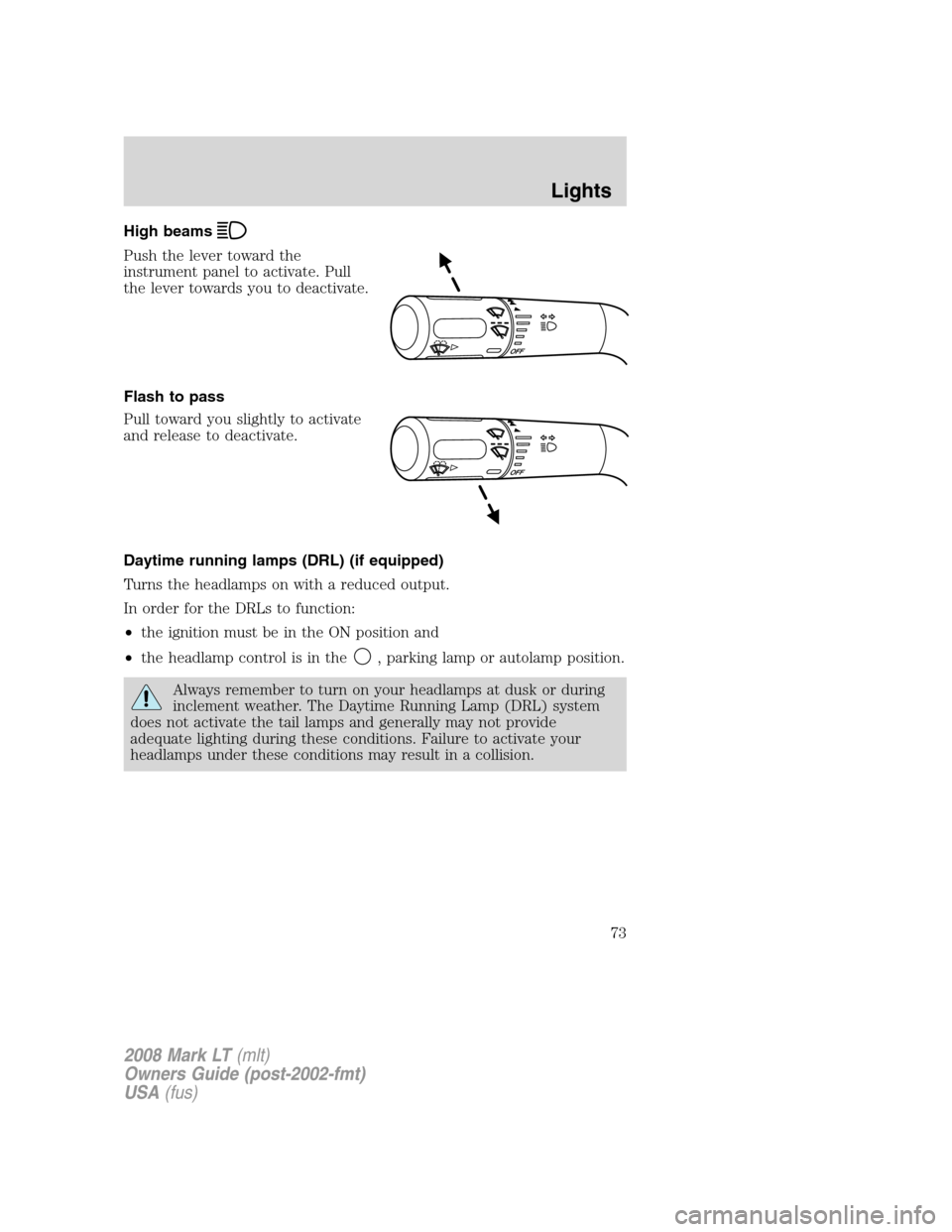
High beams
Push the lever toward the
instrument panel to activate. Pull
the lever towards you to deactivate.
Flash to pass
Pull toward you slightly to activate
and release to deactivate.
Daytime running lamps (DRL) (if equipped)
Turns the headlamps on with a reduced output.
In order for the DRLs to function:
•the ignition must be in the ON position and
•the headlamp control is in the
, parking lamp or autolamp position.
Always remember to turn on your headlamps at dusk or during
inclement weather. The Daytime Running Lamp (DRL) system
does not activate the tail lamps and generally may not provide
adequate lighting during these conditions. Failure to activate your
headlamps under these conditions may result in a collision.
2008 Mark LT(mlt)
Owners Guide (post-2002-fmt)
USA(fus)
Lights
73
Page 76 of 328
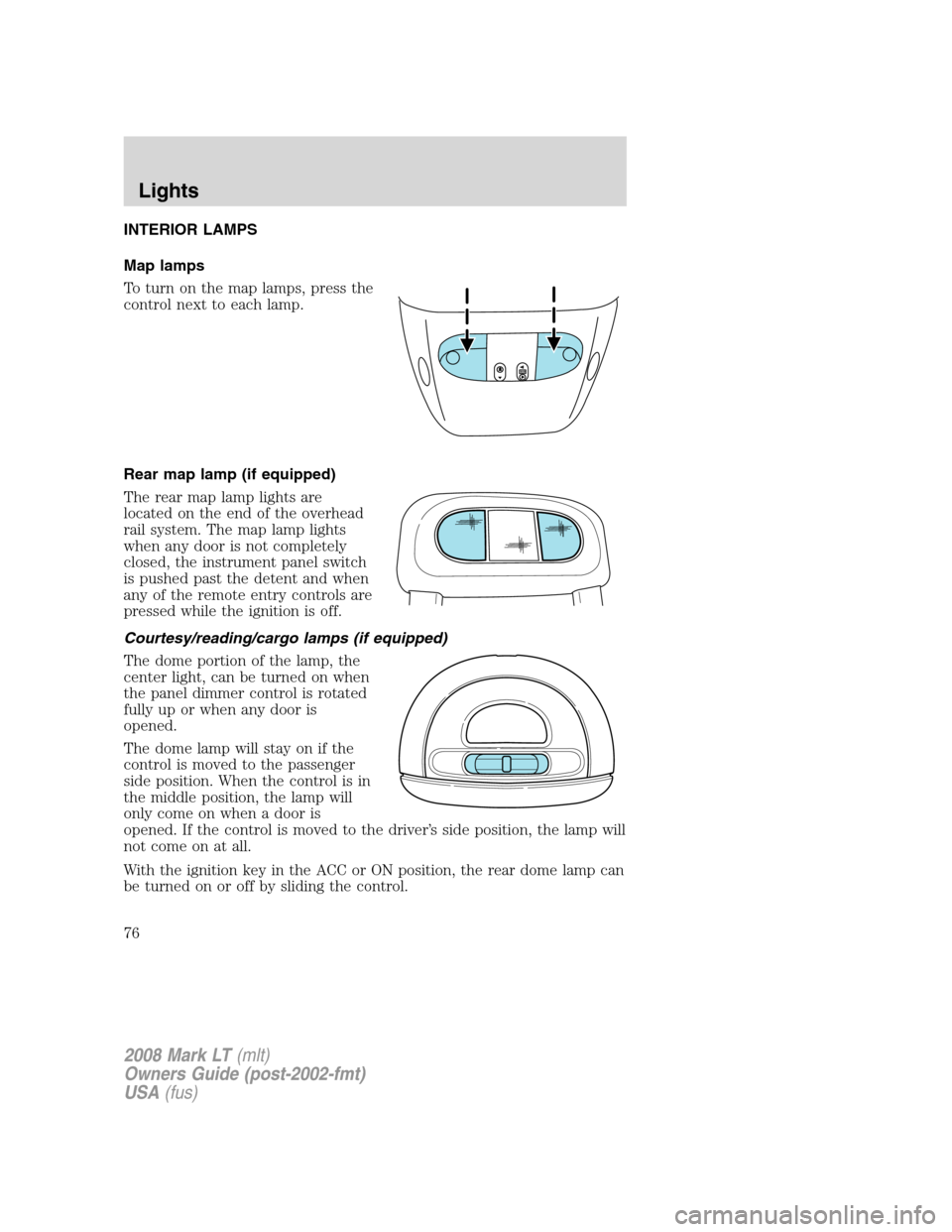
INTERIOR LAMPS
Map lamps
To turn on the map lamps, press the
control next to each lamp.
Rear map lamp (if equipped)
The rear map lamp lights are
located on the end of the overhead
rail system. The map lamp lights
when any door is not completely
closed, the instrument panel switch
is pushed past the detent and when
any of the remote entry controls are
pressed while the ignition is off.
Courtesy/reading/cargo lamps (if equipped)
The dome portion of the lamp, the
center light, can be turned on when
the panel dimmer control is rotated
fully up or when any door is
opened.
The dome lamp will stay on if the
control is moved to the passenger
side position. When the control is in
the middle position, the lamp will
only come on when a door is
opened. If the control is moved to the driver’s side position, the lamp will
not come on at all.
With the ignition key in the ACC or ON position, the rear dome lamp can
be turned on or off by sliding the control.
2008 Mark LT(mlt)
Owners Guide (post-2002-fmt)
USA(fus)
Lights
76