remote control LINCOLN MARK LT 2008 User Guide
[x] Cancel search | Manufacturer: LINCOLN, Model Year: 2008, Model line: MARK LT, Model: LINCOLN MARK LT 2008Pages: 328, PDF Size: 3.17 MB
Page 125 of 328
5. Turn the ignition to the 1 (OFF/LOCK) position to exit programming.
Note:After exiting the driver configuration mode, the horn will chirp
once to indicate a feature has been activated/deactivated.
Car finder
Press
twice within three seconds. The horn will chirp and the turn
lamps will flash. It is recommended that this method be used to locate
your vehicle, rather than using the panic alarm.
Sounding a panic alarm
Press
to activate the alarm. Press again or turn the ignition to 2
(ACCESSORY) or 3 (ON) to deactivate.
Note:The panic alarm will only operate when the ignition is in the 1
(OFF/LOCK) position.
Memory seat, adjustable pedals, and power mirrors (if equipped)
The remote entry system can also control the memory feature.
Press the
control once to unlock the driver’s door. Pressing the
control will automatically move the seat, adjustable pedals (if equipped)
and power mirrors to the desired memory position (the memory position
corresponds to the transmitter being used).
Activating the memory feature
To activate this feature:
1. Position the seat, adjustable pedals (if equipped), and power mirrors
to the positions you desire.
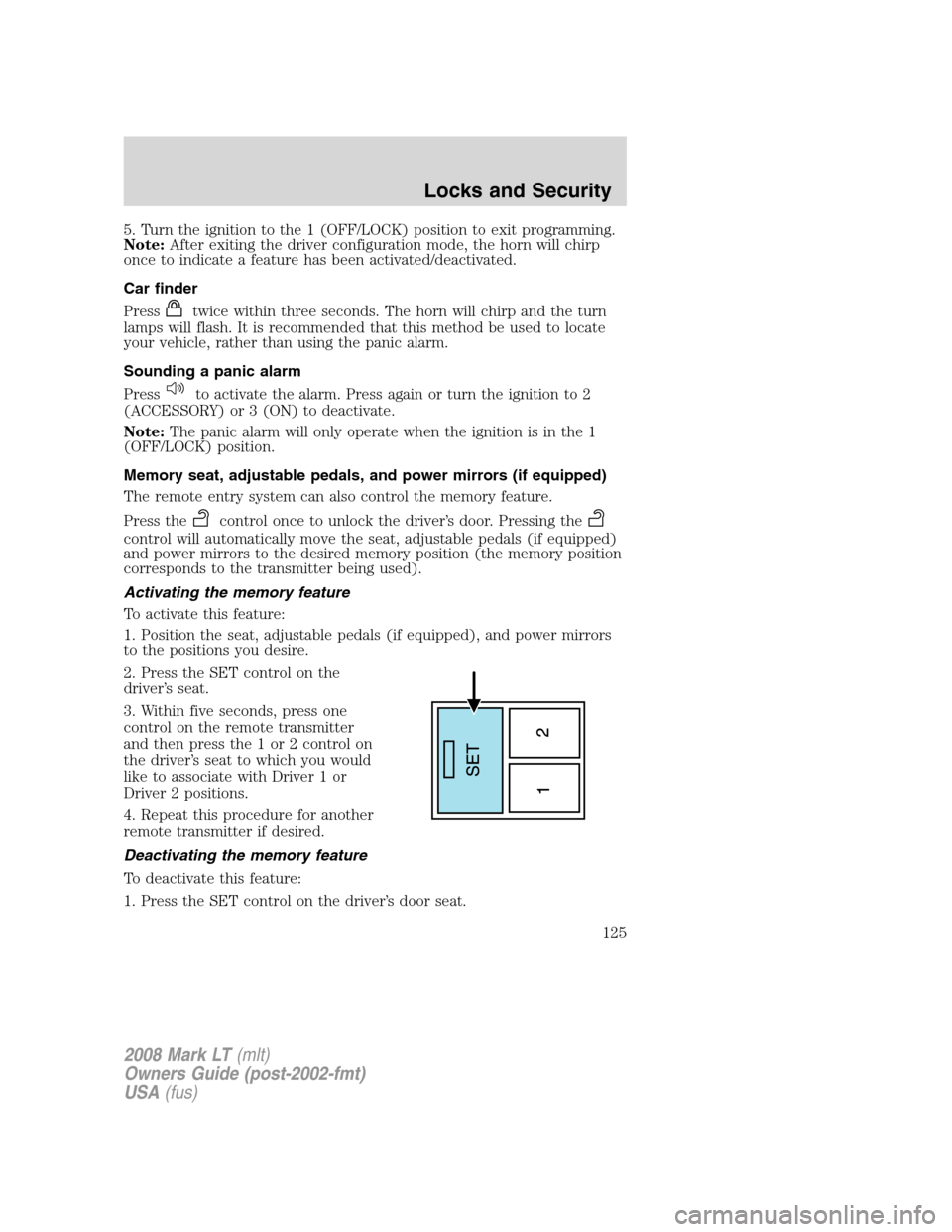
2. Press the SET control on the
driver’s seat.
3. Within five seconds, press one
control on the remote transmitter
and then press the 1 or 2 control on
the driver’s seat to which you would
like to associate with Driver 1 or
Driver 2 positions.
4. Repeat this procedure for another
remote transmitter if desired.
Deactivating the memory feature
To deactivate this feature:
1. Press the SET control on the driver’s door seat.
2008 Mark LT(mlt)
Owners Guide (post-2002-fmt)
USA(fus)
Locks and Security
125
Page 126 of 328
2. Within five seconds, press any control on the remote transmitter
which you would like to deactivate and then press the SET control on
the driver’s seat.
3. Repeat this procedure for another remote transmitter if desired.
Replacing the battery
The remote entry transmitter uses one coin type three-volt lithium
battery CR2032 or equivalent.
To replace the battery:
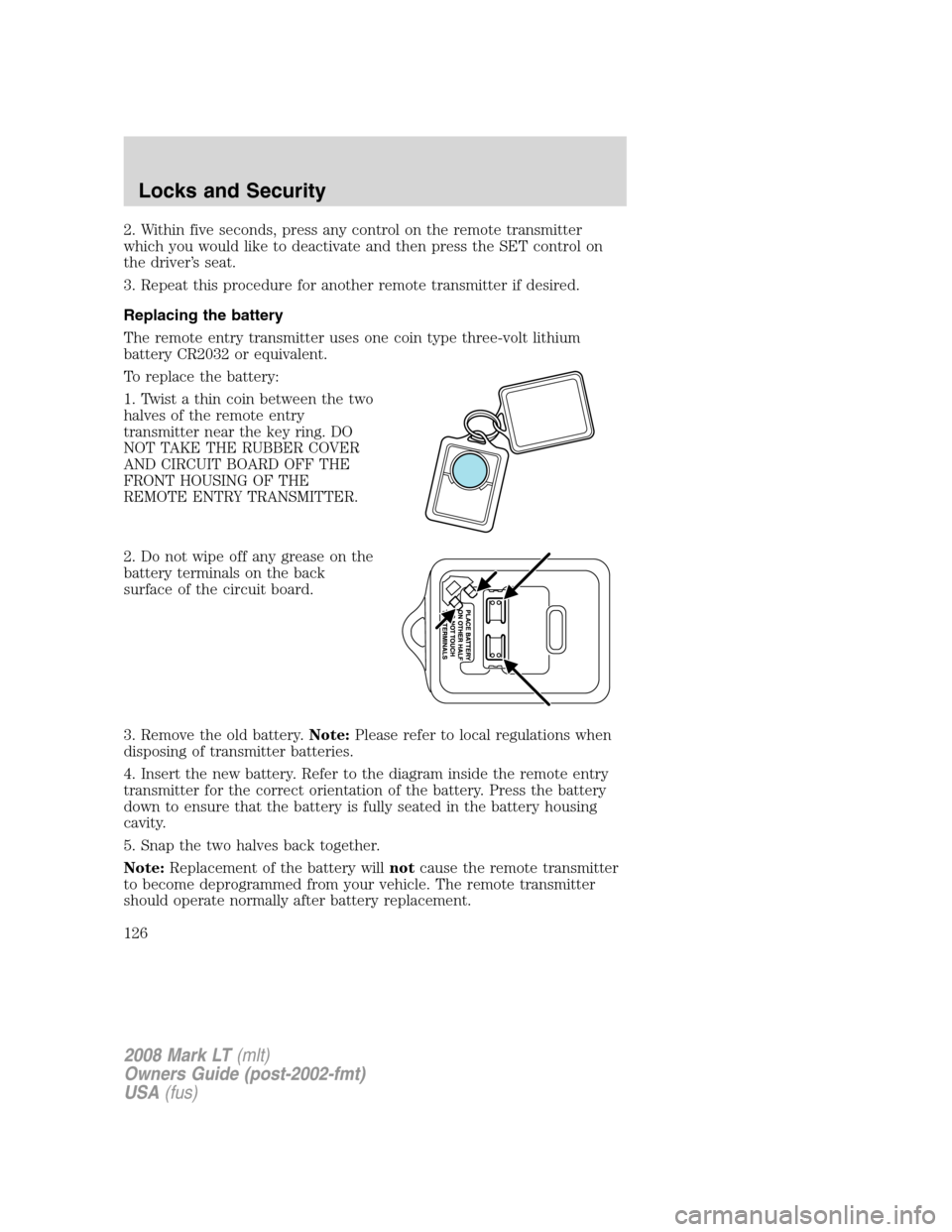
1. Twist a thin coin between the two
halves of the remote entry
transmitter near the key ring. DO
NOT TAKE THE RUBBER COVER
AND CIRCUIT BOARD OFF THE
FRONT HOUSING OF THE
REMOTE ENTRY TRANSMITTER.
2. Do not wipe off any grease on the
battery terminals on the back
surface of the circuit board.
3. Remove the old battery.Note:Please refer to local regulations when
disposing of transmitter batteries.
4. Insert the new battery. Refer to the diagram inside the remote entry
transmitter for the correct orientation of the battery. Press the battery
down to ensure that the battery is fully seated in the battery housing
cavity.
5. Snap the two halves back together.
Note:Replacement of the battery willnotcause the remote transmitter
to become deprogrammed from your vehicle. The remote transmitter
should operate normally after battery replacement.
2008 Mark LT(mlt)
Owners Guide (post-2002-fmt)
USA(fus)
Locks and Security
126
Page 127 of 328
Replacing lost transmitters
If a remote transmitter has been lost and you would like to remove it
from the vehicle’s memory, or you would like to purchase additional
remote transmitters and have them programmed to your vehicle:
•Takeallyour vehicle’s transmitters to your authorized dealer for
programming, or
•Perform the programming procedure yourself.
Programming remote transmitters
It is necessary to haveall(maximum of six — original and/or new) of
your remote transmitters available prior to beginning this procedure. If
all remote entry transmitters are not present during the programming
procedure, the transmitters that are not present during programming will
no longer operate the vehicle.
To program the transmitters yourself:
Note:Ensure the brake pedal is not
depressed during this sequence.
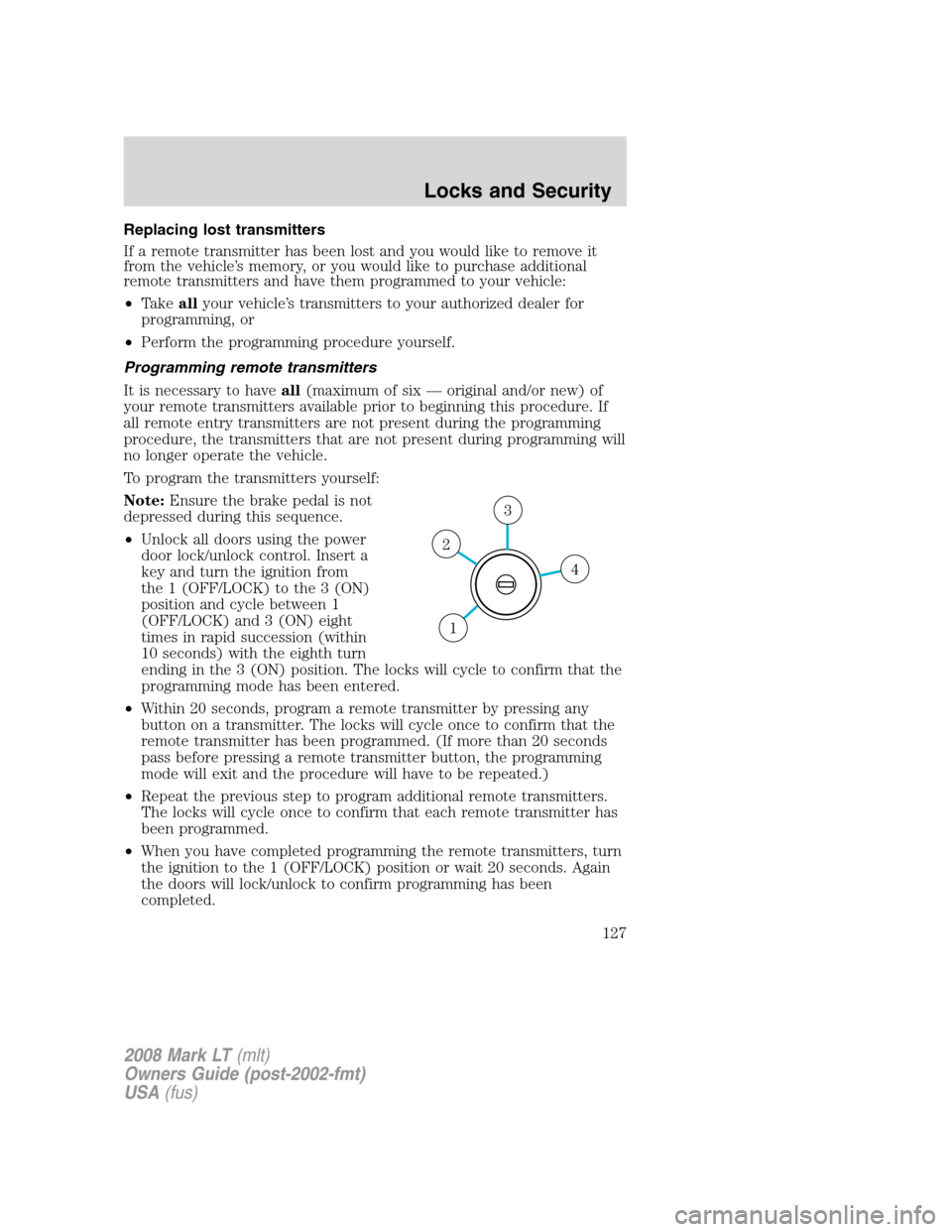
•Unlock all doors using the power
door lock/unlock control. Insert a
key and turn the ignition from
the 1 (OFF/LOCK) to the 3 (ON)
position and cycle between 1
(OFF/LOCK) and 3 (ON) eight
times in rapid succession (within
10 seconds) with the eighth turn
ending in the 3 (ON) position. The locks will cycle to confirm that the
programming mode has been entered.
•Within 20 seconds, program a remote transmitter by pressing any
button on a transmitter. The locks will cycle once to confirm that the
remote transmitter has been programmed. (If more than 20 seconds
pass before pressing a remote transmitter button, the programming
mode will exit and the procedure will have to be repeated.)
•Repeat the previous step to program additional remote transmitters.
The locks will cycle once to confirm that each remote transmitter has
been programmed.
•When you have completed programming the remote transmitters, turn
the ignition to the 1 (OFF/LOCK) position or wait 20 seconds. Again
the doors will lock/unlock to confirm programming has been
completed.
4
3
2
1
2008 Mark LT(mlt)
Owners Guide (post-2002-fmt)
USA(fus)
Locks and Security
127
Page 128 of 328
Illuminated entry
The interior lamps illuminate when the remote entry system is used to
unlock the door(s) or sound the personal alarm.
The illuminated entry system will turn off the interior lights if:
•the ignition switch is turned to the 3 (ON) position, or
•the remote transmitter lock control is pressed, or
•after 25 seconds of illumination.
The dome lamp control mustnotbe set to the off position for the
illuminated entry system to operate.
The inside lights will not turn off if:
•they have been turned on with the dimmer control, or
•any door is open.
The battery saver will shut off the interior lamps 30 minutes after the
last door is closed, even if the dimmer control is on.
Perimeter lighting feature
The perimeter lighting feature illuminates the exterior of the vehicle in
order to provide better visibility to the user while he or she approaches
and enters the vehicle.
The perimeter lighting feature activates when:
•the ignition is in the 1 (OFF/LOCK) position,
•the autolamp sensor determines that it is dark, and
•the user activates an unlock feature, using either the remote keyless
transmitter or the keypad.
The perimeter lighting feature will illuminate the headlamps and parking
lamps for 25 seconds, or until:
•the ignition is turned to any position other than the 1 (OFF/LOCK)
position, or
•the user activates a lock feature, using either the remote keyless
transmitter or the keypad.
Enabling/disabling the perimeter lighting feature
Your vehicle comes with the perimeter lighting feature enabled. All
vehicle doors must be closed before beginning the procedure. You must
complete Steps 1–5 within 30 seconds, or the procedure will have to be
repeated. If the procedure needs to be repeated, you must wait a
minimum of 30 seconds to begin again.
2008 Mark LT(mlt)
Owners Guide (post-2002-fmt)
USA(fus)
Locks and Security
128
Page 130 of 328
3. Enter your personal 5-digit code. Each number must be entered
within five seconds of each other.
4. After the code is entered, the locks will cycle, confirming that the new
code has been set.
Tips:
•Do not set a code that uses five of the same number.
•Do not use five numbers in sequential order.
•The factory set code will work even if you have set your own personal
code.
•If you set a second personal code it will erase your first personal code.
Erasing personal code
1. Enter the factory set 5–digit code.
2. Press and release 1•2 then,
3. Press and hold the 1•2 for two seconds. This must be done within
five seconds of completing Step 1.
Your personal code is now erased and only the factory set 5–digit code
will work.
Anti-scan feature
The keyless entry keypad is equipped with an anti-theft function called
“antiscan.” The antiscan feature provides a one-minute lockout feature,
where the user is unable to enter the vehicle using the keypad; this
lockout occurs when a valid entry code has not been entered by the user
within 7 attempts (35 consecutive button presses). During the lockout,
the keypad will flash and pressing the controls on the keypad will be
ignored, except for pressing the 7•8 and the 9•0 controls
simultaneously, which will still lock the vehicle.
The anti-scan feature will be turned off after:
•one minute, when the anti-scan feature times out.
•one minute of keypad inactivity.
•the
control is pressed on the remote entry transmitter.
•the ignition is turned from the 1 (OFF/LOCK) position to the 3 (ON)
position, or from the 3 (ON) position to the 1 (OFF/LOCK) position.
2008 Mark LT(mlt)
Owners Guide (post-2002-fmt)
USA(fus)
Locks and Security
130
Page 131 of 328
Unlocking and locking the doors using keyless entry keypad
To unlock the driver’s door,enter the factory set 5-digit code or your
personal code. Each number must be pressed within five seconds of each
other.Note:The driver’s door will unlock and the interior lamps will
illuminate after the factory set 5-digit code or your personal code are
correctly entered.
To unlock all doors,press the 3•4 control within five seconds.
To lock all doors,press the 7•8 and the 9•0 at the same time. You
do notneed to enter the keypad code first.Note:The interior lamps
will turn off.
SECURILOCK™ PASSIVE ANTI-THEFT SYSTEM
SecuriLock™ passive anti-theft system is an engine immobilization
system. This system is designed to help prevent the engine from being
started unless acoded key programmed to your vehicleis used. The
use of the wrong type of coded key may lead to a “no-start” condition.
Your vehicle comes with two coded keys; additional coded keys may be
purchased from your authorized dealer. The authorized dealer can
program your spare keys to your vehicle or you can program the keys
yourself. Refer toProgramming spare keysfor instructions on how to
program the coded key.
Note:The SecuriLock™ passive anti-theft system is not compatible with
non-Ford aftermarket remote start systems. Use of these systems may
result in vehicle starting problems and a loss of security protection.
Note:Large metallic objects, electronic devices that are used to
purchase gasoline or similar items, or a second coded key on the same
key chain may cause vehicle starting issues. You need to prevent these
objects from touching the coded key while starting the engine. These
objects will not cause damage to the coded key, but may cause a
momentary issue if they are too close to the key when starting the
engine. If a problem occurs, turn the ignition off, remove all objects on
the key chain away from the coded key and restart the engine.
Anti-theft indicator
The anti-theft indicator is located on top of the instrument panel.
•When the ignition is in the 1 (OFF/LOCK) position, the indicator will
flash once every 2 seconds to indicate the SecuriLock™ system is
functioning as a theft deterrent.
•When the ignition is in the 3 (ON) position, the indicator will glow for
3 seconds to indicate normal system functionality.
2008 Mark LT(mlt)
Owners Guide (post-2002-fmt)
USA(fus)
Locks and Security
131
Page 185 of 328
Only use replacement tires and wheels that are the same size,
load index, speed rating and type (such as P-metric versus
LT-metric or all-season versus all-terrain) as those originally provided
by Ford. The recommended tire and wheel size may be found on either
the Safety Compliance Certification Label or the Tire Label which is
located on the B-Pillar or edge of the driver’s door. If this information
is not found on these labels then you should consult your Ford dealer.
Use of any tire or wheel not recommended by Ford can affect the
safety and performance of your vehicle, which could result in an
increased risk of loss of vehicle control, vehicle rollover, personal injury
and death. Additionally the use of non-recommended tires and wheels
could cause steering, suspension, axle or transfer case/power transfer
unit failure. If you have questions regarding tire replacement, see an
authorized dealer.
When mounting replacement tires and wheels, you should not
exceed the maximum pressure indicated on the sidewall of the
tire to set the beads without additional precautions listed below. If the
beads do not seat at the maximum pressure indicated, re-lubricate and
try again.
When inflating the tire for mounting pressures up to 20 psi (1.38 bar)
greater than the maximum pressure on the tire sidewall, the following
precautions must be taken to protect the person mounting the tire:
1. Make sure that you have the correct tire and wheel size.
2. Lubricate the tire bead and wheel bead seat area again.
3. Stand at a minimum of 12 ft. (3.66 m) away from the tire wheel
assembly.
4. Use both eye and ear protection.
For a mounting pressure more than 20 psi (1.38 bar) greater than the
maximum pressure, a Ford Dealer or other tire service professional
should do the mounting.
Always inflate steel carcass tires with a remote air fill with the person
inflating standing at a minimum of 12 ft. (3.66 m) away from the tire
wheel assembly.
Important:Remember to replace the wheel valve stems when the road
tires are replaced on your vehicle.
It is recommended that the two front tires or two rear tires generally be
replaced as a pair.
2008 Mark LT(mlt)
Owners Guide (post-2002-fmt)
USA(fus)
Tires, Wheels and Loading
185