lock LINCOLN MKC 2015 Owners Manual
[x] Cancel search | Manufacturer: LINCOLN, Model Year: 2015, Model line: MKC, Model: LINCOLN MKC 2015Pages: 490, PDF Size: 4.74 MB
Page 297 of 490
Examples of unacceptable moisture (usually
caused by a lamp water leak) are:
•
Water puddle inside the lamp.
• Large water droplets, drip marks or
streaks present on the interior of the lens.
Take your vehicle to a dealer for service if
any of the above conditions of unacceptable
moisture are present.
Replacing High Intensity Discharge
Headlamp Bulbs (If Equipped)
The headlamps on your vehicle use a high
intensity discharge source. These lamps
operate at a high voltage. When the bulb
burns out, have the bulb and starter capsule
assembly replaced by your authorized
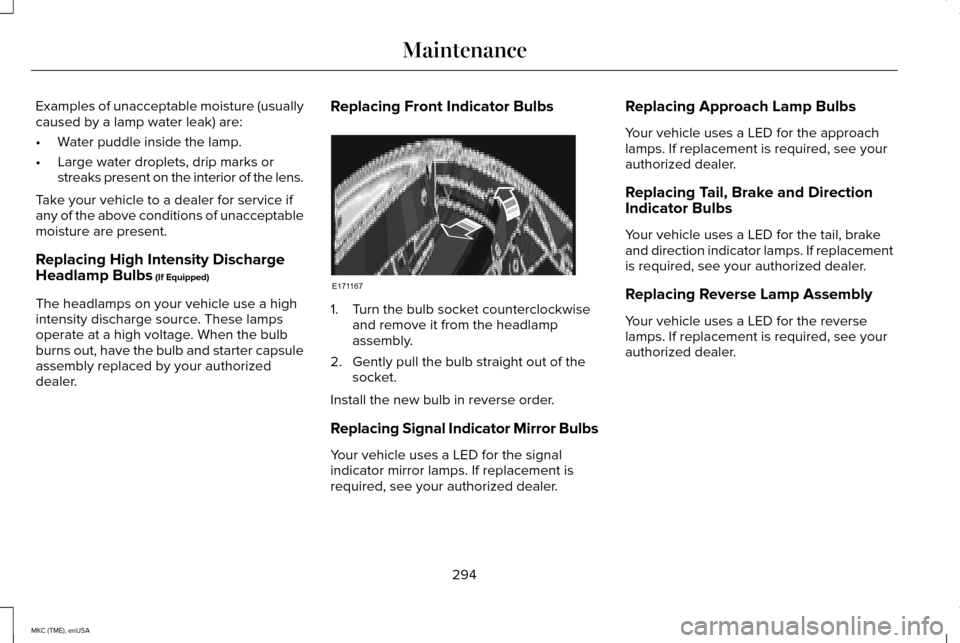
dealer. Replacing Front Indicator Bulbs 1. Turn the bulb socket counterclockwise
and remove it from the headlamp
assembly.
2. Gently pull the bulb straight out of the socket.
Install the new bulb in reverse order.
Replacing Signal Indicator Mirror Bulbs
Your vehicle uses a LED for the signal
indicator mirror lamps. If replacement is
required, see your authorized dealer. Replacing Approach Lamp Bulbs
Your vehicle uses a LED for the approach
lamps. If replacement is required, see your
authorized dealer.
Replacing Tail, Brake and Direction
Indicator Bulbs
Your vehicle uses a LED for the tail, brake
and direction indicator lamps. If replacement
is required, see your authorized dealer.
Replacing Reverse Lamp Assembly
Your vehicle uses a LED for the reverse
lamps. If replacement is required, see your
authorized dealer.
294
MKC (TME), enUSA MaintenanceE171167
Page 304 of 490
•
Do not allow wax to come in contact with
any non-body (low-gloss black) colored
trim. The wax will discolor or stain the
parts over time.
•Roof racks.
• Bumpers.
• Grained door handles.
• Side moldings.
• Mirror housings.
• Windshield cowl area.
• Do not apply wax to glass areas.
• After waxing, your car's paint should feel
smooth, and be free of streaks and
smudges.
CLEANING THE ENGINE
Engines are more efficient when they are
clean because grease and dirt buildup keep
the engine warmer than normal. When washing:
•
Take care when using a power washer
to clean the engine. The high-pressure
fluid could penetrate the sealed parts
and cause damage.
• Do not spray a hot engine with cold water
to avoid cracking the engine block or
other engine components.
• Spray Motorcraft Engine Shampoo and
Degreaser on all parts that require
cleaning and pressure rinse clean. In
Canada, use Motorcraft Engine Shampoo.
• Never wash or rinse the engine while it
is hot or running; water in the running
engine may cause internal damage.
• Never wash or rinse any ignition coil,
spark plug wire or spark plug well, or the
area in and around these locations.
• Cover the battery, power distribution box,
and air filter assembly to prevent water
damage when cleaning the engine. CLEANING THE WINDOWS AND
WIPER BLADES
Car wash chemicals and environmental
fallout can result in windshield and wiper
blade contamination. Dirty windshield and
wipers will result in poor windshield wiper
operation. Keep the windshield and wiper
blades clean to maintain windshield wiper
performance.
To clean the windshield and wiper blades:
•
Clean the windshield with a non-abrasive
glass cleaner.
• For windshields contaminated with tree
sap, chemicals, wax or bugs, clean the
entire windshield using steel wool (no
greater than 0000 grade) in a circular
motion and rinse with water.
• Clean the wiper blades with isopropyl
rubbing alcohol or windshield washer
fluid.
Note: Do not use razor blades or other
sharp objects to clean or remove decals from
the inside of the heated rear window. The
vehicle warranty does not cover damage
caused to the heated rear window grid lines.
301
MKC (TME), enUSA Vehicle Care
Page 333 of 490
•
Wet weather driving capability.
• All-wheel driving capability
When driving with the full-size dissimilar
spare wheel and tire assembly additional
caution should be given to:
• Towing a trailer.
• Driving vehicles equipped with a camper
body.
• Driving vehicles with a load on the cargo
rack.
Drive cautiously when using a full-size
dissimilar spare wheel and tire assembly and
seek service as soon as possible.
Tire Change Procedure WARNINGS
When one of the front wheels is off the
ground, the transmission alone will not
prevent your vehicle from moving or slipping
off the jack, even if your vehicle is in park
(P). WARNINGS
To help prevent your vehicle from
moving when you change a tire, be
sure the parking brake is set, then block (in
both directions) the wheel that is diagonally
opposite (other side and end of your vehicle)
to the tire being changed. If your vehicle slips off the jack, you or
someone else could be seriously
injured. Do not attempt to change a tire on the
side of the vehicle close to moving
traffic. Pull far enough off the road to avoid
the danger of being hit when operating the
jack or changing the wheel. To lessen the risk of personal injury,
do not put any part of your body under
your vehicle while changing a tire. Do not
start the engine when your vehicle is on the
jack. The jack is only meant for changing the
tire. Note:
Passengers should not remain in your
vehicle when the vehicle is being jacked. 1. Park on a level surface, set the parking
brake and activate the hazard flashers.
2. Place the transmission in park (P) and
turn the engine off.
3. Remove the carpeted wheel cover.
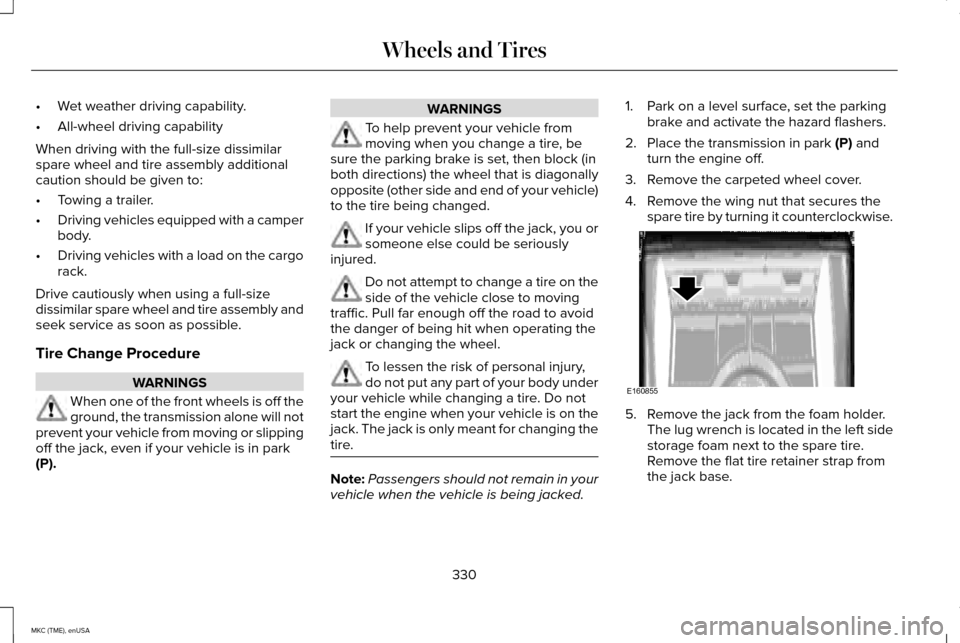
4. Remove the wing nut that secures the spare tire by turning it counterclockwise. 5. Remove the jack from the foam holder.
The lug wrench is located in the left side
storage foam next to the spare tire.
Remove the flat tire retainer strap from
the jack base.
330
MKC (TME), enUSA Wheels and TiresE160855
Page 334 of 490
6. Block the diagonally opposite wheel.
7.
Loosen each wheel lug nut one-half turn
counterclockwise, but do not remove
them until the wheel is raised off the
ground.
Note: Jack at the specified locations to avoid
damage to the vehicle.
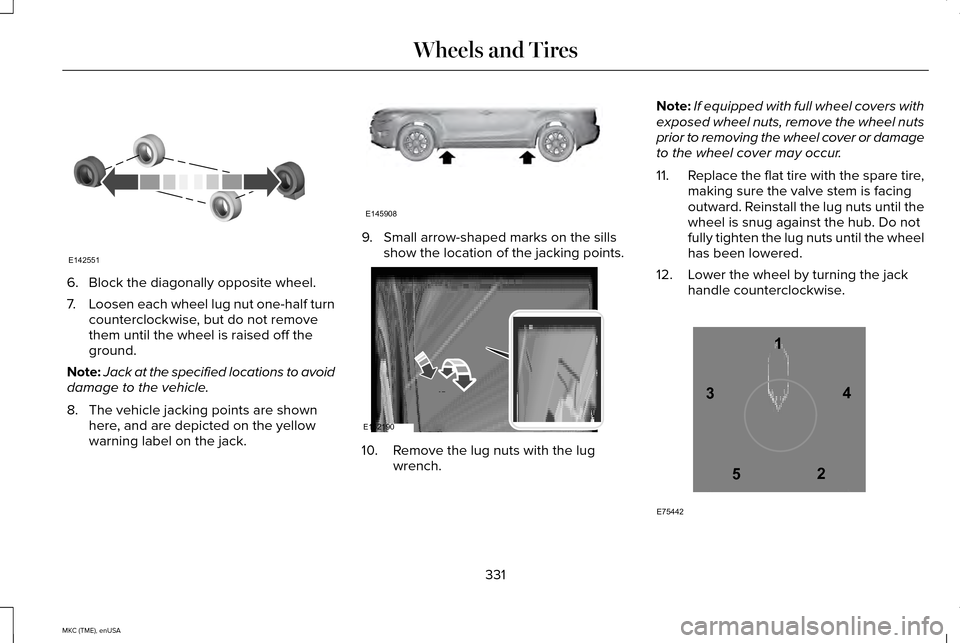
8. The vehicle jacking points are shown here, and are depicted on the yellow
warning label on the jack. 9. Small arrow-shaped marks on the sills
show the location of the jacking points. 10. Remove the lug nuts with the lug
wrench. Note:
If equipped with full wheel covers with
exposed wheel nuts, remove the wheel nuts
prior to removing the wheel cover or damage
to the wheel cover may occur.
11. Replace the flat tire with the spare tire,
making sure the valve stem is facing
outward. Reinstall the lug nuts until the
wheel is snug against the hub. Do not
fully tighten the lug nuts until the wheel
has been lowered.
12. Lower the wheel by turning the jack handle counterclockwise. 331
MKC (TME), enUSA Wheels and TiresE142551 E145908 E162190 12
3
4
5
E75442
Page 335 of 490
13. Remove the jack and fully tighten the
lug nuts in the order shown. See
Technical Specifications (page 334).
Stowing the flat tire
1. Put the jack and lug wrench away. Make
sure the jack is fastened so it does not
rattle when you drive.
2. Unblock the wheels.
3. Stow the flat tire on the floor in the cargo
area. Secure with the flat tire retainer
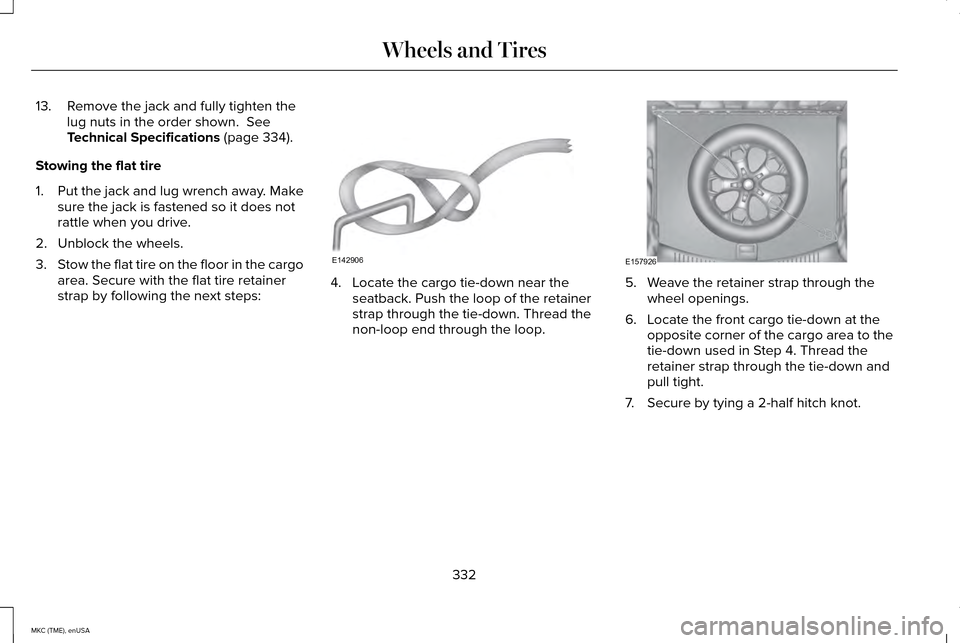
strap by following the next steps: 4. Locate the cargo tie-down near the
seatback. Push the loop of the retainer
strap through the tie-down. Thread the
non-loop end through the loop. 5. Weave the retainer strap through the
wheel openings.
6. Locate the front cargo tie-down at the opposite corner of the cargo area to the
tie-down used in Step 4. Thread the
retainer strap through the tie-down and
pull tight.
7. Secure by tying a 2-half hitch knot.
332
MKC (TME), enUSA Wheels and TiresE142906 E157926
Page 344 of 490
TECHNICAL SPECIFICATIONS
Ford part number / Ford specification
Ford part name or equivalent
Capacity
Item
PM-20 / WSS-M6C65-A2
Motorcraft High Performance DOT
4 LV Motor Vehicle Brake Fluid
Between MIN and MAX
on reservoir
Brake fluid 1
XL-5
Multi-Purpose Grease spray
(lithium grease)
–
Door latch, hood latch, auxiliary
hood latch, trunk latch, seat tracks
XL-1 (U.S.) / None
Motorcraft Penetrating and Lock
Lubricant (U.S.)
–
Lock cylinder
CXC-51-A (Canada) / None
Motorcraft Penetrating fluid
(Canada)
XT-10-QLVC
Motorcraft MERCON LV
9.0 qt (8.5 L)
Automatic transmission fluid 2, 3
WSS-M2C938-A
XY-80W90-QL /
Motorcraft SAE 80W-90 Premium
Rear Axle Lubricant
2.4 pt (1.15L)
Rear differential fluid (All Wheel
Drive) WSP-M2C197-A
XY-75W140-QL / WSL-M2C192-A
Motorcraft SAE 75W-140 Synthetic
Rear Axle Lubricant
18 fl oz (0.53 L)
Power transfer unit fluid (All Wheel
Drive) 4
XO-5W30-QSP or XO-5W30-QFS (U.S.) /WSS-M2C946-A
Motorcraft SAE 5W-30 Premium
Synthetic Blend Motor Oil orMotorcraft SAE 5W-30 Full Synthetic Motor Oil
5.7 qt (5.4 L)
Engine oil 5,6,7
2.0L EcoBoost CXO-5W30-LSP12 or CXO-5W30-LFS12(Canada) / WSS-M2C946-A
341
MKC (TME), enUSA Capacities and Specifications
Page 355 of 490
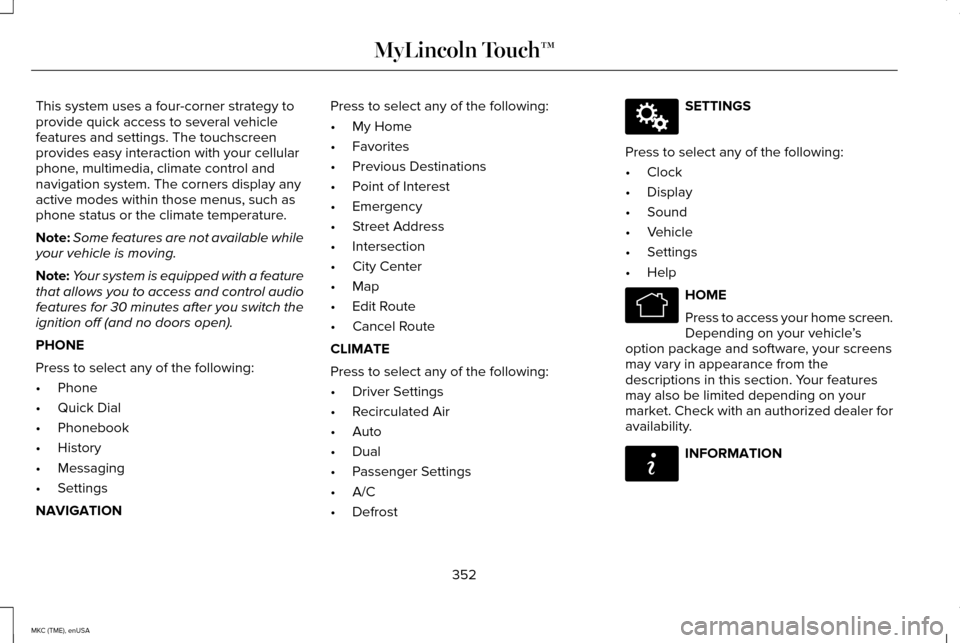
This system uses a four-corner strategy to
provide quick access to several vehicle
features and settings. The touchscreen
provides easy interaction with your cellular
phone, multimedia, climate control and
navigation system. The corners display any
active modes within those menus, such as
phone status or the climate temperature.
Note:
Some features are not available while
your vehicle is moving.
Note: Your system is equipped with a feature
that allows you to access and control audio
features for 30 minutes after you switch the
ignition off (and no doors open).
PHONE
Press to select any of the following:
• Phone
• Quick Dial
• Phonebook
• History
• Messaging
• Settings
NAVIGATION Press to select any of the following:
•
My Home
• Favorites
• Previous Destinations
• Point of Interest
• Emergency
• Street Address
• Intersection
• City Center
• Map
• Edit Route
• Cancel Route
CLIMATE
Press to select any of the following:
• Driver Settings
• Recirculated Air
• Auto
• Dual
• Passenger Settings
• A/C
• Defrost SETTINGS
Press to select any of the following:
• Clock
• Display
• Sound
• Vehicle
• Settings
• Help HOME
Press to access your home screen.
Depending on your vehicle
’s
option package and software, your screens
may vary in appearance from the
descriptions in this section. Your features
may also be limited depending on your
market. Check with an authorized dealer for
availability. INFORMATION
352
MKC (TME), enUSA MyLincoln Touch™E142607 E142613 E142608
Page 366 of 490
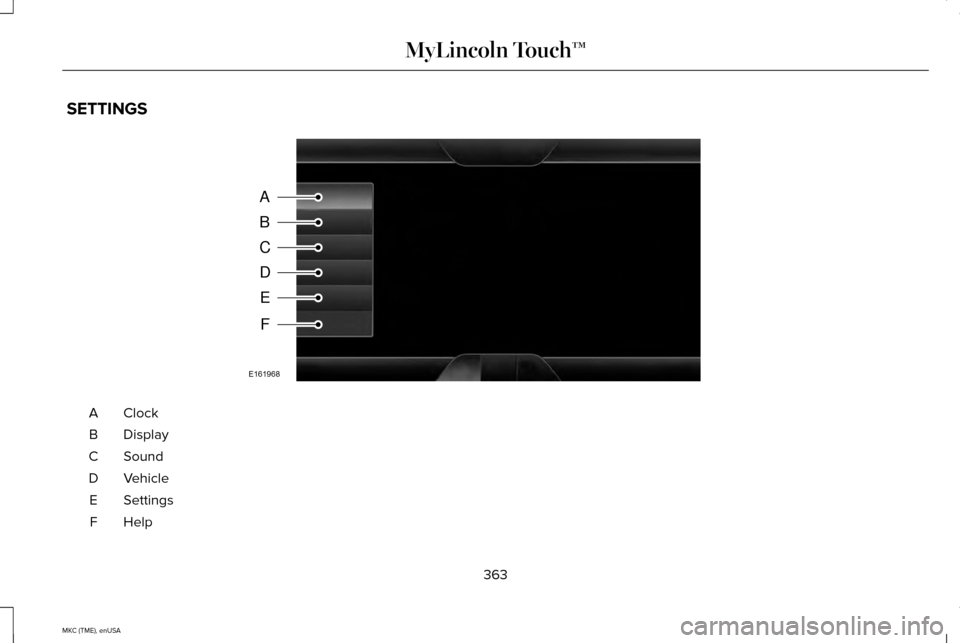
SETTINGS
ClockA
Display
B
Sound
C
Vehicle
D
Settings
E
HelpF
363
MKC (TME), enUSA MyLincoln Touch™A
B
C
D
E
F
E161968
Page 367 of 490
Under this menu, you can set your
clock, access and adjust the
display, sound and vehicle settings
as well as access settings for specific modes
or the help feature.
Clock
Note: You cannot manually set the date.
Your vehicle ’s GPS does this for you.
Note: If the battery has been disconnected,
your vehicle needs to acquire a GPS signal
to update the clock. Once your vehicle
acquires the signal, it may take a few
minutes for the update to display the correct
time. 1. Press the Settings icon > Clock.
2. Press
+ and - to adjust the time.
From this screen, you can also make other
adjustments such as 12-hour or 24-hour
mode, activate GPS time synchronization and
have the system automatically update new
time zones. You can also switch the outside air
temperature display off and on. It appears at
the top center of the touchscreen, next to
the time and date.
The system automatically saves any updates
you make to the settings.
Display
You can adjust the touchscreen display
through the touchscreen or by pressing the
voice button on your steering wheel controls
and when prompted, say, "Display settings".
Press the Settings icon >
Display,
to access and make adjustments
using the touchscreen.
• Brightness
allows you to make the
screen display brighter or dimmer.
• Auto DIM
, when set to On, lets you use
the Auto Dim Manual Offset feature.
When set to
Off, screen brightness does
not change. •
Mode
allows you to set the screen to a
certain brightness or have the system
automatically change based on the
outside light level, or switch the display
off.
• If you select
AUTO or NIGHT, you
have the options of switching the
display's Auto Dim feature on or off
and changing the Auto Dim Manual
Offset feature.
• Auto Dim Manual Offset
allows you to
adjust screen dimming as the outside
lighting conditions change from day to
night. This feature also allows you to
adjust screen brightness using the
instrument panel dimming control.
• Edit Wallpaper
•You can have your touchscreen
display the default photo or upload
your own.
364
MKC (TME), enUSA MyLincoln Touch™E142607 E142607 E142607
Page 369 of 490
Vehicle Health Report
Switch Automatic Reminders on and off and
set the mileage interval at which you would
like to receive the reports. Press ? for more
information on these selections.
When done making your selections, press
Run Vehicle Health Report Now if you want
your report.
You can find more information on Vehicle
Health Report in this chapter.
See
Information (page 403).
Camera Settings
This menu allows you to access settings for
your camera settings. Press the Settings icon >
Vehicle
> Camera Settings, then select
from the following settings:
• Enhanced Park Aids.
• Rear Camera Delay.
You can find more information on the rear
view camera in another chapter.
See Rear
View Camera (page 199).
Enable Valet Mode
Valet mode allows you to lock the system.
No information is accessible until the system
is unlocked with the correct PIN. You can
create your own four-digit PIN to lock and
unlock the system. 1. Press the Settings icon >
Vehicle >
Enable Valet Mode.
2. When prompted, enter a four-digit PIN.
After you press
Continue, the system locks
until you enter the PIN again.
Note: If the system locks, and you need to
reset the PIN, enter 3681 and the system
unlocks.
Settings
Access and adjust system settings, voice
features, as well as phone, navigation and
wireless settings.
System Press the Settings icon >
Settings
> System, then select from the
following: System
Select to have the touchscreen display in English, Spanish or French.
Language
Select to display units in kilometers or miles.
Distance
Select to display units in Celsius or Fahrenheit.
Temperature
366
MKC (TME), enUSA MyLincoln Touch™E142607 E142607 E142607