steering wheel LINCOLN MKC 2015 User Guide
[x] Cancel search | Manufacturer: LINCOLN, Model Year: 2015, Model line: MKC, Model: LINCOLN MKC 2015Pages: 490, PDF Size: 4.74 MB
Page 88 of 490
Use this control to access some of the
MyLincoln Touch features in the information
display. Navigate through the screen and
press OK to select. See MyLincoln Touch
™
(page 350).
HEATED STEERING WHEEL (If Equipped)
See
MyLincoln Touch ™ (page 350).
85
MKC (TME), enUSA Steering Wheel
Page 115 of 490
GENERAL INFORMATION
WARNING
Driving while distracted can result in
loss of vehicle control, crash and injury.
We strongly recommend that you use
extreme caution when using any device that
may take your focus off the road. Your
primary responsibility is the safe operation
of your vehicle. We recommend against the
use of any hand-held device while driving
and encourage the use of voice-operated
systems when possible. Make sure you are
aware of all applicable local laws that may
affect the use of electronic devices while
driving. You can control various systems on your
vehicle using the information display controls
on the steering wheel. The information
display provides the corresponding
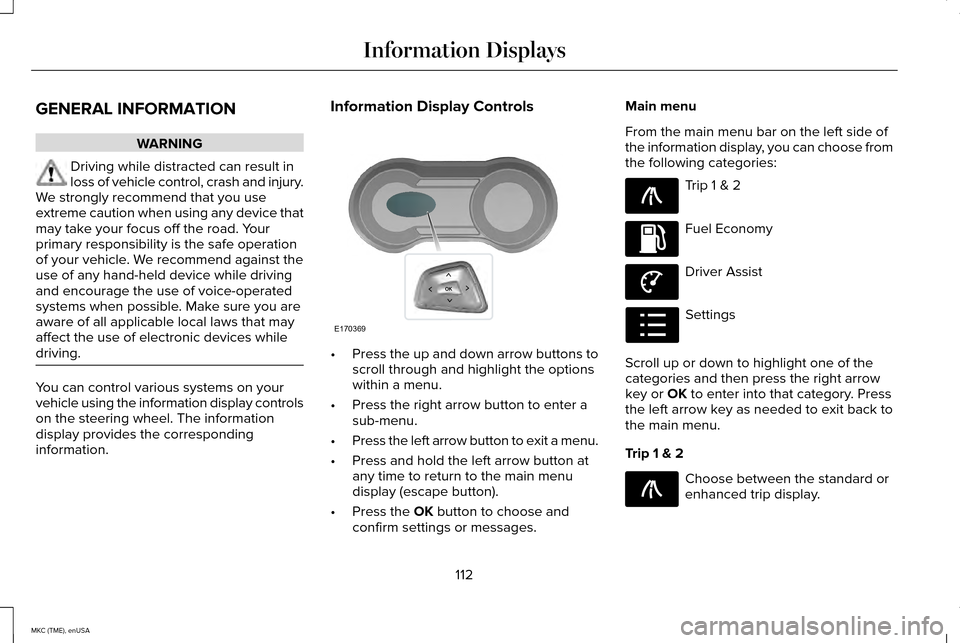
information. Information Display Controls
•
Press the up and down arrow buttons to
scroll through and highlight the options
within a menu.
• Press the right arrow button to enter a
sub-menu.
• Press the left arrow button to exit a menu.
• Press and hold the left arrow button at
any time to return to the main menu
display (escape button).
• Press the OK button to choose and
confirm settings or messages. Main menu
From the main menu bar on the left side of
the information display, you can choose from
the following categories:
Trip 1 & 2
Fuel Economy
Driver Assist
Settings
Scroll up or down to highlight one of the
categories and then press the right arrow
key or
OK to enter into that category. Press
the left arrow key as needed to exit back to
the main menu.
Trip 1 & 2 Choose between the standard or
enhanced trip display.
112
MKC (TME), enUSA Information DisplaysE170369 E138660 E144640 E144639 E100023 E138660
Page 119 of 490
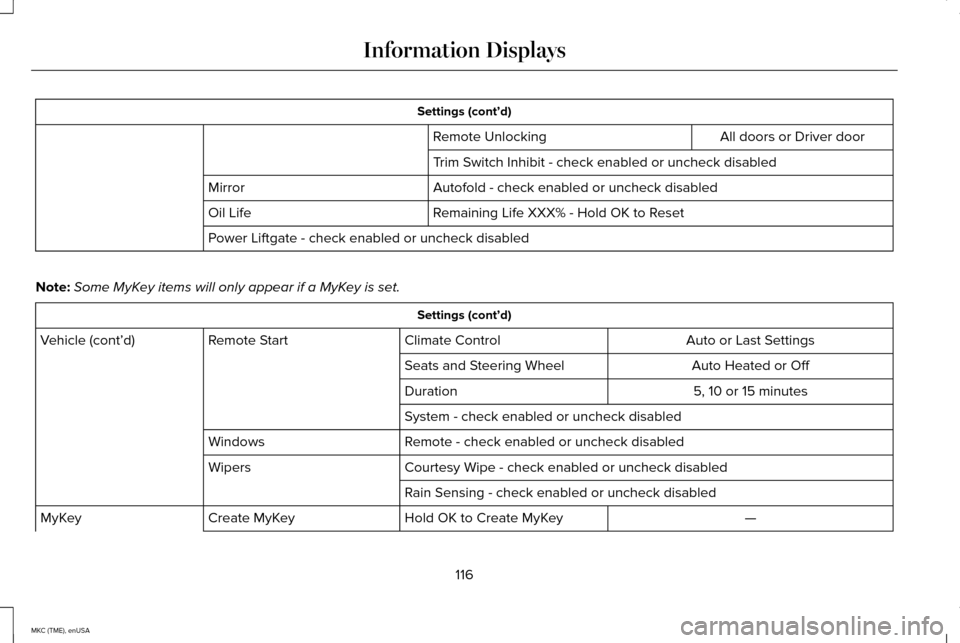
Settings (cont’d)
All doors or Driver door
Remote Unlocking
Trim Switch Inhibit - check enabled or uncheck disabled
Autofold - check enabled or uncheck disabled
Mirror
Remaining Life XXX% - Hold OK to Reset
Oil Life
Power Liftgate - check enabled or uncheck disabled
Note: Some MyKey items will only appear if a MyKey is set. Settings (cont’d)
Auto or Last Settings
Climate Control
Remote Start
Vehicle (cont’d)
Auto Heated or Off
Seats and Steering Wheel
5, 10 or 15 minutes
Duration
System - check enabled or uncheck disabled
Remote - check enabled or uncheck disabled
Windows
Courtesy Wipe - check enabled or uncheck disabled
Wipers
Rain Sensing - check enabled or uncheck disabled —
Hold OK to Create MyKey
Create MyKey
MyKey
116
MKC (TME), enUSA Information Displays
Page 123 of 490
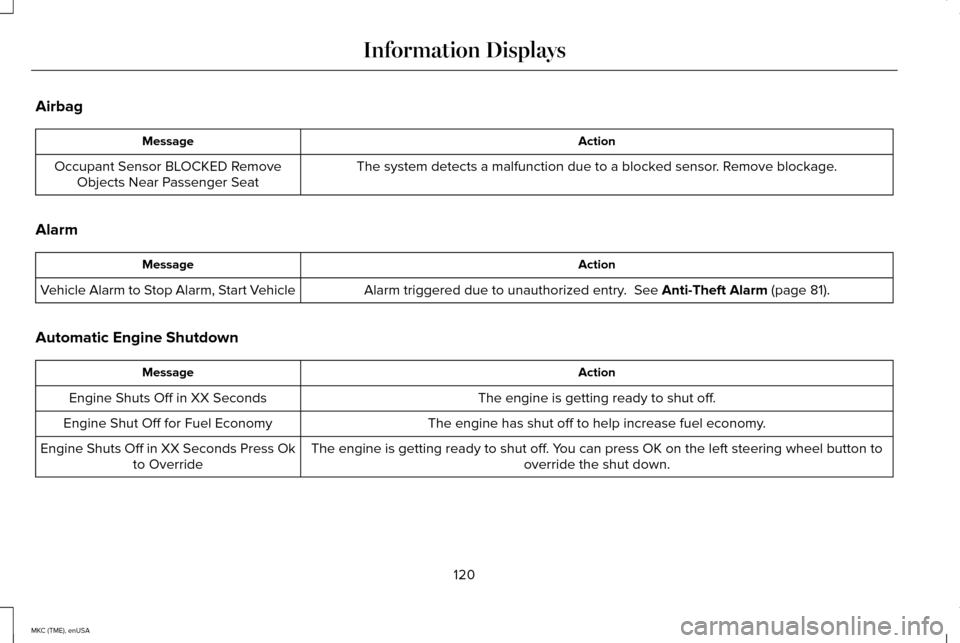
Airbag
Action
Message
The system detects a malfunction due to a blocked sensor. Remove blockage.
Occupant Sensor BLOCKED Remove
Objects Near Passenger Seat
Alarm Action
Message
Alarm triggered due to unauthorized entry. See Anti-Theft Alarm (page 81).
Vehicle Alarm to Stop Alarm, Start Vehicle
Automatic Engine Shutdown Action
Message
The engine is getting ready to shut off.
Engine Shuts Off in XX Seconds
The engine has shut off to help increase fuel economy.
Engine Shut Off for Fuel Economy
The engine is getting ready to shut off. You can press OK on the left steering wheel button tooverride the shut down.
Engine Shuts Off in XX Seconds Press Ok
to Override
120
MKC (TME), enUSA Information Displays
Page 129 of 490
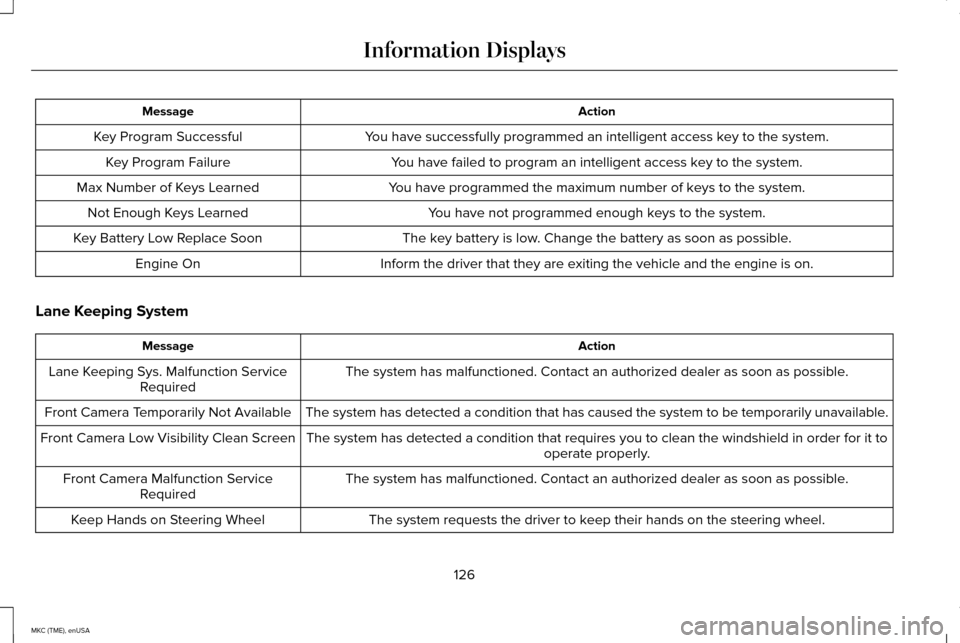
Action
Message
You have successfully programmed an intelligent access key to the system.
Key Program Successful
You have failed to program an intelligent access key to the system.
Key Program Failure
You have programmed the maximum number of keys to the system.
Max Number of Keys Learned
You have not programmed enough keys to the system.
Not Enough Keys Learned
The key battery is low. Change the battery as soon as possible.
Key Battery Low Replace Soon
Inform the driver that they are exiting the vehicle and the engine is on\
.
Engine On
Lane Keeping System Action
Message
The system has malfunctioned. Contact an authorized dealer as soon as po\
ssible.
Lane Keeping Sys. Malfunction Service
Required
The system has detected a condition that has caused the system to be tem\
porarily unavailable.
Front Camera Temporarily Not Available
The system has detected a condition that requires you to clean the winds\
hield in order for it tooperate properly.
Front Camera Low Visibility Clean Screen
The system has malfunctioned. Contact an authorized dealer as soon as po\
ssible.
Front Camera Malfunction Service
Required
The system requests the driver to keep their hands on the steering wheel.
Keep Hands on Steering Wheel
126
MKC (TME), enUSA Information Displays
Page 143 of 490
CABIN AIR FILTER
Your vehicle is equipped with a cabin air
filter. It is located inside the instrument panel
and to the left of the glove box.
The particulate filtration system reduces the
concentration of airborne particles such as
dust, spores and pollen in the air supplied to
the interior of your vehicle.
Note:
Make sure the cabin air filter is in
place at all times. Running the system
without a filter in place could result in
degradation or damage to the system.
The particulate filtration system gives you
and your passengers the following benefits:
• It improves your driving comfort by
reducing particle concentration.
• It improves the interior compartment
cleanliness.
• It protects the climate control
components from particle deposits.
Replace the filter at regular intervals. See
Scheduled Maintenance (page 451). For additional cabin air filter information, or
to replace the filter, see an authorized dealer.
REMOTE START
The remote start feature allows you to
pre-condition the interior of your vehicle. The
climate control system works to achieve
comfort according to your previous settings.
Note:
You cannot adjust the system during
remote start operation.
Turn the ignition on to return the system to
its previous settings. You can now make
adjustments normally, but you need to turn
certain vehicle-dependent features back on,
such as:
• Heated seats.
• Cooled seats.
• Heated steering wheel.
• Heated mirrors.
• Heated rear window. You can adjust the default remote start
settings using the information display
controls.
See Information Displays (page
112).
Automatic Settings
In hot weather, the system is set to 72°F
(22°C). The cooled seats are set to high (if
available, and selected to AUTO in the
information display).
In moderate weather, the system either heats
or cools (based on previous settings). The
rear defroster, heated mirrors and heated
seats do not automatically switch on.
In cold weather, the system is set to 72°F
(22°C). The heated seats are set to high (if
available, and selected to AUTO in the
information display). The rear defroster and
heated mirrors automatically switch on.
140
MKC (TME), enUSA Climate Control
Page 144 of 490
SITTING IN THE CORRECT
POSITION
WARNINGS
Sitting improperly, out of position or
with the seat back reclined too far can
take weight off the seat cushion and affect
the decision of the passenger sensing
system, resulting in serious injury or death
in the event of a crash. Always sit upright
against your seat back, with your feet on the
floor. Do not recline the seat back as this can
cause the occupant to slide under the
safety belt, resulting in serious injury in the
event of a crash. Do not place objects higher than the
seat back to reduce the risk of serious
injury in the event of a crash or during heavy
braking. When you use them properly, the seat, head
restraint, safety belt and air bags will provide
optimum protection in the event of a crash.
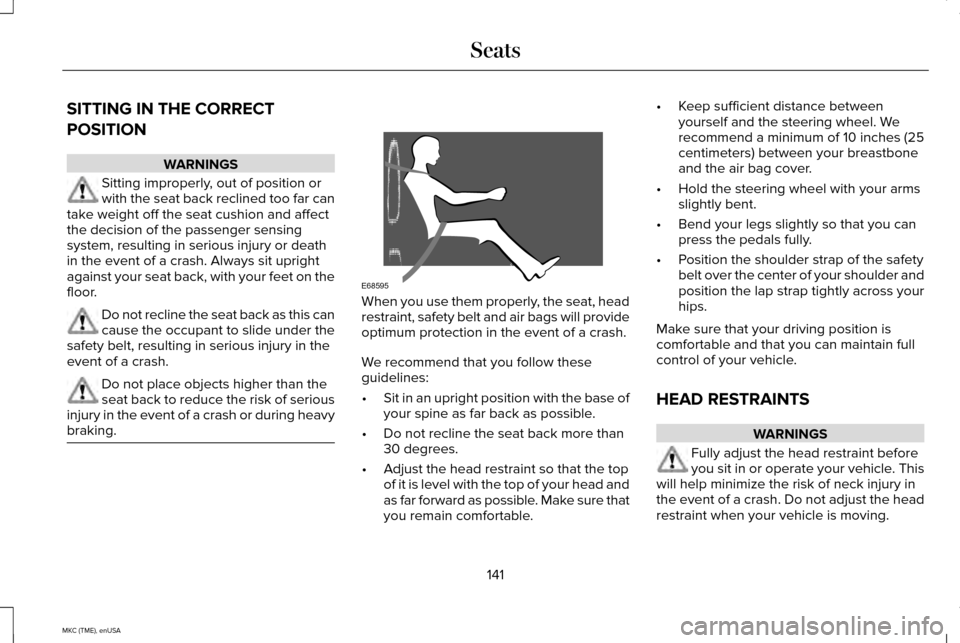
We recommend that you follow these
guidelines:
•
Sit in an upright position with the base of
your spine as far back as possible.
• Do not recline the seat back more than
30 degrees.
• Adjust the head restraint so that the top
of it is level with the top of your head and
as far forward as possible. Make sure that
you remain comfortable. •
Keep sufficient distance between
yourself and the steering wheel. We
recommend a minimum of 10 inches (25
centimeters) between your breastbone
and the air bag cover.
• Hold the steering wheel with your arms
slightly bent.
• Bend your legs slightly so that you can
press the pedals fully.
• Position the shoulder strap of the safety
belt over the center of your shoulder and
position the lap strap tightly across your
hips.
Make sure that your driving position is
comfortable and that you can maintain full
control of your vehicle.
HEAD RESTRAINTS WARNINGS
Fully adjust the head restraint before
you sit in or operate your vehicle. This
will help minimize the risk of neck injury in
the event of a crash. Do not adjust the head
restraint when your vehicle is moving.
141
MKC (TME), enUSA SeatsE68595
Page 176 of 490
The message Stay in Neutral mode
engaged will appear in your information
display screen when your vehicle has
entered Stay in Neutral mode.
Note: During this mode the
N button will
flash continuously and your instrument
cluster will display N as the selected gear.
Exiting Stay in Neutral mode
To disable Stay in Neutral mode select
another gear. See the
Putting the Vehicle
in Gear for instructions on how to do this.
Entering a Carwash
Note: Always put your vehicle in Stay in
Neutral mode when entering an automatic
car wash. Failure to do this could result in
vehicle damage not covered by warranty.
Drive (D)
The normal driving position for the best fuel
economy. Sport (S)
Putting the vehicle in sport (S):
•
Provides additional engine braking and
extends lower gear operation to enhance
performance for uphill climbs, hilly terrain
or mountainous areas. This will increase
engine RPM during engine braking
• Provides additional lower gear operation
through the automatic transmission shift
strategy
• Provides gear selection more quickly and
at higher engine speeds
SelectShift Automatic ™ Transmission
Your SelectShift Automatic transmission
gives you the ability to change gears
manually.
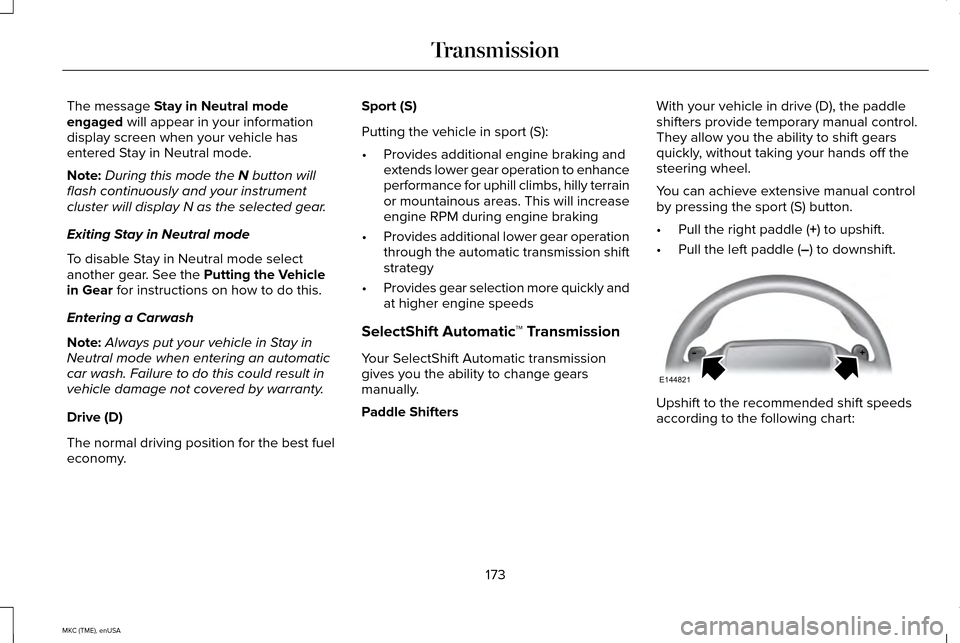
Paddle Shifters With your vehicle in drive (D), the paddle
shifters provide temporary manual control.
They allow you the ability to shift gears
quickly, without taking your hands off the
steering wheel.
You can achieve extensive manual control
by pressing the sport (S) button.
•
Pull the right paddle (
+) to upshift.
• Pull the left paddle (
–) to downshift. Upshift to the recommended shift speeds
according to the following chart:
173
MKC (TME), enUSA TransmissionE144821
Page 181 of 490
When driving at slow speeds off road under
high load conditions, use a low gear when
possible. Low gear operation will maximize
the engine and transmission cooling
capability.
Under severe operating conditions, the air
conditioning may cycle on and off to prevent
the engine from overheating.
Basic Operating Principles
•
Drive slower in strong crosswinds that
can affect the normal steering
characteristics of your vehicle.
• When driving your vehicle on surfaces
made slippery by loose sand, water,
gravel, snow or ice proceed with care.
If Your Vehicle leaves the Road
If your vehicle leaves the road, reduce your
vehicle speed and avoid severe braking.
Once you have reduced your vehicle speed,
ease your vehicle back onto the road. Do
not turn the steering wheel sharply while
returning your vehicle to the road. It may be safer to stay on the shoulder of the
road and slow down gradually before
returning to the road. You may lose control
if you do not slow down or if you turn the
steering wheel too sharply or abruptly.
It may be less risky to strike small objects,
such as freeway reflectors, with minor
damage to your vehicle rather than attempt
an abrupt dangerous direction change.
Remember, your primary concern should be
your safety and the safety of others.
Emergency Maneuvers
If you must make a sudden emergency
direction change, avoid over-driving your
vehicle. Turn the steering wheel only as
rapidly and as far as you need to avoid the
emergency. Apply smooth pressure to the
accelerator pedal or brake pedal as needed.
Avoid abrupt steering, acceleration and
braking changes. Abrupt changes could
increase the risk of vehicle roll over, loss of
vehicle control and personal injury. Use all
available road surface to bring your vehicle
to under control.In the event of an emergency stop, avoid
skidding and do not attempt any sharp
steering wheel movements.
Your vehicle responds differently to steering,
accelerating and braking on different road
surfaces when changing from one type of
surface to another.
Sand
When driving over sand, avoid driving at
excessive speeds. This will cause your
vehicle momentum to work against you. Your
vehicle could become stuck that may require
assistance from another vehicle. Remember,
if you proceed with caution you may be able
to back out the way you came.
Do not drive in deep sand for an extended
period. This will cause the all-wheel drive
system to overheat. You will see a warning
message in the information display. See
Information Messages (page 118).
178
MKC (TME), enUSA All-Wheel Drive
(If Equipped)
Page 183 of 490
Start climbing a steep slope or hill in a low
gear rather than downshifting to a low gear
from a high gear after you have started your
climb. This reduces strain on the engine and
the possibility of stalling.
If your vehicle stalls, do not try to turn
around. Turning could cause the vehicle to
roll over. Instead, reverse back to a safe
location.
Apply just enough power to the wheels to
climb the hill. Too much power will cause the
tires to slip, spin or lose traction, and you
could lose control of your vehicle. To avoid brake overheating, come down a
hill in the same gear you used to go up the
hill. Do not come down in neutral. Move the
transmission selector lever to a lower gear.
When descending a steep hill, avoid sudden
hard braking to keep the front wheels rolling
and to maintain your vehicle's steering.
Your vehicle has anti-lock brakes. Apply the
brakes steadily. Do not pump the brake
pedal.
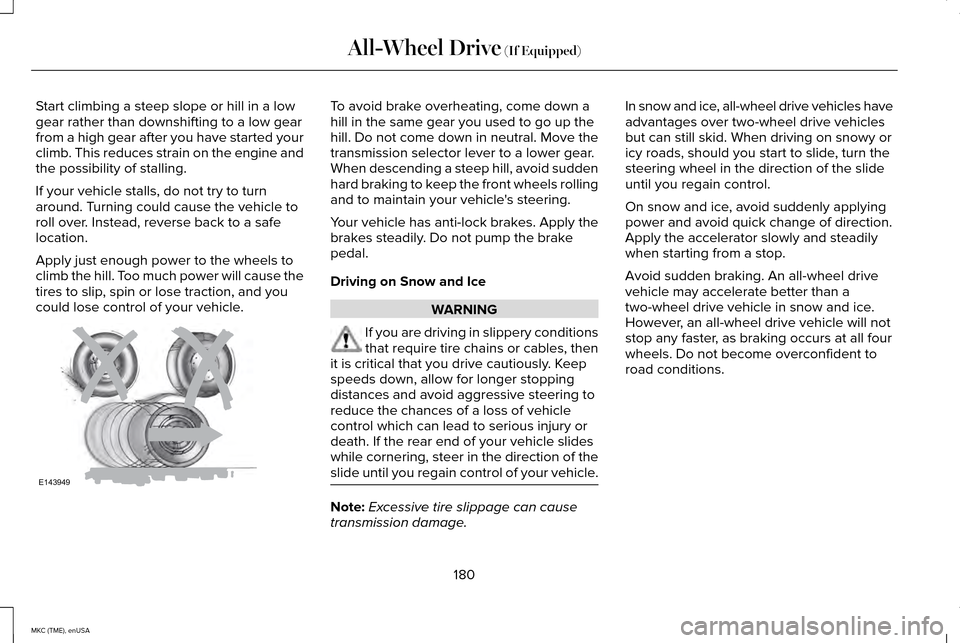
Driving on Snow and Ice
WARNING
If you are driving in slippery conditions
that require tire chains or cables, then
it is critical that you drive cautiously. Keep
speeds down, allow for longer stopping
distances and avoid aggressive steering to
reduce the chances of a loss of vehicle
control which can lead to serious injury or
death. If the rear end of your vehicle slides
while cornering, steer in the direction of the
slide until you regain control of your vehicle. Note:
Excessive tire slippage can cause
transmission damage. In snow and ice, all-wheel drive vehicles have
advantages over two-wheel drive vehicles
but can still skid. When driving on snowy or
icy roads, should you start to slide, turn the
steering wheel in the direction of the slide
until you regain control.
On snow and ice, avoid suddenly applying
power and avoid quick change of direction.
Apply the accelerator slowly and steadily
when starting from a stop.
Avoid sudden braking. An all-wheel drive
vehicle may accelerate better than a
two-wheel drive vehicle in snow and ice.
However, an all-wheel drive vehicle will not
stop any faster, as braking occurs at all four
wheels. Do not become overconfident to
road conditions.
180
MKC (TME), enUSA All-Wheel Drive (If Equipped)E143949