parking brake LINCOLN MKC 2015 Owner's Manual
[x] Cancel search | Manufacturer: LINCOLN, Model Year: 2015, Model line: MKC, Model: LINCOLN MKC 2015Pages: 490, PDF Size: 4.74 MB
Page 199 of 490
•
Driving above 6 mph (10 km/h) during
automatic steering.
• Turning off the traction control system.
Certain vehicle conditions can also
deactivate the system, such as:
• Traction control has activated on a
slippery or loose surface.
• There is an anti-lock brake system
activation or failure.
• Something touches the steering wheel.
If a problem occurs with the system, a
warning message is displayed, followed by
a tone. Occasional system messages may
occur in normal operation. For recurring or
frequent system faults, contact an authorized
dealer to have your vehicle serviced. Park Out Assist (If Equipped) WARNING
Designed to be a supplementary park
aid, this system may not work in all
conditions. This system cannot replace the
driver’ s attention and judgment. The driver
is responsible for avoiding hazards and
maintaining a safe distance and speed, even
when the system is in use. Note:
The driver is always responsible for
controlling the vehicle, supervising the
system and intervening if required.
Note: The sensors may not detect objects
in heavy rain or other conditions that cause
disruptive reflections.
Note: The sensors may not detect objects
with surfaces that absorb ultrasonic waves.
The system determines the clearance to the
front and rear of your vehicle and
automatically steers your vehicle out of a
parallel parking space (hands-free) while you
control the accelerator, gearshift and brakes.
The system visually and audibly instructs you
to enter traffic. The system may not function correctly if
something passes between the front bumper
and the parking space (a pedestrian or
cyclist) or if the edge of the neighboring
parked vehicle is high off the ground (for
example, a bus, tow truck or flatbed truck).
Do not use the system if:
•
You have attached a foreign object (bike
rack or trailer) to the front or rear of your
vehicle or attached close to the sensors.
• You have attached an overhanging
object (surfboard) to the roof.
• The front bumper or side sensors are
damaged or obstructed by a foreign
object (front bumper cover).
• A mini-spare tire is in use.
Using Park Out Assist While your vehicle is at rest in a
parallel parking space, press the
button located on the right side of
the center stack.
196
MKC (TME), enUSA Parking AidsE146186
Page 200 of 490
The touchscreen displays a message
requesting an indication of direction. Use the
direction indicator to signal which side of
your vehicle you want to exit the parking
space.
Note:
If there is no vehicle in front of you,
the Park Out Assist feature cannot be
activated.
Automatic Steering out of a Parking
Space
The system determines a suitable clearance
to the front and rear of your vehicle. The
touchscreen displays a message to shift to
Reverse (R), Drive (D) or Sport (S). When you shift the transmission into R
(Reverse), D (Drive) or S (Sport), with your
hands off the wheel (and nothing obstructing
its movement), your vehicle steers itself to
exit the space. If there is not sufficient
clearance to the vehicle in front of you, the
system displays instructions to move your
vehicle back and forth in the space. Parking
Aid is enabled to avoid contact to the
neighboring vehicles.
When automatic steering is finished, the
touchscreen displays a message informing
you to take control and a tone sounds,
indicating the completion of the Park Out
Assist process.
Note:
The driver is responsible for checking
traffic conditions at all times. Deactivating the Park Out Assist
Feature
Manually deactivate the system by:
•
Pressing the active park assist button.
• Grabbing the steering wheel.
• Driving above 6 mph (10 km/h) during
automatic steering.
• Turning off the traction control system.
Certain vehicle conditions can also
deactivate the system, such as:
• Traction control has activated on a
slippery or loose surface.
• There is an anti-lock brake system
activation or failure.
• Something touches the steering wheel.
If a problem occurs with the system, a
warning message is displayed, followed by
a tone. Occasional system messages may
occur in normal operation. For recurring or
frequent system faults, contact an authorized
dealer to have your vehicle serviced.
197
MKC (TME), enUSA Parking Aids
Page 245 of 490
Trailer Lamps
WARNING
Never connect any trailer lamp
wiring to the vehicle's tail lamp
wiring; this may damage the electrical
system resulting in fire. Contact your
authorized dealer as soon as possible
for assistance in proper trailer tow wiring
installation. Additional electrical
equipment may be required. Trailer lamps are required on most
towed vehicles. Make sure all running
lights, brake lights, turn signals and
hazard lights are working.
Before Towing a Trailer
Practice turning, stopping and backing
up to get the feel of your vehicle-trailer
combination before starting on a trip.
When turning, make wider turns so the
trailer wheels clear curbs and other
obstacles. When Towing a Trailer
•
Do not drive faster than 70 mph (113
km/h) during the first 500 miles (800
kilometers).
• Do not make full-throttle starts.
• Check your hitch, electrical
connections and trailer wheel lug
nuts thoroughly after you have
traveled 50 miles (80 kilometers).
• When stopped in congested or heavy
traffic during hot weather, place the
gearshift in position P to aid engine
and transmission cooling and to help
A/C performance.
• Turn off the speed control with heavy
loads or in hilly terrain. The speed
control may turn off automatically
when you are towing on long, steep
grades.
• Shift to a lower gear when driving
down a long or steep hill. Do not
apply the brakes continuously, as
they may overheat and become less
effective. •
If your transmission is equipped with
a Grade Assist or Tow/Haul feature,
use this feature when towing. This
provides engine braking and helps
eliminate excessive transmission
shifting for optimum fuel economy
and transmission cooling.
• Allow more distance for stopping
with a trailer attached. Anticipate
stops and brake gradually.
• Avoid parking on a grade. However,
if you must park on a grade:
1. Turn the steering wheel to point your
vehicle tires away from traffic flow.
2. Set your vehicle parking brake.
3. Place the automatic transmission in position
P.
4. Place wheel chocks in front and back
of the trailer wheels. (Chocks not
included with vehicle.)
Launching or Retrieving a Boat or
Personal Watercraft (PWC)
Note: Disconnect the wiring to the trailer
before
backing the trailer into the water.
242
MKC (TME), enUSA Towing
Page 281 of 490
GENERAL INFORMATION
Have your vehicle serviced regularly to help
maintain its roadworthiness and resale value.
There is a large network of Ford authorized
dealers that are there to help you with their
professional servicing expertise. We believe
that their specially trained technicians are
best qualified to service your vehicle properly
and expertly. They are supported by a wide
range of highly specialized tools developed
specifically for servicing your vehicle.
To help you service your vehicle, we provide
scheduled maintenance information which
makes tracking routine service easy. See
Scheduled Maintenance (page 451).
If your vehicle requires professional service,
your authorized dealer can provide the
necessary parts and service. Check your
warranty information to find out which parts
and services are covered.
Use only recommended fuels, lubricants,
fluids and service parts conforming to
specifications. Motorcraft® parts are
designed and built to provide the best
performance in your vehicle. Precautions
•
Do not work on a hot engine.
• Make sure that nothing gets caught in
moving parts.
• Do not work on a vehicle with the engine
running in an enclosed space, unless you
are sure you have enough ventilation.
• Keep all open flames and other burning
material (such as cigarettes) away from
the battery and all fuel related parts.
Working with the Engine Off
1. Set the parking brake and shift to
P
(Park).
2. Turn off the engine and remove the key (if equipped).
3. Block the wheels. Working with the Engine On WARNING
To reduce the risk of vehicle damage
and/or personal burn injuries, do not
start your engine with the air cleaner
removed and do not remove it while the
engine is running. 1. Set the parking brake and shift to
P
(Park).
2. Block the wheels
278
MKC (TME), enUSA Maintenance
Page 293 of 490
Some other computer settings, like the clock
and radio station presets, are also maintained
in memory by power from the low voltage
battery. When a technician disconnects and
connects the low voltage battery, these
settings are erased.
Note:
Until you switch the ignition to the on
position, you will receive a message in your
information display stating that your vehicle
is not in park.
Complete the following procedure in order
to restore the settings:
1. With the vehicle at a complete stop, set the parking brake.
2. Shift the transmission into P.
3. Turn off all accessories.
4. Step on the brake pedal and start the vehicle. 5. Run the engine until it reaches normal
operating temperature. While the engine
is warming up, complete the following:
Reset the clock. See Audio System
(page 345). Reset the power windows
bounce-back feature. See Windows and
Mirrors (page 97). Reset the radio station
presets.
See Audio System (page 345).
6. Allow the engine to idle for at least one minute. If the engine turns off, step on
the accelerator to start the engine.
7. While the engine is running, step on the brake pedal and shift the transmission to
N.
8. Allow the engine to run for at least one minute by pressing on the accelerator
pedal.
9. Drive your vehicle at least 10 miles (16 kilometers) to completely relearn the idle
and fuel trim strategy.
Note: Certain features may not operate if
the Battery Monitor System is not reset with
a scan tool following a jump start or battery
replacement. Normal electrical accessory
operation should resume after your vehicle
is left undisturbed for 8 hours. Note:
If you do not allow the engine to
relearn the idle and fuel trim strategy, the
idle quality of your vehicle may be adversely
affected until the engine computer
eventually relearns the idle trim and fuel trim
strategy.
Note: Always dispose of automotive
batteries in a responsible manner. Follow
your local authorized standards for disposal.
Call your local authorized recycling center
to find out more about recycling automotive
batteries.
Note: It is recommended that the negative
battery cable terminal be disconnected from
the battery if you plan to store your vehicle
for an extended period of time.
290
MKC (TME), enUSA Maintenance
Page 308 of 490
REPAIRING MINOR PAINT
DAMAGE
Authorized dealers have touch-up paint to
match your vehicle
’s color. Your vehicle color
code is printed on a sticker on the front,
left-hand side door jamb. Take your color
code to your authorized dealer to make sure
you get the correct color.
Before repairing minor paint damage, use a
cleaner such as Motorcraft Bug and Tar
Remover to remove particles such as bird
droppings, tree sap, insect deposits, tar
spots, road salt and industrial fallout.
Always read the instructions before using
cleaning products.
CLEANING THE ALLOY WHEELS (If
Equipped)
Note: Do not apply a cleaning chemical to
warm or hot wheel rims and covers.
Note: Some automatic car washes may
cause damage to the finish on your wheel
rims and covers. Note:
Industrial-strength or heavy-duty
cleaners in combination with brush agitation
to remove brake dust and dirt, could wear
away the clear coat finish over a period time.
Note: Do not use hydrofluoric acid-based or
high caustic-based wheel cleaners, steel
wool, fuels or strong household detergents.
Note: If you intend parking your vehicle for
an extended period after cleaning the
wheels with a wheel cleaner, drive your
vehicle for a few minutes before doing so.
This will reduce the risk of increased
corrosion of the brake discs.
Alloy wheels and wheel covers are coated
with a clear coat paint finish. To maintain
their condition we recommend that you:
• Clean the wheels weekly using
Motorcraft Wheel and Tire Cleaner. Apply
using manufacturer's instructions.
• Use a sponge to remove heavy deposits
of dirt and brake dust accumulation. •
Rinse thoroughly with a strong stream of
water when you have completed the
cleaning process.
• To remove tar and grease, use Motorcraft
Bug and Tar Remover.
VEHICLE STORAGE
If you plan on storing your vehicle for an
extended period of time (30 days or more),
read the following maintenance
recommendations to make sure your vehicle
stays in good operating condition.
All motor vehicles and their components
were engineered and tested for reliable,
regular driving. Long term storage under
various conditions may lead to component
degradation or failure unless specific
precautions are taken to preserve the
components.
305
MKC (TME), enUSA Vehicle Care
Page 309 of 490
General
•
Store all vehicles in a dry, ventilated
place.
• Protect from sunlight, if possible.
• If vehicles are stored outside, they
require regular maintenance to protect
against rust and damage.
Body
• Wash your vehicle thoroughly to remove
dirt, grease, oil, tar or mud from exterior
surfaces, rear-wheel housing and
underside of front fenders.
• Periodically wash your vehicle stored in
exposed locations.
• Touch-up exposed or primed metal to
prevent rust.
• Cover chrome and stainless steel parts
with a thick coat of auto wax to prevent
discoloration. Re-wax as necessary when
your vehicle is washed.
• Lubricate all hood, door and trunk lid
hinges, and latches with a light grade oil. •
Cover interior trim to prevent fading.
• Keep all rubber parts free from oil and
solvents.
Engine
• The engine oil and filter should be
changed prior to storage, as used engine
oil contain contaminates that may cause
engine damage.
• Start the engine every 15 days. Run at
fast idle until it reaches normal operating
temperature
• With your foot on the brake, shift through
all the gears while the engine is running.
Fuel system
• Fill the fuel tank with high-quality fuel
until the first automatic shutoff of the fuel
pump nozzle. Cooling system
•
Protect against freezing temperatures.
• When removing your vehicle from
storage, check coolant fluid level.
Confirm there are no cooling system
leaks, and fluid is at the recommended
level.
Battery
• Check and recharge as necessary. Keep
connections clean.
• If storing your vehicle for more than 30
days without recharging the battery, it
may be advisable to disconnect the
battery cables to ensure battery charge
is maintained for quick starting.
Note: If battery cables are disconnected, it
will be necessary to reset memory features.
Brakes
• Make sure brakes and parking brake are
fully released.
Tires
• Maintain recommended air pressure.
306
MKC (TME), enUSA Vehicle Care
Page 333 of 490
•
Wet weather driving capability.
• All-wheel driving capability
When driving with the full-size dissimilar
spare wheel and tire assembly additional
caution should be given to:
• Towing a trailer.
• Driving vehicles equipped with a camper
body.
• Driving vehicles with a load on the cargo
rack.
Drive cautiously when using a full-size
dissimilar spare wheel and tire assembly and
seek service as soon as possible.
Tire Change Procedure WARNINGS
When one of the front wheels is off the
ground, the transmission alone will not
prevent your vehicle from moving or slipping
off the jack, even if your vehicle is in park
(P). WARNINGS
To help prevent your vehicle from
moving when you change a tire, be
sure the parking brake is set, then block (in
both directions) the wheel that is diagonally
opposite (other side and end of your vehicle)
to the tire being changed. If your vehicle slips off the jack, you or
someone else could be seriously
injured. Do not attempt to change a tire on the
side of the vehicle close to moving
traffic. Pull far enough off the road to avoid
the danger of being hit when operating the
jack or changing the wheel. To lessen the risk of personal injury,
do not put any part of your body under
your vehicle while changing a tire. Do not
start the engine when your vehicle is on the
jack. The jack is only meant for changing the
tire. Note:
Passengers should not remain in your
vehicle when the vehicle is being jacked. 1. Park on a level surface, set the parking
brake and activate the hazard flashers.
2. Place the transmission in park (P) and
turn the engine off.
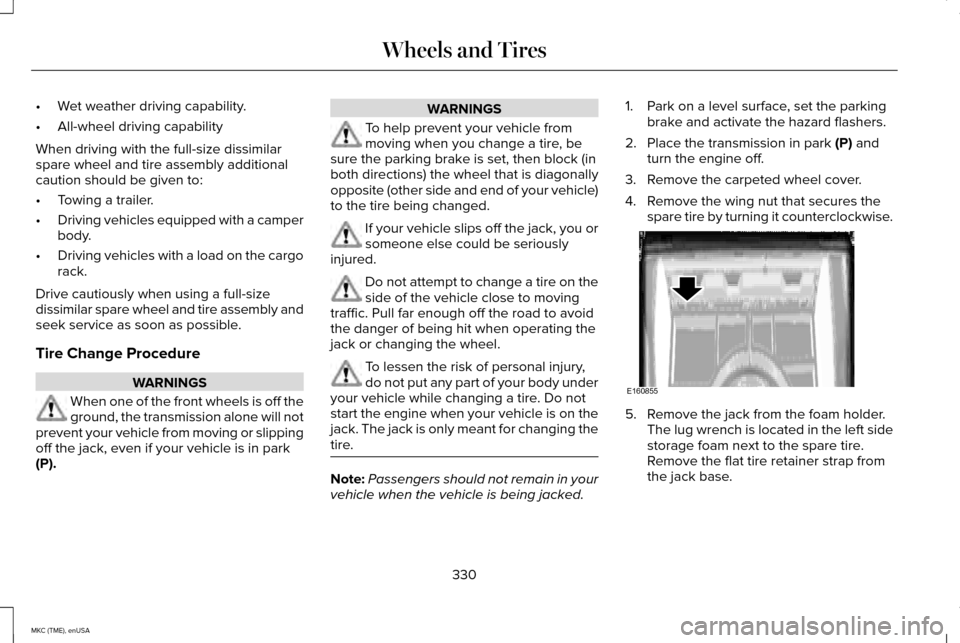
3. Remove the carpeted wheel cover.
4. Remove the wing nut that secures the spare tire by turning it counterclockwise. 5. Remove the jack from the foam holder.
The lug wrench is located in the left side
storage foam next to the spare tire.
Remove the flat tire retainer strap from
the jack base.
330
MKC (TME), enUSA Wheels and TiresE160855
Page 398 of 490
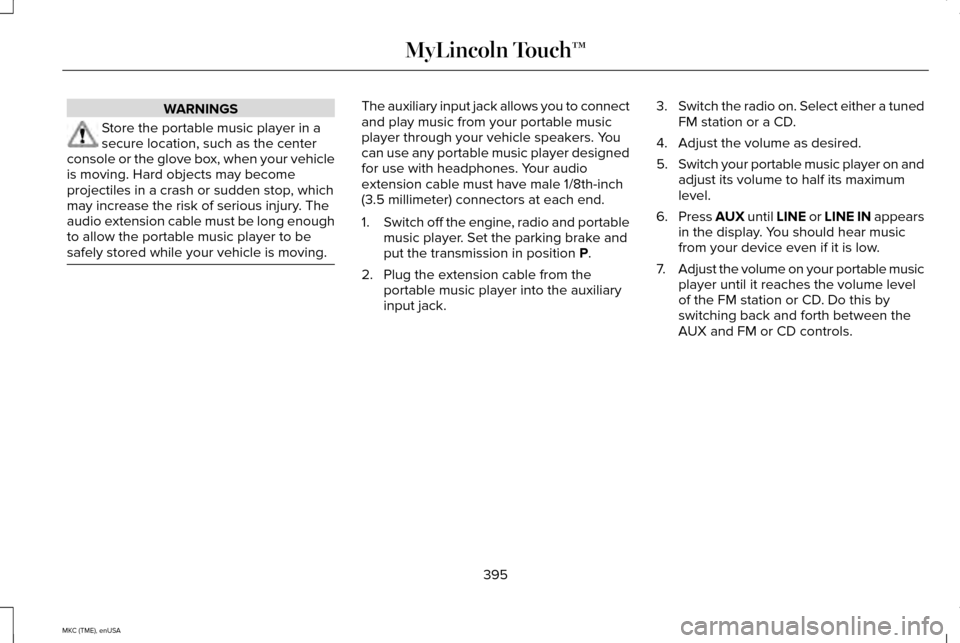
WARNINGS
Store the portable music player in a
secure location, such as the center
console or the glove box, when your vehicle
is moving. Hard objects may become
projectiles in a crash or sudden stop, which
may increase the risk of serious injury. The
audio extension cable must be long enough
to allow the portable music player to be
safely stored while your vehicle is moving. The auxiliary input jack allows you to connect
and play music from your portable music
player through your vehicle speakers. You
can use any portable music player designed
for use with headphones. Your audio
extension cable must have male 1/8th-inch
(3.5 millimeter) connectors at each end.
1.
Switch off the engine, radio and portable
music player. Set the parking brake and
put the transmission in position P.
2. Plug the extension cable from the portable music player into the auxiliary
input jack. 3.
Switch the radio on. Select either a tuned
FM station or a CD.
4. Adjust the volume as desired.
5. Switch your portable music player on and
adjust its volume to half its maximum
level.
6. Press
AUX until LINE or LINE IN appears
in the display. You should hear music
from your device even if it is low.
7. Adjust the volume on your portable music
player until it reaches the volume level
of the FM station or CD. Do this by
switching back and forth between the
AUX and FM or CD controls.
395
MKC (TME), enUSA MyLincoln Touch™
Page 456 of 490
Make sure to change your vehicle
’s oils and
fluids at the specified intervals or in
conjunction with a repair. Flushing is a viable
way to change fluid for many vehicle
sub-systems during scheduled maintenance. It is critical that systems are flushed only with
new fluid that is the same as that required
to fill and operate the system or using a
Ford-approved flushing chemical.
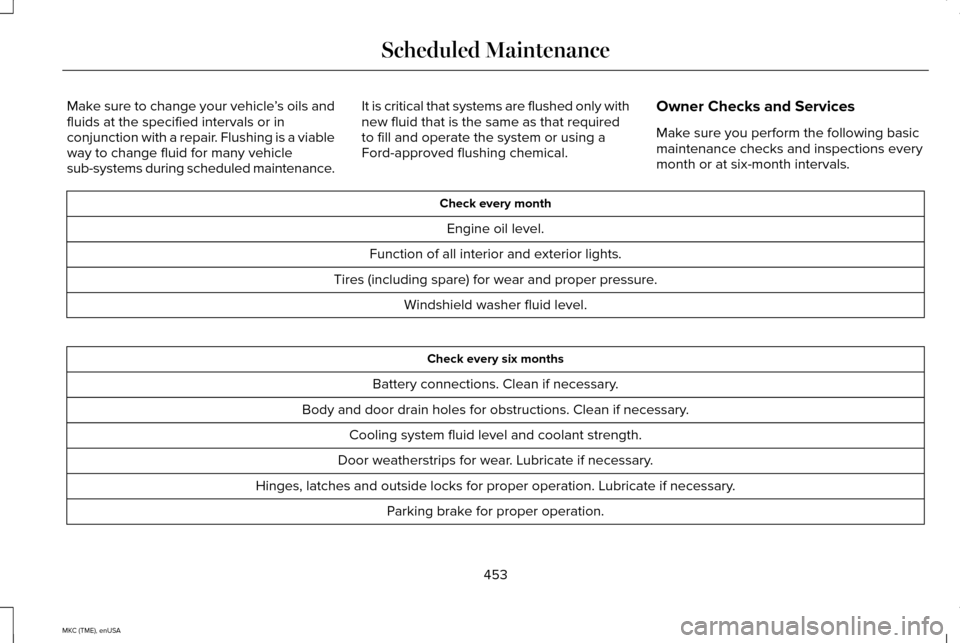
Owner Checks and Services
Make sure you perform the following basic
maintenance checks and inspections every
month or at six-month intervals. Check every month
Engine oil level.
Function of all interior and exterior lights.
Tires (including spare) for wear and proper pressure. Windshield washer fluid level. Check every six months
Battery connections. Clean if necessary.
Body and door drain holes for obstructions. Clean if necessary. Cooling system fluid level and coolant strength.
Door weatherstrips for wear. Lubricate if necessary.
Hinges, latches and outside locks for proper operation. Lubricate if necessary. Parking brake for proper operation.
453
MKC (TME), enUSA Scheduled Maintenance