transmission LINCOLN MKC 2015 Workshop Manual
[x] Cancel search | Manufacturer: LINCOLN, Model Year: 2015, Model line: MKC, Model: LINCOLN MKC 2015Pages: 490, PDF Size: 4.74 MB
Page 291 of 490
Have an authorized dealer check and change
the transmission fluid and filter at the correct
service interval. See Scheduled
Maintenance (page 451). Your transmission
does not consume fluid. However, the fluid
level should be checked if the transmission
is not working properly, (i.e., if the
transmission slips or shifts slowly) or if you
notice some sign of fluid leakage.
Do not use supplemental transmission fluid
additives, treatments or cleaning agents. The
use of these materials may affect
transmission operation and result in damage
to internal transmission components.
BRAKE FLUID CHECK
Fluid levels between the MIN and MAX lines
are within the normal operating range; there
is no need to add fluid. If the fluid levels are
outside of the normal operating range, the
performance of the system could be
compromised; seek service from your
authorized dealer immediately. POWER STEERING FLUID CHECK
Your vehicle is equipped with an electric
power steering (EPS) system. There is no
fluid reservoir to check or fill.
WASHER FLUID CHECK
WARNING
If you operate your vehicle in
temperatures below 40°F (5°C), use
washer fluid with antifreeze protection.
Failure to use washer fluid with antifreeze
protection in cold weather could result in
impaired windshield vision and increase the
risk of injury or accident. Note:
The front and rear washer systems
are supplied from the same reservoir.
Add fluid to fill the reservoir if the level is low.
Only use a washer fluid that meets Ford
specifications.
See Capacities and
Specifications (page 336). State or local regulations on volatile organic
compounds may restrict the use of methanol,
a common windshield washer antifreeze
additive. Washer fluids containing
non-methanol antifreeze agents should be
used only if they provide cold weather
protection without damaging the vehicle
’s
paint finish, wiper blades or washer system.
FUEL FILTER
Your vehicle is equipped with a lifetime fuel
filter that is integrated with the fuel tank.
Regular maintenance or replacement is not
needed.
CHANGING THE 12V BATTERY WARNINGS
Batteries normally produce explosive
gases which can cause personal injury.
Therefore, do not allow flames, sparks or
lighted substances to come near the battery.
When working near the battery, always shield
your face and protect your eyes. Always
provide proper ventilation.
288
MKC (TME), enUSA Maintenance
Page 293 of 490
Some other computer settings, like the clock
and radio station presets, are also maintained
in memory by power from the low voltage
battery. When a technician disconnects and
connects the low voltage battery, these
settings are erased.
Note:
Until you switch the ignition to the on
position, you will receive a message in your
information display stating that your vehicle
is not in park.
Complete the following procedure in order
to restore the settings:
1. With the vehicle at a complete stop, set the parking brake.
2. Shift the transmission into P.
3. Turn off all accessories.
4. Step on the brake pedal and start the vehicle. 5. Run the engine until it reaches normal
operating temperature. While the engine
is warming up, complete the following:
Reset the clock. See Audio System
(page 345). Reset the power windows
bounce-back feature. See Windows and
Mirrors (page 97). Reset the radio station
presets.
See Audio System (page 345).
6. Allow the engine to idle for at least one minute. If the engine turns off, step on
the accelerator to start the engine.
7. While the engine is running, step on the brake pedal and shift the transmission to
N.
8. Allow the engine to run for at least one minute by pressing on the accelerator
pedal.
9. Drive your vehicle at least 10 miles (16 kilometers) to completely relearn the idle
and fuel trim strategy.
Note: Certain features may not operate if
the Battery Monitor System is not reset with
a scan tool following a jump start or battery
replacement. Normal electrical accessory
operation should resume after your vehicle
is left undisturbed for 8 hours. Note:
If you do not allow the engine to
relearn the idle and fuel trim strategy, the
idle quality of your vehicle may be adversely
affected until the engine computer
eventually relearns the idle trim and fuel trim
strategy.
Note: Always dispose of automotive
batteries in a responsible manner. Follow
your local authorized standards for disposal.
Call your local authorized recycling center
to find out more about recycling automotive
batteries.
Note: It is recommended that the negative
battery cable terminal be disconnected from
the battery if you plan to store your vehicle
for an extended period of time.
290
MKC (TME), enUSA Maintenance
Page 333 of 490
•
Wet weather driving capability.
• All-wheel driving capability
When driving with the full-size dissimilar
spare wheel and tire assembly additional
caution should be given to:
• Towing a trailer.
• Driving vehicles equipped with a camper
body.
• Driving vehicles with a load on the cargo
rack.
Drive cautiously when using a full-size
dissimilar spare wheel and tire assembly and
seek service as soon as possible.
Tire Change Procedure WARNINGS
When one of the front wheels is off the
ground, the transmission alone will not
prevent your vehicle from moving or slipping
off the jack, even if your vehicle is in park
(P). WARNINGS
To help prevent your vehicle from
moving when you change a tire, be
sure the parking brake is set, then block (in
both directions) the wheel that is diagonally
opposite (other side and end of your vehicle)
to the tire being changed. If your vehicle slips off the jack, you or
someone else could be seriously
injured. Do not attempt to change a tire on the
side of the vehicle close to moving
traffic. Pull far enough off the road to avoid
the danger of being hit when operating the
jack or changing the wheel. To lessen the risk of personal injury,
do not put any part of your body under
your vehicle while changing a tire. Do not
start the engine when your vehicle is on the
jack. The jack is only meant for changing the
tire. Note:
Passengers should not remain in your
vehicle when the vehicle is being jacked. 1. Park on a level surface, set the parking
brake and activate the hazard flashers.
2. Place the transmission in park (P) and
turn the engine off.
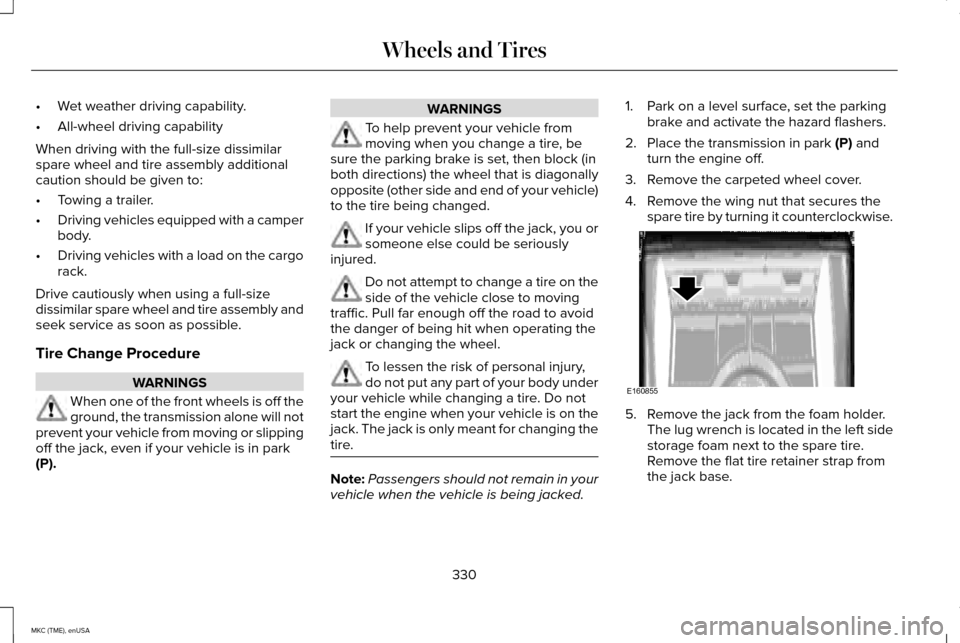
3. Remove the carpeted wheel cover.
4. Remove the wing nut that secures the spare tire by turning it counterclockwise. 5. Remove the jack from the foam holder.
The lug wrench is located in the left side
storage foam next to the spare tire.
Remove the flat tire retainer strap from
the jack base.
330
MKC (TME), enUSA Wheels and TiresE160855
Page 343 of 490
TRANSMISSION CODE
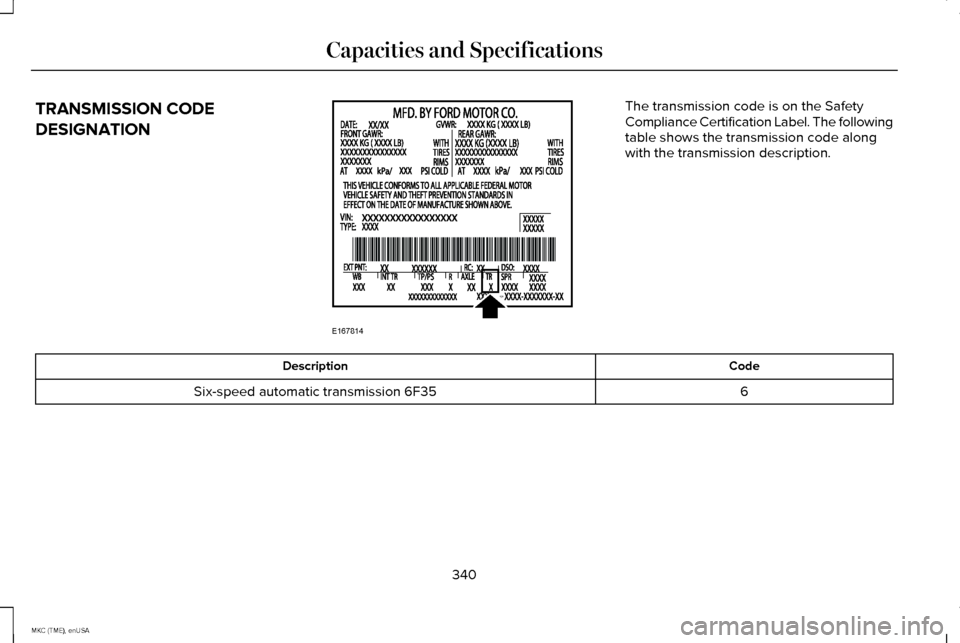
DESIGNATION The transmission code is on the Safety
Compliance Certification Label. The following
table shows the transmission code along
with the transmission description.
Code
Description
6
Six-speed automatic transmission 6F35
340
MKC (TME), enUSA Capacities and SpecificationsE167814
Page 344 of 490
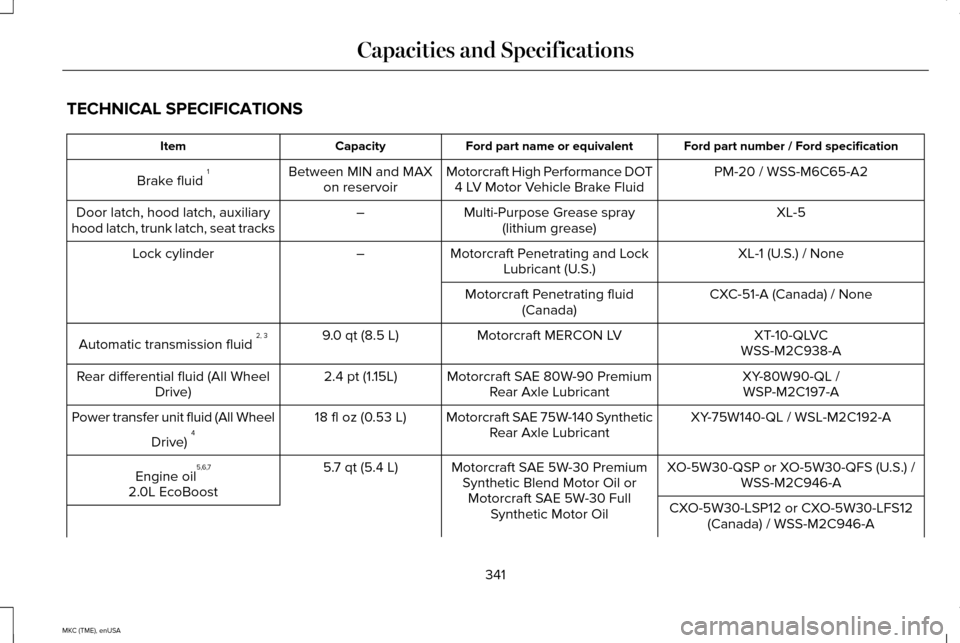
TECHNICAL SPECIFICATIONS
Ford part number / Ford specification
Ford part name or equivalent
Capacity
Item
PM-20 / WSS-M6C65-A2
Motorcraft High Performance DOT
4 LV Motor Vehicle Brake Fluid
Between MIN and MAX
on reservoir
Brake fluid 1
XL-5
Multi-Purpose Grease spray
(lithium grease)
–
Door latch, hood latch, auxiliary
hood latch, trunk latch, seat tracks
XL-1 (U.S.) / None
Motorcraft Penetrating and Lock
Lubricant (U.S.)
–
Lock cylinder
CXC-51-A (Canada) / None
Motorcraft Penetrating fluid
(Canada)
XT-10-QLVC
Motorcraft MERCON LV
9.0 qt (8.5 L)
Automatic transmission fluid 2, 3
WSS-M2C938-A
XY-80W90-QL /
Motorcraft SAE 80W-90 Premium
Rear Axle Lubricant
2.4 pt (1.15L)
Rear differential fluid (All Wheel
Drive) WSP-M2C197-A
XY-75W140-QL / WSL-M2C192-A
Motorcraft SAE 75W-140 Synthetic
Rear Axle Lubricant
18 fl oz (0.53 L)
Power transfer unit fluid (All Wheel
Drive) 4
XO-5W30-QSP or XO-5W30-QFS (U.S.) /WSS-M2C946-A
Motorcraft SAE 5W-30 Premium
Synthetic Blend Motor Oil orMotorcraft SAE 5W-30 Full Synthetic Motor Oil
5.7 qt (5.4 L)
Engine oil 5,6,7
2.0L EcoBoost CXO-5W30-LSP12 or CXO-5W30-LFS12(Canada) / WSS-M2C946-A
341
MKC (TME), enUSA Capacities and Specifications
Page 347 of 490
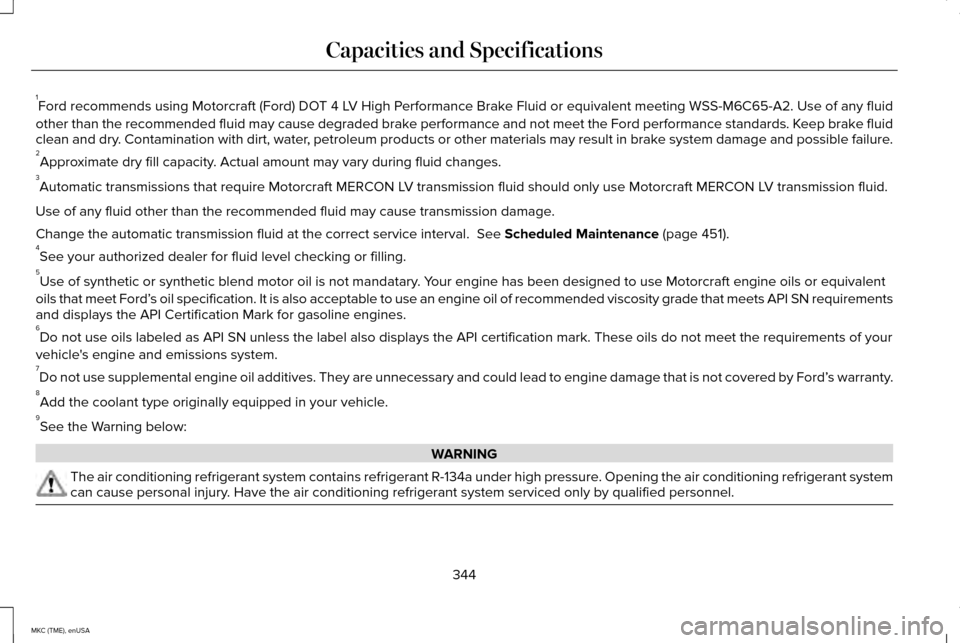
1
Ford recommends using Motorcraft (Ford) DOT 4 LV High Performance Brake Fluid or equivalent meeting WSS-M6C65-A2. Use of any fluid
other than the recommended fluid may cause degraded brake performance and not meet the Ford performance standards. Keep brake fluid
clean and dry. Contamination with dirt, water, petroleum products or other materials may result in brake system damage and possible failure.
2 Approximate dry fill capacity. Actual amount may vary during fluid changes.
3 Automatic transmissions that require Motorcraft MERCON LV transmission fluid should only use Motorcraft MERCON LV transmission fluid.
Use of any fluid other than the recommended fluid may cause transmission\
damage.
Change the automatic transmission fluid at the correct service interval.\
See Scheduled Maintenance (page 451).
4 See your authorized dealer for fluid level checking or filling.
5 Use of synthetic or synthetic blend motor oil is not mandatary. Your engine has been designed to use Motorcraft engine oils or equivalent\
oils that meet Ford’ s oil specification. It is also acceptable to use an engine oil of recom\
mended viscosity grade that meets API SN requirements
and displays the API Certification Mark for gasoline engines.
6 Do not use oils labeled as API SN unless the label also displays the API\
certification mark. These oils do not meet the requirements of your
vehicle's engine and emissions system.
7 Do not use supplemental engine oil additives. They are unnecessary and c\
ould lead to engine damage that is not covered by Ford’ s warranty.
8 Add the coolant type originally equipped in your vehicle.
9 See the Warning below: WARNING
The air conditioning refrigerant system contains refrigerant R-134a unde\
r high pressure. Opening the air conditioning refrigerant system
can cause personal injury. Have the air conditioning refrigerant system serviced only by qualifie\
d personnel.
344
MKC (TME), enUSA Capacities and Specifications
Page 398 of 490
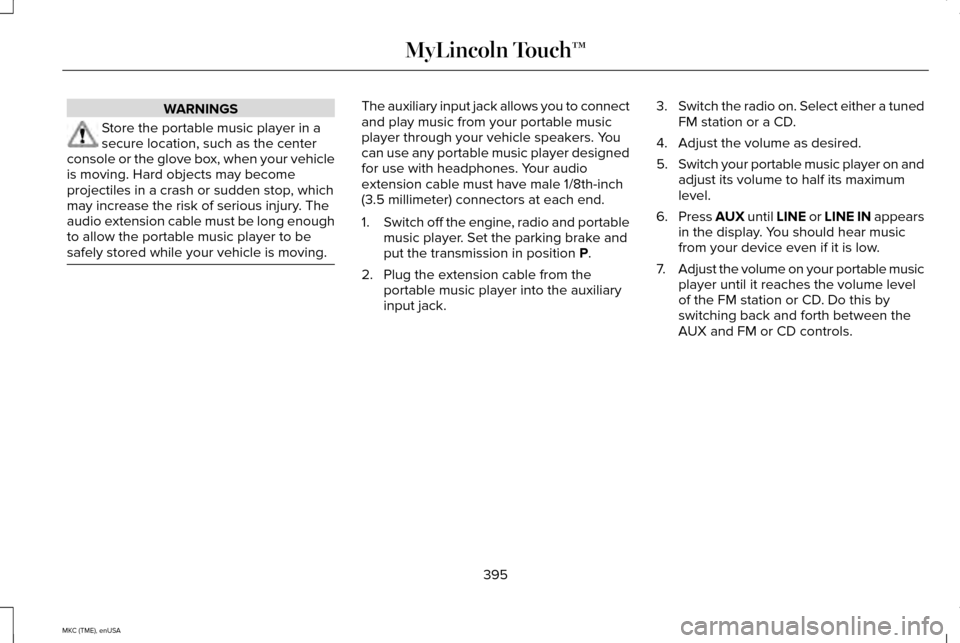
WARNINGS
Store the portable music player in a
secure location, such as the center
console or the glove box, when your vehicle
is moving. Hard objects may become
projectiles in a crash or sudden stop, which
may increase the risk of serious injury. The
audio extension cable must be long enough
to allow the portable music player to be
safely stored while your vehicle is moving. The auxiliary input jack allows you to connect
and play music from your portable music
player through your vehicle speakers. You
can use any portable music player designed
for use with headphones. Your audio
extension cable must have male 1/8th-inch
(3.5 millimeter) connectors at each end.
1.
Switch off the engine, radio and portable
music player. Set the parking brake and
put the transmission in position P.
2. Plug the extension cable from the portable music player into the auxiliary
input jack. 3.
Switch the radio on. Select either a tuned
FM station or a CD.
4. Adjust the volume as desired.
5. Switch your portable music player on and
adjust its volume to half its maximum
level.
6. Press
AUX until LINE or LINE IN appears
in the display. You should hear music
from your device even if it is low.
7. Adjust the volume on your portable music
player until it reaches the volume level
of the FM station or CD. Do this by
switching back and forth between the
AUX and FM or CD controls.
395
MKC (TME), enUSA MyLincoln Touch™
Page 400 of 490
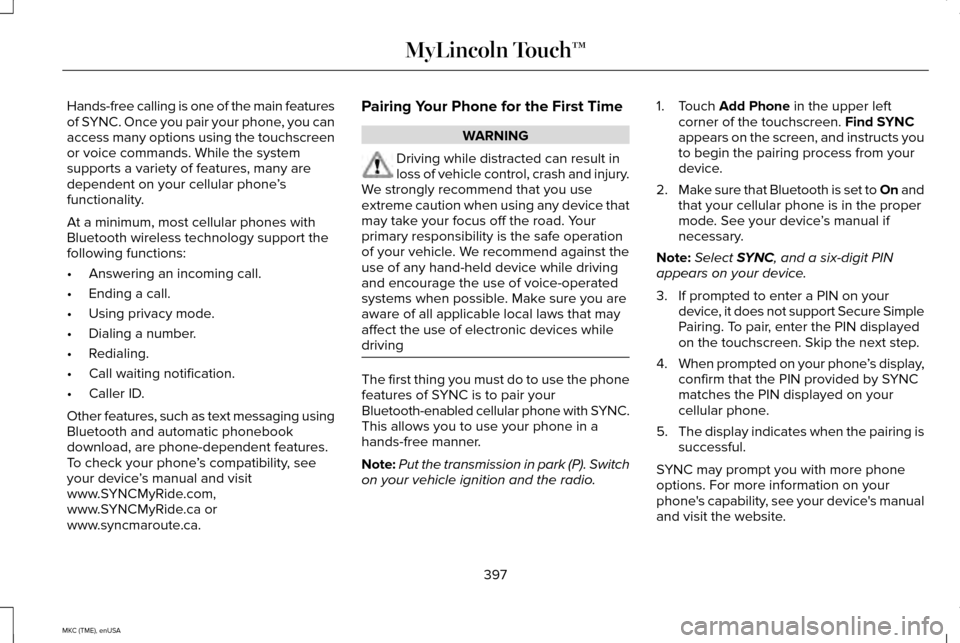
Hands-free calling is one of the main features
of SYNC. Once you pair your phone, you can
access many options using the touchscreen
or voice commands. While the system
supports a variety of features, many are
dependent on your cellular phone
’s
functionality.
At a minimum, most cellular phones with
Bluetooth wireless technology support the
following functions:
• Answering an incoming call.
• Ending a call.
• Using privacy mode.
• Dialing a number.
• Redialing.
• Call waiting notification.
• Caller ID.
Other features, such as text messaging using
Bluetooth and automatic phonebook
download, are phone-dependent features.
To check your phone ’s compatibility, see
your device ’s manual and visit
www.SYNCMyRide.com,
www.SYNCMyRide.ca or
www.syncmaroute.ca. Pairing Your Phone for the First Time WARNING
Driving while distracted can result in
loss of vehicle control, crash and injury.
We strongly recommend that you use
extreme caution when using any device that
may take your focus off the road. Your
primary responsibility is the safe operation
of your vehicle. We recommend against the
use of any hand-held device while driving
and encourage the use of voice-operated
systems when possible. Make sure you are
aware of all applicable local laws that may
affect the use of electronic devices while
driving The first thing you must do to use the phone
features of SYNC is to pair your
Bluetooth-enabled cellular phone with SYNC.
This allows you to use your phone in a
hands-free manner.
Note:
Put the transmission in park (P). Switch
on your vehicle ignition and the radio. 1. Touch Add Phone in the upper left
corner of the touchscreen. Find SYNC
appears on the screen, and instructs you
to begin the pairing process from your
device.
2. Make sure that Bluetooth is set to On and
that your cellular phone is in the proper
mode. See your device ’s manual if
necessary.
Note: Select
SYNC, and a six-digit PIN
appears on your device.
3. If prompted to enter a PIN on your device, it does not support Secure Simple
Pairing. To pair, enter the PIN displayed
on the touchscreen. Skip the next step.
4. When prompted on your phone ’s display,
confirm that the PIN provided by SYNC
matches the PIN displayed on your
cellular phone.
5. The display indicates when the pairing is
successful.
SYNC may prompt you with more phone
options. For more information on your
phone's capability, see your device's manual
and visit the website.
397
MKC (TME), enUSA MyLincoln Touch™
Page 401 of 490
Pairing Subsequent Phones
Note:
Put the transmission in park (P). Switch
on your vehicle ignition and the radio.
1. Press the Phone corner of the
touchscreen > Settings > BT Devices >
Add Device.
2. Make sure that Bluetooth is set to On and
that your cellular phone is in the proper
mode. See your device ’s manual if
necessary.
Note: Select
SYNC, and a six-digit PIN
appears on your device.
3. If prompted to enter a PIN on your device, it does not support Secure Simple
Pairing. To pair, enter the PIN displayed
on the touchscreen. Skip the next step.
4. When prompted on your phone ’s display,
confirm that the PIN provided by SYNC
matches the PIN displayed on your
cellular phone.
5. The display indicates when the pairing is
successful. SYNC may prompt you with more phone
options. For more information on your
phone's capability, see your device's manual
and visit the website.
Making Calls Press the voice button on your
steering wheel controls. When
prompted, say, "Call
say "Dial", then the desired number. To end the call or exit phone
mode, press and hold this phone
button on your steering wheel
controls.
Receiving Calls
During an incoming call, an audible tone
sounds. Call information appears in the
display if it is available. Accept the call by pressing Accept
on the touchscreen or by pressing
this phone button on your steering
wheel controls. Reject the call by pressing
Reject
on the touchscreen or by pressing
and holding this phone button on
your steering wheel controls.
Ignore the call by doing nothing. SYNC logs
it as a missed call.
Phone Menu Options
Press the top left corner on your touchscreen
to select from the following options:
Phone
Touch this button to access the on-screen
numerical pad to enter a number and place
a call. During an active call, you can also
choose to:
• Mute the call.
• Put the call on hold.
• Turn on the privacy feature.
• Join two calls.
• End the call.
398
MKC (TME), enUSA MyLincoln Touch™E142599 E142632 E142632
Page 437 of 490
•
Links to Third Party Sites: The MS
SOFTWARE may provide you with the
ability to link to third party sites through
the use of the SOFTWARE. The third
party sites are not under the control of
MS, Microsoft Corporation, their affiliates
and/or their designated agent. Neither
MS nor Microsoft Corporation nor their
affiliates nor their designated agent are
responsible for (i) the contents of any
third party sites, any links contained in
third party sites, or any changes or
updates to third party sites, or (ii)
webcasting or any other form of
transmission received from any third
party sites. If the SOFTWARE provides
links to third party sites, those links are
provided to you only as a convenience,
and the inclusion of any link does not
imply an endorsement of the third party
site by MS, Microsoft Corporation, their
affiliates and/or their designated agent. •
Obligation to Drive Responsibly: You
recognize your obligation to drive
responsibly and keep attention on the
road. You will read and abide with the
DEVICE operating instructions particularly
as they pertain to safety and assumes
any risk associated with the use of the
DEVICE.
UPGRADES AND RECOVERY MEDIA: If the
SOFTWARE is provided by FORD MOTOR
COMPANY separate from the DEVICE on
media such as a ROM chip, CD ROM disk(s)
or via web download or other means, and is
labeled "For Upgrade Purposes Only" or "For
Recovery Purposes Only" you may install one
(1) copy of such SOFTWARE onto the DEVICE
as a replacement copy for the existing
SOFTWARE, and use it in accordance with
this EULA, including any additional EULA
terms accompanying the upgrade
SOFTWARE.
INTELLECTUAL PROPERTY RIGHTS:
All
title and intellectual property rights in and to
the SOFTWARE (including but not limited to
any images, photographs, animations, video,
audio, music, text and "applets" incorporated
into the SOFTWARE), the accompanying printed materials, and any copies of the
SOFTWARE, are owned by MS, Microsoft
Corporation, FORD MOTOR COMPANY, or
their affiliates or suppliers. The SOFTWARE
is licensed, not sold. You may not copy the
printed materials accompanying the
SOFTWARE. All title and intellectual property
rights in and to the content which may be
accessed through use of the SOFTWARE is
the property of the respective content owner
and may be protected by applicable
copyright or other intellectual property laws
and treaties. This EULA grants you no rights
to use such content. All rights not specifically
granted under this EULA are reserved by MS,
Microsoft Corporation, FORD MOTOR
COMPANY, third party software and service
providers, their affiliates and suppliers. Use
of any on-line services which may be
accessed through the SOFTWARE may be
governed by the respective terms of use
relating to such services. If this SOFTWARE
contains documentation that is provided only
in electronic form, you may print one copy
of such electronic documentation.
434
MKC (TME), enUSA Appendices