steering LINCOLN MKC 2015 Repair Manual
[x] Cancel search | Manufacturer: LINCOLN, Model Year: 2015, Model line: MKC, Model: LINCOLN MKC 2015Pages: 490, PDF Size: 4.74 MB
Page 367 of 490
Under this menu, you can set your
clock, access and adjust the
display, sound and vehicle settings
as well as access settings for specific modes
or the help feature.
Clock
Note: You cannot manually set the date.
Your vehicle ’s GPS does this for you.
Note: If the battery has been disconnected,
your vehicle needs to acquire a GPS signal
to update the clock. Once your vehicle
acquires the signal, it may take a few
minutes for the update to display the correct
time. 1. Press the Settings icon > Clock.
2. Press
+ and - to adjust the time.
From this screen, you can also make other
adjustments such as 12-hour or 24-hour
mode, activate GPS time synchronization and
have the system automatically update new
time zones. You can also switch the outside air
temperature display off and on. It appears at
the top center of the touchscreen, next to
the time and date.
The system automatically saves any updates
you make to the settings.
Display
You can adjust the touchscreen display
through the touchscreen or by pressing the
voice button on your steering wheel controls
and when prompted, say, "Display settings".
Press the Settings icon >
Display,
to access and make adjustments
using the touchscreen.
• Brightness
allows you to make the
screen display brighter or dimmer.
• Auto DIM
, when set to On, lets you use
the Auto Dim Manual Offset feature.
When set to
Off, screen brightness does
not change. •
Mode
allows you to set the screen to a
certain brightness or have the system
automatically change based on the
outside light level, or switch the display
off.
• If you select
AUTO or NIGHT, you
have the options of switching the
display's Auto Dim feature on or off
and changing the Auto Dim Manual
Offset feature.
• Auto Dim Manual Offset
allows you to
adjust screen dimming as the outside
lighting conditions change from day to
night. This feature also allows you to
adjust screen brightness using the
instrument panel dimming control.
• Edit Wallpaper
•You can have your touchscreen
display the default photo or upload
your own.
364
MKC (TME), enUSA MyLincoln Touch™E142607 E142607 E142607
Page 380 of 490
CDD
USBE
Touch this button to scroll down for more options, such as SD Card, BT Stereo and Line In
F
These buttons change with the media mode you are in.
G
Radio memory presets and CD controls.
H
Note: Some features may not be available
in your area. Contact an authorized dealer
for more information.
You can access these options using the
touchscreen or voice commands.
Browsing Device Content
When listening to audio on a device, you can
browse through other devices without having
to change sources. For example, if you are
currently listening to audio on an SD card,
you can browse all the artists that are stored
on your USB device. Press the voice icon on the
steering wheel. When prompted,
you can say: "BROWSE" within devices
"Browse" *
"Browse
"Browse
"Browse SD card"
"Browse Sirius channel guide" ** "BROWSE" within devices
"Browse USB""Help"
* If you only say, "Browse", you can then say
any commands in the following chart.
** This command is only usable if you have an
active subscription to Sirius satellite radio. "BROWSE"
"
"
"SD card" **
377
MKC (TME), enUSA MyLincoln Touch™E142599
Page 381 of 490
"BROWSE"
"Sirius Channel Guide" *
"USB" **
"Help"
* This command is only usable if you have an
active subscription to Sirius satellite radio.
** For more commands in SD card or USB
mode, see the "SD Card and USB Port"
section of this chapter.
Your voice system allows you to change
audio sources with a simple voice command.
For example, if you are listening to music on
a USB device, then want to switch to a
satellite radio channel, simply press the voice
button on the steering wheel controls and
say the name of the Sirius station (such as,
"the Highway"). The following voice
commands are available at the top level of
the voice session no matter which current
audio source you are listening to (such as a
USB device or Sirius satellite radio). Note:
This is only available when your
MyFord Touch system language is set to
North American English. Sample commands
"<87.9-107.9>""<530-1710>"
"
"AM <530-1710>"
"FM <87.9-107.9>"
"Play [album]
"Play [artist]
"Play [genre]
"Play [playlist]
"Play [song]
"Play
"Play
"Sirius <0-223>" *
"Sports games" *
* This command is only usable if you have an
active subscription to Sirius satellite radio.
** The commands that have [ ] around the
word means that the word is optional. For
example, if you say, "Play Metallica", this is
the same as the voice command, "Play [artist]
AM/FM Radio Touch the AM or FM tab to listen
to the radio.
To change between AM and FM presets, just
touch the
AM or FM tab.
378
MKC (TME), enUSA MyLincoln Touch™E142611
Page 386 of 490
Potential station issues
Action
Cause
Issues
Fill out the station issue form at website listed
below.*
Data service issue by the radio broadcaster.
There is no text information shown for
currently selected frequency.
No action required. This is normal behavior.
Pressing Scan disables HD2-HD7 channel
search.
HD2-HD7 stations not found when Scan is
pressed.
* http://www.ibiquity.com/automotive/report_radio_station_experiences
HD Radio Technology manufactured under
license from iBiquity Digital Corp. U.S. and
foreign patents. HD Radio and the HD and
HD Radio logos are proprietary trademarks
of iBiquity Digital Corp. Ford Motor Company
and iBiquity Digital Corp. are not responsible
for the content sent using HD Radio
technology. Content may be changed, added
or deleted at any time at the station owner's
discretion. Radio Voice Commands If you are listening to the radio,
press the voice button on the
steering wheel controls. When
prompted, say any of the following
commands.
If you are not listening to the radio, press the
voice button and, after the tone, say "Radio",
then any of the following commands. "RADIO"
"<87.9-107.9>"
"<87.9-107.9> HD" 1
"<530-1710>" "AM"
"AM <530-1710>" "AM autoset"
"AM autoset preset <#>" "AM preset <#>"
383
MKC (TME), enUSA MyLincoln Touch™E142599
Page 391 of 490
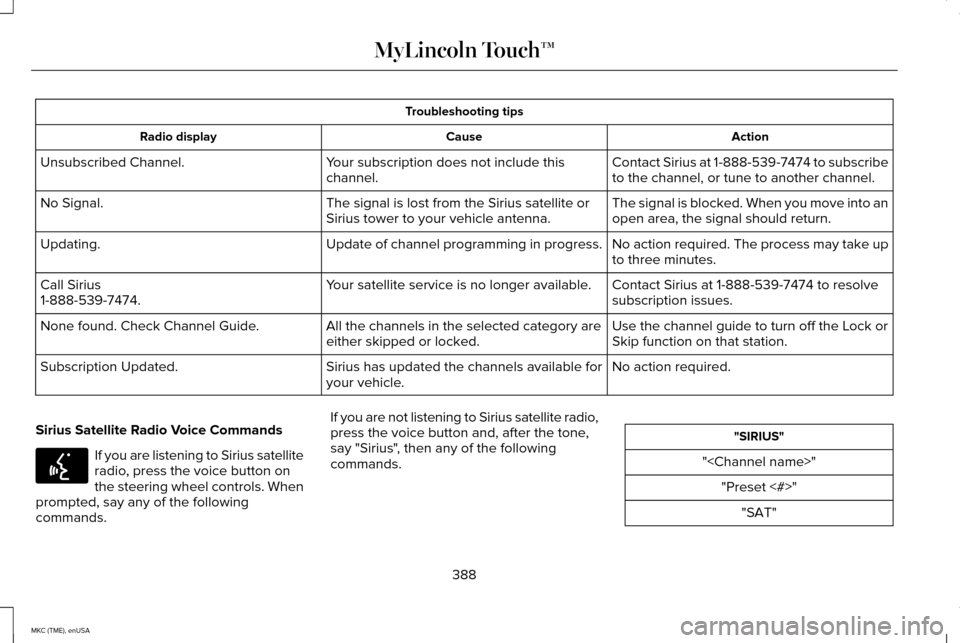
Troubleshooting tips
Action
Cause
Radio display
Contact Sirius at 1-888-539-7474 to subscribe
to the channel, or tune to another channel.
Your subscription does not include this
channel.
Unsubscribed Channel.
The signal is blocked. When you move into an
open area, the signal should return.
The signal is lost from the Sirius satellite or
Sirius tower to your vehicle antenna.
No Signal.
No action required. The process may take up
to three minutes.
Update of channel programming in progress.
Updating.
Contact Sirius at 1-888-539-7474 to resolve
subscription issues.
Your satellite service is no longer available.
Call Sirius
1-888-539-7474.
Use the channel guide to turn off the Lock or
Skip function on that station.
All the channels in the selected category are
either skipped or locked.
None found. Check Channel Guide.
No action required.
Sirius has updated the channels available for
your vehicle.
Subscription Updated.
Sirius Satellite Radio Voice Commands If you are listening to Sirius satellite
radio, press the voice button on
the steering wheel controls. When
prompted, say any of the following
commands. If you are not listening to Sirius satellite radio,
press the voice button and, after the tone,
say "Sirius", then any of the following
commands. "SIRIUS"
"
388
MKC (TME), enUSA MyLincoln Touch™E142599
Page 393 of 490
You can also advance and reverse the
current track or current folder, if applicable.
Repeat
Touch this button to repeat the currently
playing track, all tracks on the disc or turn
the feature off if already on.
Shuffle
Touch this button to play the tracks or entire
albums in random order, or turn the feature
off if already on.
Scan
Touch this button to hear a brief sampling of
all available tracks.
More Info
Touch this button to see disc information.
Options
Sound Settings
Touch this button to adjust settings for:
•
Bass
• Midrange
• Treble
• Balance and Fade
• THX Deep Note Demo
• DSP (Digital Signal processing)
• Occupancy Mode
• Speed Compensated Volume.
Note: Your vehicle may not have all these
sound settings.
Compression
Touch this button to turn the compression
feature off and on.
Browse
Touch this button to look through all
available CD tracks.
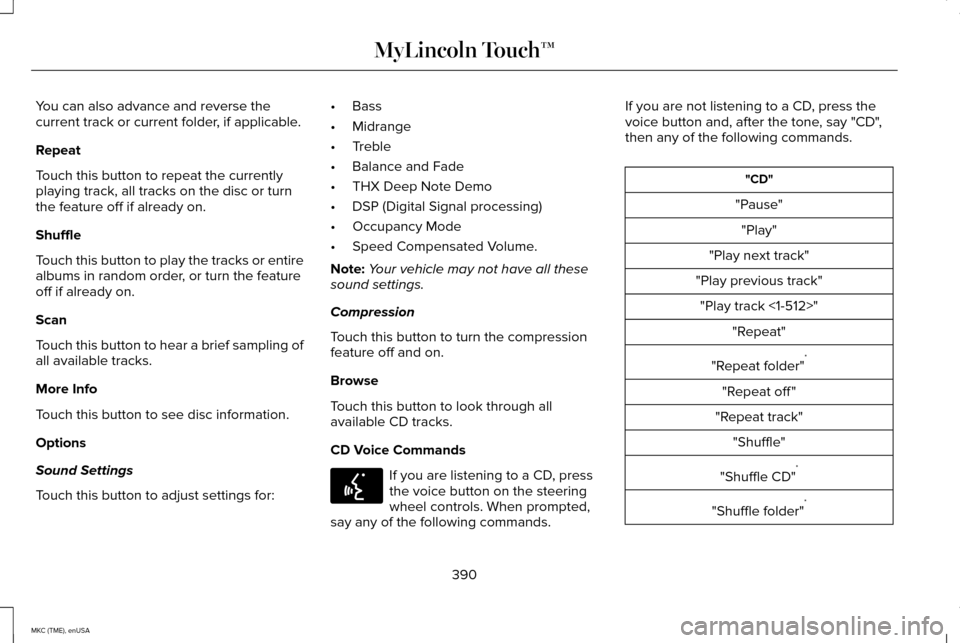
CD Voice Commands If you are listening to a CD, press
the voice button on the steering
wheel controls. When prompted,
say any of the following commands. If you are not listening to a CD, press the
voice button and, after the tone, say "CD",
then any of the following commands. "CD"
"Pause" "Play"
"Play next track"
"Play previous track" "Play track <1-512>" "Repeat"
"Repeat folder" *
"Repeat off "
"Repeat track" "Shuffle"
"Shuffle CD" *
"Shuffle folder" *
390
MKC (TME), enUSA MyLincoln Touch™E142599
Page 395 of 490
Insert your device and select the
SD Card or USB tab once the
system recognizes it. You can then
select from the following options:
Repeat
This feature replays the currently playing
song or album.
Shuffle
Touch this button to play music on the
selected album or folder in random order.
Similar Music
This feature allows you to choose music
similar to what is currently playing.
More Info
Touch this button to see disc information
such as current track, artist name, album and
genre.
Options
Touch this button to view and adjust various
media settings. Sound Settings allows you to adjust settings
for:
• Bass
• Midrange
• Treble
• Balance and Fade
• THX Deep Note Demo
• DSP (Digital Signal processing)
• Occupancy Mode
• Speed Compensated Volume.
Note: Your vehicle may not have all these
sound settings.
Media Player Settings
allows you to select
more settings, which is under Media Player.
See
Settings (page 363).
Device Information
displays software and
firmware information about the currently
connected media device.
Update Media Index
indexes your device
when you connect it for the first time and
each time the content changes (such as
adding or removing tracks) to make sure you
have the latest voice commands available
for all media on the device. Browse
This feature allows you to view the contents
of the device. It also allows you to search by
categories, such as genre, artist or album.
If you want to view song information such as
Title, Artist, File, Folder, Album, and Genre,
touch the on-screen album art.
You can also touch
What’
s Playing to hear
how the system pronounces the current band
and song. This can be helpful when using
voice commands to make sure the system
correctly plays your request.
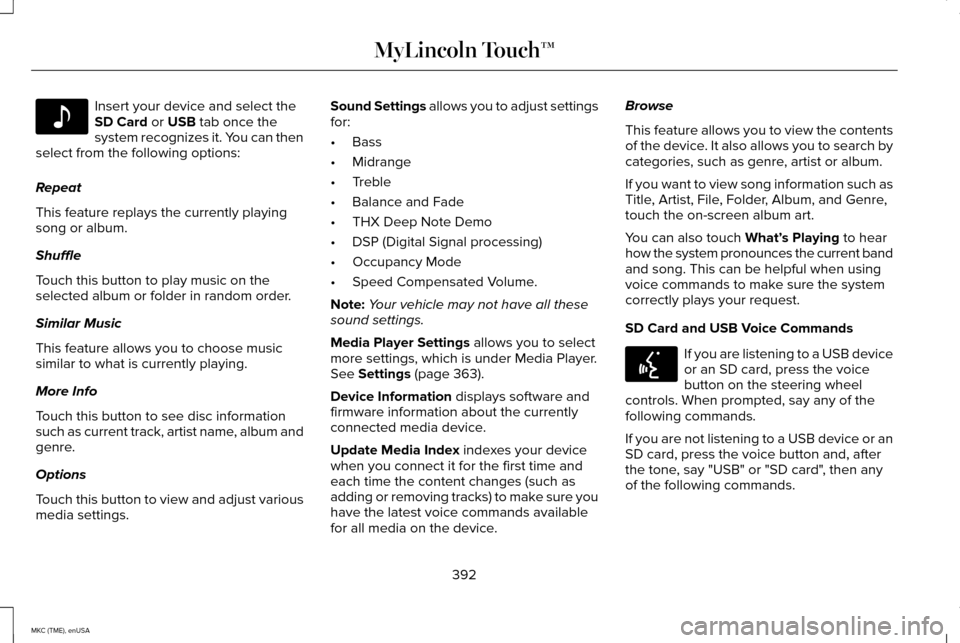
SD Card and USB Voice Commands If you are listening to a USB device
or an SD card, press the voice
button on the steering wheel
controls. When prompted, say any of the
following commands.
If you are not listening to a USB device or an
SD card, press the voice button and, after
the tone, say "USB" or "SD card", then any
of the following commands.
392
MKC (TME), enUSA MyLincoln Touch™E142611 E142599
Page 397 of 490
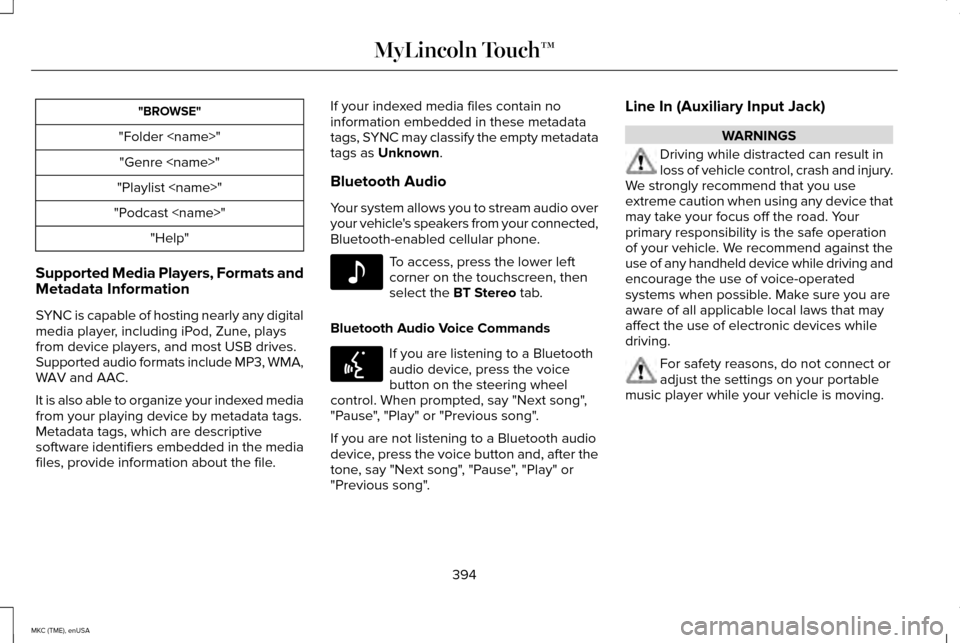
"BROWSE"
"Folder
"Playlist
"Podcast
Supported Media Players, Formats and
Metadata Information
SYNC is capable of hosting nearly any digital
media player, including iPod, Zune, plays
from device players, and most USB drives.
Supported audio formats include MP3, WMA,
WAV and AAC.
It is also able to organize your indexed media
from your playing device by metadata tags.
Metadata tags, which are descriptive
software identifiers embedded in the media
files, provide information about the file. If your indexed media files contain no
information embedded in these metadata
tags, SYNC may classify the empty metadata
tags as Unknown.
Bluetooth Audio
Your system allows you to stream audio over
your vehicle's speakers from your connected,
Bluetooth-enabled cellular phone. To access, press the lower left
corner on the touchscreen, then
select the
BT Stereo tab.
Bluetooth Audio Voice Commands If you are listening to a Bluetooth
audio device, press the voice
button on the steering wheel
control. When prompted, say "Next song",
"Pause", "Play" or "Previous song".
If you are not listening to a Bluetooth audio
device, press the voice button and, after the
tone, say "Next song", "Pause", "Play" or
"Previous song". Line In (Auxiliary Input Jack) WARNINGS
Driving while distracted can result in
loss of vehicle control, crash and injury.
We strongly recommend that you use
extreme caution when using any device that
may take your focus off the road. Your
primary responsibility is the safe operation
of your vehicle. We recommend against the
use of any handheld device while driving and
encourage the use of voice-operated
systems when possible. Make sure you are
aware of all applicable local laws that may
affect the use of electronic devices while
driving. For safety reasons, do not connect or
adjust the settings on your portable
music player while your vehicle is moving.
394
MKC (TME), enUSA MyLincoln Touch™E142611 E142599
Page 401 of 490
Pairing Subsequent Phones
Note:
Put the transmission in park (P). Switch
on your vehicle ignition and the radio.
1. Press the Phone corner of the
touchscreen > Settings > BT Devices >
Add Device.
2. Make sure that Bluetooth is set to On and
that your cellular phone is in the proper
mode. See your device ’s manual if
necessary.
Note: Select
SYNC, and a six-digit PIN
appears on your device.
3. If prompted to enter a PIN on your device, it does not support Secure Simple
Pairing. To pair, enter the PIN displayed
on the touchscreen. Skip the next step.
4. When prompted on your phone ’s display,
confirm that the PIN provided by SYNC
matches the PIN displayed on your
cellular phone.
5. The display indicates when the pairing is
successful. SYNC may prompt you with more phone
options. For more information on your
phone's capability, see your device's manual
and visit the website.
Making Calls Press the voice button on your
steering wheel controls. When
prompted, say, "Call
say "Dial", then the desired number. To end the call or exit phone
mode, press and hold this phone
button on your steering wheel
controls.
Receiving Calls
During an incoming call, an audible tone
sounds. Call information appears in the
display if it is available. Accept the call by pressing Accept
on the touchscreen or by pressing
this phone button on your steering
wheel controls. Reject the call by pressing
Reject
on the touchscreen or by pressing
and holding this phone button on
your steering wheel controls.
Ignore the call by doing nothing. SYNC logs
it as a missed call.
Phone Menu Options
Press the top left corner on your touchscreen
to select from the following options:
Phone
Touch this button to access the on-screen
numerical pad to enter a number and place
a call. During an active call, you can also
choose to:
• Mute the call.
• Put the call on hold.
• Turn on the privacy feature.
• Join two calls.
• End the call.
398
MKC (TME), enUSA MyLincoln Touch™E142599 E142632 E142632
Page 404 of 490
Phone Ringer
Select the ring tone you want to hear when
you receive a call. Choose from possible
system ring tones, your currently paired
phone
’s ring tone, a beep, text-to-speech or
a silent notification.
Text Message Notification
Select a text message notification, if
supported by your phone. Choose from
possible system alert tones, text-to-speech
or silent.
Internet Data Connection
If your phone is compatible, use this screen
to adjust your internet data connection.
Select to make your connection profile with
the personal area network or to switch off
your connection. You can also choose to
adjust your settings or have the system
always connect, never connect when
roaming or query on connect. Press ? for
more information. Manage Phonebook
Touch this button to access features such as
automatic phonebook download,
re-download your phonebook, add contacts
from your phone as well as delete or upload
your phonebook.
Roaming Warning
Touch this button to have the system alert
you when your phone is in roaming mode.
Phone Voice Commands
Press the voice button on the
steering wheel controls. When
prompted, say any of the following
commands: "PHONE"
"Call"
"Call
"Call
"Call
"Call
"Do not disturb off " "Do not disturb on"
"Forward text messages"
"Go to hands free" *
"Hold call off " *
"Hold on" *
"Join calls" *
"Listen to text message <#>" "Listen to text messages"
"Messages" **
401
MKC (TME), enUSA MyLincoln Touch™E142599