radio LINCOLN MKC 2016 User Guide
[x] Cancel search | Manufacturer: LINCOLN, Model Year: 2016, Model line: MKC, Model: LINCOLN MKC 2016Pages: 432, PDF Size: 4.89 MB
Page 279 of 432
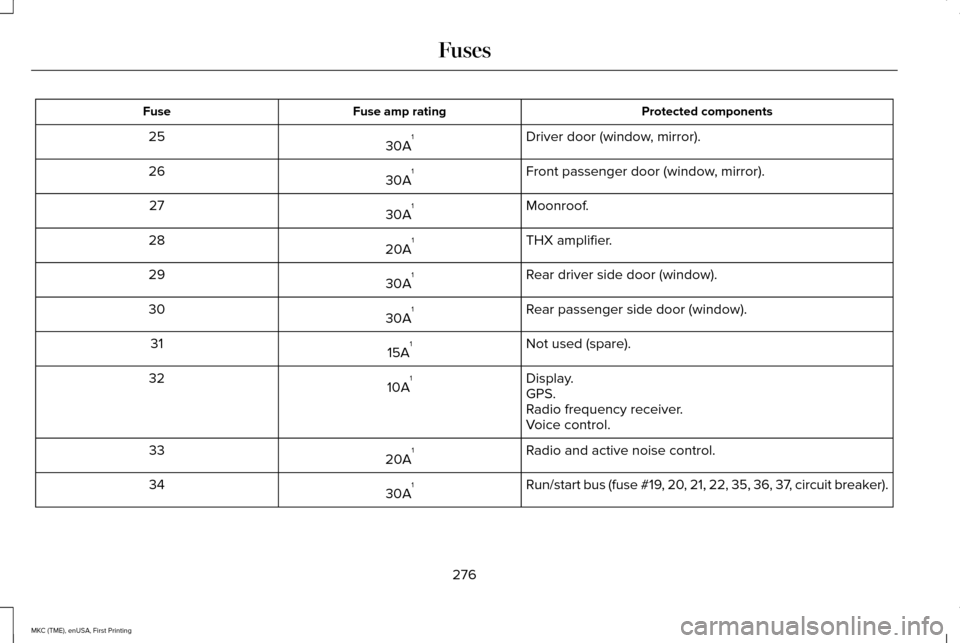
Protected components
Fuse amp rating
Fuse
Driver door (window, mirror).
30A 1
25
Front passenger door (window, mirror).
30A 1
26
Moonroof.
30A 1
27
THX amplifier.
20A 1
28
Rear driver side door (window).
30A 1
29
Rear passenger side door (window).
30A 1
30
Not used (spare).
15A 1
31
Display.
10A 1
32
GPS.
Radio frequency receiver.
Voice control.
Radio and active noise control.
20A 1
33
Run/start bus (fuse #19, 20, 21, 22, 35, 36, 37, circuit breaker).
30A 1
34
276
MKC (TME), enUSA, First Printing Fuses
Page 298 of 432
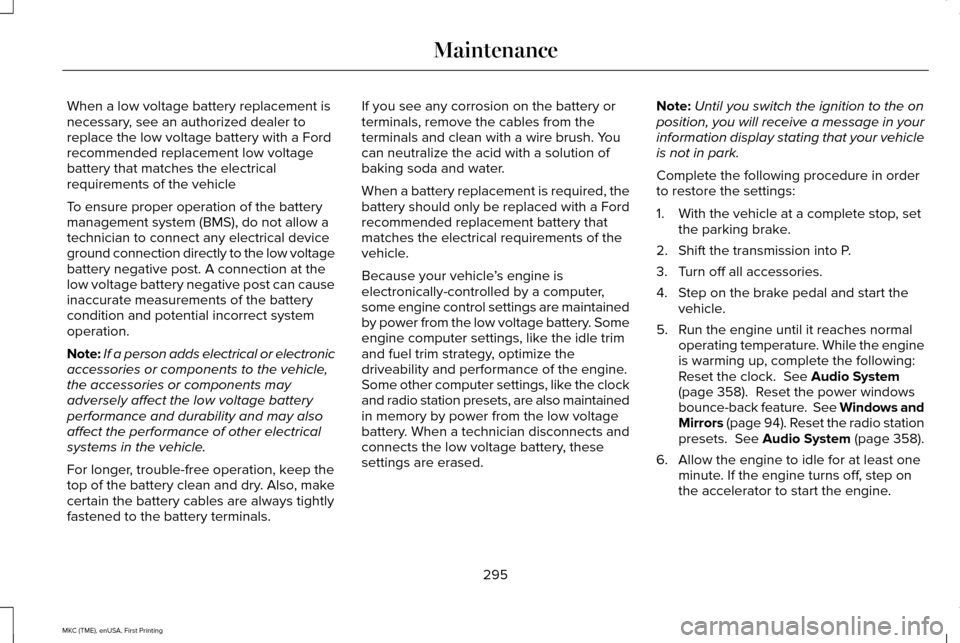
When a low voltage battery replacement is
necessary, see an authorized dealer to
replace the low voltage battery with a Ford
recommended replacement low voltage
battery that matches the electrical
requirements of the vehicle
To ensure proper operation of the battery
management system (BMS), do not allow a
technician to connect any electrical device
ground connection directly to the low voltage
battery negative post. A connection at the
low voltage battery negative post can cause
inaccurate measurements of the battery
condition and potential incorrect system
operation.
Note:
If a person adds electrical or electronic
accessories or components to the vehicle,
the accessories or components may
adversely affect the low voltage battery
performance and durability and may also
affect the performance of other electrical
systems in the vehicle.
For longer, trouble-free operation, keep the
top of the battery clean and dry. Also, make
certain the battery cables are always tightly
fastened to the battery terminals. If you see any corrosion on the battery or
terminals, remove the cables from the
terminals and clean with a wire brush. You
can neutralize the acid with a solution of
baking soda and water.
When a battery replacement is required, the
battery should only be replaced with a Ford
recommended replacement battery that
matches the electrical requirements of the
vehicle.
Because your vehicle
’s engine is
electronically-controlled by a computer,
some engine control settings are maintained
by power from the low voltage battery. Some
engine computer settings, like the idle trim
and fuel trim strategy, optimize the
driveability and performance of the engine.
Some other computer settings, like the clock
and radio station presets, are also maintained
in memory by power from the low voltage
battery. When a technician disconnects and
connects the low voltage battery, these
settings are erased. Note:
Until you switch the ignition to the on
position, you will receive a message in your
information display stating that your vehicle
is not in park.
Complete the following procedure in order
to restore the settings:
1. With the vehicle at a complete stop, set the parking brake.
2. Shift the transmission into P.
3. Turn off all accessories.
4. Step on the brake pedal and start the vehicle.
5. Run the engine until it reaches normal operating temperature. While the engine
is warming up, complete the following:
Reset the clock. See Audio System
(page 358). Reset the power windows
bounce-back feature. See Windows and
Mirrors (page 94). Reset the radio station
presets.
See Audio System (page 358).
6. Allow the engine to idle for at least one minute. If the engine turns off, step on
the accelerator to start the engine.
295
MKC (TME), enUSA, First Printing Maintenance
Page 361 of 432
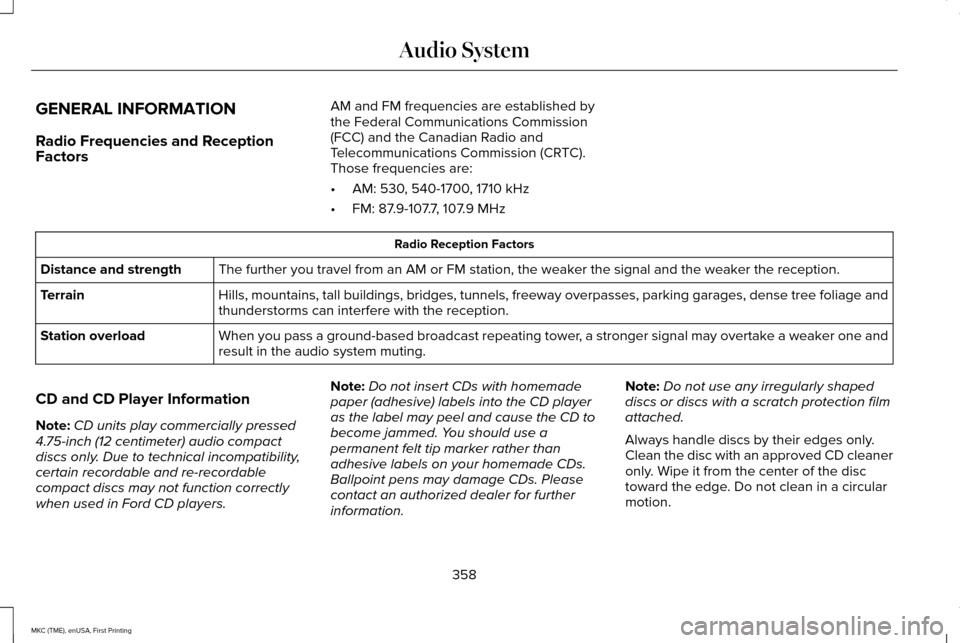
GENERAL INFORMATION
Radio Frequencies and Reception
Factors
AM and FM frequencies are established by
the Federal Communications Commission
(FCC) and the Canadian Radio and
Telecommunications Commission (CRTC).
Those frequencies are:
•
AM: 530, 540-1700, 1710 kHz
• FM: 87.9-107.7, 107.9 MHz Radio Reception Factors
The further you travel from an AM or FM station, the weaker the signal and the weaker the reception.
Distance and strength
Hills, mountains, tall buildings, bridges, tunnels, freeway overpasses, \
parking garages, dense tree foliage and
thunderstorms can interfere with the reception.
Terrain
When you pass a ground-based broadcast repeating tower, a stronger signal may overtake a weaker one and
result in the audio system muting.
Station overload
CD and CD Player Information
Note: CD units play commercially pressed
4.75-inch (12 centimeter) audio compact
discs only. Due to technical incompatibility,
certain recordable and re-recordable
compact discs may not function correctly
when used in Ford CD players. Note:
Do not insert CDs with homemade
paper (adhesive) labels into the CD player
as the label may peel and cause the CD to
become jammed. You should use a
permanent felt tip marker rather than
adhesive labels on your homemade CDs.
Ballpoint pens may damage CDs. Please
contact an authorized dealer for further
information. Note:
Do not use any irregularly shaped
discs or discs with a scratch protection film
attached.
Always handle discs by their edges only.
Clean the disc with an approved CD cleaner
only. Wipe it from the center of the disc
toward the edge. Do not clean in a circular
motion.
358
MKC (TME), enUSA, First Printing Audio System
Page 362 of 432
Do not expose discs to direct sunlight or heat
sources for extended periods.
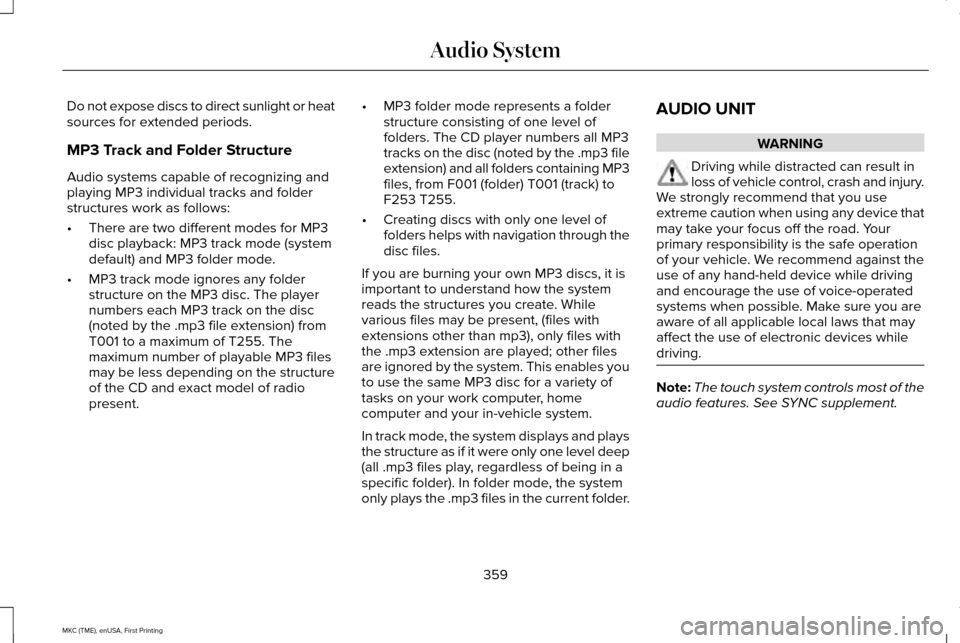
MP3 Track and Folder Structure
Audio systems capable of recognizing and
playing MP3 individual tracks and folder
structures work as follows:
•
There are two different modes for MP3
disc playback: MP3 track mode (system
default) and MP3 folder mode.
• MP3 track mode ignores any folder
structure on the MP3 disc. The player
numbers each MP3 track on the disc
(noted by the .mp3 file extension) from
T001 to a maximum of T255. The
maximum number of playable MP3 files
may be less depending on the structure
of the CD and exact model of radio
present. •
MP3 folder mode represents a folder
structure consisting of one level of
folders. The CD player numbers all MP3
tracks on the disc (noted by the .mp3 file
extension) and all folders containing MP3
files, from F001 (folder) T001 (track) to
F253 T255.
• Creating discs with only one level of
folders helps with navigation through the
disc files.
If you are burning your own MP3 discs, it is
important to understand how the system
reads the structures you create. While
various files may be present, (files with
extensions other than mp3), only files with
the .mp3 extension are played; other files
are ignored by the system. This enables you
to use the same MP3 disc for a variety of
tasks on your work computer, home
computer and your in-vehicle system.
In track mode, the system displays and plays
the structure as if it were only one level deep
(all .mp3 files play, regardless of being in a
specific folder). In folder mode, the system
only plays the .mp3 files in the current folder. AUDIO UNIT WARNING
Driving while distracted can result in
loss of vehicle control, crash and injury.
We strongly recommend that you use
extreme caution when using any device that
may take your focus off the road. Your
primary responsibility is the safe operation
of your vehicle. We recommend against the
use of any hand-held device while driving
and encourage the use of voice-operated
systems when possible. Make sure you are
aware of all applicable local laws that may
affect the use of electronic devices while
driving. Note:
The touch system controls most of the
audio features. See SYNC supplement.
359
MKC (TME), enUSA, First Printing Audio System
Page 364 of 432

TUNE: Turn the control to search manually through the radio frequency band. The\
system stops at the first station it finds in that
direction. In SIRIUS mode, the system selects the previous or next channel. If you select a speci\
fic category (Jazz, Rock, News, etc.),
turn the TUNE control to find the previous or next channel in the select\
ed category.
C
Seek/Fast Forward/Reverse:
Press the control to go to the previous or next track or available radi\
o station. Press and hold to either
reverse or fast forward through the current track or to quickly reverse \
or advance through the radio bands in individual increments.
D
Volume:
Turn the control to adjust the volume level on your system.
E
Power:
Press the control to switch the audio system on and off.
F
MEDIA HUB
(If Equipped)
The media hub is located in a compartment
inside the center console. See SYNC Supplement.
361
MKC (TME), enUSA, First Printing Audio SystemE211463
Page 366 of 432
For maximum vehicle performance, keep the
following information in mind when adding
accessories, equipment, passengers and
luggage to your vehicle:
•
Do not exceed the total weight capacity
of the vehicle or of the front or rear axle
(GVWR or GAWR as indicated on the
Safety Compliance Certification label).
Consult an authorized dealer for specific
weight information.
• The Federal Communications
Commission (FCC) and Canadian Radio
Telecommunications Commission (CRTC)
regulate the use of radio
transmitter-equipped mobile
communications systems, for example,
two-way radios, telephones and theft
alarms. Any such equipment should
comply with the Federal Communications
Commission (FCC) and Canadian Radio
Telecommunications Commission (CRTC)
regulations, and an authorized dealer
should install this equipment. •
An authorized dealer should install
mobile communications systems.
Improper installation may harm the
operation of your vehicle, particular if
their manufacturer did not design the
mobile communication system
specifically for automotive use.
• If you or an authorized dealer add any
non-Lincoln electrical or electronic
accessories or components to your
vehicle, you may adversely affect battery
performance and durability. In addition,
you may also adversely affect the
performance of other electrical systems
in the vehicle.
363
MKC (TME), enUSA, First Printing Accessories
Page 421 of 432
ERROR-FREE OR THAT THE FUNCTIONING
OF THE GRACENOTE SOFTWARE OR
GRACENOTE SERVERS WILL BE
UNINTERRUPTED. GRACENOTE IS NOT
OBLIGATED TO PROVIDE YOU WITH ANY
ENHANCED OR ADDITIONAL DATA TYPES
THAT GRACENOTE MAY CHOOSE TO
PROVIDE IN THE FUTURE AND IS FREE TO
DISCONTINUE ITS ONLINE SERVICES AT
ANY TIME. GRACENOTE DISCLAIM ALL
WARRANTIES EXPRESS OR IMPLIED,
INCLUDING, BUT NOT LIMITED TO, IMPLIED
WARRANTIES OF MERCHANTABILITY,
FITNESS FOR A PARTICULAR PURPOSE,
TITLE, AND NON-INFRINGEMENT. NEITHER
GRACENOTE WARRANTS THE RESULTS
THAT WILL BE OBTAINED BY YOUR USE
OF THE GRACENOTE SOFTWARE OR ANY
GRACENOTE SERVER. IN NO CASE WILL
GRACENOTE BE LIABLE FOR ANY
CONSEQUENTIAL OR INCIDENTAL
DAMAGES OR FOR ANY LOST PROFITS OR
LOST REVENUES FOR ANY REASON
WHATSOEVER. © Gracenote 2007.
FCC ID: ACJ-SYNCG3-L
IC: 216B-SYNCG3-L
This device complies with Part 15 of the FCC
Rules and with RSS-210 of Industry Canada.
Operation is subject to the following two
conditions:
(1) This device may not cause harmful
interference, and
(2)
this device must accept any interference
received, including interference that may
cause undesired operation. WARNING
Changes or modifications not
expressively approved by the party
responsible for compliance could void the
user's authority to operate the equipment.
The term "IC" before the radio certification
number only signifies that Industry Canada
technical specifications were met. The antenna used for this transmitter must
not be co-located or operating in conjunction
with any other antenna or transmitter.
418
MKC (TME), enUSA, First Printing Appendices
Page 425 of 432
Essential Towing Checks............................244
Before Towing a Trailer.....................................245
Hitches..................................................................244
Launching or Retrieving a Boat or Personal
Watercraft (PWC)............................................246
Safety Chains......................................................245
Trailer Brakes.......................................................245
Trailer Lamps.......................................................245
When Towing a Trailer.......................................245
Event Data Recording See: Data Recording..............................................9
Export Unique Options...................................14
Extended Service Plan (ESP).....................364 SERVICE PLANS (CANADA ONLY)................365
SERVICE PLANS (U.S. Only).............................364
Exterior Mirrors................................................95 Auto-Dimming Feature........................................97
Blind Spot Monitor................................................98
Fold-Away Exterior Mirrors.................................96
Heated Exterior Mirrors.......................................97
Integrated Blind Spot Mirrors.............................97
Lincoln Welcome Mat...........................................97
Memory Mirrors.....................................................97
Power Exterior Mirrors.........................................95 F
Fastening the Safety Belts............................31
How to Extract Safety Belts in the Rear
Outboard Positions..........................................34
Safety Belt Extension Assembly.......................
34
Safety Belt Locking Modes................................32
Using a Sliding Clip..............................................32
Using Safety Belts During Pregnancy.............32
Floor Mats......................................................250
Front Parking Aid...........................................193
Front Passenger Sensing System..............44
Fuel and Refueling........................................163
Fuel Consumption.........................................168 Calculating Fuel Economy................................168
Filling the Tank.....................................................168
Fuel Filler Funnel Location.........................165
Fuel Filter
........................................................294
Fuel Quality.....................................................164
Choosing the Right Fuel....................................164
Fuel Shutoff...................................................253
Fuses...............................................................265
Fuse Specification Chart............................265 Passenger Compartment Fuse Box...............272
Power Distribution Box.....................................265
Pre-Fuse Box.......................................................265
Rear Cargo Fuse Box.........................................277 G
Garage Door Opener
See: Universal Garage Door Opener.............150
Gauges............................................................102 Engine Coolant Temperature Gauge.............104
Fuel Gauge...........................................................103
Information Display.............................................103
General Information on Radio Frequencies..................................................52
Intelligent Access.................................................52
General Maintenance Information
...........367
Multi-Point Inspection........................................370
Owner Checks and Services...........................
369
Protecting Your Investment..............................367
Why Maintain Your Vehicle?.............................367
Why Maintain Your Vehicle at Your Dealership?......................................................367
Getting Assistance Outside the U.S. and Canada
..........................................................261
Getting the Services You Need................258 Away From Home..............................................258
Global Opening and Closing.......................95 Closing the Windows...........................................95
Opening the Windows.........................................95
422
MKC (TME), enUSA, First Printing Index