door lock LINCOLN MKC 2016 Owner's Manual
[x] Cancel search | Manufacturer: LINCOLN, Model Year: 2016, Model line: MKC, Model: LINCOLN MKC 2016Pages: 432, PDF Size: 4.89 MB
Page 124 of 432
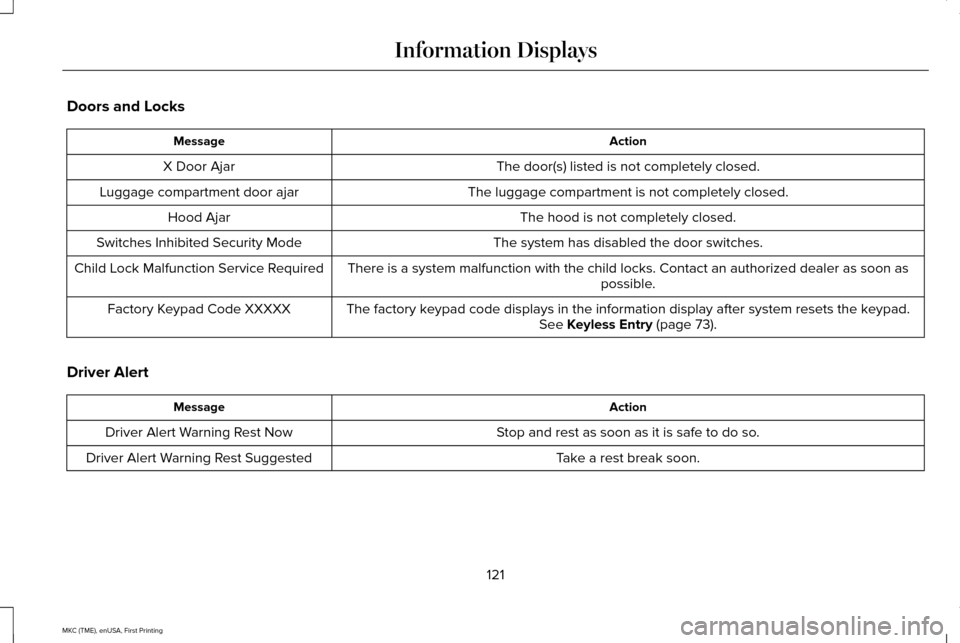
Doors and Locks
Action
Message
The door(s) listed is not completely closed.
X Door Ajar
The luggage compartment is not completely closed.
Luggage compartment door ajar
The hood is not completely closed.
Hood Ajar
The system has disabled the door switches.
Switches Inhibited Security Mode
There is a system malfunction with the child locks. Contact an authorize\
d dealer as soon as possible.
Child Lock Malfunction Service Required
The factory keypad code displays in the information display after system resets the k\
eypad.See Keyless Entry (page 73).
Factory Keypad Code XXXXX
Driver Alert Action
Message
Stop and rest as soon as it is safe to do so.
Driver Alert Warning Rest Now
Take a rest break soon.
Driver Alert Warning Rest Suggested
121
MKC (TME), enUSA, First Printing Information Displays
Page 148 of 432
You can also recall a preset memory position
by:
•
Pressing the unlock button on your
intelligent access key fob if it is linked to
a preset position.
• Unlocking the intelligent driver door
handle if a linked key fob is present.
• Entering a personal entry code on the
Securicode keypad. See Keyless Entry
(page 73).
Note: Using a linked key fob to recall your
memory position when the ignition is off will
move the seat and steering column to the
Easy Entry position.
Linking a PreSet Position to your
Remote Control or Intelligent Access
Key
Your vehicle can save the preset memory
positions for up to three remote controls or
intelligent access (IA) keys.
1. With the ignition on, move the memory positions to the desired positions. 2.
Press and hold the desired preset button
for about five seconds. A tone will sound
after about two seconds. Continue
holding until a second tone is heard.
3. Within three seconds, press the lock button on the remote control you are
linking.
To unlink a remote control, follow the same
procedure – except in Step 3, press the
unlock button on the remote control.
Easy Entry and Exit Feature
If you enable the easy entry and exit feature,
it automatically moves the driver seat
position rearward up to two inches (five
centimeters) when you switch the ignition
off. The driver seat will return to the previous
position when you switch the ignition on.
You can enable or disable this feature in the
information display.
See Information
Displays (page 109). REAR SEATS
145
MKC (TME), enUSA, First Printing SeatsE171298
Page 153 of 432
HomeLink Wireless Control System
WARNINGS
Make sure that the garage door and
security device are free from
obstruction when you are programming. Do
not program the system with the vehicle in
the garage. Do not use the system with any garage
door opener that does not have the
safety stop and reverse feature as required
by U.S. Federal Safety Standards (this
includes any garage door opener
manufactured before April 1, 1982). A garage
door opener which cannot detect an object,
signaling the door to stop and reverse, does
not meet current federal safety standards.
Using a garage door opener without these
features increases the risk of serious injury
or death. Note:
Make sure you keep the original
remote control transmitter for use in other
vehicles as well as for future system
programming. Note:
We recommend that upon the sale or
lease termination of your vehicle, you erase
the programmed function buttons for security
reasons. See Erasing the Function Button
Codes.
Note: You can program a maximum of three
devices. To change or replace any of the
three devices after it has been initially
programmed, you must first erase the current
settings. See
Erasing the Function Button
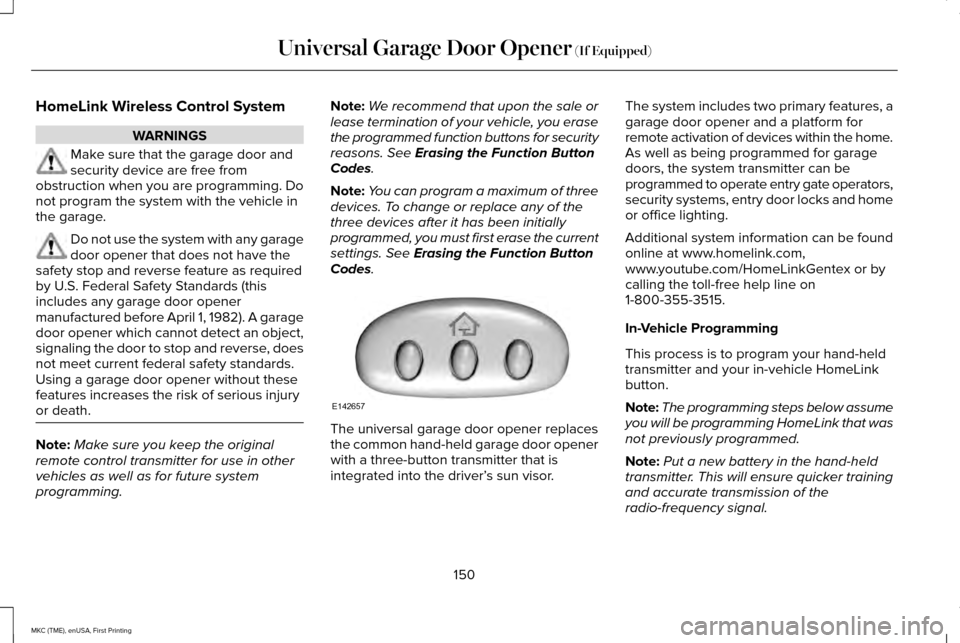
Codes. The universal garage door opener replaces
the common hand-held garage door opener
with a three-button transmitter that is
integrated into the driver’
s sun visor.The system includes two primary features, a
garage door opener and a platform for
remote activation of devices within the home.
As well as being programmed for garage
doors, the system transmitter can be
programmed to operate entry gate operators,
security systems, entry door locks and home
or office lighting.
Additional system information can be found
online at www.homelink.com,
www.youtube.com/HomeLinkGentex or by
calling the toll-free help line on
1-800-355-3515.
In-Vehicle Programming
This process is to program your hand-held
transmitter and your in-vehicle HomeLink
button.
Note:
The programming steps below assume
you will be programming HomeLink that was
not previously programmed.
Note: Put a new battery in the hand-held
transmitter. This will ensure quicker training
and accurate transmission of the
radio-frequency signal.
150
MKC (TME), enUSA, First Printing Universal Garage Door Opener
(If Equipped)E142657
Page 165 of 432
ENGINE BLOCK HEATER (If Equipped)
WARNINGS
Failure to follow engine block heater
instructions could result in property
damage or serious personal injury. Do not use your heater with
ungrounded electrical systems or
two-pronged adapters. There is a risk of
electrical shock. Do not fully close the hood, or allow it
to drop under its own weight when
using the engine block heater. This could
damage the power cable and may cause an
electrical short resulting in fire, injury and
property damage. Note:
The heater is most effective when
outdoor temperatures are below 0°F (-18°C).
The heater acts as a starting aid by warming
the engine coolant. This allows the climate
control system to respond quickly. The
equipment includes a heater element
(installed in the engine block) and a wire
harness. You can connect the system to a
grounded 120-volt AC electrical source. We recommend that you do the following for
a safe and correct operation:
•
Use a 16-gauge outdoor extension cord
that is product certified by Underwriter’ s
Laboratory (UL) or Canadian Standards
Association (CSA). This extension cord
must be suitable for use outdoors, in cold
temperatures, and be clearly marked
Suitable for Use with Outdoor
Appliances. Do not use an indoor
extension cord outdoors. This could
result in an electric shock or become a
fire hazard.
• Use as short an extension cord as
possible.
• Do not use multiple extension cords.
• Make sure that when in operation, the
extension cord plug and heater cord plug
connections are free and clear of water.
This could cause an electric shock or fire.
• Make sure your vehicle is parked in a
clean area, clear of combustibles.
• Make sure the heater, heater cord and
extension cord are firmly connected. •
Check for heat anywhere in the electrical
hookup once the system has been
operating for approximately 30 minutes.
• Make sure the system is unplugged and
properly stowed before starting and
driving your vehicle. Make sure the
protective cover seals the prongs of the
block heater cord plug when not in use.
• Make sure the heater system is checked
for proper operation before winter.
Using the Engine Block Heater
Make sure the receptacle terminals are clean
and dry prior to use. Clean them with a dry
cloth if necessary.
The heater uses 0.4 to 1.0 kilowatt-hours of
energy per hour of use. The system does not
have a thermostat. It achieves maximum
temperature after approximately three hours
of operation. Using the heater longer than
three hours does not improve system
performance and unnecessarily uses
electricity.
162
MKC (TME), enUSA, First Printing Starting and Stopping the Engine
Page 176 of 432
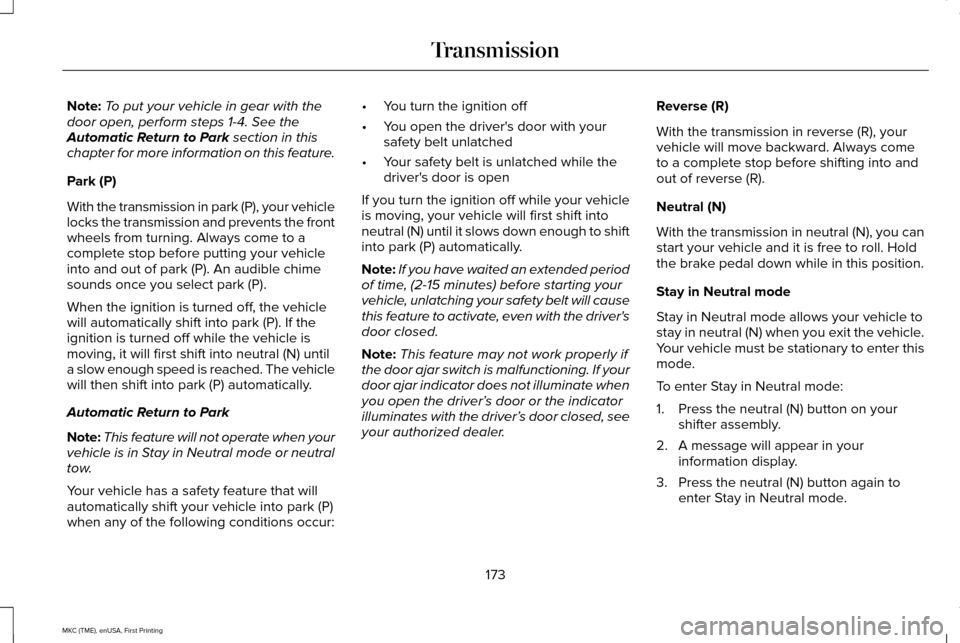
Note:
To put your vehicle in gear with the
door open, perform steps 1-4. See the
Automatic Return to Park section in this
chapter for more information on this feature.
Park (P)
With the transmission in park (P), your vehicle
locks the transmission and prevents the front
wheels from turning. Always come to a
complete stop before putting your vehicle
into and out of park (P). An audible chime
sounds once you select park (P).
When the ignition is turned off, the vehicle
will automatically shift into park (P). If the
ignition is turned off while the vehicle is
moving, it will first shift into neutral (N) until
a slow enough speed is reached. The vehicle
will then shift into park (P) automatically.
Automatic Return to Park
Note: This feature will not operate when your
vehicle is in Stay in Neutral mode or neutral
tow.
Your vehicle has a safety feature that will
automatically shift your vehicle into park (P)
when any of the following conditions occur: •
You turn the ignition off
• You open the driver's door with your
safety belt unlatched
• Your safety belt is unlatched while the
driver's door is open
If you turn the ignition off while your vehicle
is moving, your vehicle will first shift into
neutral (N) until it slows down enough to shift
into park (P) automatically.
Note: If you have waited an extended period
of time, (2-15 minutes) before starting your
vehicle, unlatching your safety belt will cause
this feature to activate, even with the driver's
door closed.
Note: This feature may not work properly if
the door ajar switch is malfunctioning. If your
door ajar indicator does not illuminate when
you open the driver’ s door or the indicator
illuminates with the driver’ s door closed, see
your authorized dealer. Reverse (R)
With the transmission in reverse (R), your
vehicle will move backward. Always come
to a complete stop before shifting into and
out of reverse (R).
Neutral (N)
With the transmission in neutral (N), you can
start your vehicle and it is free to roll. Hold
the brake pedal down while in this position.
Stay in Neutral mode
Stay in Neutral mode allows your vehicle to
stay in neutral (N) when you exit the vehicle.
Your vehicle must be stationary to enter this
mode.
To enter Stay in Neutral mode:
1. Press the neutral (N) button on your
shifter assembly.
2. A message will appear in your information display.
3. Press the neutral (N) button again to enter Stay in Neutral mode.
173
MKC (TME), enUSA, First Printing Transmission
Page 217 of 432
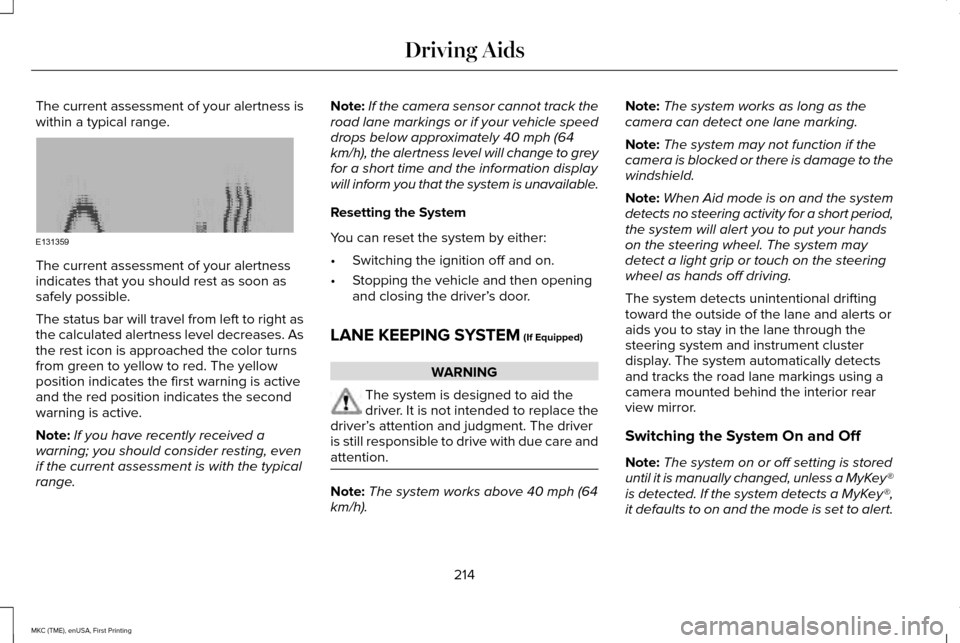
The current assessment of your alertness is
within a typical range.
The current assessment of your alertness
indicates that you should rest as soon as
safely possible.
The status bar will travel from left to right as
the calculated alertness level decreases. As
the rest icon is approached the color turns
from green to yellow to red. The yellow
position indicates the first warning is active
and the red position indicates the second
warning is active.
Note:
If you have recently received a
warning; you should consider resting, even
if the current assessment is with the typical
range. Note:
If the camera sensor cannot track the
road lane markings or if your vehicle speed
drops below approximately 40 mph (64
km/h), the alertness level will change to grey
for a short time and the information display
will inform you that the system is unavailable.
Resetting the System
You can reset the system by either:
• Switching the ignition off and on.
• Stopping the vehicle and then opening
and closing the driver’ s door.
LANE KEEPING SYSTEM (If Equipped) WARNING
The system is designed to aid the
driver. It is not intended to replace the
driver’ s attention and judgment. The driver
is still responsible to drive with due care and
attention. Note:
The system works above 40 mph (64
km/h). Note:
The system works as long as the
camera can detect one lane marking.
Note: The system may not function if the
camera is blocked or there is damage to the
windshield.
Note: When Aid mode is on and the system
detects no steering activity for a short period,
the system will alert you to put your hands
on the steering wheel. The system may
detect a light grip or touch on the steering
wheel as hands off driving.
The system detects unintentional drifting
toward the outside of the lane and alerts or
aids you to stay in the lane through the
steering system and instrument cluster
display. The system automatically detects
and tracks the road lane markings using a
camera mounted behind the interior rear
view mirror.
Switching the System On and Off
Note: The system on or off setting is stored
until it is manually changed, unless a MyKey®
is detected. If the system detects a MyKey®,
it defaults to on and the mode is set to alert.
214
MKC (TME), enUSA, First Printing Driving AidsE131359
Page 276 of 432
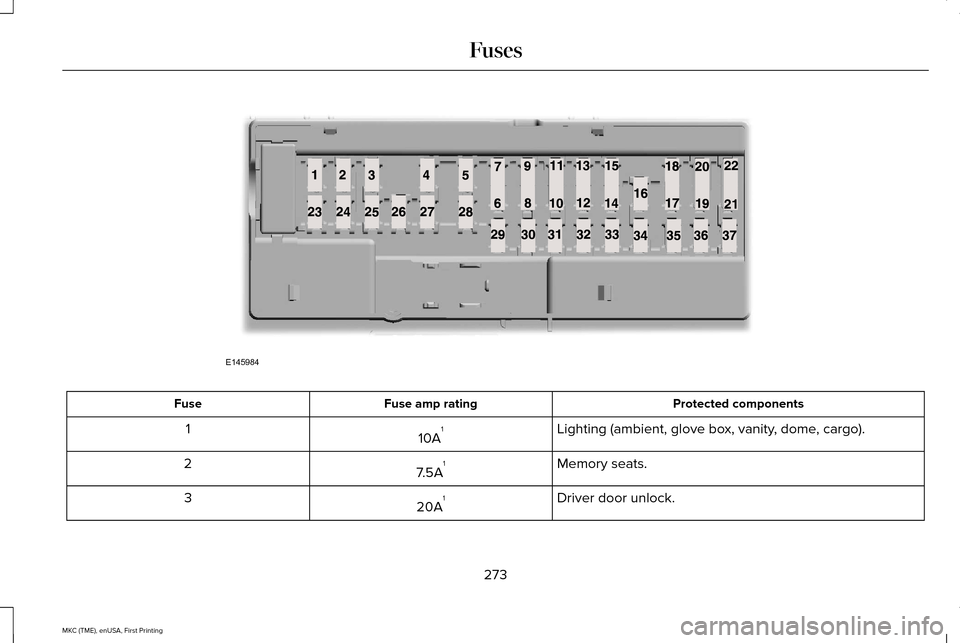
Protected components
Fuse amp rating
Fuse
Lighting (ambient, glove box, vanity, dome, cargo).
10A 1
1
Memory seats.
7.5A 1
2
Driver door unlock.
20A 1
3
273
MKC (TME), enUSA, First Printing FusesE145984
Page 309 of 432
CLEANING THE ENGINE
Engines are more efficient when they are
clean because grease and dirt buildup keep
the engine warmer than normal.
When washing:
•
Take care when using a power washer
to clean the engine. The high-pressure
fluid could penetrate the sealed parts
and cause damage.
• Do not spray a hot engine with cold water
to avoid cracking the engine block or
other engine components.
• Spray Motorcraft Engine Shampoo and
Degreaser on all parts that require
cleaning and pressure rinse clean. In
Canada, use Motorcraft Engine Shampoo.
• Never wash or rinse the engine while it
is hot or running; water in the running
engine may cause internal damage. •
Never wash or rinse any ignition coil,
spark plug wire or spark plug well, or the
area in and around these locations.
• Cover the battery, power distribution box,
and air filter assembly to prevent water
damage when cleaning the engine.
CLEANING THE WINDOWS AND
WIPER BLADES
Car wash chemicals and environmental
fallout can result in windshield and wiper
blade contamination. Dirty windshield and
wipers will result in poor windshield wiper
operation. Keep the windshield and wiper
blades clean to maintain windshield wiper
performance. To clean the windshield and wiper blades:
•
Clean the windshield with a non-abrasive
glass cleaner. When cleaning the interior
of the windshield, avoid getting any glass
cleaner on the instrument panel or door
panels. Wipe any glass cleaner off these
surfaces immediately.
• For windshields contaminated with tree
sap, chemicals, wax or bugs, clean the
entire windshield using steel wool (no
greater than 0000 grade) in a circular
motion and rinse with water.
• Clean the wiper blades with isopropyl
rubbing alcohol or windshield washer
concentrate.
Note: Do not use razor blades or other
sharp objects to clean or remove decals from
the inside of the heated rear window. The
vehicle warranty does not cover damage
caused to the heated rear window grid lines.
306
MKC (TME), enUSA, First Printing Vehicle Care
Page 372 of 432
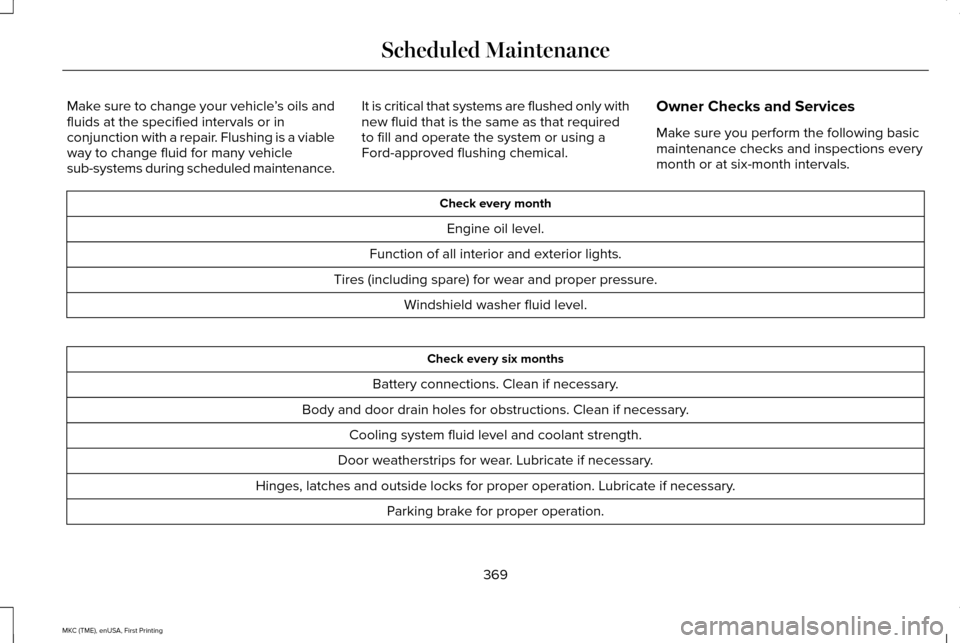
Make sure to change your vehicle
’s oils and
fluids at the specified intervals or in
conjunction with a repair. Flushing is a viable
way to change fluid for many vehicle
sub-systems during scheduled maintenance. It is critical that systems are flushed only with
new fluid that is the same as that required
to fill and operate the system or using a
Ford-approved flushing chemical.
Owner Checks and Services
Make sure you perform the following basic
maintenance checks and inspections every
month or at six-month intervals. Check every month
Engine oil level.
Function of all interior and exterior lights.
Tires (including spare) for wear and proper pressure. Windshield washer fluid level. Check every six months
Battery connections. Clean if necessary.
Body and door drain holes for obstructions. Clean if necessary. Cooling system fluid level and coolant strength.
Door weatherstrips for wear. Lubricate if necessary.
Hinges, latches and outside locks for proper operation. Lubricate if necessary. Parking brake for proper operation.
369
MKC (TME), enUSA, First Printing Scheduled Maintenance
Page 425 of 432
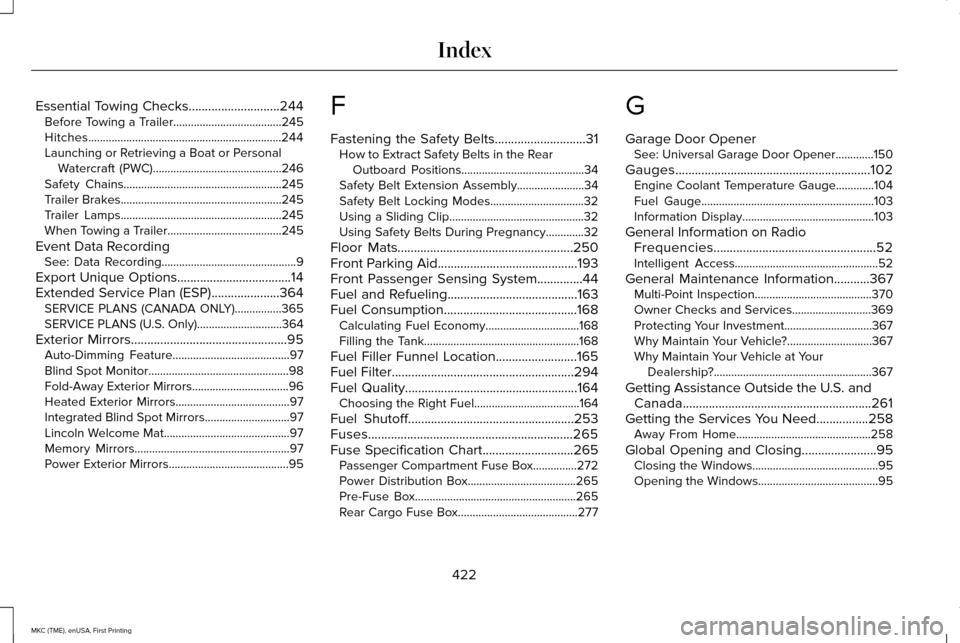
Essential Towing Checks............................244
Before Towing a Trailer.....................................245
Hitches..................................................................244
Launching or Retrieving a Boat or Personal
Watercraft (PWC)............................................246
Safety Chains......................................................245
Trailer Brakes.......................................................245
Trailer Lamps.......................................................245
When Towing a Trailer.......................................245
Event Data Recording See: Data Recording..............................................9
Export Unique Options...................................14
Extended Service Plan (ESP).....................364 SERVICE PLANS (CANADA ONLY)................365
SERVICE PLANS (U.S. Only).............................364
Exterior Mirrors................................................95 Auto-Dimming Feature........................................97
Blind Spot Monitor................................................98
Fold-Away Exterior Mirrors.................................96
Heated Exterior Mirrors.......................................97
Integrated Blind Spot Mirrors.............................97
Lincoln Welcome Mat...........................................97
Memory Mirrors.....................................................97
Power Exterior Mirrors.........................................95 F
Fastening the Safety Belts............................31
How to Extract Safety Belts in the Rear
Outboard Positions..........................................34
Safety Belt Extension Assembly.......................
34
Safety Belt Locking Modes................................32
Using a Sliding Clip..............................................32
Using Safety Belts During Pregnancy.............32
Floor Mats......................................................250
Front Parking Aid...........................................193
Front Passenger Sensing System..............44
Fuel and Refueling........................................163
Fuel Consumption.........................................168 Calculating Fuel Economy................................168
Filling the Tank.....................................................168
Fuel Filler Funnel Location.........................165
Fuel Filter
........................................................294
Fuel Quality.....................................................164
Choosing the Right Fuel....................................164
Fuel Shutoff...................................................253
Fuses...............................................................265
Fuse Specification Chart............................265 Passenger Compartment Fuse Box...............272
Power Distribution Box.....................................265
Pre-Fuse Box.......................................................265
Rear Cargo Fuse Box.........................................277 G
Garage Door Opener
See: Universal Garage Door Opener.............150
Gauges............................................................102 Engine Coolant Temperature Gauge.............104
Fuel Gauge...........................................................103
Information Display.............................................103
General Information on Radio Frequencies..................................................52
Intelligent Access.................................................52
General Maintenance Information
...........367
Multi-Point Inspection........................................370
Owner Checks and Services...........................
369
Protecting Your Investment..............................367
Why Maintain Your Vehicle?.............................367
Why Maintain Your Vehicle at Your Dealership?......................................................367
Getting Assistance Outside the U.S. and Canada
..........................................................261
Getting the Services You Need................258 Away From Home..............................................258
Global Opening and Closing.......................95 Closing the Windows...........................................95
Opening the Windows.........................................95
422
MKC (TME), enUSA, First Printing Index