automatic transmission LINCOLN MKC 2018 Owner's Manual
[x] Cancel search | Manufacturer: LINCOLN, Model Year: 2018, Model line: MKC, Model: LINCOLN MKC 2018Pages: 571, PDF Size: 4.39 MB
Page 195 of 571
Note:Auto Hold is last remembered afterignition. Auto Hold also suppresses while inReverse (R).
When Auto Hold is off, your vehicle behavesthe same as a vehicle without Auto Hold.
There is an Auto Hold indicator lamp in theinstrument cluster that has two modes, activeand unavailable:
The Auto Hold (ACTIVE) indicatorlight illuminates in the informationdisplay when the system holdsyour vehicle stationary. When in active mode,press the brake pedal and the Auto Holdbutton to switch Auto Hold off.
The Auto Hold (UNAVAILABLE)indicator light illuminates in theinformation display when thesystem is on but unavailable to hold yourvehicle (for example, during Active ParkAssist, Stay in Neutral Mode, or when youdo not fasten your seatbelt or close thedoor).
Note:Make sure you switch off Auto Holdor use the Stay in Neutral mode before youenter a car wash. See AutomaticTransmission (page 175).
Using Auto Hold
1. Bring your vehicle to a stop by pressingthe brake pedal. After coming to a stop,the green Auto Hold (ACTIVE) indicatorlamp illuminates in the informationdisplay.
2.Release the brake pedal. The Auto Hold(ACTIVE) indicator light remainsilluminated in the information display andAuto Hold will hold your vehicle at a stop.
3. When you press the accelerator pedal,Auto Hold releases the brakes and youwill be able to drive off. Once you driveoff, the green Auto Hold (ACTIVE)indicator no longer illuminates in theinformation display.
Note:The Stop/Start system (if equipped)may stop the engine when you press thebrake pedal. If this occurs, it will restart onceyou press the accelerator pedal. Auto Holdstill holds your vehicle at a standstill with theengine off.
192
MKC (TME) Canada/United States of America, JJ7J 19A321 AA enUSA, Edition date: 201707, Second Printing
BrakesE197933 E197934
Page 200 of 571
PRINCIPLE OF OPERATION
WARNINGS
To help avoid personal injury, alwaysuse caution when in reverse (R) andwhen using the sensing system.
The system may not detect objectswith surfaces that absorb reflection.Always drive with due care and attention.Failure to take care may result in a crash.
Traffic control systems, inclementweather, air brakes, external motorsand fans may affect the correct operation ofthe sensing system.This may cause reducedperformance or false alerts.
The system may not detect small ormoving objects, particularly those closeto the ground.
Note:If your vehicle is equipped withMyKey™, the sensing system cannot beturned off when a MyKey™ is present. SeePrinciple of Operation (page 59).
Note:Keep the sensors, located on thebumper or fascia, free from snow, ice andlarge accumulations of dirt. If the sensorsare covered, the system’s accuracy can beaffected. Do not clean the sensors with sharpobjects.
Note:If your vehicle sustains damage to thebumper or fascia, leaving it misaligned orbent, the sensing zone may be alteredcausing inaccurate measurement ofobstacles or false alerts.
Note:Certain add-on devices installedaround the bumper or fascia may createfalse alerts. For example, large trailerhitches, bike or surfboard racks, license platebrackets, bumper covers or any other devicethat may block the normal detection zoneof the system. Remove the add-on device toprevent false alerts.
Note:When a trailer is connected to yourvehicle, the rear parking aid may detect thetrailer and therefore provide an alert. Disablethe rear parking aid when a trailer isconnected to prevent the alert.
The sensing system warns the driver ofobstacles within a certain range of yourvehicle. The system turns on automaticallywhenever you switch the ignition on.
The system can be switched off through theinformation display menu or from the pop-upmessage that appears once you shift thetransmission into reverse (R). See GeneralInformation (page 109).
If a fault is present in the system, a warningmessage appears in the information display.See Information Messages (page 114).
REAR PARKING AID
The rear sensors are only active when thetransmission is in reverse (R). As your vehiclemoves closer to the obstacle, the rate of theaudible warning increases. When theobstacle is less than 12 in (30 cm) away, thewarning sounds continuously. If the systemdetects a stationary or receding objectfarther than 12 in (30 cm) from the corners ofthe bumper, the tone sounds for only threeseconds. Once the system detects an objectapproaching, the warning sounds again.
197
MKC (TME) Canada/United States of America, JJ7J 19A321 AA enUSA, Edition date: 201707, Second Printing
Parking Aids
Page 202 of 571
If the transmission is in drive (D) or any otherforward gear (for example, low (L), sport (S)or any forward gear in a manualtransmission), the front sensing systemprovides audio warnings when your vehicleis moving below a speed of 7 mph (12 km/h)and an obstacle is located inside thedetection area.
ACTIVE PARK ASSIST (If Equipped)
Parallel Parking, Parallel Park OutAssist
WARNINGS
You must remain in your vehicle whenthe system turns on. At all times, youare responsible for controlling your vehicle,supervising the system and intervening, ifrequired. Failure to take care may result inthe loss of control of your vehicle, seriouspersonal injury or death.
The sensors may not detect objects inheavy rain or other conditions thatcause interference.
WARNINGS
Active park assist does not apply thebrakes under any circumstances.
The system is designed to aid thedriver. It is not intended to replace yourattention and judgment. You are stillresponsible to drive with due care andattention.
Note:Active Park Assist is a multi-stepprocess and may require you to shift yourtransmission multiple times. Follow theon-screen instructions until you complete theparking process.
Note:The Blind Spot Information Systemdoes not detect traffic alongside or behindyour vehicle during an Active Park Assistmaneuver.
Active Park Assist detects an availableparallel parking space and automaticallysteers your vehicle into the space(hands-free) while you control theaccelerator, gearshift and brakes. The systemvisually and audibly guides you to park yourvehicle.
If you are uncomfortable with the proximityto any vehicle or object, you may choose tooverride the system by grabbing the steeringwheel or by pressing the Active Park Assistbutton.
Parallel Park Out Assist automatically steersyour vehicle out of a parallel parking space(hands-free) while you control theaccelerator, gearshift and brakes. The systemvisually and audibly guides you to entertraffic.
The system may not correctly operate in anyof the following conditions:
•You use a spare tire or a tire significantlyworn more than the other tires.
•One or more tires are improperly inflated.
•You try to park on a tight curve.
•Something passes between the frontbumper and the parking space. Forexample, a pedestrian or cyclist.
199
MKC (TME) Canada/United States of America, JJ7J 19A321 AA enUSA, Edition date: 201707, Second Printing
Parking Aids
Page 204 of 571
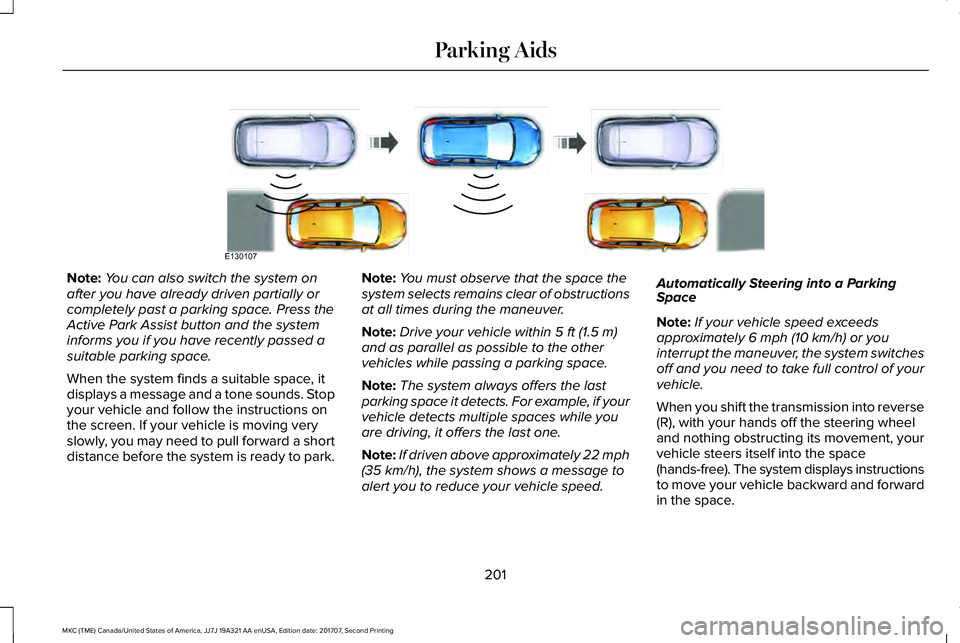
Note:You can also switch the system onafter you have already driven partially orcompletely past a parking space. Press theActive Park Assist button and the systeminforms you if you have recently passed asuitable parking space.
When the system finds a suitable space, itdisplays a message and a tone sounds. Stopyour vehicle and follow the instructions onthe screen. If your vehicle is moving veryslowly, you may need to pull forward a shortdistance before the system is ready to park.
Note:You must observe that the space thesystem selects remains clear of obstructionsat all times during the maneuver.
Note:Drive your vehicle within 5 ft (1.5 m)and as parallel as possible to the othervehicles while passing a parking space.
Note:The system always offers the lastparking space it detects. For example, if yourvehicle detects multiple spaces while youare driving, it offers the last one.
Note:If driven above approximately 22 mph(35 km/h), the system shows a message toalert you to reduce your vehicle speed.
Automatically Steering into a ParkingSpace
Note:If your vehicle speed exceedsapproximately 6 mph (10 km/h) or youinterrupt the maneuver, the system switchesoff and you need to take full control of yourvehicle.
When you shift the transmission into reverse(R), with your hands off the steering wheeland nothing obstructing its movement, yourvehicle steers itself into the space(hands-free). The system displays instructionsto move your vehicle backward and forwardin the space.
201
MKC (TME) Canada/United States of America, JJ7J 19A321 AA enUSA, Edition date: 201707, Second Printing
Parking AidsE130107
Page 227 of 571
BLIND SPOT INFORMATION
SYSTEM (If Equipped)
WARNINGS
Do not use the blind spot informationsystem as a replacement for using theinterior and exterior mirrors or looking overyour shoulder before changing lanes. Theblind spot information system is not areplacement for careful driving.
The system may not operate properlyduring severe weather conditions, forexample snow, ice, heavy rain and spray.Always drive with due care and attention.Failure to take care may result in a crash.
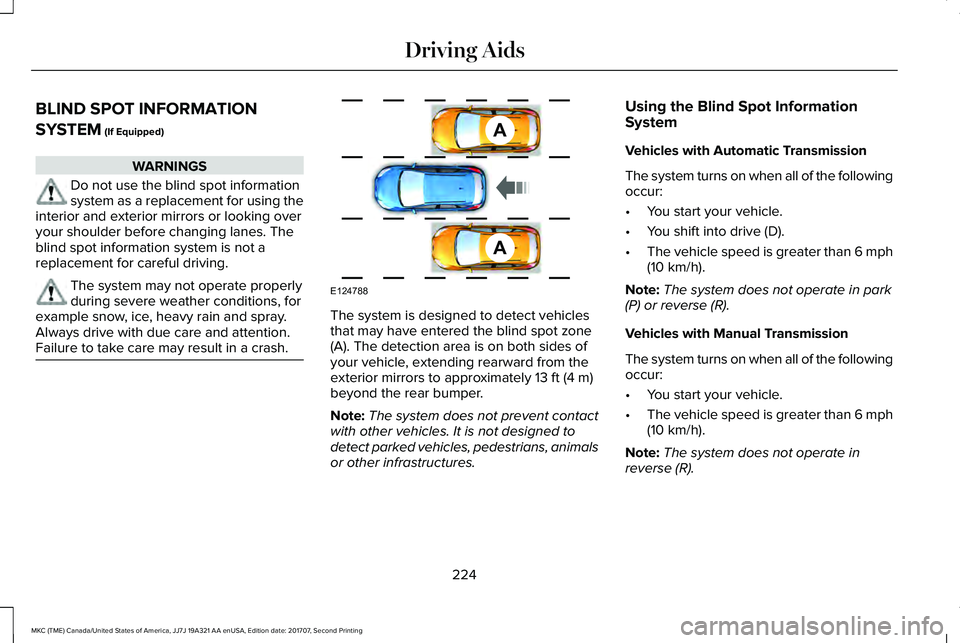
The system is designed to detect vehiclesthat may have entered the blind spot zone(A). The detection area is on both sides ofyour vehicle, extending rearward from theexterior mirrors to approximately 13 ft (4 m)beyond the rear bumper.
Note:The system does not prevent contactwith other vehicles. It is not designed todetect parked vehicles, pedestrians, animalsor other infrastructures.
Using the Blind Spot InformationSystem
Vehicles with Automatic Transmission
The system turns on when all of the followingoccur:
•You start your vehicle.
•You shift into drive (D).
•The vehicle speed is greater than 6 mph(10 km/h).
Note:The system does not operate in park(P) or reverse (R).
Vehicles with Manual Transmission
The system turns on when all of the followingoccur:
•You start your vehicle.
•The vehicle speed is greater than 6 mph(10 km/h).
Note:The system does not operate inreverse (R).
224
MKC (TME) Canada/United States of America, JJ7J 19A321 AA enUSA, Edition date: 201707, Second Printing
Driving AidsA
A
E124788
Page 250 of 571
Trailer lamps are required on most towedvehicles. Make sure all running lights, brakelights, turn signals and hazard lights areworking.
Before Towing a Trailer
Practice turning, stopping and backing up toget the feel of your vehicle-trailercombination before starting on a trip. Whenturning, make wider turns so the trailerwheels clear curbs and other obstacles.
When Towing a Trailer
•Do not drive faster than 70 mph(113 km/h) during the first 500 mi(800 km).
•Do not make full-throttle starts.
•Check your hitch, electrical connectionsand trailer wheel lug nuts thoroughly afteryou have traveled 50 mi (80 km).
•When stopped in congested or heavytraffic during hot weather, place thetransmission in park (P) to aid engine andtransmission cooling and to help A/Cperformance.
•Turn off the speed control with heavyloads or in hilly terrain. The speed controlmay turn off automatically when you aretowing on long, steep grades.
•Shift to a lower gear when driving downa long or steep hill. Do not apply thebrakes continuously, as they mayoverheat and become less effective.
•If your transmission is equipped with aGrade Assist or Tow/Haul feature, usethis feature when towing. This providesengine braking and helps eliminateexcessive transmission shifting foroptimum fuel economy and transmissioncooling.
•Allow more distance for stopping with atrailer attached. Anticipate stops andbrake gradually.
•Avoid parking on a grade. However, ifyou must park on a grade:
1. Turn the steering wheel to point yourvehicle tires away from traffic flow.
2. Set your vehicle parking brake.
3. Place the transmission in park (P).
4. Place wheel chocks in front and back ofthe trailer wheels. Chocks are notincluded with your vehicle.
Launching or Retrieving a Boat orPersonal Watercraft (PWC)
Note:Disconnect the wiring to the trailerbefore backing the trailer into the water.
Note:Reconnect the wiring to the trailerafter removing the trailer from the water.
When backing down a ramp during boatlaunching or retrieval:
•Do not allow the static water level to riseabove the bottom edge of the rearbumper.
•Do not allow waves to break higher than6 in (15 cm) above the bottom edge ofthe rear bumper.
Exceeding these limits may allow water toenter vehicle components:
•Causing internal damage to thecomponents.
•Affecting driveability, emissions, andreliability.
247
MKC (TME) Canada/United States of America, JJ7J 19A321 AA enUSA, Edition date: 201707, Second Printing
Towing
Page 251 of 571
Replace the rear axle lubricant anytime yousubmerge the rear axle in water. Water maycontaminate the rear axle lubricant, which isnot a normal maintenance inspection itemunless there is a possibility of a leak or otheraxle repair is required.
TOWING THE VEHICLE ON FOUR
WHEELS
Emergency Towing
WARNING
If your vehicle has a steering wheellock make sure the ignition is in theaccessory or on position when being towed.
If your vehicle becomes inoperable (withoutaccess to wheel dollies, car-hauling trailer,or flatbed transport vehicle), it can beflat-towed (all wheels on the ground,regardless of the powertrain andtransmission configuration) under thefollowing conditions:
•Your vehicle is facing forward for towingin a forward direction.
•You place the vehicle in Stay in Neutralmode. See Placing Your Vehicle in Stayin Neutral Mode. In addition, make sureto read the brake-shift interlock overrideprocedure. See Automatic Transmission(page 175).
•Maximum speed is 35 mph (56 km/h).
•Maximum distance is 50 mi (80 km).
Placing Your Vehicle in Stay in NeutralMode
1. Press the N button on the shifterassembly.
2. When Press N again to Enter Stay inNeutral Mode appears in the informationdisplay, press the N button again.
Note:The message Stay in Neutral ModeEngaged appears in the information displaywhen you successfully complete theprocedure.
Note:Keeping the vehicle in Stay in Neutralmode eventually causes your vehicle batteryto lose charge. Exit the mode as soon assafely possible.
Recreational Towing
Note:Put your climate control system inrecirculated air mode to prevent exhaustfumes from entering the vehicle. SeeClimate Control (page 133).
Follow these guidelines if you have a needfor recreational (RV) towing. An example ofrecreational towing would be towing yourvehicle behind a motorhome. We designedthese guidelines to prevent damage to yourtransmission.
248
MKC (TME) Canada/United States of America, JJ7J 19A321 AA enUSA, Edition date: 201707, Second Printing
Towing
Page 298 of 571
AUTOMATIC TRANSMISSION
FLUID CHECK
The automatic transmission does not havea transmission fluid dipstick.
The automatic transmission does notconsume fluid. However, the fluid levelshould be checked if the transmission is notworking properly, for example if thetransmission slips or shifts slowly or if younotice some sign of fluid leakage.
Note:Transmission fluid should be checkedby an authorized dealer. If required, fluidshould be added by an authorized dealer.
Do not use supplemental transmission fluidadditives, treatments or cleaning agents. Theuse of these materials may affecttransmission operation and result in damageto internal transmission components.
BRAKE FLUID CHECK
WARNINGS
Do not use any fluid other than therecommended brake fluid as this willreduce brake efficiency. Use of incorrect fluidcould result in the loss of vehicle control,serious personal injury or death.
Only use brake fluid from a sealedcontainer. Contamination with dirt,water, petroleum products or other materialsmay result in brake system damage or failure.Failure to adhere to this warning could resultin the loss of vehicle control, seriouspersonal injury or death.
Do not allow the fluid to touch yourskin or eyes. If this happens, rinse theaffected areas immediately with plenty ofwater and contact your physician.
A fluid level between the MAX andMIN lines is within the normaloperating range and there is no need to addfluid. A fluid level not in the normal operatingrange could compromise the performanceof the system. Have your vehicle checkedimmediately.
To avoid fluid contamination, the reservoircap must remain in place and fully tight,unless you are adding fluid.
Only use fluid that meets Ford specifications.See Capacities and Specifications (page344).
WASHER FLUID CHECK
WARNING
If you operate your vehicle intemperatures below 41.0°F (5°C), usewasher fluid with antifreeze protection.Failure to use washer fluid with antifreezeprotection in cold weather could result inimpaired windshield vision and increase therisk of injury or accident.
Note:The front and rear washer systemsare supplied from the same reservoir.
Add fluid to fill the reservoir if the level is low.Only use a washer fluid that meets Fordspecifications. See Capacities andSpecifications (page 344).
295
MKC (TME) Canada/United States of America, JJ7J 19A321 AA enUSA, Edition date: 201707, Second Printing
Maintenance
Page 352 of 571
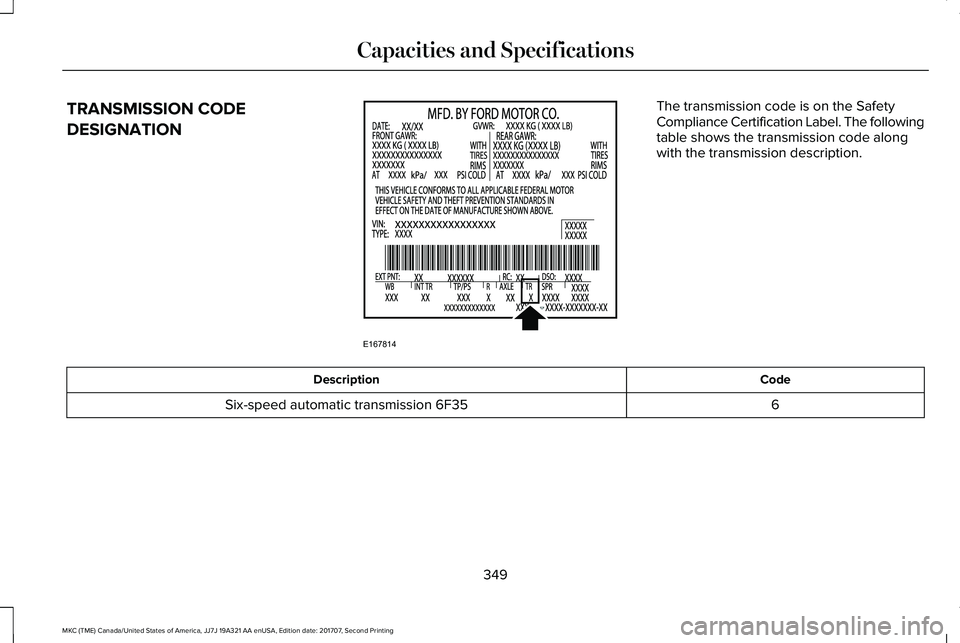
TRANSMISSION CODE
DESIGNATION
The transmission code is on the SafetyCompliance Certification Label. The followingtable shows the transmission code alongwith the transmission description.
CodeDescription
6Six-speed automatic transmission 6F35
349
MKC (TME) Canada/United States of America, JJ7J 19A321 AA enUSA, Edition date: 201707, Second Printing
Capacities and SpecificationsE167814
Page 353 of 571
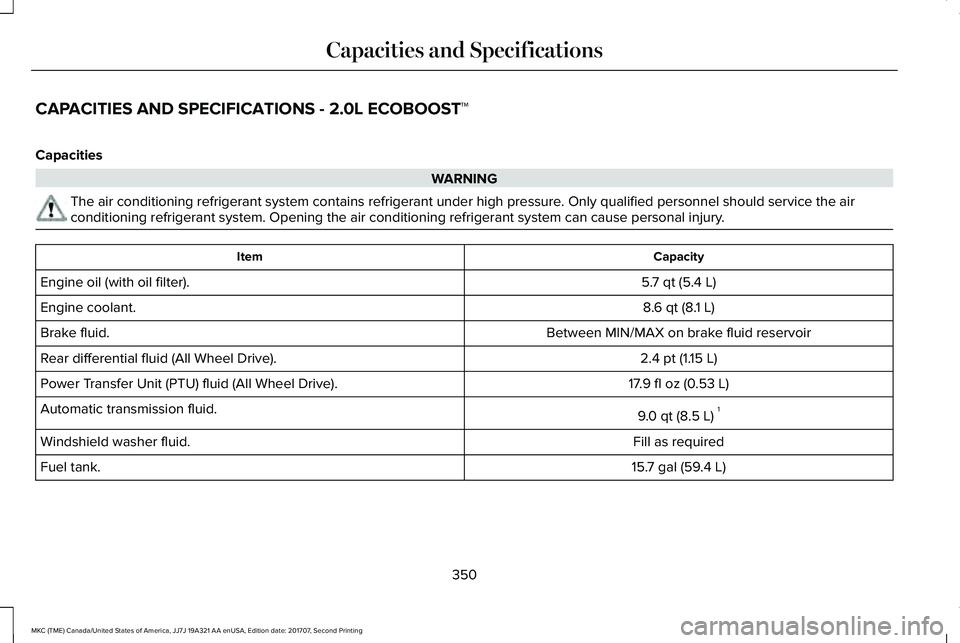
CAPACITIES AND SPECIFICATIONS - 2.0L ECOBOOST™
Capacities
WARNING
The air conditioning refrigerant system contains refrigerant under high pressure. Only qualified personnel should service the airconditioning refrigerant system. Opening the air conditioning refrigerant system can cause personal injury.
CapacityItem
5.7 qt (5.4 L)Engine oil (with oil filter).
8.6 qt (8.1 L)Engine coolant.
Between MIN/MAX on brake fluid reservoirBrake fluid.
2.4 pt (1.15 L)Rear differential fluid (All Wheel Drive).
17.9 fl oz (0.53 L)Power Transfer Unit (PTU) fluid (All Wheel Drive).
9.0 qt (8.5 L)1Automatic transmission fluid.
Fill as requiredWindshield washer fluid.
15.7 gal (59.4 L)Fuel tank.
350
MKC (TME) Canada/United States of America, JJ7J 19A321 AA enUSA, Edition date: 201707, Second Printing
Capacities and Specifications