instrument cluster LINCOLN MKC 2018 Owner's Manual
[x] Cancel search | Manufacturer: LINCOLN, Model Year: 2018, Model line: MKC, Model: LINCOLN MKC 2018Pages: 571, PDF Size: 4.39 MB
Page 214 of 571
The indicator, current gap settingand set speed appear in theinformation display.
Setting the Adaptive Cruise Speed
Note:When adaptive cruise control is active,the speedometer may vary slightly from theset speed displayed in the informationdisplay.
1. Drive to desired speed.
2. Press SET+ or SET-.
3. A green indicator light, the current gapsetting and your set speed appear in theinformation display.
4.Take your foot off the accelerator pedal.
5.A vehicle graphic illuminates if there is avehicle detected in front of you.
Following a Vehicle
WARNINGS
When following a vehicle, your vehicledoes not decelerate automatically to astop, nor does your vehicle alwaysdecelerate quickly enough to avoid a crashwithout driver intervention. Always apply thebrakes when necessary. Failing to do so mayresult in a crash, serious injury or death.
Adaptive cruise control only warns ofvehicles detected by the radar sensor.In some cases there may be no warning ora delayed warning. You should always applythe brakes when necessary. Failure to do somay result in a crash, serious injury or death.
Note:When you are following a vehicle andyou switch on a direction indicator, adaptivecruise control may provide a small temporaryacceleration to help you pass.
Note:The brakes may emit noise whenapplied by the system.
When a vehicle ahead of you enters thesame lane or a slower vehicle is ahead in thesame lane, the vehicle speed adjusts tomaintain a preset gap distance. A vehiclegraphic illuminates in the instrument cluster.
Your vehicle maintains a consistent gap fromthe vehicle ahead until:
•The vehicle in front of you accelerates toa speed above the set speed.
•The vehicle in front of you moves out ofthe lane you are in.
•Your vehicle speed falls below 12 mph(20 km/h).
•You set a new gap distance.
The system applies the brakes to slow yourvehicle to maintain a safe gap distance fromthe vehicle in front. The system only applieslimited braking. You can override the systemby applying the brakes.
211
MKC (TME) Canada/United States of America, JJ7J 19A321 AA enUSA, Edition date: 201707, Second Printing
Cruise ControlE144529 E164805 E164805
Page 222 of 571
LANE KEEPING SYSTEM (If Equipped)
WARNINGS
The system is designed to aid thedriver. It is not intended to replace yourattention and judgment. You are stillresponsible to drive with due care andattention.
Always drive with due care andattention when using and operating thecontrols and features on your vehicle.
At all times, you are responsible forcontrolling your vehicle, supervisingthe system and intervening, if required.Failure to take care may result in the loss ofcontrol of your vehicle, serious personalinjury or death.
In cold and severe weather conditionsthe system may not function. Rain,snow and spray can all limit sensorperformance.
The system will not operate if thesensor cannot track the road lanemarkings.
WARNINGS
The sensor may incorrectly track lanemarkings as other structures or objects.This can result in a false or missed warning.
The system may not operate properlyif the sensor is blocked. Keep thewindshield free from obstruction.
If damage occurs in the immediate areasurrounding the sensor, have yourvehicle checked as soon as possible.
Note:The system works above 40 mph(64 km/h).
Note:The system works as long as thecamera can detect one lane marking.
Note:When you select aid or alert and aidmode and the system detects no steeringactivity for a short period, the system alertsyou to put your hands on the steering wheel.The system may detect a light grip or touchon the steering wheel as hands off driving.
Note:The system may not function if thecamera is blocked, or if the windshield isdamaged or dirty.
The system notifies you to stay in your lanethrough the steering system and theinstrument cluster display when the frontcamera detects an unintentional drift out ofyour lane is likely to occur. The systemautomatically detects and tracks the roadlane markings using a camera mountedbehind the interior rear view mirror.
Switching the System On and Off
Note:The system on or off setting is storeduntil it is manually changed, unless a MyKeyis detected. If the system detects a MyKey,it defaults to on and the mode sets to alert.
219
MKC (TME) Canada/United States of America, JJ7J 19A321 AA enUSA, Edition date: 201707, Second Printing
Driving AidsE249505
Page 294 of 571
From the main menu scroll to:
Action and descriptionMessage
Press the right arrow button,then from this menu scroll tothe following message.
Settings
Press the right arrow button,then from this menu scroll tothe following message.
Vehicle
Press the right arrow button,then from this menu scroll tothe following message.
Oil Life
Press and hold the OK buttonuntil the instrument clusterdisplays the followingmessage.
Hold OK toReset
Reset Successful
When the oil change indicatorresets the instrument clusterdisplays 100%.
Remaining Life
{00}%
Action and descriptionMessage
If the instrument clusterdisplays one of the followingmessages, repeat theprocess.
Not Reset
Reset Cancelled
ENGINE COOLANT CHECK
Checking the Engine Coolant
WARNINGS
Do not add engine coolant when theengine is hot. Steam and scaldingliquids released from a hot cooling systemcan burn you badly. Also, you can be burnedif you spill coolant on hot engine parts.
Do not put engine coolant in thewindshield washer fluid container. Ifsprayed on the windshield, engine coolantcould make it difficult to see through thewindshield.
WARNINGS
To reduce the risk of personal injury,make sure the engine is cool beforeunscrewing the coolant pressure relief cap.The cooling system is under pressure; steamand hot liquid can come out forcefully whenthe cap is loosened slightly.
Do not add coolant further than theMAX mark.
Note:Automotive fluids are notinterchangeable. Do not use engine coolantor windshield washer fluid outside of itsspecified function and vehicle location.
Note:Do not use stop leak pellets, coolingsystem sealants, or additives as they cancause damage to the engine cooling orheating systems. This damage would not becovered under your vehicle’s warranty.
291
MKC (TME) Canada/United States of America, JJ7J 19A321 AA enUSA, Edition date: 201707, Second Printing
Maintenance
Page 314 of 571
CLEANING THE INSTRUMENT
PANEL AND INSTRUMENT
CLUSTER LENS
WARNING
Do not use chemical solvents or strongdetergents when cleaning the steeringwheel or instrument panel to avoidcontamination of the airbag system.
Note:Follow the same procedure ascleaning leather seats for cleaning leatherinstrument panels and leather interior trimsurfaces. See Cleaning Leather Seats (page311).
Clean the instrument panel and cluster lenswith a clean, damp and soft cloth, then usea clean, dry and soft cloth to dry these areas.
•Avoid cleaners or polishes that increasethe gloss of the upper portion of theinstrument panel. The dull finish in thisarea helps protect you from undesirablewindshield reflection.
•Do not use any household cleaningproducts or glass cleaners as these maydamage the finish of the instrumentpanel, interior trim and cluster lens.
•Wash or wipe your hands clean if youhave been in contact with certainproducts such as insect repellent andsuntan lotion to avoid possible damageto the interior painted surfaces.
•Do not allow air fresheners and handsanitizers to spill onto interior surfaces.If a spill occurs, wipe off immediately.Your warranty may not cover thesedamages.
If a staining liquid like coffee or juice hasbeen spilled on the instrument panel or oninterior trim surfaces:
1.Wipe up spilled liquid using a clean, softcloth as quickly as possible.
2. Use Motorcraft Premium Leather andVinyl Cleaner or a commercially availableleather cleaning product for automotiveinteriors. Test any cleaner or stainremover on an inconspicuous area.
3. Alternatively, wipe the surface with aclean, soft cloth and a mild soap andwater solution. Dry the area with a clean,soft cloth.
4.If necessary, apply more soap and watersolution or cleaning product to a clean,soft cloth and press it onto the soiledarea. Allow this to set at roomtemperature for 30 minutes.
5. Remove the soaked cloth, then with aclean, damp cloth, use a rubbing motionfor 60 seconds on the soiled area.
6. Dry the area with a clean, soft cloth.
CLEANING LEATHER SEATS
Note:Follow the same procedure ascleaning leather seats for cleaning leatherinstrument panels and leather interior trimsurfaces.
311
MKC (TME) Canada/United States of America, JJ7J 19A321 AA enUSA, Edition date: 201707, Second Printing
Vehicle Care
Page 477 of 571
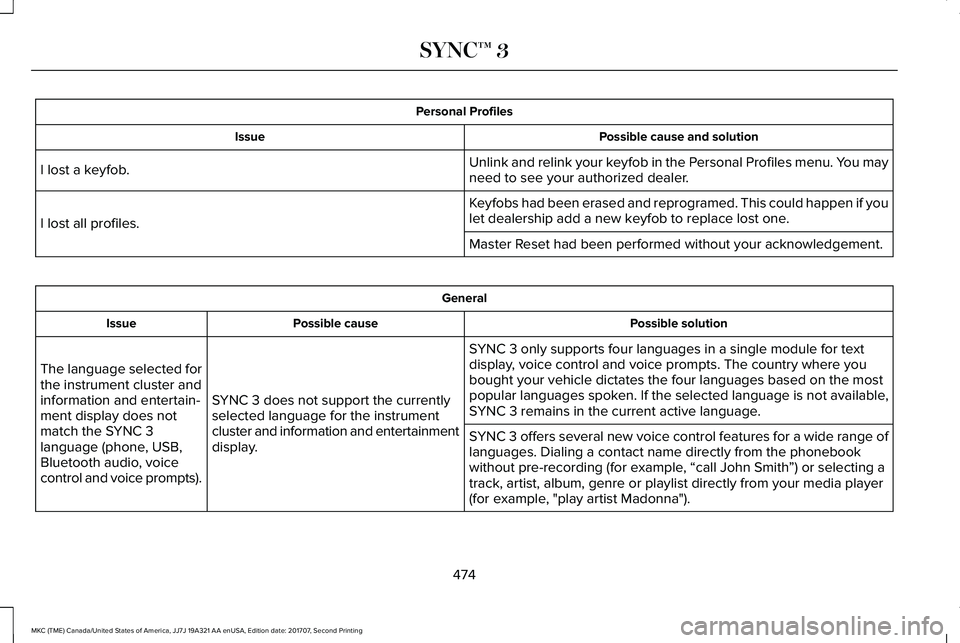
Personal Profiles
Possible cause and solutionIssue
Unlink and relink your keyfob in the Personal Profiles menu. You mayneed to see your authorized dealer.I lost a keyfob.
Keyfobs had been erased and reprogramed. This could happen if youlet dealership add a new keyfob to replace lost one.I lost all profiles.
Master Reset had been performed without your acknowledgement.
General
Possible solutionPossible causeIssue
SYNC 3 only supports four languages in a single module for textdisplay, voice control and voice prompts. The country where youbought your vehicle dictates the four languages based on the mostpopular languages spoken. If the selected language is not available,SYNC 3 remains in the current active language.SYNC 3 does not support the currentlyselected language for the instrumentcluster and information and entertainmentdisplay.
The language selected forthe instrument cluster andinformation and entertain-ment display does notmatch the SYNC 3language (phone, USB,Bluetooth audio, voicecontrol and voice prompts).
SYNC 3 offers several new voice control features for a wide range oflanguages. Dialing a contact name directly from the phonebookwithout pre-recording (for example, “call John Smith”) or selecting atrack, artist, album, genre or playlist directly from your media player(for example, "play artist Madonna").
474
MKC (TME) Canada/United States of America, JJ7J 19A321 AA enUSA, Edition date: 201707, Second Printing
SYNC™ 3
Page 562 of 571
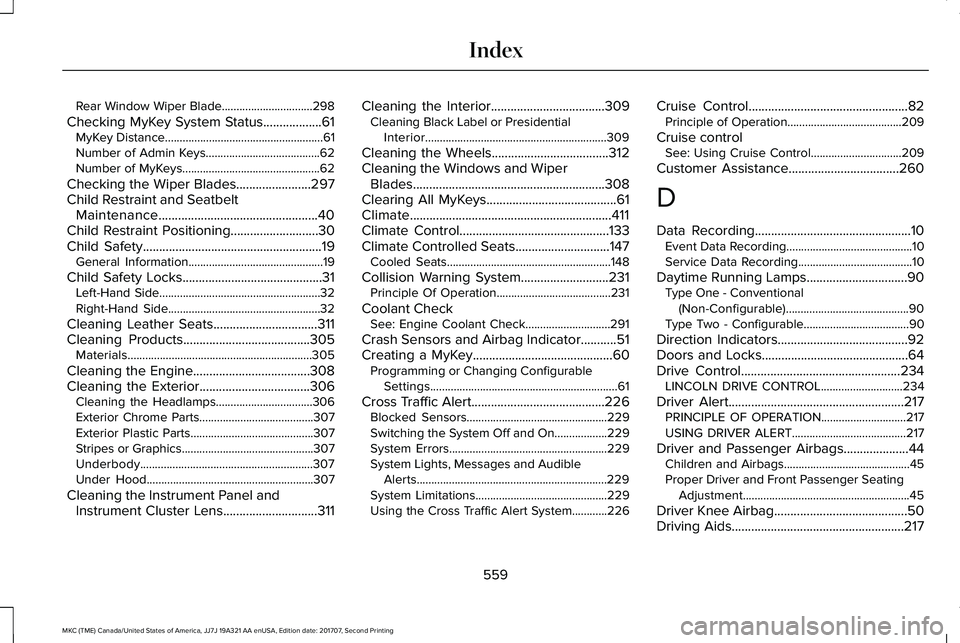
Rear Window Wiper Blade...............................298
Checking MyKey System Status..................61MyKey Distance......................................................61Number of Admin Keys.......................................62Number of MyKeys...............................................62
Checking the Wiper Blades.......................297Child Restraint and SeatbeltMaintenance.................................................40Child Restraint Positioning...........................30Child Safety.......................................................19General Information..............................................19
Child Safety Locks...........................................31Left-Hand Side.......................................................32Right-Hand Side....................................................32
Cleaning Leather Seats................................311Cleaning Products.......................................305Materials...............................................................305
Cleaning the Engine....................................308Cleaning the Exterior..................................306Cleaning the Headlamps.................................306Exterior Chrome Parts.......................................307Exterior Plastic Parts..........................................307Stripes or Graphics.............................................307Underbody...........................................................307Under Hood.........................................................307
Cleaning the Instrument Panel andInstrument Cluster Lens.............................311
Cleaning the Interior...................................309Cleaning Black Label or PresidentialInterior..............................................................309
Cleaning the Wheels....................................312Cleaning the Windows and WiperBlades...........................................................308Clearing All MyKeys........................................61Climate..............................................................411Climate Control..............................................133Climate Controlled Seats.............................147Cooled Seats........................................................148
Collision Warning System...........................231Principle Of Operation.......................................231
Coolant CheckSee: Engine Coolant Check.............................291
Crash Sensors and Airbag Indicator...........51Creating a MyKey...........................................60Programming or Changing ConfigurableSettings................................................................61
Cross Traffic Alert.........................................226Blocked Sensors................................................229Switching the System Off and On..................229System Errors......................................................229System Lights, Messages and AudibleAlerts.................................................................229System Limitations.............................................229Using the Cross Traffic Alert System............226
Cruise Control.................................................82Principle of Operation.......................................209
Cruise controlSee: Using Cruise Control...............................209
Customer Assistance..................................260
D
Data Recording................................................10Event Data Recording...........................................10Service Data Recording.......................................10
Daytime Running Lamps...............................90Type One - Conventional(Non-Configurable)..........................................90Type Two - Configurable....................................90
Direction Indicators........................................92Doors and Locks.............................................64Drive Control.................................................234LINCOLN DRIVE CONTROL............................234
Driver Alert......................................................217PRINCIPLE OF OPERATION.............................217USING DRIVER ALERT.......................................217
Driver and Passenger Airbags....................44Children and Airbags...........................................45Proper Driver and Front Passenger SeatingAdjustment.........................................................45
Driver Knee Airbag.........................................50Driving Aids.....................................................217
559
MKC (TME) Canada/United States of America, JJ7J 19A321 AA enUSA, Edition date: 201707, Second Printing
Index
Page 565 of 571
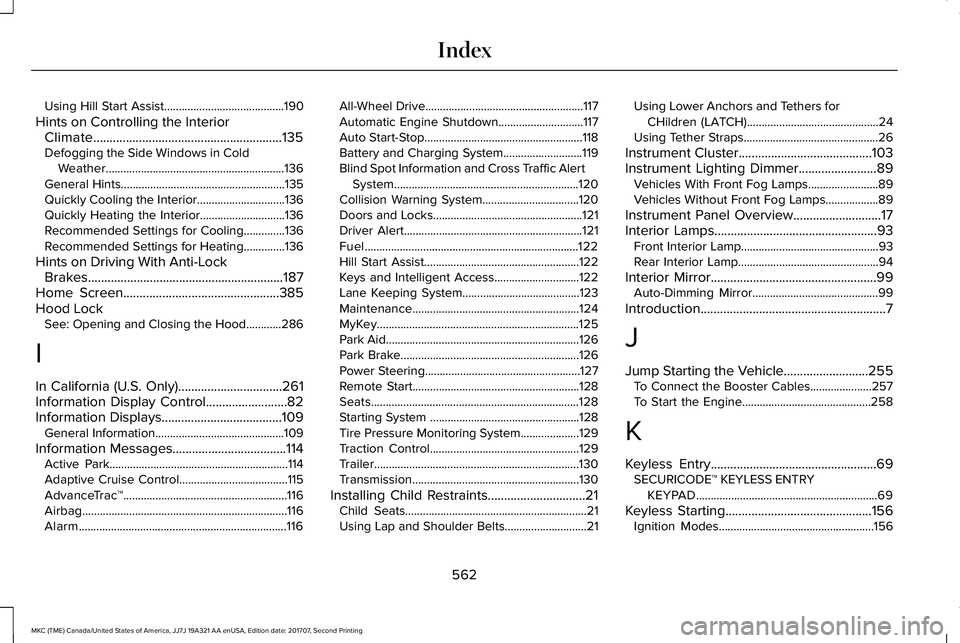
Using Hill Start Assist.........................................190
Hints on Controlling the InteriorClimate..........................................................135Defogging the Side Windows in ColdWeather.............................................................136General Hints........................................................135Quickly Cooling the Interior..............................136Quickly Heating the Interior.............................136Recommended Settings for Cooling..............136Recommended Settings for Heating..............136
Hints on Driving With Anti-LockBrakes............................................................187Home Screen................................................385Hood LockSee: Opening and Closing the Hood............286
I
In California (U.S. Only)................................261Information Display Control.........................82Information Displays.....................................109General Information............................................109
Information Messages...................................114Active Park.............................................................114Adaptive Cruise Control.....................................115AdvanceTrac™........................................................116Airbag......................................................................116Alarm.......................................................................116
All-Wheel Drive......................................................117Automatic Engine Shutdown.............................117Auto Start-Stop......................................................118Battery and Charging System...........................119Blind Spot Information and Cross Traffic AlertSystem...............................................................120Collision Warning System.................................120Doors and Locks...................................................121Driver Alert.............................................................121Fuel.........................................................................122Hill Start Assist.....................................................122Keys and Intelligent Access.............................122Lane Keeping System........................................123Maintenance.........................................................124MyKey.....................................................................125Park Aid..................................................................126Park Brake.............................................................126Power Steering.....................................................127Remote Start.........................................................128Seats.......................................................................128Starting System ...................................................128Tire Pressure Monitoring System....................129Traction Control...................................................129Trailer......................................................................130Transmission.........................................................130
Installing Child Restraints..............................21Child Seats..............................................................21Using Lap and Shoulder Belts............................21
Using Lower Anchors and Tethers forCHildren (LATCH).............................................24Using Tether Straps..............................................26
Instrument Cluster.........................................103Instrument Lighting Dimmer........................89Vehicles With Front Fog Lamps........................89Vehicles Without Front Fog Lamps..................89
Instrument Panel Overview...........................17Interior Lamps..................................................93Front Interior Lamp...............................................93Rear Interior Lamp................................................94
Interior Mirror...................................................99Auto-Dimming Mirror...........................................99
Introduction.........................................................7
J
Jump Starting the Vehicle..........................255To Connect the Booster Cables.....................257To Start the Engine............................................258
K
Keyless Entry...................................................69SECURICODE™ KEYLESS ENTRYKEYPAD..............................................................69
Keyless Starting.............................................156Ignition Modes.....................................................156
562
MKC (TME) Canada/United States of America, JJ7J 19A321 AA enUSA, Edition date: 201707, Second Printing
Index