radio LINCOLN MKC 2018 Owner's Guide
[x] Cancel search | Manufacturer: LINCOLN, Model Year: 2018, Model line: MKC, Model: LINCOLN MKC 2018Pages: 571, PDF Size: 4.39 MB
Page 448 of 571
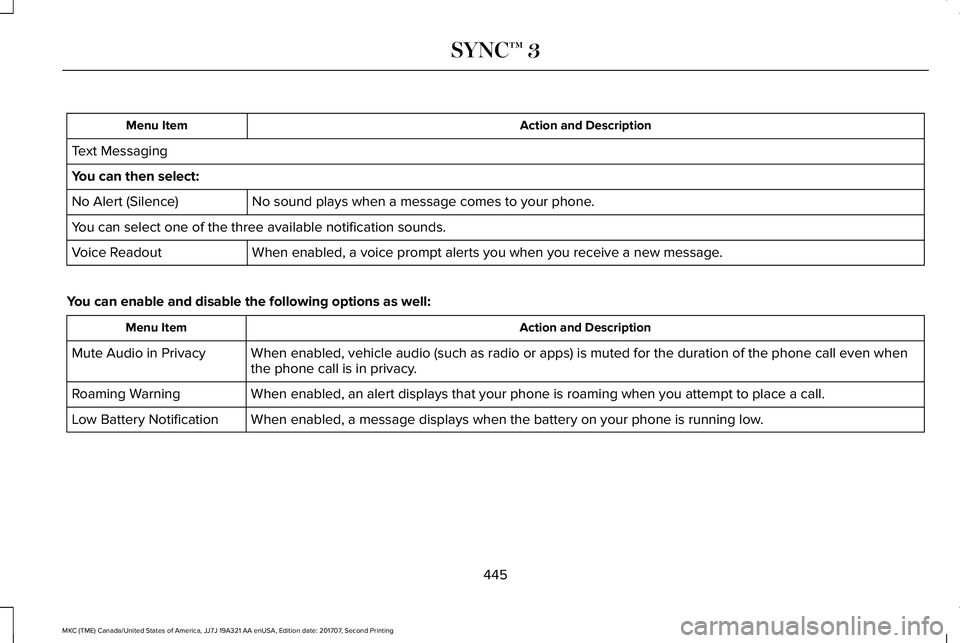
Action and DescriptionMenu Item
Text Messaging
You can then select:
No sound plays when a message comes to your phone.No Alert (Silence)
You can select one of the three available notification sounds.
When enabled, a voice prompt alerts you when you receive a new message.Voice Readout
You can enable and disable the following options as well:
Action and DescriptionMenu Item
When enabled, vehicle audio (such as radio or apps) is muted for the duration of the phone call even whenthe phone call is in privacy.Mute Audio in Privacy
When enabled, an alert displays that your phone is roaming when you attempt to place a call.Roaming Warning
When enabled, a message displays when the battery on your phone is running low.Low Battery Notification
445
MKC (TME) Canada/United States of America, JJ7J 19A321 AA enUSA, Edition date: 201707, Second Printing
SYNC™ 3
Page 450 of 571
The screen lists contacts in the phone book.Select the contact that you want to set asemergency contact. You can set EmergencyContact 2 by same process. You can set twoEmergency Contacts in total.
Note:After SYNC3 tries to place anemergency call, the Emergency Contactbutton displays on the touch screen. Youneed to press the button to call the contactthrough your Bluetooth phone.
Note:If the vehicle is equipped withnavigation, a map with your current streetinformation displays on the screen when 911Assist is in process.
Radio
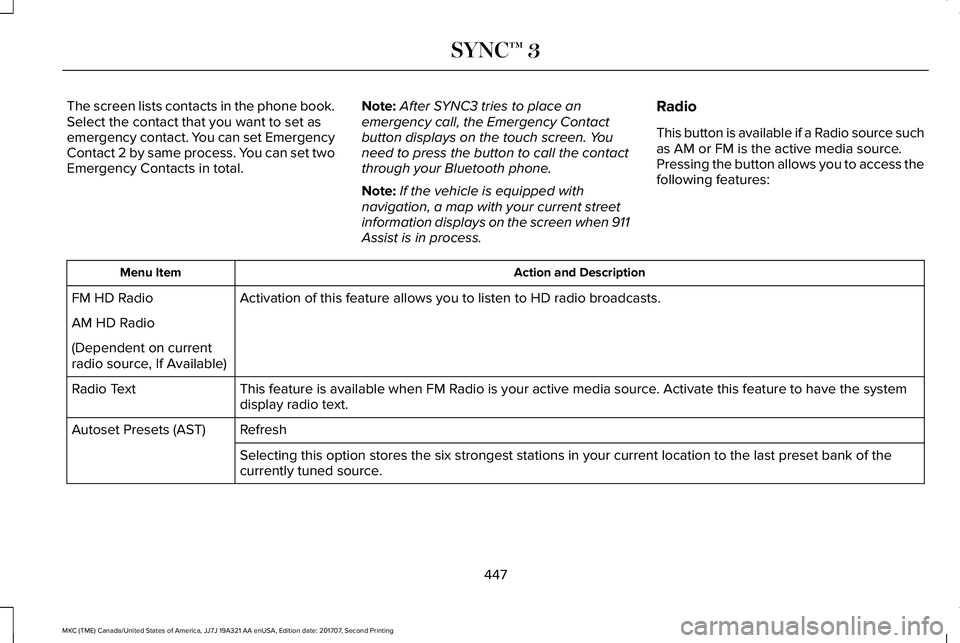
This button is available if a Radio source suchas AM or FM is the active media source.Pressing the button allows you to access thefollowing features:
Action and DescriptionMenu Item
Activation of this feature allows you to listen to HD radio broadcasts.FM HD Radio
AM HD Radio
(Dependent on currentradio source, If Available)
This feature is available when FM Radio is your active media source. Activate this feature to have the systemdisplay radio text.Radio Text
RefreshAutoset Presets (AST)
Selecting this option stores the six strongest stations in your current location to the last preset bank of thecurrently tuned source.
447
MKC (TME) Canada/United States of America, JJ7J 19A321 AA enUSA, Edition date: 201707, Second Printing
SYNC™ 3
Page 451 of 571
SiriusXM
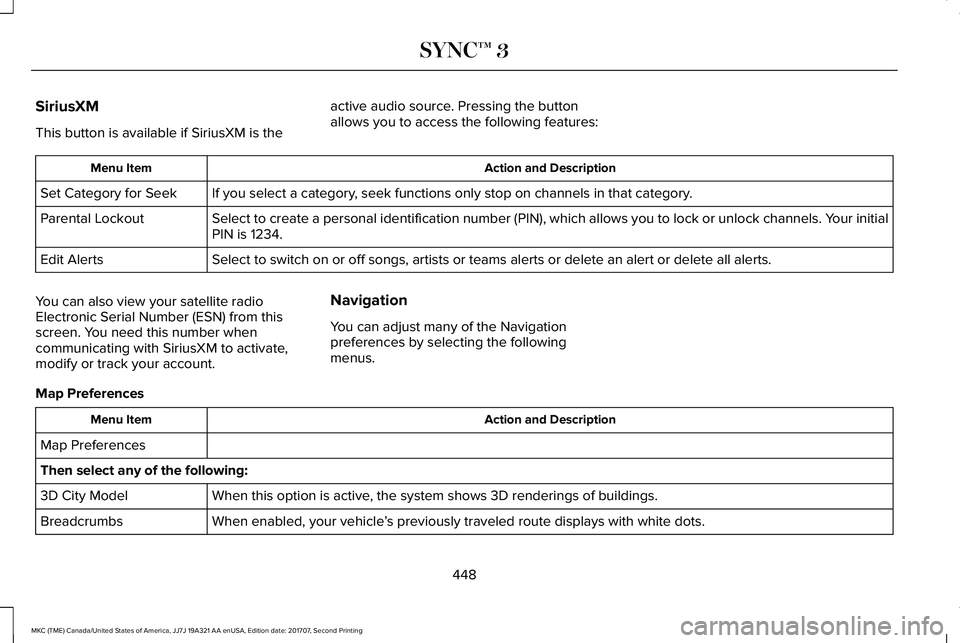
This button is available if SiriusXM is the
active audio source. Pressing the buttonallows you to access the following features:
Action and DescriptionMenu Item
If you select a category, seek functions only stop on channels in that category.Set Category for Seek
Select to create a personal identification number (PIN), which allows you to lock or unlock channels. Your initialPIN is 1234.Parental Lockout
Select to switch on or off songs, artists or teams alerts or delete an alert or delete all alerts.Edit Alerts
You can also view your satellite radioElectronic Serial Number (ESN) from thisscreen. You need this number whencommunicating with SiriusXM to activate,modify or track your account.
Navigation
You can adjust many of the Navigationpreferences by selecting the followingmenus.
Map Preferences
Action and DescriptionMenu Item
Map Preferences
Then select any of the following:
When this option is active, the system shows 3D renderings of buildings.3D City Model
When enabled, your vehicle’s previously traveled route displays with white dots.Breadcrumbs
448
MKC (TME) Canada/United States of America, JJ7J 19A321 AA enUSA, Edition date: 201707, Second Printing
SYNC™ 3
Page 459 of 571
Camera Settings
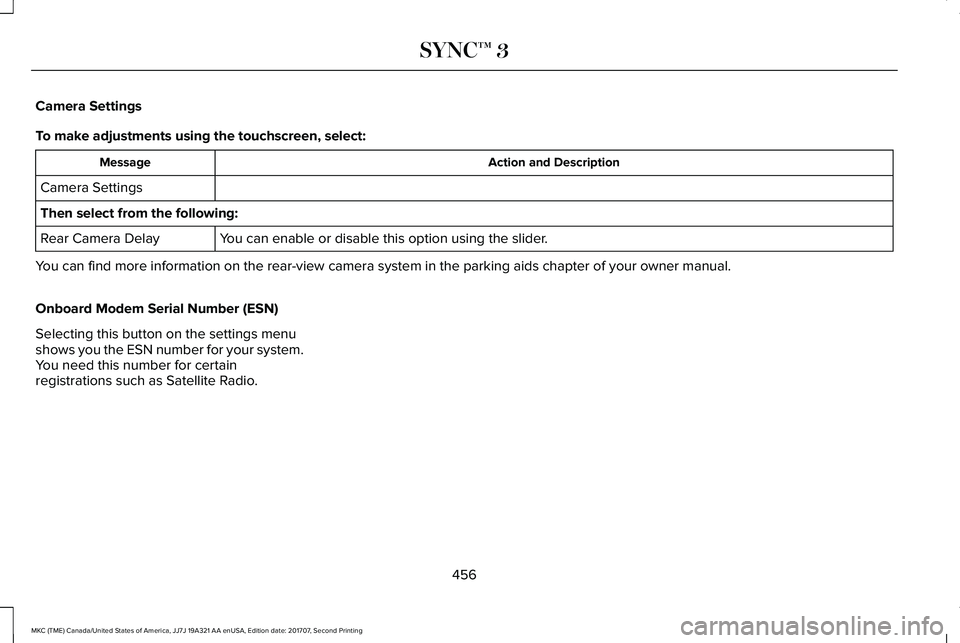
To make adjustments using the touchscreen, select:
Action and DescriptionMessage
Camera Settings
Then select from the following:
You can enable or disable this option using the slider.Rear Camera Delay
You can find more information on the rear-view camera system in the parking aids chapter of your owner manual.
Onboard Modem Serial Number (ESN)
Selecting this button on the settings menushows you the ESN number for your system.You need this number for certainregistrations such as Satellite Radio.
456
MKC (TME) Canada/United States of America, JJ7J 19A321 AA enUSA, Edition date: 201707, Second Printing
SYNC™ 3
Page 478 of 571
SYNC 3 System Reset
The system has a System Reset feature that can be performed if the function of a SYNC 3 feature is lost. This reset is intended to restorefunctionality and will not erase any information previously stored in the system (such as paired devices, phonebook, call history, textmessages, or user settings). To perform a System Reset, press and hold the Seek Up (>>|) button while pressing and holding the RadioPower button. After approximately 5 seconds the screen will go black. Allow 1-2 minutes for the system reset to complete. You may thenresume using the SYNC 3 system.
For additional assistance with SYNC 3troubleshooting, refer to the regional Fordor Lincoln website.
475
MKC (TME) Canada/United States of America, JJ7J 19A321 AA enUSA, Edition date: 201707, Second Printing
SYNC™ 3
Page 480 of 571
For maximum vehicle performance, keep thefollowing information in mind when addingaccessories, equipment, passengers andluggage to your vehicle:
•Do not exceed the total weight capacityof the vehicle or of the front or rear axle(GVWR or GAWR as indicated on theSafety Compliance Certification label).Consult an authorized dealer for specificweight information.
•The Federal CommunicationsCommission (FCC) and Canadian RadioTelecommunications Commission (CRTC)regulate the use of radiotransmitter-equipped mobilecommunications systems, for exampletwo-way radios, telephones and theftalarms. Any such equipment shouldcomply with the Federal CommunicationsCommission (FCC) and Canadian RadioTelecommunications Commission (CRTC)regulations, and an authorized dealershould install this equipment.
•An authorized dealer should installmobile communications systems.Improper installation may harm theoperation of your vehicle, particular iftheir manufacturer did not design themobile communication systemspecifically for automotive use.
•If you or an authorized dealer add anynon-Lincoln electrical or electronicaccessories or components to yourvehicle, you may adversely affect batteryperformance and durability. In addition,you may also adversely affect theperformance of other electrical systemsin the vehicle.
477
MKC (TME) Canada/United States of America, JJ7J 19A321 AA enUSA, Edition date: 201707, Second Printing
Accessories
Page 516 of 571
ELECTROMAGNETIC
COMPATIBILITY
WARNINGS
Do not place objects or mountequipment on or near the airbag cover,on the side of the seatbacks (of the frontseats), or in front seat areas that may comeinto contact with a deploying airbag. Failureto follow these instructions may increase therisk of personal injury in the event of a crash.
WARNINGS
Do not fasten antenna cables tooriginal vehicle wiring, fuel pipes andbrake pipes.
Keep antenna and power cables atleast 4 in (10 cm) from any electronicmodules and airbags.
Note:We test and certify your vehicle tomeet electromagnetic compatibilitylegislation (UNECE Regulation 10 or otherapplicable local requirements). It is yourresponsibility to make sure that anyequipment an authorized dealer installs onyour vehicle complies with applicable locallegislation and other requirements.
Note:Any radio frequency transmitterequipment in your vehicle (such as cellulartelephones and amateur radio transmitters)must keep to the parameters in the followingtable. We do not provide special provisionsor conditions for installations or use.
513
MKC (TME) Canada/United States of America, JJ7J 19A321 AA enUSA, Edition date: 201707, Second Printing
Appendices
Page 520 of 571
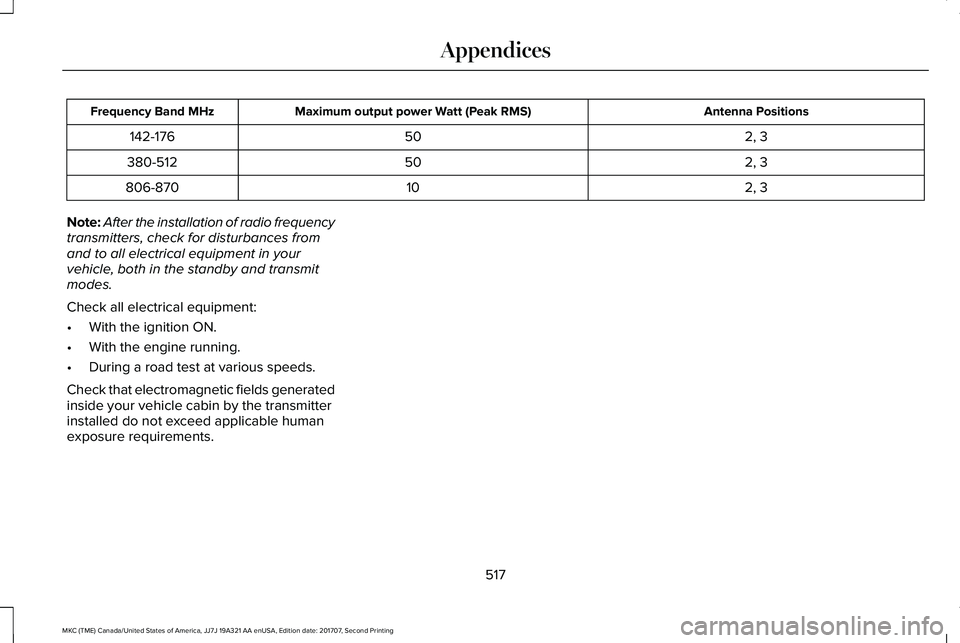
Antenna PositionsMaximum output power Watt (Peak RMS)Frequency Band MHz
2, 350142-176
2, 350380-512
2, 310806-870
Note:After the installation of radio frequencytransmitters, check for disturbances fromand to all electrical equipment in yourvehicle, both in the standby and transmitmodes.
Check all electrical equipment:
•With the ignition ON.
•With the engine running.
•During a road test at various speeds.
Check that electromagnetic fields generatedinside your vehicle cabin by the transmitterinstalled do not exceed applicable humanexposure requirements.
517
MKC (TME) Canada/United States of America, JJ7J 19A321 AA enUSA, Edition date: 201707, Second Printing
Appendices
Page 549 of 571
Gracenote uses a unique identifier to trackqueries for statistical purposes. The purposeof a randomly assigned numeric identifier isto allow Gracenote to count queries withoutknowing anything about who you are. Formore information, see the web page atwww.gracenote.com for the GracenotePrivacy Policy.
THE GRACENOTE SOFTWARE, EACH ITEMOF GRACENOTE DATA AND THEGRACENOTE CONTENT ARE LICENSED TOYOU "AS IS". NEITHER GRACENOTE MAKESANY REPRESENTATIONS OR WARRANTIES,EXPRESS OR IMPLIED, REGARDING THEACCURACY OF ANY GRACENOTE DATAFROM THE GRACENOTE SERVERS ORGRACENOTE CONTENT. GRACENOTECOLLECTIVELY AND SEPARATELY RESERVETHE RIGHT TO DELETE DATA AND/ORCONTENT FROM THE COMPANIES'RESPECTIVE SERVERS OR, IN THE CASE OFGRACENOTE, CHANGE DATA CATEGORIESFOR ANY CAUSE THAT GRACENOTEDEEMS SUFFICIENT. NO WARRANTY ISMADE THAT EITHER GRACENOTECONTENT OR THE GRACENOTE SOFTWAREOR GRACENOTE SERVERS ARE
ERROR-FREE OR THAT THE FUNCTIONINGOF THE GRACENOTE SOFTWARE ORGRACENOTE SERVERS WILL BEUNINTERRUPTED. GRACENOTE IS NOTOBLIGATED TO PROVIDE YOU WITH ANYENHANCED OR ADDITIONAL DATA TYPESTHAT GRACENOTE MAY CHOOSE TOPROVIDE IN THE FUTURE AND IS FREE TODISCONTINUE ITS ONLINE SERVICES ATANY TIME. GRACENOTE DISCLAIM ALLWARRANTIES EXPRESS OR IMPLIED,INCLUDING, BUT NOT LIMITED TO, IMPLIEDWARRANTIES OF MERCHANTABILITY,FITNESS FOR A PARTICULAR PURPOSE,TITLE, AND NON-INFRINGEMENT. NEITHERGRACENOTE WARRANTS THE RESULTSTHAT WILL BE OBTAINED BY YOUR USEOF THE GRACENOTE SOFTWARE OR ANYGRACENOTE SERVER. IN NO CASE WILLGRACENOTE BE LIABLE FOR ANYCONSEQUENTIAL OR INCIDENTALDAMAGES OR FOR ANY LOST PROFITS ORLOST REVENUES FOR ANY REASONWHATSOEVER. © Gracenote 2007.
Radio Frequency Statement
FCC ID: ACJ-SYNCG3-L
IC: 216B-SYNCG3-L
This device complies with Part 15 of the FCCRules and with RSS-210 of Industry Canada.Operation is subject to the following twoconditions:
(1) This device may not cause harmfulinterference, and
(2) this device must accept any interferencereceived, including interference that maycause undesired operation.
WARNING
Changes or modifications notexpressively approved by the partyresponsible for compliance could void theuser's authority to operate the equipment.The term "IC:" before the radio certificationnumber only signifies that Industry Canadatechnical specifications were met.
The antenna used for this transmitter mustnot be co-located or operating in conjunctionwith any other antenna or transmitter.
546
MKC (TME) Canada/United States of America, JJ7J 19A321 AA enUSA, Edition date: 201707, Second Printing
Appendices
Page 550 of 571
Taiwan Territory
Note: In accordance with the managementapproach of low-power radio wave radiationmotors:
Article 12: For approved and certifiedlow-power radiation motor models,companies, firms or users must not alter thefrequency, increase the power or change thecharacteristics and functions of the originaldesign without authorization.
Article 14: The usage of low-powerradio-frequency motors must not affectaviation safety and interfere with legaltelecommunications. Should interference bedetected, immediately stop using the deviceand only resume usage after ensuring thatthere is no longer any interference. For thelegal telecommunication and wirelesstelecommunication of the telco, thelow-power radio frequency motor must beable to tolerate legal limits of interferencefrom telecommunication, industrial, scientificand radio wave equipment.
SUNA TRAFFIC CHANNEL – TERMS ANDCONDITIONS
By activating, using and/or accessing theSUNA Traffic Channel, SUNA Predictive orother content or material provided byIntelematics (together, SUNA Productsand/or Services), you must accept certainterms and conditions. The following is a briefsummary of the terms and conditions thatapply to you. To view the full terms andconditions relevant to your use of the SUNAProducts and/or Services, please consult:
Website
www.sunatraffic.com.au/termsandcondi-tions/
1. Acceptance
By using SUNA Products and/or Services,you will be deemed to have accepted andagreed to be bound by the terms andconditions fully detailed at:
Website
www.sunatraffic.com.au/termsandcondi-tions/
2. Intellectual Property
SUNA Products and/or Services are for yourpersonal use. You may not record, orretransmit the content, nor use the contentin association with any other trafficinformation or route guidance service ordevice not approved by Intelematics. Youobtain no right of ownership in anyIntellectual Property Rights (includingcopyright) in the data that is used to provideSUNA Products and/or Services.
3. Appropriate Use
547
MKC (TME) Canada/United States of America, JJ7J 19A321 AA enUSA, Edition date: 201707, Second Printing
Appendices