ECU LINCOLN MKC 2018 Service Manual
[x] Cancel search | Manufacturer: LINCOLN, Model Year: 2018, Model line: MKC, Model: LINCOLN MKC 2018Pages: 571, PDF Size: 4.39 MB
Page 457 of 571
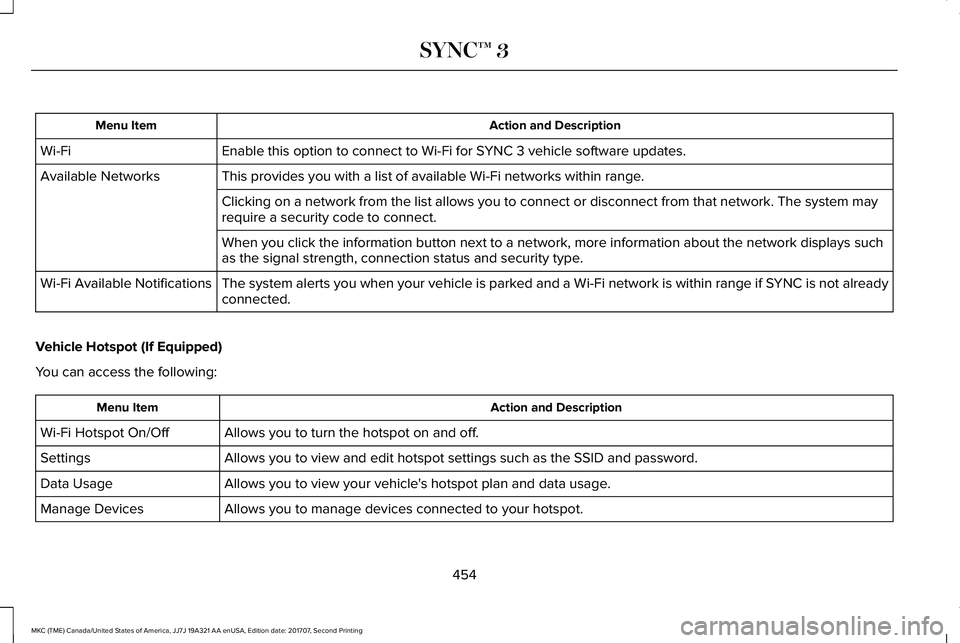
Action and DescriptionMenu Item
Enable this option to connect to Wi-Fi for SYNC 3 vehicle software updates.Wi-Fi
This provides you with a list of available Wi-Fi networks within range.Available Networks
Clicking on a network from the list allows you to connect or disconnect from that network. The system mayrequire a security code to connect.
When you click the information button next to a network, more information about the network displays suchas the signal strength, connection status and security type.
The system alerts you when your vehicle is parked and a Wi-Fi network is within range if SYNC is not alreadyconnected.Wi-Fi Available Notifications
Vehicle Hotspot (If Equipped)
You can access the following:
Action and DescriptionMenu Item
Allows you to turn the hotspot on and off.Wi-Fi Hotspot On/Off
Allows you to view and edit hotspot settings such as the SSID and password.Settings
Allows you to view your vehicle's hotspot plan and data usage.Data Usage
Allows you to manage devices connected to your hotspot.Manage Devices
454
MKC (TME) Canada/United States of America, JJ7J 19A321 AA enUSA, Edition date: 201707, Second Printing
SYNC™ 3
Page 458 of 571
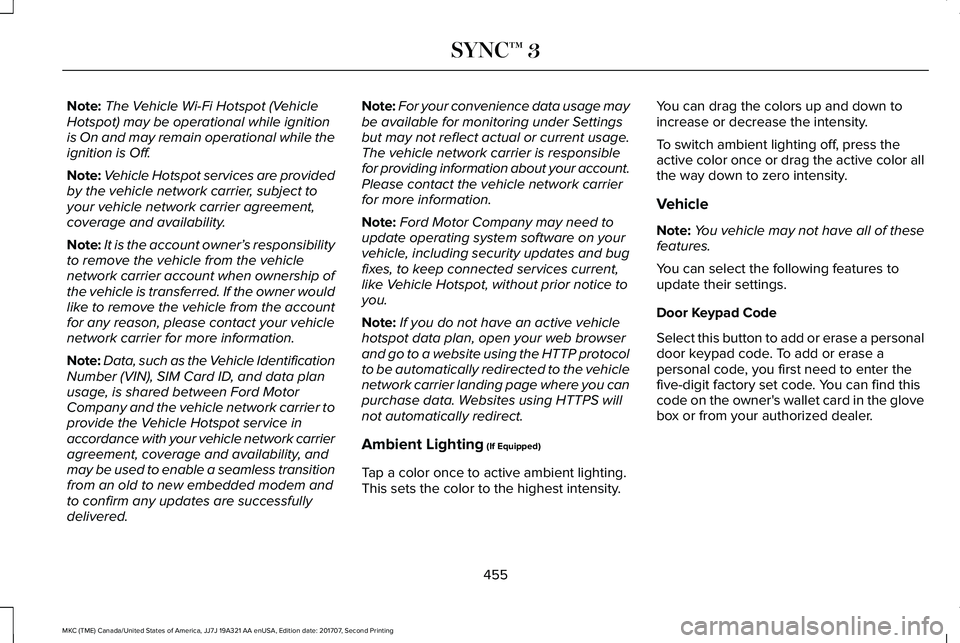
Note:The Vehicle Wi-Fi Hotspot (VehicleHotspot) may be operational while ignitionis On and may remain operational while theignition is Off.
Note:Vehicle Hotspot services are providedby the vehicle network carrier, subject toyour vehicle network carrier agreement,coverage and availability.
Note:It is the account owner’s responsibilityto remove the vehicle from the vehiclenetwork carrier account when ownership ofthe vehicle is transferred. If the owner wouldlike to remove the vehicle from the accountfor any reason, please contact your vehiclenetwork carrier for more information.
Note:Data, such as the Vehicle IdentificationNumber (VIN), SIM Card ID, and data planusage, is shared between Ford MotorCompany and the vehicle network carrier toprovide the Vehicle Hotspot service inaccordance with your vehicle network carrieragreement, coverage and availability, andmay be used to enable a seamless transitionfrom an old to new embedded modem andto confirm any updates are successfullydelivered.
Note:For your convenience data usage maybe available for monitoring under Settingsbut may not reflect actual or current usage.The vehicle network carrier is responsiblefor providing information about your account.Please contact the vehicle network carrierfor more information.
Note:Ford Motor Company may need toupdate operating system software on yourvehicle, including security updates and bugfixes, to keep connected services current,like Vehicle Hotspot, without prior notice toyou.
Note:If you do not have an active vehiclehotspot data plan, open your web browserand go to a website using the HTTP protocolto be automatically redirected to the vehiclenetwork carrier landing page where you canpurchase data. Websites using HTTPS willnot automatically redirect.
Ambient Lighting (If Equipped)
Tap a color once to active ambient lighting.This sets the color to the highest intensity.
You can drag the colors up and down toincrease or decrease the intensity.
To switch ambient lighting off, press theactive color once or drag the active color allthe way down to zero intensity.
Vehicle
Note:You vehicle may not have all of thesefeatures.
You can select the following features toupdate their settings.
Door Keypad Code
Select this button to add or erase a personaldoor keypad code. To add or erase apersonal code, you first need to enter thefive-digit factory set code. You can find thiscode on the owner's wallet card in the glovebox or from your authorized dealer.
455
MKC (TME) Canada/United States of America, JJ7J 19A321 AA enUSA, Edition date: 201707, Second Printing
SYNC™ 3
Page 461 of 571
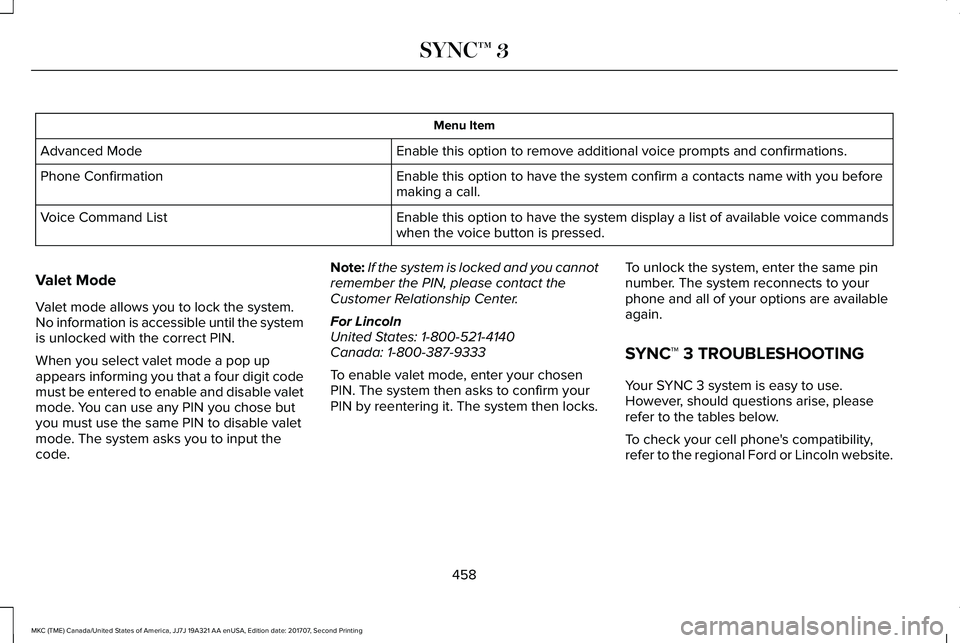
Menu Item
Enable this option to remove additional voice prompts and confirmations.Advanced Mode
Enable this option to have the system confirm a contacts name with you beforemaking a call.Phone Confirmation
Enable this option to have the system display a list of available voice commandswhen the voice button is pressed.Voice Command List
Valet Mode
Valet mode allows you to lock the system.No information is accessible until the systemis unlocked with the correct PIN.
When you select valet mode a pop upappears informing you that a four digit codemust be entered to enable and disable valetmode. You can use any PIN you chose butyou must use the same PIN to disable valetmode. The system asks you to input thecode.
Note:If the system is locked and you cannotremember the PIN, please contact theCustomer Relationship Center.
For LincolnUnited States: 1-800-521-4140Canada: 1-800-387-9333
To enable valet mode, enter your chosenPIN. The system then asks to confirm yourPIN by reentering it. The system then locks.
To unlock the system, enter the same pinnumber. The system reconnects to yourphone and all of your options are availableagain.
SYNC™ 3 TROUBLESHOOTING
Your SYNC 3 system is easy to use.However, should questions arise, pleaserefer to the tables below.
To check your cell phone's compatibility,refer to the regional Ford or Lincoln website.
458
MKC (TME) Canada/United States of America, JJ7J 19A321 AA enUSA, Edition date: 201707, Second Printing
SYNC™ 3
Page 463 of 571
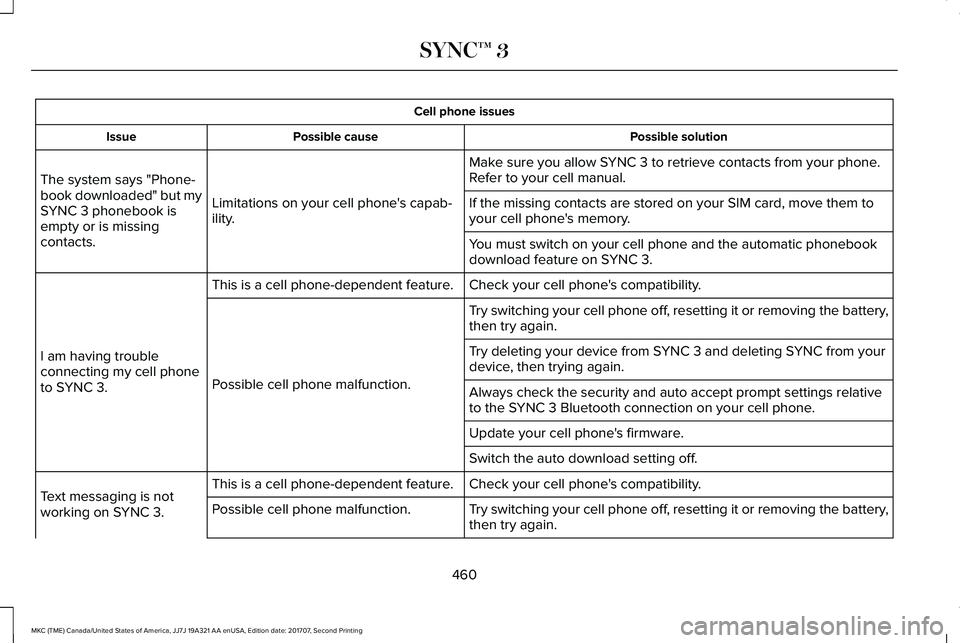
Cell phone issues
Possible solutionPossible causeIssue
Make sure you allow SYNC 3 to retrieve contacts from your phone.Refer to your cell manual.
Limitations on your cell phone's capab-ility.
The system says "Phone-book downloaded" but mySYNC 3 phonebook isempty or is missingcontacts.
If the missing contacts are stored on your SIM card, move them toyour cell phone's memory.
You must switch on your cell phone and the automatic phonebookdownload feature on SYNC 3.
Check your cell phone's compatibility.This is a cell phone-dependent feature.
I am having troubleconnecting my cell phoneto SYNC 3.
Try switching your cell phone off, resetting it or removing the battery,then try again.
Possible cell phone malfunction.
Try deleting your device from SYNC 3 and deleting SYNC from yourdevice, then trying again.
Always check the security and auto accept prompt settings relativeto the SYNC 3 Bluetooth connection on your cell phone.
Update your cell phone's firmware.
Switch the auto download setting off.
Check your cell phone's compatibility.This is a cell phone-dependent feature.Text messaging is notworking on SYNC 3.Try switching your cell phone off, resetting it or removing the battery,then try again.Possible cell phone malfunction.
460
MKC (TME) Canada/United States of America, JJ7J 19A321 AA enUSA, Edition date: 201707, Second Printing
SYNC™ 3
Page 465 of 571
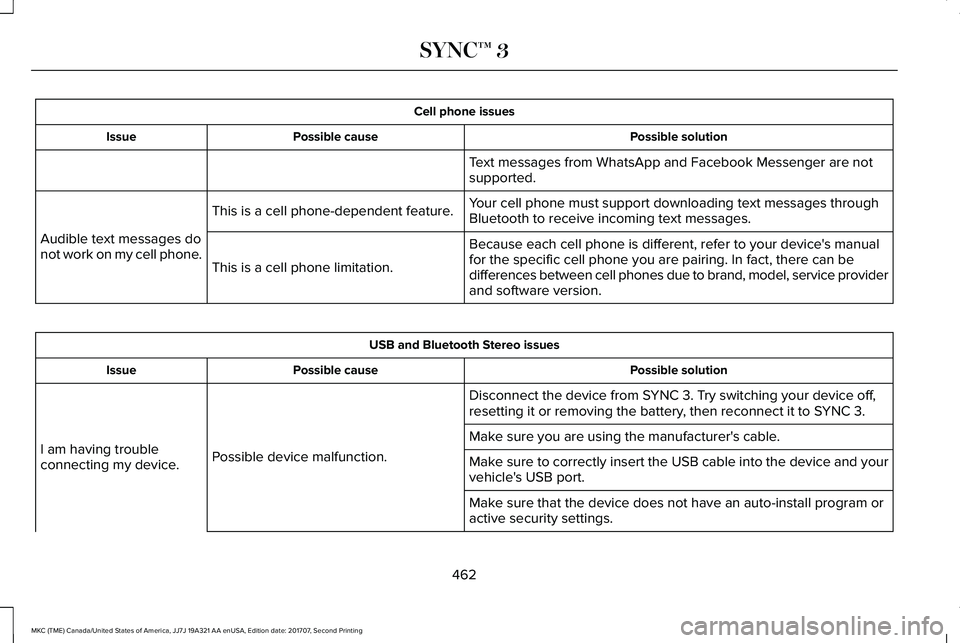
Cell phone issues
Possible solutionPossible causeIssue
Text messages from WhatsApp and Facebook Messenger are notsupported.
Your cell phone must support downloading text messages throughBluetooth to receive incoming text messages.This is a cell phone-dependent feature.
Audible text messages donot work on my cell phone.Because each cell phone is different, refer to your device's manualfor the specific cell phone you are pairing. In fact, there can bedifferences between cell phones due to brand, model, service providerand software version.
This is a cell phone limitation.
USB and Bluetooth Stereo issues
Possible solutionPossible causeIssue
Disconnect the device from SYNC 3. Try switching your device off,resetting it or removing the battery, then reconnect it to SYNC 3.
Possible device malfunction.I am having troubleconnecting my device.
Make sure you are using the manufacturer's cable.
Make sure to correctly insert the USB cable into the device and yourvehicle's USB port.
Make sure that the device does not have an auto-install program oractive security settings.
462
MKC (TME) Canada/United States of America, JJ7J 19A321 AA enUSA, Edition date: 201707, Second Printing
SYNC™ 3
Page 479 of 571
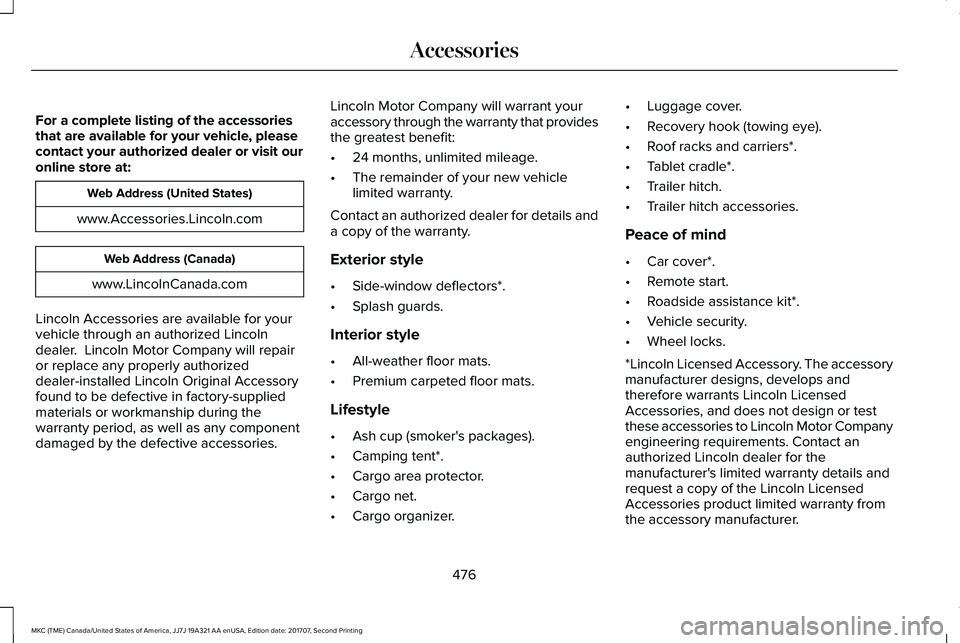
For a complete listing of the accessoriesthat are available for your vehicle, pleasecontact your authorized dealer or visit ouronline store at:
Web Address (United States)
www.Accessories.Lincoln.com
Web Address (Canada)
www.LincolnCanada.com
Lincoln Accessories are available for yourvehicle through an authorized Lincolndealer. Lincoln Motor Company will repairor replace any properly authorizeddealer-installed Lincoln Original Accessoryfound to be defective in factory-suppliedmaterials or workmanship during thewarranty period, as well as any componentdamaged by the defective accessories.
Lincoln Motor Company will warrant youraccessory through the warranty that providesthe greatest benefit:
•24 months, unlimited mileage.
•The remainder of your new vehiclelimited warranty.
Contact an authorized dealer for details anda copy of the warranty.
Exterior style
•Side-window deflectors*.
•Splash guards.
Interior style
•All-weather floor mats.
•Premium carpeted floor mats.
Lifestyle
•Ash cup (smoker's packages).
•Camping tent*.
•Cargo area protector.
•Cargo net.
•Cargo organizer.
•Luggage cover.
•Recovery hook (towing eye).
•Roof racks and carriers*.
•Tablet cradle*.
•Trailer hitch.
•Trailer hitch accessories.
Peace of mind
•Car cover*.
•Remote start.
•Roadside assistance kit*.
•Vehicle security.
•Wheel locks.
*Lincoln Licensed Accessory. The accessorymanufacturer designs, develops andtherefore warrants Lincoln LicensedAccessories, and does not design or testthese accessories to Lincoln Motor Companyengineering requirements. Contact anauthorized Lincoln dealer for themanufacturer's limited warranty details andrequest a copy of the Lincoln LicensedAccessories product limited warranty fromthe accessory manufacturer.
476
MKC (TME) Canada/United States of America, JJ7J 19A321 AA enUSA, Edition date: 201707, Second Printing
Accessories
Page 482 of 571
Transferable Coverage
If you sell your vehicle before your LincolnProtect extended service plan coverageexpires, you can transfer any remainingcoverage to the new owner. Which shouldgive you and your potential buyer a littlemore peace of mind.
Less Cost to Properly Maintain Your Vehicle
Lincoln Protect extended service plan alsooffers a Premium Maintenance Plan thatcovers all scheduled maintenance, andselected wear items. The coverage isprepaid, so you never have to worry aboutthe cost of your vehicle’s maintenance.
Covered maintenance includes:
•Windshield wiper blades.
•Spark plugs.
•The clutch disc (if equipped).
•Brake pads and linings.
•Shock absorbers and struts.
•Engine cooling hoses, clamps ando-rings.
•Engine belts.
•Diesel exhaust fluid replenishment (ifequipped).
Interest Free Finance Options
Just a 10% down payment will provide youwith an affordable, no interest, no feepayment program allowing you all thesecurity and benefits Lincoln Protectextended service plan has to offer whilepaying over time. You are pre-approved withno credit check or hassles. To learn more,call our Lincoln Protect extended serviceplan specialists at 800-367-3377.
Complete the information below and mail to:
Lincoln Protect Extended Service PlanP.O. Box 321067Detroit, MI 48232
Lincoln Protect (CANADA ONLY)
You can get more protection for your vehicleby purchasing a Lincoln Protect extendedservice plan. Lincoln Protect extendedservice plan is the only service contractbacked by Lincoln Motor Company ofCanada, Limited. Depending on the plan youpurchase, Lincoln Protect extended serviceplan provides benefits such as:
•Rental reimbursement.
•Coverage for certain maintenance andwear items.
•Protection against repair costs after yourNew Vehicle Limited Warranty Coverageexpires.
•Roadside Assistance benefits.
479
MKC (TME) Canada/United States of America, JJ7J 19A321 AA enUSA, Edition date: 201707, Second Printing
Lincoln Protect
Page 532 of 571
(b) use your own personal judgment whiledriving. If you feel that a route suggested bythe TeleNav Software instructs you toperform an unsafe or illegal maneuver,places you in an unsafe situation, or directsyou into an area that you consider to beunsafe, do not follow such instructions;
(c) do not input destinations, or otherwisemanipulate the TeleNav Software, unlessyour vehicle is stationary and parked;
(d) do not use the TeleNav Software for anyillegal, unauthorized, unintended, unsafe,hazardous, or unlawful purposes, or in anymanner inconsistent with this Agreement;
(e) arrange all GPS and wireless devices andcables necessary for use of the TeleNavSoftware in a secure manner in your vehicleso that they will not interfere with yourdriving and will not prevent the operation ofany safety device (such as an airbag).
You agree to indemnify and hold TeleNavharmless against all claims resulting from anydangerous or otherwise inappropriate useof the TeleNav Software in any movingvehicle, including as a result of your failureto comply with the directions above.
2. Account Information
You agree: (a) when registering the TeleNavSoftware, to provide TeleNav with true,accurate, current, and complete informationabout yourself, and (b) to inform TeleNavpromptly of any changes to such information,and to keep it true, accurate, current andcomplete.
3. Software License
•Subject to your compliance with theterms of this Agreement, TeleNav herebygrants to you a personal, non-exclusive,non-transferable license (except asexpressly permitted below in connectionwith your permanent transfer of theTeleNav Software license), without theright to sublicense, to use the TeleNavSoftware (in object code form only) inorder to access and use the TeleNavSoftware. This license shall terminateupon any termination or expiration of thisAgreement. You agree that you will usethe TeleNav Software only for yourpersonal business or leisure purposes,and not to provide commercial navigationservices to other parties.
3.1 License Limitations
•(a) reverse engineer, decompile,disassemble, translate, modify, alter orotherwise change the TeleNav Softwareor any part thereof; (b) attempt to derivethe source code, audio library orstructure of the TeleNav Software withoutthe prior express written consent ofTeleNav; (c) remove from the TeleNavSoftware, or alter, any of TeleNav's or itssuppliers' trademarks, trade names,logos, patent or copyright notices, orother notices or markings; (d) distribute,sublicense or otherwise transfer theTeleNav Software to others, except aspart of your permanent transfer of theTeleNav Software; or (e) use the TeleNavSoftware in any manner that
I. infringes the intellectual property orproprietary rights, rights of publicity orprivacy or other rights of any party,
ii. violates any law, statute, ordinance orregulation, including but not limited to lawsand regulations related to spamming, privacy,consumer and child protection, obscenity ordefamation, or
529
MKC (TME) Canada/United States of America, JJ7J 19A321 AA enUSA, Edition date: 201707, Second Printing
Appendices
Page 537 of 571
communication with any positioning devicesor any mobile or wireless-connectedelectronic or computer devices, includingwithout limitation cellular phones, palmtopand handheld computers, pagers, andpersonal digital assistants or PDAs.
Warning. The Data may contain inaccurateor incomplete information due to thepassage of time, changing circumstances,sources used and the nature of collectingcomprehensive geographic data, any ofwhich may lead to incorrect results.
No Warranty. This Data is provided to you“as is,” and you agree to use it at your ownrisk. Telenav and its licensors (and theirlicensors and suppliers) make no guarantees,representations or warranties of any kind,express or implied, arising by law orotherwise, including but not limited to,content, quality, accuracy, completeness,effectiveness, reliability, fitness for aparticular purpose, usefulness, use or resultsto be obtained from this Data, or that theData or server will be uninterrupted orerror-free.
Disclaimer of Warranty: TELENAV AND ITSLICENSORS (INCLUDING THEIR LICENSORSAND SUPPLIERS) DISCLAIM ANYWARRANTIES, EXPRESS OR IMPLIED, OFQUALITY, PERFORMANCE,MERCHANTABILITY, FITNESS FOR APARTICULAR PURPOSE ORNON-INFRINGEMENT. Some States,Territories and Countries do not allow certainwarranty exclusions, so to that extent theabove exclusion may not apply to you.
Disclaimer of Liability: TELENAV AND ITSLICENSORS (INCLUDING THEIR LICENSORSAND SUPPLIERS) SHALL NOT BE LIABLE TOYOU: IN RESPECT OF ANY CLAIM, DEMANDOR ACTION, IRRESPECTIVE OF THENATURE OF THE CAUSE OF THE CLAIM,DEMAND OR ACTION ALLEGING ANY LOSS,INJURY OR DAMAGES, DIRECT ORINDIRECT, WHICH MAY RESULT FROM THEUSE OR POSSESSION OF THEINFORMATION; OR FOR ANY LOSS OFPROFIT, REVENUE, CONTRACTS ORSAVINGS, OR ANY OTHER DIRECT,INDIRECT, INCIDENTAL, SPECIAL ORCONSEQUENTIAL DAMAGES ARISING OUTOF YOUR USE OF OR INABILITY TO USE
THIS INFORMATION, ANY DEFECT IN THEINFORMATION, OR THE BREACH OF THESETERMS OR CONDITIONS, WHETHER IN ANACTION IN CONTRACT OR TORT OR BASEDON A WARRANTY, EVEN IF TELENAV ORITS LICENSORS HAVE BEEN ADVISED OFTHE POSSIBILITY OF SUCH DAMAGES.Some States, Territories and Countries donot allow certain liability exclusions ordamages limitations, so to that extent theabove may not apply to you.
Export Control. You shall not export fromanywhere any part of the Data or any directproduct thereof except in compliance with,and with all licenses and approvals requiredunder, applicable export laws, rules andregulations, including but not limited to thelaws, rules and regulations administered bythe Office of Foreign Assets Control of theU.S. Department of Commerce and theBureau of Industry and Security of the U.S.Department of Commerce. To the extent thatany such export laws, rules or regulationsprohibit HERE from complying with any of itsobligations hereunder to deliver or distributeData, such failure shall be excused and shallnot constitute a breach of this Agreement.
534
MKC (TME) Canada/United States of America, JJ7J 19A321 AA enUSA, Edition date: 201707, Second Printing
Appendices
Page 541 of 571
II. Mexico. The following provision appliesto the Data for Mexico, which includescertain data from the Instituto Nacional deEstadística y Geografía (“INEGI”):
A. Any and all copies of the Data and/orpackaging containing Data for Mexicoshall contain the following notice: “Fuente:INEGI (Instituto Nacional de Estadística yGeografía)”
III. Latin America Territory
A. Third Party Notices. Any and all copiesof the Data and/or packaging relatingthereto shall include the respective ThirdParty Notices set forth below and used asdescribed below corresponding to theTerritory (or portion thereof ) included insuch copy:
NoticeTerritory
“INSTITUTO GEOGRAFICOMILITAR DEL ECUADORAUTORIZACION N° IGM-2011-01- PCO-01 DEL 25 DE ENERODE 2011”
Ecuador
“source: © IGN 2009 - BDTOPO ®”
“Fuente: INEGI (InstitutoNacional de Estadística yGeografía)”
Guade-loupe,FrenchGuianaandMarti-niqueMexico
IV. Middle East Territory
A. Third Party Notices. Any and all copiesof the Data and/or packaging relatingthereto shall include the respective ThirdParty Notices set forth below and used asdescribed below corresponding to theTerritory (or portion thereof ) included insuch copy:
NoticeCountry
“© Royal Jordanian GeographicCentre”. The foregoing noticerequirement for Jordan Data isa material term of the Agree-ment. If Client or any of itspermitted sublicensees (if any)fail to meet such requirement,HERE shall have the right toterminate Client’s license withrespect to the Jordan Data.
Jordan
B. Jordan Data. Client and its permittedsublicensees (if any) are restricted fromlicensing and/or otherwise distributingHERE’s database for the country of Jordan(“Jordan Data”) for use in EnterpriseApplications to (i) non-Jordanian entitiesfor use of the Jordan Data solely in Jordanor (ii) Jordan-based customers. In addition,Client, its permitted sublicensees (if any)and End-Users are restricted from usingthe Jordan Data in Enterprise Applicationsif such party is (i) a non-Jordanian entityusing the Jordan Data solely in Jordan or(ii) a Jordan-based customer. For purposesof the foregoing, “Enterprise Applications”
538
MKC (TME) Canada/United States of America, JJ7J 19A321 AA enUSA, Edition date: 201707, Second Printing
Appendices