phone LINCOLN MKC 2018 Service Manual
[x] Cancel search | Manufacturer: LINCOLN, Model Year: 2018, Model line: MKC, Model: LINCOLN MKC 2018Pages: 571, PDF Size: 4.39 MB
Page 423 of 571
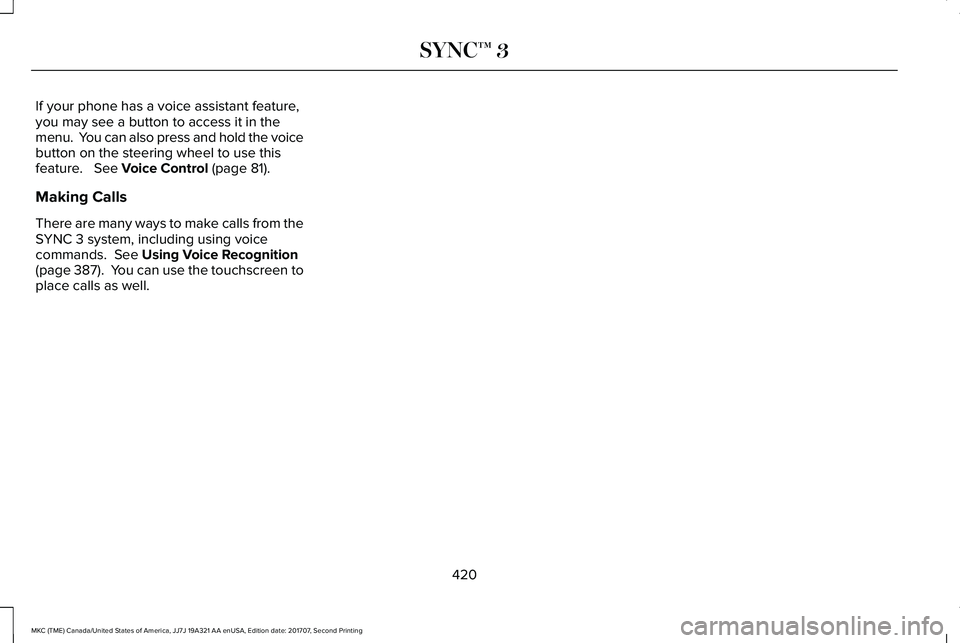
If your phone has a voice assistant feature,you may see a button to access it in themenu. You can also press and hold the voicebutton on the steering wheel to use thisfeature. See Voice Control (page 81).
Making Calls
There are many ways to make calls from theSYNC 3 system, including using voicecommands. See Using Voice Recognition(page 387). You can use the touchscreen toplace calls as well.
420
MKC (TME) Canada/United States of America, JJ7J 19A321 AA enUSA, Edition date: 201707, Second Printing
SYNC™ 3
Page 424 of 571
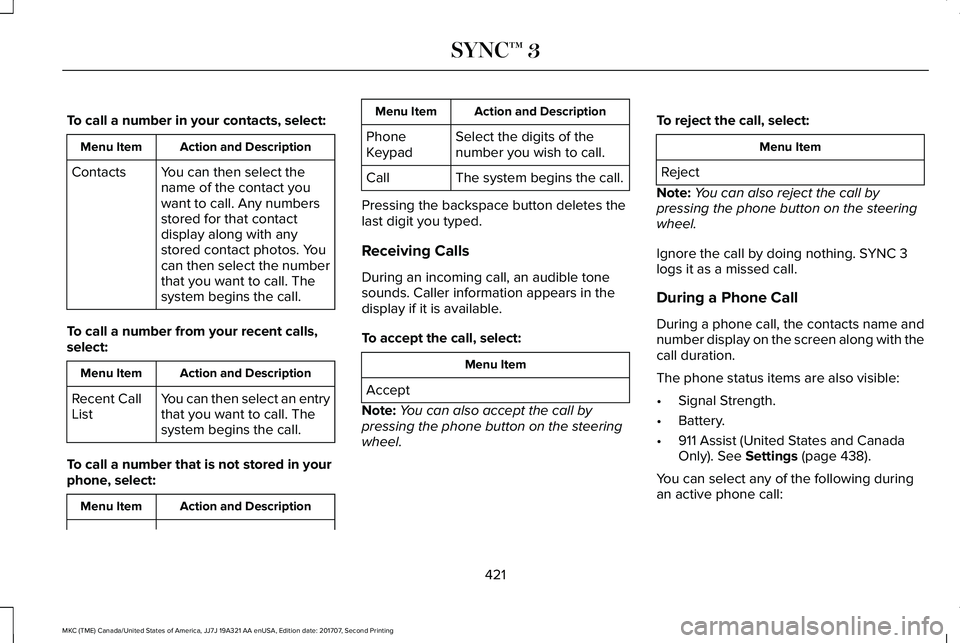
To call a number in your contacts, select:
Action and DescriptionMenu Item
You can then select thename of the contact youwant to call. Any numbersstored for that contactdisplay along with anystored contact photos. Youcan then select the numberthat you want to call. Thesystem begins the call.
Contacts
To call a number from your recent calls,select:
Action and DescriptionMenu Item
You can then select an entrythat you want to call. Thesystem begins the call.
Recent CallList
To call a number that is not stored in yourphone, select:
Action and DescriptionMenu Item
Action and DescriptionMenu Item
Select the digits of thenumber you wish to call.PhoneKeypad
The system begins the call.Call
Pressing the backspace button deletes thelast digit you typed.
Receiving Calls
During an incoming call, an audible tonesounds. Caller information appears in thedisplay if it is available.
To accept the call, select:
Menu Item
Accept
Note:You can also accept the call bypressing the phone button on the steeringwheel.
To reject the call, select:
Menu Item
Reject
Note:You can also reject the call bypressing the phone button on the steeringwheel.
Ignore the call by doing nothing. SYNC 3logs it as a missed call.
During a Phone Call
During a phone call, the contacts name andnumber display on the screen along with thecall duration.
The phone status items are also visible:
•Signal Strength.
•Battery.
•911 Assist (United States and CanadaOnly). See Settings (page 438).
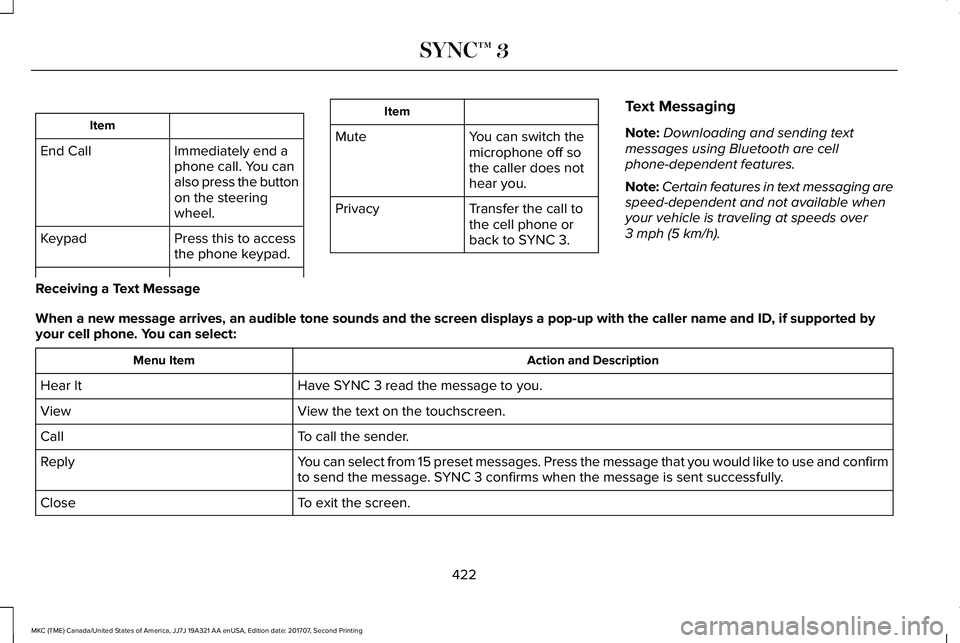
You can select any of the following duringan active phone call:
421
MKC (TME) Canada/United States of America, JJ7J 19A321 AA enUSA, Edition date: 201707, Second Printing
SYNC™ 3
Page 425 of 571
Item
Immediately end aphone call. You canalso press the buttonon the steeringwheel.
End Call
Press this to accessthe phone keypad.Keypad
Item
MuteYou can switch themicrophone off sothe caller does nothear you.
Transfer the call tothe cell phone orback to SYNC 3.
Privacy
Text Messaging
Note:Downloading and sending textmessages using Bluetooth are cellphone-dependent features.
Note:Certain features in text messaging arespeed-dependent and not available whenyour vehicle is traveling at speeds over3 mph (5 km/h).
Receiving a Text Message
When a new message arrives, an audible tone sounds and the screen displays a pop-up with the caller name and ID, if supported byyour cell phone. You can select:
Action and DescriptionMenu Item
Have SYNC 3 read the message to you.Hear It
View the text on the touchscreen.View
To call the sender.Call
You can select from 15 preset messages. Press the message that you would like to use and confirmto send the message. SYNC 3 confirms when the message is sent successfully.Reply
To exit the screen.Close
422
MKC (TME) Canada/United States of America, JJ7J 19A321 AA enUSA, Edition date: 201707, Second Printing
SYNC™ 3
Page 426 of 571
Smartphone Connectivity (If Equipped)
SYNC 3 allows you to use Apple CarPlay andAndroid Auto to access your phone.
When you use Apple CarPlay or AndroidAuto, you can:
•Make calls.
•Send and receive messages.
•Listen to music.
•Use your phone's voice assistant.
Apple CarPlay and Android Auto disablesome SYNC 3 features.
Most Apple CarPlay and Android Autofeatures use mobile data.
Apple CarPlay
Apple CarPlay requires an iPhone 5 or newerwith iOS 7.1 or newer. Updating to the latestiOS version is recommended.
1. Plug your phone into a USB port.
2. Follow the prompts on the touchscreen.
3. Follow the prompts that appear on yourphone to allow access to Apple CarPlay.
After completing the setup, your phoneconnects to Apple CarPlay automaticallywhen plugged into a USB port.
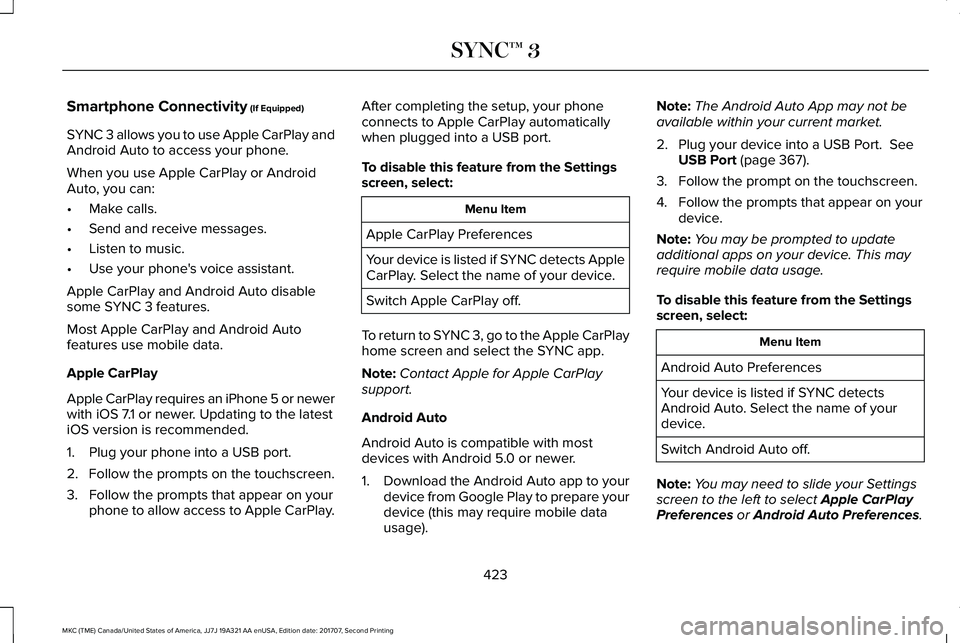
To disable this feature from the Settingsscreen, select:
Menu Item
Apple CarPlay Preferences
Your device is listed if SYNC detects AppleCarPlay. Select the name of your device.
Switch Apple CarPlay off.
To return to SYNC 3, go to the Apple CarPlayhome screen and select the SYNC app.
Note:Contact Apple for Apple CarPlaysupport.
Android Auto
Android Auto is compatible with mostdevices with Android 5.0 or newer.
1.Download the Android Auto app to yourdevice from Google Play to prepare yourdevice (this may require mobile datausage).
Note:The Android Auto App may not beavailable within your current market.
2. Plug your device into a USB Port. SeeUSB Port (page 367).
3. Follow the prompt on the touchscreen.
4. Follow the prompts that appear on yourdevice.
Note:You may be prompted to updateadditional apps on your device. This mayrequire mobile data usage.
To disable this feature from the Settingsscreen, select:
Menu Item
Android Auto Preferences
Your device is listed if SYNC detectsAndroid Auto. Select the name of yourdevice.
Switch Android Auto off.
Note:You may need to slide your Settingsscreen to the left to select Apple CarPlayPreferences or Android Auto Preferences.
423
MKC (TME) Canada/United States of America, JJ7J 19A321 AA enUSA, Edition date: 201707, Second Printing
SYNC™ 3
Page 436 of 571
Menu Item
The waypoint list then appears and you are able to re-order all of yourwaypoints by selecting the menu icon on the right hand side of thelocation. You can select up to five waypoints.
Add Waypoint
Optimize OrderYou can also have the system set the order for you by pressing:
GoTo return to your route, press:
SYNC AppLink
The AppLink app allows you to use someSYNC 3 navigation features on your phone.
First Mile Navigation
When you switch your ignition off, thelocation of your vehicle is recorded and sentto your SYNC AppLink app. The location ofyour vehicle can be viewed within the app.You can also view walking directions to yourvehicle.
Last Mile Navigation
When you park near your destination, thesystem provides walking directions to yourdestination.
POI Search
Your paired phone can be used to accessadditional points of interest (POI). Thesepoints of interest can only be access whenyour phone is paired.
Send To Car
You can send destinations to your navigationsystem using a computer or phone usingAppLink.
cityseeker (If Equipped)
Note:cityseeker point of interest (POI)information is limited to approximately 1,110cities (1,049 in the United States, 36 inCanada and 15 in Mexico).
433
MKC (TME) Canada/United States of America, JJ7J 19A321 AA enUSA, Edition date: 201707, Second Printing
SYNC™ 3E225487
Page 437 of 571
cityseeker, when available, is a service thatprovides more information about certainpoints of interest such as restaurants, hotelsand attractions.
When you have selected a point of interest,the location and information appear, such asaddress, phone number and a star rating.
Press More Information to see a photo, areview, a list of services and facilities, theaverage room or meal price and the webaddress. This screen displays the point ofinterest icons.
For restaurants, cityseeker can provideinformation such as star rating, average cost,review, handicap access, hours of operation,and website address.
For hotels, cityseeker can provideinformation such as star rating, pricecategory, review, check-in and checkouttimes, hotel service icons and websiteaddress. Hotel service icons include:
•Restaurant
•Business center
•Handicap facilities
•Laundry
•Refrigerator
•24 hour room service
•Fitness center
•Internet access
•Pool
•Wi-Fi
Attractions include nearby landmarks,amusement parks, historic buildings andmore. cityseeker can provide informationsuch as star rating, reviews, hour of operationand admission price.
SiriusXM Traffic and Travel Link (If
Equipped)
SiriusXM Traffic and Travel Link is availableon vehicles equipped with navigation andonly in select markets. You must activate andsubscribe to receive SiriusXM Traffic andTravel Link information. It helps you locatethe best gas prices, find movie listings, getcurrent traffic alerts, view the weather map,get accurate ski conditions and see currentsports scores. See Apps (page 435).
The system calculates a reasonable efficientroute based on available speed limits, traffic,and road conditions. You may know a localshort cut that is more efficient at a given timethan the route provided by SYNC 3, but youshould expect a slight difference in minutesor miles with the SYNC 3 route.
Navigation Map Updates
Annual navigation map updates are availablefor purchase through your dealership, bycalling 1-866-462-8837 in the United Statesand Canada or 01-800-557-5539 in Mexico.You can also visit:
Website
www.navigation.com/sync
You need to specify the make and model ofyour vehicle to determine if there is anupdate available.
434
MKC (TME) Canada/United States of America, JJ7J 19A321 AA enUSA, Edition date: 201707, Second Printing
SYNC™ 3
Page 438 of 571
HERE is the digital map provider for thenavigation application. If you find map dataerrors, you may report them directly to HEREby going to www.here.com/mapcreator.HERE evaluates all reported map errors andresponds with the result of their investigationby e-mail.
Map coverage includes the USA (includingPuerto Rico and the US Virgin Islands),Canada and Mexico.
APPS
The system enables voice, steering wheel,and touch screen control of SYNC 3 AppLinkenabled smartphone apps. When an app isrunning through AppLink, you can controlmain features of the app through voicecommands and steering wheel controls.
Note:Available AppLink enabled apps willvary by market.
Note:You must pair and connect yoursmartphone via Bluetooth to SYNC 3 toaccess AppLink.
Note:iPhone users need to connect thephone to the USB port.
Note:For information on available apps,supported smartphone devices andtroubleshooting tips please visit:
Websites
owner.lincoln.comwww.syncmyride.cawww.syncmaroute.ca
Note:Make sure you have an active accountfor the app that you have downloaded. Someapps will work with no setup. Other apps willwant you to configure your personal settingsand personalize your experience by creatingstations or favorites. We recommend you dothis at home or outside of your vehicle.
Note:We encourage you to review thesmartphone app’s terms of service andprivacy policies because Lincoln is notresponsible for your app or its use of data.
Note:AppLink is a native SYNC systemfeature. Accessing mobile apps throughAppLink is only possible when Android Autoor Apple CarPlay are disabled. Some appsmay only be accessible in the car throughAppLink and others only through AndroidAuto or Apple CarPlay. Please refer to theSmartphone Connectivity information todisable Android Auto or Apple CarPlay.
Note:In order to use an app with SYNC 3,the app needs to be running in thebackground of your phone. If you shut downthe app on your phone, it shuts down theapp on SYNC 3 as well.
Note:If a SYNC 3 AppLink compatible appis not shown in the Apps Domain, make surethe required app is running on the mobiledevice.
435
MKC (TME) Canada/United States of America, JJ7J 19A321 AA enUSA, Edition date: 201707, Second Printing
SYNC™ 3
Page 444 of 571
Clock
To adjust the time, select the up and downarrows on either side of the screen. The
arrows on the left adjust the hour and arrowson the right adjust the minute. You can thenselect AM or PM.
You can adjust the following features:
Action and DescriptionMenu Item
Select how time displays.Clock Format
When active, the clock adjusts to time zone changes.Auto Time Zone UpdateThis feature is only available in vehicles with navigation.
When selected, the vehicle clock resets to GPS satellite time.Reset Clock to GPS Time
The system automatically saves any updatesyou make to the settings.
Bluetooth
Pressing this button allows you to access thefollowing:
ActionMenu Item
OnBluetooth
Off
You must activate Bluetooth to pair aBluetooth enabled device.
The processes of pairing a Bluetooth deviceis the same as pairing a phone. See Pairinga Device in Phone settings for how to pair adevice and the available options.
441
MKC (TME) Canada/United States of America, JJ7J 19A321 AA enUSA, Edition date: 201707, Second Printing
SYNC™ 3
Page 445 of 571
Phone
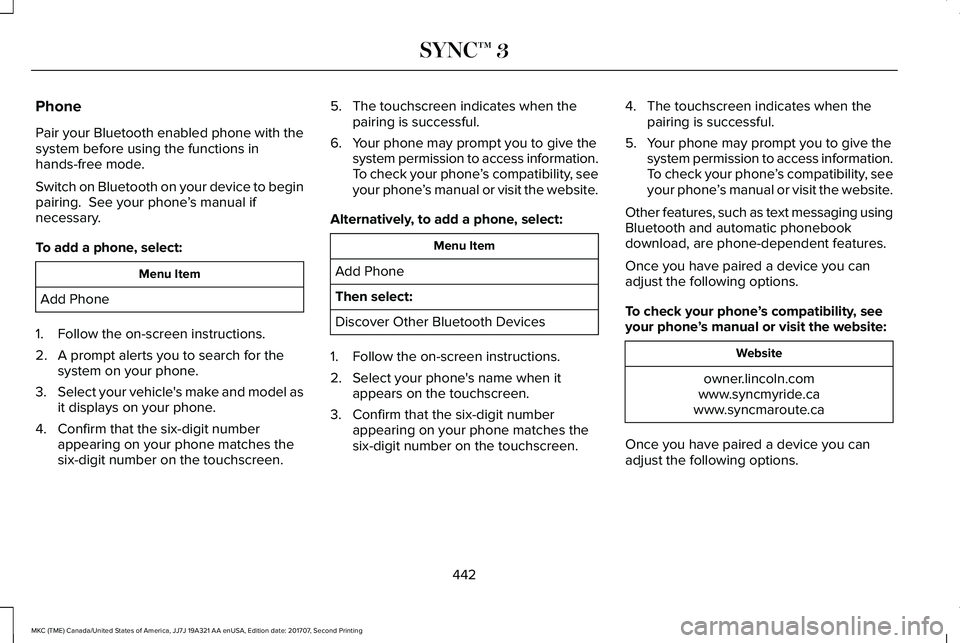
Pair your Bluetooth enabled phone with thesystem before using the functions inhands-free mode.
Switch on Bluetooth on your device to beginpairing. See your phone’s manual ifnecessary.
To add a phone, select:
Menu Item
Add Phone
1. Follow the on-screen instructions.
2. A prompt alerts you to search for thesystem on your phone.
3.Select your vehicle's make and model asit displays on your phone.
4. Confirm that the six-digit numberappearing on your phone matches thesix-digit number on the touchscreen.
5. The touchscreen indicates when thepairing is successful.
6. Your phone may prompt you to give thesystem permission to access information.To check your phone’s compatibility, seeyour phone’s manual or visit the website.
Alternatively, to add a phone, select:
Menu Item
Add Phone
Then select:
Discover Other Bluetooth Devices
1. Follow the on-screen instructions.
2. Select your phone's name when itappears on the touchscreen.
3. Confirm that the six-digit numberappearing on your phone matches thesix-digit number on the touchscreen.
4. The touchscreen indicates when thepairing is successful.
5. Your phone may prompt you to give thesystem permission to access information.To check your phone’s compatibility, seeyour phone’s manual or visit the website.
Other features, such as text messaging usingBluetooth and automatic phonebookdownload, are phone-dependent features.
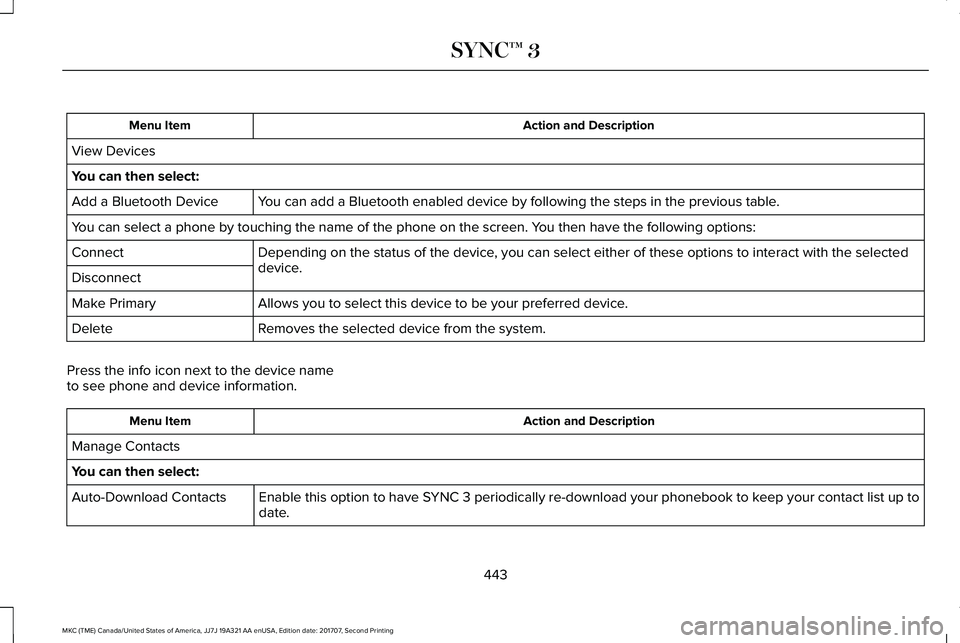
Once you have paired a device you canadjust the following options.
To check your phone’s compatibility, seeyour phone’s manual or visit the website:
Website
owner.lincoln.comwww.syncmyride.cawww.syncmaroute.ca
Once you have paired a device you canadjust the following options.
442
MKC (TME) Canada/United States of America, JJ7J 19A321 AA enUSA, Edition date: 201707, Second Printing
SYNC™ 3
Page 446 of 571
Action and DescriptionMenu Item
View Devices
You can then select:
You can add a Bluetooth enabled device by following the steps in the previous table.Add a Bluetooth Device
You can select a phone by touching the name of the phone on the screen. You then have the following options:
Depending on the status of the device, you can select either of these options to interact with the selecteddevice.Connect
Disconnect
Allows you to select this device to be your preferred device.Make Primary
Removes the selected device from the system.Delete
Press the info icon next to the device nameto see phone and device information.
Action and DescriptionMenu Item
Manage Contacts
You can then select:
Enable this option to have SYNC 3 periodically re-download your phonebook to keep your contact list up todate.Auto-Download Contacts
443
MKC (TME) Canada/United States of America, JJ7J 19A321 AA enUSA, Edition date: 201707, Second Printing
SYNC™ 3