service LINCOLN MKC 2018 Repair Manual
[x] Cancel search | Manufacturer: LINCOLN, Model Year: 2018, Model line: MKC, Model: LINCOLN MKC 2018Pages: 571, PDF Size: 4.39 MB
Page 382 of 571
•DISP: Switch the display on or off. Youcan also touch the screen to switch thedisplay back on.
•Temperature, fan and climate controlbuttons: Control the temperature, fanspeed or settings of the climate controlsystem. See Climate Control (page 133).
911 Assist
WARNINGS
Unless the 911 Assist setting is set onbefore a crash, the system will not dialfor help which could delay response time,potentially increasing the risk of seriousinjury or death after a crash.
Do not wait for 911 Assist to make anemergency call if you can do it yourself.Dial emergency services immediately toavoid delayed response time which couldincrease the risk of serious injury or deathafter a crash. If you do not hear 911 Assistwithin five seconds of the crash, the systemor phone may be damaged or non-functional.
WARNINGS
Always place your phone in a securelocation in your vehicle so it does notbecome a projectile or get damaged in acrash. Failure to do so may cause seriousinjury to someone or damage the phonewhich could prevent 911 Assist from workingproperly.
Note:The SYNC 911 Assist feature must beset on before the incident.
Note:The SYNC 911 Assist feature onlyoperates in the U.S., Canada or in a territoryin which 911 is the emergency number.
Note:Before setting this feature on, makesure that you read the 911 Assist PrivacyNotice later in this section for importantinformation.
Note:If any user sets 911 Assist to on or off,that setting applies for all paired phones. If911 Assist is switched off and the phone isconnected to SYNC, an icon displays on thestatus bar.
Note:Every phone operates differently.While SYNC 911 Assist works with mostcellular phones, some may have troubleusing this feature.
If a crash deploys an airbag (excluding kneeairbags and rear inflatable safety belts [ifequipped]) or activates the fuel pumpshut-off, your SYNC-equipped vehicle maybe able to contact emergency services bydialing 911 through a paired and connectedBluetooth-enabled phone. You can learnmore about the 911 Assist feature, by visiting:
Website
www.owner.lincoln.comwww.syncmyride.cawww.syncmaroute.ca
For important information about airbagdeployment and the fuel pump shut-offplease see the Supplementary Restrains andRoadside Emergencies sections of yourowner manual.
To switch 911 Assist on and off please viewthe settings information. See Settings (page438).
379
MKC (TME) Canada/United States of America, JJ7J 19A321 AA enUSA, Edition date: 201707, Second Printing
SYNC™ 3
Page 383 of 571
To make sure that 911 Assist works correctly:
•SYNC must be powered and workingproperly at the time of the incident andthroughout feature activation and use.
•The 911 Assist feature must be set onbefore the incident.
•You must pair and connect aBluetooth-enabled and compatible cellphone to SYNC.
•A connected Bluetooth-enabled phonemust have the ability to make andmaintain an outgoing call at the time ofthe incident.
•A connected Bluetooth-enabled phonemust have adequate network coverage,battery power and signal strength.
•The vehicle must have battery power andbe located in the U.S., Canada or in aterritory in which 911 is the emergencynumber.
In the Event of a Crash
Not all crashes will deploy an airbag oractivate the fuel pump shut-off (the triggersfor 911 Assist). If a connected cell phonesustains damage or loses its connection toSYNC during a crash, SYNC will search forand try to connect to a previously paired cellphone; SYNC will then attempt to call theemergency services.
Before making the call:
•SYNC provides a short window of time(about 10 seconds) to cancel the call. Ifyou fail to cancel the call, SYNC attemptsto dial 911.
•SYNC says the following, or a similarmessage: "SYNC will attempt to call 911,to cancel the call, press Cancel on yourscreen or press and hold the phonebutton on your steering wheel."
If you do not cancel the call, and SYNCmakes a successful call, a pre-recordedmessage plays for the 911 operator, and thenthe occupant(s) in your vehicle is able to talkwith the operator. Be prepared to provideyour name, phone number and locationimmediately, because not all 911 systems arecapable of receiving this informationelectronically.
911 Assist May Not Work If
•Your cellular phone or 911 Assisthardware sustains damage in a crash.
•The vehicle's battery or the SYNC systemhas no power.
•The phone(s) thrown from your vehicleare the ones paired and connected tothe system.
911 Assist Privacy Notice
When you switch on 911 Assist, it maydisclose to emergency services that yourvehicle has been in a crash involving thedeployment of an airbag or activation of thefuel pump shut-off. Certain versions orupdates to 911 Assist may also be capable
380
MKC (TME) Canada/United States of America, JJ7J 19A321 AA enUSA, Edition date: 201707, Second Printing
SYNC™ 3
Page 384 of 571
of electronically or verbally disclosing to 911operators your vehicle location or otherdetails about your vehicle or crash to assist911 operators to provide the most appropriateemergency services. If you do not want todisclose this information, do not switch thefeature on.
Safety Information
WARNING
Driving while distracted can result inloss of vehicle control, crash and injury.We strongly recommend that you useextreme caution when using any device thatmay take your focus off the road. Yourprimary responsibility is the safe operationof your vehicle. We recommend against theuse of any hand-held device while drivingand encourage the use of voice-operatedsystems when possible. Make sure you areaware of all applicable local laws that mayaffect the use of electronic devices whiledriving.
•Do not attempt to service or repair thesystem. Have an authorized dealercheck your vehicle.
•Do not operate playing devices if thepower cords or cables are broken, splitor damaged. Place cords and cables outof the way, so they do not interfere withthe operation of pedals, seats,compartments or safe driving abilities.
•Do not leave playing devices in yourvehicle during extreme conditions as itcould cause them damage. See yourdevice's user guide for furtherinformation.
•For your safety, some SYNC 3 functionsare speed-dependent. Their use is limitedto when your vehicle is traveling atspeeds under 3 mph (5 km/h). Make surethat you review your device's manualbefore using it with SYNC 3.
Speed-restricted Features
Some features of this system may be toodifficult to use while your vehicle is movingso they are restricted from use unless yourvehicle is stationary.
•Screens crowded with information, suchas Points of Interest reviews and ratings,SiriusXM Travel Link sports information,or ski condition search areas.
•Any action that requires you to use akeyboard is restricted, such as enteringa navigation destination or editinginformation.
•All lists are limited so the user can viewfewer entries (such as phone contacts orrecent phone call entries).
See the following table for more specificexamples.
381
MKC (TME) Canada/United States of America, JJ7J 19A321 AA enUSA, Edition date: 201707, Second Printing
SYNC™ 3
Page 386 of 571
Website
www.syncmaroute.ca
Lincoln Connect with Lincoln Way
With a Lincoln Connect-equipped vehicle,you can use Lincoln Way® to track yourvehicle’s location and remotely accessvehicle features such as start, lock andunlock and vehicle status including fuel leveland approximate mileage. You can alsoschedule specific times to remotely start yourvehicle so it’s ready to hit the road as soonas you are. Lincoln Way® is available througha free download via the Apple App Store®or Google Play™. Message and data ratesmay apply. Services may be limited by mobilephone network coverage area.
•FCC: LHJ-FAN
•IC: 2807E-FAN
Updating Your System
You can choose to download the updateonto a USB drive or use Wi-Fi to deliverautomatic updates.
USB Updates
To use the USB update you need to log intoyour owner account and visit the SYNCsoftware update page.
Website
www.owner.lincoln.comwww.syncmyride.cawww.syncmaroute.ca
The website notifies you if an update isavailable. You can then select to downloadthe update.
You will need an empty USB drive. Pleasecheck the website for minimumrequirements. Once you have inserted theUSB drive into your computer, choose to startthe download. Follow the instructionsprovided to download the files to the USBdrive.
The installation of most files occurs in thebackground, and does not interrupt your useof the system. Navigation updates cannot beinstalled in the background, because the filesare too large.
To install the update in your vehicle, removeanything that is plugged in the USB ports onthe media hub and plug in the USB drivecontaining the update. When the USB driveis plugged in, the installation should beginimmediately. After a successful installation,the update is available the next time thevehicle is started.
Please reference the website for any furtheractions.
Updating Over Wi-Fi
To update your System over Wi-Fi yourvehicle must be within the range of a Wi-Fiaccess point. Data rates may apply.
383
MKC (TME) Canada/United States of America, JJ7J 19A321 AA enUSA, Edition date: 201707, Second Printing
SYNC™ 3
Page 404 of 571
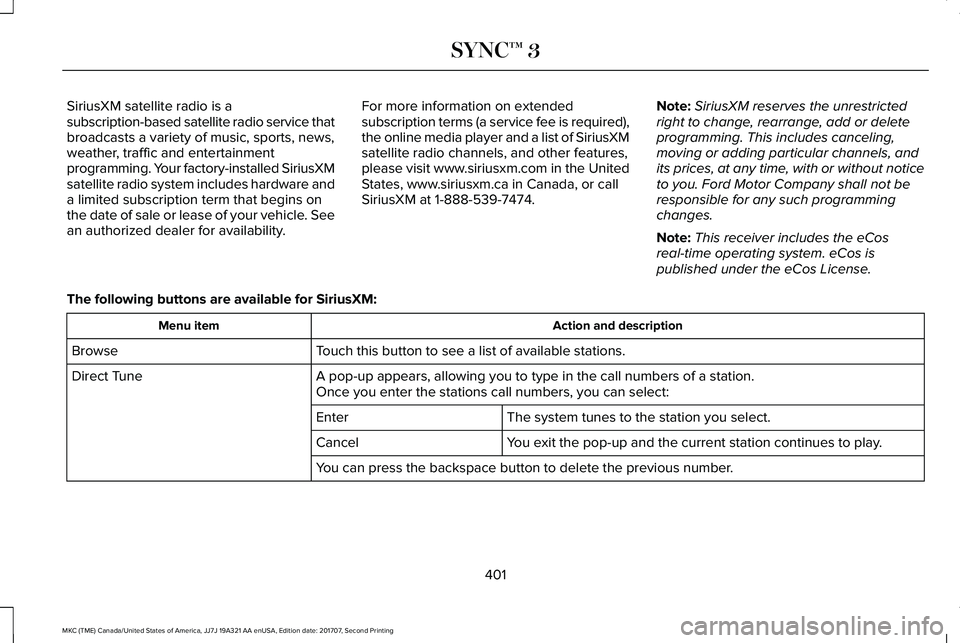
SiriusXM satellite radio is asubscription-based satellite radio service thatbroadcasts a variety of music, sports, news,weather, traffic and entertainmentprogramming. Your factory-installed SiriusXMsatellite radio system includes hardware anda limited subscription term that begins onthe date of sale or lease of your vehicle. Seean authorized dealer for availability.
For more information on extendedsubscription terms (a service fee is required),the online media player and a list of SiriusXMsatellite radio channels, and other features,please visit www.siriusxm.com in the UnitedStates, www.siriusxm.ca in Canada, or callSiriusXM at 1-888-539-7474.
Note:SiriusXM reserves the unrestrictedright to change, rearrange, add or deleteprogramming. This includes canceling,moving or adding particular channels, andits prices, at any time, with or without noticeto you. Ford Motor Company shall not beresponsible for any such programmingchanges.
Note:This receiver includes the eCosreal-time operating system. eCos ispublished under the eCos License.
The following buttons are available for SiriusXM:
Action and descriptionMenu item
Touch this button to see a list of available stations.Browse
A pop-up appears, allowing you to type in the call numbers of a station.Direct TuneOnce you enter the stations call numbers, you can select:
The system tunes to the station you select.Enter
You exit the pop-up and the current station continues to play.Cancel
You can press the backspace button to delete the previous number.
401
MKC (TME) Canada/United States of America, JJ7J 19A321 AA enUSA, Edition date: 201707, Second Printing
SYNC™ 3
Page 406 of 571
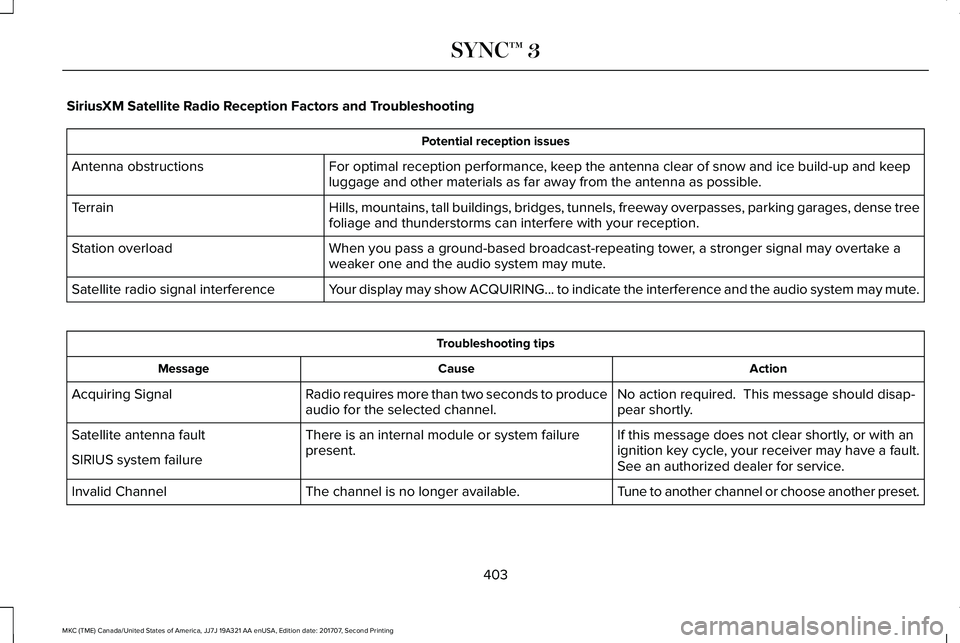
SiriusXM Satellite Radio Reception Factors and Troubleshooting
Potential reception issues
For optimal reception performance, keep the antenna clear of snow and ice build-up and keepluggage and other materials as far away from the antenna as possible.Antenna obstructions
Hills, mountains, tall buildings, bridges, tunnels, freeway overpasses, parking garages, dense treefoliage and thunderstorms can interfere with your reception.Terrain
When you pass a ground-based broadcast-repeating tower, a stronger signal may overtake aweaker one and the audio system may mute.Station overload
Your display may show ACQUIRING... to indicate the interference and the audio system may mute.Satellite radio signal interference
Troubleshooting tips
ActionCauseMessage
No action required. This message should disap-pear shortly.Radio requires more than two seconds to produceaudio for the selected channel.Acquiring Signal
If this message does not clear shortly, or with anignition key cycle, your receiver may have a fault.See an authorized dealer for service.
There is an internal module or system failurepresent.Satellite antenna fault
SIRIUS system failure
Tune to another channel or choose another preset.The channel is no longer available.Invalid Channel
403
MKC (TME) Canada/United States of America, JJ7J 19A321 AA enUSA, Edition date: 201707, Second Printing
SYNC™ 3
Page 407 of 571
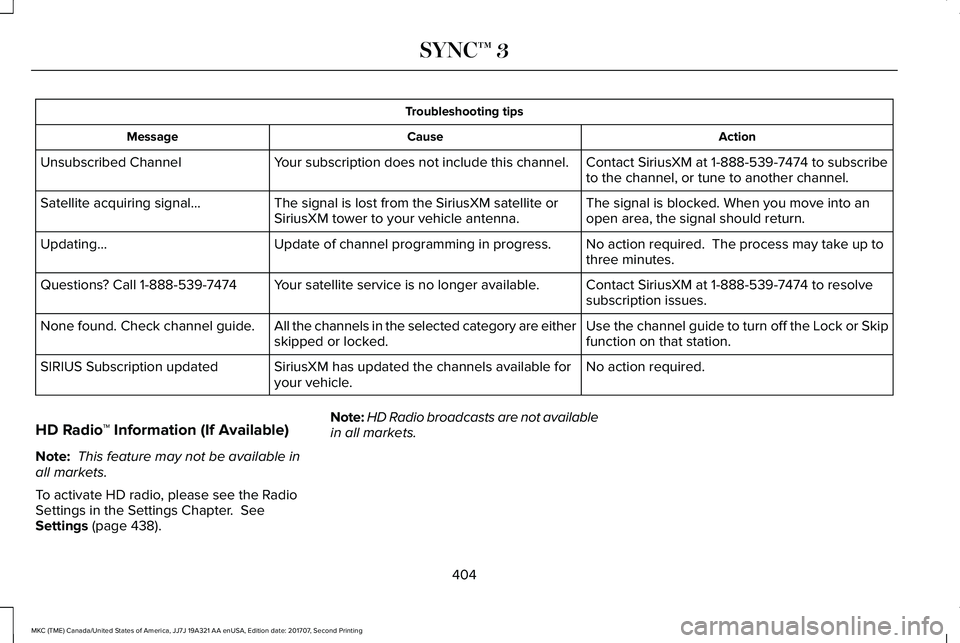
Troubleshooting tips
ActionCauseMessage
Contact SiriusXM at 1-888-539-7474 to subscribeto the channel, or tune to another channel.Your subscription does not include this channel.Unsubscribed Channel
The signal is blocked. When you move into anopen area, the signal should return.The signal is lost from the SiriusXM satellite orSiriusXM tower to your vehicle antenna.Satellite acquiring signal…
No action required. The process may take up tothree minutes.Update of channel programming in progress.Updating…
Contact SiriusXM at 1-888-539-7474 to resolvesubscription issues.Your satellite service is no longer available.Questions? Call 1-888-539-7474
Use the channel guide to turn off the Lock or Skipfunction on that station.All the channels in the selected category are eitherskipped or locked.None found. Check channel guide.
No action required.SiriusXM has updated the channels available foryour vehicle.SIRIUS Subscription updated
HD Radio™ Information (If Available)
Note: This feature may not be available inall markets.
To activate HD radio, please see the RadioSettings in the Settings Chapter. SeeSettings (page 438).
Note:HD Radio broadcasts are not availablein all markets.
404
MKC (TME) Canada/United States of America, JJ7J 19A321 AA enUSA, Edition date: 201707, Second Printing
SYNC™ 3
Page 410 of 571
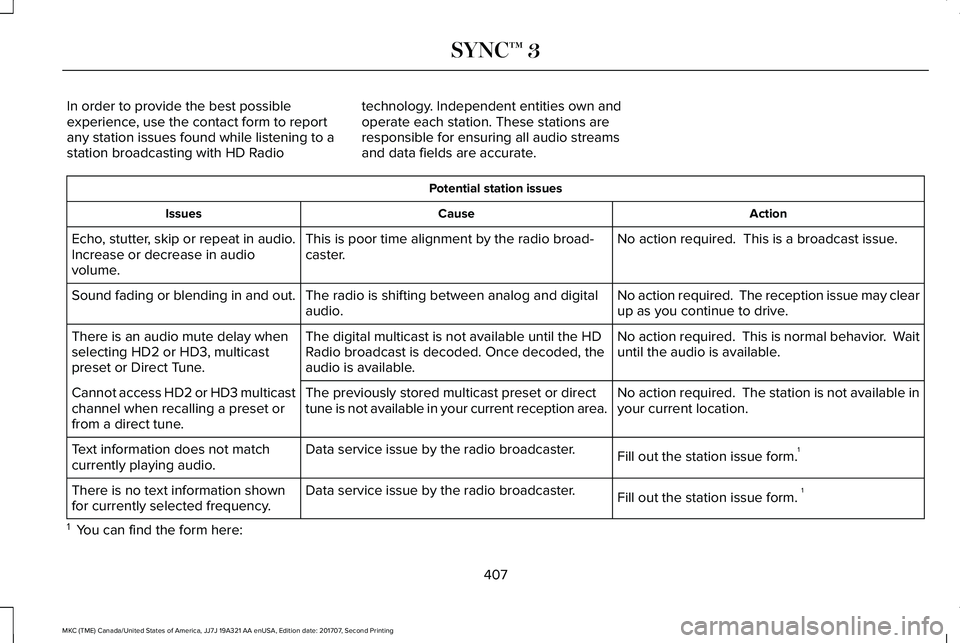
In order to provide the best possibleexperience, use the contact form to reportany station issues found while listening to astation broadcasting with HD Radio
technology. Independent entities own andoperate each station. These stations areresponsible for ensuring all audio streamsand data fields are accurate.
Potential station issues
ActionCauseIssues
No action required. This is a broadcast issue.This is poor time alignment by the radio broad-caster.Echo, stutter, skip or repeat in audio.Increase or decrease in audiovolume.
No action required. The reception issue may clearup as you continue to drive.The radio is shifting between analog and digitalaudio.Sound fading or blending in and out.
No action required. This is normal behavior. Waituntil the audio is available.The digital multicast is not available until the HDRadio broadcast is decoded. Once decoded, theaudio is available.
There is an audio mute delay whenselecting HD2 or HD3, multicastpreset or Direct Tune.
No action required. The station is not available inyour current location.The previously stored multicast preset or directtune is not available in your current reception area.Cannot access HD2 or HD3 multicastchannel when recalling a preset orfrom a direct tune.
Fill out the station issue form.1Data service issue by the radio broadcaster.Text information does not matchcurrently playing audio.
Fill out the station issue form. 1Data service issue by the radio broadcaster.There is no text information shownfor currently selected frequency.
1 You can find the form here:
407
MKC (TME) Canada/United States of America, JJ7J 19A321 AA enUSA, Edition date: 201707, Second Printing
SYNC™ 3
Page 437 of 571
cityseeker, when available, is a service thatprovides more information about certainpoints of interest such as restaurants, hotelsand attractions.
When you have selected a point of interest,the location and information appear, such asaddress, phone number and a star rating.
Press More Information to see a photo, areview, a list of services and facilities, theaverage room or meal price and the webaddress. This screen displays the point ofinterest icons.
For restaurants, cityseeker can provideinformation such as star rating, average cost,review, handicap access, hours of operation,and website address.
For hotels, cityseeker can provideinformation such as star rating, pricecategory, review, check-in and checkouttimes, hotel service icons and websiteaddress. Hotel service icons include:
•Restaurant
•Business center
•Handicap facilities
•Laundry
•Refrigerator
•24 hour room service
•Fitness center
•Internet access
•Pool
•Wi-Fi
Attractions include nearby landmarks,amusement parks, historic buildings andmore. cityseeker can provide informationsuch as star rating, reviews, hour of operationand admission price.
SiriusXM Traffic and Travel Link (If
Equipped)
SiriusXM Traffic and Travel Link is availableon vehicles equipped with navigation andonly in select markets. You must activate andsubscribe to receive SiriusXM Traffic andTravel Link information. It helps you locatethe best gas prices, find movie listings, getcurrent traffic alerts, view the weather map,get accurate ski conditions and see currentsports scores. See Apps (page 435).
The system calculates a reasonable efficientroute based on available speed limits, traffic,and road conditions. You may know a localshort cut that is more efficient at a given timethan the route provided by SYNC 3, but youshould expect a slight difference in minutesor miles with the SYNC 3 route.
Navigation Map Updates
Annual navigation map updates are availablefor purchase through your dealership, bycalling 1-866-462-8837 in the United Statesand Canada or 01-800-557-5539 in Mexico.You can also visit:
Website
www.navigation.com/sync
You need to specify the make and model ofyour vehicle to determine if there is anupdate available.
434
MKC (TME) Canada/United States of America, JJ7J 19A321 AA enUSA, Edition date: 201707, Second Printing
SYNC™ 3
Page 438 of 571
HERE is the digital map provider for thenavigation application. If you find map dataerrors, you may report them directly to HEREby going to www.here.com/mapcreator.HERE evaluates all reported map errors andresponds with the result of their investigationby e-mail.
Map coverage includes the USA (includingPuerto Rico and the US Virgin Islands),Canada and Mexico.
APPS
The system enables voice, steering wheel,and touch screen control of SYNC 3 AppLinkenabled smartphone apps. When an app isrunning through AppLink, you can controlmain features of the app through voicecommands and steering wheel controls.
Note:Available AppLink enabled apps willvary by market.
Note:You must pair and connect yoursmartphone via Bluetooth to SYNC 3 toaccess AppLink.
Note:iPhone users need to connect thephone to the USB port.
Note:For information on available apps,supported smartphone devices andtroubleshooting tips please visit:
Websites
owner.lincoln.comwww.syncmyride.cawww.syncmaroute.ca
Note:Make sure you have an active accountfor the app that you have downloaded. Someapps will work with no setup. Other apps willwant you to configure your personal settingsand personalize your experience by creatingstations or favorites. We recommend you dothis at home or outside of your vehicle.
Note:We encourage you to review thesmartphone app’s terms of service andprivacy policies because Lincoln is notresponsible for your app or its use of data.
Note:AppLink is a native SYNC systemfeature. Accessing mobile apps throughAppLink is only possible when Android Autoor Apple CarPlay are disabled. Some appsmay only be accessible in the car throughAppLink and others only through AndroidAuto or Apple CarPlay. Please refer to theSmartphone Connectivity information todisable Android Auto or Apple CarPlay.
Note:In order to use an app with SYNC 3,the app needs to be running in thebackground of your phone. If you shut downthe app on your phone, it shuts down theapp on SYNC 3 as well.
Note:If a SYNC 3 AppLink compatible appis not shown in the Apps Domain, make surethe required app is running on the mobiledevice.
435
MKC (TME) Canada/United States of America, JJ7J 19A321 AA enUSA, Edition date: 201707, Second Printing
SYNC™ 3