ABS LINCOLN MKC 2018 Owners Manual
[x] Cancel search | Manufacturer: LINCOLN, Model Year: 2018, Model line: MKC, Model: LINCOLN MKC 2018Pages: 571, PDF Size: 4.39 MB
Page 142 of 571
WARNINGS
The head restraint is a safety device.Whenever possible it should beinstalled and properly adjusted when theseat is occupied. Failure to adjust the headrestraint properly could reduce itseffectiveness during certain impacts.
Note:Adjust the seat backrest (front seatsonly) to an upright driving position beforeadjusting the head restraint. Adjust the headrestraint so that the top of it is level with thetop of your head and as far forward aspossible. Make sure that you remaincomfortable. If you are extremely tall, adjustthe head restraint to its highest position.
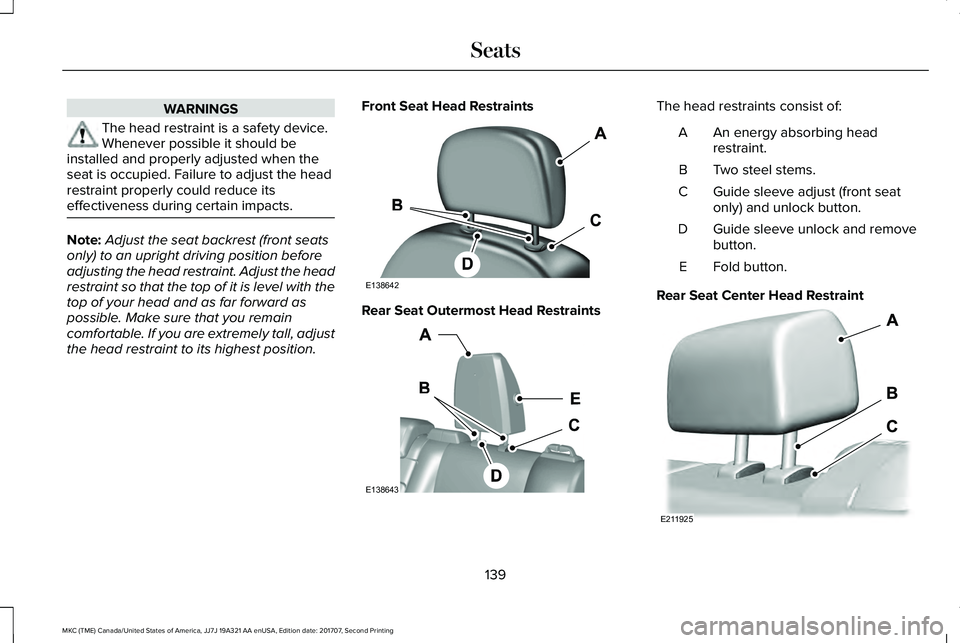
Front Seat Head Restraints
Rear Seat Outermost Head Restraints
The head restraints consist of:
An energy absorbing headrestraint.A
Two steel stems.B
Guide sleeve adjust (front seatonly) and unlock button.C
Guide sleeve unlock and removebutton.D
Fold button.E
Rear Seat Center Head Restraint
139
MKC (TME) Canada/United States of America, JJ7J 19A321 AA enUSA, Edition date: 201707, Second Printing
SeatsE138642 E138643 E211925
Page 143 of 571
The rear center head restraint consists of:
An energy absorbing headrestraint.A
Two steel stems.B
Guide sleeve unlock and removebutton.C
Adjusting the Head Restraint
Raising the Front Seat Head Restraint
Pull the head restraint up.
Lowering the Front Seat Head Restraint
1. Press and hold button C.
2. Push the head restraint down.
Removing the Head Restraint
1.Pull the head restraint up until it reachesits highest position.
2. Press and hold buttons C and D.
3. Pull the head restraint up.
Installing the Head Restraint
Align the steel stems into the guide sleevesand push the head restraint down until itlocks.
Folding the Rear Seat Head Restraint
1. Press and hold button E.
2. Pull the head restraint back up to reset.
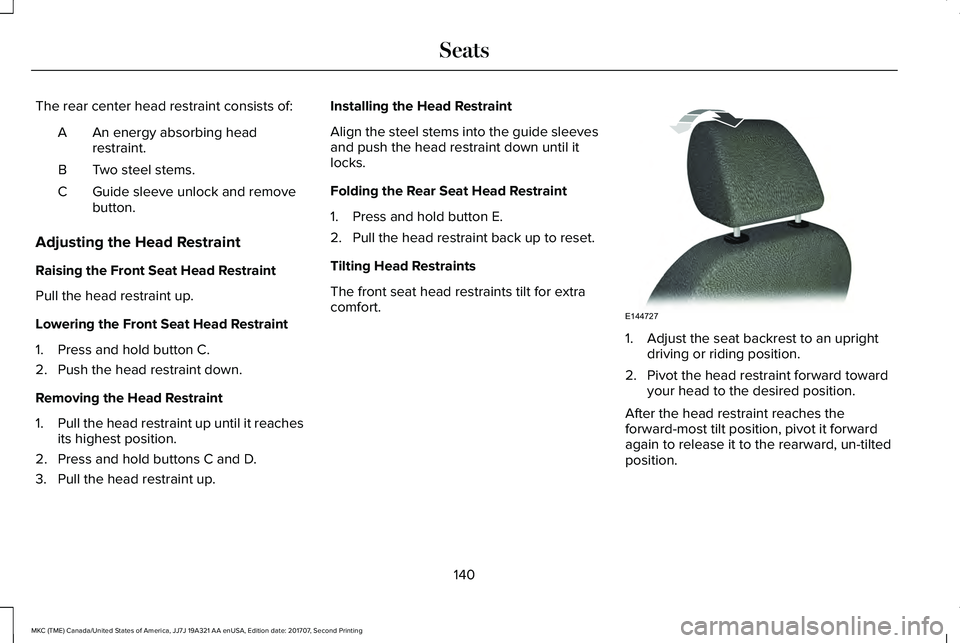
Tilting Head Restraints
The front seat head restraints tilt for extracomfort.
1. Adjust the seat backrest to an uprightdriving or riding position.
2. Pivot the head restraint forward towardyour head to the desired position.
After the head restraint reaches theforward-most tilt position, pivot it forwardagain to release it to the rearward, un-tiltedposition.
140
MKC (TME) Canada/United States of America, JJ7J 19A321 AA enUSA, Edition date: 201707, Second Printing
SeatsE144727
Page 167 of 571
SAFETY PRECAUTIONS
WARNINGS
Do not overfill the fuel tank. Thepressure in an overfilled tank maycause leakage and lead to fuel spray andfire.
The fuel system may be underpressure. If you hear a hissing soundnear the fuel filler inlet, do not refuel until thesound stops. Otherwise, fuel may spray out,which could cause serious personal injury.
Fuels can cause serious injury or deathif misused or mishandled.
Fuel may contain benzene, which is acancer-causing agent.
When refueling always shut the engineoff and never allow sparks or openflames near the fuel tank filler valve. Neversmoke or use a cell phone while refueling.Fuel vapor is extremely hazardous undercertain conditions. Avoid inhaling excessfumes.
Follow these guidelines when refueling:
•Extinguish all smoking materials and anyopen flames before refueling yourvehicle.
•Always switch the engine off beforerefueling.
•Automotive fuels can be harmful or fatalif swallowed. Fuel is highly toxic and ifswallowed can cause death or permanentinjury. If fuel is swallowed immediatelycall a physician, even if no symptoms areimmediately apparent. The toxic effectsof fuel may not be apparent for hours.
•Avoid inhaling fuel vapors. Inhaling fuelvapor can lead to eye and respiratorytract irritation. In severe cases, excessiveor prolonged breathing of fuel vapor cancause serious illness and permanentinjury.
•Avoid getting fuel in your eyes. If yousplash fuel in your eyes, immediatelyremove contact lenses (if worn), flush withwater for 15 minutes and seek medicalattention. Failure to seek proper medicalattention could lead to permanent injury.
•Fuels can be harmful if absorbed throughthe skin. If you splash fuel on your skin,clothing or both, promptly removecontaminated clothing and thoroughlywash your skin with soap and water.Repeated or prolonged skin contactcauses skin irritation.
•Be particularly careful if you are takingAntabuse or other forms of Disulfiram forthe treatment of alcoholism. Breathingfuel vapors could cause an adversereaction, serious personal injury orsickness. Immediately call a physician ifyou experience any adverse reactions.
FUEL QUALITY
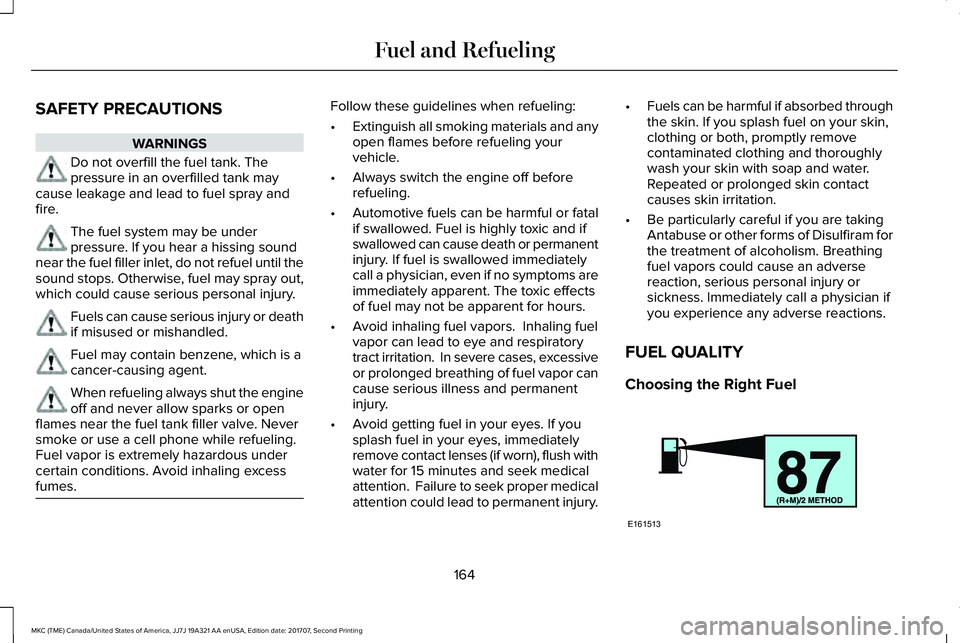
Choosing the Right Fuel
164
MKC (TME) Canada/United States of America, JJ7J 19A321 AA enUSA, Edition date: 201707, Second Printing
Fuel and RefuelingE161513
Page 174 of 571
EMISSION LAW
WARNING
Do not remove or alter the originalequipment floor covering or insulationbetween it and the metal floor of the vehicle.The floor covering and insulation protectoccupants of the vehicle from the engineand exhaust system heat and noise. Onvehicles with no original equipment floorcovering insulation, do not carry passengersin a manner that permits prolonged skincontact with the metal floor. Failure to followthese instructions may result in fire orpersonal injury.
U.S. federal laws and certain state lawsprohibit removing or rendering inoperativeemission control system components. Similarfederal or provincial laws may apply inCanada. We do not approve of any vehiclemodification without first determiningapplicable laws.
Tampering with emissions controlsystems including related sensorsor the Diesel Exhaust Fluid systemcan result in reduced engine power and theillumination of the service engine soon light.
Tampering With a Noise ControlSystem
Federal laws prohibit the following acts:
•Removal or rendering inoperative by anyperson other than for purposes ofmaintenance.
•Repair or replacement of any device orelement of the design incorporated intoa new vehicle for the purpose of noisecontrol prior to its sale or delivery to theultimate purchaser or while it is in use.
•The use of the vehicle after any personremoves or renders inoperative anydevice or element of the design.
The U.S. Environmental Protection Agencymay presume to constitute tampering asfollows:
•Removal of hood blanket, fender apronabsorbers, fender apron barriers,underbody noise shields or acousticallyabsorptive material.
•Tampering or rendering inoperative theengine speed governor, to allow enginespeed to exceed manufacturerspecifications.
If the engine does not start, runs rough,experiences a decrease in engineperformance, experiences excess fuelconsumption or produces excessive exhaustsmoke, check for the following:
•A plugged or disconnected air inletsystem hose.
•A plugged engine air filter element.
•Water in the fuel filter and waterseparator.
•A clogged fuel filter.
•Contaminated fuel.
•Air in the fuel system, due to looseconnections.
171
MKC (TME) Canada/United States of America, JJ7J 19A321 AA enUSA, Edition date: 201707, Second Printing
Engine Emission Control
Page 175 of 571
•An open or pinched sensor hose.
•Incorrect engine oil level.
•Incorrect fuel for climatic conditions.
•Incorrect engine oil viscosity for climacticconditions.
Note:Some vehicles have a lifetime fuel filterthat is integrated with the fuel tank. Regularmaintenance or replacement is not needed.
Note:If these checks do not help you correctthe concern, have your vehicle checked assoon as possible.
Noise Emissions Warranty, ProhibitedTampering Acts and Maintenance
On January 1, 1978, Federal regulationbecame effective governing the noiseemission on trucks over 10,000 lb (4,536 kg)Gross Vehicle Weight Rating (GVWR). Thepreceding statements concerning prohibitedtampering acts and maintenance, and thenoise warranty found in the Warranty Guide,are applicable to complete chassis cabs over10,000 lb (4,536 kg) GVWR.
CATALYTIC CONVERTER
WARNINGS
Do not park, idle or drive your vehicleon dry grass or other dry ground cover.The emission system heats up the enginecompartment and exhaust system, creatingthe risk of fire.
The normal operating temperature ofthe exhaust system is very high. Neverwork around or attempt to repair any part ofthe exhaust system until it has cooled. Usespecial care when working around thecatalytic converter. The catalytic converterheats up to a very high temperature afteronly a short period of engine operation andstays hot after the engine is switched off.
Exhaust leaks may result in entry ofharmful and potentially lethal fumesinto the passenger compartment. If you smellexhaust fumes inside your vehicle, have yourvehicle inspected immediately. Do not driveif you smell exhaust fumes.
Your vehicle has various emission controlcomponents and a catalytic converter thatenables it to comply with applicable exhaustemission standards.
To make sure that the catalytic converter andother emission control components continueto work properly:
•Do not crank the engine for more than10 seconds at a time.
•Do not run the engine with a spark pluglead disconnected.
•Do not push-start or tow-start yourvehicle. Use booster cables. See JumpStarting the Vehicle (page 255).
•Use only the specified fuel listed.
•Do not switch the ignition off when yourvehicle is moving.
•Avoid running out of fuel.
•Have the items listed in scheduledmaintenance information performedaccording to the specified schedule.
Note:Resulting component damage maynot be covered by the vehicle Warranty.
172
MKC (TME) Canada/United States of America, JJ7J 19A321 AA enUSA, Edition date: 201707, Second Printing
Engine Emission Control
Page 200 of 571
PRINCIPLE OF OPERATION
WARNINGS
To help avoid personal injury, alwaysuse caution when in reverse (R) andwhen using the sensing system.
The system may not detect objectswith surfaces that absorb reflection.Always drive with due care and attention.Failure to take care may result in a crash.
Traffic control systems, inclementweather, air brakes, external motorsand fans may affect the correct operation ofthe sensing system.This may cause reducedperformance or false alerts.
The system may not detect small ormoving objects, particularly those closeto the ground.
Note:If your vehicle is equipped withMyKey™, the sensing system cannot beturned off when a MyKey™ is present. SeePrinciple of Operation (page 59).
Note:Keep the sensors, located on thebumper or fascia, free from snow, ice andlarge accumulations of dirt. If the sensorsare covered, the system’s accuracy can beaffected. Do not clean the sensors with sharpobjects.
Note:If your vehicle sustains damage to thebumper or fascia, leaving it misaligned orbent, the sensing zone may be alteredcausing inaccurate measurement ofobstacles or false alerts.
Note:Certain add-on devices installedaround the bumper or fascia may createfalse alerts. For example, large trailerhitches, bike or surfboard racks, license platebrackets, bumper covers or any other devicethat may block the normal detection zoneof the system. Remove the add-on device toprevent false alerts.
Note:When a trailer is connected to yourvehicle, the rear parking aid may detect thetrailer and therefore provide an alert. Disablethe rear parking aid when a trailer isconnected to prevent the alert.
The sensing system warns the driver ofobstacles within a certain range of yourvehicle. The system turns on automaticallywhenever you switch the ignition on.
The system can be switched off through theinformation display menu or from the pop-upmessage that appears once you shift thetransmission into reverse (R). See GeneralInformation (page 109).
If a fault is present in the system, a warningmessage appears in the information display.See Information Messages (page 114).
REAR PARKING AID
The rear sensors are only active when thetransmission is in reverse (R). As your vehiclemoves closer to the obstacle, the rate of theaudible warning increases. When theobstacle is less than 12 in (30 cm) away, thewarning sounds continuously. If the systemdetects a stationary or receding objectfarther than 12 in (30 cm) from the corners ofthe bumper, the tone sounds for only threeseconds. Once the system detects an objectapproaching, the warning sounds again.
197
MKC (TME) Canada/United States of America, JJ7J 19A321 AA enUSA, Edition date: 201707, Second Printing
Parking Aids
Page 203 of 571
•The edge of the neighboring parkedvehicle is high off the ground. Forexample, a bus, tow truck or flatbedtruck.
•The weather conditions are poor. Forexample, during heavy rain, snow or fog.
Note: Keep the sensors on the bumper orfascia free from snow, ice and largeaccumulations of dirt. Covered sensors canaffect the system's accuracy. Do not cleanthe sensors with sharp objects.
Note:The sensors may not detect objectswith surfaces that absorb ultrasonic wavesor cause ultrasonic interference. Forexample, motorcycle exhaust, truck airbrakes or horns.
Note:Following a change in tire size, thesystem must recalibrate and operation maybe impaired for a short time.
Do not use the system if:
•You have attached a foreign object closeto the sensors on the front or rear of yourvehicle. For example, a bike rack ortrailer.
•You attach an overhanging object to theroof. For example, a surfboard.
•A foreign object damages or obstructsthe front or rear bumper or side sensors.
•The correct tire size is not in use on yourvehicle. For example, a mini-spare tire.
Using Active Park Assist - Parallel Parking
Press the Active Park Assist buttononce to search for a parallelparking space.
When driving at a speed less than 22 mph(35 km/h), the system automatically scansboth sides of your vehicle for an availableparking space. The system displays amessage and a corresponding graphic toindicate it is searching for a parking space.Use the direction indicator to selectsearching either to the left-hand side orright-hand side of your vehicle.
Note:If the direction indicators are not used,the system defaults to the passenger sideof your vehicle.
200
MKC (TME) Canada/United States of America, JJ7J 19A321 AA enUSA, Edition date: 201707, Second Printing
Parking AidsE146186
Page 225 of 571
•Using the turn signal indicator.•Evasive steering maneuver.
•Driving too close to the lane marking.
Troubleshooting
Why is the feature not available (line markings are gray) when I can see the lane markings on the road?
Your vehicle speed is outside the operational range of the feature.
The sun is shining directly into the camera lens.
A quick intentional lane change has occurred.
Your vehicle stays too close to the lane markings.
Driving at high speeds in curves.
The last alert warning or aid intervention occurred a short time ago.
Ambiguous lane markings, for example in construction zones.
Rapid transition from light to dark, or from dark to light.
Sudden offset in lane markings.
ABS or AdvanceTrac™ is active.
There is a camera blockage due to dirt, grime, fog, frost or water on the windshield.
You are driving too close to the vehicle in front of you.
Transitioning between no lane markings to lane markings or vice versa.
222
MKC (TME) Canada/United States of America, JJ7J 19A321 AA enUSA, Edition date: 201707, Second Printing
Driving Aids
Page 237 of 571
DRIVE CONTROL (If Equipped)
LINCOLN DRIVE CONTROL
Lincoln Drive Control delivers the Lincolndriving experience through a suite ofsophisticated electronic vehicle systems.These systems continuously monitor yourdriving inputs and the road conditions tooptimize ride comfort, steering, handling,powertrain response and sound. You canpreset your preferences for these systemswithin the information display. Lincoln DriveControl will respond to your preferencesbased on what gear position you select. Thisprovides a single location to control multiplesystems performance settings.
Lincoln Drive Control consists of thefollowing systems:
•Continuously controlled dampingdynamically adjusts the shock absorbersstiffness in real time to match the roadsurface and driver inputs. This systemcontinuously monitors your vehicle’smotion (roll, pitch, bounce), suspensionposition, load, speed, road conditions,and steering to adjust the suspensiondamping for optimal vehicle control.
•Electronically power-assisted steeringadjusts steering effort and feel based onyour vehicle speed and your inputs.
•Active noise control utilizes your vehicleelectronics to enhance the acousticexperience.
•Electronic stability control and tractioncontrol maintain your vehicle control inadverse conditions or high performancedriving.
•Electronic throttle control enhances thepowertrain response to your inputs.
Using Lincoln Drive Control
You can configure which of the Drive Controlmodes are active when your vehicle is indrive (D) or in sport (S). The configurationremains active until modified from the mainmenu on the information display.
234
MKC (TME) Canada/United States of America, JJ7J 19A321 AA enUSA, Edition date: 201707, Second Printing
Driving Aids
Page 293 of 571
9. If the oil level is correct, replace thedipstick and make sure it is fully seated.
Note:Do not remove the dipstick when theengine is running.
Note: If the oil level is between themaximum and minimum marks, the oil levelis acceptable. Do not add oil.
Note:The oil consumption of new enginesreaches its normal level after approximately3,000 mi (5,000 km).
Adding Engine Oil
WARNINGS
Do not add engine oil when the engineis hot. Failure to follow this instructioncould result in personal injury.
Do not remove the filler cap when theengine is running.
Do not use supplemental engine oil additivesbecause they are unnecessary and couldlead to engine damage that may not becovered by the vehicle Warranty.
Only use oils certified for gasoline enginesby the American Petroleum Institute (API). An oil with this trademark symbol conformsto the current engine and emission systemprotection standards and fuel economyrequirements of the International LubricantsSpecification Advisory Committee (ILSAC).
To top up the engine oil level do thefollowing:
1. Clean the area surrounding the engineoil filler cap before you remove it.
2. Remove the engine oil filler cap. SeeUnder Hood Overview (page 287). Turnit counterclockwise and remove it.
3. Add engine oil that meets Fordspecifications. See Capacities andSpecifications (page 350). See Capacitiesand Specifications (page 356). You mayhave to use a funnel to pour the engineoil into the opening.
4. Recheck the oil level.
5. If the oil level is correct, replace thedipstick and make sure it is fully seated.
6. Replace the engine oil filler cap. Turn itclockwise until you feel a strongresistance.
Note: Do not add oil further than themaximum mark. Oil levels above themaximum mark may cause engine damage.
Note:Make sure you install the oil filler capcorrectly.
Note:Soak up any spillage with anabsorbent cloth immediately.
OIL CHANGE INDICATOR RESET
Use the information display controls on thesteering wheel to reset the oil changeindicator.
290
MKC (TME) Canada/United States of America, JJ7J 19A321 AA enUSA, Edition date: 201707, Second Printing
MaintenanceE142732