oil LINCOLN MKC 2019 User Guide
[x] Cancel search | Manufacturer: LINCOLN, Model Year: 2019, Model line: MKC, Model: LINCOLN MKC 2019Pages: 581, PDF Size: 5.41 MB
Page 293 of 581
Engine coolant reservoir. SeeEngine Coolant Check (page 292).A
Engine oil dipstick. See Engine OilDipstick (page 290).B
Engine oil filler cap. See EngineOil Check (page 290).C
Brake fluid reservoir. See BrakeFluid Check (page 296).D
Battery. See Changing the 12VBattery (page 297).E
Power distribution box. See Fuses(page 268).F
Air filter assembly. See Changingthe Engine Air Filter (page 302).G
Windshield washer fluid reservoir.See Washer Fluid Check (page296).
H
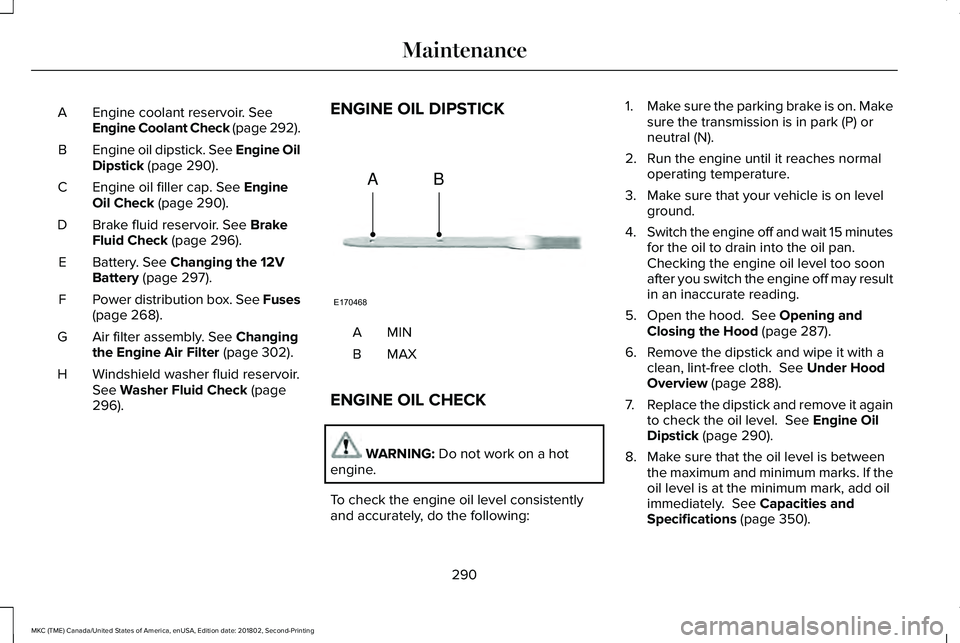
ENGINE OIL DIPSTICK
MINA
MAXB
ENGINE OIL CHECK
WARNING: Do not work on a hotengine.
To check the engine oil level consistentlyand accurately, do the following:
1.Make sure the parking brake is on. Makesure the transmission is in park (P) orneutral (N).
2. Run the engine until it reaches normaloperating temperature.
3. Make sure that your vehicle is on levelground.
4.Switch the engine off and wait 15 minutesfor the oil to drain into the oil pan. Checking the engine oil level too soonafter you switch the engine off may resultin an inaccurate reading.
5. Open the hood. See Opening andClosing the Hood (page 287).
6. Remove the dipstick and wipe it with aclean, lint-free cloth. See Under HoodOverview (page 288).
7.Replace the dipstick and remove it againto check the oil level. See Engine OilDipstick (page 290).
8. Make sure that the oil level is betweenthe maximum and minimum marks. If theoil level is at the minimum mark, add oilimmediately. See Capacities andSpecifications (page 350).
290
MKC (TME) Canada/United States of America, enUSA, Edition date: 201802, Second-Printing
MaintenanceE170468
AB
Page 294 of 581
9. If the oil level is correct, replace thedipstick and make sure it is fully seated.
Note:Do not remove the dipstick when theengine is running.
Note: If the oil level is between themaximum and minimum marks, the oil levelis acceptable. Do not add oil.
Note:The oil consumption of new enginesreaches its normal level after approximately3,000 mi (5,000 km).
Adding Engine Oil
WARNING: Do not add engine oil whenthe engine is hot. Failure to follow thisinstruction could result in personal injury.
WARNING: Do not remove the fillercap when the engine is running.
Do not use supplemental engine oil additivesbecause they are unnecessary and couldlead to engine damage that may not becovered by the vehicle Warranty.
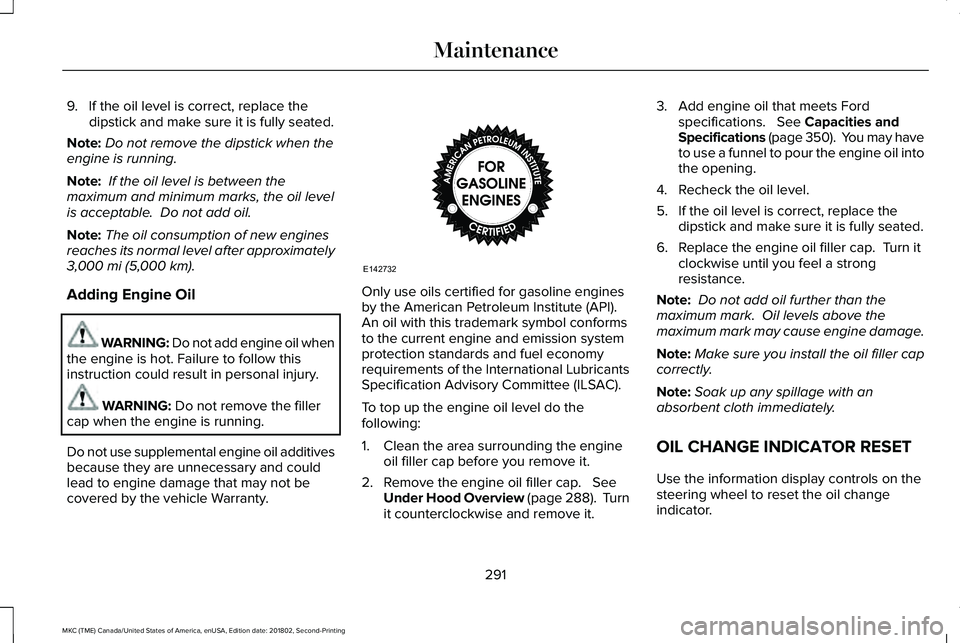
Only use oils certified for gasoline enginesby the American Petroleum Institute (API). An oil with this trademark symbol conformsto the current engine and emission systemprotection standards and fuel economyrequirements of the International LubricantsSpecification Advisory Committee (ILSAC).
To top up the engine oil level do thefollowing:
1. Clean the area surrounding the engineoil filler cap before you remove it.
2. Remove the engine oil filler cap. SeeUnder Hood Overview (page 288). Turnit counterclockwise and remove it.
3. Add engine oil that meets Fordspecifications. See Capacities andSpecifications (page 350). You may haveto use a funnel to pour the engine oil intothe opening.
4. Recheck the oil level.
5. If the oil level is correct, replace thedipstick and make sure it is fully seated.
6. Replace the engine oil filler cap. Turn itclockwise until you feel a strongresistance.
Note: Do not add oil further than themaximum mark. Oil levels above themaximum mark may cause engine damage.
Note:Make sure you install the oil filler capcorrectly.
Note:Soak up any spillage with anabsorbent cloth immediately.
OIL CHANGE INDICATOR RESET
Use the information display controls on thesteering wheel to reset the oil changeindicator.
291
MKC (TME) Canada/United States of America, enUSA, Edition date: 201802, Second-Printing
MaintenanceE142732
Page 295 of 581
From the main menu scroll to:
Action and descriptionMessage
Press the right arrow button,then from this menu scroll tothe following message.
Settings
Press the right arrow button,then from this menu scroll tothe following message.
Vehicle
Press the right arrow button,then from this menu scroll tothe following message.
Oil Life
Press and hold the OK buttonuntil the instrument clusterdisplays the followingmessage.
Hold OK toReset
Reset Successful
When the oil change indicatorresets the instrument clusterdisplays 100%.
Remaining Life
{00}%
Action and descriptionMessage
If the instrument clusterdisplays one of the followingmessages, repeat theprocess.
Not Reset
Reset Cancelled
ENGINE COOLANT CHECK
Checking the Engine Coolant
WARNING: Do not add engine coolantwhen the engine is hot. Steam and scaldingliquids released from a hot cooling systemcan burn you badly. Also, you can be burnedif you spill coolant on hot engine parts.
WARNING: Do not put engine coolantin the windshield washer fluid container. Ifsprayed on the windshield, engine coolantcould make it difficult to see through thewindshield.
WARNING: To reduce the risk ofpersonal injury, make sure the engine is coolbefore unscrewing the coolant pressure reliefcap. The cooling system is under pressure;steam and hot liquid can come out forcefullywhen the cap is loosened slightly.
WARNING: Do not add coolant furtherthan the MAX mark.
Note:Automotive fluids are notinterchangeable. Do not use engine coolantor windshield washer fluid outside of itsspecified function and vehicle location.
Note:Do not use stop leak pellets, coolingsystem sealants, or additives as they cancause damage to the engine cooling orheating systems. This damage would not becovered under your vehicle’s warranty.
292
MKC (TME) Canada/United States of America, enUSA, Edition date: 201802, Second-Printing
Maintenance
Page 311 of 581
•Do not allow wax to come in contact withany non-body (low-gloss black) coloredtrim. The wax will discolor or stain theparts over time.
•Roof racks.
•Bumpers.
•Grained door handles.
•Side moldings.
•Mirror housings.
•Windshield cowl area.
•Do not apply wax to glass areas.
•After waxing, your car's paint should feelsmooth, and be free of streaks andsmudges.
CLEANING THE ENGINE
Engines are more efficient when they areclean because grease and dirt buildup keepthe engine warmer than normal.
When washing:
•Take care when using a power washerto clean the engine. The high-pressurefluid could penetrate the sealed partsand cause damage.
•Do not spray a hot engine with cold waterto avoid cracking the engine block orother engine components.
•Spray Motorcraft Engine Shampoo andDegreaser on all parts that requirecleaning and pressure rinse clean. InCanada, use Motorcraft Engine Shampoo.
•Never wash or rinse the engine while itis hot or running; water in the runningengine may cause internal damage.
•Never wash or rinse any ignition coil,spark plug wire or spark plug well, or thearea in and around these locations.
•Cover the battery, power distribution box,and air filter assembly to prevent waterdamage when cleaning the engine.
CLEANING THE WINDOWS AND
WIPER BLADES
Car wash chemicals and environmentalfallout can result in windshield and wiperblade contamination. Dirty windshield andwipers will result in poor windshield wiperoperation. Keep the windshield and wiperblades clean to maintain windshield wiperperformance.
To clean the windshield and wiper blades:
•Clean the windshield with a non-abrasiveglass cleaner. When cleaning the interiorof the windshield, avoid getting any glasscleaner on the instrument panel or doorpanels. Wipe any glass cleaner off thesesurfaces immediately.
•For windshields contaminated with treesap, chemicals, wax or bugs, clean theentire windshield using steel wool (nogreater than 0000 grade) in a circularmotion and rinse with water.
•Clean the wiper blades with isopropylrubbing alcohol or windshield washerconcentrate.
308
MKC (TME) Canada/United States of America, enUSA, Edition date: 201802, Second-Printing
Vehicle Care
Page 312 of 581
Note: Do not use razor blades or othersharp objects to clean or remove decals fromthe inside of the heated rear window. Thevehicle warranty does not cover damagecaused to the heated rear window grid lines.
CLEANING THE INTERIOR
WARNING: Do not use cleaningsolvents, bleach or dye on the vehicle'sseatbelts, as these actions may weaken thebelt webbing.
WARNING: On vehicles equipped withseat-mounted airbags, do not use chemicalsolvents or strong detergents. Such productscould contaminate the side airbag systemand affect performance of the side airbag ina crash.
Note:Follow the same procedure forcleaning leather seats when cleaning leatherinterior. See Cleaning Leather Seats (page311).
Note:Do not use household cleaningproducts or glass cleaners, which can stainand discolor the fabric and affect the flameretardant abilities of the seat materials.
For fabric, carpets, cloth seats, safety beltsand seats equipped with side airbags:
•Remove dust and loose dirt with avacuum cleaner.
•Remove light stains and soil withMotorcraft® Professional Strength Carpet& Upholstery Cleaner.
For grease or tar stains:
•Spot clean the area with Motorcraft® Spotand Stain Remover. In Canada, useMotorcraft® Multi-Purpose Cleaner.
•If a ring forms on the fabric after spotcleaning, clean the entire areaimmediately, but do not oversaturate orthe ring will set.
Cleaning Black Label or PresidentialInterior (If Equipped)
Note:Alcantara microfiber cloth fabric ismade of polyester microfiber withmicro-porous polyurethane. Usingcommercially available fabric cleaners cancause permanent damage.
Note:Do not use commercially availableleather and vinyl cleaning products onAlcantara microfiber cloth fabric.
Note:Lincoln Black Label or Presidentialvehicles may have Alcantara microfiber clothfabric on the seats, headliner, floor mats anddoor panels.
Depending on the type of stain, use water,lemon juice or pure ethyl alcohol whencleaning. For cleaning Alcantara microfibercloth, refer to the following chart:
309
MKC (TME) Canada/United States of America, enUSA, Edition date: 201802, Second-Printing
Vehicle Care
Page 314 of 581
CLEANING THE INSTRUMENT
PANEL AND INSTRUMENT
CLUSTER LENS
WARNING: Do not use chemicalsolvents or strong detergents when cleaningthe steering wheel or instrument panel toavoid contamination of the airbag system.
Note:Follow the same procedure ascleaning leather seats for cleaning leatherinstrument panels and leather interior trimsurfaces. See Cleaning Leather Seats (page311).
Clean the instrument panel and cluster lenswith a clean, damp and soft cloth, then usea clean, dry and soft cloth to dry these areas.
•Avoid cleaners or polishes that increasethe gloss of the upper portion of theinstrument panel. The dull finish in thisarea helps protect you from undesirablewindshield reflection.
•Do not use any household cleaningproducts or glass cleaners as these maydamage the finish of the instrumentpanel, interior trim and cluster lens.
•Wash or wipe your hands clean if youhave been in contact with certainproducts such as insect repellent andsuntan lotion to avoid possible damageto the interior painted surfaces.
•Do not allow air fresheners and handsanitizers to spill onto interior surfaces.If a spill occurs, wipe off immediately.Your warranty may not cover thesedamages.
If a staining liquid like coffee or juice hasbeen spilled on the instrument panel or oninterior trim surfaces:
1.Wipe up spilled liquid using a clean, softcloth as quickly as possible.
2. Use Motorcraft Premium Leather andVinyl Cleaner or a commercially availableleather cleaning product for automotiveinteriors. Test any cleaner or stainremover on an inconspicuous area.
3. Alternatively, wipe the surface with aclean, soft cloth and a mild soap andwater solution. Dry the area with a clean,soft cloth.
4.If necessary, apply more soap and watersolution or cleaning product to a clean,soft cloth and press it onto the soiledarea. Allow this to set at roomtemperature for 30 minutes.
5. Remove the soaked cloth, then with aclean, damp cloth, use a rubbing motionfor 60 seconds on the soiled area.
6. Dry the area with a clean, soft cloth.
CLEANING LEATHER SEATS
Note:Follow the same procedure ascleaning leather seats for cleaning leatherinstrument panels and leather interior trimsurfaces.
311
MKC (TME) Canada/United States of America, enUSA, Edition date: 201802, Second-Printing
Vehicle Care
Page 315 of 581
For routine cleaning, wipe the surface witha soft, damp cloth and a mild soap and watersolution. Dry the area with a clean, soft cloth.
Note:Test any cleaner or stain remover onan inconspicuous area.
You should:
•Remove dust and loose dirt with avacuum cleaner.
•Clean and treat spills and stains as soonas possible.
Do not use the following products as thesemay damage the leather:
•Oil and petroleum or silicone-basedleather conditioners.
•Household cleaners.
•Alcohol solutions.
•Solvents or cleaners intended specificallyfor rubber, vinyl and plastics.
REPAIRING MINOR PAINT
DAMAGE
Authorized dealers have touch-up paint tomatch your vehicle’s color. Your vehicle colorcode is printed on a sticker on the front,left-hand side door jamb. Take your colorcode to your authorized dealer to make sureyou get the correct color.
Before repairing minor paint damage, use acleaner such as Motorcraft Bug and TarRemover to remove particles such as birddroppings, tree sap, insect deposits, tarspots, road salt and industrial fallout.
Always read the instructions before usingcleaning products.
CLEANING THE WHEELS
1. Regularly clean them with a wheelcleaner. We recommend that you use anapproved wheel cleaner if available.
2. Remove dirt and brake dust with asponge.
3. Remove tar and grease with a bug andtar remover. We recommend that you usean approved bug and tar remover ifavailable.
4. Thoroughly rinse the wheels with waterafter cleaning.
If you intend on parking your vehicle for anextended period after cleaning the wheelswith a wheel cleaner, drive your vehicle fora few minutes before doing so. This reducesthe risk of corrosion of the brake discs, brakepads and linings.
Do not clean the wheels when they are hot.
Note: Some car washes could damagewheel rims and covers.
Note: Using non-recommended cleaners,harsh cleaning products, chrome wheelcleaners or abrasive materials coulddamage wheel rims and covers.
312
MKC (TME) Canada/United States of America, enUSA, Edition date: 201802, Second-Printing
Vehicle Care
Page 316 of 581
VEHICLE STORAGE
If you plan on storing your vehicle for 30days or more, read the followingmaintenance recommendations to make sureyour vehicle stays in good operatingcondition.
We engineer and test all motor vehicles andtheir components for reliable, regular driving.Under various conditions, long-term storagemay lead to degraded engine performanceor failure unless you use specific precautionsto preserve engine components.
General
•Store all vehicles in a dry, ventilatedplace.
•Protect from sunlight, if possible.
•If vehicles are stored outside, theyrequire regular maintenance to protectagainst rust and damage.
Body
•Wash your vehicle thoroughly to removedirt, grease, oil, tar or mud from exteriorsurfaces, rear-wheel housing and theunderside of front fenders.
•Periodically wash your vehicle if it isstored in exposed locations.
•Touch-up exposed or primed metal toprevent rust.
•Cover chrome and stainless steel partswith a thick coat of auto wax to preventdiscoloration. Re-wax as necessary whenyou wash your vehicle.
•Lubricate all hood, door and luggagecompartment hinges and latches with alight grade oil.
•Cover interior trim to prevent fading.
•Keep all rubber parts free from oil andsolvents.
Engine
•Change the engine oil and filter prior tostorage because used engine oil containscontaminates which may cause enginedamage.
•Start the engine every 15 days for aminimum of 15 minutes. Run at fast idlewith the climate controls set to defrostuntil the engine reaches normaloperating temperature.
•With your foot on the brake, shift throughall the gears while the engine is running.
•We recommend that you change theengine oil before you use your vehicleagain.
Fuel system
•Fill the fuel tank with high-quality fueluntil the first automatic shutoff of the fuelpump nozzle.
313
MKC (TME) Canada/United States of America, enUSA, Edition date: 201802, Second-Printing
Vehicle Care
Page 317 of 581
Cooling system
•Protect against freezing temperatures.
•When removing your vehicle fromstorage, check coolant fluid level.Confirm that there are no cooling systemleaks and that fluid is at therecommended level.
Battery
•Check and recharge as necessary. Keepconnections clean.
•If storing your vehicle for more than 30days without recharging the battery, werecommend that you disconnect thebattery cables to maintain battery chargefor quick starting.
Note:It is necessary to reset memoryfeatures if battery cables are disconnected.
Brakes
•Make sure the brakes and parking brakerelease fully.
Tires
•Maintain recommended air pressure.
Miscellaneous
•Make sure all linkages, cables, levers andpins under your vehicle are covered withgrease to prevent rust.
•Move vehicles at least 25 ft (7.5 m) every15 days to lubricate working parts andprevent corrosion.
Removing Vehicle From Storage
When your vehicle is ready to come out ofstorage, do the following:
•Wash your vehicle to remove any dirt orgrease film build-up on window surfaces.
•Check windshield wipers for anydeterioration.
•Check under the hood for any foreignmaterial that may have collected duringstorage such as mice or squirrel nests.
•Check the exhaust for any foreignmaterial that may have collected duringstorage.
•Check tire pressures and set tire inflationper the Tire Label.
•Check brake pedal operation. Drive yourvehicle 15 ft (4.5 m) back and forth toremove rust build-up.
•Check fluid levels (including coolant, oiland gas) to make sure there are no leaks,and fluids are at recommended levels.
•If you remove the battery, clean thebattery cable ends and check fordamage.
Contact an authorized dealer if you have anyconcerns or issues.
BODY STYLING KITS
The distance between the underside of yourvehicle and the ground is less than that ofother models. Drive with extreme care toavoid damage to your vehicle.
314
MKC (TME) Canada/United States of America, enUSA, Edition date: 201802, Second-Printing
Vehicle Care
Page 345 of 581
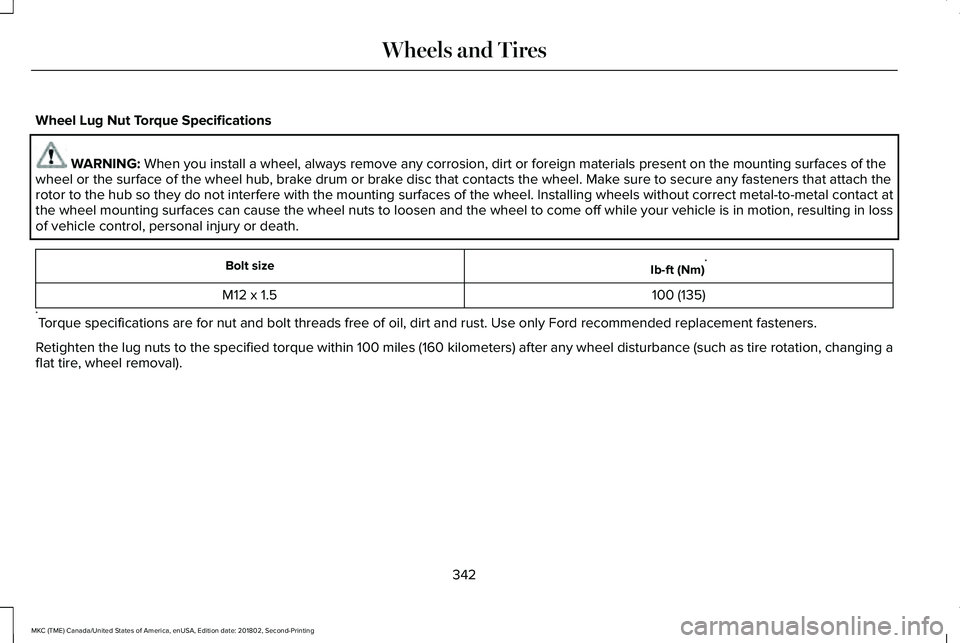
Wheel Lug Nut Torque Specifications
WARNING: When you install a wheel, always remove any corrosion, dirt or foreign materials present on the mounting surfaces of thewheel or the surface of the wheel hub, brake drum or brake disc that contacts the wheel. Make sure to secure any fasteners that attach therotor to the hub so they do not interfere with the mounting surfaces of the wheel. Installing wheels without correct metal-to-metal contact atthe wheel mounting surfaces can cause the wheel nuts to loosen and the wheel to come off while your vehicle is in motion, resulting in lossof vehicle control, personal injury or death.
Ib-ft (Nm)*Bolt size
100 (135)M12 x 1.5
*Torque specifications are for nut and bolt threads free of oil, dirt and rust. Use only Ford recommended replacement fasteners.
Retighten the lug nuts to the specified torque within 100 miles (160 kilometers) after any wheel disturbance (such as tire rotation, changing aflat tire, wheel removal).
342
MKC (TME) Canada/United States of America, enUSA, Edition date: 201802, Second-Printing
Wheels and Tires