phone LINCOLN MKC 2019 Repair Manual
[x] Cancel search | Manufacturer: LINCOLN, Model Year: 2019, Model line: MKC, Model: LINCOLN MKC 2019Pages: 581, PDF Size: 5.41 MB
Page 472 of 581
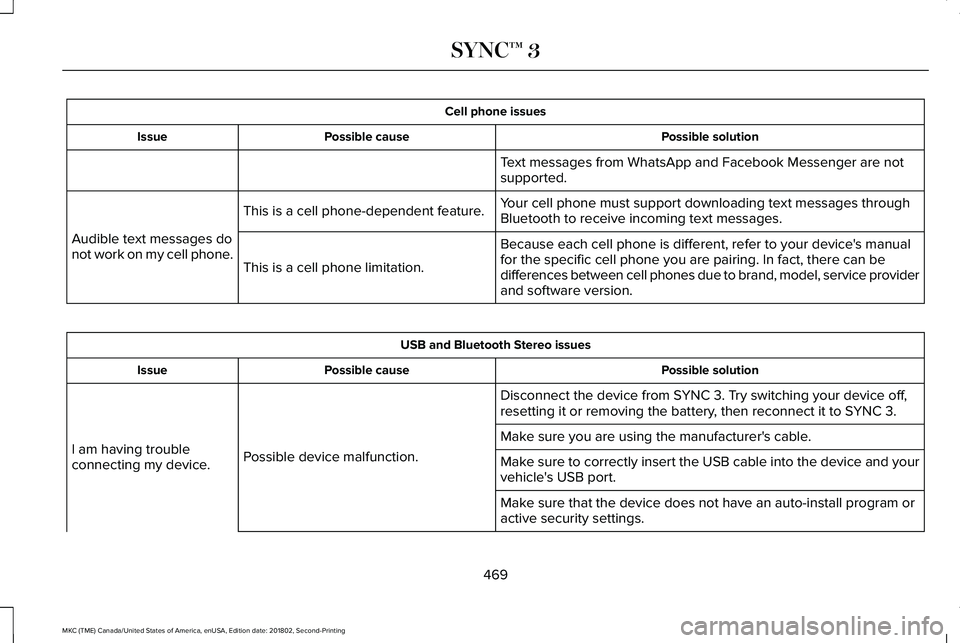
Cell phone issues
Possible solutionPossible causeIssue
Text messages from WhatsApp and Facebook Messenger are notsupported.
Your cell phone must support downloading text messages throughBluetooth to receive incoming text messages.This is a cell phone-dependent feature.
Audible text messages donot work on my cell phone.Because each cell phone is different, refer to your device's manualfor the specific cell phone you are pairing. In fact, there can bedifferences between cell phones due to brand, model, service providerand software version.
This is a cell phone limitation.
USB and Bluetooth Stereo issues
Possible solutionPossible causeIssue
Disconnect the device from SYNC 3. Try switching your device off,resetting it or removing the battery, then reconnect it to SYNC 3.
Possible device malfunction.I am having troubleconnecting my device.
Make sure you are using the manufacturer's cable.
Make sure to correctly insert the USB cable into the device and yourvehicle's USB port.
Make sure that the device does not have an auto-install program oractive security settings.
469
MKC (TME) Canada/United States of America, enUSA, Edition date: 201802, Second-Printing
SYNC™ 3
Page 475 of 581
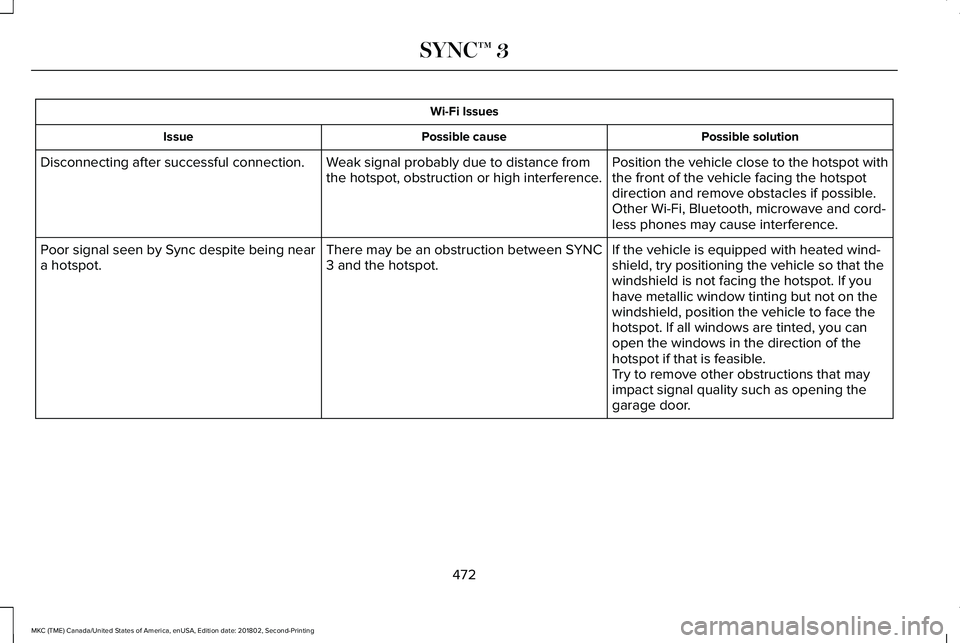
Wi-Fi Issues
Possible solutionPossible causeIssue
Position the vehicle close to the hotspot withthe front of the vehicle facing the hotspotdirection and remove obstacles if possible.Other Wi-Fi, Bluetooth, microwave and cord-less phones may cause interference.
Weak signal probably due to distance fromthe hotspot, obstruction or high interference.Disconnecting after successful connection.
If the vehicle is equipped with heated wind-shield, try positioning the vehicle so that thewindshield is not facing the hotspot. If youhave metallic window tinting but not on thewindshield, position the vehicle to face thehotspot. If all windows are tinted, you canopen the windows in the direction of thehotspot if that is feasible.
There may be an obstruction between SYNC3 and the hotspot.Poor signal seen by Sync despite being neara hotspot.
Try to remove other obstructions that mayimpact signal quality such as opening thegarage door.
472
MKC (TME) Canada/United States of America, enUSA, Edition date: 201802, Second-Printing
SYNC™ 3
Page 477 of 581
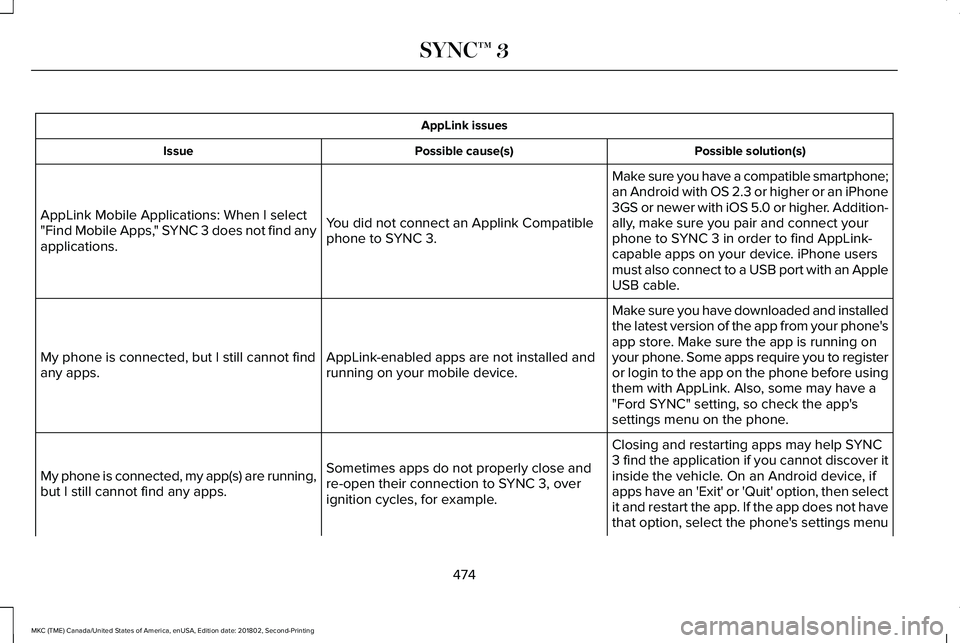
AppLink issues
Possible solution(s)Possible cause(s)Issue
Make sure you have a compatible smartphone;an Android with OS 2.3 or higher or an iPhone3GS or newer with iOS 5.0 or higher. Addition-ally, make sure you pair and connect yourphone to SYNC 3 in order to find AppLink-capable apps on your device. iPhone usersmust also connect to a USB port with an AppleUSB cable.
You did not connect an Applink Compatiblephone to SYNC 3.
AppLink Mobile Applications: When I select"Find Mobile Apps," SYNC 3 does not find anyapplications.
Make sure you have downloaded and installedthe latest version of the app from your phone'sapp store. Make sure the app is running onyour phone. Some apps require you to registeror login to the app on the phone before usingthem with AppLink. Also, some may have a"Ford SYNC" setting, so check the app'ssettings menu on the phone.
AppLink-enabled apps are not installed andrunning on your mobile device.My phone is connected, but I still cannot findany apps.
Closing and restarting apps may help SYNC3 find the application if you cannot discover itinside the vehicle. On an Android device, ifapps have an 'Exit' or 'Quit' option, then selectit and restart the app. If the app does not havethat option, select the phone's settings menu
Sometimes apps do not properly close andre-open their connection to SYNC 3, overignition cycles, for example.
My phone is connected, my app(s) are running,but I still cannot find any apps.
474
MKC (TME) Canada/United States of America, enUSA, Edition date: 201802, Second-Printing
SYNC™ 3
Page 478 of 581
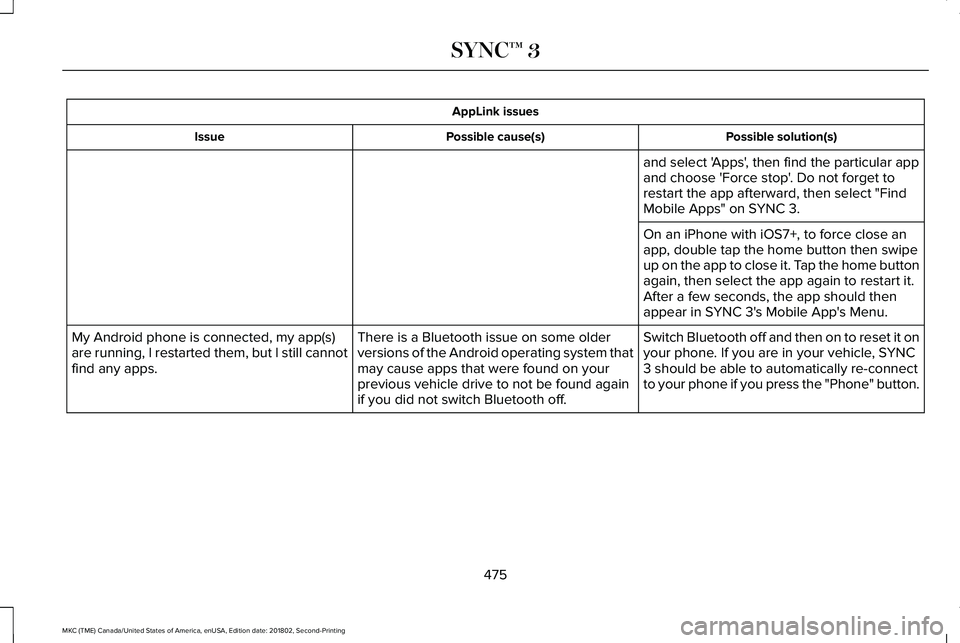
AppLink issues
Possible solution(s)Possible cause(s)Issue
and select 'Apps', then find the particular appand choose 'Force stop'. Do not forget torestart the app afterward, then select "FindMobile Apps" on SYNC 3.
On an iPhone with iOS7+, to force close anapp, double tap the home button then swipeup on the app to close it. Tap the home buttonagain, then select the app again to restart it.After a few seconds, the app should thenappear in SYNC 3's Mobile App's Menu.
Switch Bluetooth off and then on to reset it onyour phone. If you are in your vehicle, SYNC3 should be able to automatically re-connectto your phone if you press the "Phone" button.
There is a Bluetooth issue on some olderversions of the Android operating system thatmay cause apps that were found on yourprevious vehicle drive to not be found againif you did not switch Bluetooth off.
My Android phone is connected, my app(s)are running, I restarted them, but I still cannotfind any apps.
475
MKC (TME) Canada/United States of America, enUSA, Edition date: 201802, Second-Printing
SYNC™ 3
Page 479 of 581
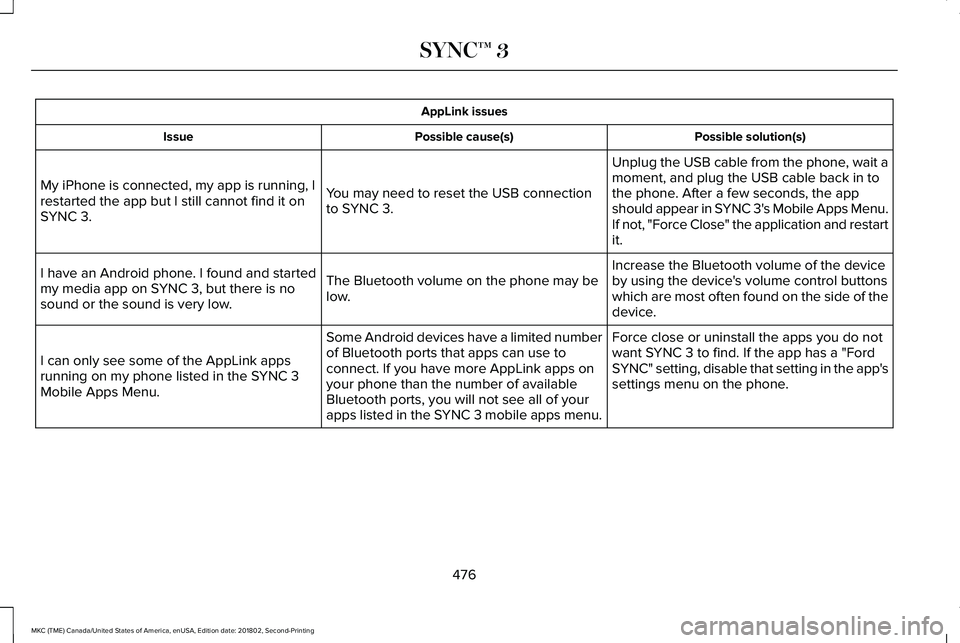
AppLink issues
Possible solution(s)Possible cause(s)Issue
Unplug the USB cable from the phone, wait amoment, and plug the USB cable back in tothe phone. After a few seconds, the appshould appear in SYNC 3's Mobile Apps Menu.If not, "Force Close" the application and restartit.
You may need to reset the USB connectionto SYNC 3.
My iPhone is connected, my app is running, Irestarted the app but I still cannot find it onSYNC 3.
Increase the Bluetooth volume of the deviceby using the device's volume control buttonswhich are most often found on the side of thedevice.
The Bluetooth volume on the phone may below.
I have an Android phone. I found and startedmy media app on SYNC 3, but there is nosound or the sound is very low.
Force close or uninstall the apps you do notwant SYNC 3 to find. If the app has a "FordSYNC" setting, disable that setting in the app'ssettings menu on the phone.
Some Android devices have a limited numberof Bluetooth ports that apps can use toconnect. If you have more AppLink apps onyour phone than the number of availableBluetooth ports, you will not see all of yourapps listed in the SYNC 3 mobile apps menu.
I can only see some of the AppLink appsrunning on my phone listed in the SYNC 3Mobile Apps Menu.
476
MKC (TME) Canada/United States of America, enUSA, Edition date: 201802, Second-Printing
SYNC™ 3
Page 480 of 581
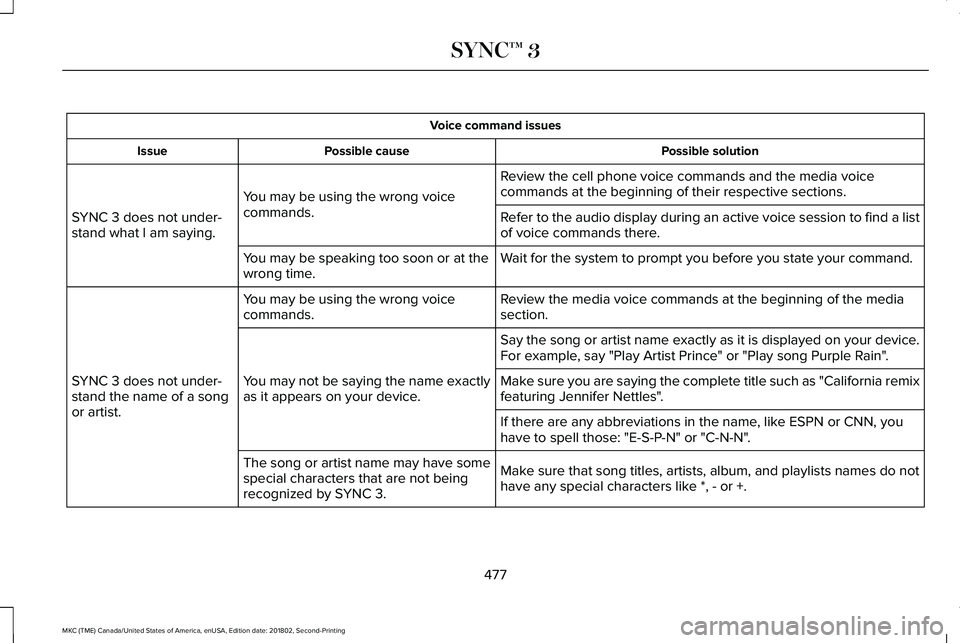
Voice command issues
Possible solutionPossible causeIssue
Review the cell phone voice commands and the media voicecommands at the beginning of their respective sections.You may be using the wrong voicecommands.SYNC 3 does not under-stand what I am saying.Refer to the audio display during an active voice session to find a listof voice commands there.
Wait for the system to prompt you before you state your command.You may be speaking too soon or at thewrong time.
Review the media voice commands at the beginning of the mediasection.You may be using the wrong voicecommands.
SYNC 3 does not under-stand the name of a songor artist.
Say the song or artist name exactly as it is displayed on your device.For example, say "Play Artist Prince" or "Play song Purple Rain".
You may not be saying the name exactlyas it appears on your device.Make sure you are saying the complete title such as "California remixfeaturing Jennifer Nettles".
If there are any abbreviations in the name, like ESPN or CNN, youhave to spell those: "E-S-P-N" or "C-N-N".
Make sure that song titles, artists, album, and playlists names do nothave any special characters like *, - or +.
The song or artist name may have somespecial characters that are not beingrecognized by SYNC 3.
477
MKC (TME) Canada/United States of America, enUSA, Edition date: 201802, Second-Printing
SYNC™ 3
Page 481 of 581
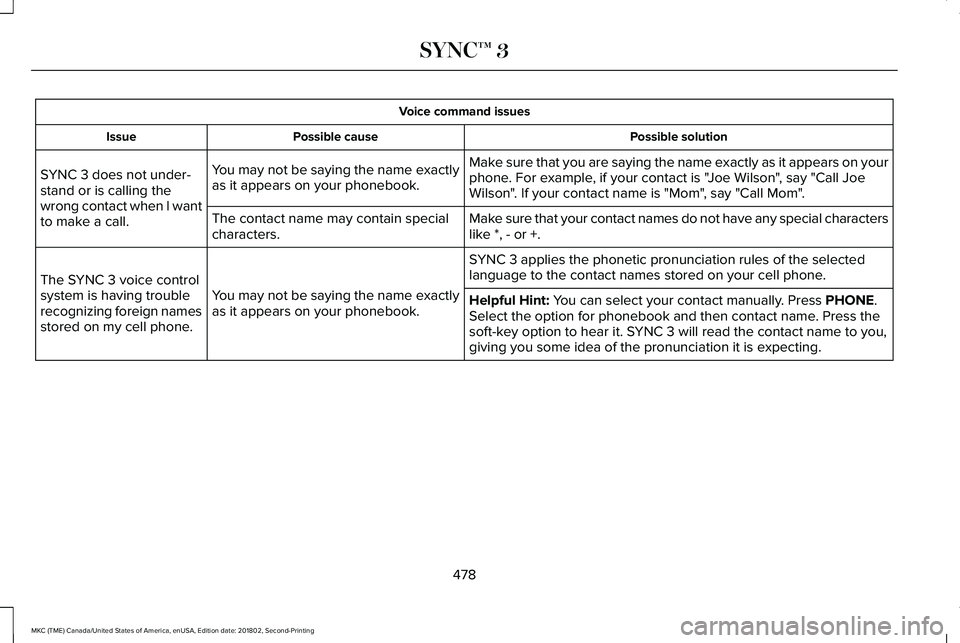
Voice command issues
Possible solutionPossible causeIssue
Make sure that you are saying the name exactly as it appears on yourphone. For example, if your contact is "Joe Wilson", say "Call JoeWilson". If your contact name is "Mom", say "Call Mom".
You may not be saying the name exactlyas it appears on your phonebook.SYNC 3 does not under-stand or is calling thewrong contact when I wantto make a call.Make sure that your contact names do not have any special characterslike *, - or +.The contact name may contain specialcharacters.
SYNC 3 applies the phonetic pronunciation rules of the selectedlanguage to the contact names stored on your cell phone.
You may not be saying the name exactlyas it appears on your phonebook.
The SYNC 3 voice controlsystem is having troublerecognizing foreign namesstored on my cell phone.
Helpful Hint: You can select your contact manually. Press PHONE.Select the option for phonebook and then contact name. Press thesoft-key option to hear it. SYNC 3 will read the contact name to you,giving you some idea of the pronunciation it is expecting.
478
MKC (TME) Canada/United States of America, enUSA, Edition date: 201802, Second-Printing
SYNC™ 3
Page 482 of 581
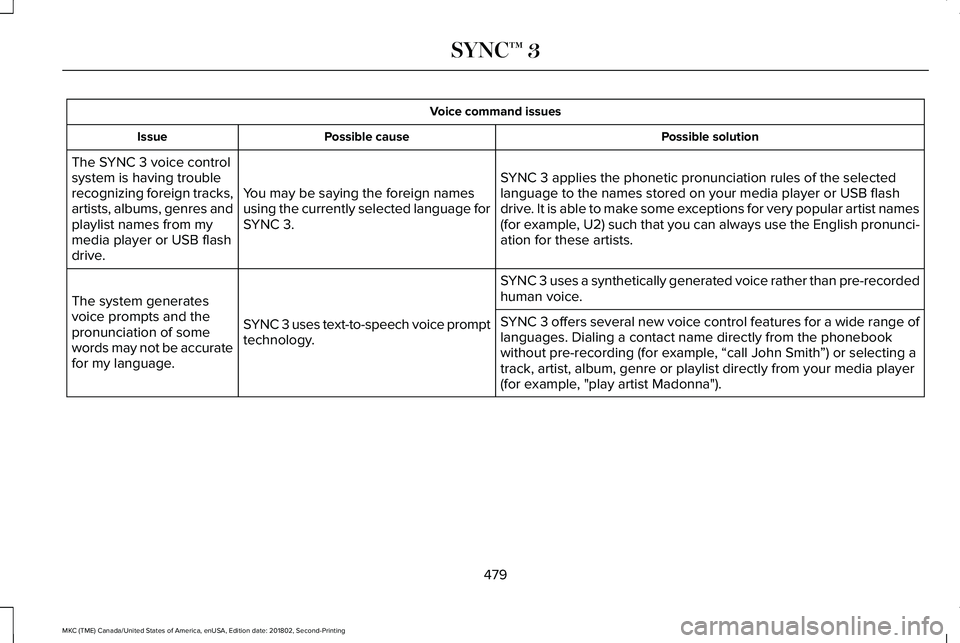
Voice command issues
Possible solutionPossible causeIssue
SYNC 3 applies the phonetic pronunciation rules of the selectedlanguage to the names stored on your media player or USB flashdrive. It is able to make some exceptions for very popular artist names(for example, U2) such that you can always use the English pronunci-ation for these artists.
You may be saying the foreign namesusing the currently selected language forSYNC 3.
The SYNC 3 voice controlsystem is having troublerecognizing foreign tracks,artists, albums, genres andplaylist names from mymedia player or USB flashdrive.
SYNC 3 uses a synthetically generated voice rather than pre-recordedhuman voice.
SYNC 3 uses text-to-speech voice prompttechnology.
The system generatesvoice prompts and thepronunciation of somewords may not be accuratefor my language.
SYNC 3 offers several new voice control features for a wide range oflanguages. Dialing a contact name directly from the phonebookwithout pre-recording (for example, “call John Smith”) or selecting atrack, artist, album, genre or playlist directly from your media player(for example, "play artist Madonna").
479
MKC (TME) Canada/United States of America, enUSA, Edition date: 201802, Second-Printing
SYNC™ 3
Page 483 of 581
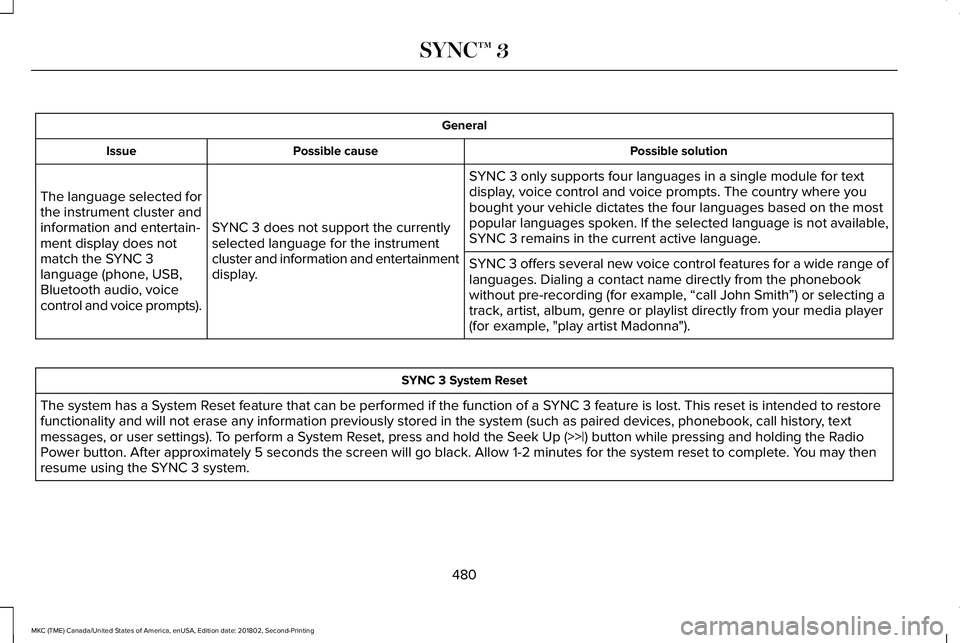
General
Possible solutionPossible causeIssue
SYNC 3 only supports four languages in a single module for textdisplay, voice control and voice prompts. The country where youbought your vehicle dictates the four languages based on the mostpopular languages spoken. If the selected language is not available,SYNC 3 remains in the current active language.SYNC 3 does not support the currentlyselected language for the instrumentcluster and information and entertainmentdisplay.
The language selected forthe instrument cluster andinformation and entertain-ment display does notmatch the SYNC 3language (phone, USB,Bluetooth audio, voicecontrol and voice prompts).
SYNC 3 offers several new voice control features for a wide range oflanguages. Dialing a contact name directly from the phonebookwithout pre-recording (for example, “call John Smith”) or selecting atrack, artist, album, genre or playlist directly from your media player(for example, "play artist Madonna").
SYNC 3 System Reset
The system has a System Reset feature that can be performed if the function of a SYNC 3 feature is lost. This reset is intended to restorefunctionality and will not erase any information previously stored in the system (such as paired devices, phonebook, call history, textmessages, or user settings). To perform a System Reset, press and hold the Seek Up (>>|) button while pressing and holding the RadioPower button. After approximately 5 seconds the screen will go black. Allow 1-2 minutes for the system reset to complete. You may thenresume using the SYNC 3 system.
480
MKC (TME) Canada/United States of America, enUSA, Edition date: 201802, Second-Printing
SYNC™ 3
Page 486 of 581
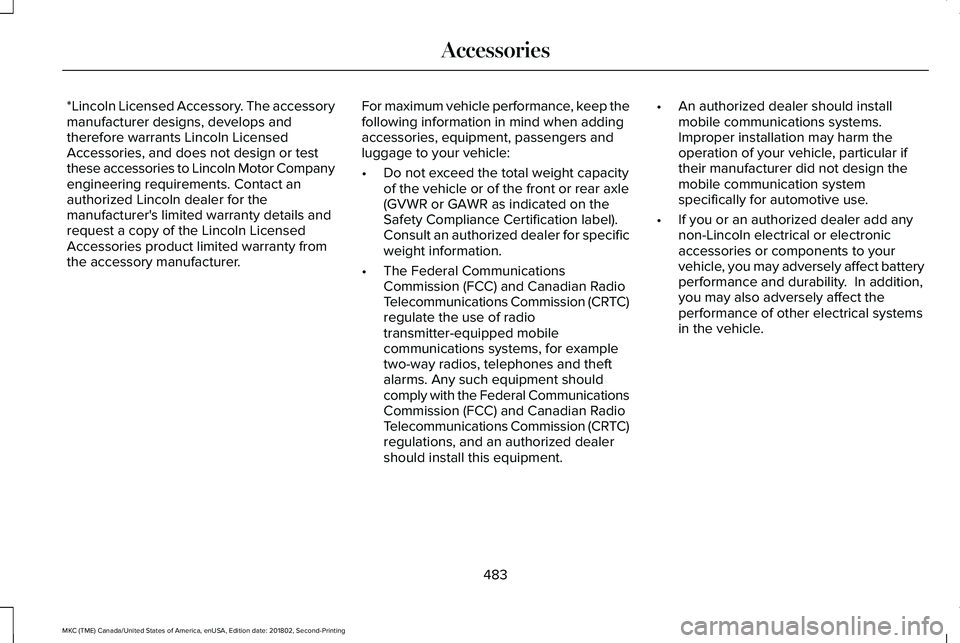
*Lincoln Licensed Accessory. The accessorymanufacturer designs, develops andtherefore warrants Lincoln LicensedAccessories, and does not design or testthese accessories to Lincoln Motor Companyengineering requirements. Contact anauthorized Lincoln dealer for themanufacturer's limited warranty details andrequest a copy of the Lincoln LicensedAccessories product limited warranty fromthe accessory manufacturer.
For maximum vehicle performance, keep thefollowing information in mind when addingaccessories, equipment, passengers andluggage to your vehicle:
•Do not exceed the total weight capacityof the vehicle or of the front or rear axle(GVWR or GAWR as indicated on theSafety Compliance Certification label).Consult an authorized dealer for specificweight information.
•The Federal CommunicationsCommission (FCC) and Canadian RadioTelecommunications Commission (CRTC)regulate the use of radiotransmitter-equipped mobilecommunications systems, for exampletwo-way radios, telephones and theftalarms. Any such equipment shouldcomply with the Federal CommunicationsCommission (FCC) and Canadian RadioTelecommunications Commission (CRTC)regulations, and an authorized dealershould install this equipment.
•An authorized dealer should installmobile communications systems.Improper installation may harm theoperation of your vehicle, particular iftheir manufacturer did not design themobile communication systemspecifically for automotive use.
•If you or an authorized dealer add anynon-Lincoln electrical or electronicaccessories or components to yourvehicle, you may adversely affect batteryperformance and durability. In addition,you may also adversely affect theperformance of other electrical systemsin the vehicle.
483
MKC (TME) Canada/United States of America, enUSA, Edition date: 201802, Second-Printing
Accessories