mirror LINCOLN MKS 2009 User Guide
[x] Cancel search | Manufacturer: LINCOLN, Model Year: 2009, Model line: MKS, Model: LINCOLN MKS 2009Pages: 323, PDF Size: 2.58 MB
Page 111 of 323
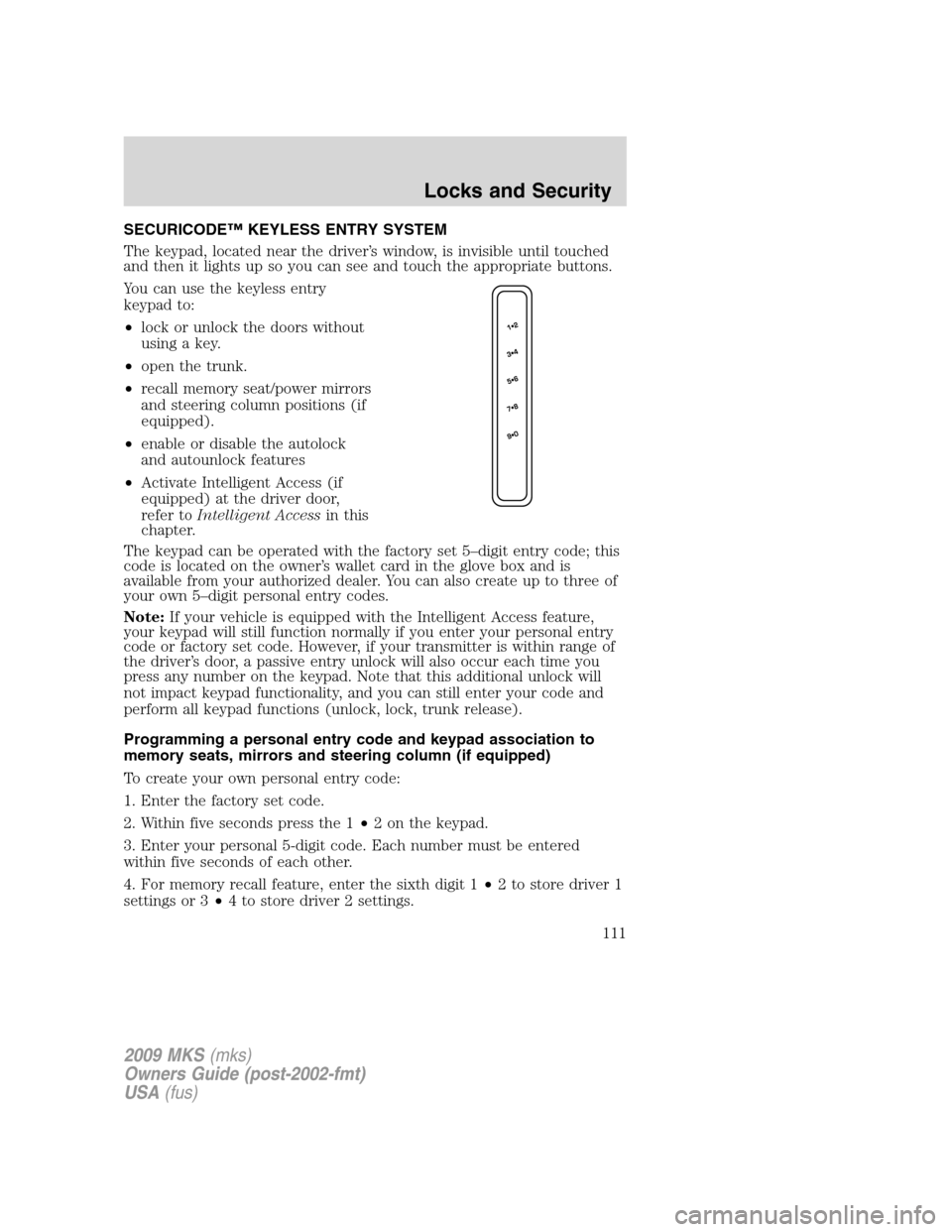
SECURICODE™ KEYLESS ENTRY SYSTEM
The keypad, located near the driver’s window, is invisible until touched
and then it lights up so you can see and touch the appropriate buttons.
You can use the keyless entry
keypad to:
•lock or unlock the doors without
using a key.
•open the trunk.
•recall memory seat/power mirrors
and steering column positions (if
equipped).
•enable or disable the autolock
and autounlock features
•Activate Intelligent Access (if
equipped) at the driver door,
refer toIntelligent Accessin this
chapter.
The keypad can be operated with the factory set 5–digit entry code; this
code is located on the owner’s wallet card in the glove box and is
available from your authorized dealer. You can also create up to three of
your own 5–digit personal entry codes.
Note:If your vehicle is equipped with the Intelligent Access feature,
your keypad will still function normally if you enter your personal entry
code or factory set code. However, if your transmitter is within range of
the driver’s door, a passive entry unlock will also occur each time you
press any number on the keypad. Note that this additional unlock will
not impact keypad functionality, and you can still enter your code and
perform all keypad functions (unlock, lock, trunk release).
Programming a personal entry code and keypad association to
memory seats, mirrors and steering column (if equipped)
To create your own personal entry code:
1. Enter the factory set code.
2. Within five seconds press the 1•2 on the keypad.
3. Enter your personal 5-digit code. Each number must be entered
within five seconds of each other.
4. For memory recall feature, enter the sixth digit 1•2 to store driver 1
settings or 3•4 to store driver 2 settings.
2009 MKS(mks)
Owners Guide (post-2002-fmt)
USA(fus)
Locks and Security
111
Page 128 of 323
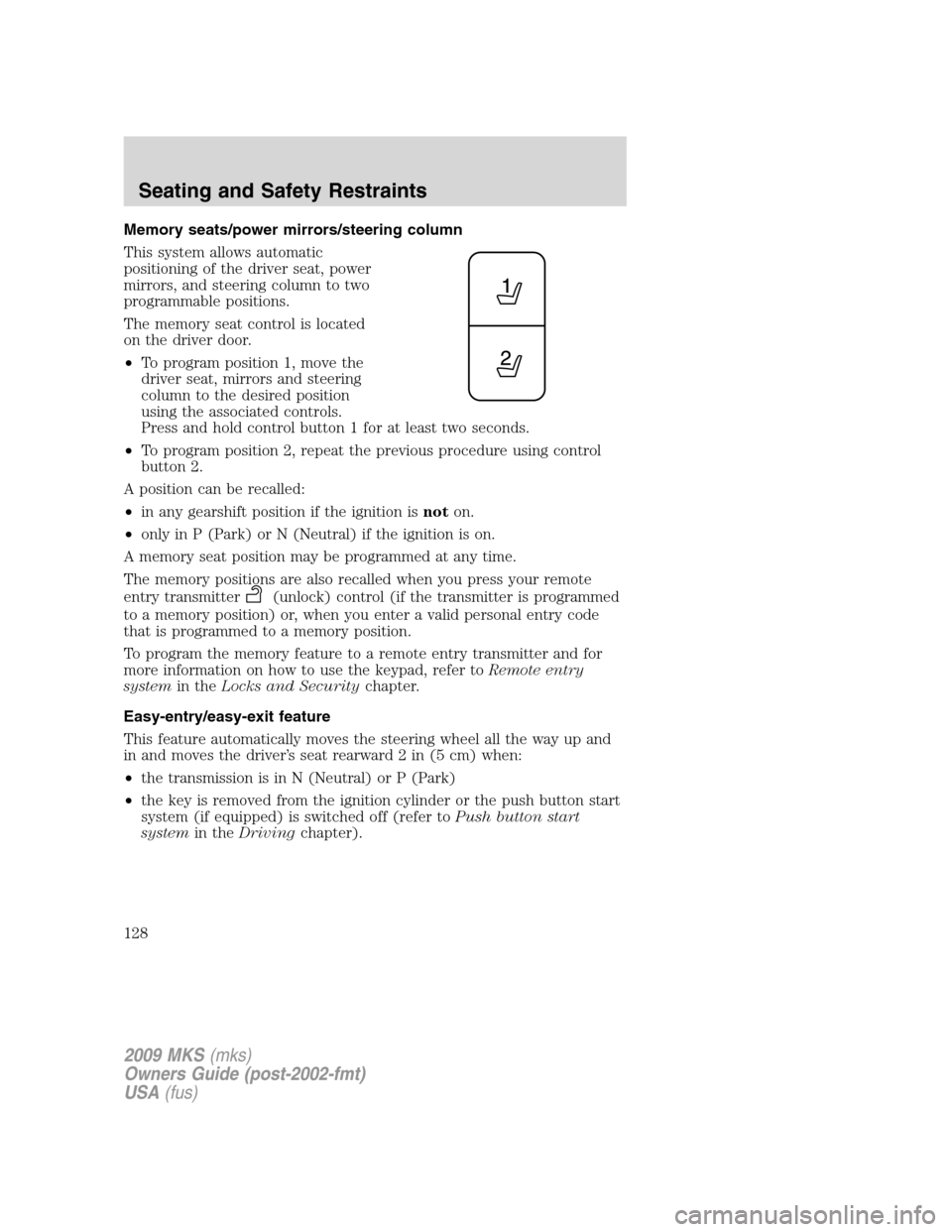
Memory seats/power mirrors/steering column
This system allows automatic
positioning of the driver seat, power
mirrors, and steering column to two
programmable positions.
The memory seat control is located
on the driver door.
•To program position 1, move the
driver seat, mirrors and steering
column to the desired position
using the associated controls.
Press and hold control button 1 for at least two seconds.
•To program position 2, repeat the previous procedure using control
button 2.
A position can be recalled:
•in any gearshift position if the ignition isnoton.
•only in P (Park) or N (Neutral) if the ignition is on.
A memory seat position may be programmed at any time.
The memory positions are also recalled when you press your remote
entry transmitter
(unlock) control (if the transmitter is programmed
to a memory position) or, when you enter a valid personal entry code
that is programmed to a memory position.
To program the memory feature to a remote entry transmitter and for
more information on how to use the keypad, refer toRemote entry
systemin theLocks and Securitychapter.
Easy-entry/easy-exit feature
This feature automatically moves the steering wheel all the way up and
in and moves the driver’s seat rearward 2 in (5 cm) when:
•the transmission is in N (Neutral) or P (Park)
•the key is removed from the ignition cylinder or the push button start
system (if equipped) is switched off (refer toPush button start
systemin theDrivingchapter).
2009 MKS(mks)
Owners Guide (post-2002-fmt)
USA(fus)
Seating and Safety Restraints
128
Page 230 of 323
The system defaults toenabledevery time the ignition is switched on.
Press the control to disable or enable the system
Keep the sensors (located on the front and rear bumper/fascia)
free from snow, ice and large accumulations of dirt (do not clean
the sensors with sharp objects). If the sensors are covered, it will
affect the accuracy of the sensing system.
If your vehicle sustains damage to the front or rear
bumper/fascia, leaving it misaligned or bent, the sensing zone may
be altered causing inaccurate measurement of obstacles or false
alarms.
REAR-VIEW CAMERA SYSTEM (IF EQUIPPED)
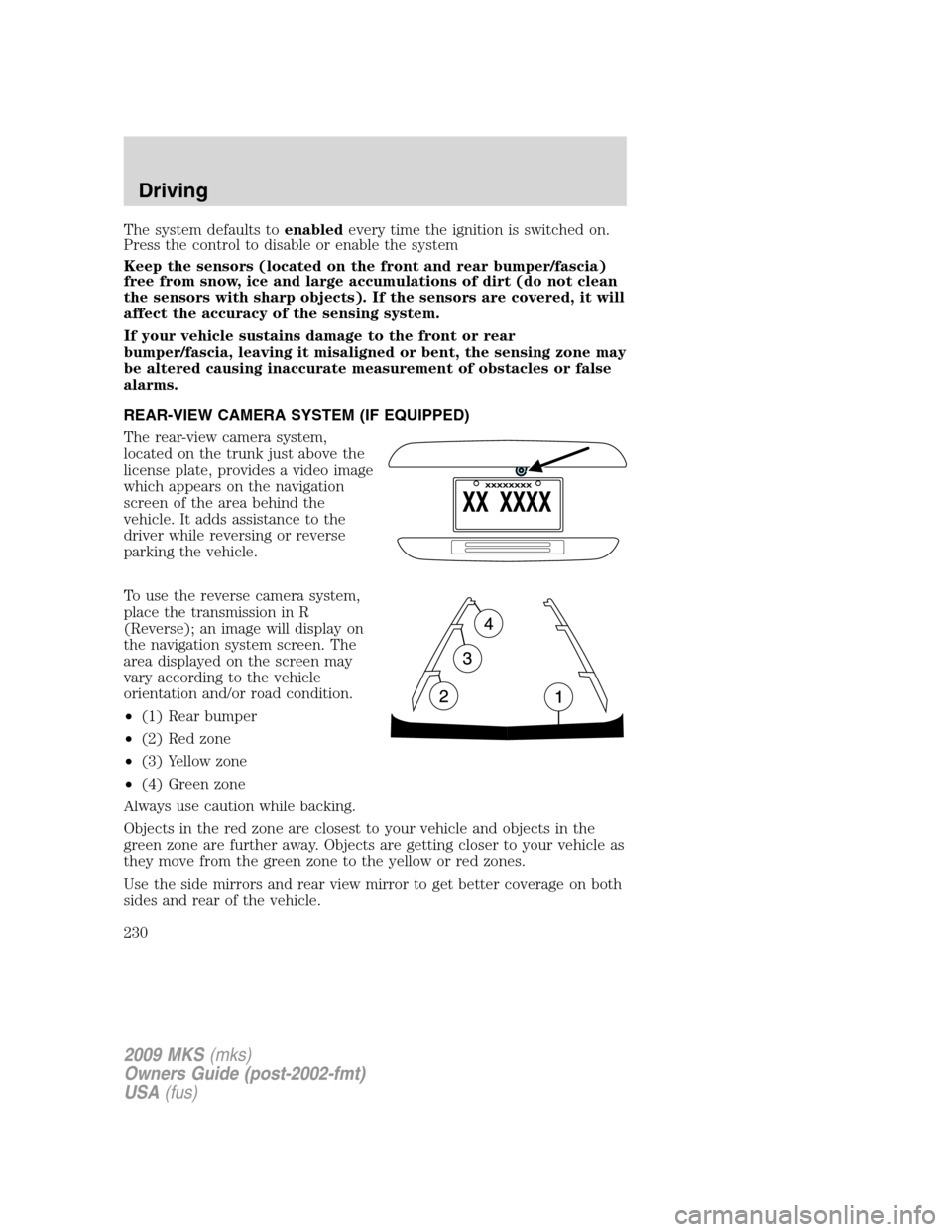
The rear-view camera system,
located on the trunk just above the
license plate, provides a video image
which appears on the navigation
screen of the area behind the
vehicle. It adds assistance to the
driver while reversing or reverse
parking the vehicle.
To use the reverse camera system,
place the transmission in R
(Reverse); an image will display on
the navigation system screen. The
area displayed on the screen may
vary according to the vehicle
orientation and/or road condition.
•(1) Rear bumper
•(2) Red zone
•(3) Yellow zone
•(4) Green zone
Always use caution while backing.
Objects in the red zone are closest to your vehicle and objects in the
green zone are further away. Objects are getting closer to your vehicle as
they move from the green zone to the yellow or red zones.
Use the side mirrors and rear view mirror to get better coverage on both
sides and rear of the vehicle.
2009 MKS(mks)
Owners Guide (post-2002-fmt)
USA(fus)
Driving
230
Page 231 of 323
After shifting out of R (Reverse) and into any gear other than P (Park),
the image will remain until the vehicle speed reaches five mph (8 km/h),
only if the rear camera delay feature is on, or until any navigation radio
button is depressed.
Note:The default setting for the rear camera delay is off. Push the
“Settings” button found on the navigation screen to set the rear camera
delay feature to on or off.
The camera lens for the reverse camera system is located on the trunk,
above the license plate. Keep the lens clean so that the video image
remains clear and undistorted. Clean the lens with a soft, lint-free cloth
and non-abrasive cleaner.
Note:If the reverse camera system image is not clear or seems
distorted, it may be covered with water droplets, snow, mud or any other
substance. If this occurs, clean the camera lens before using the reverse
camera system.
WARNING:The reverse camera system is a reverse aid
supplement device that still requires the driver to use it in
conjunction with the rear view mirror and the side mirrors for
maximum coverage.
WARNING:Objects that are close to either corner of the
bumper or under the bumper, might not be seen on the screen
due to the limited coverage of the reverse camera system.
WARNING:Backup as slow as possible since higher speeds
might limit your reaction time to stop the vehicle.
WARNING:Do not use the reverse camera system with the
trunk open.
If the back end of the vehicle is hit or damaged, then check with your
authorized dealer to have your rear video system checked for proper
coverage and operation.
Night time and dark area use
At night time or in dark areas, the reverse camera system relies on the
reverse lamp lighting to produce an image. Therefore it is necessary that
both reverse lamps are operating in order to get a clear image in the
2009 MKS(mks)
Owners Guide (post-2002-fmt)
USA(fus)
Driving
231
Page 244 of 323
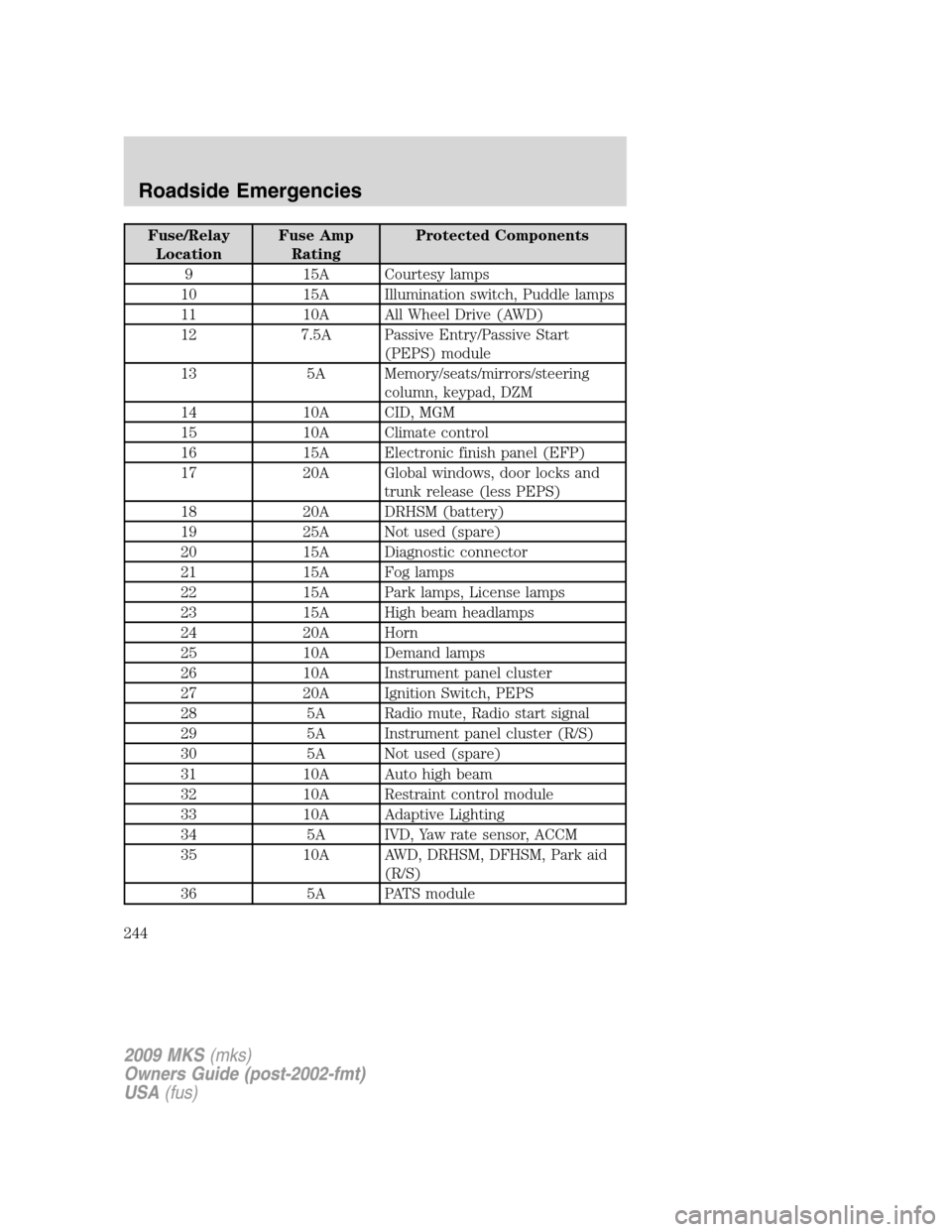
Fuse/Relay
LocationFuse Amp
RatingProtected Components
9 15A Courtesy lamps
10 15A Illumination switch, Puddle lamps
11 10A All Wheel Drive (AWD)
12 7.5A Passive Entry/Passive Start
(PEPS) module
13 5A Memory/seats/mirrors/steering
column, keypad, DZM
14 10A CID, MGM
15 10A Climate control
16 15A Electronic finish panel (EFP)
17 20A Global windows, door locks and
trunk release (less PEPS)
18 20A DRHSM (battery)
19 25A Not used (spare)
20 15A Diagnostic connector
21 15A Fog lamps
22 15A Park lamps, License lamps
23 15A High beam headlamps
24 20A Horn
25 10A Demand lamps
26 10A Instrument panel cluster
27 20A Ignition Switch, PEPS
28 5A Radio mute, Radio start signal
29 5A Instrument panel cluster (R/S)
30 5A Not used (spare)
31 10A Auto high beam
32 10A Restraint control module
33 10A Adaptive Lighting
34 5A IVD, Yaw rate sensor, ACCM
35 10A AWD, DRHSM, DFHSM, Park aid
(R/S)
36 5A PATS module
2009 MKS(mks)
Owners Guide (post-2002-fmt)
USA(fus)
Roadside Emergencies
244
Page 248 of 323
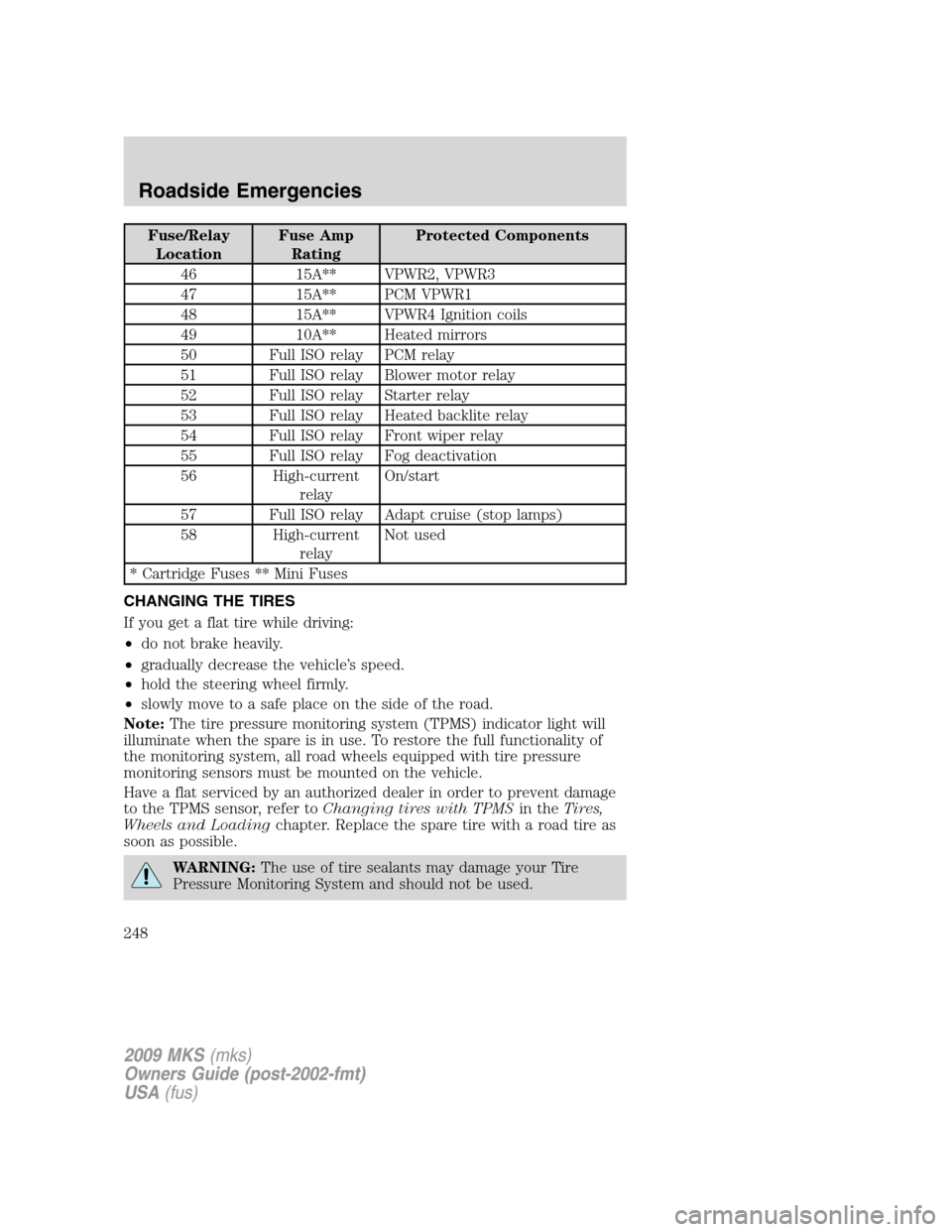
Fuse/Relay
LocationFuse Amp
RatingProtected Components
46 15A** VPWR2, VPWR3
47 15A** PCM VPWR1
48 15A** VPWR4 Ignition coils
49 10A** Heated mirrors
50 Full ISO relay PCM relay
51 Full ISO relay Blower motor relay
52 Full ISO relay Starter relay
53 Full ISO relay Heated backlite relay
54 Full ISO relay Front wiper relay
55 Full ISO relay Fog deactivation
56 High-current
relayOn/start
57 Full ISO relay Adapt cruise (stop lamps)
58 High-current
relayNot used
* Cartridge Fuses ** Mini Fuses
CHANGING THE TIRES
If you get a flat tire while driving:
•do not brake heavily.
•gradually decrease the vehicle’s speed.
•hold the steering wheel firmly.
•slowly move to a safe place on the side of the road.
Note:The tire pressure monitoring system (TPMS) indicator light will
illuminate when the spare is in use. To restore the full functionality of
the monitoring system, all road wheels equipped with tire pressure
monitoring sensors must be mounted on the vehicle.
Have a flat serviced by an authorized dealer in order to prevent damage
to the TPMS sensor, refer toChanging tires with TPMSin theTires,
Wheels and Loadingchapter. Replace the spare tire with a road tire as
soon as possible.
WARNING:The use of tire sealants may damage your Tire
Pressure Monitoring System and should not be used.
2009 MKS(mks)
Owners Guide (post-2002-fmt)
USA(fus)
Roadside Emergencies
248
Page 273 of 323
WAXING
•Wash the vehicle first.
•Do not use waxes that contain abrasives; use Motorcraft Premium
Liquid Wax (ZC-53-A), which is available from your authorized dealer,
or an equivalent quality product.
•Do not allow paint sealant to come in contact with any non-body
(low-gloss black) colored trim, such as grained door handles, roof
racks, bumpers, side moldings, mirror housings or the windshield cowl
area. The paint sealant will “gray” or stain the parts over time.
PAINT CHIPS
Your authorized dealer has touch-up paint to match your vehicle’s color.
Take your color code (printed on a sticker in the driver’s door jamb) to
your authorized dealer to ensure you get the correct color.
•Remove particles such as bird droppings, tree sap, insect deposits, tar
spots, road salt and industrial fallout before repairing paint chips.
•Always read the instructions before using the products.
ALUMINUM WHEELS AND WHEEL COVERS
Aluminum wheels and wheel covers are coated with a clearcoat paint
finish. In order to maintain their shine:
•Clean weekly with Motorcraft Wheel and Tire Cleaner (ZC-37-A),
which is available from your authorized dealer. Heavy dirt and brake
dust accumulation may require agitation with a sponge. Rinse
thoroughly with a strong stream of water.
•Never apply any cleaning chemical to hot or warm wheel rims or
covers.
•Some automatic car washes may cause damage to the finish on your
wheel rims or covers. Chemical-strength cleaners, or cleaning
chemicals, in combination with brush agitation to remove brake dust
and dirt, could wear away the clearcoat finish over time.
•Do not use hydrofluoric acid-based or high caustic-based wheel
cleaners, steel wool, fuels or strong household detergent.
•To remove tar and grease, use Motorcraft Bug and Tar Remover
(ZC-42), available from your authorized dealer.
2009 MKS(mks)
Owners Guide (post-2002-fmt)
USA(fus)
Cleaning
273
Page 316 of 323
GENUINE LINCOLN ACCESSORIES FOR YOUR VEHICLE
A wide selection of Genuine Lincoln Accessories are available for your
vehicle through your local Lincoln or Ford of Canada dealer. These
quality accessories have been specifically engineered to fulfill your
automotive needs; they are custom designed to complement the style
and aerodynamic appearance of your vehicle. In addition, each accessory
is made from high quality materials and meets or exceeds Lincoln’s
rigorous engineering and safety specifications. Ford Motor Company will
repair or replace any properly dealer-installed Genuine Lincoln
Accessories found to be defective in factory-supplied materials or
workmanship during the warranty period, as well as any component
damaged by the defective accessories. The accessories will be warranted
for whichever provides you the greatest benefit:
•12 months or 12,000 miles (20,000 km) (whichever occurs first), or
•the remainder of your new vehicle limited warranty.
Contact your dealer for details and a copy of the warranty.
Following is a list of several Genuine Lincoln Accessories. Not all
accessories are available for all models. To find out what accessories are
available for your vehicle, please contact your dealer or visit our online
store at: www.lincolnaccessories.com.
Exterior style
Bug shields
Moonroof deflector
Side window deflector
Splash guards
Interior style
All weather floor mats
Electrochromatic compass/temperature interior mirrors
Carpeted floor mats
Lifestyle
Ash cup / smoker’s package
Cargo organization and management
2009 MKS(mks)
Owners Guide (post-2002-fmt)
USA(fus)
Accessories
316
Page 319 of 323
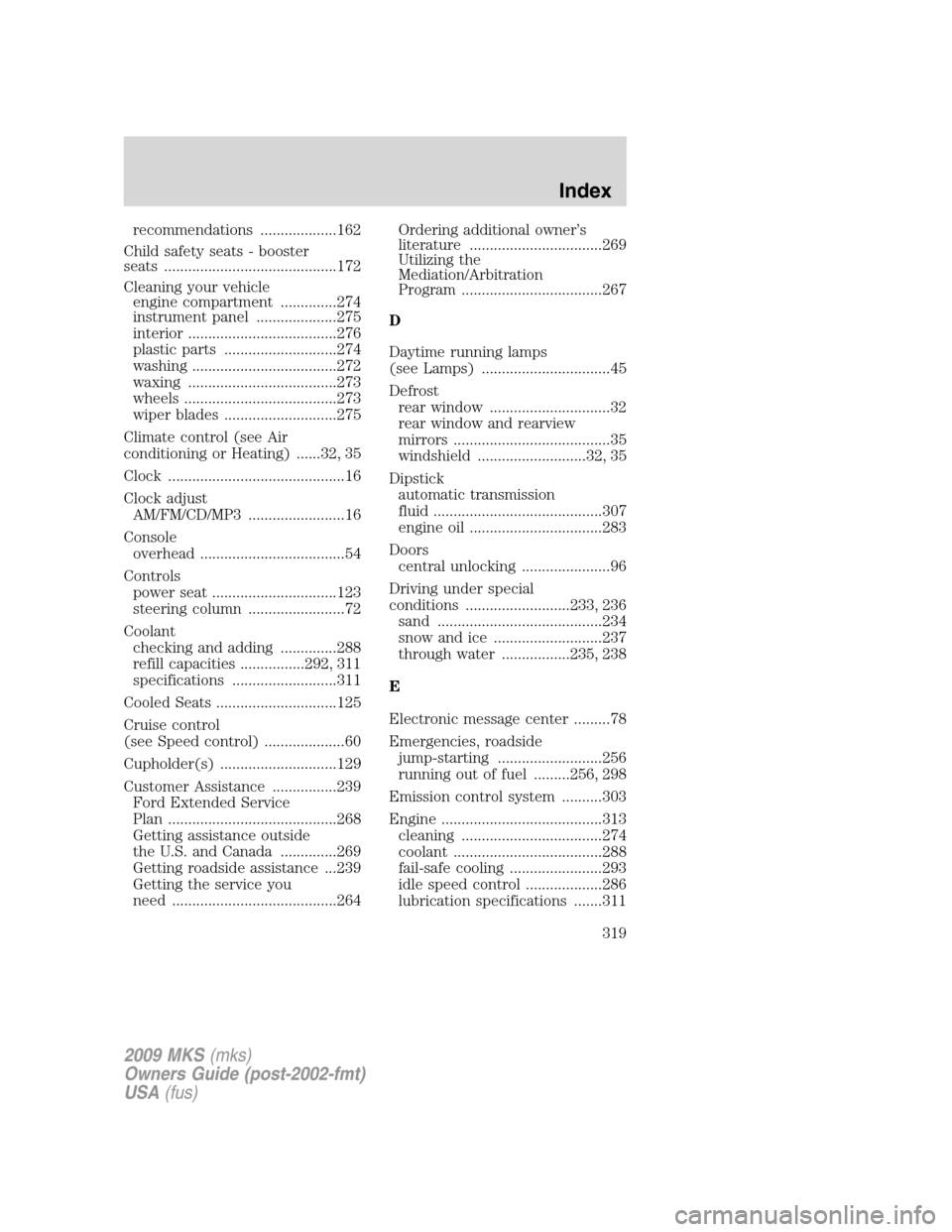
recommendations ...................162
Child safety seats - booster
seats ...........................................172
Cleaning your vehicle
engine compartment ..............274
instrument panel ....................275
interior .....................................276
plastic parts ............................274
washing ....................................272
waxing .....................................273
wheels ......................................273
wiper blades ............................275
Climate control (see Air
conditioning or Heating) ......32, 35
Clock ............................................16
Clock adjust
AM/FM/CD/MP3 ........................16
Console
overhead ....................................54
Controls
power seat ...............................123
steering column ........................72
Coolant
checking and adding ..............288
refill capacities ................292, 311
specifications ..........................311
Cooled Seats ..............................125
Cruise control
(see Speed control) ....................60
Cupholder(s) .............................129
Customer Assistance ................239
Ford Extended Service
Plan ..........................................268
Getting assistance outside
the U.S. and Canada ..............269
Getting roadside assistance ...239
Getting the service you
need .........................................264Ordering additional owner’s
literature .................................269
Utilizing the
Mediation/Arbitration
Program ...................................267
D
Daytime running lamps
(see Lamps) ................................45
Defrost
rear window ..............................32
rear window and rearview
mirrors .......................................35
windshield ...........................32, 35
Dipstick
automatic transmission
fluid ..........................................307
engine oil .................................283
Doors
central unlocking ......................96
Driving under special
conditions ..........................233, 236
sand .........................................234
snow and ice ...........................237
through water .................235, 238
E
Electronic message center .........78
Emergencies, roadside
jump-starting ..........................256
running out of fuel .........256, 298
Emission control system ..........303
Engine ........................................313
cleaning ...................................274
coolant .....................................288
fail-safe cooling .......................293
idle speed control ...................286
lubrication specifications .......311
2009 MKS(mks)
Owners Guide (post-2002-fmt)
USA(fus)
Index
319
Page 320 of 323
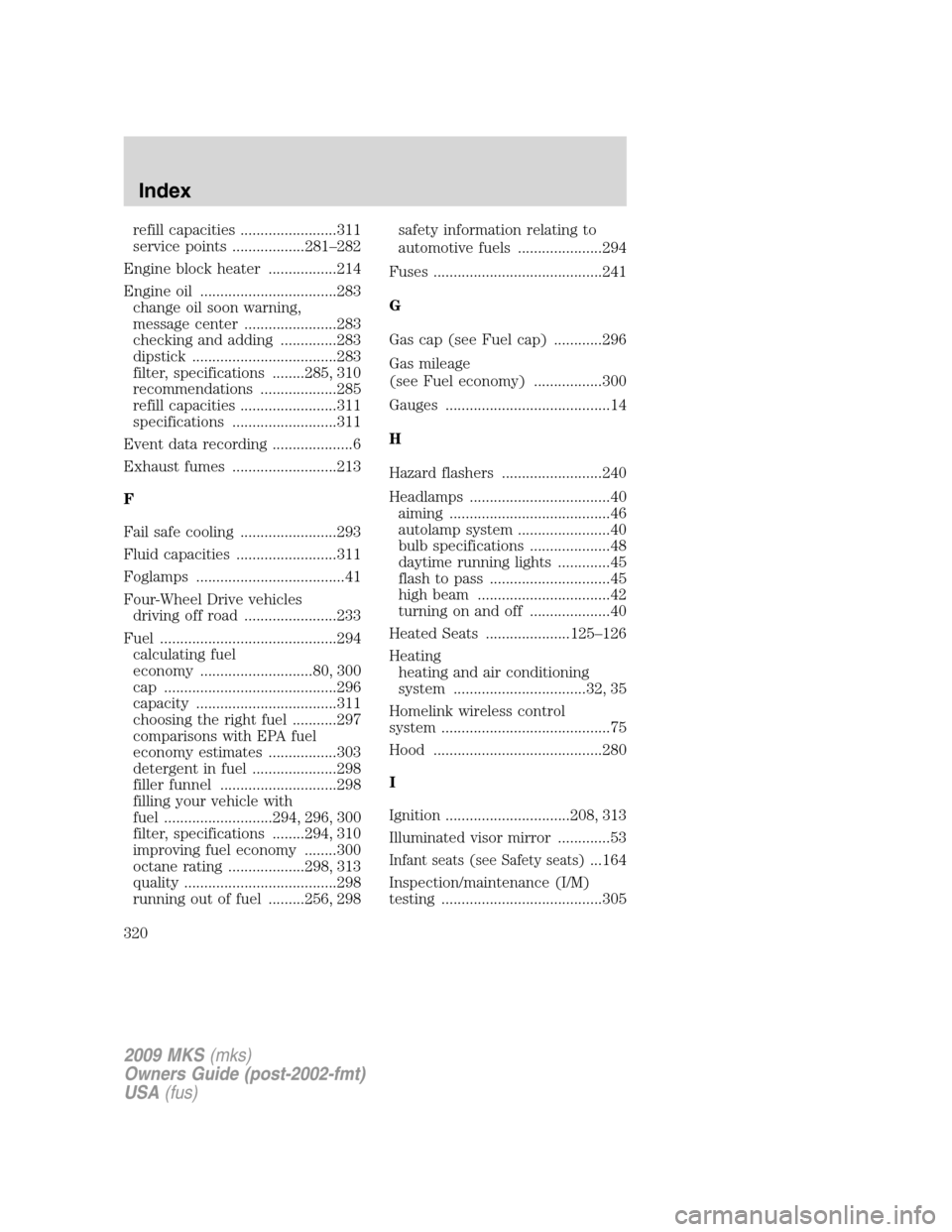
refill capacities ........................311
service points ..................281–282
Engine block heater .................214
Engine oil ..................................283
change oil soon warning,
message center .......................283
checking and adding ..............283
dipstick ....................................283
filter, specifications ........285, 310
recommendations ...................285
refill capacities ........................311
specifications ..........................311
Event data recording ....................6
Exhaust fumes ..........................213
F
Fail safe cooling ........................293
Fluid capacities .........................311
Foglamps .....................................41
Four-Wheel Drive vehicles
driving off road .......................233
Fuel ............................................294
calculating fuel
economy ............................80, 300
cap ...........................................296
capacity ...................................311
choosing the right fuel ...........297
comparisons with EPA fuel
economy estimates .................303
detergent in fuel .....................298
filler funnel .............................298
filling your vehicle with
fuel ...........................294, 296, 300
filter, specifications ........294, 310
improving fuel economy ........300
octane rating ...................298, 313
quality ......................................298
running out of fuel .........256, 298safety information relating to
automotive fuels .....................294
Fuses ..........................................241
G
Gas cap (see Fuel cap) ............296
Gas mileage
(see Fuel economy) .................300
Gauges .........................................14
H
Hazard flashers .........................240
Headlamps ...................................40
aiming ........................................46
autolamp system .......................40
bulb specifications ....................48
daytime running lights .............45
flash to pass ..............................45
high beam .................................42
turning on and off ....................40
Heated Seats .....................125–126
Heating
heating and air conditioning
system .................................32, 35
Homelink wireless control
system ..........................................75
Hood ..........................................280
I
Ignition ...............................208, 313
Illuminated visor mirror .............53
Infant seats (see Safety seats)...164
Inspection/maintenance (I/M)
testing ........................................305
2009 MKS(mks)
Owners Guide (post-2002-fmt)
USA(fus)
Index
320