rear entertainment LINCOLN MKS 2009 Owners Manual
[x] Cancel search | Manufacturer: LINCOLN, Model Year: 2009, Model line: MKS, Model: LINCOLN MKS 2009Pages: 323, PDF Size: 2.58 MB
Page 1 of 323
Introduction 4
Instrument Cluster 10
Warning lights and chimes 10
Gauges 14
Entertainment Systems 16
AM/FM stereo with CDX6/MP3 16
Auxiliary input jack (Line in) 23
USB port 25
Satellite radio information 28
Navigation system 31
SYNC 31
Climate Controls 32
Dual automatic temperature control 32
Navigation system based climate control 35
Rear window defroster 39
Lights 40
Headlamps 40
Turn signal control 47
Bulb replacement 48
Driver Controls 52
Windshield wiper/washer control 52
Steering wheel adjustment 53
Power windows 56
Mirrors 58
Speed control 60
Adaptive cruise control 63
Moon roof 73
Message center 78
Table of Contents
1
2009 MKS(mks)
Owners Guide (post-2002-fmt)
USA(fus)
Page 23 of 323
UseSEEKto adjust between SPEED OFF and levels1–7:
Increasing the level from 1 (lowest setting) to 7 (highest setting) allows
the radio volume to automatically change slightly with vehicle speed to
compensate for road and wind noise.
Recommended level is1–3;SPEED OFF turns the feature off and level 7
is the maximum setting.
ALL SEATS (Occupancy mode, if equipped):Press SOUND
repeatedly to reach the Occupancy mode setting. Press
SEEKto
select and optimize sound for ALL SEATS, DRIVERS SEAT or REAR
SEATS.
Extra Features
AUX:Press for SYNC LINE IN (auxiliary audio mode).
For location and further information on auxiliary audio mode, refer to
Auxiliary input jacklater in this chapter.
For more information on SYNC, please refer to theSYNC supplement.
OK
/(Play/Pause):Your vehicle is equipped with special phone
and media features which will require you to confirm commands by
pressing OK. For further information, refer to theSYNC supplement.
(Phone):Press to access SYNC PHONE features. For further
information, please refer to theSYNC supplement.
Audio system–Navigation system based (if equipped)
If your vehicle is equipped with the navigation system, it will have an
integrated navigation/audio system. See theNavigation system
supplement for operating instructions on using this audio system.
Auxiliary input jack (Line in)
WARNING:Driving while distracted can result in loss of vehicle
control, accident and injury. Ford strongly recommends that
drivers use extreme caution when using any device that may take their
focus off the road. The driver’s primary responsibility is the safe
operation of their vehicle. Only use cell phones and other devices not
essential to the driving task when it is safe to do so.
2009 MKS(mks)
Owners Guide (post-2002-fmt)
USA(fus)
Entertainment Systems
23
Page 29 of 323
Satellite radio reception factors:To receive the satellite signal, your
vehicle has been equipped with a satellite radio antenna located on the
roof of your vehicle. The vehicle roof provides the best location for an
unobstructed, open view of the sky, a requirement of a satellite radio
system. Like AM/FM, there are several factors that can affect satellite
radio reception performance:
•Antenna obstructions: For optimal reception performance, keep the
antenna clear of snow and ice build-up and keep luggage and other
material as far away from the antenna as possible.
•Terrain: Hills, mountains, tall buildings, bridges, tunnels, freeway
overpasses, parking garages, dense tree foliage and thunderstorms can
interfere with your reception.
•Station overload: When you pass a ground based broadcast repeating
tower, a stronger signal may overtake a weaker one and result in an
audio mute.
Unlike AM/FM audible static, you will hear an audio mute when there is
a satellite radio signal interference. Your radio display may display NO
SIGNAL to indicate the interference.
SIRIUS satellite radio service:SIRIUS Satellite Radio is a subscription
based satellite radio service that broadcasts music, sports, news and
entertainment programming. A service fee is required in order to receive
SIRIUS service. Vehicles that are equipped with a factory installed
SIRIUS Satellite Radio system include:
•Hardware and limited subscription term, which begins on the date of
sale or lease of the vehicle.
•Use of online media player providing access to all SIRIUS music
channels over the internet using any computer connected to the
internet (U.S. customers only)
For information on extended subscription terms, contact SIRIUS at
1–888–539–7474.
Note:SIRIUS reserves the unrestricted right to change, rearrange, add
or delete programming including canceling, moving or adding particular
channels, and its prices, at any time, with or without notice to you. Ford
Motor Company shall not be responsible for any such programming
changes.
Satellite Radio Electronic Serial Number (ESN):This 12–digit
Satellite Serial Number is needed to activate, modify or track your
satellite radio account. You will need this number when communicating
with SIRIUS. While in Satellite Radio mode, you can view this number on
the radio display by pressing AUX and Preset 1 control simultaneously.
2009 MKS(mks)
Owners Guide (post-2002-fmt)
USA(fus)
Entertainment Systems
29
Page 58 of 323
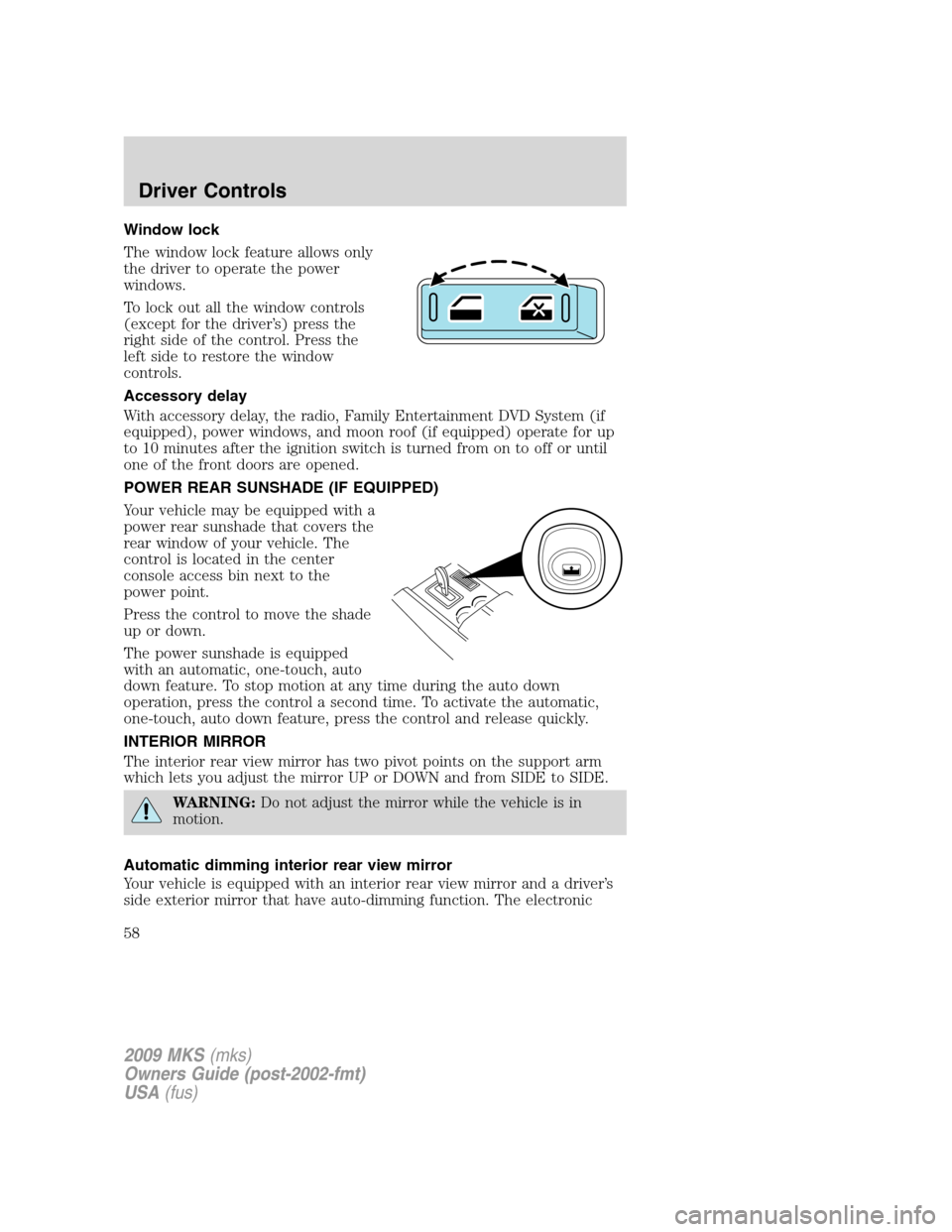
Window lock
The window lock feature allows only
the driver to operate the power
windows.
To lock out all the window controls
(except for the driver’s) press the
right side of the control. Press the
left side to restore the window
controls.
Accessory delay
With accessory delay, the radio, Family Entertainment DVD System (if
equipped), power windows, and moon roof (if equipped) operate for up
to 10 minutes after the ignition switch is turned from on to off or until
one of the front doors are opened.
POWER REAR SUNSHADE (IF EQUIPPED)
Your vehicle may be equipped with a
power rear sunshade that covers the
rear window of your vehicle. The
control is located in the center
console access bin next to the
power point.
Press the control to move the shade
up or down.
The power sunshade is equipped
with an automatic, one-touch, auto
down feature. To stop motion at any time during the auto down
operation, press the control a second time. To activate the automatic,
one-touch, auto down feature, press the control and release quickly.
INTERIOR MIRROR
The interior rear view mirror has two pivot points on the support arm
which lets you adjust the mirror UP or DOWN and from SIDE to SIDE.
WARNING:Do not adjust the mirror while the vehicle is in
motion.
Automatic dimming interior rear view mirror
Your vehicle is equipped with an interior rear view mirror and a driver’s
side exterior mirror that have auto-dimming function. The electronic
2009 MKS(mks)
Owners Guide (post-2002-fmt)
USA(fus)
Driver Controls
58