air filter LINCOLN MKS 2013 Owner's Manual
[x] Cancel search | Manufacturer: LINCOLN, Model Year: 2013, Model line: MKS, Model: LINCOLN MKS 2013Pages: 453, PDF Size: 4.82 MB
Page 336 of 453
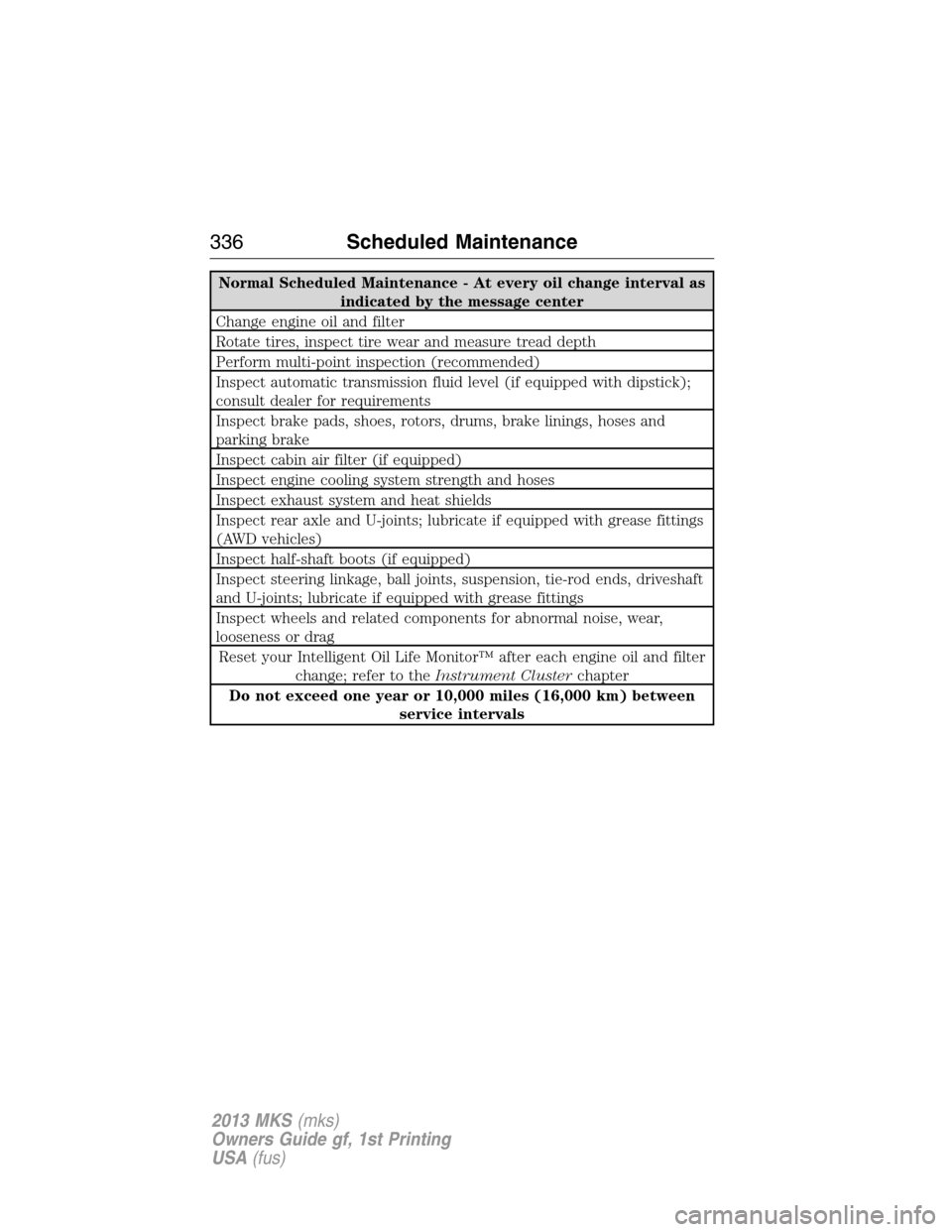
Normal Scheduled Maintenance - At every oil change interval as
indicated by the message center
Change engine oil and filter
Rotate tires, inspect tire wear and measure tread depth
Perform multi-point inspection (recommended)
Inspect automatic transmission fluid level (if equipped with dipstick);
consult dealer for requirements
Inspect brake pads, shoes, rotors, drums, brake linings, hoses and
parking brake
Inspect cabin air filter (if equipped)
Inspect engine cooling system strength and hoses
Inspect exhaust system and heat shields
Inspect rear axle and U-joints; lubricate if equipped with grease fittings
(AWD vehicles)
Inspect half-shaft boots (if equipped)
Inspect steering linkage, ball joints, suspension, tie-rod ends, driveshaft
and U-joints; lubricate if equipped with grease fittings
Inspect wheels and related components for abnormal noise, wear,
looseness or drag
Reset your Intelligent Oil Life Monitor™ after each engine oil and filter
change; refer to theInstrument Clusterchapter
Do not exceed one year or 10,000 miles (16,000 km) between
service intervals
336Scheduled Maintenance
2013 MKS(mks)
Owners Guide gf, 1st Printing
USA(fus)
Page 337 of 453
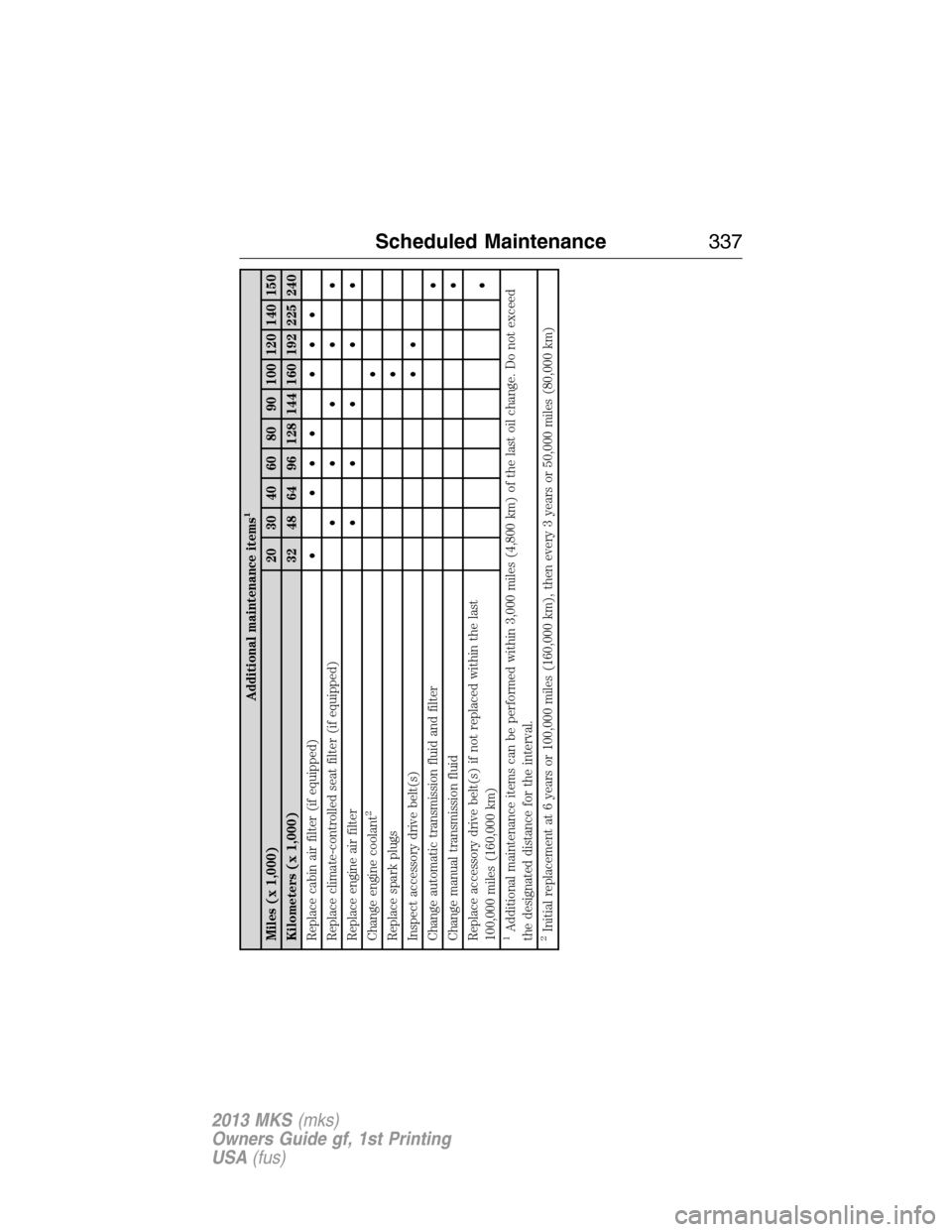
Additional maintenance items
1
Miles (x 1,000) 20 30 40 60 80 90 100 120 140 150
Kilometers (x 1,000) 32 48 64 96 128 144 160 192 225 240
Replace cabin air filter (if equipped)• ••• •••
Replace climate-controlled seat filter (if equipped)•••••
Replace engine air filter•••••
Change engine coolant
2
•
Replace spark plugs•
Inspect accessory drive belt(s)••
Change automatic transmission fluid and filter•
Change manual transmission fluid•
Replace accessory drive belt(s) if not replaced within the last
100,000 miles (160,000 km)•
1Additional maintenance items can be performed within 3,000 miles (4,800 km) of the last oil change. Do not exceed
the designated distance for the interval.2Initial replacement at 6 years or 100,000 miles (160,000 km), then every 3 years or 50,000 miles (80,000 km)
Scheduled Maintenance337
2013 MKS(mks)
Owners Guide gf, 1st Printing
USA(fus)
Page 341 of 453
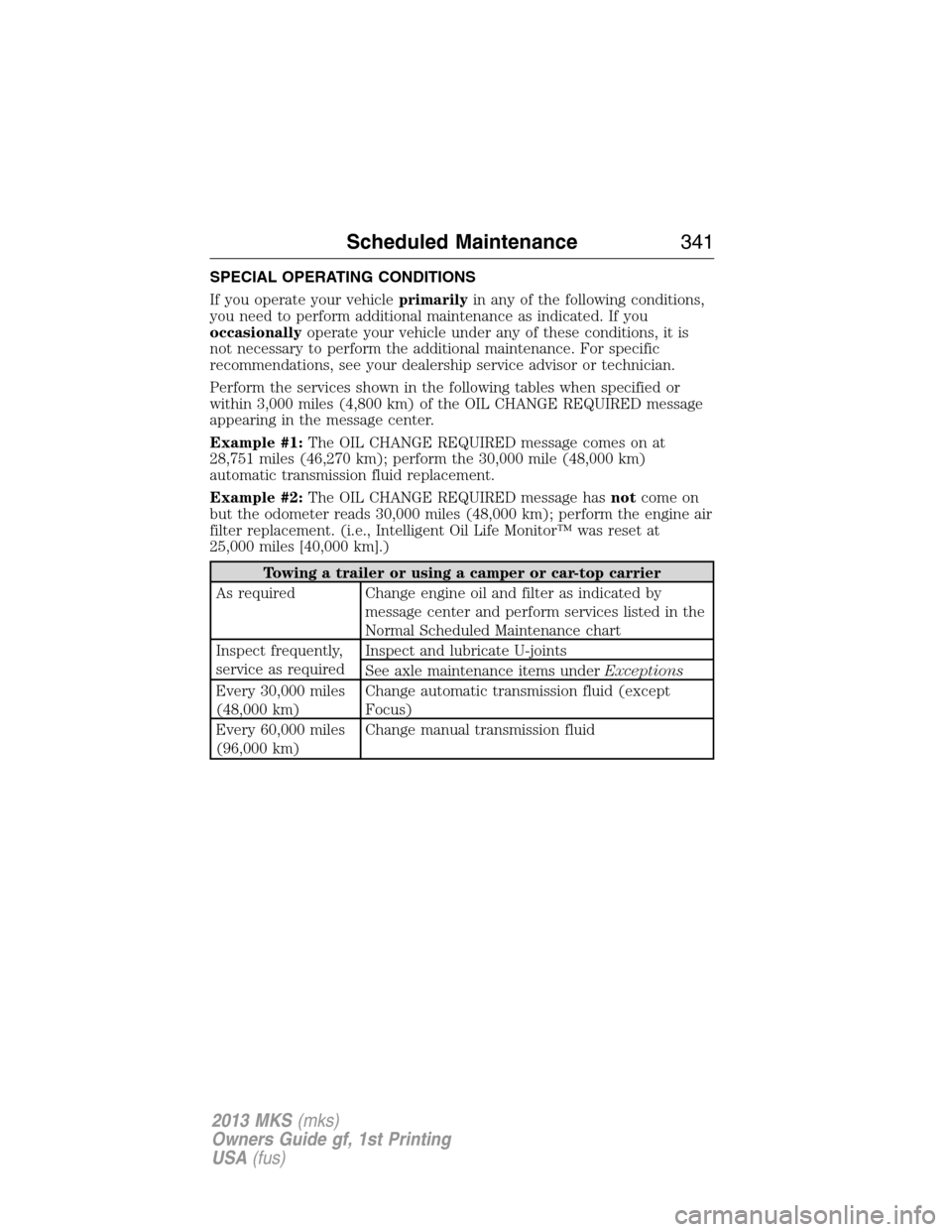
SPECIAL OPERATING CONDITIONS
If you operate your vehicleprimarilyin any of the following conditions,
you need to perform additional maintenance as indicated. If you
occasionallyoperate your vehicle under any of these conditions, it is
not necessary to perform the additional maintenance. For specific
recommendations, see your dealership service advisor or technician.
Perform the services shown in the following tables when specified or
within 3,000 miles (4,800 km) of the OIL CHANGE REQUIRED message
appearing in the message center.
Example #1:The OIL CHANGE REQUIRED message comes on at
28,751 miles (46,270 km); perform the 30,000 mile (48,000 km)
automatic transmission fluid replacement.
Example #2:The OIL CHANGE REQUIRED message hasnotcome on
but the odometer reads 30,000 miles (48,000 km); perform the engine air
filter replacement. (i.e., Intelligent Oil Life Monitor™ was reset at
25,000 miles [40,000 km].)
Towing a trailer or using a camper or car-top carrier
As required Change engine oil and filter as indicated by
message center and perform services listed in the
Normal Scheduled Maintenance chart
Inspect frequently,
service as requiredInspect and lubricate U-joints
See axle maintenance items underExceptions
Every 30,000 miles
(48,000 km)Change automatic transmission fluid (except
Focus)
Every 60,000 miles
(96,000 km)Change manual transmission fluid
Scheduled Maintenance341
2013 MKS(mks)
Owners Guide gf, 1st Printing
USA(fus)
Page 342 of 453
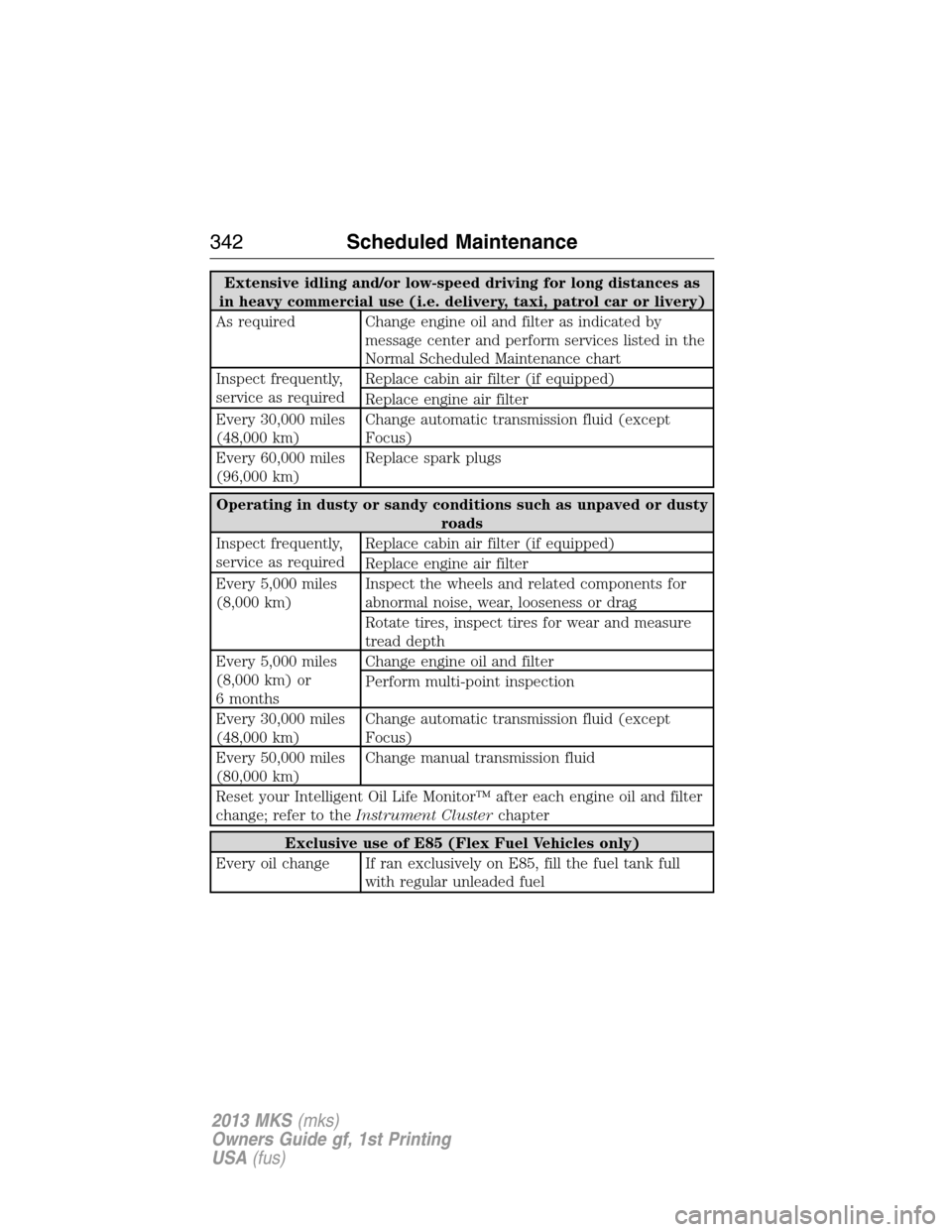
Extensive idling and/or low-speed driving for long distances as
in heavy commercial use (i.e. delivery, taxi, patrol car or livery)
As required Change engine oil and filter as indicated by
message center and perform services listed in the
Normal Scheduled Maintenance chart
Inspect frequently,
service as requiredReplace cabin air filter (if equipped)
Replace engine air filter
Every 30,000 miles
(48,000 km)Change automatic transmission fluid (except
Focus)
Every 60,000 miles
(96,000 km)Replace spark plugs
Operating in dusty or sandy conditions such as unpaved or dusty
roads
Inspect frequently,
service as requiredReplace cabin air filter (if equipped)
Replace engine air filter
Every 5,000 miles
(8,000 km)Inspect the wheels and related components for
abnormal noise, wear, looseness or drag
Rotate tires, inspect tires for wear and measure
tread depth
Every 5,000 miles
(8,000 km) or
6 monthsChange engine oil and filter
Perform multi-point inspection
Every 30,000 miles
(48,000 km)Change automatic transmission fluid (except
Focus)
Every 50,000 miles
(80,000 km)Change manual transmission fluid
Reset your Intelligent Oil Life Monitor™ after each engine oil and filter
change; refer to theInstrument Clusterchapter
Exclusive use of E85 (Flex Fuel Vehicles only)
Every oil change If ran exclusively on E85, fill the fuel tank full
with regular unleaded fuel
342Scheduled Maintenance
2013 MKS(mks)
Owners Guide gf, 1st Printing
USA(fus)
Page 343 of 453
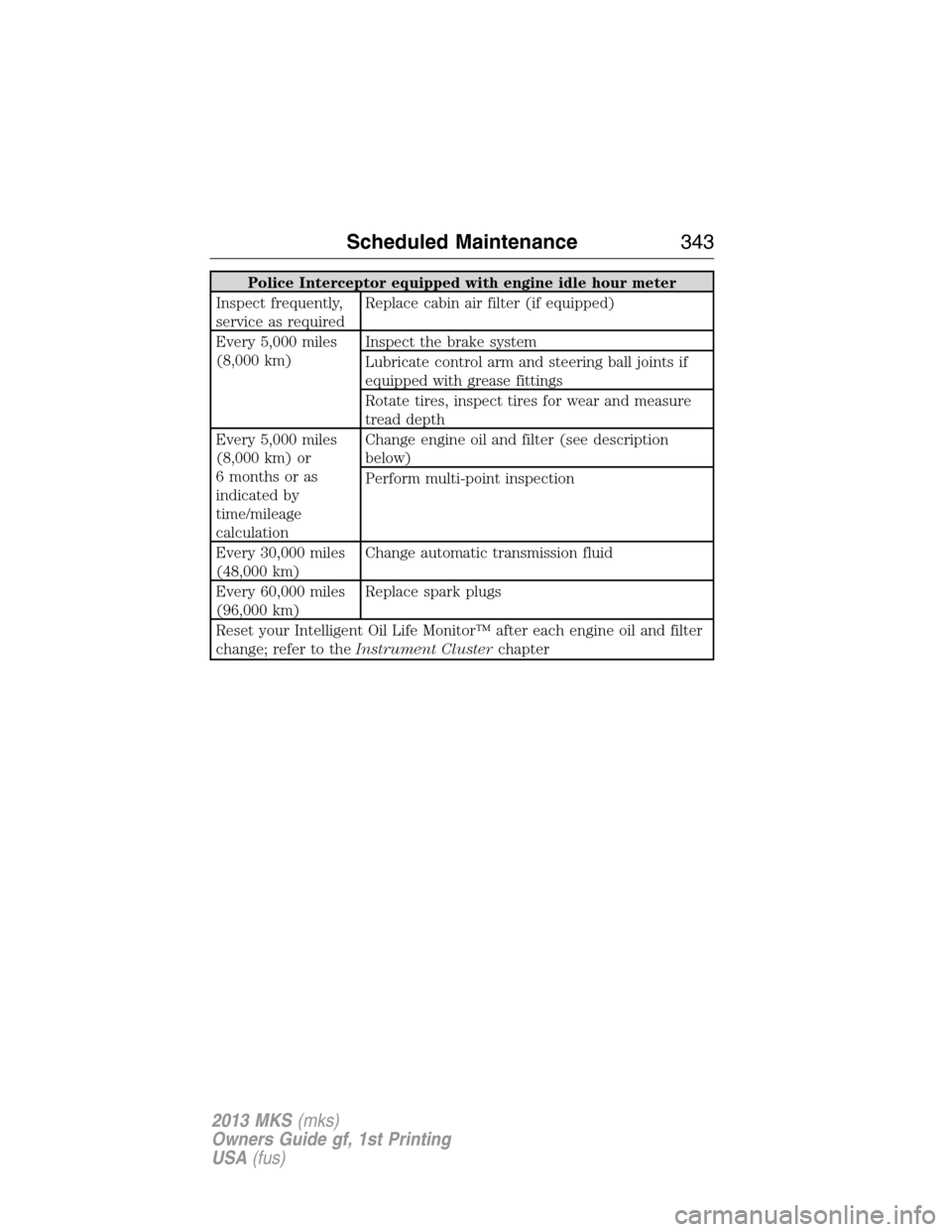
Police Interceptor equipped with engine idle hour meter
Inspect frequently,
service as requiredReplace cabin air filter (if equipped)
Every 5,000 miles
(8,000 km)Inspect the brake system
Lubricate control arm and steering ball joints if
equipped with grease fittings
Rotate tires, inspect tires for wear and measure
tread depth
Every 5,000 miles
(8,000 km) or
6 months or as
indicated by
time/mileage
calculationChange engine oil and filter (see description
below)
Perform multi-point inspection
Every 30,000 miles
(48,000 km)Change automatic transmission fluid
Every 60,000 miles
(96,000 km)Replace spark plugs
Reset your Intelligent Oil Life Monitor™ after each engine oil and filter
change; refer to theInstrument Clusterchapter
Scheduled Maintenance343
2013 MKS(mks)
Owners Guide gf, 1st Printing
USA(fus)
Page 347 of 453
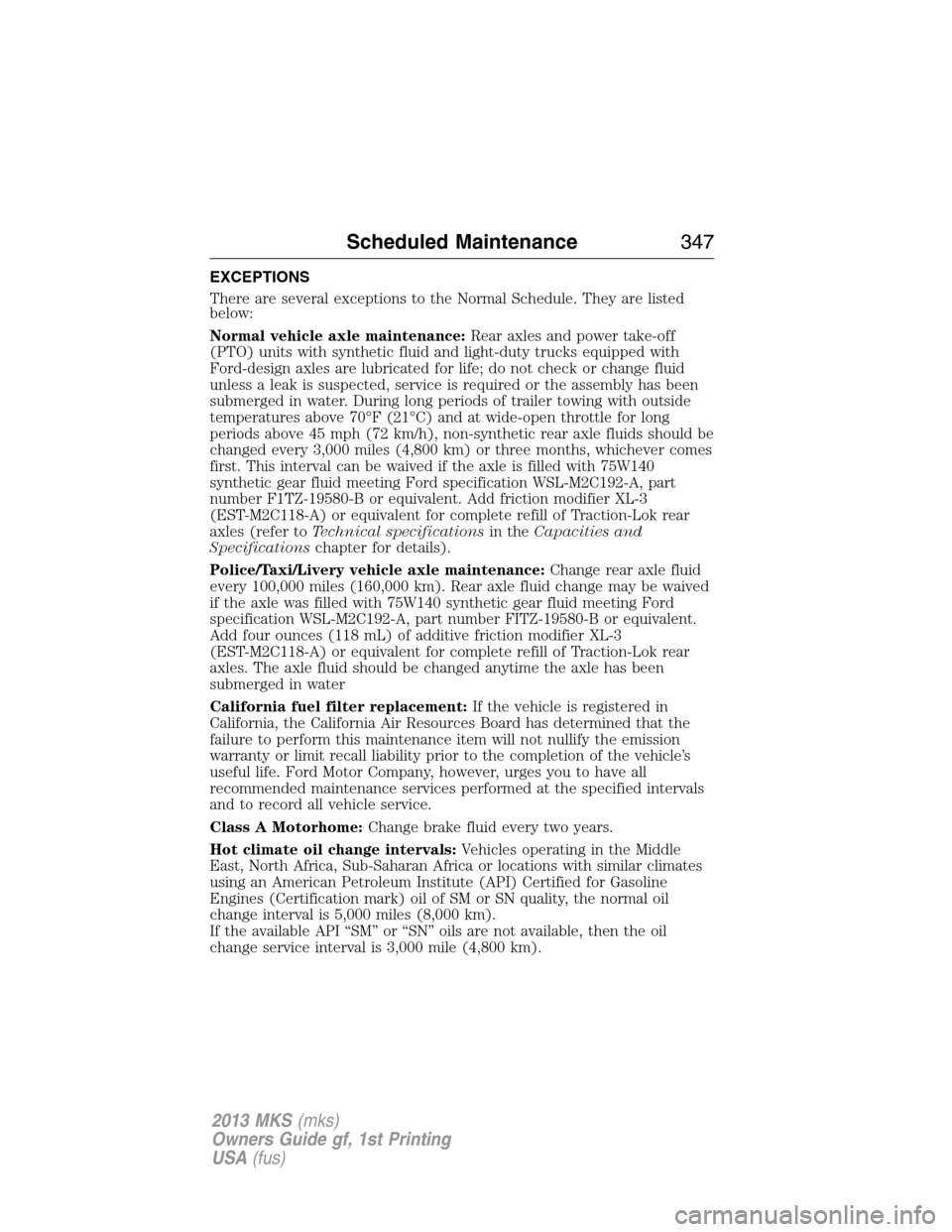
EXCEPTIONS
There are several exceptions to the Normal Schedule. They are listed
below:
Normal vehicle axle maintenance:Rear axles and power take-off
(PTO) units with synthetic fluid and light-duty trucks equipped with
Ford-design axles are lubricated for life; do not check or change fluid
unless a leak is suspected, service is required or the assembly has been
submerged in water. During long periods of trailer towing with outside
temperatures above 70°F (21°C) and at wide-open throttle for long
periods above 45 mph (72 km/h), non-synthetic rear axle fluids should be
changed every 3,000 miles (4,800 km) or three months, whichever comes
first. This interval can be waived if the axle is filled with 75W140
synthetic gear fluid meeting Ford specification WSL-M2C192-A, part
number F1TZ-19580-B or equivalent. Add friction modifier XL-3
(EST-M2C118-A) or equivalent for complete refill of Traction-Lok rear
axles (refer toTechnical specificationsin theCapacities and
Specificationschapter for details).
Police/Taxi/Livery vehicle axle maintenance:Change rear axle fluid
every 100,000 miles (160,000 km). Rear axle fluid change may be waived
if the axle was filled with 75W140 synthetic gear fluid meeting Ford
specification WSL-M2C192-A, part number FITZ-19580-B or equivalent.
Add four ounces (118 mL) of additive friction modifier XL-3
(EST-M2C118-A) or equivalent for complete refill of Traction-Lok rear
axles. The axle fluid should be changed anytime the axle has been
submerged in water
California fuel filter replacement:If the vehicle is registered in
California, the California Air Resources Board has determined that the
failure to perform this maintenance item will not nullify the emission
warranty or limit recall liability prior to the completion of the vehicle’s
useful life. Ford Motor Company, however, urges you to have all
recommended maintenance services performed at the specified intervals
and to record all vehicle service.
Class A Motorhome:Change brake fluid every two years.
Hot climate oil change intervals:Vehicles operating in the Middle
East, North Africa, Sub-Saharan Africa or locations with similar climates
using an American Petroleum Institute (API) Certified for Gasoline
Engines (Certification mark) oil of SM or SN quality, the normal oil
change interval is 5,000 miles (8,000 km).
If the available API “SM” or “SN” oils are not available, then the oil
change service interval is 3,000 mile (4,800 km).
Scheduled Maintenance347
2013 MKS(mks)
Owners Guide gf, 1st Printing
USA(fus)
Page 348 of 453
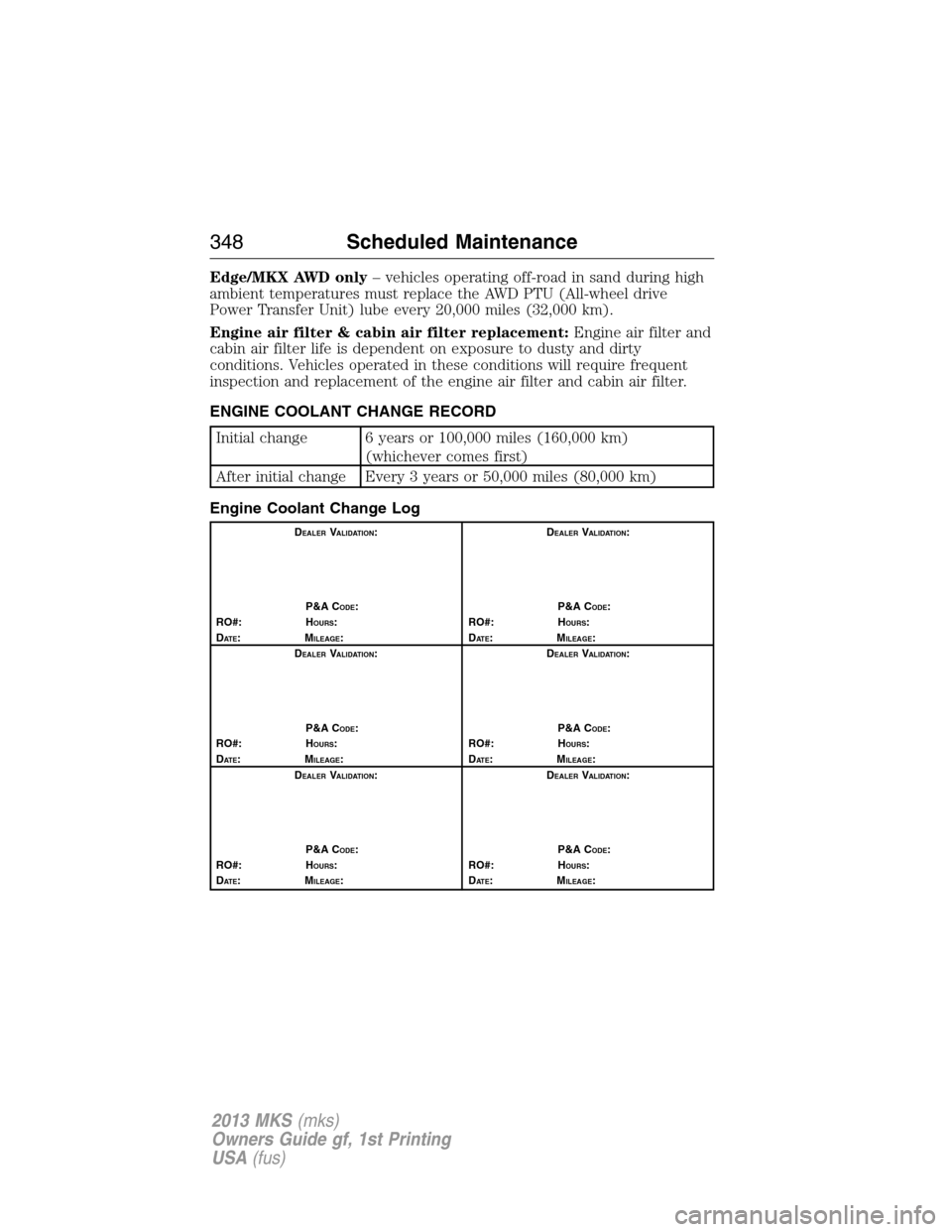
Edge/MKX AWD only– vehicles operating off-road in sand during high
ambient temperatures must replace the AWD PTU (All-wheel drive
Power Transfer Unit) lube every 20,000 miles (32,000 km).
Engine air filter & cabin air filter replacement:Engine air filter and
cabin air filter life is dependent on exposure to dusty and dirty
conditions. Vehicles operated in these conditions will require frequent
inspection and replacement of the engine air filter and cabin air filter.
ENGINE COOLANT CHANGE RECORD
Initial change 6 years or 100,000 miles (160,000 km)
(whichever comes first)
After initial change Every 3 years or 50,000 miles (80,000 km)
Engine Coolant Change Log
DEALERVALIDATION:
P&A C
ODE:
RO#: HOURS:
DAT E:MILEAGE:D
EALERVALIDATION:
P&A C
ODE:
RO#: HOURS:
DAT E:MILEAGE:
D
EALERVALIDATION:
P&A C
ODE:
RO#: HOURS:
DAT E:MILEAGE:D
EALERVALIDATION:
P&A C
ODE:
RO#: HOURS:
DAT E:MILEAGE:
D
EALERVALIDATION:
P&A C
ODE:
RO#: HOURS:
DAT E:MILEAGE:D
EALERVALIDATION:
P&A C
ODE:
RO#: HOURS:
DAT E:MILEAGE:
348Scheduled Maintenance
2013 MKS(mks)
Owners Guide gf, 1st Printing
USA(fus)
Page 447 of 453
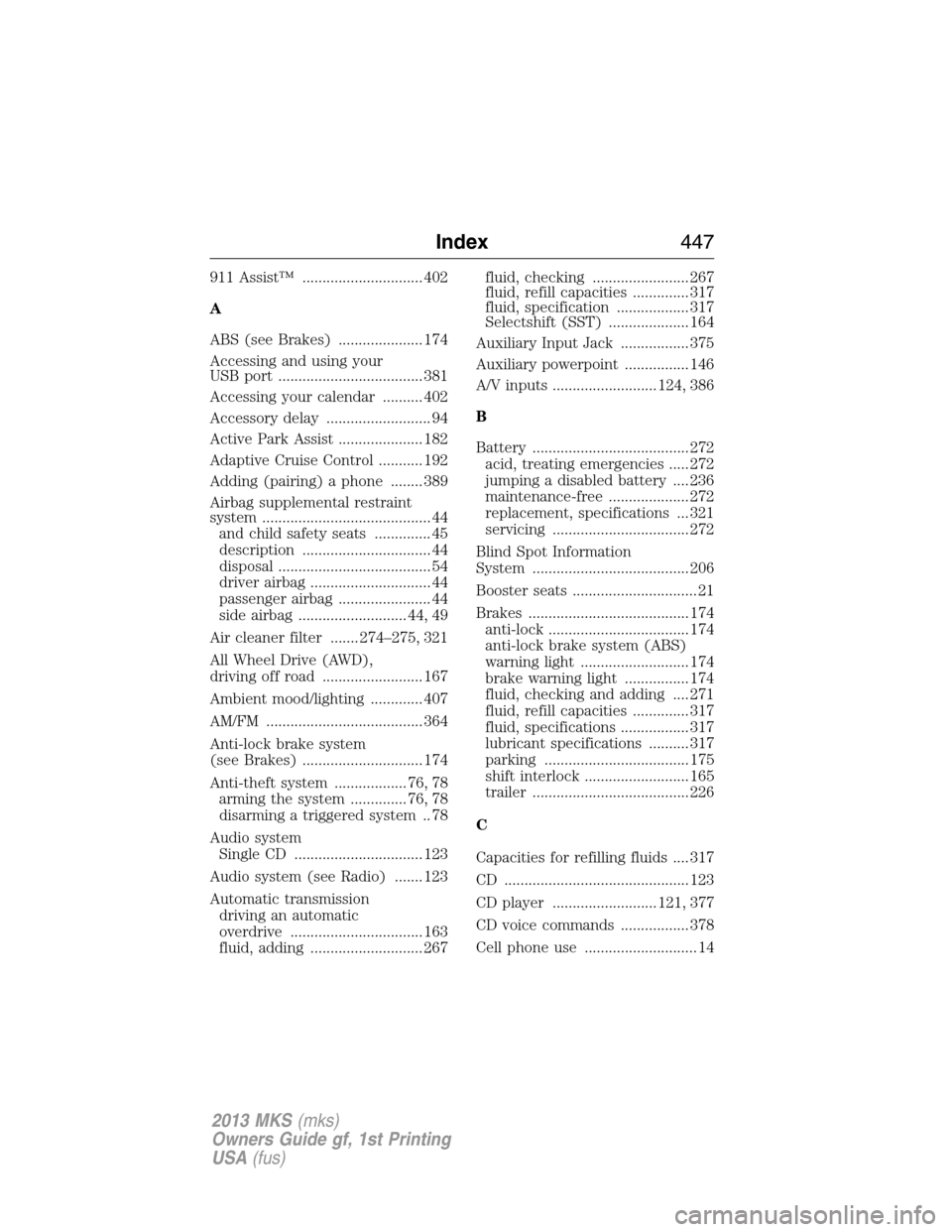
911 Assist™ .............................. 402
A
ABS (see Brakes) ..................... 174
Accessing and using your
USB port .................................... 381
Accessing your calendar .......... 402
Accessory delay .......................... 94
Active Park Assist ..................... 182
Adaptive Cruise Control ........... 192
Adding (pairing) a phone ........ 389
Airbag supplemental restraint
system .......................................... 44
and child safety seats .............. 45
description ................................ 44
disposal ...................................... 54
driver airbag .............................. 44
passenger airbag ....................... 44
side airbag ........................... 44, 49
Air cleaner filter ....... 274–275, 321
All Wheel Drive (AWD),
driving off road ......................... 167
Ambient mood/lighting ............. 407
AM/FM ....................................... 364
Anti-lock brake system
(see Brakes) .............................. 174
Anti-theft system .................. 76, 78
arming the system .............. 76, 78
disarming a triggered system .. 78
Audio system
Single CD ................................ 123
Audio system (see Radio) ....... 123
Automatic transmission
driving an automatic
overdrive ................................. 163
fluid, adding ............................ 267fluid, checking ........................ 267
fluid, refill capacities .............. 317
fluid, specification .................. 317
Selectshift (SST) .................... 164
Auxiliary Input Jack ................. 375
Auxiliary powerpoint ................ 146
A/V inputs .......................... 124, 386
B
Battery ....................................... 272
acid, treating emergencies ..... 272
jumping a disabled battery .... 236
maintenance-free .................... 272
replacement, specifications ... 321
servicing .................................. 272
Blind Spot Information
System ....................................... 206
Booster seats ............................... 21
Brakes ........................................ 174
anti-lock ................................... 174
anti-lock brake system (ABS)
warning light ........................... 174
brake warning light ................ 174
fluid, checking and adding .... 271
fluid, refill capacities .............. 317
fluid, specifications ................. 317
lubricant specifications .......... 317
parking .................................... 175
shift interlock .......................... 165
trailer ....................................... 226
C
Capacities for refilling fluids .... 317
CD .............................................. 123
CD player .......................... 121, 377
CD voice commands ................. 378
Cell phone use ............................ 14
Index447
2013 MKS(mks)
Owners Guide gf, 1st Printing
USA(fus)