lock LINCOLN MKS 2014 Owners Manual
[x] Cancel search | Manufacturer: LINCOLN, Model Year: 2014, Model line: MKS, Model: LINCOLN MKS 2014Pages: 461, PDF Size: 5.98 MB
Page 393 of 461
Vehicle Health Report Privacy Notice
When you create a Vehicle Health Report, Ford Motor Company may
collect your cellular phone number (to process your report request) and
diagnostic information about your vehicle. Certain versions or updates to
Vehicle Health Report may also collect more vehicle information. Ford
may use your vehicle information it collects for any purpose. If you do
not want to disclose your cellular phone number or vehicle information,
do not run the feature or set up your Vehicle Health Report profile at
www.SYNCMyRide.com. See www.SYNCMyRide.com (Vehicle Health
Report Terms and Conditions, and Privacy Statement) for more
information.
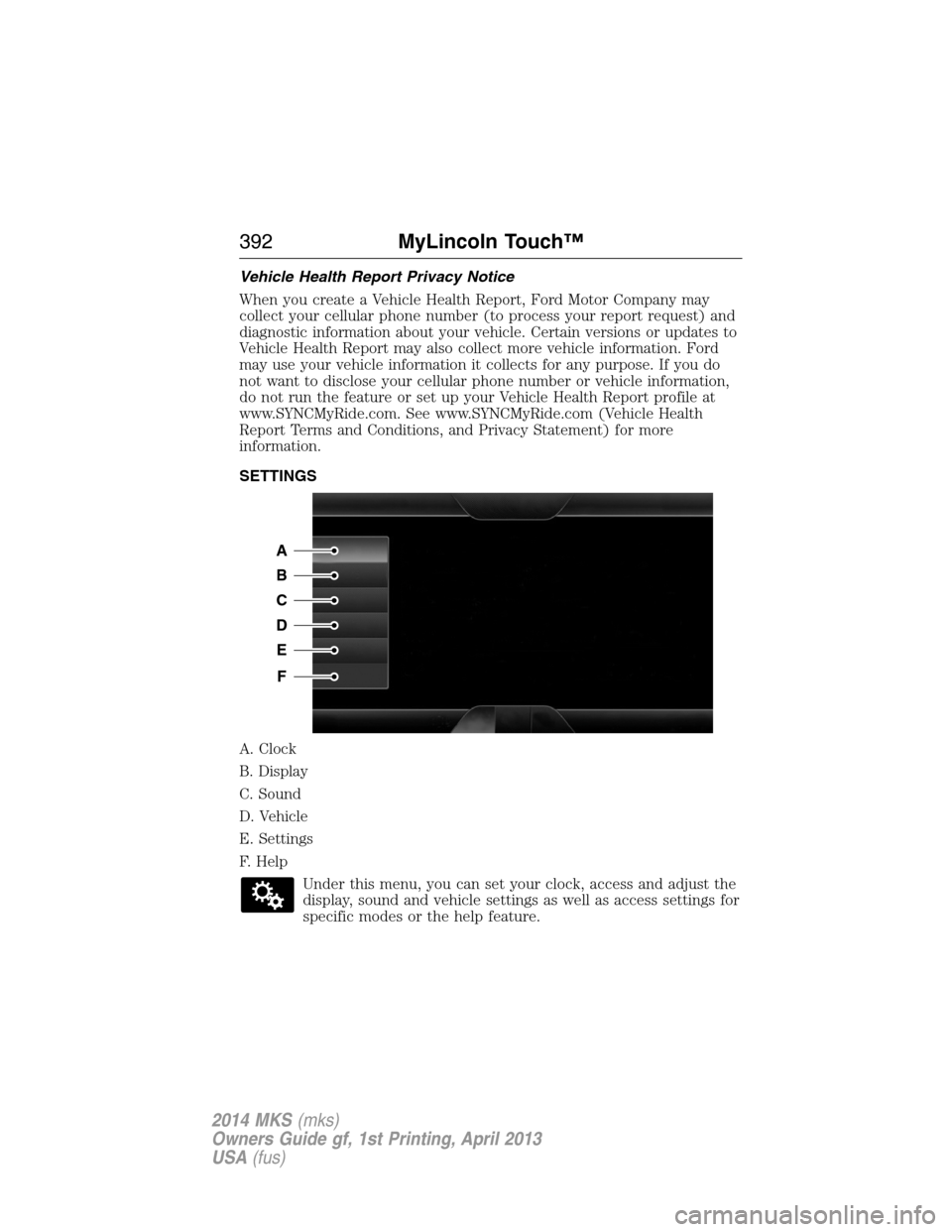
SETTINGS
A. Clock
B. Display
C. Sound
D. Vehicle
E. Settings
F. Help
Under this menu, you can set your clock, access and adjust the
display, sound and vehicle settings as well as access settings for
specific modes or the help feature.
A
B
C
D
E
F
392MyLincoln Touch™
2014 MKS(mks)
Owners Guide gf, 1st Printing, April 2013
USA(fus)
Page 394 of 461
Clock
Note:You cannot manually set the date. Your vehicle’s GPS does this for
you.
Note:If the battery has been disconnected, your vehicle needs to
acquire a GPS signal to update the clock. Once your vehicle acquires the
signal, it may take a few minutes for the update to display the correct
time.
1. Press theSettings icon >Clock.
2. Press+andto adjust the time.
From this screen, you can also make other adjustments, such as 12– or
24–hour mode, activate GPS time synchronization and have the system
automatically update for new time zones.
You can also turn the outside air temperature display on and off. It
appears at the top center of the touchscreen, next to the time and date.
The system automatically saves any updates you make to the settings.
Display
You can adjust the touchscreen display through the touchscreen or by
pressing the voice button on your steering wheel controls and when
prompted, say, “Display settings”.
Press the Settings icon >Display,then select from the
following:
Brightnessallows you to make the screen display brighter or dimmer.
Modeallows you to set the screen to a certain brightness or have the
system automatically change based on the outside light level, or turn the
display off.
•If you selectAUTOorNIGHT,you have the options of turning the
display’s Auto Dim feature on or off and changing the Auto Dim
Manual Offset feature.
Edit Wallpaper
•You can have your touchscreen display the default photo or upload
your own.
Uploading Photos for Your Home Screen Wallpaper
Note:You cannot load photos directly from your camera. You must
access the photos either from your USB mass storage device or from an
SD card.
Note:
Photographs with extremely large dimensions (such as 2048 x 1536)
may not be compatible and appear as a blank (black) image on the display.
MyLincoln Touch™393
2014 MKS(mks)
Owners Guide gf, 1st Printing, April 2013
USA(fus)
Page 396 of 461
Ambient Lighting (If Equipped)
When activated, ambient lighting illuminates footwells and cupholders
with a choice of colors. To access and make adjustments:
1. Press the Settings icon >Vehicle>Ambient Lighting.
2. Touch the desired color.
3. Use the scroll bar to increase or decrease the intensity.
To turn the feature on or off, press the power button.
Vehicle Health Report
Turn Automatic Reminders on and off and set the mileage interval at
which you would like to receive the reports. Press?for more information
on these selections.
When done making your selections, pressRun Vehicle Health Report
Nowif you want your report.
Door Keypad Code
To change the keypad code for your keyless entry keypad system:
1. Press the Settings icon >Vehicle>Door Keypad Code.
2. Enter your current factory code, then, when prompted, enter your
new code.
Rear View Camera
This menu allows you to access settings for your rear view camera.
Press the Settings icon >Vehicle>Rear View Camera,then select
from the following settings:
•Rear Camera Delay
•Visual Park Aid Alert
•Guidelines.
Enable Valet Mode
Note:If the system locks, and you need to reset the PIN, enter 3681 and
the system unlocks.
Valet mode allows you to lock the system. No information is accessible
until the system is unlocked with the correct PIN.
1. Press the Settings icon >Vehicle>Enable Valet Mode.
2. When prompted, enter a four-digit PIN.
After you press Continue, the system locks until you enter the PIN again.
MyLincoln Touch™395
2014 MKS(mks)
Owners Guide gf, 1st Printing, April 2013
USA(fus)
Page 406 of 461
F.A/C:Touch to turn the air conditioning on or off.
•Use with recirculated air to improve cooling performance and
efficiency.
•Engages automatically in MAX A/C, defrost and floor/defrost.
G.AUTO:Touch to engage automatic operation, then set the
temperature using the temperature control. The system automatically
controls:
•Fan speed
•Airflow distribution
•A/Conoroff
•Outside or recirculated air.
H.Rear defroster:Touch to turn the rear window defroster and heated
mirrors.
I.Defrost:Touch to clear the windshield of fog and thin ice. Touch
again to return to the previous airflow selection. When on, defrost:
•Provides outside air to reduce window fogging.
•Distributes air through the windshield defroster vents and demister
vents.
J.Manual controls:Select any of the following airflow distribution
modes:
•Floor and Defrost:Distributes air through the windshield defroster
vents, demister vents, floor vents and rear seat floor vents, and
provides outside air to reduce window fogging.
•Panel:Distributes air through the instrument panel vents.
•Panel and Floor:Distributes air through the instrument panel vents,
demister vents, floor vents and rear seat floor vents.
•Floor:Distributes air through the demister vents, floor vents and
rear seat floor vents.
K.Driver settings:Depending on your vehicle and option package, you
may have the following features:
•Touch+or–to adjust the temperature.
•If your vehicle is equipped with heated seats, touch the heated seat
icon to control the heated seat. See theSeatschapter.
•If your vehicle is equipped with cooled seats, touch the cooled seat
icon to control the cooled seat. See theSeatschapter.
•Touch and holdMyTempto select a temperature you would like your
vehicle to remember and maintain for you.
•If your vehicle is equipped with a heated steering wheel, touch the
heated steering wheel icon to warm the steering wheel.
Note:If your vehicle is equipped with a wood-trimmed steering wheel, it
does not heat between the 10 o’clock and 2 o’clock positions.
MyLincoln Touch™405
2014 MKS(mks)
Owners Guide gf, 1st Printing, April 2013
USA(fus)
Page 414 of 461
Traffic Alert Notificationallows you to choose have the system
display traffic alert notifications.
Other traffic alert features allows you to turn on certain, or all, traffic
icons on the map such as road work, incident, accidents and closed
roads. Scroll down to view all the different types of alerts. Turn these
featuresONorOFF.
Avoid Areas
Avoid Areasallows you to choose areas which you want the system to
avoid when calculating a route for you.
PressAddto program an entry. Once you make a selection, the system
tries to avoid the area(s) if possible for all routes. To delete a selection,
choose the listing on the screen. When the screen changes toAvoid
Areas Edit,you can pressDeleteat the bottom right of the screen.
Map Mode
Press the green bar in the upper right area of the touchscreen to view
map mode. Map mode shows advanced viewing comprised of both 2D
city maps as well as 3D landmarks (when available).
2D city mapsshow detailed outlines of buildings, visible land use and
land elements and detailed railway infrastructure for the most essential
cities around the globe. These maps also contain features, such as town
blocks, building footprints, and railways.
3D landmarksappear as clear, visible objects that are typically
recognizable and have a certain tourist value. The 3D landmarks appear
in 3D map mode only. Coverage varies, and improves with updated map
releases.
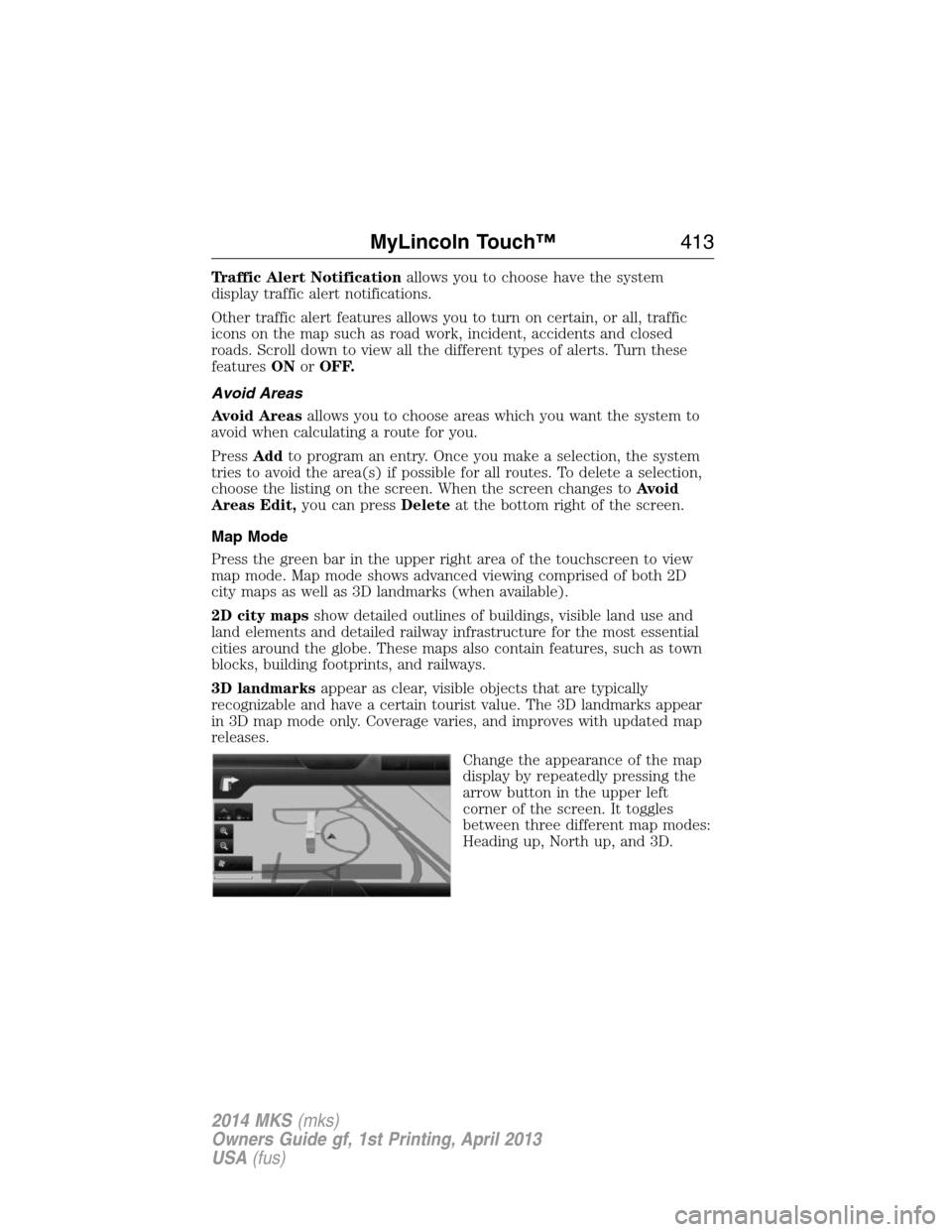
Change the appearance of the map
display by repeatedly pressing the
arrow button in the upper left
corner of the screen. It toggles
between three different map modes:
Heading up, North up, and 3D.
MyLincoln Touch™413
2014 MKS(mks)
Owners Guide gf, 1st Printing, April 2013
USA(fus)
Page 440 of 461
Oils, Fluids and Flushing
In many cases, fluid discoloration is a normal operating characteristic
and, by itself, does not necessarily indicate a concern or that the fluid
needs to be changed. However, discolored fluids that also show signs of
overheating and foreign material contamination should be inspected
immediately by a qualified expert, such as the factory-trained technicians
at your dealership. Your vehicle’s oils and fluids should be changed at the
specified intervals or in conjunction with a repair. Flushing is a viable
way to change fluid for many vehicle sub-systems during scheduled
maintenance. It is critical that systems are flushed only with new fluid
that is the same as that required to fill and operate the system, or using
a Ford-approved flushing chemical.
Owner Checks and Services
Certain basic maintenance checks and inspections should be performed
every month or at six month intervals.
Check every month
Engine oil level.
Function of all interior and exterior lights.
Tires (including spare) for wear and proper pressure.
Windshield washer fluid level.
Check every six months
Battery connections. Clean if necessary.
Body and door drain holes for obstructions. Clean if necessary.
Cooling system fluid level and coolant strength.
Door weatherstrips for wear. Lubricate if necessary.
Hinges, latches and outside locks for proper operation. Lubricate if
necessary.
Parking brake for proper operation.
Safety belts and seat latches for wear and function.
Safety warning lamps (brake, ABS, airbag, safety belt) for operation.
Washer spray and wiper operation. Clean or replace blades as
necessary.
Scheduled Maintenance439
2014 MKS(mks)
Owners Guide gf, 1st Printing, April 2013
USA(fus)
Page 455 of 461
911 Assist™ ..............................388
A
ABS (see Brakes) .....................177
Accessing and using your
USB port ....................................366
Accessing your calendar ..........388
Accessory delay ..........................95
Active Park Assist .....................184
Adaptive Cruise Control ...........195
Adding (pairing) a phone ........374
Airbag supplemental restraint
system ..........................................46
and child safety seats ..............47
description ................................46
disposal ......................................56
driver airbag ..............................46
passenger airbag .......................46
side airbag ...........................46, 51
Air cleaner filter .......280–281, 328
Air filter, cabin ..........................126
All Wheel Drive (AWD),
driving off road .........................170
Ambient mood/lighting .............395
AM/FM .......................................353
Antifreeze
(see Engine coolant) ................267
Anti-lock brake system
(see Brakes) ..............................177
Anti-theft system ..................77, 79
arming the system ..............77, 79
disarming a triggered system ..79
Audio system
Single CD ................................338
Audio system (see Radio) .......338Automatic transmission
driving an automatic
overdrive .................................165
fluid, adding ............................272
fluid, checking ........................272
fluid, refill capacities ..............324
fluid, specification ..................324
Selectshift (SST) ....................166
Auxiliary Input Jack .................362
Auxiliary powerpoint ................145
A/V inputs ..........................339, 371
B
Battery .......................................278
acid, treating emergencies .....278
jumping a disabled battery ....242
maintenance-free ....................278
replacement, specifications ...328
servicing ..................................278
Blind Spot Information
System .......................................210
Booster seats ...............................22
Brakes ........................................177
anti-lock ...................................177
anti-lock brake system (ABS)
warning light ...........................177
brake warning light ................177
fluid, checking and adding ....277
fluid, refill capacities ..............324
fluid, specifications .................324
lubricant specifications ..........324
parking ....................................178
shift interlock ..........................168
trailer .......................................231
C
Capacities for refilling fluids ....324
CD ..............................................338
454Index
2014 MKS(mks)
Owners Guide gf, 1st Printing, April 2013
USA(fus)
Page 456 of 461
CD player ..........................336, 365
CD voice commands .................366
Cell phone use ............................15
Changing a tire .........................316
Child safety restraints ..........28, 30
Child safety seats
attaching with tether straps ....30
automatic locking mode
(retractor) .................................36
LATCH .......................................28
Child safety seats - booster
seats .............................................22
Cleaning the touchscreen ........343
Cleaning your vehicle ...............287
engine compartment ..............289
instrument panel ....................291
interior .....................................291
plastic parts ............................288
washing ....................................287
waxing .....................................289
wheels ......................................293
wiper blades ............................290
Climate voice commands .........406
Clock ..................................338, 393
Collision Warning System .........215
Console ......................................146
overhead ..................................146
Coolant ......................................267
checking and adding ..............267
refill capacities ........................324
specifications ..........................324
Cross Traffic Alert ....................210
Cruise control ...........................194
Cupholder(s) .............................137
Customer Assistance ................240Ford Extended Service
Plan ..........................................333
Getting roadside assistance ...240
Getting the service you
need .........................................245
Ordering additional owner’s
literature .................................251
Utilizing the
Mediation/Arbitration
Program ...................................249
D
Defrost .......................................123
rear window ............................125
Dipstick
automatic transmission
fluid ..........................................272
engine oil .................................266
Display settings .........................393
Driver alert ................................204
Driving under special
conditions ..................169, 171, 174
sand .........................................172
snow and ice ...........................175
through water .................173, 237
Dual automatic temperature
control (DATC) .........................123
E
Electronic message center .......108
Electronic stability control ......181
Emergencies, roadside
jump-starting ..........................242
running out of fuel .................156
Emergency brake
(see Parking brake) ..................178
Emission control system ..........161
Index455
2014 MKS(mks)
Owners Guide gf, 1st Printing, April 2013
USA(fus)
Page 457 of 461
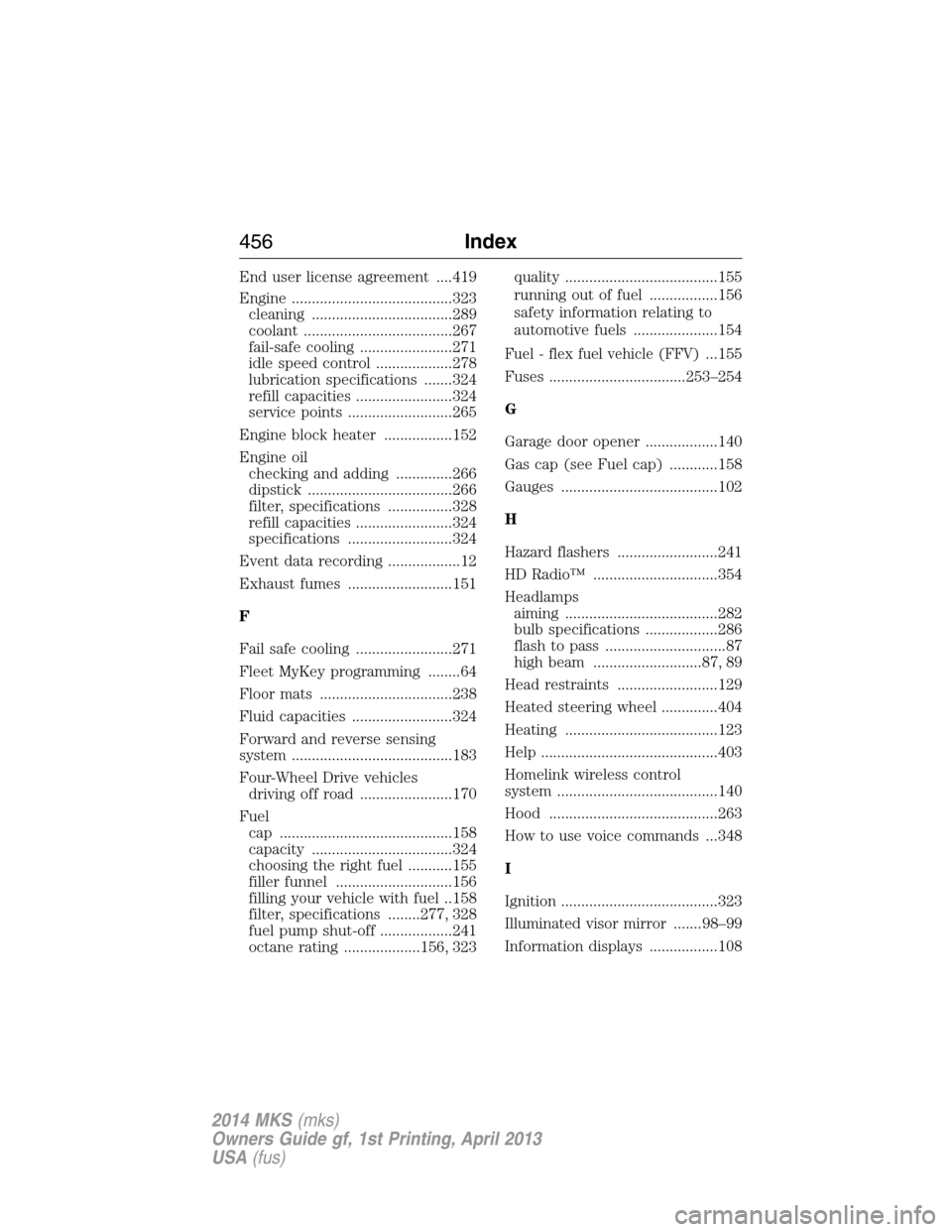
End user license agreement ....419
Engine ........................................323
cleaning ...................................289
coolant .....................................267
fail-safe cooling .......................271
idle speed control ...................278
lubrication specifications .......324
refill capacities ........................324
service points ..........................265
Engine block heater .................152
Engine oil
checking and adding ..............266
dipstick ....................................266
filter, specifications ................328
refill capacities ........................324
specifications ..........................324
Event data recording ..................12
Exhaust fumes ..........................151
F
Fail safe cooling ........................271
Fleet MyKey programming ........64
Floor mats .................................238
Fluid capacities .........................324
Forward and reverse sensing
system ........................................183
Four-Wheel Drive vehicles
driving off road .......................170
Fuel
cap ...........................................158
capacity ...................................324
choosing the right fuel ...........155
filler funnel .............................156
filling your vehicle with fuel ..158
filter, specifications ........277, 328
fuel pump shut-off ..................241
octane rating ...................156, 323quality ......................................155
running out of fuel .................156
safety information relating to
automotive fuels .....................154
Fuel - flex fuel vehicle (FFV)...155
Fuses ..................................253–254
G
Garage door opener ..................140
Gas cap (see Fuel cap) ............158
Gauges .......................................102
H
Hazard flashers .........................241
HD Radio™ ...............................354
Headlamps
aiming ......................................282
bulb specifications ..................286
flash to pass ..............................87
high beam ...........................87, 89
Head restraints .........................129
Heated steering wheel ..............404
Heating ......................................123
Help ............................................403
Homelink wireless control
system ........................................140
Hood ..........................................263
How to use voice commands ...348
I
Ignition .......................................323
Illuminated visor mirror .......98–99
Information displays .................108
456Index
2014 MKS(mks)
Owners Guide gf, 1st Printing, April 2013
USA(fus)
Page 458 of 461
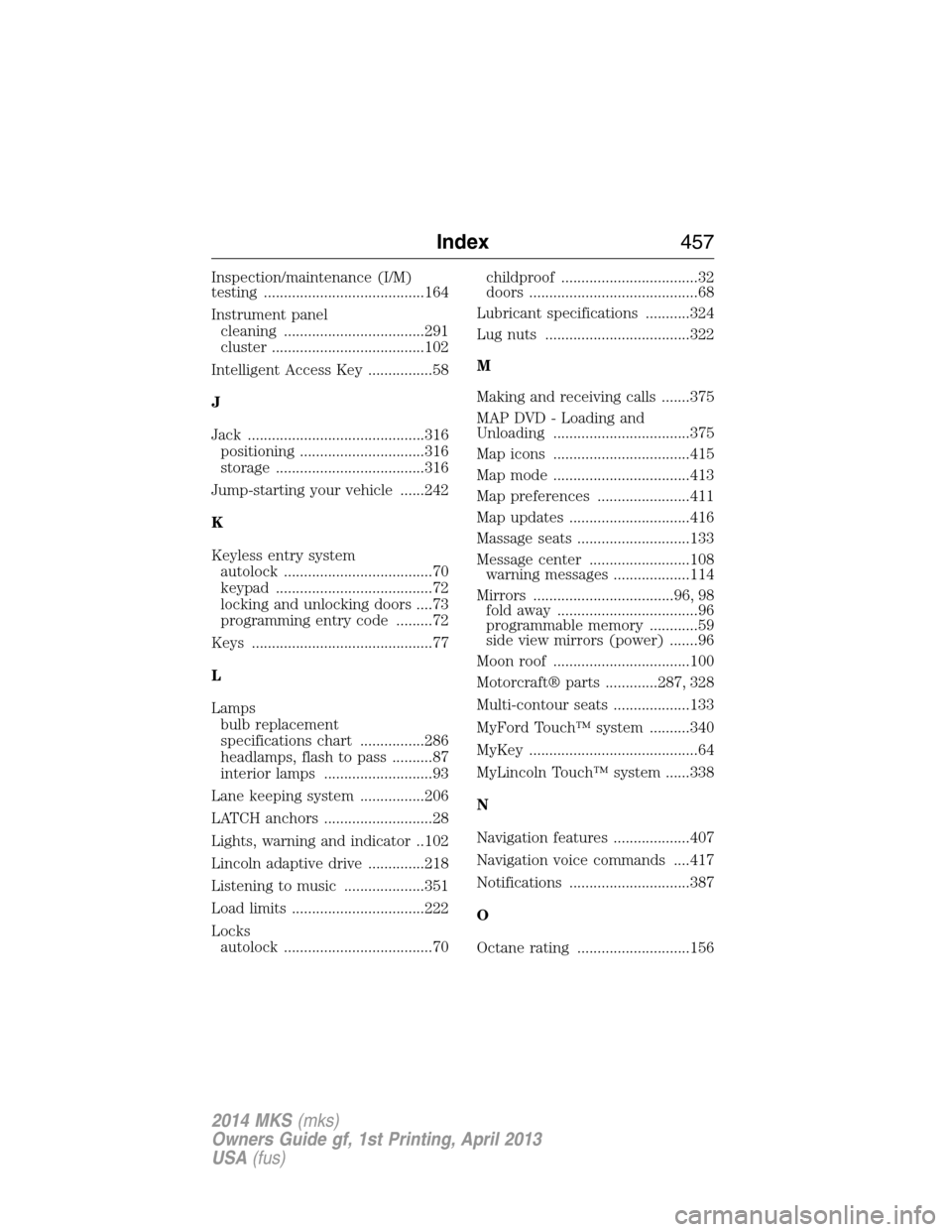
Inspection/maintenance (I/M)
testing ........................................164
Instrument panel
cleaning ...................................291
cluster ......................................102
Intelligent Access Key ................58
J
Jack ............................................316
positioning ...............................316
storage .....................................316
Jump-starting your vehicle ......242
K
Keyless entry system
autolock .....................................70
keypad .......................................72
locking and unlocking doors ....73
programming entry code .........72
Keys .............................................77
L
Lamps
bulb replacement
specifications chart ................286
headlamps, flash to pass ..........87
interior lamps ...........................93
Lane keeping system ................206
LATCH anchors ...........................28
Lights, warning and indicator ..102
Lincoln adaptive drive ..............218
Listening to music ....................351
Load limits .................................222
Locks
autolock .....................................70childproof ..................................32
doors ..........................................68
Lubricant specifications ...........324
Lug nuts ....................................322
M
Making and receiving calls .......375
MAP DVD - Loading and
Unloading ..................................375
Map icons ..................................415
Map mode ..................................413
Map preferences .......................411
Map updates ..............................416
Massage seats ............................133
Message center .........................108
warning messages ...................114
Mirrors ...................................96, 98
fold away ...................................96
programmable memory ............59
side view mirrors (power) .......96
Moon roof ..................................100
Motorcraft® parts .............287, 328
Multi-contour seats ...................133
MyFord Touch™ system ..........340
MyKey ..........................................64
MyLincoln Touch™ system ......338
N
Navigation features ...................407
Navigation voice commands ....417
Notifications ..............................387
O
Octane rating ............................156
Index457
2014 MKS(mks)
Owners Guide gf, 1st Printing, April 2013
USA(fus)